
HyperLedger Fabric 1.4 生产环境使用ca生成msp和tls(12)
在上一章:Fabric kafka生产环境部署的基础上部署Fabric CA,使用Fabric CA进行生成公私钥和证书等文件,全部替换cryptogen工具,包括生成TLS相关的私钥和证书等文件。
Fabric kafka生产环境部署有三个组织,分别为orderer(排序)组织和两个Peer(节点)组织,对应的ID为example.com、org1.example.com和org2.example.com。为了让生产环境Fabric CA具有扩展性和安全性,存在一个逻辑的根CA(RootCA)和三个中间CA(Intermedia CA),三个中间CA(Intermedia CA)都隶属根CA(RootCA)。
三个中间CA(Intermedia CA)分别负责orderer(排序)组织和两个Peer(节点)组织的公私钥和证书生成。当有新的组织加入,只需再生成一个中间CA(Intermedia CA)接入到根CA(RootCA)下,不会影响其它中间CA(Intermedia CA),生产环境CA网络拓扑图如下:

根据生产环境CA网络拓扑图,实现生产环境CA的部署及生成上一章:Fabric kafka生产环境部署所需要公私钥、证书及TLS证书等文件。
生产环境CA部署到上一章:Fabric kafka生产环境部署的kafka3(192.168.235.6)服务器上;由于四CA都在同一台电脑,端口号不能使用同一个,对应的端口号如下表:
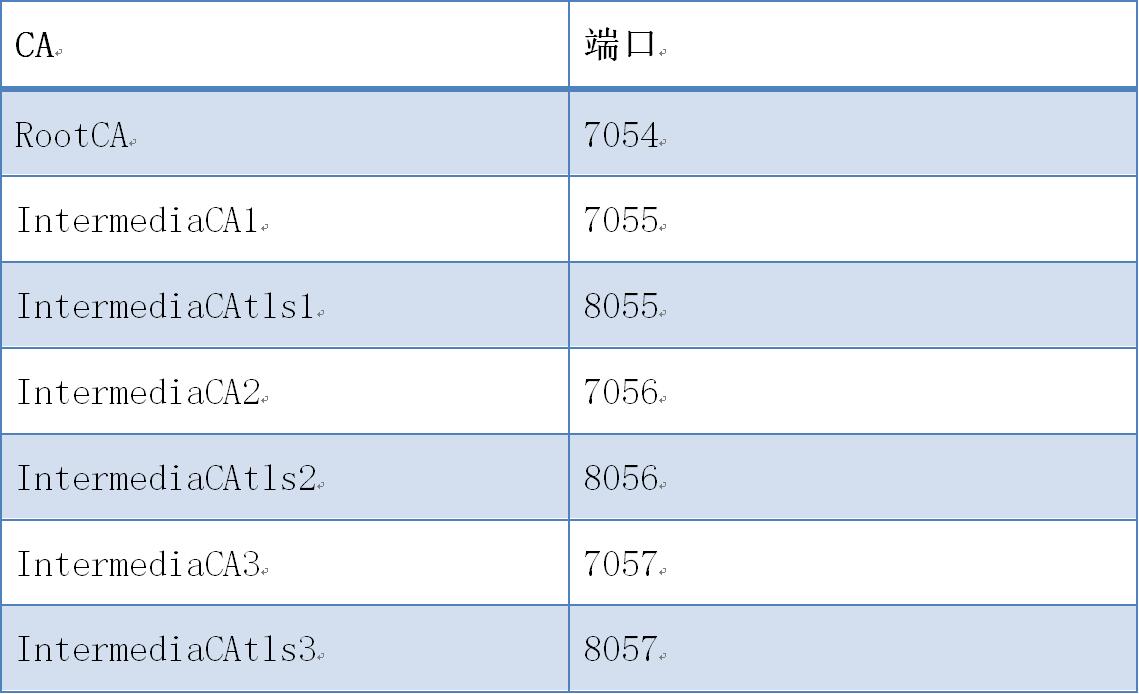
运行和配置步骤如下:
(一) CA服务启动
1. RootCA启动
1) 创建目录
# cd $GOPATH/src/github.com/hyperledger/fabric-ca/bin

# mkdir ca-server

# cd ca-server
2) 初始化CA服务
# fabric-ca-server init -b admin:adminpw --home ./rootca
3) 启动CA服务
【命令行启动】
# fabric-ca-server start -b admin:adminpw --home ./rootca --cfg.affiliations.allowremove --cfg.identities.allowremove
【docker启动】
拷贝文件docker-rootca.yml到ca-server目录
# docker-compose -f docker-rootca.yaml up -d
2. IntermediaCA1启动
1) 初始化CA服务
# fabric-ca-server init -b admin1:adminpw1 -u http://admin:adminpw@localhost:7054 --home ./intermediaca1

# vi ./intermediaca1/fabric-ca-server-config.yaml

修改

port:
2) 启动CA服务
【命令行启动】
# fabric-ca-server start -b admin1:adminpw1 -u http://admin:adminpw@localhost:7054 --home ./intermediaca1 --cfg.affiliations.allowremove --cfg.identities.allowremove
【docker启动】
拷贝文件docker-intermediaca1.yml到ca-server目录
# docker-compose -f docker-intermediaca1.yaml up -d
3. IntermediaCAtls1启动
1) 初始化CA服务
# fabric-ca-server init -b admin1:adminpw1 -u http://admin:adminpw@localhost:7054 --home ./intermediacatls1

# vi ./intermediacatls1/fabric-ca-server-config.yaml

修改

port:
2) 启动CA服务
【命令行启动】
# fabric-ca-server start -b admin1:adminpw1 -u http://admin:adminpw@localhost:7054 --home ./intermediacatls1 --cfg.affiliations.allowremove --cfg.identities.allowremove
【docker启动】
拷贝文件docker-intermediaca1.yml到ca-server目录
# docker-compose -f docker-intermediacatls1.yaml up -d
4. IntermediaCA2启动
1) 初始化CA服务
# fabric-ca-server init -b admin2:adminpw2 -u http://admin:adminpw@localhost:7054 --home ./intermediaca2

# vi ./intermediaca2/fabric-ca-server-config.yaml

修改

port:
2) 启动CA服务
【命令行启动】
# fabric-ca-server start -b admin2:adminpw2 -u http://admin:adminpw@localhost:7054 --home ./intermediaca2 --cfg.affiliations.allowremove --cfg.identities.allowremove
【docker启动】
拷贝文件docker-intermediaca2.yml到ca-server目录
# docker-compose -f docker-intermediaca2.yaml up -d
5. IntermediaCAtls2启动
1) 初始化CA服务
# fabric-ca-server init -b admin2:adminpw2 -u http://admin:adminpw@localhost:7054 --home ./intermediacatls2

# vi ./intermediacatls2/fabric-ca-server-config.yaml

修改

port:
2) 启动CA服务
【命令行启动】
# fabric-ca-server start -b admin2:adminpw2 -u http://admin:adminpw@localhost:7054 --home ./intermediacatls2 --cfg.affiliations.allowremove --cfg.identities.allowremove
【docker启动】
拷贝文件docker-intermediaca2.yml到ca-server目录
# docker-compose -f docker-intermediacatls2.yaml up -d
6. IntermediaCA3启动
1) 初始化CA服务
# fabric-ca-server init -b admin3:adminpw3 -u http://admin:adminpw@localhost:7054 --home ./intermediaca3

# vi ./intermediaca3/fabric-ca-server-config.yaml

修改

port:
2) 启动CA服务
【命令行启动】
# fabric-ca-server start -b admin3:adminpw3 -u http://admin:adminpw@localhost:7054 --home ./intermediaca3 --cfg.affiliations.allowremove --cfg.identities.allowremove
【docker启动】
拷贝文件docker-intermediaca3.yml到ca-server目录
# docker-compose -f docker-intermediaca3.yaml up -d
7. IntermediaCAtls3启动
1) 初始化CA服务
# fabric-ca-server init -b admin3:adminpw3 -u http://admin:adminpw@localhost:7054 --home ./intermediacatls3

# vi ./intermediacatls3/fabric-ca-server-config.yaml

修改

port:
2) 启动CA服务
【命令行启动】
# fabric-ca-server start -b admin3:adminpw3 -u http://admin:adminpw@localhost:7054 --home ./intermediacatls3 --cfg.affiliations.allowremove --cfg.identities.allowremove
【docker启动】
拷贝文件docker-intermediaca3.yml到ca-server目录
# docker-compose -f docker-intermediacatls3.yaml up -d
(二) IntermediaCA1生成证书
1. 生成example.com的msp
1) 登记example.com
# cd /opt/gopath/src/github.com/hyperledger/fabric-ca/bin/ca-server

# fabric-ca-client enroll -M ./crypto-config/ordererOrganizations/example.com/msp -u http://admin1:adminpw1@localhost:7055 --home ./fabric-ca-client
2) 添加联盟成员
# fabric-ca-client affiliation list -M ./crypto-config/ordererOrganizations/example.com/msp -u http://admin1:adminpw1@localhost:7055 --home ./fabric-ca-client

# fabric-ca-client affiliation remove --force org1 -M ./crypto-config/ordererOrganizations/example.com/msp -u http://admin1:adminpw1@localhost:7055 --home ./fabric-ca-client

# fabric-ca-client affiliation remove --force org2 -M ./crypto-config/ordererOrganizations/example.com/msp -u http://admin1:adminpw1@localhost:7055 --home ./fabric-ca-client

# fabric-ca-client affiliation add com -M ./crypto-config/ordererOrganizations/example.com/msp -u http://admin1:adminpw1@localhost:7055 --home ./fabric-ca-client

# fabric-ca-client affiliation add com.example -M ./crypto-config/ordererOrganizations/example.com/msp -u http://admin1:adminpw1@localhost:7055 --home ./fabric-ca-client
2. 生成Admin@example.com的msp
1) 注册Admin@example.com
# fabric-ca-client register --id.name Admin@example.com --id.type client --id.affiliation "com.example" --id.attrs '"hf.Registrar.Roles=client,orderer,peer,user","hf.Registrar.DelegateRoles=client,orderer,peer,user",hf.Registrar.Attributes=*,hf.GenCRL=true,hf.Revoker=true,hf.AffiliationMgr=true,hf.IntermediateCA=true,role=admin:ecert' --id.secret= --csr.cn=example.com --csr.hosts=['example.com'] -M ./crypto-config/ordererOrganizations/example.com/msp -u http://admin1:adminpw1@localhost:7055 --home ./fabric-ca-client
2) 登记Admin@example.com
# fabric-ca-client enroll -u http://Admin@example.com:123456@localhost:7055 --csr.cn=example.com --csr.hosts=['example.com'] -M ./crypto-config/ordererOrganizations/example.com/users/Admin@example.com/msp --home ./fabric-ca-client
3) 生成msp
# mkdir ./fabric-ca-client/crypto-config/ordererOrganizations/example.com/users/Admin@example.com/msp/admincerts

# cp ./fabric-ca-client/crypto-config/ordererOrganizations/example.com/users/Admin@example.com/msp/signcerts/cert.pem ./fabric-ca-client/crypto-config/ordererOrganizations/example.com/users/Admin@example.com/msp/admincerts

# mkdir ./fabric-ca-client/crypto-config/ordererOrganizations/example.com/msp/admincerts

# cp ./fabric-ca-client/crypto-config/ordererOrganizations/example.com/users/Admin@example.com/msp/signcerts/cert.pem ./fabric-ca-client/crypto-config/ordererOrganizations/example.com/msp/admincerts
3. 生成orderer0.example.com的msp和tls
1) 注册orderer0.example.com
# fabric-ca-client register --id.name orderer0.example.com --id.type orderer --id.affiliation "com.example" --id.attrs '"role=orderer",ecert=true' --id.secret= --csr.cn=orderer0.example.com --csr.hosts=['orderer0.example.com'] -M ./crypto-config/ordererOrganizations/example.com/msp -u http://admin1:adminpw1@localhost:7055 --home ./fabric-ca-client
2) 登记orderer0.example.com
# fabric-ca-client enroll -u http://orderer0.example.com:123456@localhost:7055 --csr.cn=orderer0.example.com --csr.hosts=['orderer0.example.com'] -M ./crypto-config/ordererOrganizations/example.com/orderers/orderer0.example.com/msp --home ./fabric-ca-client
3) 生成msp
# mkdir ./fabric-ca-client/crypto-config/ordererOrganizations/example.com/orderers/orderer0.example.com/msp/admincerts

# cp ./fabric-ca-client/crypto-config/ordererOrganizations/example.com/users/Admin@example.com/msp/signcerts/cert.pem ./fabric-ca-client/crypto-config/ordererOrganizations/example.com/orderers/orderer0.example.com/msp/admincerts
4. 生成orderer1.example.com的msp
1) 注册orderer1.example.com
# fabric-ca-client register --id.name orderer1.example.com --id.type orderer --id.affiliation "com.example" --id.attrs '"role=orderer",ecert=true' --id.secret= --csr.cn=orderer1.example.com --csr.hosts=['orderer1.example.com'] -M ./crypto-config/ordererOrganizations/example.com/msp -u http://admin1:adminpw1@localhost:7055 --home ./fabric-ca-client
2) 登记orderer1.example.com
# fabric-ca-client enroll -u http://orderer1.example.com:123456@localhost:7055 --csr.cn=orderer1.example.com --csr.hosts=['orderer1.example.com'] -M ./crypto-config/ordererOrganizations/example.com/orderers/orderer1.example.com/msp --home ./fabric-ca-client
3) 生成msp
# mkdir ./fabric-ca-client/crypto-config/ordererOrganizations/example.com/orderers/orderer1.example.com/msp/admincerts

# cp ./fabric-ca-client/crypto-config/ordererOrganizations/example.com/users/Admin@example.com/msp/signcerts/cert.pem ./fabric-ca-client/crypto-config/ordererOrganizations/example.com/orderers/orderer1.example.com/msp/admincerts
5. 生成orderer2.example.com的msp
1) 注册orderer2.example.com
# fabric-ca-client register --id.name orderer2.example.com --id.type orderer --id.affiliation "com.example" --id.attrs '"role=orderer",ecert=true' --id.secret= --csr.cn=orderer2.example.com --csr.hosts=['orderer2.example.com'] -M ./crypto-config/ordererOrganizations/example.com/msp -u http://admin1:adminpw1@localhost:7055 --home ./fabric-ca-client
2) 登记orderer2.example.com
# fabric-ca-client enroll -u http://orderer2.example.com:123456@localhost:7055 --csr.cn=orderer2.example.com --csr.hosts=['orderer2.example.com'] -M ./crypto-config/ordererOrganizations/example.com/orderers/orderer2.example.com/msp --home ./fabric-ca-client
3) 生成msp
# mkdir ./fabric-ca-client/crypto-config/ordererOrganizations/example.com/orderers/orderer2.example.com/msp/admincerts

# cp ./fabric-ca-client/crypto-config/ordererOrganizations/example.com/users/Admin@example.com/msp/signcerts/cert.pem ./fabric-ca-client/crypto-config/ordererOrganizations/example.com/orderers/orderer2.example.com/msp/admincerts
(三) IntermediaCAtls1生成证书
1. 生成example.com的msp
1) 登记example.com
# cd /opt/gopath/src/github.com/hyperledger/fabric-ca/bin/ca-server

# fabric-ca-client enroll -M ./crypto-config/ordererOrganizations/example.com/tls -u http://admin1:adminpw1@localhost:8055 --home ./fabric-ca-client
2) 添加联盟成员
# fabric-ca-client affiliation list -M ./crypto-config/ordererOrganizations/example.com/tls -u http://admin1:adminpw1@localhost:8055 --home ./fabric-ca-client

# fabric-ca-client affiliation remove --force org1 -M ./crypto-config/ordererOrganizations/example.com/tls -u http://admin1:adminpw1@localhost:8055 --home ./fabric-ca-client

# fabric-ca-client affiliation remove --force org2 -M ./crypto-config/ordererOrganizations/example.com/tls -u http://admin1:adminpw1@localhost:8055 --home ./fabric-ca-client

# fabric-ca-client affiliation add com -M ./crypto-config/ordererOrganizations/example.com/tls -u http://admin1:adminpw1@localhost:8055 --home ./fabric-ca-client

# fabric-ca-client affiliation add com.example -M ./crypto-config/ordererOrganizations/example.com/tls -u http://admin1:adminpw1@localhost:8055 --home ./fabric-ca-client
2. 生成Admin@example.com的tls
1) 注册Admin@example.com
# fabric-ca-client register --id.name Admin@example.com --id.type client --id.affiliation "com.example" --id.attrs '"hf.Registrar.Roles=client,orderer,peer,user","hf.Registrar.DelegateRoles=client,orderer,peer,user",hf.Registrar.Attributes=*,hf.GenCRL=true,hf.Revoker=true,hf.AffiliationMgr=true,hf.IntermediateCA=true,role=admin:ecert' --id.secret= --csr.cn=example.com --csr.hosts=['example.com'] -M ./crypto-config/ordererOrganizations/example.com/tls -u http://admin1:adminpw1@localhost:8055 --home ./fabric-ca-client
2) 登记Admin@example.com
# fabric-ca-client enroll -d --enrollment.profile tls -u http://Admin@example.com:123456@localhost:8055 --csr.cn=example.com --csr.hosts=['example.com'] -M ./crypto-config/ordererOrganizations/example.com/users/Admin@example.com/tls --home ./fabric-ca-client
3) 生成tls
# cp ./fabric-ca-client/crypto-config/ordererOrganizations/example.com/users/Admin@example.com/tls/tlsintermediatecerts/tls-localhost-.pem ./fabric-ca-client/crypto-config/ordererOrganizations/example.com/users/Admin@example.com/tls/ca.crt

# cp ./fabric-ca-client/crypto-config/ordererOrganizations/example.com/users/Admin@example.com/tls/signcerts/cert.pem ./fabric-ca-client/crypto-config/ordererOrganizations/example.com/users/Admin@example.com/tls/client.crt

# cp ./fabric-ca-client/crypto-config/ordererOrganizations/example.com/users/Admin@example.com/tls/keystore/xxxxxxx_sk ./fabric-ca-client/crypto-config/ordererOrganizations/example.com/users/Admin@example.com/tls/client.key
3. 生成orderer0.example.com的msp和tls
1) 注册orderer0.example.com
# fabric-ca-client register --id.name orderer0.example.com --id.type orderer --id.affiliation "com.example" --id.attrs '"role=orderer",ecert=true' --id.secret= --csr.cn=orderer0.example.com --csr.hosts=['orderer0.example.com'] -M ./crypto-config/ordererOrganizations/example.com/tls -u http://admin1:adminpw1@localhost:8055 --home ./fabric-ca-client
2) 登记orderer0.example.com
# fabric-ca-client enroll -d --enrollment.profile tls -u http://orderer0.example.com:123456@localhost:8055 --csr.cn=orderer0.example.com --csr.hosts=['orderer0.example.com'] -M ./crypto-config/ordererOrganizations/example.com/orderers/orderer0.example.com/tls --home ./fabric-ca-client
3) 生成tls
# cp ./fabric-ca-client/crypto-config/ordererOrganizations/example.com/orderers/orderer0.example.com/tls/tlsintermediatecerts/tls-localhost-.pem ./fabric-ca-client/crypto-config/ordererOrganizations/example.com/orderers/orderer0.example.com/tls/ca.crt

# cp ./fabric-ca-client/crypto-config/ordererOrganizations/example.com/orderers/orderer0.example.com/tls/signcerts/cert.pem ./fabric-ca-client/crypto-config/ordererOrganizations/example.com/orderers/orderer0.example.com/tls/server.crt

# cp ./fabric-ca-client/crypto-config/ordererOrganizations/example.com/orderers/orderer0.example.com/tls/keystore/xxxxxxx_sk ./fabric-ca-client/crypto-config/ordererOrganizations/example.com/orderers/orderer0.example.com/tls/server.key
4. 生成orderer1.example.com的msp
1) 注册orderer1.example.com
# fabric-ca-client register --id.name orderer1.example.com --id.type orderer --id.affiliation "com.example" --id.attrs '"role=orderer",ecert=true' --id.secret= --csr.cn=orderer1.example.com --csr.hosts=['orderer1.example.com'] -M ./crypto-config/ordererOrganizations/example.com/tls -u http://admin1:adminpw1@localhost:8055 --home ./fabric-ca-client
2) 登记orderer1.example.com
# fabric-ca-client enroll -d --enrollment.profile tls -u http://orderer1.example.com:123456@localhost:8055 --csr.cn=orderer1.example.com --csr.hosts=['orderer1.example.com'] -M ./crypto-config/ordererOrganizations/example.com/orderers/orderer1.example.com/tls --home ./fabric-ca-client
3) 生成tls
# cp ./fabric-ca-client/crypto-config/ordererOrganizations/example.com/orderers/orderer1.example.com/tls/tlsintermediatecerts/tls-localhost-.pem ./fabric-ca-client/crypto-config/ordererOrganizations/example.com/orderers/orderer1.example.com/tls/ca.crt

# cp ./fabric-ca-client/crypto-config/ordererOrganizations/example.com/orderers/orderer1.example.com/tls/signcerts/cert.pem ./fabric-ca-client/crypto-config/ordererOrganizations/example.com/orderers/orderer1.example.com/tls/server.crt

# cp ./fabric-ca-client/crypto-config/ordererOrganizations/example.com/orderers/orderer1.example.com/tls/keystore/xxxxxxx_sk ./fabric-ca-client/crypto-config/ordererOrganizations/example.com/orderers/orderer1.example.com/tls/server.key
5. 生成orderer2.example.com的msp
1) 注册orderer2.example.com
# fabric-ca-client register --id.name orderer2.example.com --id.type orderer --id.affiliation "com.example" --id.attrs '"role=orderer",ecert=true' --id.secret= --csr.cn=orderer2.example.com --csr.hosts=['orderer2.example.com'] -M ./crypto-config/ordererOrganizations/example.com/tls -u http://admin1:adminpw1@localhost:8055 --home ./fabric-ca-client
2) 登记orderer2.example.com
# fabric-ca-client enroll -d --enrollment.profile tls -u http://orderer2.example.com:123456@localhost:8055 --csr.cn=orderer2.example.com --csr.hosts=['orderer2.example.com'] -M ./crypto-config/ordererOrganizations/example.com/orderers/orderer2.example.com/tls --home ./fabric-ca-client
3) 生成tls
# cp ./fabric-ca-client/crypto-config/ordererOrganizations/example.com/orderers/orderer2.example.com/tls/tlsintermediatecerts/tls-localhost-.pem ./fabric-ca-client/crypto-config/ordererOrganizations/example.com/orderers/orderer2.example.com/tls/ca.crt

# cp ./fabric-ca-client/crypto-config/ordererOrganizations/example.com/orderers/orderer2.example.com/tls/signcerts/cert.pem ./fabric-ca-client/crypto-config/ordererOrganizations/example.com/orderers/orderer2.example.com/tls/server.crt

# cp ./fabric-ca-client/crypto-config/ordererOrganizations/example.com/orderers/orderer2.example.com/tls/keystore/xxxxxxx_sk ./fabric-ca-client/crypto-config/ordererOrganizations/example.com/orderers/orderer2.example.com/tls/server.key
(四) IntermediaCA2生成证书
1. 生成org1.example.com的msp
1) 登记org1.example.com
# fabric-ca-client enroll --csr.cn=org1.example.com --csr.hosts=['org1.example.com'] -M ./crypto-config/peerOrganizations/org1.example.com/msp -u http://admin2:adminpw2@localhost:7056 --home ./fabric-ca-client
2) 添加联盟成员
# fabric-ca-client affiliation list -M ./crypto-config/peerOrganizations/org1.example.com/msp -u http://admin2:adminpw2@localhost:7056 --home ./fabric-ca-client

# fabric-ca-client affiliation remove --force org1 -M ./crypto-config/peerOrganizations/org1.example.com/msp -u http://admin2:adminpw2@localhost:7056 --home ./fabric-ca-client

# fabric-ca-client affiliation remove --force org2 -M ./crypto-config/peerOrganizations/org1.example.com/msp -u http://admin2:adminpw2@localhost:7056 --home ./fabric-ca-client

# fabric-ca-client affiliation add com -M ./crypto-config/peerOrganizations/org1.example.com/msp -u http://admin2:adminpw2@localhost:7056 --home ./fabric-ca-client

# fabric-ca-client affiliation add com.example -M ./crypto-config/peerOrganizations/org1.example.com/msp -u http://admin2:adminpw2@localhost:7056 --home ./fabric-ca-client

# fabric-ca-client affiliation add com.example.org1 -M ./crypto-config/peerOrganizations/org1.example.com/msp -u http://admin2:adminpw2@localhost:7056 --home ./fabric-ca-client
2. 生成Admin@example.com的msp
1) 注册Admin@example.com
# fabric-ca-client register --id.name Admin@org1.example.com --id.type client --id.affiliation "com.example.org1" --id.attrs '"hf.Registrar.Roles=client,orderer,peer,user","hf.Registrar.DelegateRoles=client,orderer,peer,user",hf.Registrar.Attributes=*,hf.GenCRL=true,hf.Revoker=true,hf.AffiliationMgr=true,hf.IntermediateCA=true,role=admin:ecert' --id.secret= --csr.cn=org1.example.com --csr.hosts=['org1.example.com'] -M ./crypto-config/peerOrganizations/org1.example.com/msp -u http://admin2:adminpw2@localhost:7056 --home ./fabric-ca-client
2) 登记Admin@example.com
# fabric-ca-client enroll -u http://Admin@org1.example.com:123456@localhost:7056 --csr.cn=org1.example.com --csr.hosts=['org1.example.com'] -M ./crypto-config/peerOrganizations/org1.example.com/users/Admin@org1.example.com/msp --home ./fabric-ca-client
3) 生成msp
# mkdir ./fabric-ca-client/crypto-config/peerOrganizations/org1.example.com/users/Admin@org1.example.com/msp/admincerts

# cp ./fabric-ca-client/crypto-config/peerOrganizations/org1.example.com/users/Admin@org1.example.com/msp/signcerts/cert.pem ./fabric-ca-client/crypto-config/peerOrganizations/org1.example.com/users/Admin@org1.example.com/msp/admincerts

# mkdir ./fabric-ca-client/crypto-config/peerOrganizations/org1.example.com/msp/admincerts

# cp ./fabric-ca-client/crypto-config/peerOrganizations/org1.example.com/users/Admin@org1.example.com/msp/signcerts/cert.pem ./fabric-ca-client/crypto-config/peerOrganizations/org1.example.com/msp/admincerts
3. 生成peer0.org1.example.com的msp
1) 注册peer0.org1.example.com
# fabric-ca-client register --id.name peer0.org1.example.com --id.type peer --id.affiliation "com.example.org1" --id.attrs '"role=peer",ecert=true' --id.secret= --csr.cn=peer0.org1.example.com --csr.hosts=['peer0.org1.example.com'] -M ./crypto-config/peerOrganizations/org1.example.com/msp -u http://admin2:adminpw2@localhost:7056 --home ./fabric-ca-client
2) 登记peer0.org1.example.com
# fabric-ca-client enroll -u http://peer0.org1.example.com:123456@localhost:7056 --csr.cn=peer0.org1.example.com --csr.hosts=['peer0.org1.example.com'] -M ./crypto-config/peerOrganizations/org1.example.com/peers/peer0.org1.example.com/msp --home ./fabric-ca-client
3) 生成msp
# mkdir ./fabric-ca-client/crypto-config/peerOrganizations/org1.example.com/peers/peer0.org1.example.com/msp/admincerts

# cp ./fabric-ca-client/crypto-config/peerOrganizations/org1.example.com/users/Admin@org1.example.com/msp/signcerts/cert.pem ./fabric-ca-client/crypto-config/peerOrganizations/org1.example.com/peers/peer0.org1.example.com/msp/admincerts
4. 生成peer1.org1.example.com的msp
1) 注册peer1.org1.example.com
# fabric-ca-client register --id.name peer1.org1.example.com --id.type peer --id.affiliation "com.example.org1" --id.attrs '"role=peer",ecert=true' --id.secret= --csr.cn=peer1.org1.example.com --csr.hosts=['peer1.org1.example.com'] -M ./crypto-config/peerOrganizations/org1.example.com/msp -u http://admin2:adminpw2@localhost:7056 --home ./fabric-ca-client
2) 登记peer1.org1.example.com
# fabric-ca-client enroll -u http://peer1.org1.example.com:123456@localhost:7056 --csr.cn=peer1.org1.example.com --csr.hosts=['peer1.org1.example.com'] -M ./crypto-config/peerOrganizations/org1.example.com/peers/peer1.org1.example.com/msp --home ./fabric-ca-client
3) 生成msp
# mkdir ./fabric-ca-client/crypto-config/peerOrganizations/org1.example.com/peers/peer1.org1.example.com/msp/admincerts

# cp ./fabric-ca-client/crypto-config/peerOrganizations/org1.example.com/users/Admin@org1.example.com/msp/signcerts/cert.pem ./fabric-ca-client/crypto-config/peerOrganizations/org1.example.com/peers/peer1.org1.example.com/msp/admincerts
(五) IntermediaCAtls2生成证书
1. 生成org1.example.com的msp
1) 登记org1.example.com
# fabric-ca-client enroll --csr.cn=org1.example.com --csr.hosts=['org1.example.com'] -M ./crypto-config/peerOrganizations/org1.example.com/tls -u http://admin2:adminpw2@localhost:8056 --home ./fabric-ca-client
2) 添加联盟成员
# fabric-ca-client affiliation list -M ./crypto-config/peerOrganizations/org1.example.com/tls -u http://admin2:adminpw2@localhost:8056 --home ./fabric-ca-client

# fabric-ca-client affiliation remove --force org1 -M ./crypto-config/peerOrganizations/org1.example.com/tls -u http://admin2:adminpw2@localhost:8056 --home ./fabric-ca-client

# fabric-ca-client affiliation remove --force org2 -M ./crypto-config/peerOrganizations/org1.example.com/tls -u http://admin2:adminpw2@localhost:8056 --home ./fabric-ca-client

# fabric-ca-client affiliation add com -M ./crypto-config/peerOrganizations/org1.example.com/tls -u http://admin2:adminpw2@localhost:8056 --home ./fabric-ca-client

# fabric-ca-client affiliation add com.example -M ./crypto-config/peerOrganizations/org1.example.com/tls -u http://admin2:adminpw2@localhost:8056 --home ./fabric-ca-client

# fabric-ca-client affiliation add com.example.org1 -M ./crypto-config/peerOrganizations/org1.example.com/tls -u http://admin2:adminpw2@localhost:8056 --home ./fabric-ca-client
2. 生成Admin@example.com的msp
1) 注册Admin@example.com
# fabric-ca-client register --id.name Admin@org1.example.com --id.type client --id.affiliation "com.example.org1" --id.attrs '"hf.Registrar.Roles=client,orderer,peer,user","hf.Registrar.DelegateRoles=client,orderer,peer,user",hf.Registrar.Attributes=*,hf.GenCRL=true,hf.Revoker=true,hf.AffiliationMgr=true,hf.IntermediateCA=true,role=admin:ecert' --id.secret= --csr.cn=org1.example.com --csr.hosts=['org1.example.com'] -M ./crypto-config/peerOrganizations/org1.example.com/tls -u http://admin2:adminpw2@localhost:8056 --home ./fabric-ca-client
2) 登记Admin@example.com
# fabric-ca-client enroll -d --enrollment.profile tls -u http://Admin@org1.example.com:123456@localhost:8056 --csr.cn=org1.example.com --csr.hosts=['org1.example.com'] -M ./crypto-config/peerOrganizations/org1.example.com/users/Admin@org1.example.com/tls --home ./fabric-ca-client
3) 生成tls
# cp ./fabric-ca-client/crypto-config/peerOrganizations/org1.example.com/users/Admin@org1.example.com/tls/tlsintermediatecerts/tls-localhost-.pem ./fabric-ca-client/crypto-config/peerOrganizations/org1.example.com/users/Admin@org1.example.com/tls/ca.crt

# cp ./fabric-ca-client/crypto-config/peerOrganizations/org1.example.com/users/Admin@org1.example.com/tls/signcerts/cert.pem ./fabric-ca-client/crypto-config/peerOrganizations/org1.example.com/users/Admin@org1.example.com/tls/client.crt

# cp ./fabric-ca-client/crypto-config/peerOrganizations/org1.example.com/users/Admin@org1.example.com/tls/keystore/xxxxxxx_sk ./fabric-ca-client/crypto-config/peerOrganizations/org1.example.com/users/Admin@org1.example.com/tls/client.key
3. 生成peer0.org1.example.com的msp
1) 注册peer0.org1.example.com
# fabric-ca-client register --id.name peer0.org1.example.com --id.type peer --id.affiliation "com.example.org1" --id.attrs '"role=peer",ecert=true' --id.secret= --csr.cn=peer0.org1.example.com --csr.hosts=['peer0.org1.example.com'] -M ./crypto-config/peerOrganizations/org1.example.com/tls -u http://admin2:adminpw2@localhost:8056 --home ./fabric-ca-client
2) 登记peer0.org1.example.com
# fabric-ca-client enroll -d --enrollment.profile tls -u http://peer0.org1.example.com:123456@localhost:8056 --csr.cn=peer0.org1.example.com --csr.hosts=['peer0.org1.example.com'] -M ./crypto-config/peerOrganizations/org1.example.com/peers/peer0.org1.example.com/tls --home ./fabric-ca-client
3) 生成tls
# cp ./fabric-ca-client/crypto-config/peerOrganizations/org1.example.com/peers/peer0.org1.example.com/tls/tlsintermediatecerts/tls-localhost-.pem ./fabric-ca-client/crypto-config/peerOrganizations/org1.example.com/peers/peer0.org1.example.com/tls/ca.crt

# cp ./fabric-ca-client/crypto-config/peerOrganizations/org1.example.com/peers/peer0.org1.example.com/tls/signcerts/cert.pem ./fabric-ca-client/crypto-config/peerOrganizations/org1.example.com/peers/peer0.org1.example.com/tls/server.crt

# cp ./fabric-ca-client/crypto-config/peerOrganizations/org1.example.com/peers/peer0.org1.example.com/tls/keystore/xxxxxxx_sk ./fabric-ca-client/crypto-config/peerOrganizations/org1.example.com/peers/peer0.org1.example.com/tls/server.key
4. 生成peer1.org1.example.com的tls
1) 注册peer1.org1.example.com
# fabric-ca-client register --id.name peer1.org1.example.com --id.type peer --id.affiliation "com.example.org1" --id.attrs '"role=peer",ecert=true' --id.secret= --csr.cn=peer1.org1.example.com --csr.hosts=['peer1.org1.example.com'] -M ./crypto-config/peerOrganizations/org1.example.com/tls -u http://admin2:adminpw2@localhost:8056 --home ./fabric-ca-client
2) 登记peer1.org1.example.com
# fabric-ca-client enroll -d --enrollment.profile tls -u http://peer1.org1.example.com:123456@localhost:8056 --csr.cn=peer1.org1.example.com --csr.hosts=['peer1.org1.example.com'] -M ./crypto-config/peerOrganizations/org1.example.com/peers/peer1.org1.example.com/tls --home ./fabric-ca-client
3) 生成tls
# cp ./fabric-ca-client/crypto-config/peerOrganizations/org1.example.com/peers/peer1.org1.example.com/tls/tlsintermediatecerts/tls-localhost-.pem ./fabric-ca-client/crypto-config/peerOrganizations/org1.example.com/peers/peer1.org1.example.com/tls/ca.crt

# cp ./fabric-ca-client/crypto-config/peerOrganizations/org1.example.com/peers/peer1.org1.example.com/tls/signcerts/cert.pem ./fabric-ca-client/crypto-config/peerOrganizations/org1.example.com/peers/peer1.org1.example.com/tls/server.crt

# cp ./fabric-ca-client/crypto-config/peerOrganizations/org1.example.com/peers/peer1.org1.example.com/tls/keystore/xxxxxxx_sk ./fabric-ca-client/crypto-config/peerOrganizations/org1.example.com/peers/peer1.org1.example.com/tls/server.key
(六) IntermediaCA3生成证书
1. 生成org2.example.com的msp
1) 登记org2.example.com
# fabric-ca-client enroll --csr.cn=org2.example.com --csr.hosts=['org2.example.com'] -M ./crypto-config/peerOrganizations/org2.example.com/msp -u http://admin3:adminpw3@localhost:7057 --home ./fabric-ca-client
2) 添加联盟成员
# fabric-ca-client affiliation list -M ./crypto-config/peerOrganizations/org2.example.com/msp -u http://admin3:adminpw3@localhost:7057 --home ./fabric-ca-client

# fabric-ca-client affiliation remove --force org1 -M ./crypto-config/peerOrganizations/org2.example.com/msp -u http://admin3:adminpw3@localhost:7057 --home ./fabric-ca-client

# fabric-ca-client affiliation remove --force org2 -M ./crypto-config/peerOrganizations/org2.example.com/msp -u http://admin3:adminpw3@localhost:7057 --home ./fabric-ca-client

# fabric-ca-client affiliation add com -M ./crypto-config/peerOrganizations/org2.example.com/msp -u http://admin3:adminpw3@localhost:7057 --home ./fabric-ca-client

# fabric-ca-client affiliation add com.example -M ./crypto-config/peerOrganizations/org2.example.com/msp -u http://admin3:adminpw3@localhost:7057 --home ./fabric-ca-client

# fabric-ca-client affiliation add com.example.org2 -M ./crypto-config/peerOrganizations/org2.example.com/msp -u http://admin3:adminpw3@localhost:7057 --home ./fabric-ca-client
2. 生成Admin@example.com的msp
1) 注册Admin@example.com
# fabric-ca-client register --id.name Admin@org2.example.com --id.type client --id.affiliation "com.example.org2" --id.attrs '"hf.Registrar.Roles=client,orderer,peer,user","hf.Registrar.DelegateRoles=client,orderer,peer,user",hf.Registrar.Attributes=*,hf.GenCRL=true,hf.Revoker=true,hf.AffiliationMgr=true,hf.IntermediateCA=true,role=admin:ecert' --id.secret= --csr.cn=org2.example.com --csr.hosts=['org2.example.com'] -M ./crypto-config/peerOrganizations/org2.example.com/msp -u http://admin3:adminpw3@localhost:7057 --home ./fabric-ca-client
2) 登记Admin@example.com
# fabric-ca-client enroll -u http://Admin@org2.example.com:123456@localhost:7057 --csr.cn=org2.example.com --csr.hosts=['org2.example.com'] -M ./crypto-config/peerOrganizations/org2.example.com/users/Admin@org2.example.com/msp --home ./fabric-ca-client
3) 生成msp
# mkdir ./fabric-ca-client/crypto-config/peerOrganizations/org2.example.com/users/Admin@org2.example.com/msp/admincerts

# cp ./fabric-ca-client/crypto-config/peerOrganizations/org2.example.com/users/Admin@org2.example.com/msp/signcerts/cert.pem ./fabric-ca-client/crypto-config/peerOrganizations/org2.example.com/users/Admin@org2.example.com/msp/admincerts

# mkdir ./fabric-ca-client/crypto-config/peerOrganizations/org2.example.com/msp/admincerts

# cp ./fabric-ca-client/crypto-config/peerOrganizations/org2.example.com/users/Admin@org2.example.com/msp/signcerts/cert.pem ./fabric-ca-client/crypto-config/peerOrganizations/org2.example.com/msp/admincerts
3. 生成peer0.org2.example.com的msp
1) 注册peer0.org2.example.com
# fabric-ca-client register --id.name peer0.org2.example.com --id.type peer --id.affiliation "com.example.org2" --id.attrs '"role=peer",ecert=true' --id.secret= --csr.cn=peer0.org2.example.com --csr.hosts=['peer0.org2.example.com'] -M ./crypto-config/peerOrganizations/org2.example.com/msp -u http://admin3:adminpw3@localhost:7057 --home ./fabric-ca-client
2) 登记peer0.org2.example.com
# fabric-ca-client enroll -u http://peer0.org2.example.com:123456@localhost:7057 --csr.cn=peer0.org2.example.com --csr.hosts=['peer0.org2.example.com'] -M ./crypto-config/peerOrganizations/org2.example.com/peers/peer0.org2.example.com/msp --home ./fabric-ca-client
3) 生成msp
# mkdir ./fabric-ca-client/crypto-config/peerOrganizations/org2.example.com/peers/peer0.org2.example.com/msp/admincerts

# cp ./fabric-ca-client/crypto-config/peerOrganizations/org2.example.com/users/Admin@org2.example.com/msp/signcerts/cert.pem ./fabric-ca-client/crypto-config/peerOrganizations/org2.example.com/peers/peer0.org2.example.com/msp/admincerts

.    生成peer1.org2.example.com的msp
1) 注册peer1.org2.example.com
# fabric-ca-client register --id.name peer1.org2.example.com --id.type peer --id.affiliation "com.example.org2" --id.attrs '"role=peer",ecert=true' --id.secret= --csr.cn=peer1.org2.example.com --csr.hosts=['peer1.org2.example.com'] -M ./crypto-config/peerOrganizations/org2.example.com/msp -u http://admin3:adminpw3@localhost:7057 --home ./fabric-ca-client
2) 登记peer1.org2.example.com
# fabric-ca-client enroll -u http://peer1.org2.example.com:123456@localhost:7057 --csr.cn=peer1.org2.example.com --csr.hosts=['peer1.org2.example.com'] -M ./crypto-config/peerOrganizations/org2.example.com/peers/peer1.org2.example.com/msp --home ./fabric-ca-client
3) 生成msp
# mkdir ./fabric-ca-client/crypto-config/peerOrganizations/org2.example.com/peers/peer1.org2.example.com/msp/admincerts

# cp ./fabric-ca-client/crypto-config/peerOrganizations/org2.example.com/users/Admin@org2.example.com/msp/signcerts/cert.pem ./fabric-ca-client/crypto-config/peerOrganizations/org2.example.com/peers/peer1.org2.example.com/msp/admincerts
(七) IntermediaCAtls3生成证书
1. 生成org2.example.com的msp
1) 登记org2.example.com
# fabric-ca-client enroll --csr.cn=org2.example.com --csr.hosts=['org2.example.com'] -M ./crypto-config/peerOrganizations/org2.example.com/tls -u http://admin3:adminpw3@localhost:8057 --home ./fabric-ca-client
2) 添加联盟成员
# fabric-ca-client affiliation list -M ./crypto-config/peerOrganizations/org2.example.com/tls -u http://admin3:adminpw3@localhost:8057 --home ./fabric-ca-client

# fabric-ca-client affiliation remove --force org1 -M ./crypto-config/peerOrganizations/org2.example.com/tls -u http://admin3:adminpw3@localhost:8057 --home ./fabric-ca-client

# fabric-ca-client affiliation remove --force org2 -M ./crypto-config/peerOrganizations/org2.example.com/tls -u http://admin3:adminpw3@localhost:8057 --home ./fabric-ca-client

# fabric-ca-client affiliation add com -M ./crypto-config/peerOrganizations/org2.example.com/tls -u http://admin3:adminpw3@localhost:8057 --home ./fabric-ca-client

# fabric-ca-client affiliation add com.example -M ./crypto-config/peerOrganizations/org2.example.com/tls -u http://admin3:adminpw3@localhost:8057 --home ./fabric-ca-client

# fabric-ca-client affiliation add com.example.org2 -M ./crypto-config/peerOrganizations/org2.example.com/tls -u http://admin3:adminpw3@localhost:8057 --home ./fabric-ca-client
2. 生成Admin@example.com的msp
1) 注册Admin@example.com
# fabric-ca-client register --id.name Admin@org2.example.com --id.type client --id.affiliation "com.example.org2" --id.attrs '"hf.Registrar.Roles=client,orderer,peer,user","hf.Registrar.DelegateRoles=client,orderer,peer,user",hf.Registrar.Attributes=*,hf.GenCRL=true,hf.Revoker=true,hf.AffiliationMgr=true,hf.IntermediateCA=true,role=admin:ecert' --id.secret= --csr.cn=org2.example.com --csr.hosts=['org2.example.com'] -M ./crypto-config/peerOrganizations/org2.example.com/tls -u http://admin3:adminpw3@localhost:8057 --home ./fabric-ca-client
2) 登记Admin@example.com
# fabric-ca-client enroll -d --enrollment.profile tls -u http://Admin@org2.example.com:123456@localhost:8057 --csr.cn=org2.example.com --csr.hosts=['org2.example.com'] -M ./crypto-config/peerOrganizations/org2.example.com/users/Admin@org2.example.com/tls --home ./fabric-ca-client
1) 生成tls
# cp ./fabric-ca-client/crypto-config/peerOrganizations/org2.example.com/users/Admin@org2.example.com/tls/tlsintermediatecerts/tls-localhost-.pem ./fabric-ca-client/crypto-config/peerOrganizations/org2.example.com/users/Admin@org2.example.com/tls/ca.crt

# cp ./fabric-ca-client/crypto-config/peerOrganizations/org2.example.com/users/Admin@org2.example.com/tls/signcerts/cert.pem ./fabric-ca-client/crypto-config/peerOrganizations/org2.example.com/users/Admin@org2.example.com/tls/client.crt

# cp ./fabric-ca-client/crypto-config/peerOrganizations/org2.example.com/users/Admin@org2.example.com/tls/keystore/xxxxxxx_sk ./fabric-ca-client/crypto-config/peerOrganizations/org2.example.com/users/Admin@org2.example.com/tls/client.key
3. 生成peer0.org2.example.com的tls
1) 注册peer0.org2.example.com
# fabric-ca-client register --id.name peer0.org2.example.com --id.type peer --id.affiliation "com.example.org2" --id.attrs '"role=peer",ecert=true' --id.secret= --csr.cn=peer0.org2.example.com --csr.hosts=['peer0.org2.example.com'] -M ./crypto-config/peerOrganizations/org2.example.com/tls -u http://admin3:adminpw3@localhost:8057 --home ./fabric-ca-client
2) 登记peer0.org2.example.com
# fabric-ca-client enroll -d --enrollment.profile tls -u http://peer0.org2.example.com:123456@localhost:8057 --csr.cn=peer0.org2.example.com --csr.hosts=['peer0.org2.example.com'] -M ./crypto-config/peerOrganizations/org2.example.com/peers/peer0.org2.example.com/tls --home ./fabric-ca-client
3) 生成tls
# cp ./fabric-ca-client/crypto-config/peerOrganizations/org2.example.com/peers/peer0.org2.example.com/tls/tlsintermediatecerts/tls-localhost-.pem ./fabric-ca-client/crypto-config/peerOrganizations/org2.example.com/peers/peer0.org2.example.com/tls/ca.crt

# cp ./fabric-ca-client/crypto-config/peerOrganizations/org2.example.com/peers/peer0.org2.example.com/tls/signcerts/cert.pem ./fabric-ca-client/crypto-config/peerOrganizations/org2.example.com/peers/peer0.org2.example.com/tls/server.crt

# cp ./fabric-ca-client/crypto-config/peerOrganizations/org2.example.com/peers/peer0.org2.example.com/tls/keystore/xxxxxxx_sk ./fabric-ca-client/crypto-config/peerOrganizations/org2.example.com/peers/peer0.org2.example.com/tls/server.key
4. 生成peer1.org2.example.com的tls
1) 注册peer1.org2.example.com
# fabric-ca-client register --id.name peer1.org2.example.com --id.type peer --id.affiliation "com.example.org2" --id.attrs '"role=peer",ecert=true' --id.secret= --csr.cn=peer1.org2.example.com --csr.hosts=['peer1.org2.example.com'] -M ./crypto-config/peerOrganizations/org2.example.com/tls -u http://admin3:adminpw3@localhost:8057 --home ./fabric-ca-client
2) 登记peer1.org2.example.com
# fabric-ca-client enroll -d --enrollment.profile tls -u http://peer1.org2.example.com:123456@localhost:8057 --csr.cn=peer1.org2.example.com --csr.hosts=['peer1.org2.example.com'] -M ./crypto-config/peerOrganizations/org2.example.com/peers/peer1.org2.example.com/tls --home ./fabric-ca-client
3) 生成tls
# cp ./fabric-ca-client/crypto-config/peerOrganizations/org2.example.com/peers/peer1.org2.example.com/tls/tlsintermediatecerts/tls-localhost-.pem ./fabric-ca-client/crypto-config/peerOrganizations/org2.example.com/peers/peer1.org2.example.com/tls/ca.crt

# cp ./fabric-ca-client/crypto-config/peerOrganizations/org2.example.com/peers/peer1.org2.example.com/tls/signcerts/cert.pem ./fabric-ca-client/crypto-config/peerOrganizations/org2.example.com/peers/peer1.org2.example.com/tls/server.crt

# cp ./fabric-ca-client/crypto-config/peerOrganizations/org2.example.com/peers/peer1.org2.example.com/tls/keystore/xxxxxxx_sk ./fabric-ca-client/crypto-config/peerOrganizations/org2.example.com/peers/peer1.org2.example.com/tls/server.key
网易云课堂视频在线教学,地址:https://study.163.com/course/introduction/1209401942.htm
HyperLedger Fabric 1.4 生产环境使用ca生成msp和tls(12)的更多相关文章
- HyperLedger Fabric 1.4 生产环境动态添加组织及节点
网易云课堂视频在线教学,地址:https://study.163.com/course/introduction/1209401942.htm 1.1 操作概述 在“kafka生产环境部署” ...
- Centos7 HyperLedger Fabric 1.4 生产环境部署
Kafka生产环境部署案例采用三个排序(orderer)服务.四个kafka.三个zookeeper和四个节点(peer)组成,共准备八台服务器,每台服务器对应的服务如下所示: kafka案例网络拓扑 ...
- 基于Debian搭建Hyperledger Fabric 2.4开发环境及运行简单案例
相关实验源码已上传:https://github.com/wefantasy/FabricLearn 前言 在基于truffle框架实现以太坊公开拍卖智能合约中我们已经实现了以太坊智能合约的编写及部署 ...
- HyperLedger Fabric 1.4 基础环境搭建(7)
学习了前面几章理论知识后,本章开始介绍实践操作,先介绍Fabric基础环境搭建,采用的操作系统为Centos 7 64位,依次介绍Docker安装.Docker-Compose安装.GO语言环境安装. ...
- Hyperledger Fabric 1.4 快速环境搭建
自己的硕士研究方向和区块链有关,工程上一直以IBM的Hyperledger Fabric为基础进行开发,对该项目关注也有两年了.目前迎来了Hyperledger Fabric v1.4,这也是Fabr ...
- 区块链 Hyperledger Fabric v1.0.0 环境搭建
前言:最近项目涉及到超级账本,在有些理论知识的基础上,需要整一套环境来. 这是一个特别要注意的事情,笔者之前按照网络上推荐,大部分都是推荐ubuntu系统的,于是下载Ubuntu系统(16.04.5和 ...
- HyperLedger Fabric 1.4 kafka生产环境部署(11.1)
11.1 Kafka模式简介 上一章介绍的Solo模式只存在一个排序(orderer)服务,是一种中心化结构,一旦排序(orderer)服务出现了问题,整个区块链网络将会崩溃,为了能在正式 ...
- Hyperledger Fabric 部署在多个主机上
前言 在实验Hyperledger Fabric无排序组织以Raft协议启动多个Orderer服务.TLS组织运行维护Orderer服务中,我们已经完成了使用提供 TLS-CA 服务的 council ...
- Hyperledger Fabric开发(二):创建网络
运行fabric-samples项目中的一个例子:first-network,创建第一个网络(Building Your First Network). 该网络共有4个peer节点,划分为2个组织(o ...
随机推荐
- Struts学习-Hibernate
Hibernate (开放源代码的对象关系映射框架) http://www.cnblogs.com/wenwen123/p/5658625.html 一. 1.新建 2.配置 <!-- hibe ...
- 沉淀,再出发——在Hadoop集群的基础上搭建Spark
在Hadoop集群的基础上搭建Spark 一.环境准备 在搭建Spark环境之前必须搭建Hadoop平台,尽管以前的一些博客上说在单机的环境下使用本地FS不用搭建Hadoop集群,可是在新版spark ...
- .net 流(Stream) - StreamWriter和StreamReader、BinaryReader和BinaryWriter
转自:http://www.oseye.net/user/kevin/blog/86 一.StreamWriter和StreamReader 从上一篇博文可知文件流.内存流和网络流操作的都是字节,每次 ...
- SAP Customer Data Cloud(Gigya)的用户搜索实现
我在Gigya前台根据email搜索,输入一个邮箱地址,回车,在Chrome开发者工具里观察到到后台的网络请求: 这是一个post请求: __RequestVerificationToken 请求体: ...
- 使用jMeter构造逻辑上有依赖关系的一系列并发请求
相信前端开发工程师对CSRF(Cross-site request forgery)跨站请求伪造这个概念都非常熟悉,有的时候也简写成XSRF,是一种对网站的恶意利用. 尽管听起来像跨站脚本(XSS), ...
- POJ-2429 GCD & LCM Inverse---给出gcd和lcm求原来两个数
题目链接: https://cn.vjudge.net/problem/POJ-2429 题目大意: 给出两个数的gcd和lcm,求原来的这两个数(限定两数之和最小). 解题思路: 首先,知道gcd和 ...
- Nginx卸载重装问题
1.删除nginx,-purge包括配置文件 sudo apt-get --purge remove nginx 2.移除全部不使用的软件包 sudo apt-get autoremove 3 ...
- hdu 3068 最长回文_Manacher模板
版权声明:本文为博主原创文章,未经博主同意不得转载. https://blog.csdn.net/neng18/article/details/24269469 pid=3068" rel= ...
- Ajax同时上传表单序列化参数+自定义参数
$.ajax({ type:'POST', url :"<{:U('jiuzhu/edit')}>", data:$.param({'name1':value1,'na ...
- STM32之系统时钟
转载:http://www.openedv.com/posts/list/302.htm 时钟系统是处理器的核心,所以在学习STM32所有外设之前,认真学习时钟系统是必要的,有助于深入理解STM32. ...