
Django 简单评论实现
创建项目 django_comment 和应用 app01
修改 urls.py 文件
from django.contrib import admin

from django.urls import path

from app01 import views

urlpatterns = [

    path('admin/', admin.site.urls),

    path('comment/', views.comment),

]
修改 views.py 文件
from django.shortcuts import render, HttpResponse

from app01 import models

# Create your views here.

class Node:

    @staticmethod

    def digui(ret, row):

        for rt in ret:                           #  循环列表 ret

            if rt['id'] == row['parent_id']:     #  如果 rt 记录中的 id 与 row 的 praent_id 一样,则执行以下操作

                row['children'] = []

                rt['children'].append(row)       #  在 rt key 为 children 的值中添加 row 记录

                return

            else:

                Node.digui(rt['children'], row)  #  递归执行,判断 children 值里面的 id 是否与 row 的 praent_id 一样

    @staticmethod

    def create_tree(comment_list):

        ret = []                        #  定义列表 ret

        for row in comment_list:        #  循环列表

            if not row['parent_id']:    #  如果记录中 parent_id 不会空就执行操作

                row['children'] = []

                ret.append(row)

            else:

                Node.digui(ret, row)    #  如果记录中 parent_id 为空就执行操作

        return ret

def comment(request):

    comment_list = [

        {'id': 1, 'content': 'Python is best', 'user': 'klvchen', 'parent_id': None},

        {'id': 2, 'content': 'Java is best', 'user': 'klvchen', 'parent_id': None},

        {'id': 3, 'content': 'PHP is best', 'user': 'klvchen', 'parent_id': None},

        {'id': 4, 'content': 'what is best', 'user': 'lily', 'parent_id': 1},

        {'id': 5, 'content': 'hahaha', 'user': 'lucy', 'parent_id': 1},

        {'id': 6, 'content': 'Today', 'user': 'james', 'parent_id': 4},

        {'id': 7, 'content': 'good', 'user': 'jack', 'parent_id': 2},

        {'id': 8, 'content': 'I do not know', 'user': 'jack', 'parent_id': 3},

        {'id': 9, 'content': 'en', 'user': 'klvchen', 'parent_id': 8},

        {'id': 10, 'content': 'Hey Python', 'user': 'kim', 'parent_id': None},

    ]

    comment_tree = Node.create_tree(comment_list)

    for i in comment_tree:

        print(i)

    return HttpResponse('Comment')
访问 http://127.0.0.1:8000/comment/, 得到结果:
{'parent_id': None, 'user': 'klvchen', 'content': 'Python is best', 'children': [{'parent_id': 1, 'user': 'lily', 'content': 'what is best', 'children': [{'parent_id': 4, 'user': 'ja

mes', 'content': 'Today', 'children': [], 'id': 6}], 'id': 4}, {'parent_id': 1, 'user': 'lucy', 'content': 'hahaha', 'children': [], 'id': 5}], 'id': 1}

{'parent_id': None, 'user': 'klvchen', 'content': 'Java is best', 'children': [{'parent_id': 2, 'user': 'jack', 'content': 'good', 'children': [], 'id': 7}], 'id': 2}

{'parent_id': None, 'user': 'klvchen', 'content': 'PHP is best', 'children': [{'parent_id': 3, 'user': 'jack', 'content': 'I do not know', 'children': [{'parent_id': 8, 'user': 'klvc

hen', 'content': 'en', 'children': [], 'id': 9}], 'id': 8}], 'id': 3}

{'parent_id': None, 'user': 'kim', 'content': 'Hey Python', 'children': [], 'id': 10}
采用方式二:
Python 中字典,列表是引用类型。
新建一个 test.py 文件
comment_list = [

    {'id': 1, 'content': 'Python is best', 'user': 'klvchen', 'parent_id': None},

    {'id': 2, 'content': 'Java is best', 'user': 'klvchen', 'parent_id': None},

    {'id': 3, 'content': 'PHP is best', 'user': 'klvchen', 'parent_id': None},

    {'id': 4, 'content': 'what is best', 'user': 'lily', 'parent_id': 1},

    {'id': 5, 'content': 'hahaha', 'user': 'lucy', 'parent_id': 1},

    {'id': 6, 'content': 'Today', 'user': 'james', 'parent_id': 4},

    {'id': 7, 'content': 'good', 'user': 'jack', 'parent_id': 2},

    {'id': 8, 'content': 'I do not know', 'user': 'jack', 'parent_id': 3},

    {'id': 9, 'content': 'en', 'user': 'klvchen', 'parent_id': 8},

    {'id': 10, 'content': 'Hey Python', 'user': 'kim', 'parent_id': None},

]

for row in comment_list:

    row.update({'children': []})                 #  为每条记录添加一个 children 的 key

ret = []                                         #  定义一个 ret 列表

for item in comment_list:

    current_row = item

    current_row_parent_id = current_row['parent_id']

    if not current_row_parent_id:                #  记录不存在 parent_id 才执行

        ret.append(item)                         #  ret 列表添加记录

    else:

        for r in comment_list:                   #  遍历 comment_list

            if r['id'] == current_row_parent_id: #  若记录 r 中的 id 与上面的 current_row['parent_id'] 相同

                r['children'].append(item)       #  把当前记录加入 r['children'] 中

print(ret)
运行结果
[{'content': 'Python is best', 'parent_id': None, 'children': [{'content': 'what is best', 'parent_id': 1, 'children': [{'content': 'Today', 'parent_id': 4, 'children': [], 'id': 6, 'user': 'james'}], 'id': 4, 'user': 'lily'}, {'content': 'hahaha', 'parent_id': 1, 'children': [], 'id': 5, 'user': 'lucy'}], 'id': 1, 'user': 'klvchen'}, {'content': 'Java is best', 'parent_id': None, 'children': [{'content': 'good', 'parent_id': 2, 'children': [], 'id': 7, 'user': 'jack'}], 'id': 2, 'user': 'klvchen'}, {'content': 'PHP is best', 'parent_id': None, 'children': [{'content': 'I do not know', 'parent_id': 3, 'children': [{'content': 'en', 'parent_id': 8, 'children': [], 'id': 9, 'user': 'klvchen'}], 'id': 8, 'user': 'jack'}], 'id': 3, 'user': 'klvchen'}, {'content': 'Hey Python', 'parent_id': None, 'children': [], 'id': 10, 'user': 'kim'}]
采用方式三:
通过字典来优化代码。因为字典是通过键来索引的,关联到相对的值,理论上他的查询复杂度是O(1)。
comment_list = [

    {'id': 1, 'content': 'Python is best', 'user': 'klvchen', 'parent_id': None},

    {'id': 2, 'content': 'Java is best', 'user': 'klvchen', 'parent_id': None},

    {'id': 3, 'content': 'PHP is best', 'user': 'klvchen', 'parent_id': None},

    {'id': 4, 'content': 'what is best', 'user': 'lily', 'parent_id': 1},

    {'id': 5, 'content': 'hahaha', 'user': 'lucy', 'parent_id': 1},

    {'id': 6, 'content': 'Today', 'user': 'james', 'parent_id': 4},

    {'id': 7, 'content': 'good', 'user': 'jack', 'parent_id': 2},

    {'id': 8, 'content': 'I do not know', 'user': 'jack', 'parent_id': 3},

    {'id': 9, 'content': 'en', 'user': 'klvchen', 'parent_id': 8},

    {'id': 10, 'content': 'Hey Python', 'user': 'kim', 'parent_id': None},

]

ret = []

comment_list_dict = {}

for row in comment_list:                     #   遍历 comment_list

    row.update({'children': []})             #   每条记录添加一个 children key

    comment_list_dict[row['id']] = row       #  创建 comment_list_dict 字典,row['id'] 为 key,vaule 是 row

for item in comment_list:

    parent_row = comment_list_dict.get(item['parent_id'])    #  通过 item['parent_id'] 的获取其父亲记录

    if not parent_row:                                       #  若没有 parent_id

        ret.append(item)                                     #  在 ret 中增加记录

    else:

        parent_row['children'].append(item)                  #   其父亲记录的 children 添加当期记录

print(ret)
运行结果
[{'user': 'klvchen', 'parent_id': None, 'id': 1, 'content': 'Python is best', 'children': [{'user': 'lily', 'parent_id': 1, 'id': 4, 'content': 'what is best', 'children': [{'user': 'james', 'parent_id': 4, 'id': 6, 'content': 'Today', 'children': []}]}, {'user': 'lucy', 'parent_id': 1, 'id': 5, 'content': 'hahaha', 'children': []}]}, {'user': 'klvchen', 'parent_id': None, 'id': 2, 'content': 'Java is best', 'children': [{'user': 'jack', 'parent_id': 2, 'id': 7, 'content': 'good', 'children': []}]}, {'user': 'klvchen', 'parent_id': None, 'id': 3, 'content': 'PHP is best', 'children': [{'user': 'jack', 'parent_id': 3, 'id': 8, 'content': 'I do not know', 'children': [{'user': 'klvchen', 'parent_id': 8, 'id': 9, 'content': 'en', 'children': []}]}]}, {'user': 'kim', 'parent_id': None, 'id': 10, 'content': 'Hey Python', 'children': []}]
前端处理评论数据
增加 statics 文件夹,放入 jquery.min.js 文件
修改 settings.py
# 注释

# 'django.middleware.csrf.CsrfViewMiddleware',

# 在最后添加

STATICFILES_DIRS = [

    os.path.join(BASE_DIR, "statics"),

]
修改 urls.py
# 添加

path('index/', views.index),
修改 views.py
from django.shortcuts import render, HttpResponse

from app01 import models

# Create your views here.

def index(request):

    return render(request, 'index.html')

def comment(request):

    news_id = request.GET.get('news_id')

    comment_list = [

        {'id': 1, 'content': 'Python is best', 'user': 'klvchen', 'parent_id': None},

        {'id': 2, 'content': 'Java is best', 'user': 'klvchen', 'parent_id': None},

        {'id': 3, 'content': 'PHP is best', 'user': 'klvchen', 'parent_id': None},

        {'id': 4, 'content': 'what is best', 'user': 'lily', 'parent_id': 1},

        {'id': 5, 'content': 'hahaha', 'user': 'lucy', 'parent_id': 1},

        {'id': 6, 'content': 'Today', 'user': 'james', 'parent_id': 4},

        {'id': 7, 'content': 'good', 'user': 'jack', 'parent_id': 2},

        {'id': 8, 'content': 'I do not know', 'user': 'jack', 'parent_id': 3},

        {'id': 9, 'content': 'en', 'user': 'klvchen', 'parent_id': 8},

        {'id': 10, 'content': 'Hey Python', 'user': 'kim', 'parent_id': None},

        {'id': 10, 'content': 'I am god', 'user': 'god', 'parent_id': 6},

    ]

    comment_tree = []

    comment_list_dict = {}

    for row in comment_list:

        row.update({'children': []})

        comment_list_dict[row['id']] = row

    for item in comment_list:

        parent_row = comment_list_dict.get(item['parent_id'])

        if not parent_row:

            comment_tree.append(item)

        else:

            parent_row['children'].append(item)

    import json

    return HttpResponse(json.dumps(comment_tree))
在templates 下添加 index.html
<!DOCTYPE html>

<html lang="en">

<head>

    <meta charset="UTF-8">

    <title>Title</title>

    <style>

        .comment-box{

            margin-left: 20px;

        }

    </style>

</head>

<body>

    <div class="item">

        <a news_id="19" class="com">评论</a>

        <div class="comment-box">

            <span>Py最牛</span>

            <div class="comment-box">

                <span>PHP最牛</span>

                <div class="comment-box">

                    <span>what a pity</span>

                </div>

            </div>

            <div class="comment-box">

                <span>en en en </span>

            </div>

        </div>

    </div>

    <div class="item">

        <a news_id="18" class="com">评论</a>

    </div>

    <div class="item">

        <a news_id="17" class="com">评论</a>

    </div>

    <script src="/static/jquery.min.js"></script>

    <script>

        $(function () {

            bindCommentEvent();                         // 初始化 bindCommentEvent() 函数

        });

        function bindCommentEvent() {

            $('.com').click(function () {               // 添加点击事件

                var news_id = $(this).attr('news_id');  // 获取 news_id

                var _this = $(this);                    // 获取当前的元素

                $.ajax({

                    url: '/comment/',

                    type: 'GET',

                    data: {news_id: news_id},

                    dataType: "JSON",

                    success:function (arg) {

                        create_tree(arg, _this);       // 执行 create_tree() 函数

                    }

                })

            })

        }

        function diGui(children_list) {

            var html = "";

            $.each(children_list, function (ck, cv) {       // 递归 children_list

                var b = '<div class="comment-box"><span>';  // 拼凑 html 元素

                b += cv.content + "</span>";

                b += diGui(cv.children);

                b += "</div>";

                html += b;

            });

            return html;

        }

        function create_tree(data, $this) {

            var html = '<div class="comment-list">';

            $.each(data, function (k, v) {

                var a = '<div class="comment-box"><span>';

                a += v.content + "</span>";

                // 创建自评论

                a += diGui(v.children);                // 递归所有子评论

                a += "</div>";

                html += a;

            });

            html += "</div>"

            $this.append(html)

        }

    </script>

</body>

</html>
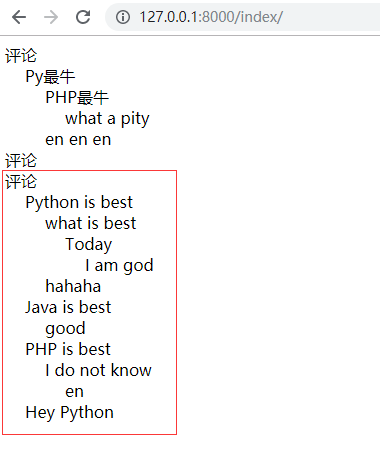
点击评论后,出现下面结果
后端处理评论数据
在 views.py 上添加
path('comment/', views.comment),
在 index.html 出修改
<!DOCTYPE html>

<html lang="en">

<head>

    <meta charset="UTF-8">

    <title>Title</title>

    <style>

        .comment-box{

            margin-left: 20px;

        }

    </style>

</head>

<body>

    <div class="item">

        <a news_id="19" class="com">评论</a>

        <div class="comment-box">

            <span>Py最牛</span>

            <div class="comment-box">

                <span>PHP最牛</span>

                <div class="comment-box">

                    <span>what a pity</span>

                </div>

            </div>

            <div class="comment-box">

                <span>en en en </span>

            </div>

        </div>

    </div>

    <div class="item">

        <a news_id="18" class="com">评论</a>

    </div>

    <div class="item">

        <a news_id="17" class="com">评论</a>

    </div>

    <script src="/static/jquery.min.js"></script>

    <script>

        $(function () {

            bindCommentEvent();

        });

        function bindCommentEvent() {

            $('.com').click(function () {

                var news_id = $(this).attr('news_id');

                var _this = $(this);

                $.ajax({

                    url: '/comment/',

                    type: 'GET',

                    data: {news_id: news_id},

                    dataType: "html",

                    success:function (arg) {

                        _this.after(arg);                    //  在该元素后添加后台返回的数据

                    }

                })

            })

        }

    </script>

</body>

</html>
创建一个 templateags 文件夹,里面创建 klvchen.py 文件
from django import template

from django.utils.safestring import mark_safe

register = template.Library()

def diGui(children_list):

    html = ""

    for cv in children_list:

        b = '<div class="comment-box"><span>'

        b += cv['content'] + "</span>"

        b += diGui(cv['children'])

        b += "</div>"

        html += b

    return html

@register.simple_tag

def create_tree(comment_tree):

    html = '<div class="comment-list">'

    for v in comment_tree:

        a = '<div class="comment-box"><span>'

        a += v['content'] + "</span>"

        a += diGui(v['children'])

        a += "</div>"

        html += a

    return mark_safe(html)
在 templates 文件夹里,创建 comment.html 文件
{% load klvchen %}

{% create_tree comment_tree %}
修改 views.py 文件
from django.shortcuts import render, HttpResponse

from app01 import models

# Create your views here.

def index(request):

    return render(request, 'index.html')

def comment(request):

    news_id = request.GET.get('news_id')

    comment_list = [

        {'id': 1, 'content': 'Python is best', 'user': 'klvchen', 'parent_id': None},

        {'id': 2, 'content': 'Java is best', 'user': 'klvchen', 'parent_id': None},

        {'id': 3, 'content': 'PHP is best', 'user': 'klvchen', 'parent_id': None},

        {'id': 4, 'content': 'what is best', 'user': 'lily', 'parent_id': 1},

        {'id': 5, 'content': 'hahaha', 'user': 'lucy', 'parent_id': 1},

        {'id': 6, 'content': 'Today', 'user': 'james', 'parent_id': 4},

        {'id': 7, 'content': 'good', 'user': 'jack', 'parent_id': 2},

        {'id': 8, 'content': 'I do not know', 'user': 'jack', 'parent_id': 3},

        {'id': 9, 'content': 'en', 'user': 'klvchen', 'parent_id': 8},

        {'id': 10, 'content': 'Hey Python', 'user': 'kim', 'parent_id': None},

        {'id': 10, 'content': 'I am god', 'user': 'god', 'parent_id': 6},

    ]

    comment_tree = []

    comment_list_dict = {}

    for row in comment_list:

        row.update({'children': []})

        comment_list_dict[row['id']] = row

    for item in comment_list:

        parent_row = comment_list_dict.get(item['parent_id'])

        if not parent_row:

            comment_tree.append(item)

        else:

            parent_row['children'].append(item)

    # import json

    # return HttpResponse(json.dumps(comment_tree))

    return render(request, 'comment.html', {'comment_tree': comment_tree})
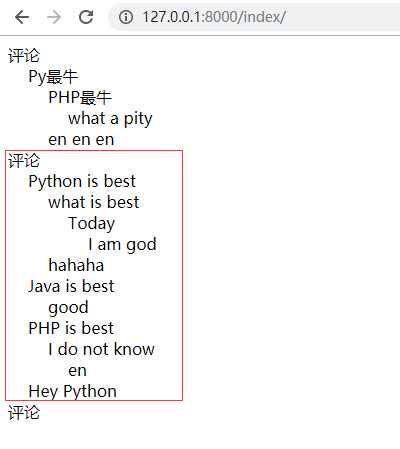
运行结果
Django 简单评论实现的更多相关文章
- [个人网站搭建]·Django增加评论功能(Python3)
[个人网站搭建]·Django增加评论功能 个人主页--> https://xiaosongshine.github.io/ 个人网站搭建github地址:https://github.com/ ...
- DJango简单的后台定义登录验证
第一步创建一个新的项目 APPLICATIONNAME : 表示创建子项目 第二步:找到主项目的url 进行 include 分发式url 简单的说,就是将app里边的url放在这里. 这里也可以找到 ...
- 我的Vue之旅 07 Axios + Golang + Sqlite3 实现简单评论机制
第三期 · 使用 Vue 3.1 + TailWind.CSS + Axios + Golang + Sqlite3 实现简单评论机制 效果图 CommentArea.vue 我们需要借助js的Dat ...
- Django——实现评论功能(包括评论回复)
提示:(1)功能不全面,仅仅实现评论(2)样式简单 1.项目目录结构 2.模型 from django.db import models from django.contrib.auth.models ...
- Django简单的数据库操作
当然,本篇的前提是你已经配置好了相关的环境,这里就不详细介绍. 一. 在settings.py文件中设置数据库属性. 如下: DATABASES = { 'default': { 'ENGINE': ...
- 循序渐进Python3(十二) --2-- web框架之django简单实现oracle数据库操作
在 Django 中构建 Oracle 数据库支持的 Web 应用程序 了解如何配置 Django 以便与 Oracle 数据库交互,并使用 ORM 进行数据库连接. 产能在软 ...
- django 简单的邮件系统
django邮件系统 Django发送邮件官方中文文档 总结如下: 1.首先这份文档看三两遍是不行的,很多东西再看一遍就通顺了. 2.send_mail().send_mass_mail()都是对Em ...
- Django多级评论
一.原理 #多级评论原理简单原理,弄完之后发现基础白学了 msg_list = [ {'id':1,'content':'xxx','parent_id':None}, {'id':2,'conten ...
- 前端、数据库、Django简单的练习
一.前端 1.前端页面由哪几层构成,分别是什么,作用是什么? 分为:结构层(html),表示层(css),行为层(js). 结构层 超文本标记语言.由HTML或XHTML之类的标记语言负责创建.标签, ...
随机推荐
- Linux—系统关机命令详解
不管是重启系统还是关闭系统,首先要运行 sync 命令,把内存中的数据写到磁盘中.将数据由内存同步写入到硬盘中. [root@localhost ~]# sync 一.shutdown命令 # 立刻关 ...
- gevent实现协程
gevent的好处:能够自动识别程序中的耗时操作,在耗时的时候自动切换到其他任务 # gevent的好处:能够自动识别程序中的耗时操作,在耗时的时候自动切换到其他任务 from gevent impo ...
- 解决springboot读取jar包中文件的问题
转载自: https://www.oschina.net/question/2272552_2269641 https://stackoverflow.com/questions/25869428/c ...
- day2_窗口句柄切换
#!/usr/bin/env python # -*- coding: utf-8 -*- # @Time : 2019/7/16 14:21 # @Author : 大坏男孩 # @File : d ...
- Appium 解决微信公众号、小程序切换 webview 后无法定位元素的问题
如何切换webview进入小程序请参考https://testerhome.com/topics/12003 脚本思路:进入webview后会存在多个handle同Web页签一样,获取所有的handl ...
- 这一次,彻底弄懂 JavaScript 执行机制
本文转自https://juejin.im/post/59e85eebf265da430d571f89#heading-4 本文的目的就是要保证你彻底弄懂javascript的执行机制,如果读完本文还 ...
- 【CodeChef EDGEST】Edges in Spanning Trees(树链剖分+树上启发式合并)
点此看题面 大致题意: 给你两棵\(n\)个点的树,对于第一棵树中的每条边\(e_1\),求存在多少条第二棵树中的边\(e_2\),使得第一棵树删掉\(e_1\)加上\(e_2\).第二棵树删掉\(e ...
- 微信jssdk的getLocalImgData拿到的base64不完整
最近上传图片接口突然出现偶尔报错,错误内容是 图片的base64 在调用 Convert.FromBase64String 报错了. 我从log里面拿到一些 出错的 base64. 发现都有一个特征 ...
- 奥展项目笔记05--域名、端口、Nginx相关知识笔记
1.我国的电信运营商是默认封闭80端口的. 中国电信屏蔽ADSL用户80端口 只是做应用服务器的话你可以使用别的端口. 80端口电脑上同时有各种各样的程序在运行,他们都需要借助网络来进行通信.例如,你 ...
- Knative 基本功能深入剖析:Knative Serving 的流量灰度和版本管理
作者|冬岛 阿里云技术专家 本篇主要介绍 Knative Serving 的流量灰度,通过一个 rest-api 的例子演示如何创建不同的 Revision.如何在不同的 Revision 之间按照流 ...