
我的Vue之旅 07 Axios + Golang + Sqlite3 实现简单评论机制
第三期 · 使用 Vue 3.1 + TailWind.CSS + Axios + Golang + Sqlite3 实现简单评论机制
效果图
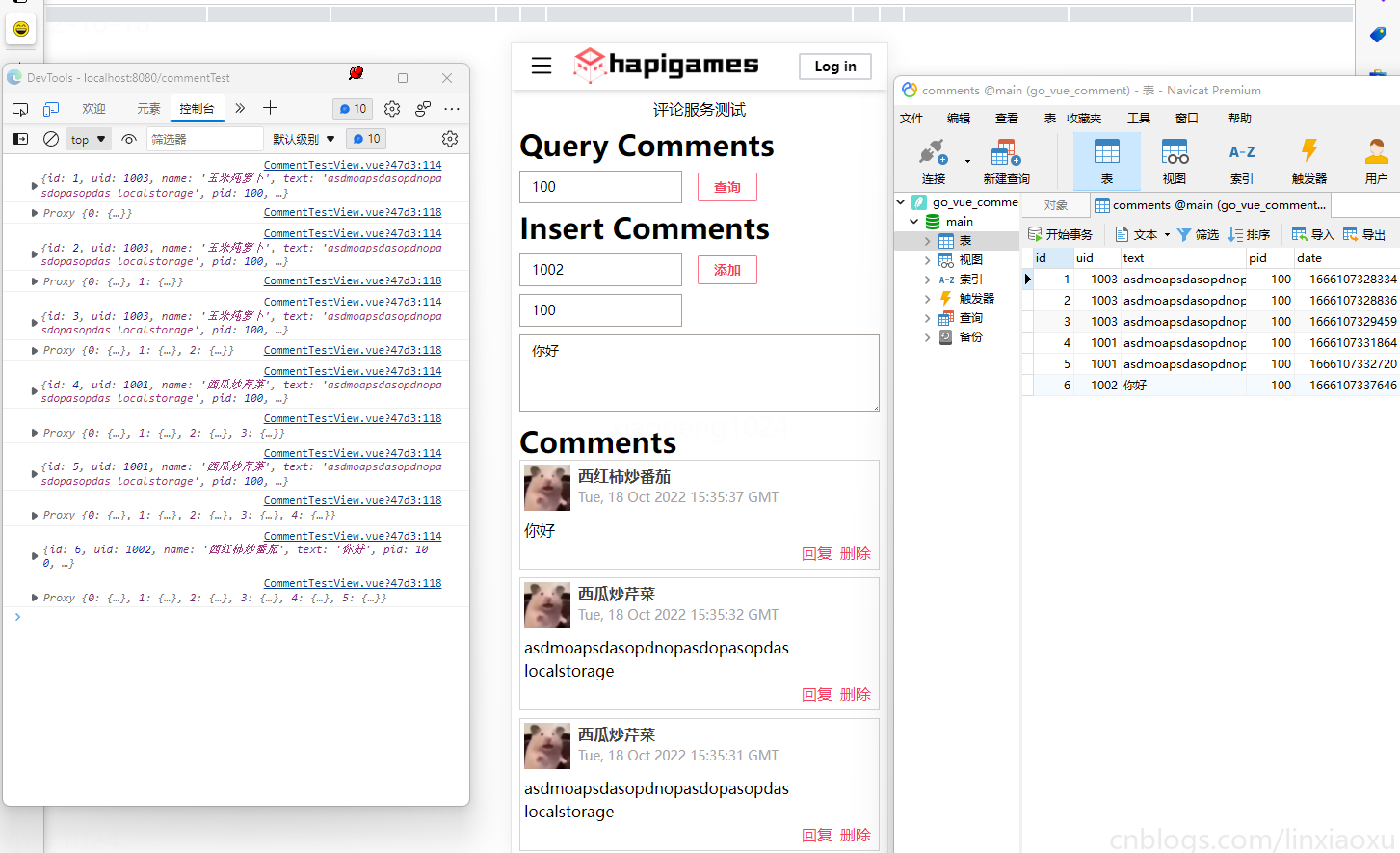
CommentArea.vue
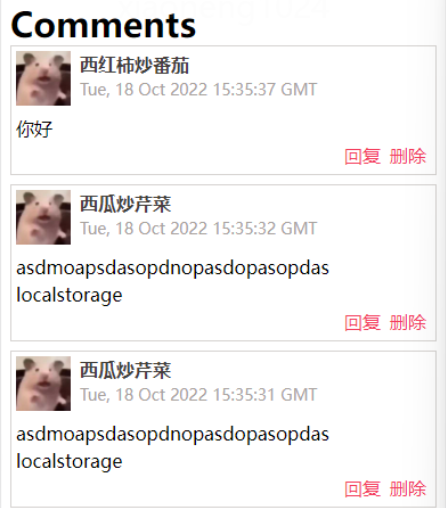
我们需要借助js的Data对象把毫秒时间戳转化成 UTCString() 。并在模板表达式中使用 {{ dateConvert(value.date) }}
src="@/assets/avater/hamster.jpg"头像目前目前是固定的,也可以将头像资源地址存入数据库中。
获取JavaScript时间戳函数的方法和js时间戳转时间方法_半生过往的博客-CSDN博客_js时间戳转时间
    dateConvert(date: number): string {

      return new Date(date).toUTCString();

    },
<template>

  <div class="m-2">

    <div class="text-3xl font-bold">Comments</div>

    <template v-if="comments.length == 0">当前pid帖子没有评论</template>

    <template v-for="(value, index) in comments" :key="index">

      <div class="border border-stone-300 p-1">

        <div>

          <img

            src="@/assets/avater/hamster.jpg"

            class="inline-block w-12 h-12 align-top"

          />

          <div class="inline-block ml-2">

            <div class="font-bold text-stone-700">{{ value.name }}</div>

            <div class="text-stone-400 text-sm">

              {{ dateConvert(value.date) }}

            </div>

          </div>

        </div>

        <div class="mt-2">{{ value.text }}</div>

        <div class="float-right">

          <span class="m-1 text-rose-500">回复</span>

          <span class="m-1 text-rose-500" @click="deleteComment(value.id)"

            >删除</span

          >

        </div>

        <div class="clear-both"></div>

      </div>

      <div class="mt-2"></div>

    </template>

  </div>

</template>

<script lang="ts">

import { PropType } from "vue";

interface Comment {

  date: number;

  text: string;

  id: number;

  name: string;

}

export default {

  name: "CommentArea",

  props: {

    comments: {

      type: Array as PropType<Comment[]>,

      required: true,

    },

  },

  methods: {

    dateConvert(date: number): string {

      return new Date(date).toUTCString();

    },

    deleteComment(id: number) {

      this.$emit("delete-comment", id);

    },

  },

};

</script>
Axios
安装vue-axios
npm install axios vue-axios --save
导入vue-axios
修改 main.ts
import { createApp } from 'vue'

import App from './App.vue'

import router from './router'

import store from './store'

import { BootstrapIconsPlugin } from 'bootstrap-icons-vue';

import './index.css'

import axios from 'axios'

import VueAxios from 'vue-axios'

axios.defaults.baseURL = '/api'

createApp(App).use(VueAxios, axios).use(BootstrapIconsPlugin).use(store).use(router).mount('#app')
axios.defaults.baseURL = '/api' 用于解决跨域问题
解决跨域问题
修改 vue.config.js
const { defineConfig } = require('@vue/cli-service')

module.exports = defineConfig({

  transpileDependencies: true,

  devServer: {

    port: 8080, //前端服务启动的端口号

    host: 'localhost', //前端服务启动后的访问ip,默认为localhost, host和port组成了前端服务启动后的访问入口。

    https: false,

    open: true,

    //以上的ip和端口是我们本机的;下面为需要跨域的

    proxy: {//配置跨域

        '/api': {

            target: 'http://localhost:1314/',//这里后台的地址模拟的;应该填写你们真实的后台接口

            ws: true,

            changOrigin: true,//允许跨域

            pathRewrite: {

                '^/api': ''//请求的时候使用这个api就可以

            }

        }

    }

  }

})
CommentTestView.vue
<template>

  <div class="text-center m-2">评论服务测试</div>

  <div class="m-2">

    <div class="text-3xl font-bold">Query Comments</div>

    <input

      id="pid"

      class="input_text"

      type="text"

      placeholder="输入帖子id查找评论"

      v-model="pid"

    />

    <input

      type="button"

      value="查询"

      class="input_button"

      @click="queryComment"

    />

  </div>

  <div class="m-2">

    <div class="text-3xl font-bold">Insert Comments</div>

    <input

      id="uid"

      class="input_text"

      type="text"

      placeholder="当前用户uid"

      v-model="uid"

    />

    <input

      type="button"

      value="添加"

      class="input_button"

      @click="insertComment"

    />

    <div></div>

    <input

      id="pid"

      class="input_text"

      type="text"

      placeholder="当前帖子pid"

      v-model="pid"

    />

    <div></div>

    <textarea

      id="text"

      class="input_text w-full h-20"

      rows="3"

      cols="40"

      placeholder="评论内容"

      v-model="text"

    />

  </div>

  <comment-area

    :comments="comments"

    @delete-comment="deleteComment"

  ></comment-area>

</template>
将 deleteComment 绑定到commentArea的delete-comment事件上,将 insertComment 、 queryComment 分别绑定到两个按钮的click事件上。
insertComment 成功执行将拿到插入的评论json对象并放入当前数组中。
deleteComment 成功执行将通过数组的filter函数删除当前评论json对象。
下方代码相比前几期多了style代码块,可以将相同标签使用的共同功能类组合提取出来(两个按钮,五个输入框),简化代码。
<script>

import CommentArea from '@/components/common/CommentArea.vue';

export default {

  components: { CommentArea },

  name: 'CommentTestView',

  data: function () {

    return {

      pid: 100,

      uid: 1003,

      text: "",

      comments: [

        // {

        //   id: 1,

        //   uid: 1001,

        //   name: "西红柿炒芹菜",

        //   text: "真的很不错啊。SQLite 是一个开源的嵌入式关系数据库,实现自包容、零配置、支持事务的 SQL 数据库引擎。",

        //   date: 1665912139673,

        //   img: require("@/assets/avater/hamster.jpg")

        // }

      ]

    }

  },

  methods: {

    insertComment() {

      const params = new URLSearchParams();

      params.append('uid', this.uid)

      params.append('pid', this.pid)

      params.append('text', this.text)

      this.axios.post("insertComment", params

      ).then(response => {

        console.log(response.data)

        this.comments.unshift(

          response.data

        )

        console.log(this.comments)

      }).catch(err => {

        console.log(err)

      })

    },

    deleteComment(id) {

      const params = new URLSearchParams();

      params.append('id', id)

      this.axios.post("deleteComment", params).then(response => {

        console.log(response.data)

        this.comments = this.comments.filter(elem => {

          return elem.id != id

        })

      }).catch(err => {

        console.log(err)

      })

    },

    queryComment() {

      this.axios.get("queryComment", {

        params: {

          pid: this.pid

        }

      }).then(response => {

        if (!response.data) {

          this.comments = []

          return

        }

        this.comments = response.data

        this.comments.reverse()

      }).catch(err => {

        console.log(err)

      })

    }

  },

  created() {

    let old = localStorage.getItem(`comment_${this.pid}`)

    if (old) {

      this.text = old

    }

  },

  watch: {

    text() {

      localStorage.setItem(`comment_${this.pid}`, this.text)

    }

  }

}

</script>

<style scoped>

.input_text {

  @apply mt-2

        inline-block

        bg-white

        focus:outline-none focus:ring focus:border-blue-200

        py-1.5

        pl-3

        border border-stone-400

        text-sm;

}

.input_button {

  @apply border border-rose-400

        text-sm

        font-bold

        text-rose-500

        rounded-sm

        px-4

        py-1

        mt-2

        ml-4

        active:bg-rose-400 active:text-white;

}

</style>
请求体编码
axios post 请求客户端可以直接发吗,不能!在这里使用了URLSearchParams对象以application/x-www-form-urlencoded格式发送数据。
const params = new URLSearchParams();

params.append('uid', this.uid)

params.append('pid', this.pid)

params.append('text', this.text)
其他方式可看 请求体编码 | Axios Docs (axios-http.com)
保存没写完的评论
写到一半关闭页面后重新打开就不在了,可以用 localStorage 本地存储临时保存写的内容,只能保存字符串。
  created() {

    let old = localStorage.getItem(`comment_${this.pid}`)

    if (old) {

      this.text = old

    }

  },

  watch: {

    text() {

      localStorage.setItem(`comment_${this.pid}`, this.text)

    }

  }
创建数据库和表
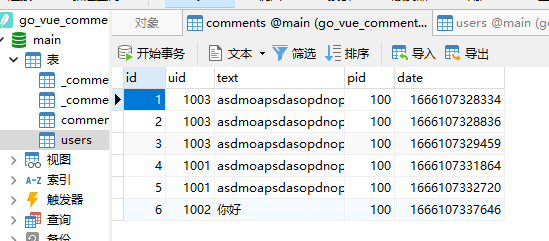
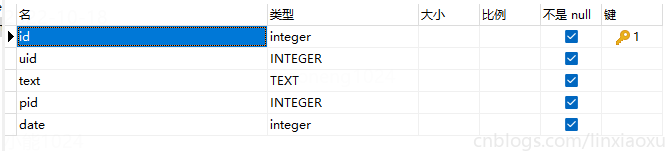
使用 Navicat Premium 创建数据库跟表

Golang 服务端
C:.

│   comment.json

│   go.mod

│   go.sum

│   main.go

│

├───data

│       data.db

│

└───lib

    ├───http

    │       server.go

    │

    ├───mysql

    └───sqlite

            sq3_comment.go

            sq3_init.go

            sq3_users.go
JSON2GO
我们把消息JSON格式拟定出来
[

  {

    "id": 1,

    "uid": 1001,

    "name": "小王",

    "text": "看起来很好玩的样子。",

    "pid": 100,

    "date": 1665908807784

  }

]
JSON 转GO,JSON转GO代码, go json解析 (sojson.com)
type AutoGenerated []struct {

	ID int `json:"id"`

	UID int `json:"uid"`

	Name string `json:"name"`

	Text string `json:"text"`

	Pid int `json:"pid"`

	Date int64 `json:"date"`

}
解决sqlite3 gcc:exec: "gcc": executable file not found in %PATH%
Windows 如果使用 Go 语言使用 sqlite3 时,需要gcd来编译sqlite3模块相关c代码。
解决方法:安装tdm64-gcc-9.2.0.exe, https://jmeubank.github.io/tdm-gcc/download/
数据库处理逻辑 sq3_vue包
sq3_init.go
init() 初始化函数获取main执行目录,并按操作系统连接文件位置,读取文件。
package sq3_vue

import (

	"database/sql"

	"os"

	"path"

	_ "github.com/mattn/go-sqlite3"

)

var db *sql.DB

func init() {

	p, err := os.Getwd()

	checkError(err)

	db, err = sql.Open("sqlite3", path.Join(p, "data/data.db"))

	checkError(err)

}

func checkError(err error) {

	if err != nil {

		panic(err)

	}

}
sq3_comment.go
为具体的数据库处理逻辑,插入返回comment的json字节切片 {},查询返回comment数组的json字节切片 [{},{},{}]。
*sql.DB 是Go标准库规定的接口,方便操作。
stmt、rows 需要 defer close()
package sq3_vue

import (

	"encoding/json"

	"fmt"

	"time"

)

type Comment struct {

	ID   int    `json:"id"`

	UID  int    `json:"uid"`

	Name string `json:"name"`

	Text string `json:"text"`

	Pid  int    `json:"pid"`

	Date int64  `json:"date"`

}

const insertStmt = `

INSERT INTO comments(uid,text,pid,date) values(?,?,?,?)

`

const lastedStmt = `

select id,uid,text,pid,date,name from comments join users using(uid) where id = ?

`

func (Comment) InsertComment(uid, pid int64, text string) (json_ []byte, err error) {

	stmt, err := db.Prepare(insertStmt)

	checkError(err)

	defer stmt.Close()

	res, err := stmt.Exec(uid, text, pid, time.Now().UnixMilli())

	checkError(err)

	n, err := res.RowsAffected()

	checkError(err)

	if n == 0 {

		return nil, fmt.Errorf("插入失败")

	}

	n, err = res.LastInsertId()

	checkError(err)

	stmt, err = db.Prepare(lastedStmt)

	checkError(err)

	defer stmt.Close()

	rows, err := stmt.Query(n)

	checkError(err)

	defer rows.Close()

	rows.Next()

	var c Comment

	rows.Scan(&c.ID, &c.UID, &c.Text, &c.Pid, &c.Date, &c.Name)

	checkError(err)

	json_, err = json.Marshal(c)

	checkError(err)

	return json_, nil

}

const deleteStmt = `

delete from comments where id = ?

`

func (Comment) DeleteComment(id int64) error {

	stmt, err := db.Prepare(deleteStmt)

	checkError(err)

	defer stmt.Close()

	res, err := stmt.Exec(id)

	checkError(err)

	n, err := res.RowsAffected()

	checkError(err)

	if n == 0 {

		return fmt.Errorf("删除失败")

	}

	return nil

}

const queryStmt = `

select id,uid,text,pid,date,name from comments join users using(uid) where pid = ?

`

func (Comment) QueryComment(pid int64) (json_ []byte, err error) {

	var res []Comment

	stmt, err := db.Prepare(queryStmt)

	checkError(err)

	defer stmt.Close()

	rows, err := stmt.Query(pid)

	checkError(err)

	defer rows.Close()

	for rows.Next() {

		var c Comment

		err = rows.Scan(&c.ID, &c.UID, &c.Text, &c.Pid, &c.Date, &c.Name)

		checkError(err)

		res = append(res, c)

	}

	json_, err = json.Marshal(res)

	checkError(err)

	return

}
简单HTTP服务器
server.go
我们分别判断请求方法,要求删除和插入只能用post请求,查询只能用get请求。使用r.ParseForm() 处理表单。
r.Form["uid"] 本质上拿到的字符串数组,需要进行显式类型转换。
db "wolflong.com/vue_comment/lib/sqlite" 引入了前面写的数据库处理包。因为考虑到不一定要用 sqlite,未来可能会使用 mysql、mongoDB。目前已经强耦合了,即当前http服务器的实现跟sq3_vue包紧密相关,考虑用接口降低耦合程度。
type comment interface {

	QueryComment(pid int64) (json_ []byte, err error)

	InsertComment(uid, pid int64, text string) (json_ []byte, err error)

	DeleteComment(id int64) error

}

var c comment = db.Comment{}
我们将数据库行为接收者指派为Comment类型,当该类型实现了三个对应函数签名的方法就实现了comment接口。此时我们创建一个空Comment类型赋值给comment接口变量。那么其他数据库逻辑处理包只要提供实现comment接口的类型对象就好了。换什么数据库也影响不到当前HTTP的处理逻辑。
package server

import (

	"fmt"

	"log"

	"net/http"

	"strconv"

	db "wolflong.com/vue_comment/lib/sqlite"

)

type comment interface {

	QueryComment(pid int64) (json_ []byte, err error)

	InsertComment(uid, pid int64, text string) (json_ []byte, err error)

	DeleteComment(id int64) error

}

var c comment = db.Comment{}

func checkError(err error) {

	if err != nil {

		panic(err)

	}

}

func insertComment(w http.ResponseWriter, r *http.Request) {

	if r.Method != "POST" {

		fmt.Fprintf(w, "Only POST Method")

		return

	}

	r.ParseForm()

	fmt.Println(r.Form)

	// ^ 简单实现,有待提高健壮性

	uid, err := strconv.Atoi(r.Form["uid"][0])

	checkError(err)

	pid, err := strconv.Atoi(r.Form["pid"][0])

	checkError(err)

	text := r.Form["text"][0]

	inserted, err := c.InsertComment(int64(uid), int64(pid), text)

	if err != nil {

		fmt.Fprintf(w, "Error Insert")

		return

	}

	fmt.Fprint(w, string(inserted))

}

func deleteComment(w http.ResponseWriter, r *http.Request) {

	if r.Method != "POST" {

		fmt.Fprintf(w, "Only POST Method")

		return

	}

	r.ParseForm()

	fmt.Println(r.Form)

	id, err := strconv.Atoi(r.Form["id"][0])

	checkError(err)

	err = c.DeleteComment(int64(id))

	if err != nil {

		fmt.Fprintf(w, "Error Delete")

		return

	}

	fmt.Fprintf(w, "Success Delete")

}

func queryComment(w http.ResponseWriter, r *http.Request) {

	if r.Method != "GET" {

		fmt.Fprintf(w, "Only GET Method")

		return

	}

	r.ParseForm()

	fmt.Println(r.Form)

	pid, err := strconv.Atoi(r.Form["pid"][0])

	checkError(err)

	json, err := c.QueryComment(int64(pid))

	if err != nil {

		fmt.Fprintf(w, "Error Delete")

		return

	}

	fmt.Fprint(w, string(json))

}

func StartServer() {

	http.HandleFunc("/insertComment", insertComment)

	http.HandleFunc("/deleteComment", deleteComment)

	http.HandleFunc("/queryComment", queryComment)

	err := http.ListenAndServe(":1314", nil)

	if err != nil {

		log.Fatal("ListenAndServe: ", err)

	}

}
main.go
package main

import (

	"fmt"

	http "wolflong.com/vue_comment/lib/http"

)

func main() {

	fmt.Println("2022年10月16日 https://cnblogs.com/linxiaoxu")

	http.StartServer()

}
资料
SQLite Join | 菜鸟教程 (runoob.com)
使用 SQLite 資料庫 - 使用 Golang 打造 Web 應用程式 (gitbook.io)
mattn/go-sqlite3: sqlite3 driver for go using database/sql (github.com)
sqlite3 package - github.com/mattn/go-sqlite3 - Go Packages
go-sqlite3/simple.go at master · mattn/go-sqlite3 (github.com)
05.3. 使用 SQLite 数据库 | 第五章. 访问数据库 |《Go Web 编程》| Go 技术论坛 (learnku.com)
04.1. 处理表单的输入 | 第四章. 表单 |《Go Web 编程》| Go 技术论坛 (learnku.com)
我的Vue之旅 07 Axios + Golang + Sqlite3 实现简单评论机制的更多相关文章
- 我的Vue之旅 10 Gin重写后端、实现页面详情页 Mysql + Golang + Gin
第三期 · 使用 Vue 3.1 + Axios + Golang + Mysql + Gin 实现页面详情页 使用 Gin 框架重写后端 Gin Web Framework (gin-gonic.c ...
- vue实例讲解之axios的使用
本篇来讲解一下axios插件的使用,axios是用来做数据交互的插件. 这篇将基于vue实例讲解之vue-router的使用这个项目的源码进行拓展. axios的使用步骤: 1.安装axios npm ...
- vue 组件开发、vue自动化工具、axios使用与router的使用(3)
一. 组件化开发 1.1 组件[component] 在网页中实现一个功能,需要使用html定义功能的内容结构,使用css声明功能的外观样式,还要使用js定义功能的特效,因此就产生了一个功能先关的代码 ...
- vue中的ajax - axios
vue中的ajax - axios axios - 简书 使用 axios 实现 ajax 方案 VUE 更好的 ajax 上传处理 axios.js vue.js 自2.0版本已经不对 vue-re ...
- vue中局部封装axios
Vue中局部配置axios 'use strict' import axios from 'axios'; import { Loading } from 'element-ui'; export c ...
- vue中axios的封装以及简单使用
一.axios的封装 在vue中为了使用axios使用方便,不需要每一个模块进行导入,就需要对其进行封装: 1.新建http.js模块 import axios from 'axios' // 设置基 ...
- day 84 Vue学习六之axios、vuex、脚手架中组件传值
Vue学习六之axios.vuex.脚手架中组件传值 本节目录 一 axios的使用 二 vuex的使用 三 组件传值 四 xxx 五 xxx 六 xxx 七 xxx 八 xxx 一 axios的 ...
- Vue. 之 npm安装 axios
Vue. 之 npm安装 axios 使用指令: cnpm install axios
- 创建Vue项目及封装axios
1. 始vue化项目 https://www.cnblogs.com/xiaonq/p/11027880.html vue init webpack deaxios # 使用脚手架创建项目 deaxi ...
随机推荐
- 利用DockerHub在Centos7.7环境下部署Nginx反向代理Gunicorn+Flask独立架构
原文转载自「刘悦的技术博客」https://v3u.cn/a_id_165 上一篇文章:Docker在手,天下我有,在Win10系统下利用Docker部署Gunicorn+Flask打造独立镜像,是在 ...
- Linux 时间设置和同步服务
修改日期时间的工具 date hwclock timedatectl date工具的使用 作用:显示和设置系统时间 选项: -d <字符串> 显示字符串所指的日期与时间,比如:" ...
- Luogu P3273 [SCOI2011]棘手的操作(左偏树)
什么恶心东西啊,又水又烦 两个可并堆维护即可 #include <cstdio> #include <iostream> #include <cstring> #i ...
- Luogu1879 [USACO06NOV]玉米田Corn Fields (状压DP)
曾经放弃的坑,都是坑 #include <iostream> #include <cstdio> #include <cstring> #include <a ...
- LuoguP1922 女仆咖啡厅桌游吧 (树形动态规划)
#include <iostream> #include <cstdio> #include <cstring> #include <algorithm> ...
- Mybatis 插件使用及源码分析
Mybatis 插件 Mybatis插件主要是通过JDK动态代理实现的,插件可以针对接口中的方法进行代理增强,在Mybatis中比较重要的接口如下: Executor :sql执行器,包含多个实现类, ...
- 初次认识 Canvas
画布的概念 Canvas(画布)可以用于动画.游戏画面.数据可视化.图片编辑以及实时视频处理等方面.画布在 HTML5 中是通过canvas标签来表现,通过 JavaScript 提供的画布 API, ...
- 我用Axure制作了一款火影小游戏 | PM老猫
Axure不仅仅是一个原型工具,除了原型之外还可以用来制作一些静态网页,这点对于不懂代码或前端的同学来说挺实用.之前整理了一版<Axure函数自查表>,因为感觉内容太多又对前端样式及脚本感 ...
- ZZH与计数(矩阵加速,动态规划,记忆化搜索)
题面 因为出题人水平很高,所以这场比赛的题水平都很高. ZZH 喜欢计数. ZZH 有很多的数,经过统计,ZZH一共有 v 0 v_0 v0 个 0 , v 1 v_1 v1 个 1,-, v 2 ...
- C++基础入门:C++初始
1. C++环境:Clion搭建 下载链接:clion官方网址 1.1 点击下载 1.2 下载对应版本 1.3 安装步骤: 1.3.1 下载完毕后,打开exe文件,进入安装界面,点击[Next > ...