
Dynamics 365 CE Update消息PostOperation阶段Image的尝试
我是微软Dynamics 365 & Power Platform方面的工程师罗勇,也是2015年7月到2018年6月连续三年Dynamics CRM/Business Solutions方面的微软最有价值专家(Microsoft MVP),欢迎关注我的微信公众号 MSFTDynamics365erLuoYong ,回复355或者20190827可方便获取本文,同时可以在第一间得到我发布的最新博文信息,follow me!
前面的文章 Dynamics 365 CE在Pre Delete插件中应用Image 讲了Delete消息PreOperation阶段Image的应用,今天我们来看下Update 消息PostOperation阶段Image的尝试。
我使用如下代码简单注册一个插件:
using Microsoft.Xrm.Sdk;

using Microsoft.Xrm.Sdk.Query;

using System;

using System.ServiceModel;

using System.Text;

namespace CRM.Plugins

{

    public class PostWorkOrderUpdate : IPlugin

    {

        public void Execute(IServiceProvider serviceProvider)

        {

            ITracingService tracingService = (ITracingService)serviceProvider.GetService(typeof(ITracingService));

            IPluginExecutionContext context = (IPluginExecutionContext)serviceProvider.GetService(typeof(IPluginExecutionContext));

            if (context.InputParameters.Contains("Target") && context.InputParameters["Target"] is Entity)

            {

                Entity currentEntity = (Entity)context.InputParameters["Target"];

                IOrganizationServiceFactory serviceFactory = (IOrganizationServiceFactory)serviceProvider.GetService(typeof(IOrganizationServiceFactory));

                IOrganizationService service = serviceFactory.CreateOrganizationService(context.UserId);

                Entity preImgEntity;

                Entity postImgEntity;

                Entity retrieveEntity;

                StringBuilder sb = new StringBuilder();

                try

                {

                    if (context.PreEntityImages.Contains("PreImg"))

                    {

                        preImgEntity = context.PreEntityImages["PreImg"];

                    }

                    else

                    {

                        throw new InvalidPluginExecutionException("Pre Update image - PreImg does not exist!");

                    }

                    if (context.PostEntityImages.Contains("PostImg"))

                    {

                        postImgEntity = context.PostEntityImages["PostImg"];

                    }

                    else

                    {

                        throw new InvalidPluginExecutionException("Post Update image - PostImg does not exist!");

                    }

                    retrieveEntity = service.Retrieve(currentEntity.LogicalName, currentEntity.Id, new ColumnSet("ly_singletext2", "ly_singletext3"));

                    if (retrieveEntity.Contains("ly_singletext2"))

                    {

                        sb.Append("retrieveEntity contains attribute ly_singletext2 = ");

                        sb.Append(retrieveEntity.GetAttributeValue<string>("ly_singletext2"));

                        sb.Append("; ");

                    }

                    else

                    {

                        sb.Append("retrieveEntity does not contain attribute ly_singletext2");

                        sb.Append("; ");

                    }

                    if (currentEntity.Contains("ly_singletext2"))

                    {

                        sb.Append("currentEntity contains attribute ly_singletext2 = ");

                        sb.Append(currentEntity.GetAttributeValue<string>("ly_singletext2"));

                        sb.Append("; ");

                    }

                    else

                    {

                        sb.Append("currentEntity does not contain attribute ly_singletext2");

                        sb.Append("; ");

                    }

                    if (preImgEntity.Contains("ly_singletext2"))

                    {

                        sb.Append("preImgEntity contains attribute ly_singletext2 = ");

                        sb.Append(preImgEntity.GetAttributeValue<string>("ly_singletext2"));

                        sb.Append("; ");

                    }

                    else

                    {

                        sb.Append("preImgEntity does not contain attribute ly_singletext2");

                        sb.Append("; ");

                    }

                    if (postImgEntity.Contains("ly_singletext2"))

                    {

                        sb.Append("postImgEntity contains attribute ly_singletext2 = ");

                        sb.Append(postImgEntity.GetAttributeValue<string>("ly_singletext2"));

                        sb.Append("; ");

                    }

                    else

                    {

                        sb.Append("postImgEntity does not contain attribute ly_singletext2");

                        sb.Append("; ");

                    }

                    if (retrieveEntity.Contains("ly_singletext3"))

                    {

                        sb.Append("retrieveEntity contains attribute ly_singletext3 = ");

                        sb.Append(retrieveEntity.GetAttributeValue<string>("ly_singletext3"));

                        sb.Append("; ");

                    }

                    else

                    {

                        sb.Append("retrieveEntity does not contain attribute ly_singletext3");

                        sb.Append("; ");

                    }

                    if (currentEntity.Contains("ly_singletext3"))

                    {

                        sb.Append("currentEntity contains attribute ly_singletext3 = ");

                        sb.Append(currentEntity.GetAttributeValue<string>("ly_singletext3"));

                        sb.Append("; ");

                    }

                    else

                    {

                        sb.Append("currentEntity does not contain attribute ly_singletext3");

                        sb.Append("; ");

                    }

                    if (preImgEntity.Contains("ly_singletext3"))

                    {

                        sb.Append("preImgEntity contains attribute ly_singletext3 = ");

                        sb.Append(preImgEntity.GetAttributeValue<string>("ly_singletext3"));

                        sb.Append("; ");

                    }

                    else

                    {

                        sb.Append("preImgEntity does not contain attribute ly_singletext3");

                        sb.Append("; ");

                    }

                    if (postImgEntity.Contains("ly_singletext3"))

                    {

                        sb.Append("postImgEntity contains attribute ly_singletext3 = ");

                        sb.Append(postImgEntity.GetAttributeValue<string>("ly_singletext3"));

                        sb.Append("; ");

                    }

                    else

                    {

                        sb.Append("postImgEntity does not contain attribute ly_singletext3");

                        sb.Append("; ");

                    }

                    throw new InvalidPluginExecutionException(sb.ToString());

                }

                catch (FaultException<OrganizationServiceFault> ex)

                {

                    throw new InvalidPluginExecutionException("An error occurred in PostWorkOrderUpdate.", ex);

                }

                catch (Exception ex)

                {

                    tracingService.Trace("PostWorkOrderUpdate unexpected exception: {0}", ex.Message);

                    throw;

                }

            }

        }

    }

}
插件注册信息如下:
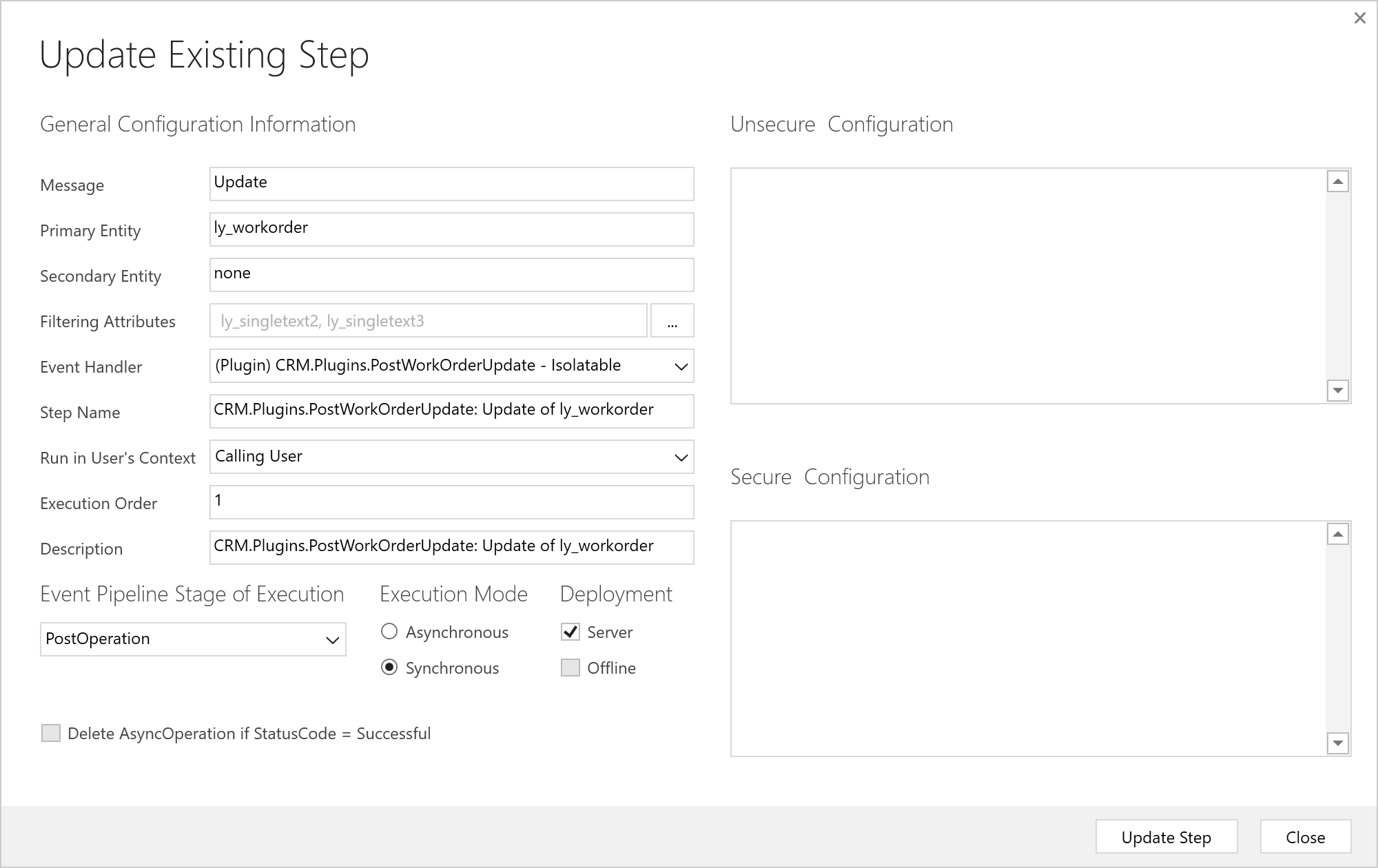
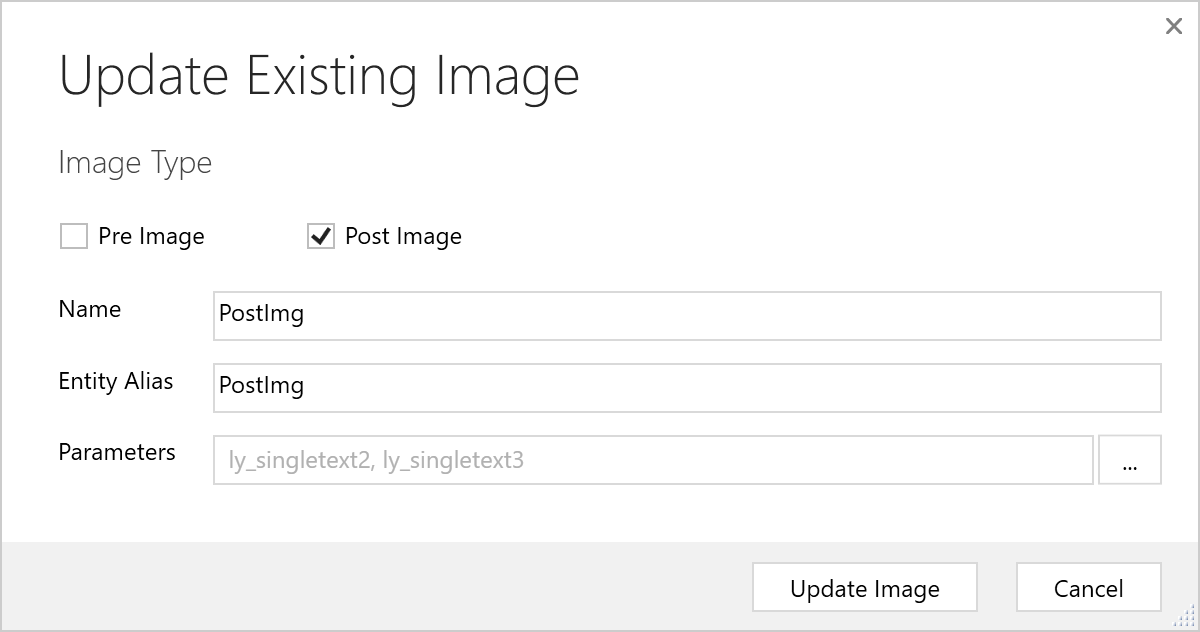
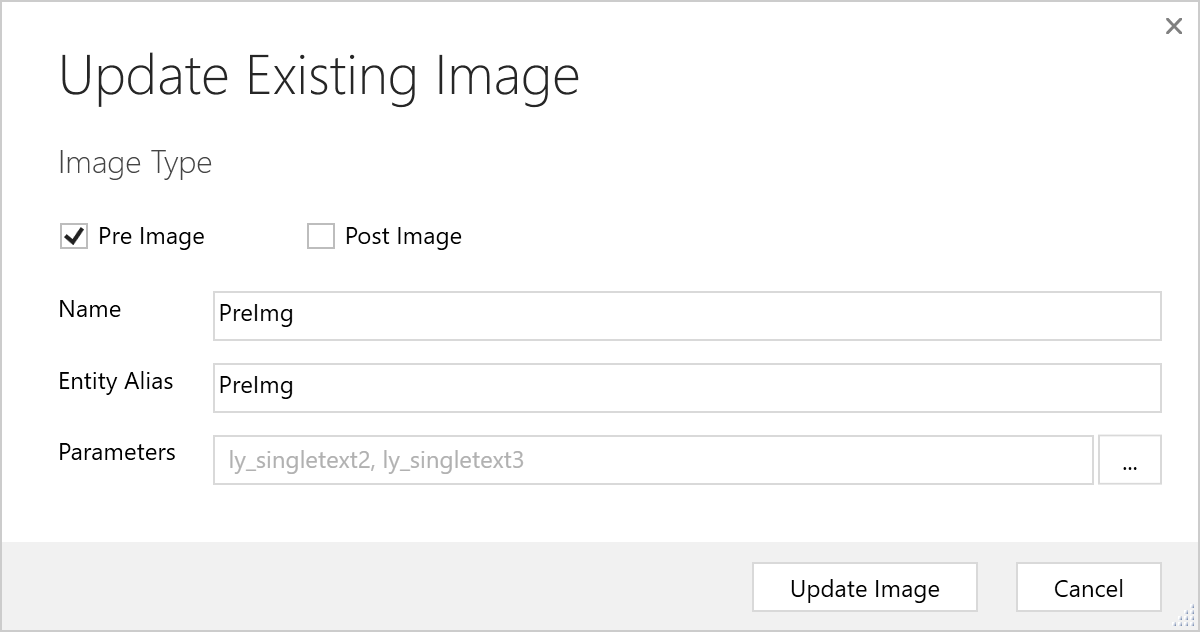
我还为此Step注册了两个Image,一个为Pre阶段的Image,一个为Post阶段的Image,如下:
然后我进行了一系列测试:
如果两个字段都变化,获取到的消息如下:
retrieveEntity contains attribute ly_singletext2 = 5-New;

currentEntity contains attribute ly_singletext2 = 5-New;

preImgEntity contains attribute ly_singletext2 = 5;

postImgEntity contains attribute ly_singletext2 = 5-New;

retrieveEntity contains attribute ly_singletext3 = 总体满意度-New;

currentEntity contains attribute ly_singletext3 = 总体满意度-New;

preImgEntity contains attribute ly_singletext3 = 总体满意度;

postImgEntity contains attribute ly_singletext3 = 总体满意度-New;
如果只更改一个字段ly_singletext2的值,另外一个字段ly_singletext3不变,保存后获取的结果是:
retrieveEntity contains attribute ly_singletext2 = 5-New;

currentEntity contains attribute ly_singletext2 = 5-New;

preImgEntity contains attribute ly_singletext2 = 5;

postImgEntity contains attribute ly_singletext2 = 5-New;

retrieveEntity contains attribute ly_singletext3 = 总体满意度;

currentEntity does not contain attribute ly_singletext3;

preImgEntity contains attribute ly_singletext3 = 总体满意度;

postImgEntity contains attribute ly_singletext3 = 总体满意度;
如果只更改一个字段ly_singletext2的值,这里将其值清空,另外一个字段ly_singletext3不变,保存后获取的结果是:
retrieveEntity does not contain attribute ly_singletext2;

currentEntity contains attribute ly_singletext2 = ;

preImgEntity contains attribute ly_singletext2 = 5;

postImgEntity does not contain attribute ly_singletext2;

retrieveEntity contains attribute ly_singletext3 = 总体满意度;

currentEntity does not contain attribute ly_singletext3;

preImgEntity contains attribute ly_singletext3 = 总体满意度;

postImgEntity contains attribute ly_singletext3 = 总体满意度;
如果只更改一个字段ly_singletext2的值,本来该字段的值为空,这里设置其值为New,另外一个字段ly_singletext3的值一直为空保持不变,保存后获取的结果是:
retrieveEntity contains attribute ly_singletext2 = New;

currentEntity contains attribute ly_singletext2 = New;

preImgEntity does not contain attribute ly_singletext2;

postImgEntity contains attribute ly_singletext2 = New;

retrieveEntity does not contain attribute ly_singletext3;

currentEntity does not contain attribute ly_singletext3;

preImgEntity does not contain attribute ly_singletext3;

postImgEntity does not contain attribute ly_singletext3;
总结下:
- Target参数转换后的实体会包括所有要设置新值的字段(属性),如果要设置的新值为空值,也会包括该字段(属性),只是该字段(属性)的值为空。
- Target参数转换后的实体不会包括不更改的字段(属性)。
- Pre Update Image包括了字段更新之前的值,如果之前该字段的值为空值,则Pre Update Image不会包括这个字段(属性);
- Post Update Image包括了字段(属性)要更新的值,如果字段(属性)是更新为空值则Post Update Image不包括该字段,如果字段(属性)不更新的话,Post Update Image包括的就是这个字段(属性)的原值;
- 在Post Update阶段查询当前实体的字段(属性)值,查询到的是要变更的新值,如果字段(属性)要要更新为空值,查询结果的字段(属性)集中不会包括该字段(属性),所以不用再查询,直接从Target参数转换后的实体的字段(属性)集合中获取。
- 如果要看字段(属性)值在Update消息中是否变化的话,检查Target参数转换后的实体是否包括该字段(属性)即可,新值在Target参数转换后的实体的字段(属性)集合中,旧值可以用Pre Update Image来获取。
- 获取Image之前先检查Image是否存在,分别用类似context.PreEntityImages.Contains("PreImg") 或者 context.PostEntityImages.Contains("PostImg")。
- 获取字段(属性)值之前先检查字段(属性)的确存在,用类似 currentEntity.Contains("ly_singletext2") 的语法。
Dynamics 365 CE Update消息PostOperation阶段Image的尝试的更多相关文章
- Use SQL to Query Data from CDS and Dynamics 365 CE
from : https://powerobjects.com/2020/05/20/use-sql-to-query-data-from-cds-and-dynamics-365-ce/ Have ...
- 使用Dynamics 365 CE Web API查询数据加点料及选项集字段常用查询
微软动态CRM专家罗勇 ,回复336或者20190516可方便获取本文,同时可以在第一间得到我发布的最新博文信息,follow me. 紧接上文:配置Postman通过OAuth 2 implicit ...
- Dynamics 365 CE中AsyncOperationBase表记录太多,影响系统性能怎么办?
微软动态CRM专家罗勇 ,回复311或者20190311可方便获取本文,同时可以在第一间得到我发布的最新博文信息,follow me!我的网站是 www.luoyong.me . 本文主要是根据微软官 ...
- Dynamics 365 CE将自定义工作流活动程序集注册到磁盘并引用其他类库
我是微软Dynamics 365 & Power Platform方面的工程师罗勇,也是2015年7月到2018年6月连续三年Dynamics CRM/Business Solutions方面 ...
- 安装完成Dynamics 365 CE后别忘了更改维护作业的运行时间
摘要: 微软动态CRM专家罗勇 ,回复309或者20190308可方便获取本文,同时可以在第一间得到我发布的最新博文信息,follow me!我的网站是 www.luoyong.me . 安装完毕Dy ...
- Dynamics 365 CE中使用FetchXML进行聚合运算
微软动态CRM专家罗勇 ,回复328或者20190429可方便获取本文,同时可以在第一间得到我发布的最新博文信息,follow me! Dynamics 365 Customer Engagement ...
- Dynamics 365 CE命令栏按钮点击后刷新表单页面方法
微软动态CRM专家罗勇 ,回复326或者20190428可方便获取本文,同时可以在第一间得到我发布的最新博文信息,follow me! Dynamics 365 Customer Engagement ...
- 启用WCF压缩提升Dynamics 365 CE的网络性能
摘要: 微软动态CRM专家罗勇 ,回复307或者20190308可方便获取本文,同时可以在第一间得到我发布的最新博文信息,follow me!我的网站是 www.luoyong.me . 本文系根据微 ...
- 做了面向互联网部署的Dynamics 365 CE更改AD FS的登录页面
摘要: 微软动态CRM专家罗勇 ,回复306或者20190307可方便获取本文,同时可以在第一间得到我发布的最新博文信息,follow me!我的网站是 www.luoyong.me . 默认情况下A ...
随机推荐
- 在命令提示符下,运行Java程序时,提示"找不到或无法加载主类"
小白:在命令提示符下,运行Java程序时,提示"找不到或无法加载主类". 大神:运行Java程序的作用是让Java解释器装载,检验并运行字节码文件(.class).因此,在运行Ja ...
- inux 磁盘监控分析
一.查看磁盘空间 1. df -h Size 分割区总容量 Used 已使用的大小 Avail 剩下的大小 Use% 使用的百分比 Mounted on 路径地址 2.查看目录的空间 du -sh ...
- vue中实现百度地图
1.项目根目录下下载百度地图插件 npm install vue-baidu-map –save 2.在首页index.html中引入百度地图: <script type="text/ ...
- C++ std::deque 基本用法
#include <iostream> #include <string> #include <deque> // https://zh.cppreference. ...
- [Codeforces 1244C] The Football Season
思维加枚举 题意 :足球赛,赢平所得到的分数分别为w和d,w>d,分别求赢平输的场数,输出一组即可,即x+y+z=n 且 xw+yd=p的一组解. 可以扩展公约数做,但由于注意到d和w<1 ...
- Spring Boot Request method DELETE not supported
1: 开启HiddenHttpMethodFilter 最新版本的spring boot 默认不开启 restful 分割api @Bean @ConditionalOnMissingBean({Hi ...
- Android Studio出现Failed to open zip file问题的解决方法
直接在网上找到gradle-3.3-all.zip下载下来,不要解压缩,放在类似下面的目录中 C:\Users\Administrator\.gradle\wrapper\dists\gradle-3 ...
- ASP.NET Core Web 应用程序系列(五)- 在ASP.NET Core中使用AutoMapper进行实体映射
本章主要简单介绍下在ASP.NET Core中如何使用AutoMapper进行实体映射.在正式进入主题之前我们来看下几个概念: 1.数据库持久化对象PO(Persistent Object):顾名思义 ...
- JavaWeb学习——web.xml文件说明
JavaWeb学习——web.xml文件说明 摘要:本文主要学习了web.xml文件的作用以及如果配置. 是什么 web.xml文件是用来在JavaWeb项目里面初始化配置信息的,比如:访问的首页.S ...
- JavaWeb中的MVC
不使用什么MVC的案例分析: 利用Servlet与jsp实现登陆请求,数据库查询,以及页面的跳转逻辑 具体流程如下: 不做任何结构上的考虑,可以简单的做如下实现: 目录结构 LoginServlet ...