
Dynamics 365 CE将自定义工作流活动程序集注册到磁盘并引用其他类库
我是微软Dynamics 365 & Power Platform方面的工程师罗勇,也是2015年7月到2018年6月连续三年Dynamics CRM/Business Solutions方面的微软最有价值专家(Microsoft MVP),欢迎关注我的微信公众号 MSFTDynamics365erLuoYong ,回复347或者20190723可方便获取本文,同时可以在第一间得到我发布的最新博文信息,follow me!
本文参考了官方文档: Register a plug-in to be deployed on-premise 。
我们知道本地部署的Dynamics 365 Customer Engagement可以将自定义工作流活动程序集/插件程序集可以注册到非沙盒中(None) + 磁盘(Disk)中,这样注册有什么注意事项呢?一起来看看。
我这里使用如下的代码,准备在工作流或者操作中调用外部API:
using Microsoft.Xrm.Sdk;

using Microsoft.Xrm.Sdk.Workflow;

using Newtonsoft.Json.Linq;

using System;

using System.Activities;

using System.Net.Http;

using System.Net.Http.Headers;

using System.ServiceModel;

using System.Threading.Tasks;

namespace ActivitiesRegisteredInNoneDisk

{

    public class CallWebAPISample : CodeActivity

    {

        protected override void Execute(CodeActivityContext executionContext)

        {

            ITracingService tracingService = executionContext.GetExtension<ITracingService>();

            tracingService.Trace("Enter CallWebAPISample on {0}", DateTime.Now.ToString());

            IWorkflowContext context = executionContext.GetExtension<IWorkflowContext>();

            IOrganizationServiceFactory serviceFactory = executionContext.GetExtension<IOrganizationServiceFactory>();

            IOrganizationService orgService = serviceFactory.CreateOrganizationService(context.UserId);

            try

            {

                var responseContent = GetApiAsync("").Result;

                tracingService.Trace("HTTP POST RESPONSE CONTENT = {0}", responseContent);

                JObject jo = JObject.Parse(responseContent);

                throw new InvalidPluginExecutionException(jo["result"][]["orderEntryDate"].ToString());

            }

            catch (FaultException<OrganizationServiceFault> ex)

            {

                tracingService.Trace(ex.Message + ex.StackTrace);

                throw new InvalidPluginExecutionException("CallWebAPISample encountered fault exception." + ex.Message);

            }

            catch (Exception e)

            {

                tracingService.Trace(e.Message + e.StackTrace);

                throw new InvalidPluginExecutionException("CallWebAPISample encountered general exception." + e.Message);

            }

            tracingService.Trace("Leave CallWebAPISample on {0}", DateTime.Now.ToString());

        }

        private async Task<string> GetApiAsync(string OrderNumber)

        {

            string returnVal = string.Empty;

            using (var client = new HttpClient())

            {

                client.DefaultRequestHeaders.Accept.Add(new MediaTypeWithQualityHeaderValue("application/json"));

                var response = client.GetAsync(string.Format("https://thomaswebapi.azurewebsites.net/api/Order?OrderNo={0}", OrderNumber)).Result;

                if (response.IsSuccessStatusCode)

                {

                    returnVal = await response.Content.ReadAsStringAsync();

                }

                else

                {

                    throw new Exception(response.Content.ToString());

                }

            }

            return returnVal;

        }

    }

}
为了展示引用其他类库,我这里特意引用了额外的类库Newtonsoft.Json,如下:
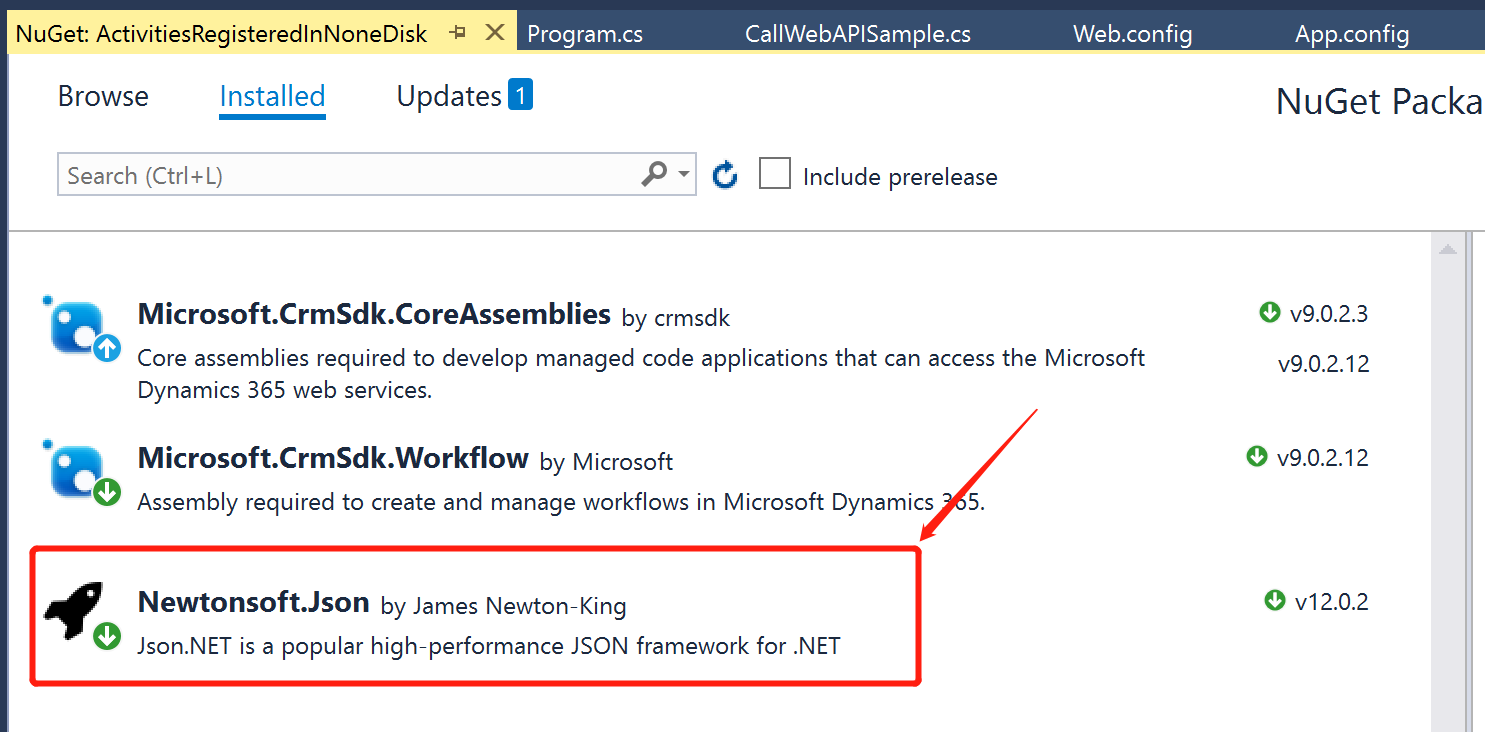
如果直接注册的话,我的注册界面如下,注意如果插件的isolation mode为 None,注册插件时候使用的账号除了需要据悉D365 CE的系统管理员角色外,需要属于部署管理员(Deployment Administrators)这个组:
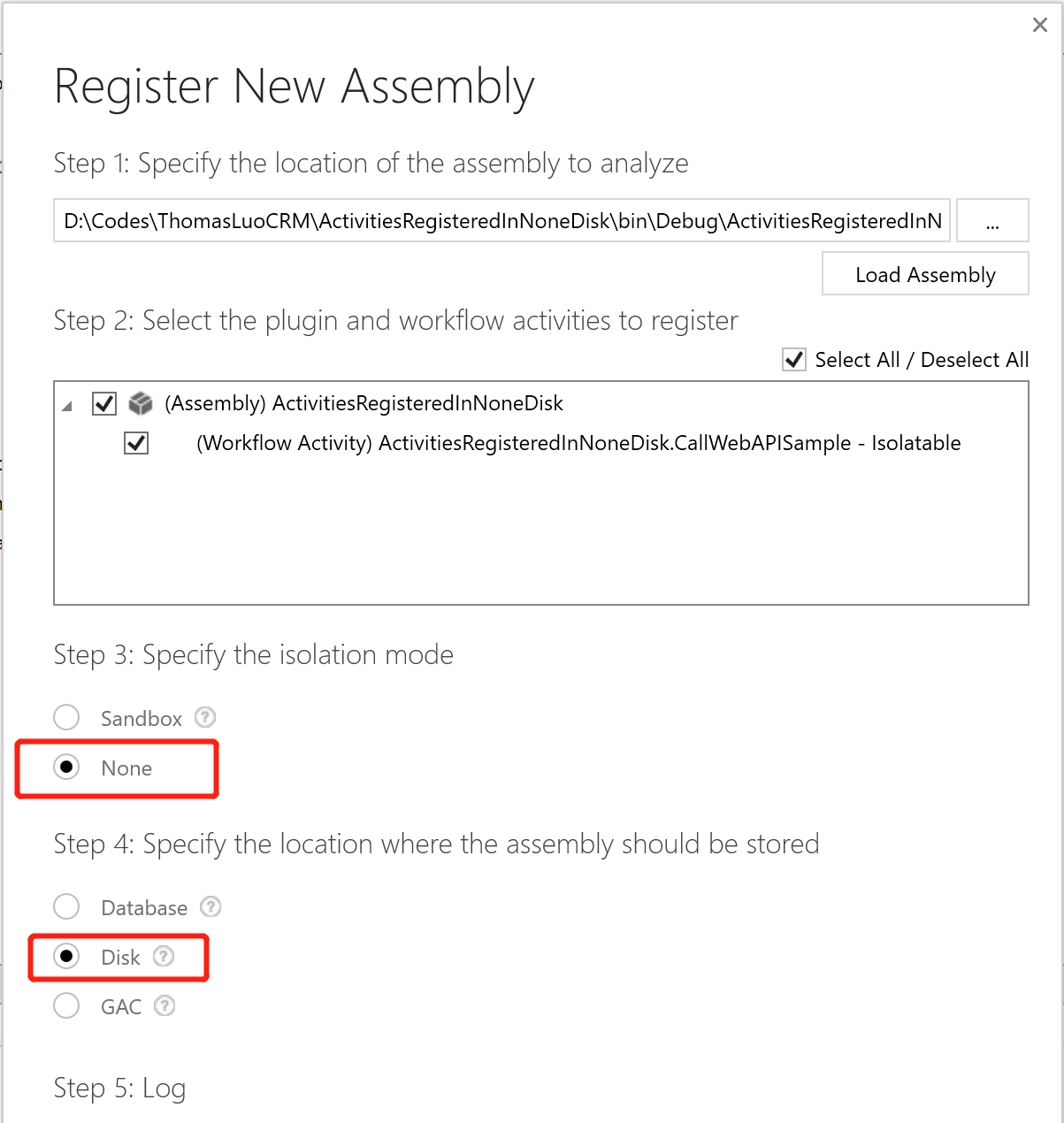
这样注册很容易报错,报错如下:
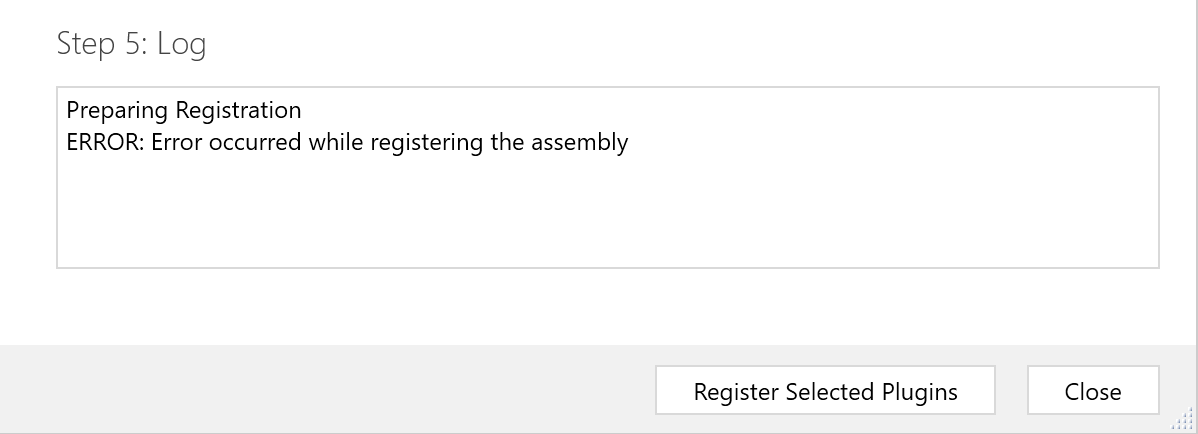
报错的详细信息如下:
Unhandled Exception: System.ServiceModel.FaultException`1[[Microsoft.Xrm.Sdk.OrganizationServiceFault, Microsoft.Xrm.Sdk, Version=9.0.0.0, Culture=neutral, PublicKeyToken=31bf3856ad364e35]]: Unable to load plug-in assembly.
Detail: <OrganizationServiceFault xmlns="http://schemas.microsoft.com/xrm/2011/Contracts" xmlns:i="http://www.w3.org/2001/XMLSchema-instance">
<ActivityId>9beef9f0-82da-4792-bb0e-48540c2a1d84</ActivityId>
<ErrorCode>-2147204719</ErrorCode>
<ErrorDetails xmlns:a="http://schemas.datacontract.org/2004/07/System.Collections.Generic">
<KeyValuePairOfstringanyType>
<a:key>ApiExceptionSourceKey</a:key>
<a:value i:type="b:string" xmlns:b="http://www.w3.org/2001/XMLSchema">Plugin/Microsoft.Crm.ObjectModel.PluginAssemblyService</a:value>
</KeyValuePairOfstringanyType>
<KeyValuePairOfstringanyType>
<a:key>ApiOriginalExceptionKey</a:key>
<a:value i:type="b:string" xmlns:b="http://www.w3.org/2001/XMLSchema">Microsoft.Crm.CrmException: Unable to load plug-in assembly. ---> Microsoft.Crm.CrmException: Unable to load plug-in assembly.
at Microsoft.Crm.ObjectModel.PluginAssemblyServiceInternal`1.LoadCrmPluginAssemblyMetadata(IBusinessEntity pluginAssembly, ExecutionContext context, Boolean loadAllMetadata)
at Microsoft.Crm.ObjectModel.PluginAssemblyServiceInternal`1.RetrieveAssemblyMetadata(IBusinessEntity pluginAssembly, ExecutionContext context, Boolean retrieveFromExisting, Boolean forSystemAssembly)
at Microsoft.Crm.ObjectModel.PluginAssemblyServiceInternal`1.ValidateOperation(String operationName, IBusinessEntity entity, ExecutionContext context)
at Microsoft.Crm.ObjectModel.SdkEntityServiceBase.CreateInternal(IBusinessEntity entity, ExecutionContext context, Boolean verifyAction)
--- End of inner exception stack trace ---
at Microsoft.Crm.Extensibility.VersionedPluginProxyStepBase.Execute(PipelineExecutionContext context)
at Microsoft.Crm.Extensibility.PipelineInstrumentationHelper.Execute(Boolean instrumentationEnabled, String stopwatchName, ExecuteWithInstrumentation action, PipelineExecutionContext context)
at Microsoft.Crm.Extensibility.Pipeline.<>c__DisplayClass2_1.<Execute>b__0()</a:value>
</KeyValuePairOfstringanyType>
<KeyValuePairOfstringanyType>
<a:key>ApiStepKey</a:key>
<a:value i:type="b:guid" xmlns:b="http://schemas.microsoft.com/2003/10/Serialization/">3ecabb1b-ea3e-db11-86a7-000a3a5473e8</a:value>
</KeyValuePairOfstringanyType>
<KeyValuePairOfstringanyType>
<a:key>ApiDepthKey</a:key>
<a:value i:type="b:int" xmlns:b="http://www.w3.org/2001/XMLSchema">1</a:value>
</KeyValuePairOfstringanyType>
<KeyValuePairOfstringanyType>
<a:key>ApiActivityIdKey</a:key>
<a:value i:type="b:guid" xmlns:b="http://schemas.microsoft.com/2003/10/Serialization/">9beef9f0-82da-4792-bb0e-48540c2a1d84</a:value>
</KeyValuePairOfstringanyType>
<KeyValuePairOfstringanyType>
<a:key>ApiPluginSolutionNameKey</a:key>
<a:value i:type="b:string" xmlns:b="http://www.w3.org/2001/XMLSchema">System</a:value>
</KeyValuePairOfstringanyType>
<KeyValuePairOfstringanyType>
<a:key>ApiStepSolutionNameKey</a:key>
<a:value i:type="b:string" xmlns:b="http://www.w3.org/2001/XMLSchema">System</a:value>
</KeyValuePairOfstringanyType>
</ErrorDetails>
<Message>Unable to load plug-in assembly.</Message>
<Timestamp>2019-07-22T14:12:57.9063414Z</Timestamp>
<ExceptionRetriable>false</ExceptionRetriable>
<ExceptionSource i:nil="true" />
<InnerFault>
<ActivityId>9beef9f0-82da-4792-bb0e-48540c2a1d84</ActivityId>
<ErrorCode>-2147204719</ErrorCode>
<ErrorDetails xmlns:a="http://schemas.datacontract.org/2004/07/System.Collections.Generic" />
<Message>Unable to load plug-in assembly.</Message>
<Timestamp>2019-07-22T14:12:57.9063414Z</Timestamp>
<ExceptionRetriable>false</ExceptionRetriable>
<ExceptionSource i:nil="true" />
<InnerFault i:nil="true" />
<OriginalException i:nil="true" />
<TraceText i:nil="true" />
</InnerFault>
<OriginalException i:nil="true" />
<TraceText i:nil="true" />
</OrganizationServiceFault> Server stack trace:
at System.ServiceModel.Channels.ServiceChannel.HandleReply(ProxyOperationRuntime operation, ProxyRpc& rpc)
at System.ServiceModel.Channels.ServiceChannel.Call(String action, Boolean oneway, ProxyOperationRuntime operation, Object[] ins, Object[] outs, TimeSpan timeout)
at System.ServiceModel.Channels.ServiceChannelProxy.InvokeService(IMethodCallMessage methodCall, ProxyOperationRuntime operation)
at System.ServiceModel.Channels.ServiceChannelProxy.Invoke(IMessage message) Exception rethrown at [0]:
at Microsoft.Crm.Tools.Libraries.RegistrationHelper.RegisterAssembly(CrmOrganization org, String pathToAssembly, CrmPluginAssembly assembly)
at Microsoft.Crm.Tools.AssemblyRegistration.PluginRegistrationViewModel.btnregisterClick()
开启CRM服务器端日志,如果包括了类似如下错误信息:
>Crm Exception: Message: Failed to load plugin assembly with exception System.IO.DirectoryNotFoundException: The system cannot find the path specified. (Exception from HRESULT: 0x80070003)

   at Microsoft.Crm.IMetaDataDispenserEx.OpenScope(String szScope, UInt32 dwOpenFlags, Guid& riid)

   at Microsoft.Crm.CrmPluginAssemblyMetadata.OpenScopeForAssemblyOnDisk(String fullFilePath)

   at Microsoft.Crm.CrmPluginAssemblyMetadata.LoadMetadataFromAssemblyFile(String fullFilePath, Boolean loadAllMetadata)

   at Microsoft.Crm.ObjectModel.PluginAssemblyServiceInternal`1.LoadCrmPluginAssemblyMetadata(IBusinessEntity pluginAssembly, ExecutionContext context, Boolean loadAllMetadata). PluginInfo => Crm plugin assembly info : sourcetype = 1, description = , ismanaged = False, pluginassemblyid = c21af9cf-0313-4af0-8c80-7d9644e4c581, ispasswordset = False, publickeytoken = 440C114085C1E28B, path = D:\Codes\ThomasLuoCRM\ActivitiesRegisteredInNoneDisk\bin\Debug\ActivitiesRegisteredInNoneDisk.dll, name = ActivitiesRegisteredInNoneDisk, culture = neutral, isolationmode = 1, version = 1.0.0.0, Location = D:\Codes\ThomasLuoCRM\ActivitiesRegisteredInNoneDisk\bin\Debug\ActivitiesRegisteredInNoneDisk.dll, ErrorCode: -2147220970, InnerException: System.IO.DirectoryNotFoundException: The system cannot find the path specified. (Exception from HRESULT: 0x80070003)

   at Microsoft.Crm.IMetaDataDispenserEx.OpenScope(String szScope, UInt32 dwOpenFlags, Guid& riid)

   at Microsoft.Crm.CrmPluginAssemblyMetadata.OpenScopeForAssemblyOnDisk(String fullFilePath)

   at Microsoft.Crm.CrmPluginAssemblyMetadata.LoadMetadataFromAssemblyFile(String fullFilePath, Boolean loadAllMetadata)

   at Microsoft.Crm.ObjectModel.PluginAssemblyServiceInternal`1.LoadCrmPluginAssemblyMetadata(IBusinessEntity pluginAssembly, ExecutionContext context, Boolean loadAllMetadata)
那就在自己的开发机器上简历和服务器安装目录一样的文件夹,比如我这里是在自己的开发机器上建立 C:\Program Files\Dynamics 365\Server\bin\assembly 文件夹,然后将要部署的dll复制到这个文件夹中,注册程序集的时候从这个文件中中选择要注册的dll。还有需要将程序集DLL拷贝到CRM安装目录\Server\bin\assembly 中了,我这里完整的路径是:C:\Program Files\Dynamics 365\Server\bin\assembly 。我这里自定义工作流活动程序集文件名是ActivitiesRegisteredInNoneDisk.dll,我需要将这个文件复制到CRM前端,后端所有服务器的C:\Program Files\Dynamics 365\Server\bin\assembly文件夹中。
还需要授予 everyone 账号对 C:\Program Files\Dynamics 365\Server\bin\assembly 文件夹的Full control权限,根据 Unable to load Microsoft plug-in on a fresh CRM 9 on-premise organization 的解决方法,应该授予 Users 这个账号 Read & execute 权限即可,若这个权限足够的话就不要设置 everyone的权限了。记得改了以后重启前端服务器的IIS。

注册完了以后直接运行的话会报错:Assembly file name (ActivitiesRegisteredInNoneDisk.dll) is in invalid format. Only file name is allowed.
具体错误信息如下:
Unhandled Exception: Microsoft.Crm.CrmException: Assembly file name (ActivitiesRegisteredInNoneDisk.dll) is in invalid format. Only file name is allowed.

   at Microsoft.Crm.Extensibility.PluginAssemblyFactory.LoadAssembly(String assemblyFile)

   at Microsoft.Crm.Extensibility.PluginAssemblyFactory.LoadAssemblyWithoutMetadataValidation(PluginAssemblyDescription assemblyDescription, String assemblyName)

   at Microsoft.Crm.Extensibility.PluginAssemblyFactory.CreateInstance(Guid pluginAssemblyId, PluginAssemblyDescription& assemblyDescription, IOrganizationContext context)

   at Microsoft.Crm.Caching.PluginAssemblyCacheLoader.LoadCacheData(Guid key, ExecutionContext context)

   at Microsoft.Crm.Caching.ObjectModelCacheLoader`2.LoadCacheDataInternal(TKey key, Object existingDataContainer, IOrganizationContext context)

   at Microsoft.Crm.Caching.ObjectModelCacheLoader`2.LoadCacheData(TKey key, IOrganizationContext context)

   at Microsoft.Crm.Caching.CrmMultiOrgCacheBase`2.CreateEntry(TKey key, IOrganizationContext context)

   at Microsoft.Crm.Caching.CrmEntitySharedMultiOrgCache`2.LookupEntry(TKey key, IOrganizationContext context)

   at Microsoft.Crm.Caching.PluginTypeCacheLoader.LoadCacheData(Guid key, ExecutionContext context)

   at Microsoft.Crm.Caching.ObjectModelCacheLoader`2.LoadCacheDataInternal(TKey key, Object existingDataContainer, IOrganizationContext context)

   at Microsoft.Crm.Caching.ObjectModelCacheLoader`2.LoadCacheData(TKey key, IOrganizationContext context)

   at Microsoft.Crm.Caching.CrmMultiOrgCacheBase`2.CreateEntry(TKey key, IOrganizationContext context)

   at Microsoft.Crm.Caching.CrmEntitySharedMultiOrgCache`2.LookupEntry(TKey key, IOrganizationContext context)

   at Microsoft.Crm.Workflow.AsyncCustomActivityLoaderDirect.CustomActivityTypeAndAssemblyData(Guid pluginTypeId)

   at Microsoft.Crm.Workflow.Services.ActivityReferenceService.ResolveType(String assemblyQualifiedName)

   at Microsoft.Crm.Workflow.Services.ActivityReferenceService.InitializeActivity(ActivityReferenceBase activityReferenceBase)

   at Microsoft.Xrm.Sdk.Workflow.Activities.ActivityReferenceBase.CacheMetadata(NativeActivityMetadata metadata)

   at System.Activities.NativeActivity.OnInternalCacheMetadata(Boolean createEmptyBindings)

   at System.Activities.Activity.InternalCacheMetadata(Boolean createEmptyBindings, IList`1& validationErrors)

   at System.Activities.ActivityUtilities.ProcessActivity(ChildActivity childActivity, ChildActivity& nextActivity, Stack`1& activitiesRemaining, ActivityCallStack parentChain, IList`1& validationErrors, ProcessActivityTreeOptions options, ProcessActivityCallback callback)

   at System.Activities.ActivityUtilities.ProcessActivityTreeCore(ChildActivity currentActivity, ActivityCallStack parentChain, ProcessActivityTreeOptions options, ProcessActivityCallback callback, IList`1& validationErrors)

   at System.Activities.ActivityUtilities.CacheRootMetadata(Activity activity, LocationReferenceEnvironment hostEnvironment, ProcessActivityTreeOptions options, ProcessActivityCallback callback, IList`1& validationErrors)

   at System.Activities.Hosting.WorkflowInstance.ValidateWorkflow(WorkflowInstanceExtensionManager extensionManager)

   at System.Activities.Hosting.WorkflowInstance.RegisterExtensionManager(WorkflowInstanceExtensionManager extensionManager)

   at System.Activities.WorkflowApplication.EnsureInitialized()

   at System.Activities.WorkflowApplication.Enqueue(InstanceOperation operation, Boolean push)

   at System.Activities.WorkflowApplication.InternalRun(TimeSpan timeout, Boolean isUserRun)

   at System.Activities.WorkflowApplication.Run()

   at Microsoft.Crm.Workflow.ActivityHost.StartWorkflowExecution(Activity workflow, ICommonWorkflowContext context)

   at Microsoft.Crm.Workflow.ActivityHostBase.StartWorkflow(ICommonWorkflowContext context, Activity preLoadedActivity)
这个根据 Problems adding Step to Disk based Plugin Assembly 的说法,执行类似如下的SQL就可以了:
 update PluginAssemblybase set Path='ActivitiesRegisteredInNoneDisk.dll'

 where Name ='ActivitiesRegisteredInNoneDisk'
这里还涉及到引用了外部程序集,需要将该程序集注册到CRM服务器的GAC。
服务器上没有 gacutil 的话,我这里从安装了 Visual Stuido 的我的机器上复制如下文件(文件夹)到服务器上:
C:\Program Files (x86)\Microsoft SDKs\Windows\v10.0A\bin\NETFX 4.6.2 Tools\gacutil.exe
C:\Program Files (x86)\Microsoft SDKs\Windows\v10.0A\bin\NETFX 4.6.2 Tools\gacutil.exe.config
C:\Program Files (x86)\Microsoft SDKs\Windows\v10.0A\bin\NETFX 4.6.2 Tools\1033 文件夹中的所有文件
然后我用类似如下命令将其复制到GAC, gacutil 的使用请参考 Gacutil.exe (Global Assembly Cache Tool)
cd C:\Software\gacutil

gacutil /i "C:\Program Files\Dynamics 365\Server\bin\assembly\Newtonsoft.Json.dll" /f
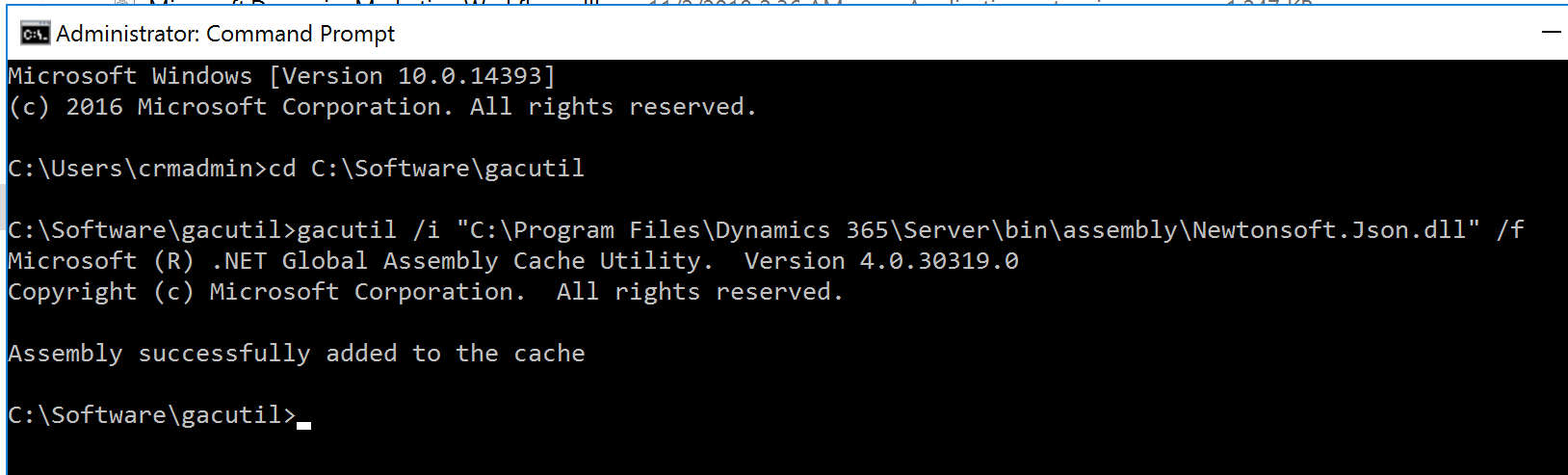
然后我就可以顺利的调用Web API,并拿到结果了。
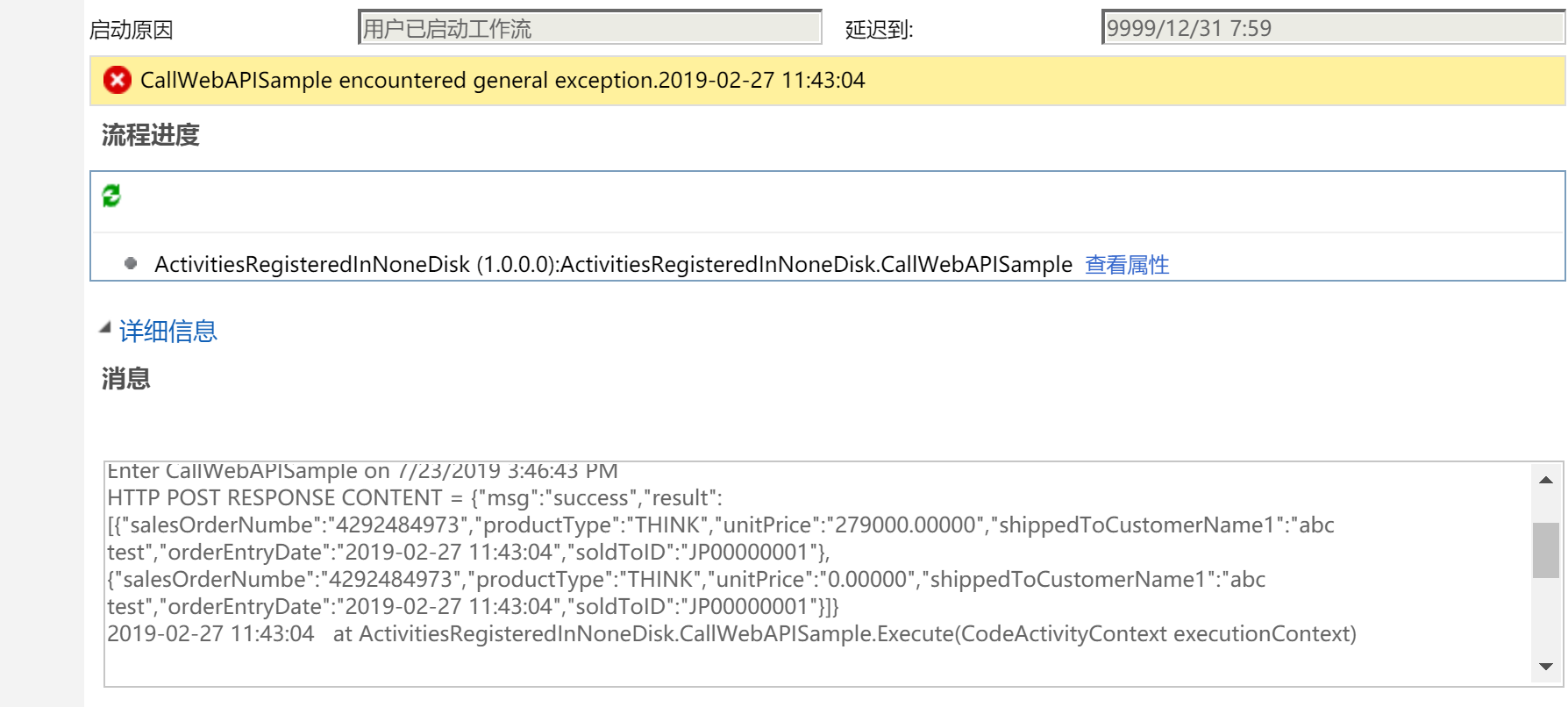
写了那么多,我只想说,不要将插件/自定义工作流程序集注册存储到Disk或者GAC中,而是遵从官方文档Register a plug-in to be deployed on-premise 的建议注册到Database中,官方原文是:We strongly recommend that you store your production-ready plug-ins in the Dynamics 365 for Customer Engagement apps database, instead of on-disk。
关于注册到数据库中相对与其他两种(磁盘和GAC)的优势,CRM 2015 – plugin deployment options 的说的比较简单明了,如下:
- The plugin is backed up when the database is backed up
- For multiple server configurations you only need to deploy once to the database and not individually to each CRM server.
- Plugins in the database can be added to solutions, Disk, GAC plugins cannot
- Plugins deployed to the GAC or Disk will need an IISRESET to refresh, plugins deployed in the database do not.
- Sandboxed and CRM Online plugins have to be deployed in the database
Dynamics 365 CE将自定义工作流活动程序集注册到磁盘并引用其他类库的更多相关文章
- Dynamics 365 CE的插件/自定义工作流活动中调用Web API示例代码
微软动态CRM专家罗勇 ,回复325或者20190428可方便获取本文,同时可以在第一间得到我发布的最新博文信息,follow me! 现在Web API越来越流行,有时候为了程序更加健壮,需要在插件 ...
- Dynamics 365中自定义工作流活动获取的上下文分析及注意事项
关注本人微信和易信公众号: 微软动态CRM专家罗勇 ,回复244或者20170306可方便获取本文,同时可以在第一间得到我发布的最新的博文信息,follow me!我的网站是 www.luoyong. ...
- 自定义工作流活动报错:您无法登陆系统。原因可能是您的用户记录或您所属的业务部门在Microsoft Dynamics 365中已被禁用。
本人微信和易信公众号: 微软动态CRM专家罗勇 ,回复265或者20170926可方便获取本文,同时可以在第一间得到我发布的最新的博文信息,follow me!我的网站是 www.luoyong.me ...
- Dynamics 365中自定义工作流活动更新了输入输出参数后获取的方法
关注本人微信和易信公众号: 微软动态CRM专家罗勇 ,回复245或者20170309可方便获取本文,同时可以在第一间得到我发布的最新的博文信息,follow me!我的网站是 www.luoyong. ...
- 自定义工作流活动运行产生System.Security.SecurityException
摘要: 微软动态CRM专家罗勇 ,回复305或者20190224可方便获取本文,同时可以在第一间得到我发布的最新博文信息,follow me!我的网站是 www.luoyong.me . 最近碰到一个 ...
- Dynamics 365 CE Update消息PostOperation阶段Image的尝试
我是微软Dynamics 365 & Power Platform方面的工程师罗勇,也是2015年7月到2018年6月连续三年Dynamics CRM/Business Solutions方面 ...
- 使用Dynamics 365 CE Web API查询数据加点料及选项集字段常用查询
微软动态CRM专家罗勇 ,回复336或者20190516可方便获取本文,同时可以在第一间得到我发布的最新博文信息,follow me. 紧接上文:配置Postman通过OAuth 2 implicit ...
- Use SQL to Query Data from CDS and Dynamics 365 CE
from : https://powerobjects.com/2020/05/20/use-sql-to-query-data-from-cds-and-dynamics-365-ce/ Have ...
- Dynamics 365 CE中AsyncOperationBase表记录太多,影响系统性能怎么办?
微软动态CRM专家罗勇 ,回复311或者20190311可方便获取本文,同时可以在第一间得到我发布的最新博文信息,follow me!我的网站是 www.luoyong.me . 本文主要是根据微软官 ...
随机推荐
- MySql-8.0.16-winx64 安装
参考文章: https://www.cnblogs.com/lxlin/p/9635350.html https://www.cnblogs.com/xc1234/p/9050149.html MyS ...
- 立 Flag
行动目标 立Flag时间 计划开始时间 开始时间 行动寄语 通关目标 打卡1 打卡2 打卡3 打卡4 打卡5 打卡6 C# 7.0 核心技术指南 2019-11-1 1号 1号 打好C#基础 看完.实 ...
- console的各种输出格式
console.log('%c',CSS样式)输出css样式 console.log('%s',字符串) 字符串格式化 %d%i 整数格式化: console.log('%o',节点) 可扩展的dom ...
- zabbix 分布式监控及优化
1..zabbix分布式监控,模拟多机房实现监控? 1.有多机房时,需要用到proxy 1.网络不通 2.网络延迟 2.当监控的主机较多时,也可以用proxy来缓解压力 1.安装proxy [root ...
- vue关于mock的简单使用
一.mock 1.简介 mock是一个模拟数据生成器,旨在帮助前端独立于后端进行开发,帮助编写单元测试.其可模拟 Ajax 并返回模拟数据,使前端不用去调用后端的接口,方便测试. 2.vue直接使用m ...
- Python语法速查: 5. 运算符、math模块、表达式
返回目录 (1)一些较容易搞错的运算符 一般简单的如加减乘除之类的运算符就不写了,这里主要列些一些容易搞错或忘记的运算符.运算符不仅仅只有号,有一些英文单词如 in, and 之类,也是运算符,并不是 ...
- Druid-类图-属性表
所属文章:池化技术(一)Druid是如何管理数据库连接的? 本篇为「工具人」文章,建议直接用「ctrl+f」进行查找属性.方法.类名,快速了解其含义和所属类. 主要流程里主要涉及到的类名称.类属性.类 ...
- 201871010123-吴丽丽《面向对象程序设计(Java)》第一周学习总结
201871010123-吴丽丽<面向对象程序设计 ...
- 【西北师大-2108Java】第九次作业成绩汇总
[西北师大-2108Java]第九次作业成绩汇总 作业题目 面向对象程序设计(JAVA) 第11周学习指导及要求 实验目的与要求 (1)理解泛型概念: (2)掌握泛型类的定义与使用: (3)掌握泛型方 ...
- 算法问题实战策略 SORTGAME
地址 https://algospot.com/judge/problem/read/SORTGAME 解答 常规BFS是会超时的 按照书上的提示 应该是打表(居然还有提倡打表的题目) tle 代码 ...