
Egret自定义位图文字(自定义+BitmapLabel)
一 自定位图文字
因为egret的位图文字是texturemerger做的,需要多张单图片导入tm,然后导出两个文件来使用,过程比较麻烦。
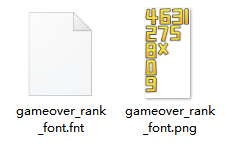
而Laya的位图文字则是一张整图数字图片,使用FontClip就能直接使用, 很方便。
所以现在弄个自定义的位图文字类,也不用tm去导图了。
二 决战沙城的位图文字代码
先来看看别人的。据说这个框架里的位图文字被用于很多大型H5 mmo项目。14年写的工具类ε=(´ο`*)))唉。
主要原理就是1个字1个bitmap,然后并列排起来。“123“就是3个bitmap排起来。
/**

 * 素材需要提前加载好

 * 素材命名规则:类型_数值(有类型是因为一般会同时有几种数字图片,比如大小号或不同颜色)

 * 点号素材命名:类型_dot

 * 创建BitmapNumber使用createNumPic返回DisplayObjectContainer

 * 创建好的BitmapNumber数值需要变化是调用changeNum

 * 回收使用desstroyNumPic

 *

 * Created by Saco on 2014/8/1.

 */

class BitmapNumber extends SingtonClass {

    private _imgPool:egret.Bitmap[];

    private _containerPool:egret.DisplayObjectContainer[];

    public constructor() {

        super();

        this._imgPool = [];

        this._containerPool = [];

    }

    /*

     * 根据需要的数字和类型返回一个DisplayObjectContainer

     * num数字值,支持小数点

     * type素材类型

     * */

    public createNumPic(num:number, type:string):egret.DisplayObjectContainer {

        var container:egret.DisplayObjectContainer = this.getContainer();

        var numStr:string = num.toString();

        var index:number = 0;

        var tempBm:egret.Bitmap;

        for (index; index < numStr.length; index++) {

            tempBm = this.getSingleNumPic(numStr.charAt(index), type);

            container.addChild(tempBm);

        }

        this.repositionNumPic(container);

        return container;

    }

    //回收带数字的DisplayObjectContainer

    public desstroyNumPic(picContainer:egret.DisplayObjectContainer):void {

        this.clearContainer(picContainer);

        if (picContainer.parent)

            picContainer.parent.removeChild(picContainer);

        this._containerPool.push(picContainer);

    }

    /*

     * 改变带数字的DisplayObjectContainer数字值

     * 提供这个方法是为了提高效率,直接更换之前创建对象的texture,避免多余的删除和创建

     * */

    public changeNum(picContainer:egret.DisplayObjectContainer, num:number, type:string):void {

        var numStr:string = num.toString();

        var tempBm:egret.Bitmap;

        //如果当前数字个数多于目标个数则把多余的回收

        if (picContainer.numChildren > numStr.length) {

            while (picContainer.numChildren > numStr.length) {

                this.recycleBM(<egret.Bitmap>picContainer.getChildAt(picContainer.numChildren - 1))

            }

        }

        var index:number = 0;

        var tempStr:string;

        for (index; index < numStr.length; index++) {

            //如果当前的Bitmap数量不够则获取新的Bitmap补齐

            if (index >= picContainer.numChildren)

                picContainer.addChild(this.getBitmap());

            tempStr = numStr.charAt(index);

            tempStr = tempStr == "." ? "dot" : tempStr;

            (<egret.Bitmap>picContainer.getChildAt(index)).texture = this.getTexture(tempStr, type);

        }

        this.repositionNumPic(picContainer);

    }

    //每个数字宽度不一样,所以重新排列

    private repositionNumPic(container:egret.DisplayObjectContainer):void {

        var index:number = 0;

        var lastX:number = 0;

        var temp:egret.DisplayObject;

        for (index; index < container.numChildren; index++) {

            temp = container.getChildAt(index);

            temp.x = lastX;

            lastX = temp.x + temp.width;

        }

    }

    //清理容器

    private clearContainer(picContainer:egret.DisplayObjectContainer):void {

        while (picContainer.numChildren) {

            this.recycleBM(<egret.Bitmap>picContainer.removeChildAt(0));

        }

    }

    //回收Bitmap

    private recycleBM(bm:egret.Bitmap):void {

        if (bm && bm.parent) {

            bm.parent.removeChild(bm);

            bm.texture = null;

            this._imgPool.push(bm);

        }

    }

    private getContainer():egret.DisplayObjectContainer {

        if (this._containerPool.length)

            return this._containerPool.shift();

        return new egret.DisplayObjectContainer();

    }

    //获得单个数字Bitmap

    private getSingleNumPic(num:string, type:string):egret.Bitmap {

        if (num == ".")

            num = "dot";

        var bm:egret.Bitmap = this.getBitmap();

        bm.texture = this.getTexture(num, type);

        return bm;

    }

    private getTexture(num:string, type:string):egret.Texture {

        return RES.getRes(type + num);

    }

    private getBitmap():egret.Bitmap {

        if (this._imgPool.length)

            return this._imgPool.shift();

        return new egret.Bitmap();

    }

}
顺便看了下凡人修仙传的位图文字。可以看到文字是一整张合图且无序排列,而且network里没有fnt文件。推测应该也是使用支持单张数字的自定义位图文字。

三 我自己写了个
相对于决战沙城的有些改动
1. 支持使用整图和单张图片。
2. 支持代码创建和拖动到exml上摆放。
3. 文字图片可以使用tm和其他图片进行合并,减少drawcall和http请求,而不影响位图文字的使用。
需要注意的是
1. 不要用cacheAsBitmap,对于变化数字非常卡。我试了下,卡爆了。
测试用整图

测试用单张图

具体代码
/**

 * 位图文字

 * @deprecated 可以使用单张整图或者多张散图,制作位图文字。

 *             注意"."的图片命名要改为dot,例如"1"是font_1.png,那么"."的图片命名是font_dot.png。

 * @author ck 2019.11.10

 */

class BitmapFont extends eui.Component{

    /**位图缓存 */

    private static bmCaches:Array<egret.Bitmap> = [];

    /**纹理缓存 */

    private static textureCaches = {};

    /**显示的文字 */

    private _text:string;

    /**图片名 */

    private pngName:string;

    public constructor() {

        super();

    }

    /**

     * 文字在一张图上

     * @param pngName 图片名   pngName = font_test  (font_test.png)

     * @param txt     文字名   "0123456789.+-"

     */

    public static registerByOne(pngName:string, txt:string){

        let textureCache = this.getTextureCache(pngName);

        if(textureCache.length > 0){

            console.log("位图字体缓存已存在:",pngName);

            return;

        }

        let src:egret.Texture = new egret.Texture();

        src = RES.getRes(pngName + "_png");

        let len = txt.length;

        let fontWidth:number = src.textureWidth/len;

        let fontHeight:number=  src.textureHeight;

        let texture:egret.Texture;

        let rect:egret.Rectangle = new egret.Rectangle();

        for(let i=0;i<len;i++){

            texture = new egret.Texture();

			texture.disposeBitmapData = false;

			texture.$bitmapData = src.$bitmapData

			texture.$initData(i*fontWidth,0, fontWidth, fontHeight, 0, 0, fontWidth, fontHeight, src.textureWidth, src.textureHeight);

            textureCache[txt.charAt(i)] = texture;

        }

    }

    /**

     * 文字在不同的图片上

     * @param pngName 图片名 pngName=font_test    多张图片源文件名(font_test0.png font_test1.png .... font_testdot.png)

     * @param txt     文字名 "0123456789.+-"

     */

    public static registerByMulti(pngName:string, txt:string){

        let textureCache = this.getTextureCache(pngName);

        if(textureCache.length > 0){

            console.log("位图字体缓存已存在:",pngName);

            return;

        }

        let len = txt.length;

        let char:string;

        for(let i=0;i<len;i++){

            char = txt.charAt(i);

            if(char == "."){

                textureCache[char] = RES.getRes(pngName + "dot" + "_png");

            }else{

                textureCache[char] = RES.getRes(pngName + char + "_png");

            }

        }

    }

    /**

     * 获取纹理缓存

     * @param pngName 图片名

     */

    public static getTextureCache(pngName:string){

        let textureCache = BitmapFont.textureCaches[pngName];

        if(textureCache == null){

            textureCache = [];

            BitmapFont.textureCaches[pngName] = textureCache;

        }

        return textureCache;

    }

    /**

     * 设置文字

     * @param txt 文字

     */

    public set text(txt:string){

        let bmCaches = BitmapFont.bmCaches;

        let textureCache = BitmapFont.getTextureCache(this.pngName);

        let curLen = this.numChildren;

        let targetLen = txt.length;

        this._text = txt;

        //文字存在,且大于显示文字,则移除多余文字

        if(curLen > targetLen){

            let bm:egret.Bitmap;

            for(let i=curLen-1;i>=targetLen;i--){

                bm = this.removeChildAt(i) as egret.Bitmap;

                bm.texture = null;

                bmCaches.push(bm);

            }

        }

        //显示文字

        let bm:egret.Bitmap;

        let tempX:number = 0;

        let char:string;

        for(let i=0;i<targetLen;i++){

            //少于显示文字,则增加文字

            if(i >= curLen){

                if(bmCaches.length > 0){

                    bm = bmCaches.pop();

                }else{

                    bm = new egret.Bitmap();

                }

                this.addChild(bm);

            }

            bm = this.getChildAt(i) as egret.Bitmap;

            bm.texture =  textureCache[txt.charAt(i)];

            bm.x = tempX;

            tempX = bm.x + bm.width;

        }

    }

    /**

     * 获取文字

     */

    public get text(){

        return this._text;

    }

	/**

	 * 设置文字类型

	 * @value 字体类型   文字是font_test.png一张图片,则value = "font_test""。 若文字是font_test0.png font1_test1.png..多张图片,则value="font_test"

	 */

	public set font(value:string){

		this.pngName = value;

	}

    /**销毁 */

    public destroy(){

        //回收bitmap

        let len = this.numChildren;

        let bm:egret.Bitmap;

        let bmCaches = BitmapFont.bmCaches;

        for(let i=len-1;i>=0;i--){

            bm = this.getChildAt(i) as egret.Bitmap;

            this.removeChild(bm);

            bm.texture = null;

            bmCaches.push(bm);

        }

        //从视图移除

        this.parent && this.parent.removeChild(this);

    }

}
使用示例
 //注册

BitmapFont.registerByOne("font_test","02345");

//使用

let mc:BitmapFont = new BitmapFont();

mc.font = "font_test";

mc.text = "0222";

this.addChild(mc);
运行效果

四 测试下效率
新建n个位图文字放到列表bmList,然后不停的切换数字显示
private onEnterFrame(){

        for(let i=0;i<this.bmList.length;i++){

            //BitmapNumber.ins().changeNum(this.bmList[i],(Math.random()>0.5)?200000:200,"font" );

            this.bmList[i].text = (Math.random()>0.5)?"200000":"200";

        }

    }
200个 1000个 2000个 4000个
自定义字体 60FPS 58-60FPS 30FPS 8FPS
BtimapLabl 60FPS 59-60FPS 59-60FPS 30FPS
决战沙城 60FPS 59-60FPS 24FPS 8FPS
Egret自定义位图文字(自定义+BitmapLabel)的更多相关文章
- Android实现自定义带文字和图片的Button
Android实现自定义带文字和图片的Button 在Android开发中经常会需要用到带文字和图片的button,下面来讲解一下常用的实现办法. 一.用系统自带的Button实现 最简单的一种办法就 ...
- WPF自定义空心文字
首先创建一个自定义控件,继承自FrameworkElement,“Generic.xaml”中可以不添加样式. 要自定义空心文字,要用到绘制格式化文本FormattedText类.FormattedT ...
- Android之自定义画图文字动画
结构: BaseView: package com.caiduping.canvas; import android.content.Context; import android.graphics. ...
- oracle的order by decode根据文字自定义排序的例子
oracle的order by decode根据文字自定义排序的例子: order by decode(t.title, '当前生效预警', 1, '今日即将生效', 2, '明日预计生效', 3, ...
- 写了一个迷你toast提示插件,支持自定义提示文字和显示时间
写了一个迷你toast提示插件,支持自定义提示文字和显示时间,不想用其他第三方的ui插件,又想要toast等小效果来完善交互的同学可以试试, 代码中还贡献了一段css能力检测js工具函数,做项目的时候 ...
- Laya的位图文字
参考: Laya文本 测试版本:Laya 2.1.1.1 大部分游戏都会用到位图文字,例如dnf的伤害数字. 白鹭的位图文字是美术提供0-9十张单张图片,由TextureMerger导出fnt+jso ...
- Dialog详解(包括进度条、PopupWindow、自定义view、自定义样式的对话框)
Dialog详解(包括进度条.PopupWindow.自定义view.自定义样式的对话框) Android中提供了多种对话框,在实际应用中我们可能会需要修改这些已有的对话框.本实例就是从实际出发, ...
- asp.net MVC 自定义@helper 和自定义函数@functions小结
asp.net Razor 视图具有.cshtml后缀,可以轻松的实现c#代码和html标签的切换,大大提升了我们的开发效率.但是Razor语法还是有一些棉花糖值得我们了解一下,可以更加强劲的提升我们 ...
- activiti自定义流程之自定义表单(三):表单列表及预览和删除
注:(1)环境配置:activiti自定义流程之自定义表单(一):环境配置 (2)创建表单:activiti自定义流程之自定义表单(二):创建表单 自定义表单创建成功,要拿到activiti中使用,自 ...
随机推荐
- MapReduce工程(IDEA)
MapReduce工程(IDEA) hadoop 1. maven工程 1.1 创建maven工程 1.2 修改配置文件 1.3 Mapper类 1.4 Reduces类 1.5 Driver类 1. ...
- Refrence
深入详解美团点评CAT跨语言服务监控(一) CAT简介与部署 https://blog.csdn.net/caohao0591/article/details/80693289 搭建大众点评CAT监控 ...
- linux使用useradd创建的用户没有目录的解决办法
转载请注明来源https://www.cnblogs.com/sogeisetsu/p/11401562.html或https://blog.csdn.net/suyues/article/detai ...
- Python时间模块。
python中时间的表示方式 unix时间戳,字符串时间,格式化时间 时间模块有,time,datetime,calendar #time模块 import time #获取本地时间戳,返回浮点数 p ...
- django项目用higcharts统计最近七天文章点击量。
下载higcharts插件放在static文件夹下 前端引入 <script src="/static/highcharts/highcharts.js"></s ...
- dart 中的 try on catch
catch 捕获异常 捕获了一个异常后,就停止了捕获异常过程.捕获一个异常,你就有机会去处理它: try { breedMoreLlamas(); } on OutOfLlamasException ...
- python基础语法8 叠加装饰器,有参装饰器,wraps补充,迭代器
叠加装饰器: 叠加装饰器 - 每一个新的功能都应该写一个新的装饰器 - 否则会导致,代码冗余,结构不清晰,可扩展性差 在同一个被装饰对象中,添加多个装饰器,并执行. @装饰1 @装饰2 @装饰3 de ...
- 【时空大数据】Access 到 Postgres 数据迁移遇到的ODBC坑----驱动程序和应用程序之间的体系结构不匹配
1.安装Postgres10 2.安装Postgis插件 3.创建数据库 4.执行postgis脚本插件:参考https://www.cnblogs.com/defineconst/p/1064853 ...
- Jupyter的快捷键使用
命令模式 (按键 Esc 开启) Enter : 转入编辑模式 Shift-Enter : 运行本单元,选中下个单元 Ctrl-Enter : 运行本单元 Alt-Enter : 运行本单元,在其下插 ...
- 在windbg调试会话中查找.NET版本
如何在调试会话中找到调试对象中使用的.NET运行时版本?以自动/脚本方式,不使用调试器扩展或符号? 答案: !for_each_module .if ( ($sicmp( "@#Module ...