
SpringBoot终章(整合小型进销系统)
在前面的章节中我们学习Spring的时候可以看到配置文件比较多,所以我们有了SpringBoot
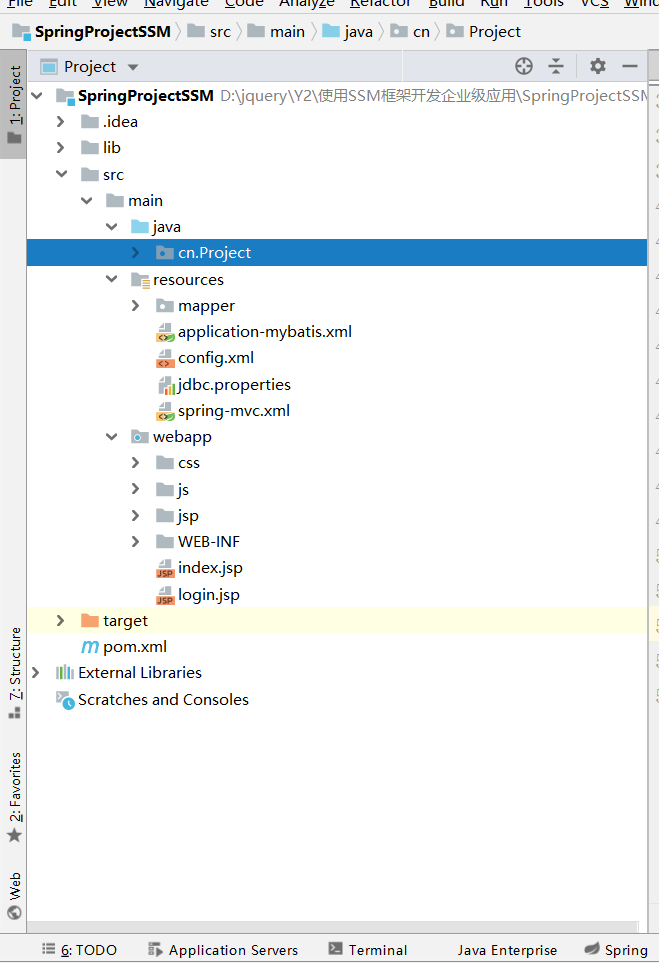
1. 引入依赖
<dependencies>

        <dependency>

            <groupId>org.springframework.boot</groupId>

            <artifactId>spring-boot-starter-web</artifactId>

        </dependency>

        <dependency>

            <groupId>org.springframework.boot</groupId>

            <artifactId>spring-boot-starter-test</artifactId>

            <scope>test</scope>

            <exclusions>

                <exclusion>

                    <groupId>org.junit.vintage</groupId>

                    <artifactId>junit-vintage-engine</artifactId>

                </exclusion>

            </exclusions>

        </dependency>

        <dependency>

            <groupId>org.springframework.boot</groupId>

            <artifactId>spring-boot-starter</artifactId>

        </dependency>

        <dependency>

            <groupId>org.springframework.boot</groupId>

            <artifactId>spring-boot-starter-logging</artifactId>

        </dependency>

        <!-- 核心依赖 -->

        <dependency>

            <groupId>org.springframework.boot</groupId>

            <artifactId>spring-boot-starter-web</artifactId>

        </dependency>

        <!-- 可以实现热部署,在IDEA上实现热部署还需一些额外的配置,请查阅资料 -->

        <dependency>

            <groupId>org.springframework.boot</groupId>

            <artifactId>spring-boot-devtools</artifactId>

            <optional>true</optional>

            <scope>runtime</scope>

        </dependency>

        <!-- JDBC for mysql -->

        <dependency>

            <groupId>mysql</groupId>

            <artifactId>mysql-connector-java</artifactId>

            <scope>runtime</scope>

        </dependency>

        <dependency>

            <groupId>mysql</groupId>

            <artifactId>mysql-connector-java</artifactId>

            <version>5.1.32</version>

        </dependency>

        <!-- mybatis -->

        <!--mybatis-->

        <!-- https://mvnrepository.com/artifact/org.mybatis.spring.boot/mybatis-spring-boot-starter -->

        <dependency>

            <groupId>org.mybatis.spring.boot</groupId>

            <artifactId>mybatis-spring-boot-starter</artifactId>

            <version>1.3.1</version>

        </dependency>

        <!--fastJson-->

        <dependency>

            <groupId>com.alibaba</groupId>

            <artifactId>fastjson</artifactId>

            <version>1.2.12</version>

        </dependency>

        <!--druid-->

        <dependency>

            <groupId>com.alibaba</groupId>

            <artifactId>druid</artifactId>

            <version>1.0.18</version>

        </dependency>

        <dependency>

            <groupId>org.mybatis</groupId>

            <artifactId>mybatis</artifactId>

            <version>3.4.1</version>

        </dependency>

        <!--thymeleaf  新的模板引擎,比jsp要出色-->

        <dependency>

            <groupId>org.springframework.boot</groupId>

            <artifactId>spring-boot-starter-thymeleaf</artifactId>

        </dependency>

        <!--jdbc-->

        <dependency>

            <groupId>org.springframework.boot</groupId>

            <artifactId>spring-boot-starter-jdbc</artifactId>

        </dependency>

        <!-- 分页插件 -->

        <dependency>

            <groupId>com.github.pagehelper</groupId>

            <artifactId>pagehelper-spring-boot-starter</artifactId>

            <version>1.2.3</version>

        </dependency>

    </dependencies>
2.配置application.properties文件
spring.datasource.driver-class-name=com.mysql.jdbc.Driver

spring.datasource.url=jdbc:mysql:///invoicingsystem

spring.datasource.username=root

spring.datasource.password=123456

mybais.mapper-locations=classpath:mapper/*.xml

mybatis.type-aliases-package=com.zn.entity

#映射级别

mybatis.configuration.auto-mapping-behavior=full

#Spring Data JPA配置

spring.jpa.hibernate.ddl-auto=update

spring.jpa.show-sql=true

spring.jackson.serialization.indent-output=true

spring.jpa.database=mysql

spring.main.allow-bean-definition-overriding=true
3.配置页面
在前面的页面中我们使用的都是jsp页面,但是在这里我们是使用html页面的并且存放到templates目录下

4.配置Dao接口
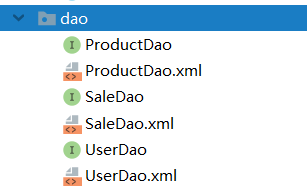
@Repository

public interface ProductDao {

    //查库存

    public List<Product> getList();

    public Product getname(@Param("pid") Integer pid);

}
@Repository

public interface SaleDao {

    //查询

    public List<Sale> getsale(@Param("num") Integer num);

    //绑定下拉框

    public List<Product> getList();

    //添加

    public int addsale(Sale sale);

}
@Repository

public interface UserDao {

    //登录的方法

    public User login(User user);

}
5.配置Dao.xml文件
product
<?xml version="1.0" encoding="UTF-8" ?>

<!DOCTYPE mapper

        PUBLIC "-//mybatis.org//DTD Mapper 3.0//EN"

        "http://mybatis.org/dtd/mybatis-3-mapper.dtd">

<!--namespace需要指向接口全路径-->

<mapper namespace="com.zn.dao.ProductDao">

    <select id="getList" resultType="com.zn.entity.Product">

        select * from product

    </select>

    <select id="getname" resultType="com.zn.entity.Product">

        select * from product where pid=#{pid}

    </select>

</mapper>
sale
<?xml version="1.0" encoding="UTF-8" ?>

<!DOCTYPE mapper

        PUBLIC "-//mybatis.org//DTD Mapper 3.0//EN"

        "http://mybatis.org/dtd/mybatis-3-mapper.dtd">

<!--namespace需要指向接口全路径-->

<mapper namespace="com.zn.dao.SaleDao">

    <resultMap id="getAllSales" type="com.zn.entity.Sale">

        <id property="sid" column="sid"></id>

        <result property="quantity" column="quantity"></result>

        <result property="price" column="price"></result>

        <result column="totalPrice" property="totalPrice"></result>

        <result property="saleDate" column="saleDate"></result>

        <result column="userId" property="userId"></result>

        <result property="productId" column="productId"></result>

        <association property="product" javaType="com.zn.entity.Product">

            <id column="pid" property="pid"></id>

            <result column="productName" property="productName"></result>

        </association>

        <association property="user" javaType="com.zn.entity.User">

            <id property="uid" column="uid"></id>

            <result column="userName" property="userName"></result>

        </association>

    </resultMap>

    <select id="getsale" resultMap="getAllSales">

        select * from product as p,sale as s,users as u where p.pid=s.productId and u.uid=s.userId

        <if test="num==1">

            order by s.totalPrice DESC

        </if>

        <if test="num==2">

            order by s.saleDate DESC

        </if>

    </select>

    <select id="getList" resultType="com.zn.entity.Product">

        select * from product

    </select>

    <insert id="addsale">

        INSERT INTO sale(price,quantity,totalPrice,saleDate,userId,productId)

         VALUE(#{price},#{quantity},#{totalPrice},#{saleDate},#{userId},#{productId})

    </insert>

</mapper>
user
<?xml version="1.0" encoding="UTF-8" ?>

<!DOCTYPE mapper

        PUBLIC "-//mybatis.org//DTD Mapper 3.0//EN"

        "http://mybatis.org/dtd/mybatis-3-mapper.dtd">

<!--namespace需要指向接口全路径-->

<mapper namespace="com.zn.dao.UserDao">

    <select id="login" resultType="com.zn.entity.User">

        select * from users where userName=#{userName} and password=#{password}

    </select>

</mapper>
6.配置Service层
product
public interface ProductService {

    //查库存

    public List<Product> getList();

    public Product getname(Integer pid);

}
sale
public interface SaleService {

    //查询

    public PageInfo<Sale> getsale(@Param("num") Integer num, @Param("pageNum") Integer pageNum, @Param("pageSize") Integer pageSize);

    //绑定下拉框

    public List<Product> getList();

    //添加

    public int addsale(Sale sale);

}
user
public interface UserService {

    //登录的方法

    public User login(User user);

}
7.配置serviceimpl层
product
package com.zn.service.impl;

import com.zn.dao.ProductDao;

import com.zn.entity.Product;

import com.zn.service.ProductService;

import org.springframework.beans.factory.annotation.Autowired;

import org.springframework.stereotype.Service;

import java.util.List;

@Service("ProductService")

public class ProductServiceImpl implements ProductService {

    @Autowired

    ProductDao productDao;

    @Override

    public List<Product> getList() {

        List<Product> list = productDao.getList();

        return list;

    }

    @Override

    public Product getname(Integer pid) {

        Product getname = productDao.getname(pid);

        return getname;

    }

}
sale
package com.zn.service.impl;

import com.github.pagehelper.Page;

import com.github.pagehelper.PageHelper;

import com.github.pagehelper.PageInfo;

import com.zn.dao.ProductDao;

import com.zn.dao.SaleDao;

import com.zn.entity.Product;

import com.zn.entity.Sale;

import com.zn.service.SaleService;

import org.springframework.beans.factory.annotation.Autowired;

import org.springframework.stereotype.Service;

import java.util.List;

@Service("SaleService")

public class SaleServiceImpl implements SaleService {

    @Autowired

    SaleDao saleDao;

    @Autowired

    ProductDao productDao;

    @Override

    public PageInfo<Sale> getsale(Integer num, Integer pageNum, Integer pageSize) {

        Page<Sale> page = PageHelper.startPage(pageNum, pageSize);

        List<Sale> getsale = saleDao.getsale(num);

        return page.toPageInfo();

    }

    @Override

    public List<Product> getList() {

        List<Product> list = productDao.getList();

        return list;

    }

    @Override

    public int addsale(Sale sale) {

        int addsale = saleDao.addsale(sale);

        return addsale;

    }

}
user
package com.zn.service.impl;

import com.zn.dao.UserDao;

import com.zn.entity.User;

import com.zn.service.UserService;

import org.springframework.beans.factory.annotation.Autowired;

import org.springframework.stereotype.Service;

@Service("UserService")

public class UserServiceImpl implements UserService {

    @Autowired

    UserDao userDao;

    @Override

    public User login(User user) {

        return userDao.login(user);

    }

}
8.配置Controller控制器
product
package com.zn.controller;

import com.zn.entity.Product;

import com.zn.service.ProductService;

import org.springframework.stereotype.Controller;

import org.springframework.web.bind.annotation.RequestMapping;

import org.springframework.web.bind.annotation.ResponseBody;

import javax.annotation.Resource;

import java.util.List;

@Controller

@RequestMapping("/product")

public class ProductController {

    @Resource(name = "ProductService")

    ProductService productService;

    @RequestMapping("/getproduct")

    @ResponseBody

    public Object getProductList(){

        System.out.println("库存列表绑定");

        List<Product> proList = productService.getList();

        return proList;

    }

    /*根据id查询库存*/

    @RequestMapping("/getpr")

    @ResponseBody

    public Object getProduct(Integer pid){

        System.out.println("库存详情");

        Product proLists = productService.getname(pid);

        return proLists;

    }

}
sale
package com.zn.controller;

import com.github.pagehelper.PageInfo;

import com.zn.entity.Product;

import com.zn.entity.Sale;

import com.zn.entity.User;

import com.zn.service.SaleService;

import org.springframework.stereotype.Controller;

import org.springframework.web.bind.annotation.RequestMapping;

import org.springframework.web.bind.annotation.ResponseBody;

import org.springframework.web.servlet.ModelAndView;

import javax.annotation.Resource;

import javax.servlet.http.HttpServletRequest;

import java.util.Date;

import java.util.List;

@Controller

@RequestMapping("/sale")

public class SaleController {

    @Resource(name = "SaleService")

    SaleService saleService;

    @RequestMapping("/getsale")

    @ResponseBody

    public Object getsale(Integer num, Integer pageNum, Integer pageSize){

        System.out.println("进了吗??");

        PageInfo<Sale> getsale = saleService.getsale(num, pageNum + 1, 5);

        return getsale;

    }

    @RequestMapping("/getlist")

    @ResponseBody

    public Object getlist(){

        System.out.println("绑定下拉框");

        List<Product> list = saleService.getList();

        return list;

    }

    @RequestMapping("/addsale")

    @ResponseBody

    public ModelAndView addsale(Sale sale, HttpServletRequest request, ModelAndView mv){

        if (sale!=null){

            Double totalPrice=sale.getPrice() * sale.getQuantity();

            sale.setTotalPrice(totalPrice);

            sale.setSaleDate(new Date());

            User login = (User) request.getSession().getAttribute("login");

            sale.setUserId(login.getUid());

            int addsale = saleService.addsale(sale);

            if (addsale>0){

                System.out.println("添加成功!");

                mv.setViewName("saleList");

            }else{

                System.out.println("添加失败!");

                mv.setViewName("prodectAdd");

            }

        }

        return mv;

    }

}
user
package com.zn.controller;

import com.zn.entity.User;

import com.zn.service.UserService;

import org.springframework.stereotype.Controller;

import org.springframework.web.bind.annotation.RequestMapping;

import org.springframework.web.bind.annotation.ResponseBody;

import org.springframework.web.servlet.ModelAndView;

import javax.annotation.Resource;

import javax.servlet.http.HttpServletRequest;

import javax.servlet.http.HttpServletResponse;

@Controller

@RequestMapping(value = "/user")

public class UserController {

    @Resource(name = "UserService")

    UserService userService;

    @RequestMapping("/login")

    @ResponseBody

    public ModelAndView login(User user, HttpServletRequest request, HttpServletResponse response, ModelAndView modelAndView){

        User login = userService.login(user);

        if (login!=null){

            System.out.println("登陆成功!");

            request.getSession().setAttribute("login",login);

            modelAndView.setViewName("index");

        }else {

            modelAndView.setViewName("login");

        }

        return modelAndView;

    }

    @RequestMapping("/remover")

    private String loginOut(HttpServletRequest request, HttpServletResponse response) {

        request.getSession().removeAttribute("login");

        return "login";

    }

    /*转发登陆页面*/

    @RequestMapping("/goLogin")

    public Object goLogin(){

        return "login";

    }

    /*转发查询页面*/

    @RequestMapping("leList")

    public Object saleList(){

        return "saleList";

    }

    /*转发销售页面*/

    @RequestMapping("/prodectAdd")

    public Object productAdd(){

        return "prodectAdd";

    }

    /*转发查看库存页面*/

    @RequestMapping("/prview")

    public Object prview(){

        return "prview";

    }

}
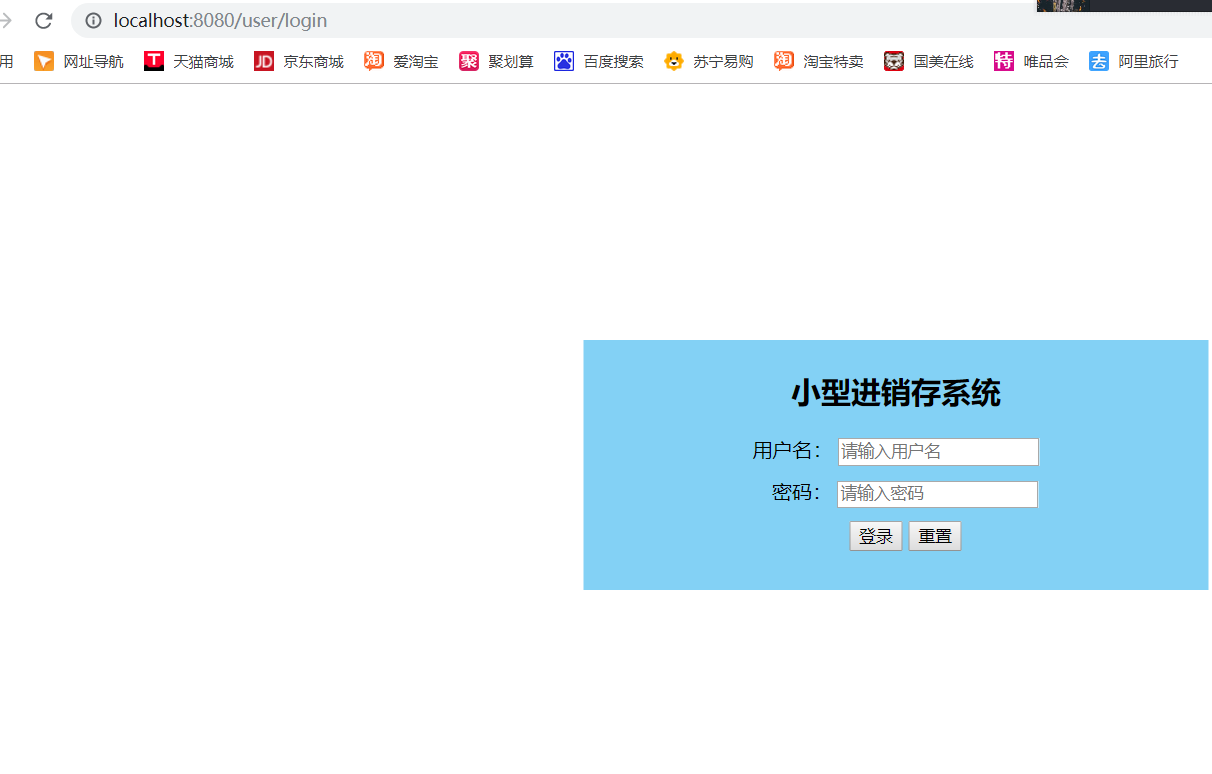
9.开启SpringbootInvoicingApplication

开启后直接访问控制器写入的路径
SpringBoot终章(整合小型进销系统)的更多相关文章
- spring boot的一个小项目小型进销存系统
项目所需的依赖: <dependency> <groupId>org.springframework.boot</groupId> <artifactId&g ...
- SQL 报表 --简易进销系统
模型图: -- ============================================ -- Author: lifu -- Create Date: 2017-06-18 -- D ...
- BugPhobia终章篇章:学霸在线系统Beta阶段展示
0x00 :序言 1 universe, 9 planets, 204 countries,809 islands, 7 seas, and i had the privilege to meet y ...
- spring-boot序章:打造博客系统
blog 使用spring-boot打造一个博客系统,在项目中学习! 项目功能 文章 游览 创建 编辑 删除 评论 用户 游客 注册用户 关注 被关注 后台统计 注册用户数 在线人数 文章总数 评论总 ...
- SpringBoot非官方教程 | 终章:文章汇总
转载请标明出处: 原文首发于:https://www.fangzhipeng.com/springboot/2017/07/11/springboot-all/ 本文出自方志朋的博客 SpringBo ...
- 浩瀚技术团队... 安卓智能POS移动PDA开单器 开单器 进销存系统 进销存系统
浩瀚技术团队... 智能POS移动PDA开单器 开单器 进销存系统 进销存系统 点餐 会员管理 会员管理 深度解读 手机APP移动办公到底是什么? 快速打单POS·不仅仅是快那么简单!
- PDA手持机 移动开单进销存系统 现场出打印凭据和扫码 新的亮点
传统车销模式弊端:1.手写开单,效率低,动作慢2.现场手写开单明细不能打印,产品明细不规范3.电脑办公人员及车销人员对车上的库存情况掌握不清楚,销售人员对每种产品销售价格不清楚4.老板对员工工作的管控 ...
- Silverlight管理系统源码(用于开发ERP、OA、CRM、HR、进销存、财务等系统之用)
Silverlight大型管理系统源代码(支持创建ERP.OA.CRM.HR.进销存.财务等系统之用) 可用于开发以下系统 SilverlightERP SilverlightCRM Silverli ...
- [系统开发] FileMaker进销存系统
一.简介 这是我用 FileMaker 编写的进销存系统: FileMaker 是一种在欧美流行的桌面型数据库:它使用非常方便,功能也很强大,用户可以在它上面开发自己的系统: 开发时间:2008年 二 ...
随机推荐
- Python之路【第二十三篇】:数据库基础
数据库的简介 数据库 数据库(database,DB)是指长期存储在计算机内的,有组织,可共享的数据的集合.数据库中的数据按一定的数学模型组织.描述和存储,具有较小的冗余,较高的数据独立性和易扩展性, ...
- LeetCode 5071. 找出所有行中最小公共元素(Java)
题目:5071. 找出所有行中最小公共元素 给你一个矩阵 mat,其中每一行的元素都已经按 递增 顺序排好了.请你帮忙找出在所有这些行中 最小的公共元素. 如果矩阵中没有这样的公共元素,就请返回 -1 ...
- Akka-CQRS(9)- gRPC,实现前端设备与平台系统的高效集成
前面我们完成了一个CQRS模式的数据采集(录入)平台.可以预见:数据的产生是在线下各式各样的终端系统中,包括web.桌面.移动终端.那么,为了实现一个完整的系统,必须把前端设备通过某种网络连接形式与数 ...
- PLC采集与控制,实现MES工序管理与品质管控,记录产品的加工数据,工厂生产装配流水线的一次成功应用
1.通过程序与PLC的采集与控制,实现MES工序管理,品质管控,历史数据追溯的目的 2.大概的流程图 3.有三个地方相关联来实现以上功能,首先是MES的工序管理,设置指定的产品有那些工序,上位机程序扫 ...
- Outlook 邮件助手
Outlook 邮件助手 1 Overview 2 C# 编程 3 Outlook 设置 3.1 Outlook 2013 3.2 Outlook 2010 1 Overview 本章将示例如何开发一 ...
- 2019 2345网址导航java面试笔试题 (含面试题解析)
本人5年开发经验.18年年底开始跑路找工作,在互联网寒冬下成功拿到阿里巴巴.今日头条.2345网址导航等公司offer,岗位是Java后端开发,因为发展原因最终选择去了2345网址导航,入职一年时 ...
- 微信小程序代码开源啦
想学习如何使用mpvue开发微信小程序吗? 想知道微信消息推送如何实现吗? 想知道如何用springboot开发小程序后台吗? 看这里就全都有了.耗时一个月打造的微信小程序:PSN折扣助手前后端所有源 ...
- SocksCap代理
所有Windows应用都可以使用Socks代理上网,即使不支持Socks代理的应用也可以用Socks代理上网 配置代理 点击"添加",代理类型可以修改, 支持代理测试 运行程序 点 ...
- FFmpeg参考资料合集(会一直更新)
让你的软件飞起来:RGB转为YUV 朋友曾经给我推荐了一个有关代码优化的pdf文档<让你的软件飞起来>,看完之后,感受颇深.为了推广其,同时也为了自己加深印象,故将其总结为word 文档. ...
- 【故障处理】队列等待之TX - allocate ITL entry引起的死锁处理
[故障处理]队列等待之TX - allocate ITL entry引起的死锁处理 1 BLOG文档结构图 2 前言部分 2.1 导读和注意事项 各位技术爱好者,看完本文后,你可以掌 ...