
Devexpress GridView 数据格式化显示
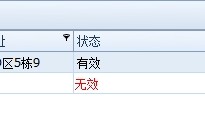
 gridView1.CustomColumnDisplayText += gridView1_CustomColumnDisplayText;

 void gridView1_CustomColumnDisplayText(object sender, DevExpress.XtraGrid.Views.Base.CustomColumnDisplayTextEventArgs e)

        {

            if (e.Column.FieldName == "State")

            {

                switch (e.DisplayText)

                {

                    case "":

                        e.DisplayText = "有效";

                        break;

                    case "":

                        e.DisplayText = "无效";

                        break;

                }

            }

        }
void gridView1_CustomDrawCell(object sender, DevExpress.XtraGrid.Views.Base.RowCellCustomDrawEventArgs e)
{
var currentView = sender as GridView;
if (currentView != null && e.RowHandle == currentView.FocusedRowHandle) return;
Rectangle r = e.Bounds;
if (e.Column.FieldName == "F_State")
{
if (e.CellValue.ToString().Equals("False"))
{
e.Appearance.ForeColor=Color.Red;
e.Appearance.DrawString(e.Cache,e.DisplayText,r);
e.Handled = true;
}
}
} 或者以下面的这种形式也可以的、
还有一个就是改变行的颜色
在对GridControl绑定好数据后:
No.1:右键GridControl选择Run Designer;
No.2:Appearance下Style Conditions点击Add,需要注意的是每一个变色条件都得Add一个变色方案;
No.3:在Properties中需要用到的属性依次往下详解为:
a)Appearance下BackColor=255.255.128,BackColor2=255.255.128,此项指定符合特定条件时单元格/行背景颜色,如果两项设置颜色不同时则为渐变效果;要是每次都这样设置也太不方便了。。所以我又封装了一个方法

        public void SetColumnFormatCell(object value1, object value2,Color backColor1,Color backColor2,GridColumn gridColumn,FormatConditionEnum formatType,GridView gridView)

        {

            var styleFormatCondition1 = new StyleFormatCondition();

            styleFormatCondition1.Appearance.BackColor = backColor1;

            styleFormatCondition1.Appearance.BackColor2 =backColor2;

            styleFormatCondition1.Appearance.Options.UseBackColor = true;

            styleFormatCondition1.Column = gridColumn;

            styleFormatCondition1.Condition = formatType;

            styleFormatCondition1.Expression = "true";

            styleFormatCondition1.Value1 = value1;

            styleFormatCondition1.Value2 = value2;

            gridView.FormatConditions.Add(styleFormatCondition1);

        }
调用:
  var dev=new DataGridControlHelper();

      dev.SetColumnFormatCell("无效","无效",Color.Red,Color.Red,gridColumn03,FormatConditionEnum.Equal,gridView1);
 虽然效果是出来了。但是我觉得效率很差。
    要是有那位网友有更好的方案。请分享一下。谢谢
Devexpress GridView 数据格式化显示的更多相关文章
- GridView数据格式化
一.动态生成列的格式化 此种GridView中的列是动态生成的,格式化可以通过RowDataBound事件进行.如下边代码,对第十列的值进行格式化. protected void gvUserList ...
- Devexpress GridView 列中显示图片
首先将图片添加到ImageList中 添加GridView中Column void gridView1_CustomUnboundColumnData(object sender, DevExpres ...
- C# DevExpress 的gridControl或gridView数据导出失败解决方法
来自:http://blog.csdn.net/lybwwp/article/details/8049464 谢谢 在使用DevExpress 的GridPanel控件的时候出现了一个莫名其妙的现象, ...
- EasyUI datagrid 格式化显示数据
http://blog.163.com/ppy2790@126/blog/static/103242241201512502532379/ 设置formatter属性,是一个函数,格式化函数有3个参数 ...
- 扩展:gridview 空数据时显示表头
2015年7月14日16:50:06 Gridview 默认展示数据时,若数据为空,则表格不显示,显示不美观. 针对此问题进行扩展: using System.Web.UI.WebControls; ...
- DevExpress GridView 整理(转)
DevExpress GridView 那些事儿 1:去除 GridView 头上的 "Drag a column header here to group by that column&q ...
- DevExpress GridView自动滚动
引言 最新有一个winform项目使用的是DevExpress的控件,所以最近都在摸索使用这套控件,实在是佩服整套控件的强大,同时代码写起来也简洁.客户有一个需求,希望报表结果能在外接的大屏幕上定时滚 ...
- DevExpress GridView 那些事儿
1:去除 GridView 头上的 "Drag a column header here to group by that column" --> 点击 Run Desig ...
- DevExpress GridView 整理
1:去除 GridView 头上的 "Drag a column header here to group by that column" --> 点击 Run Desig ...
随机推荐
- 大白话讲解Promise(一)
去年6月份, ES2015正式发布(也就是ES6,ES6是它的乳名),其中Promise被列为正式规范.作为ES6中最重要的特性之一,我们有必要掌握并理解透彻.本文将由浅到深,讲解Promise的基本 ...
- redis总结
redis总结 redis与memcached redis支持更多的数据结构 redis支持数据持久化 redis支持两种存储方式:snapshot(快照)和aof(append only mode) ...
- 《Entity Framework 6 Recipes》中文翻译系列 (33) ------ 第六章 继承与建模高级应用之TPH与TPT (2)
翻译的初衷以及为什么选择<Entity Framework 6 Recipes>来学习,请看本系列开篇 6-8 嵌套的TPH建模 问题 你想使用超过一层的TPH继承映射为一张表建模. 解 ...
- Java学习笔记(03)
一.回顾运算符: 一.控制语句 1.1 顺序结构 (最常见的) 特点:代码从上往下依次执行
- AngularJS移动开发中的各种坑
捂脸,辛酸泪ing...... 本文主要涉及部分在移动设备上特有的问题. 相对来说,Jquery侧重DOM操作,AngularJS是以视图模型和双向绑定为核心的. DOM操作的问题 避免使用 jQue ...
- Data Flow的Error Output
一,在Data Flow Task中,对于Error Row的处理通过Error Output Tab配置的. 1,操作失败的类型:Error(Conversion) 和 Truncation. 2, ...
- 前端:图文混排-怎么在不使用float的情况下实现想要的效果呢?
异常处理汇总-前端系列 http://www.cnblogs.com/dunitian/p/4523015.html 举个例子 重点:display:flex (参考:http://www.360do ...
- 解密jQuery事件核心 - 委托设计(二)
第一篇 http://www.cnblogs.com/aaronjs/p/3444874.html 从上章就能得出几个信息: 事件信息都存储在数据缓存中 对于没有特殊事件特有监听方法和普通事件都用ad ...
- 【转】C#语言之“string格式的日期时间字符串转为DateTime类型”的方法
方法一:Convert.ToDateTime(string) string格式有要求,必须是yyyy-MM-dd hh:mm:ss ================================== ...
- 详解 ML2 Core Plugin(II) - 每天5分钟玩转 OpenStack(72)
上一节我们讨论了 ML2 Plugin 解决的问题,本节将继续研究 ML2 的架构. ML2 对二层网络进行抽象和建模,引入了 type driver 和 mechansim driver. 这两类 ...