
DevExpress GridView 整理
1:去除 GridView 头上的 "Drag a column header here to group by that column"
--> 点击 Run Designer -> 找到:OptionView -> 将 ShowGroupPanel : 设置为 false ;
2:如何 显示出 GridView 自带的 搜索功能
--> 点击 Run Designer -> 找到: OptionsFind -> 将AlwaysVisible : 设置为 True
3:如何 将GridView 的大小自适应窗体的大小
--> 右键 GridView 控件 -> 属性 -> 找到 Dock : 设置为 Fill
4:当GridView数据源发生变化时,如何更改GridView所"绑定的值"
Code 注 : 其实就是重新创建了一个GridView的实例。
1  gridView1 = new DevExpress.XtraGrid.Views.Grid.GridView(gridControl1);

2  gridControl1.MainView = gridView1;

3  gridView1.OptionsView.ShowGroupPanel = false;

4  gridView1.OptionsFind.AlwaysVisible = true;

5  gridControl1.DataSource = dt;
5:在GridControl 中添加checkbox复选框
--> gridView -> run designer -> columns -> 添加一列(如果没有的话) 然后如图设置

-- > 另外当我们需要动态绑定grid数据时,DataTable 中列的名字要和我们在gridview中设置的FileName名字要移植,不然数据是显示不出来的。
6:让GridView 行 不可编辑
-- > Run Designer -> OptionsBehavior -> Editable : False
7 : 在GridView 行中添加Button按钮
 1 public void ButtonInitial()

 2         {

 3             RepositoryItemButtonEdit rib = new RepositoryItemButtonEdit();

 4             rib.TextEditStyle = TextEditStyles.HideTextEditor;

 5             rib.Buttons[0].Kind = ButtonPredefines.Glyph;

 6             rib.ButtonClick += rib_ButtonClick;

 7             rib.Buttons[0].Caption = "详细信息";

 8             rib.Buttons[0].Visible = true;

 9             gridView1.Columns["DOWNSTATE"].ColumnEdit = rib;

10

11         }

12

13         void rib_ButtonClick(object sender, ButtonPressedEventArgs e)

14         {

15             int rowindex = gridView1.FocusedRowHandle;

16             DataRow row = gridView1.GetDataRow(rowindex);

17         }
8 : GirdView行添加Button按钮之后,触发事件不可用.
将GridView Editable 设置为True 让GridView可编辑,如果不想让它可编辑的话,在一列一列的进行设置.原因是:将GridView设置为不可编辑之后,那么鼠标点击Button那一列只是选中而已,不会进行触发事件.
9 : GridView 设置选中行的颜色
GridView : Run Designer -> Appearences : selectRow & FocusedRow (两项都要设置)
BackColor : MediumSlateBlue 背景色
ForeColor : White 前景色 字体颜色
10 : GridView 设置标题行颜色
GridView : Run Designer -> Appearences : HeadPanel 在这个属性组中都是关于标题行的设置,再次不做诠释.
当设置完HeadPanel 其实并没有结束,是不显示效果的, 还需要设置 GridControl 属性中 LookAndFeel : Style 设置为ultraFlat , UseDefaultLookAndFeel 设置为 False .
11 : GridView 设置标题行以及内容行 数据居中
标题行 10 所述 在HeadPanel 里有一个TextOptions 展开之后 将HAlignment : Center
如果是将内容行数据居中.有两种方法 1 : 逐行设置 2 : 设置Appearences
1 : GridView -> Run Designer -> Columns -> AppearanceCell -> TextOptions 找到HAlignment : Center .
2 : GridView -> Run Designer -> Appearance -> ViewCaption -> TextOptions -> HAlignment : Center
12 : GridView添加CheckBox 并支持多选操作.
GridView : Run Designer -> OptionsSelection -> MultiSelect : True MultiSelectMode : CheckBoxRowSelect
13 : GridView 添加 序号 列
GridView : Run Designer -> Event -> CustomDrawRowIndicator
在事件中添加代码 :

 1 e.Appearance.TextOptions.HAlignment = DevExpress.Utils.HorzAlignment.Center;

 2             if (e.Info.IsRowIndicator)

 3             {

 4                 if (e.RowHandle >= 0)

 5                 {

 6                     e.Info.DisplayText = (e.RowHandle + 1).ToString();

 7                 }

 8                 else if (e.RowHandle < 0 && e.RowHandle > -1000)

 9                 {

10                     e.Info.Appearance.BackColor = System.Drawing.Color.AntiqueWhite;

11                     e.Info.DisplayText = "G" + e.RowHandle.ToString();

12                 }

13             }
另外在 Run Desginer -> IndicatorWidth 设置序号列的宽度 一般30左右就比较适合一些了.
14 : 单元格双击响应
 1  private void gridControl1_DoubleClick(object sender, EventArgs e)

 2         {

 3             MouseEventArgs arg = e as MouseEventArgs;

 4             if (arg == null)

 5                 return;

 6

 7             GridHitInfo hitInfo = gridView1.CalcHitInfo(new Point(arg.X, arg.Y));//获取坐标点

 8             if (hitInfo.RowHandle >= 0)

 9             {

10                 DataRow row = gridView1.GetDataRow(hitInfo.RowHandle);

11                 _list.Clear();

12                 _list.Add(row[0].ToString());

13                 gisResoureMonControl1.SetSelectResource(_list);

14             }

15         }
15 : 获取选中行的值
代码:
1  private void gridData_FocusedRowChanged(object sender, DevExpress.XtraGrid.Views.Base.FocusedRowChangedEventArgs e)

2         {

3              _id = GWEntLib.Utilities.Mix.ConvertUtils.ToInt32(gridData.GetRowCellValu(e.FocusedRowHandle, "Id"));

4              _emrFileReadList = EMRTemplateFileReadList.GetEMRTemplateFileReadList(_id);

5             gridVersonData.DataSource = _emrFileReadList;

6

7         }
响应事件:FocusedRowChanged
获取字段值:gridData.GetRowCellValue(e.FocusedRowHandle, "Id")
注意:FocusedRowChanged是Gridview的事件而不是gridControl的事件
gridControl与Gridview的区别:前者是容器,后者为视图
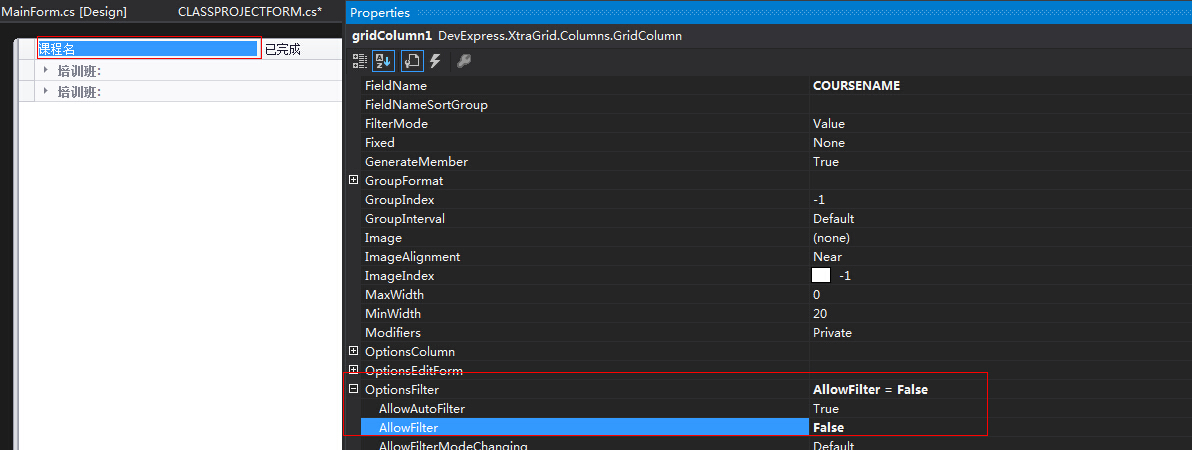
16:将GridView 列表表头固定,无Filter效果
17、DevExpress GridView 获取当前选中行的值。
1  int rowIndex = gridView1.FocusedRowHandle;

2  DataRow dr = gridView1.GetDataRow(rowIndex);

3  MessageBox.Show("课件 \"" + dr.ItemArray[0].ToString() + "\" 下载成功");
18、GridView 去除选中行虚线。
Run Desginer -> Appearance : FocusRectStyle : none;
。。。。。。
DevExpress GridView 整理的更多相关文章
- DevExpress GridView 整理(转)
DevExpress GridView 那些事儿 1:去除 GridView 头上的 "Drag a column header here to group by that column&q ...
- DevExpress gridview下拉框的再次研究
原文:DevExpress gridview下拉框的再次研究 前几天写了一篇关于研究DevExpress gridview下拉框的随笔(DevExpress gridview下拉框repository ...
- DevExpress GridView 那些事儿
1:去除 GridView 头上的 "Drag a column header here to group by that column" --> 点击 Run Desig ...
- Devexpress Gridview 自定义汇总CustomSummaryCalculate(加权平均)
Devexpress Gridview 提供了简单的求和,平均等方法,复杂的汇总方法则需要自定义,使用gridview 的CustomSummaryCalculate 事件,根据官网的文档及各论坛案例 ...
- DevExpress GridView属性说明
转自http://www.cnblogs.com/-ShiL/archive/2012/06/08/ShiL201206081335.html (一)双击展开,收缩字表 1 Private Sub E ...
- Devexpress GridView 列中显示图片
首先将图片添加到ImageList中 添加GridView中Column void gridView1_CustomUnboundColumnData(object sender, DevExpres ...
- Devexpress GridView 数据格式化显示
gridView1.CustomColumnDisplayText += gridView1_CustomColumnDisplayText; void gridView1_CustomColumnD ...
- DevExpress GridView对表格的部分说明
1. int[] selects = this.m_grdView1.GetSelectedRows(); // 获取选中的行,可能是几行 2. this.m_grdView1.GetRowCellV ...
- DevExpress GridView中加入CheckBox方法
添加一列,FieldName为 "check",将ColumnEdit 设置为 复选框 样式.gridview1 editable设置为true 将要绑定的DataTable添加列 ...
随机推荐
- Python 实现图片上表格的写入
直接上代码:import matplotlib.pylab as pltimport numpy as npplt.figure()axes=plt.gca()y= np.random.randn(9 ...
- 最全Python内置函数
内置函数的基本使用 abs的使用: 取绝对值 absprint(abs(123))print(abs(-123)) result:123123 all的使用: 循环参数,如果每个元素都为真的情况下,那 ...
- 尺取法拓展——POJ3320
#include <iostream> #include <cstdio> #include <algorithm> #include <set> #i ...
- 最小生成树prim和kruskal模板
prim: int cost[MAX_V][MAX_V]; //cost[u][v]表示边e=(u,v)的权值(不存在的情况下设为INF) int mincost[MAX_V]; //从集合X出发的每 ...
- 005PHP文件处理——目录操作,统计大小 filesize unlink
<?php /* 目录操作,统计大小 filesize unlink * */ $dir = dir("."); while (($file = $dir->read( ...
- HDU 4686 Arc of Dream 矩阵快速幂,线性同余 难度:1
http://acm.hdu.edu.cn/showproblem.php?pid=4686 当看到n为小于64位整数的数字时,就应该有个感觉,acm范畴内这应该是道矩阵快速幂 Ai,Bi的递推式题目 ...
- hdu 3682 10 杭州 现场 C To Be an Dream Architect 容斥 难度:0
C - To Be an Dream Architect Time Limit:1000MS Memory Limit:32768KB 64bit IO Format:%I64d &a ...
- Big Table中文翻译
题记:google 的成功除了一个个出色的创意外,还因为有 Jeff Dean 这样的软件架构天才. 官方的 Google Reader blog 中有对BigTable 的解释.这是Google 内 ...
- StreamSets Data Collector Edge 说明
Data Collector Edge 是不包含界面的agent 安装 下载包 https://streamsets.com/opensource tar xf streamsets-datacoll ...
- AbstractBeanDefinition:lenientConstructorResolution属性源码分析
版本:spring-framework-4.1 一概述 在看AbstractBeanDefinition源码时,注意到lenientConstructorResolution属性有诸多不疑,现在通过示 ...