
2019 SDN上机第3次作业
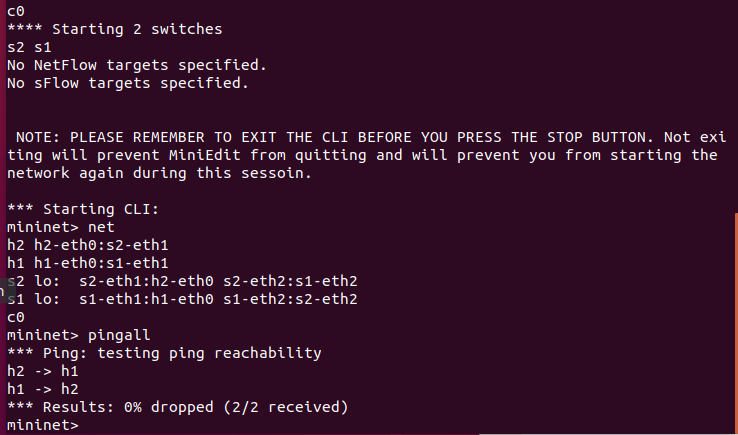
1. 利用Mininet仿真平台构建如下图所示的网络拓扑,配置主机h1和h2的IP地址(h1:10.0.0.1,h2:10.0.0.2),测试两台主机之间的网络连通性
创建拓扑
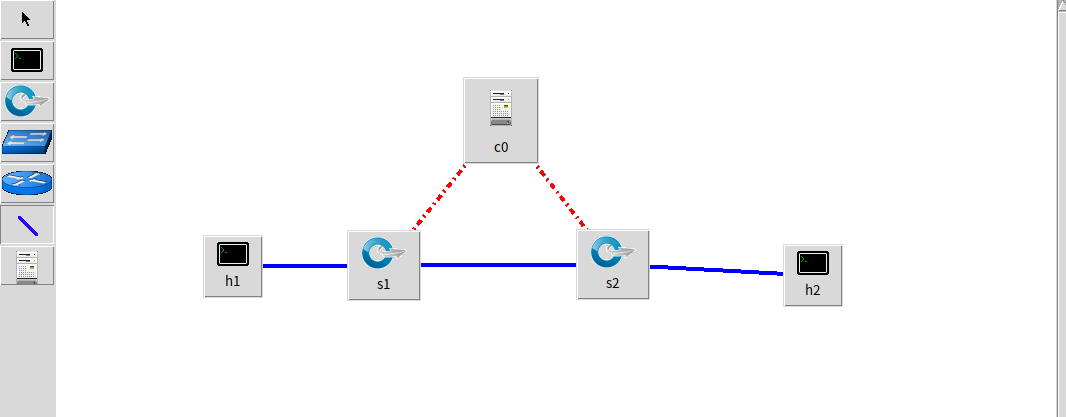
配置主机h1和h2的IP地址(h1:10.0.0.1,h2:10.0.0.2),开启CLI,设置 OpenFlow 1.0 1.1 1.2 1.3
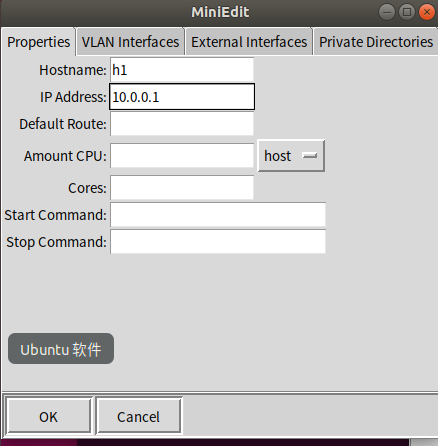
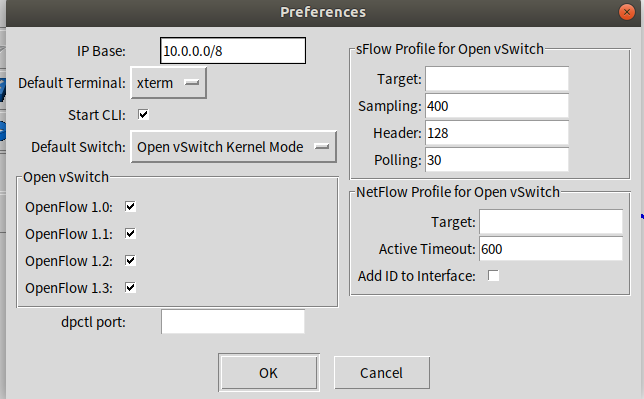
输入pingall查看连通性
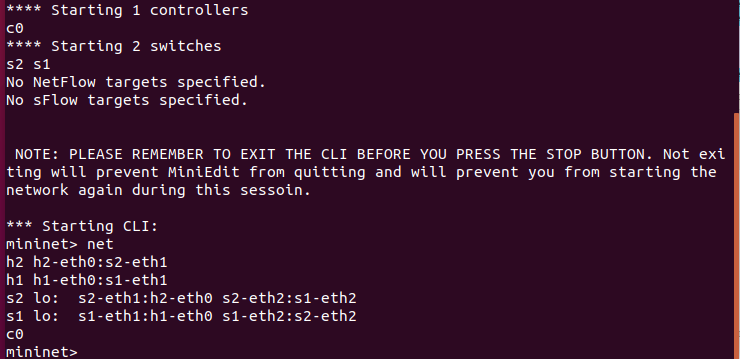
2. 利用Wireshark工具,捕获拓扑中交换机与控制器之间的通信数据,对OpenFlow协议类型的各类报文(hello, features_request, features_reply, set_config, packet_in, packet_out等)进行分析,对照wireshark截图写出你的分析内容
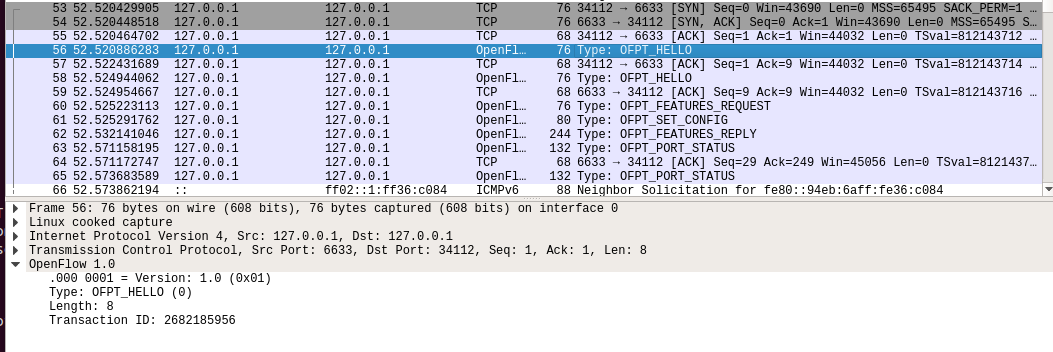
hello
控制器6633端口(我最高能支持OpenFlow 1.0) ---> 交换机34112端口
交换机34112端口(我最高能支持OpenFlow 1.3)--- 控制器6633端口
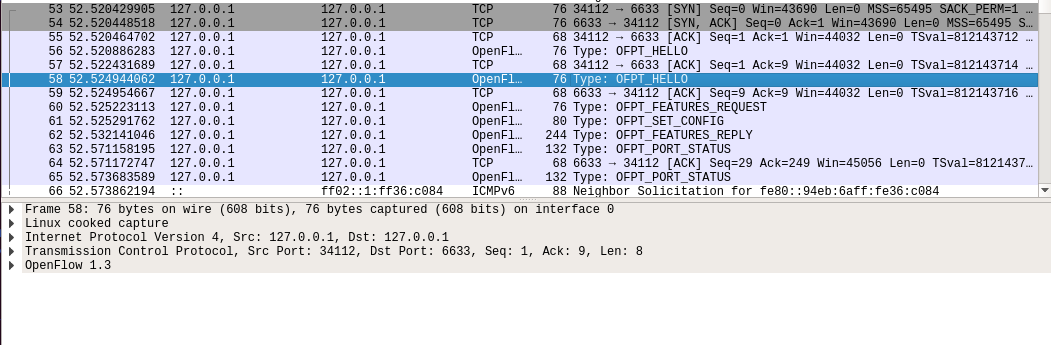
于是双方建立连接,并使用OpenFlow 1.0Features Request
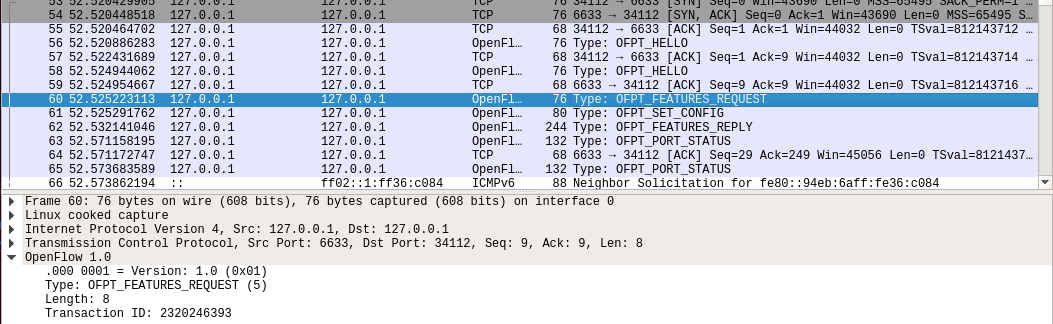
控制器6633端口(我需要你的特征信息) ---> 交换机34112端口
Set Config
控制器6633端口(请按照我给你的flag和max bytes of packet进行配置) ---> 交换机34112端口
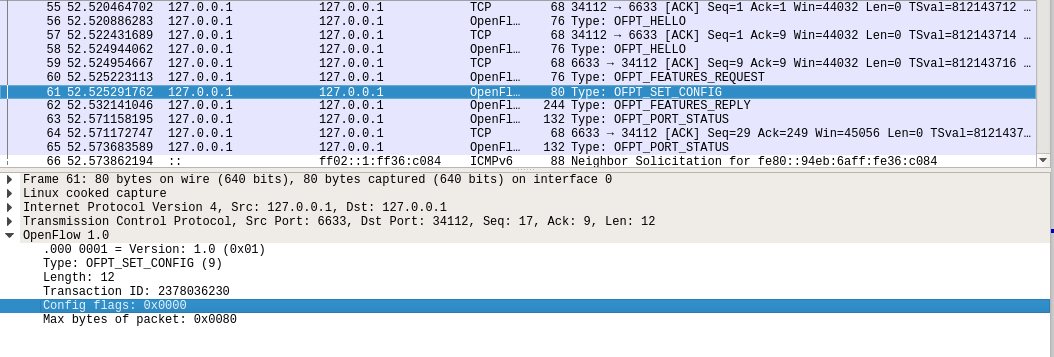
Features Reply
交换机34112端口(这是我的特征信息,请查收)--- 控制器6633端口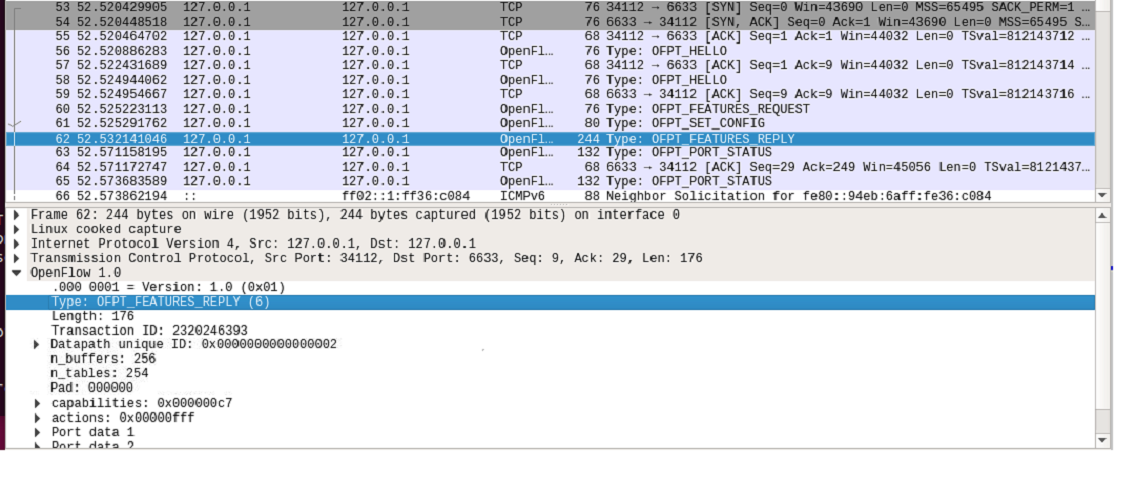
Features 消息包括 OpenFlow Header 和 Features Reply Message
对照Features Reply Message结构
struct ofp_switch_features{

    struct ofp_header header;

    uint64_t datapath_id; /*唯一标识 id 号*/

    uint32_t n_buffers; /*交缓冲区可以缓存的最大数据包个数*/

    uint8_t n_tables; /*流表数量*/

    uint8_t pad[3]; /*align to 64 bits*/

    uint32_t capabilities; /*支持的特殊功能,具体见 ofp_capabilities*/

    uint32_t actions; /*支持的动作,具体见 ofp_actions_type*/

    struct ofp_phy_port ports[0]; /*物理端口描述列表,具体见 ofp_phy_port*/

};
对应到抓取到的报文,逐项查看报文内容
OpenFlow 1.0

    .000 0001 = Version: 1.0 (0x01)

    Type: OFPT_FEATURES_REPLY (6)

    Length: 176

    Transaction ID: 2320246393

    Datapath unique ID: 0x0000000000000002

        MAC addr: 00:00:00_00:00:00 (00:00:00:00:00:00)

        Implementers part: 0x0001

    n_buffers: 256

    n_tables: 254

    Pad: 000000

    capabilities: 0x000000c7

        .... .... .... .... .... .... .... ...1 = Flow statistics: True

        .... .... .... .... .... .... .... ..1. = Table statistics: True

        .... .... .... .... .... .... .... .1.. = Port statistics: True

        .... .... .... .... .... .... .... 0... = Group statistics: False

        .... .... .... .... .... .... ..0. .... = Can reassemble IP fragments: False

        .... .... .... .... .... .... .1.. .... = Queue statistics: True

        .... .... .... .... .... ...0 .... .... = Switch will block looping ports: False

    actions: 0x00000fff

        .... .... .... .... .... .... .... ...1 = Output to switch port: True

        .... .... .... .... .... .... .... ..1. = Set the 802.1q VLAN id: True

        .... .... .... .... .... .... .... .1.. = Set the 802.1q priority: True

        .... .... .... .... .... .... .... 1... = Strip the 802.1q header: True

        .... .... .... .... .... .... ...1 .... = Ethernet source address: True

        .... .... .... .... .... .... ..1. .... = Ethernet destination address: True

        .... .... .... .... .... .... .1.. .... = IP source address: True

        .... .... .... .... .... .... 1... .... = IP destination address: True

        .... .... .... .... .... ...1 .... .... = IP ToS (DSCP field, 6 bits): True

        .... .... .... .... .... ..1. .... .... = TCP/UDP source port: True

        .... .... .... .... .... .1.. .... .... = TCP/UDP destination port: True

        .... .... .... .... .... 1... .... .... = Output to queue: True

    Port data 1

        Port number: 65534

        HW Address: fe:c6:b6:b9:5a:cf (fe:c6:b6:b9:5a:cf)

        Port Name: s1

        Config flags: 0x00000001

            .... .... .... .... .... .... .... ...1 = Port is administratively down: True

            .... .... .... .... .... .... .... ..0. = Disable 802.1D spanning tree on port: False

            .... .... .... .... .... .... .... .0.. = Drop all packets except 802.1D spanning tree packets: False

            .... .... .... .... .... .... .... 0... = Drop received 802.1D STP packets: False

            .... .... .... .... .... .... ...0 .... = Do not include this port when flooding: False

            .... .... .... .... .... .... ..0. .... = Drop packets forwarded to port: False

            .... .... .... .... .... .... .0.. .... = Do not send packet-in msgs for port: False

        State flags: 0x00000001

            .... .... .... .... .... .... .... ...1 = No physical link present: True

        Current features: 0x00000000

            .... .... .... .... .... .... .... ...0 = 10 Mb half-duplex rate support: False

            .... .... .... .... .... .... .... ..0. = 10 Mb full-duplex rate support: False

            .... .... .... .... .... .... .... .0.. = 100 Mb half-duplex rate support: False

            .... .... .... .... .... .... .... 0... = 100 Mb full-duplex rate support: False

            .... .... .... .... .... .... ...0 .... = 1 Gb half-duplex rate support: False

            .... .... .... .... .... .... ..0. .... = 1 Gb full-duplex rate support: False

            .... .... .... .... .... .... .0.. .... = 10 Gb full-duplex rate support: False

            .... .... .... .... .... .... 0... .... = Copper medium: False

            .... .... .... .... .... ...0 .... .... = Fiber medium: False

            .... .... .... .... .... ..0. .... .... = Auto-negotiation: False

            .... .... .... .... .... .0.. .... .... = Pause: False

            .... .... .... .... .... 0... .... .... = Asymmetric pause: False

        Advertised features: 0x00000000

        Features supported: 0x00000000

        Features advertised by peer: 0x00000000

    Port data 2

        Port number: 1

        HW Address: 16:30:eb:96:ed:9b (16:30:eb:96:ed:9b)

        Port Name: s1-eth1

        Config flags: 0x00000000

            .... .... .... .... .... .... .... ...0 = Port is administratively down: False

            .... .... .... .... .... .... .... ..0. = Disable 802.1D spanning tree on port: False

            .... .... .... .... .... .... .... .0.. = Drop all packets except 802.1D spanning tree packets: False

            .... .... .... .... .... .... .... 0... = Drop received 802.1D STP packets: False

            .... .... .... .... .... .... ...0 .... = Do not include this port when flooding: False

            .... .... .... .... .... .... ..0. .... = Drop packets forwarded to port: False

            .... .... .... .... .... .... .0.. .... = Do not send packet-in msgs for port: False

        State flags: 0x00000000

            .... .... .... .... .... .... .... ...0 = No physical link present: False

        Current features: 0x000000c0

            .... .... .... .... .... .... .... ...0 = 10 Mb half-duplex rate support: False

            .... .... .... .... .... .... .... ..0. = 10 Mb full-duplex rate support: False

            .... .... .... .... .... .... .... .0.. = 100 Mb half-duplex rate support: False

            .... .... .... .... .... .... .... 0... = 100 Mb full-duplex rate support: False

            .... .... .... .... .... .... ...0 .... = 1 Gb half-duplex rate support: False

            .... .... .... .... .... .... ..0. .... = 1 Gb full-duplex rate support: False

            .... .... .... .... .... .... .1.. .... = 10 Gb full-duplex rate support: True

            .... .... .... .... .... .... 1... .... = Copper medium: True

            .... .... .... .... .... ...0 .... .... = Fiber medium: False

            .... .... .... .... .... ..0. .... .... = Auto-negotiation: False

            .... .... .... .... .... .0.. .... .... = Pause: False

            .... .... .... .... .... 0... .... .... = Asymmetric pause: False

        Advertised features: 0x00000000

        Features supported: 0x00000000

        Features advertised by peer: 0x00000000

    Port data 3

        Port number: 2

        HW Address: de:73:62:c2:a2:2a (de:73:62:c2:a2:2a)

        Port Name: s1-eth2

        Config flags: 0x00000000

            .... .... .... .... .... .... .... ...0 = Port is administratively down: False

            .... .... .... .... .... .... .... ..0. = Disable 802.1D spanning tree on port: False

            .... .... .... .... .... .... .... .0.. = Drop all packets except 802.1D spanning tree packets: False

            .... .... .... .... .... .... .... 0... = Drop received 802.1D STP packets: False

            .... .... .... .... .... .... ...0 .... = Do not include this port when flooding: False

            .... .... .... .... .... .... ..0. .... = Drop packets forwarded to port: False

            .... .... .... .... .... .... .0.. .... = Do not send packet-in msgs for port: False

        State flags: 0x00000000

            .... .... .... .... .... .... .... ...0 = No physical link present: False

        Current features: 0x000000c0

            .... .... .... .... .... .... .... ...0 = 10 Mb half-duplex rate support: False

            .... .... .... .... .... .... .... ..0. = 10 Mb full-duplex rate support: False

            .... .... .... .... .... .... .... .0.. = 100 Mb half-duplex rate support: False

            .... .... .... .... .... .... .... 0... = 100 Mb full-duplex rate support: False

            .... .... .... .... .... .... ...0 .... = 1 Gb half-duplex rate support: False

            .... .... .... .... .... .... ..0. .... = 1 Gb full-duplex rate support: False

            .... .... .... .... .... .... .1.. .... = 10 Gb full-duplex rate support: True

            .... .... .... .... .... .... 1... .... = Copper medium: True

            .... .... .... .... .... ...0 .... .... = Fiber medium: False

            .... .... .... .... .... ..0. .... .... = Auto-negotiation: False

            .... .... .... .... .... .0.. .... .... = Pause: False

            .... .... .... .... .... 0... .... .... = Asymmetric pause: False

        Advertised features: 0x00000000

        Features supported: 0x00000000

        Features advertised by peer: 0x00000000
Packet_in
交换机34112端口(有数据包进来,请指示)--- 控制器6633端口
结合Packet_in的结构
struct ofp_packet_in {

    struct ofp_header header;

    uint32_t buffer_id; /*Packet-in消息所携带的数据包在交换机缓存区中的ID*/

    uint16_t total_len; /*data字段的长度*/

    uint16_t in_port; /*数据包进入交换机时的端口号*/

    uint8_t reason; /*发送Packet-in消息的原因,具体见 ofp_packet_in_reason*/

    uint8_t pad;

    uint8_t data[0]; /*携带的数据包*/

};
分析抓取的数据包,可以发现是因为交换机发现此时自己并没有匹配的流表(Reason: No matching flow (table-miss flow entry) (0)),所以要问控制器如何处理
OpenFlow 1.0

     .000 0001 = Version: 1.0 (0x01)

    Type: OFPT_PACKET_IN (10)

    Length: 104

    Transaction ID: 0

    Buffer Id: 0xffffffff

    Total length: 86

    In port:2

    Reason: No matching flow (table-miss flow entry) (0)

    Pad: 00

    Ethernet II, Src: c6:1d:91:1b:83:6d (c6:1d:91:1b:83:6d), Dst: IPv6mcast_16 (33:33:00:00:00:16)

        Destination: IPv6mcast_16 (33:33:00:00:00:16)

            Address: IPv6mcast_16 (33:33:00:00:00:16)

            .... ..1. .... .... .... .... = LG bit: Locally administered address (this is NOT the factory default)

            .... ...1 .... .... .... .... = IG bit: Group address (multicast/broadcast)

        Source: c6:1d:91:1b:83:6d (c6:1d:91:1b:83:6d)

            Address: c6:1d:91:1b:83:6d (c6:1d:91:1b:83:6d)

            .... ..1. .... .... .... .... = LG bit: Locally administered address (this is NOT the factory default)

            .... ...0 .... .... .... .... = IG bit: Individual address (unicast)

        Type: IPv6 (0x86dd)

    Internet Protocol Version 6, Src: ::, Dst: ff02::16

        0110 .... = Version: 6

        .... 0000 0000 .... .... .... .... .... = Traffic Class: 0x00 (DSCP: CS0, ECN: Not-ECT)

            .... 0000 00.. .... .... .... .... .... = Differentiated Services Codepoint: Default (0)

            .... .... ..00 .... .... .... .... .... = Explicit Congestion Notification: Not ECN-Capable Transport (0)

        .... .... .... 0000 0000 0000 0000 0000 = Flow Label: 0x00000

        Payload Length: 36

        Next Header: IPv6 Hop-by-Hop Option (0)

        Hop Limit: 1

        Source: ::

        Destination: ff02::16

        IPv6 Hop-by-Hop Option

            Next Header: ICMPv6 (58)

            Length: 0

            [Length: 8 bytes]

            Router Alert

                Type: Router Alert (0x05)

                    00.. .... = Action: Skip and continue (0)

                    ..0. .... = May Change: No

                    ...0 0101 = Low-Order Bits: 0x05

                Length: 2

                Router Alert: MLD (0)

            PadN

                Type: PadN (0x01)

                    00.. .... = Action: Skip and continue (0)

                    ..0. .... = May Change: No

                    ...0 0001 = Low-Order Bits: 0x01

                Length: 0

                PadN: <none>

    Internet Control Message Protocol v6

        Type: Multicast Listener Report Message v2 (143)

        Code: 0

        Checksum: 0xec01 [correct]

        [Checksum Status: Good]

        Reserved: 0000

        Number of Multicast Address Records: 1

        Multicast Address Record Changed to exclude: ff02::1:ff1b:836d

            Record Type: Changed to exclude (4)

            Aux Data Len: 0

            Number of Sources: 0

            Multicast Address: ff02::1:ff1b:836d
Packet_out
控制器6633端口(请按照我给你的action进行处理) ---> 交换机34112端口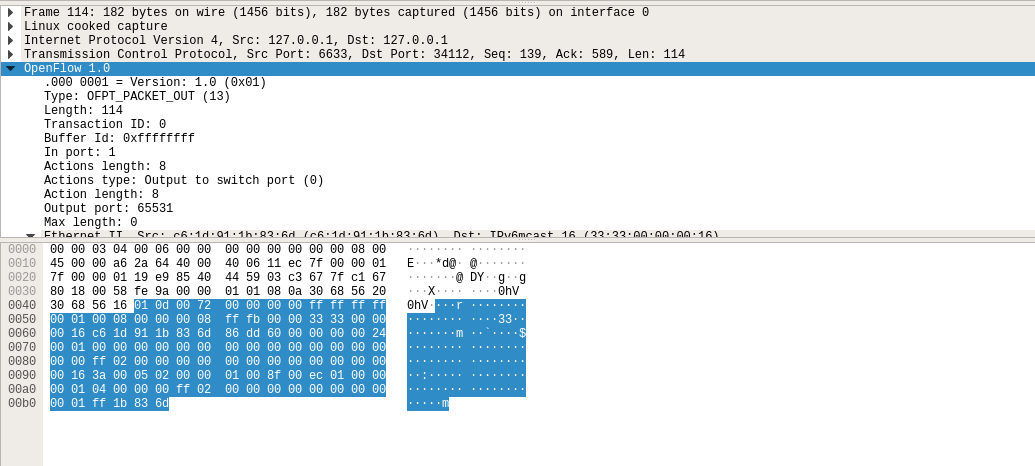
结合Packet_out的结构
struct ofp_packet_out {

    struct ofp_header header;

    uint32_t buffer_id; /*交换机缓存区id,如果为-1则指定的为packet-out消息携带的data字段*/

    uint16_t in_port; /*如果buffer_id为‐1,并且action列表中指定了Output=TABLE的动作,in_port将作为data段数据包的额外匹配信息进行流表查询*/

    uint16_t actions_len; /*action列表的长度,可以用来区分actions和data段*/

    struct ofp_action_header actions[0]; /*动作列表*/

    uint8_t data[0]; /*数据缓存区,可以存储一个以太网帧,可选*/

}
告诉输出到交换机的65531端口
OpenFlow 1.0

    .000 0001 = Version: 1.0 (0x01)

    Type: OFPT_PACKET_OUT (13)

    Length: 114

    Transaction ID: 0

    Buffer Id: 0xffffffff

    In port: 1

    Actions length: 8

    Actions type: Output to switch port (0)

    Action length: 8

    Output port: 65531

    Max length: 0
接下来是另一台交换机(端口35536)与控制器(端口6633)的交互过程

h1 ping h2
- packet_in
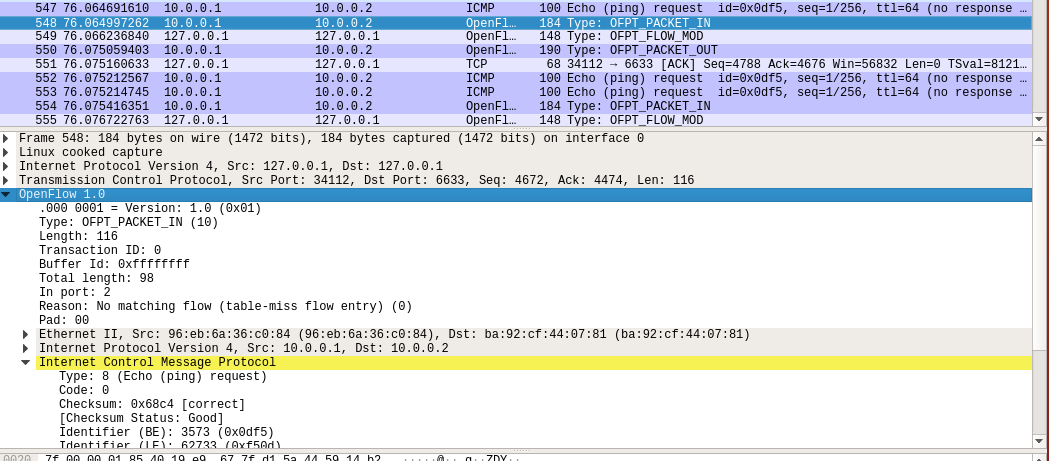
- flow_mod
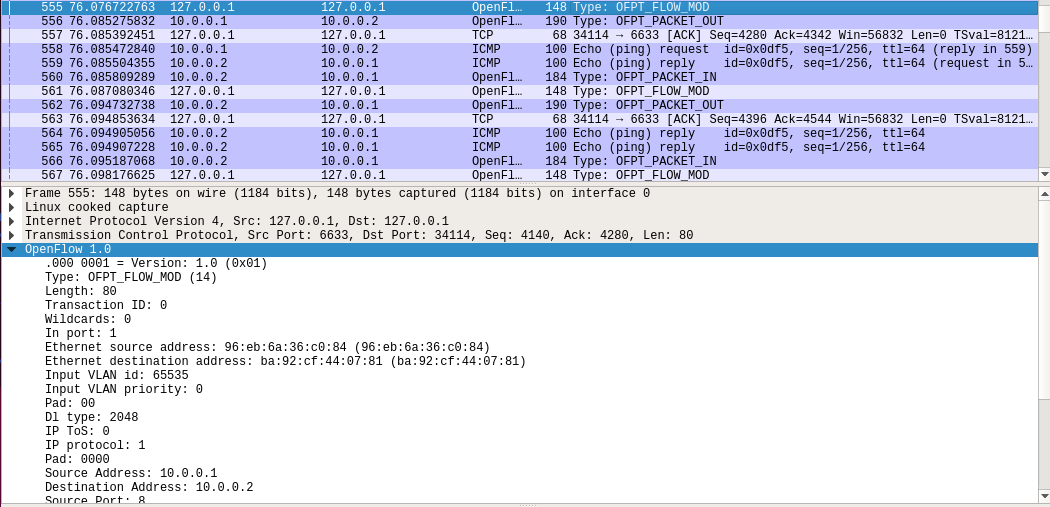
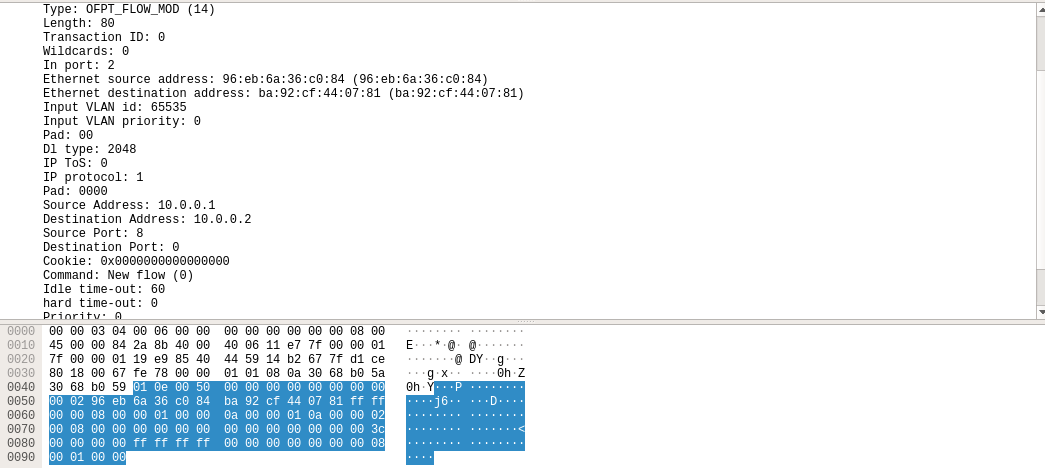
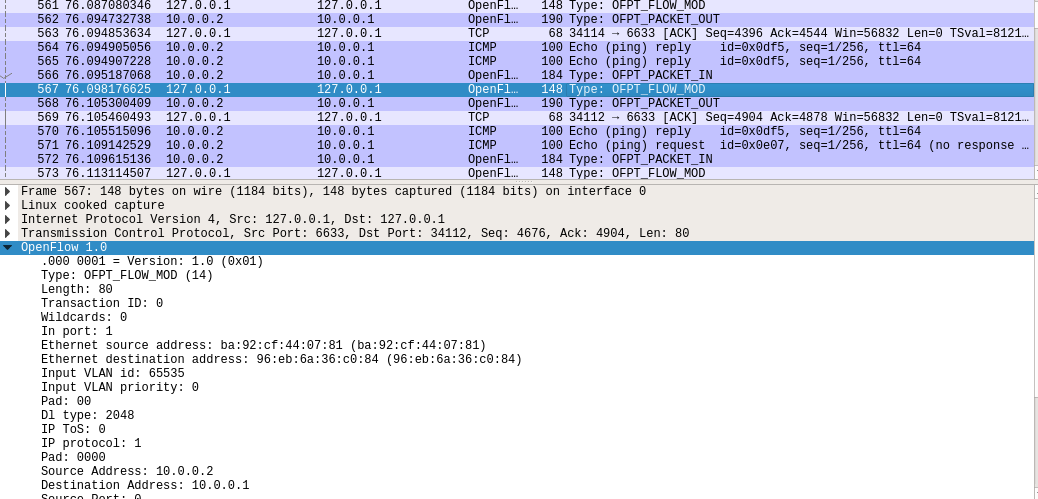
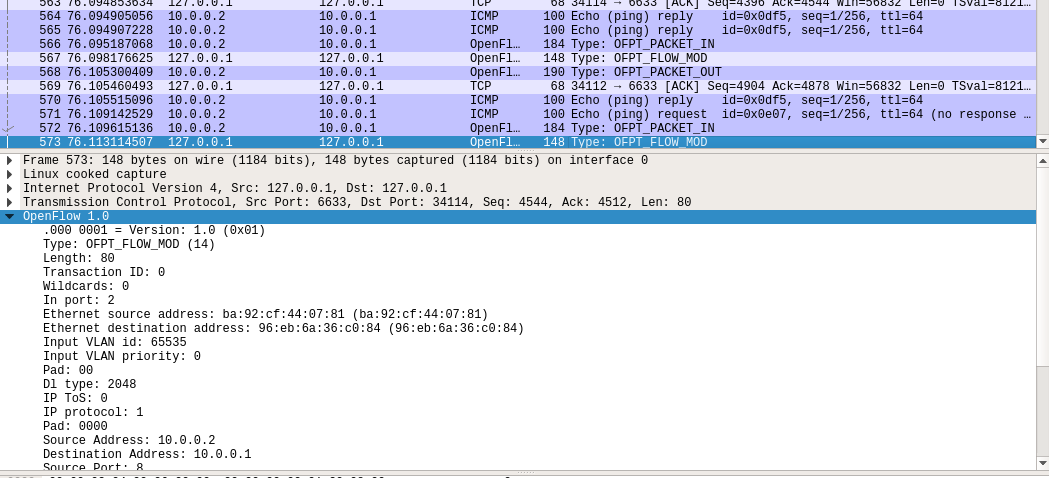
结合flow_mod结构
struct ofp_flow_mod {

    struct ofp_header header;

    struct ofp_match match; /*流表的匹配域*/

    uint64_t cookie; /*流表项标识符*/

    uint16_t command; /*可以是ADD,DELETE,DELETE-STRICT,MODIFY,MODIFY-STRICT*/

    uint16_t idle_timeout; /*空闲超时时间*/

    uint16_t hard_timeout; /*最大生存时间*/

    uint16_t priority; /*优先级,优先级高的流表项优先匹配*/

    uint32_t buffer_id; /*缓存区ID ,用于指定缓存区中的一个数据包按这个消息的action列表处理*/

    uint16_t out_port; /*如果这条消息是用于删除流表则需要提供额外的匹配参数*/

    uint16_t flags; /*标志位,可以用来指示流表删除后是否发送flow‐removed消息,添加流表时是否检查流表重复项,添加的流表项是否为应急流表项。*/

    struct ofp_action_header actions[0]; /*action列表*/

};
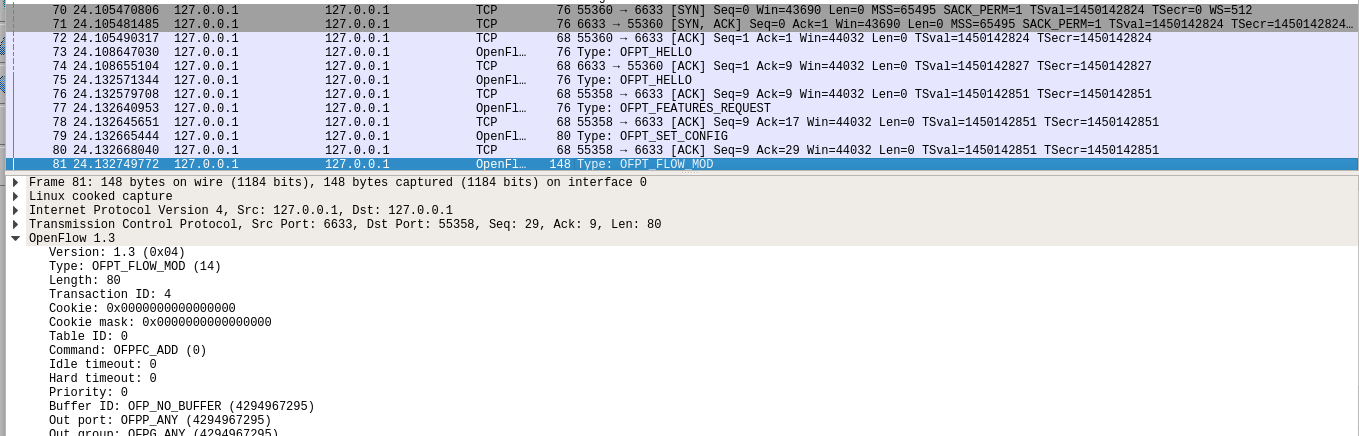
分析抓取的flow_mod数据包,控制器通过6633端口向交换机34112端口、交换机34114端口下发流表项,指导数据的转发处理
PS.把控制器从openflow reference改成ovs controller
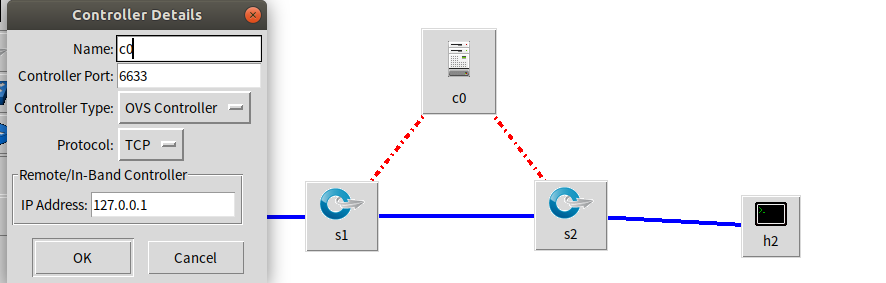
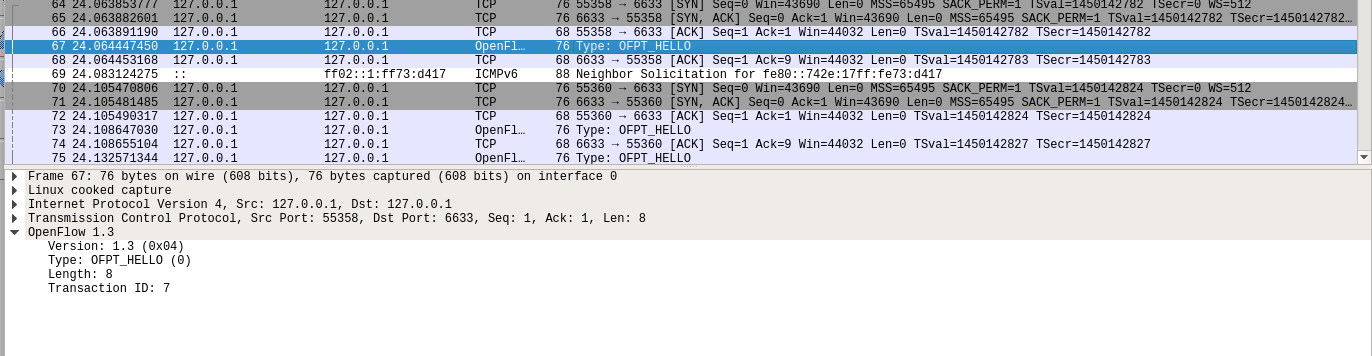
在hello报文中可以发现控制器支持的OpenFlow版本从1.0变成了1.3,因此,经过协商交换机和控制器之间将通过1.3版本的OpenFlow协议进行通信
- flow_mod
2019 SDN上机第3次作业的更多相关文章
- 2019 SDN上机第7次作业
2019 SDN上机第7 次作业 basic补充`/* -- P4_16 -- */ include <core.p4> include <v1model.p4> const ...
- 2019 SDN上机第6次作业
2019 SDN上机第6次作业 1.实验拓扑 (1)实验拓扑 (2)使用Python脚本完成拓扑搭建 from mininet.topo import Topo from mininet.net im ...
- 2019 SDN上机第5次作业
2019 SDN上机第5次作业 1.浏览RYU官网学习RYU控制器的安装和RYU开发入门教程,提交你对于教程代码的理解,包括但不限于: 描述官方教程实现了一个什么样的交换机功能? 答:官方教程实现了一 ...
- 2019 SDN上机第四次作业
2019 SDN上机第4次作业 1. 解压安装OpenDayLight控制器(本次实验统一使用Beryllium版本) 修改环境变量 2. 启动并安装插件 3. 用Python脚本搭建如下拓扑,连接O ...
- 2019 SDN上机第三次作业
2019 SDN上机第三次作业 实验一 利用Mininet仿真平台构建如下图所示的网络拓扑,配置主机h1和h2的IP地址(h1:10.0.0.1,h2:10.0.0.2),测试两台主机之间的网络连通性 ...
- 2019 SDN上机第六次作业
1.实验拓扑 (1)实验拓扑 (2)使用python脚本完成拓扑搭建 from mininet.topo import Topo class Mytopo(Topo): def __init__(se ...
- 2019 SDN上机第五次作业
1.浏览RYU官网学习RYU控制器的安装和RYU开发入门教程,提交你对于教程代码的理解,包括但不限于: 描述官方教程实现了一个什么样的交换机功能? 实现将接收到的数据包发送到所有端口 控制器设定交换机 ...
- 2019 SDN上机第4次作业
1. 解压安装OpenDayLight控制器(本次实验统一使用Beryllium版本) 配置java环境 安装OpenDayLight控制器 2. 启动并安装插件 cd distribution-ka ...
- 2019 SDN上机第2次作业
1.利用mininet创建如下拓扑,要求拓扑支持OpenFlow 1.3协议,主机名.交换机名以及端口对应正确,请给出拓扑Mininet执行结果,展示端口连接情况 1.1拓扑 1.2 代码 #!/us ...
随机推荐
- 2019 SDN上机第4次作业
1. 解压安装OpenDayLight控制器(本次实验统一使用Beryllium版本) 配置java环境 安装OpenDayLight控制器 2. 启动并安装插件 cd distribution-ka ...
- 算法六Z自形变换
将一个给定字符串根据给定的行数,以从上往下.从左到右进行 Z 字形排列. 比如输入字符串为 "LEETCODEISHIRING" 行数为 3 时,排列如下: L C ...
- GV900 Political Explanation
GV900 Political Explanation, 2017/201830 October, 2018Homework assignment 2Due Week 7 (13 November)W ...
- Spring AOP中使用@Aspect注解 面向切面实现日志横切功能详解
引言: AOP为Aspect Oriented Programming的缩写,意为:面向切面编程,通过预编译方式和运行期动态代理实现程序功能的统一维护的一种技术.AOP是OOP的延续,是软件开发中的一 ...
- 第三节: List类型的介绍、生产者消费者模式、发布订阅模式
一. List类型基础 1.介绍 它是一个双向链表,支持左进.左出.右进.右出,所以它即可以充当队列使用,也可以充当栈使用. (1). 队列:先进先出, 可以利用List左进右出,或者右进左出(Lis ...
- mybaties报错:There is no getter for property named 'table' in 'class java.lang.String'
报错是由于xml里获取不到这个table参数 package com.xxx.mapper; import java.util.List; import org.apache.ibatis.annot ...
- EF Core 根据已有的数据库来生成 EF 领域模型
1. 如图: 2. 命令 <Project Sdk="Microsoft.NET.Sdk"> <PropertyGroup> <TargetFrame ...
- kali渗透综合靶机(十八)--FourAndSix2靶机
kali渗透综合靶机(十八)--FourAndSix2靶机 靶机下载地址:https://download.vulnhub.com/fourandsix/FourAndSix2.ova 一.主机发现 ...
- RFC的远程调用-异步
接上篇RFC的远程调用-同步(https://www.cnblogs.com/BruceKing/p/11169930.html). TABLES:USR21. DATA:A TYPE USR21-P ...
- NetCoreApi框架搭建(一、swagger插件使用)
1.首先用vs2017创建新的项目 2.开始引入swagger插件 右击项目=>管理NuGet程序包=>搜索Swashbuckle.AspNetCore点击安装 3.打开Startup.c ...