
2019 SDN上机第3次作业
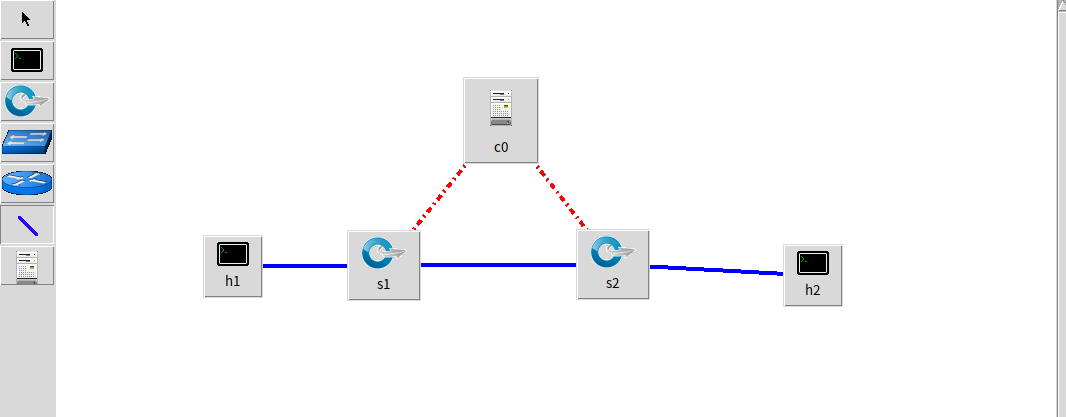
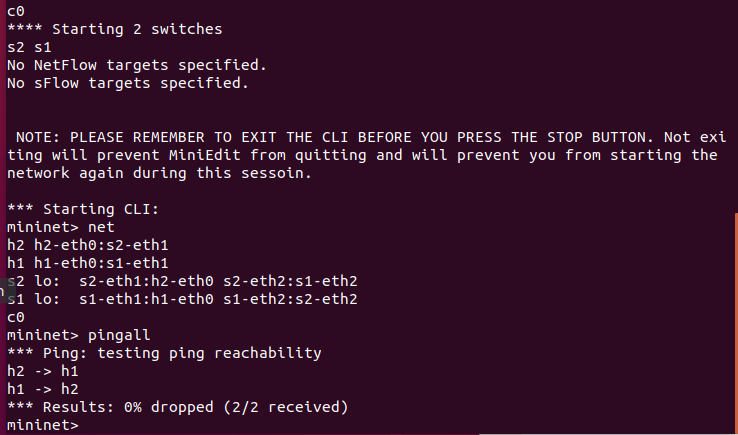
1. 利用Mininet仿真平台构建如下图所示的网络拓扑,配置主机h1和h2的IP地址(h1:10.0.0.1,h2:10.0.0.2),测试两台主机之间的网络连通性
创建拓扑
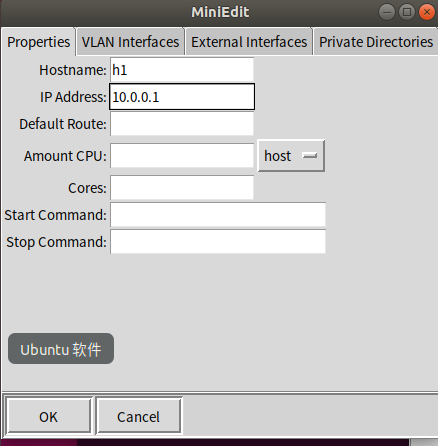
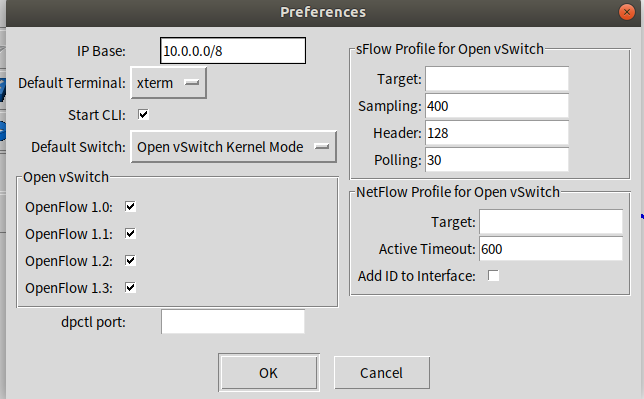
配置主机h1和h2的IP地址(h1:10.0.0.1,h2:10.0.0.2),开启CLI,设置 OpenFlow 1.0 1.1 1.2 1.3
输入pingall查看连通性
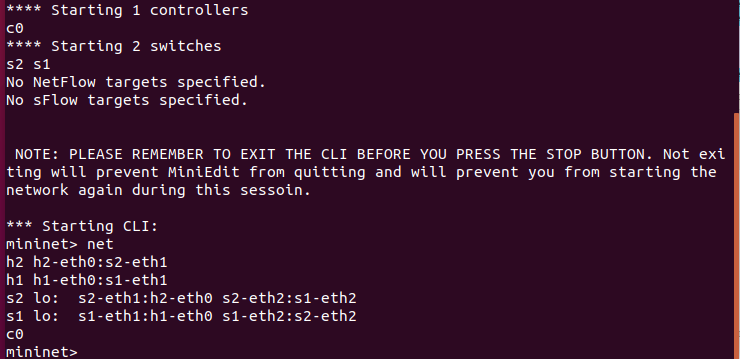
2. 利用Wireshark工具,捕获拓扑中交换机与控制器之间的通信数据,对OpenFlow协议类型的各类报文(hello, features_request, features_reply, set_config, packet_in, packet_out等)进行分析,对照wireshark截图写出你的分析内容
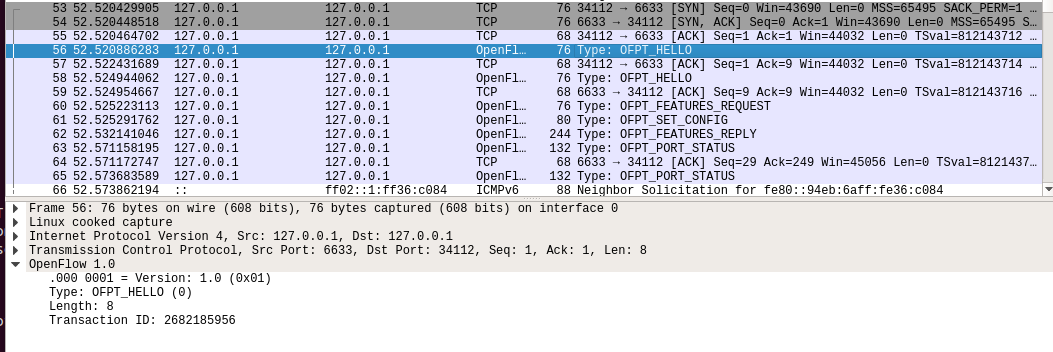
hello
控制器6633端口(我最高能支持OpenFlow 1.0) ---> 交换机34112端口
交换机34112端口(我最高能支持OpenFlow 1.3)--- 控制器6633端口
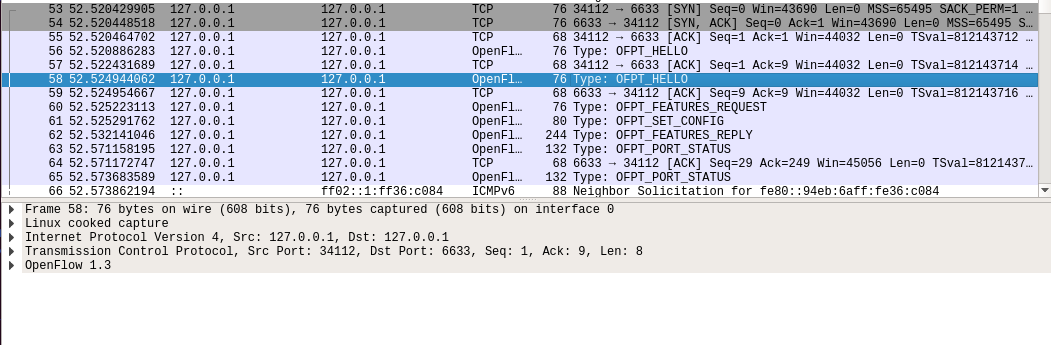
于是双方建立连接,并使用OpenFlow 1.0Features Request
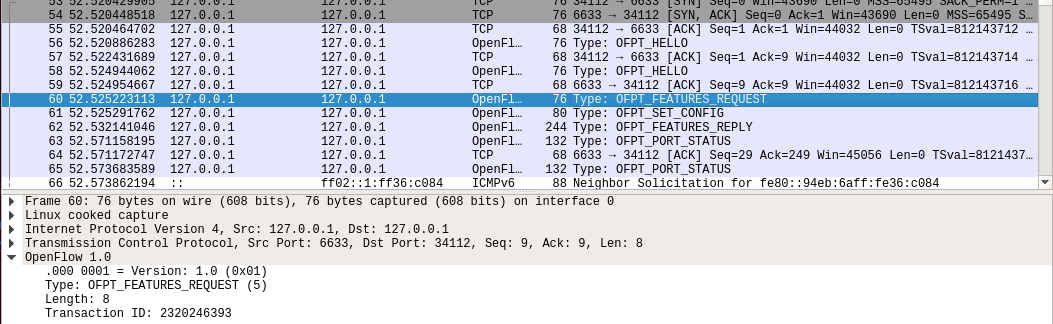
控制器6633端口(我需要你的特征信息) ---> 交换机34112端口
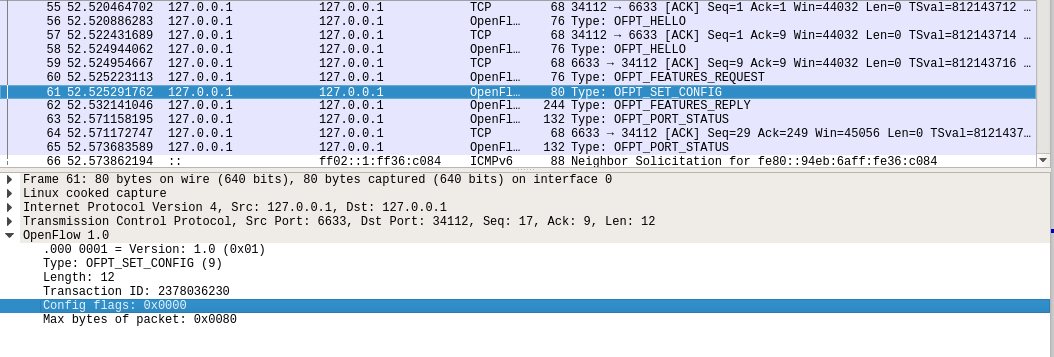
Set Config
控制器6633端口(请按照我给你的flag和max bytes of packet进行配置) ---> 交换机34112端口
Features Reply
交换机34112端口(这是我的特征信息,请查收)--- 控制器6633端口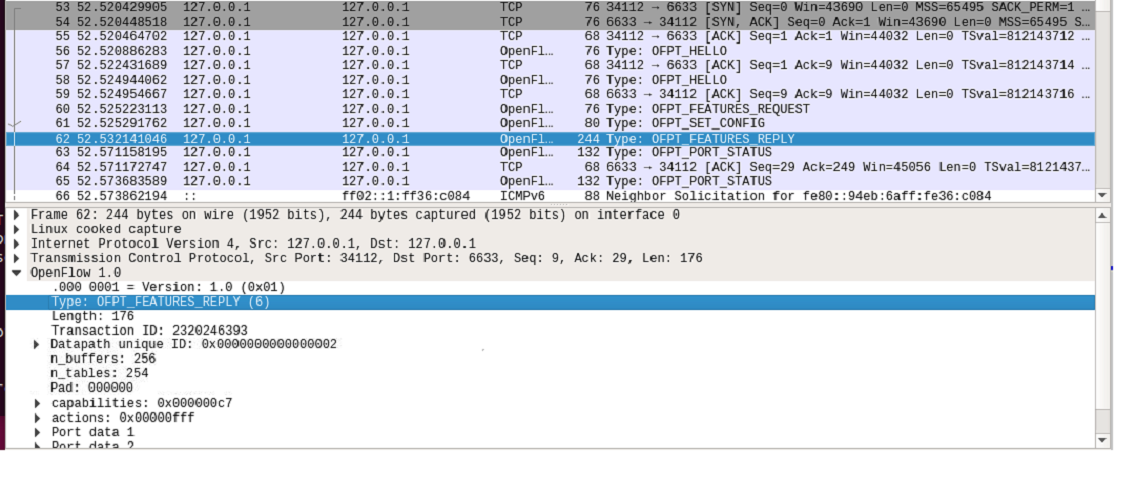
Features 消息包括 OpenFlow Header 和 Features Reply Message
对照Features Reply Message结构
struct ofp_switch_features{

    struct ofp_header header;

    uint64_t datapath_id; /*唯一标识 id 号*/

    uint32_t n_buffers; /*交缓冲区可以缓存的最大数据包个数*/

    uint8_t n_tables; /*流表数量*/

    uint8_t pad[3]; /*align to 64 bits*/

    uint32_t capabilities; /*支持的特殊功能,具体见 ofp_capabilities*/

    uint32_t actions; /*支持的动作,具体见 ofp_actions_type*/

    struct ofp_phy_port ports[0]; /*物理端口描述列表,具体见 ofp_phy_port*/

};
对应到抓取到的报文,逐项查看报文内容
OpenFlow 1.0

    .000 0001 = Version: 1.0 (0x01)

    Type: OFPT_FEATURES_REPLY (6)

    Length: 176

    Transaction ID: 2320246393

    Datapath unique ID: 0x0000000000000002

        MAC addr: 00:00:00_00:00:00 (00:00:00:00:00:00)

        Implementers part: 0x0001

    n_buffers: 256

    n_tables: 254

    Pad: 000000

    capabilities: 0x000000c7

        .... .... .... .... .... .... .... ...1 = Flow statistics: True

        .... .... .... .... .... .... .... ..1. = Table statistics: True

        .... .... .... .... .... .... .... .1.. = Port statistics: True

        .... .... .... .... .... .... .... 0... = Group statistics: False

        .... .... .... .... .... .... ..0. .... = Can reassemble IP fragments: False

        .... .... .... .... .... .... .1.. .... = Queue statistics: True

        .... .... .... .... .... ...0 .... .... = Switch will block looping ports: False

    actions: 0x00000fff

        .... .... .... .... .... .... .... ...1 = Output to switch port: True

        .... .... .... .... .... .... .... ..1. = Set the 802.1q VLAN id: True

        .... .... .... .... .... .... .... .1.. = Set the 802.1q priority: True

        .... .... .... .... .... .... .... 1... = Strip the 802.1q header: True

        .... .... .... .... .... .... ...1 .... = Ethernet source address: True

        .... .... .... .... .... .... ..1. .... = Ethernet destination address: True

        .... .... .... .... .... .... .1.. .... = IP source address: True

        .... .... .... .... .... .... 1... .... = IP destination address: True

        .... .... .... .... .... ...1 .... .... = IP ToS (DSCP field, 6 bits): True

        .... .... .... .... .... ..1. .... .... = TCP/UDP source port: True

        .... .... .... .... .... .1.. .... .... = TCP/UDP destination port: True

        .... .... .... .... .... 1... .... .... = Output to queue: True

    Port data 1

        Port number: 65534

        HW Address: fe:c6:b6:b9:5a:cf (fe:c6:b6:b9:5a:cf)

        Port Name: s1

        Config flags: 0x00000001

            .... .... .... .... .... .... .... ...1 = Port is administratively down: True

            .... .... .... .... .... .... .... ..0. = Disable 802.1D spanning tree on port: False

            .... .... .... .... .... .... .... .0.. = Drop all packets except 802.1D spanning tree packets: False

            .... .... .... .... .... .... .... 0... = Drop received 802.1D STP packets: False

            .... .... .... .... .... .... ...0 .... = Do not include this port when flooding: False

            .... .... .... .... .... .... ..0. .... = Drop packets forwarded to port: False

            .... .... .... .... .... .... .0.. .... = Do not send packet-in msgs for port: False

        State flags: 0x00000001

            .... .... .... .... .... .... .... ...1 = No physical link present: True

        Current features: 0x00000000

            .... .... .... .... .... .... .... ...0 = 10 Mb half-duplex rate support: False

            .... .... .... .... .... .... .... ..0. = 10 Mb full-duplex rate support: False

            .... .... .... .... .... .... .... .0.. = 100 Mb half-duplex rate support: False

            .... .... .... .... .... .... .... 0... = 100 Mb full-duplex rate support: False

            .... .... .... .... .... .... ...0 .... = 1 Gb half-duplex rate support: False

            .... .... .... .... .... .... ..0. .... = 1 Gb full-duplex rate support: False

            .... .... .... .... .... .... .0.. .... = 10 Gb full-duplex rate support: False

            .... .... .... .... .... .... 0... .... = Copper medium: False

            .... .... .... .... .... ...0 .... .... = Fiber medium: False

            .... .... .... .... .... ..0. .... .... = Auto-negotiation: False

            .... .... .... .... .... .0.. .... .... = Pause: False

            .... .... .... .... .... 0... .... .... = Asymmetric pause: False

        Advertised features: 0x00000000

        Features supported: 0x00000000

        Features advertised by peer: 0x00000000

    Port data 2

        Port number: 1

        HW Address: 16:30:eb:96:ed:9b (16:30:eb:96:ed:9b)

        Port Name: s1-eth1

        Config flags: 0x00000000

            .... .... .... .... .... .... .... ...0 = Port is administratively down: False

            .... .... .... .... .... .... .... ..0. = Disable 802.1D spanning tree on port: False

            .... .... .... .... .... .... .... .0.. = Drop all packets except 802.1D spanning tree packets: False

            .... .... .... .... .... .... .... 0... = Drop received 802.1D STP packets: False

            .... .... .... .... .... .... ...0 .... = Do not include this port when flooding: False

            .... .... .... .... .... .... ..0. .... = Drop packets forwarded to port: False

            .... .... .... .... .... .... .0.. .... = Do not send packet-in msgs for port: False

        State flags: 0x00000000

            .... .... .... .... .... .... .... ...0 = No physical link present: False

        Current features: 0x000000c0

            .... .... .... .... .... .... .... ...0 = 10 Mb half-duplex rate support: False

            .... .... .... .... .... .... .... ..0. = 10 Mb full-duplex rate support: False

            .... .... .... .... .... .... .... .0.. = 100 Mb half-duplex rate support: False

            .... .... .... .... .... .... .... 0... = 100 Mb full-duplex rate support: False

            .... .... .... .... .... .... ...0 .... = 1 Gb half-duplex rate support: False

            .... .... .... .... .... .... ..0. .... = 1 Gb full-duplex rate support: False

            .... .... .... .... .... .... .1.. .... = 10 Gb full-duplex rate support: True

            .... .... .... .... .... .... 1... .... = Copper medium: True

            .... .... .... .... .... ...0 .... .... = Fiber medium: False

            .... .... .... .... .... ..0. .... .... = Auto-negotiation: False

            .... .... .... .... .... .0.. .... .... = Pause: False

            .... .... .... .... .... 0... .... .... = Asymmetric pause: False

        Advertised features: 0x00000000

        Features supported: 0x00000000

        Features advertised by peer: 0x00000000

    Port data 3

        Port number: 2

        HW Address: de:73:62:c2:a2:2a (de:73:62:c2:a2:2a)

        Port Name: s1-eth2

        Config flags: 0x00000000

            .... .... .... .... .... .... .... ...0 = Port is administratively down: False

            .... .... .... .... .... .... .... ..0. = Disable 802.1D spanning tree on port: False

            .... .... .... .... .... .... .... .0.. = Drop all packets except 802.1D spanning tree packets: False

            .... .... .... .... .... .... .... 0... = Drop received 802.1D STP packets: False

            .... .... .... .... .... .... ...0 .... = Do not include this port when flooding: False

            .... .... .... .... .... .... ..0. .... = Drop packets forwarded to port: False

            .... .... .... .... .... .... .0.. .... = Do not send packet-in msgs for port: False

        State flags: 0x00000000

            .... .... .... .... .... .... .... ...0 = No physical link present: False

        Current features: 0x000000c0

            .... .... .... .... .... .... .... ...0 = 10 Mb half-duplex rate support: False

            .... .... .... .... .... .... .... ..0. = 10 Mb full-duplex rate support: False

            .... .... .... .... .... .... .... .0.. = 100 Mb half-duplex rate support: False

            .... .... .... .... .... .... .... 0... = 100 Mb full-duplex rate support: False

            .... .... .... .... .... .... ...0 .... = 1 Gb half-duplex rate support: False

            .... .... .... .... .... .... ..0. .... = 1 Gb full-duplex rate support: False

            .... .... .... .... .... .... .1.. .... = 10 Gb full-duplex rate support: True

            .... .... .... .... .... .... 1... .... = Copper medium: True

            .... .... .... .... .... ...0 .... .... = Fiber medium: False

            .... .... .... .... .... ..0. .... .... = Auto-negotiation: False

            .... .... .... .... .... .0.. .... .... = Pause: False

            .... .... .... .... .... 0... .... .... = Asymmetric pause: False

        Advertised features: 0x00000000

        Features supported: 0x00000000

        Features advertised by peer: 0x00000000
Packet_in
交换机34112端口(有数据包进来,请指示)--- 控制器6633端口
结合Packet_in的结构
struct ofp_packet_in {

    struct ofp_header header;

    uint32_t buffer_id; /*Packet-in消息所携带的数据包在交换机缓存区中的ID*/

    uint16_t total_len; /*data字段的长度*/

    uint16_t in_port; /*数据包进入交换机时的端口号*/

    uint8_t reason; /*发送Packet-in消息的原因,具体见 ofp_packet_in_reason*/

    uint8_t pad;

    uint8_t data[0]; /*携带的数据包*/

};
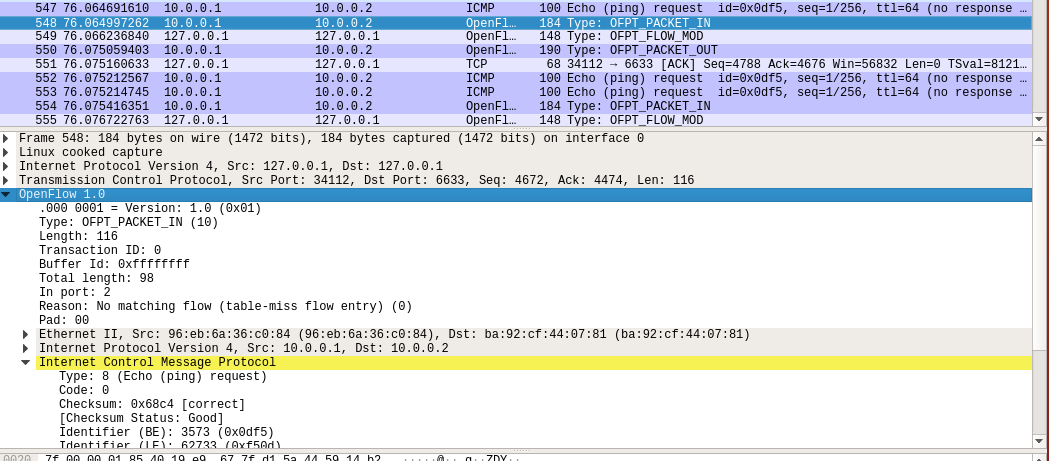
分析抓取的数据包,可以发现是因为交换机发现此时自己并没有匹配的流表(Reason: No matching flow (table-miss flow entry) (0)),所以要问控制器如何处理
OpenFlow 1.0

     .000 0001 = Version: 1.0 (0x01)

    Type: OFPT_PACKET_IN (10)

    Length: 104

    Transaction ID: 0

    Buffer Id: 0xffffffff

    Total length: 86

    In port:2

    Reason: No matching flow (table-miss flow entry) (0)

    Pad: 00

    Ethernet II, Src: c6:1d:91:1b:83:6d (c6:1d:91:1b:83:6d), Dst: IPv6mcast_16 (33:33:00:00:00:16)

        Destination: IPv6mcast_16 (33:33:00:00:00:16)

            Address: IPv6mcast_16 (33:33:00:00:00:16)

            .... ..1. .... .... .... .... = LG bit: Locally administered address (this is NOT the factory default)

            .... ...1 .... .... .... .... = IG bit: Group address (multicast/broadcast)

        Source: c6:1d:91:1b:83:6d (c6:1d:91:1b:83:6d)

            Address: c6:1d:91:1b:83:6d (c6:1d:91:1b:83:6d)

            .... ..1. .... .... .... .... = LG bit: Locally administered address (this is NOT the factory default)

            .... ...0 .... .... .... .... = IG bit: Individual address (unicast)

        Type: IPv6 (0x86dd)

    Internet Protocol Version 6, Src: ::, Dst: ff02::16

        0110 .... = Version: 6

        .... 0000 0000 .... .... .... .... .... = Traffic Class: 0x00 (DSCP: CS0, ECN: Not-ECT)

            .... 0000 00.. .... .... .... .... .... = Differentiated Services Codepoint: Default (0)

            .... .... ..00 .... .... .... .... .... = Explicit Congestion Notification: Not ECN-Capable Transport (0)

        .... .... .... 0000 0000 0000 0000 0000 = Flow Label: 0x00000

        Payload Length: 36

        Next Header: IPv6 Hop-by-Hop Option (0)

        Hop Limit: 1

        Source: ::

        Destination: ff02::16

        IPv6 Hop-by-Hop Option

            Next Header: ICMPv6 (58)

            Length: 0

            [Length: 8 bytes]

            Router Alert

                Type: Router Alert (0x05)

                    00.. .... = Action: Skip and continue (0)

                    ..0. .... = May Change: No

                    ...0 0101 = Low-Order Bits: 0x05

                Length: 2

                Router Alert: MLD (0)

            PadN

                Type: PadN (0x01)

                    00.. .... = Action: Skip and continue (0)

                    ..0. .... = May Change: No

                    ...0 0001 = Low-Order Bits: 0x01

                Length: 0

                PadN: <none>

    Internet Control Message Protocol v6

        Type: Multicast Listener Report Message v2 (143)

        Code: 0

        Checksum: 0xec01 [correct]

        [Checksum Status: Good]

        Reserved: 0000

        Number of Multicast Address Records: 1

        Multicast Address Record Changed to exclude: ff02::1:ff1b:836d

            Record Type: Changed to exclude (4)

            Aux Data Len: 0

            Number of Sources: 0

            Multicast Address: ff02::1:ff1b:836d
Packet_out
控制器6633端口(请按照我给你的action进行处理) ---> 交换机34112端口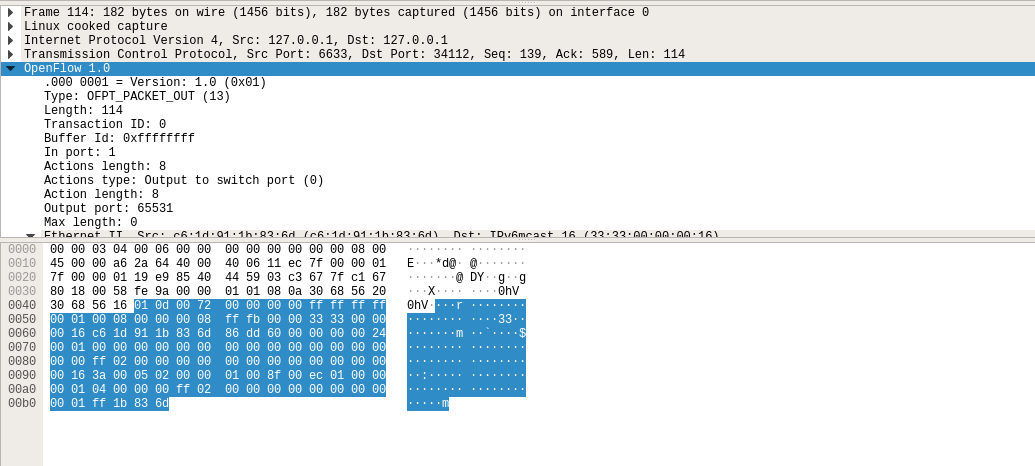
结合Packet_out的结构
struct ofp_packet_out {

    struct ofp_header header;

    uint32_t buffer_id; /*交换机缓存区id,如果为-1则指定的为packet-out消息携带的data字段*/

    uint16_t in_port; /*如果buffer_id为‐1,并且action列表中指定了Output=TABLE的动作,in_port将作为data段数据包的额外匹配信息进行流表查询*/

    uint16_t actions_len; /*action列表的长度,可以用来区分actions和data段*/

    struct ofp_action_header actions[0]; /*动作列表*/

    uint8_t data[0]; /*数据缓存区,可以存储一个以太网帧,可选*/

}
告诉输出到交换机的65531端口
OpenFlow 1.0

    .000 0001 = Version: 1.0 (0x01)

    Type: OFPT_PACKET_OUT (13)

    Length: 114

    Transaction ID: 0

    Buffer Id: 0xffffffff

    In port: 1

    Actions length: 8

    Actions type: Output to switch port (0)

    Action length: 8

    Output port: 65531

    Max length: 0
接下来是另一台交换机(端口35536)与控制器(端口6633)的交互过程

h1 ping h2
- packet_in
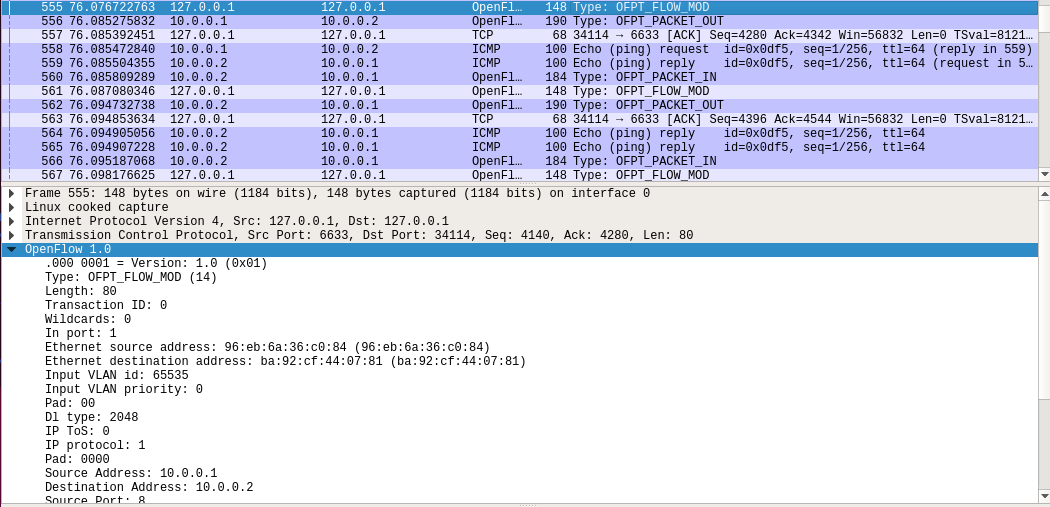
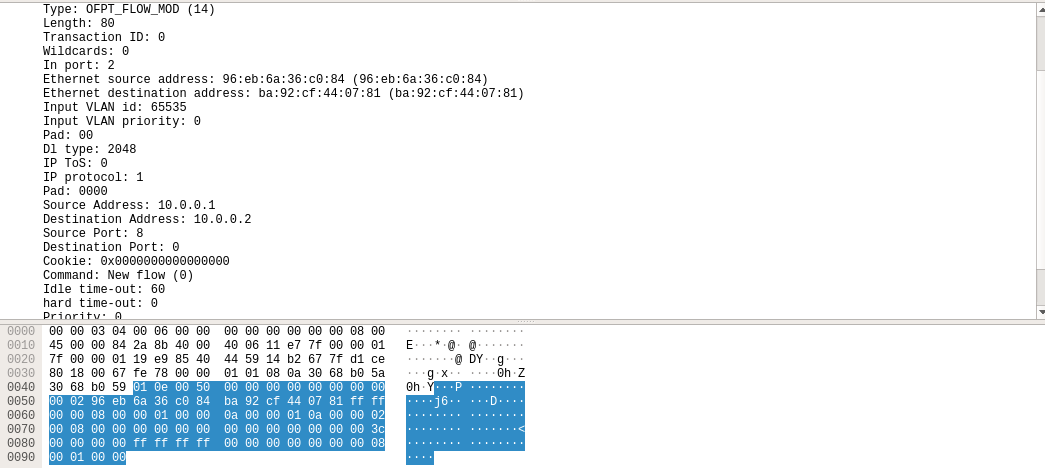
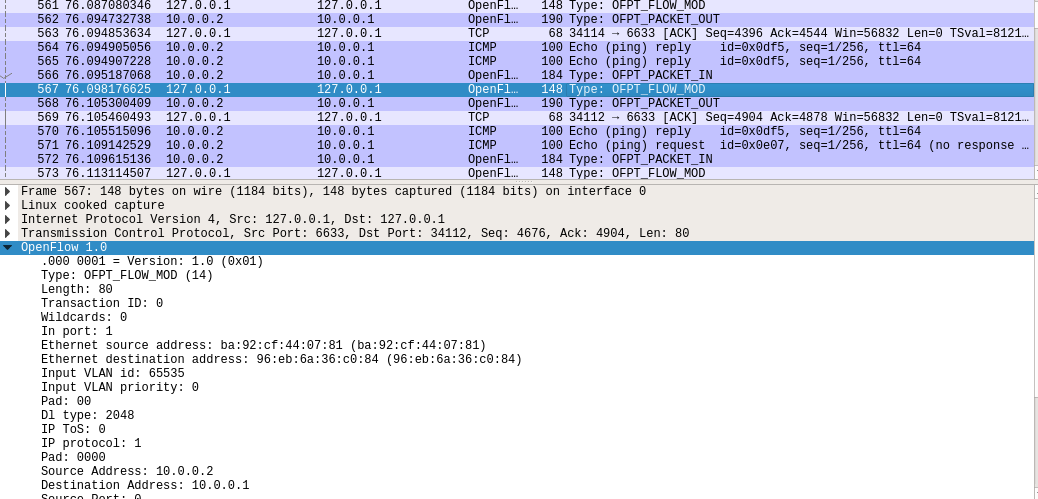
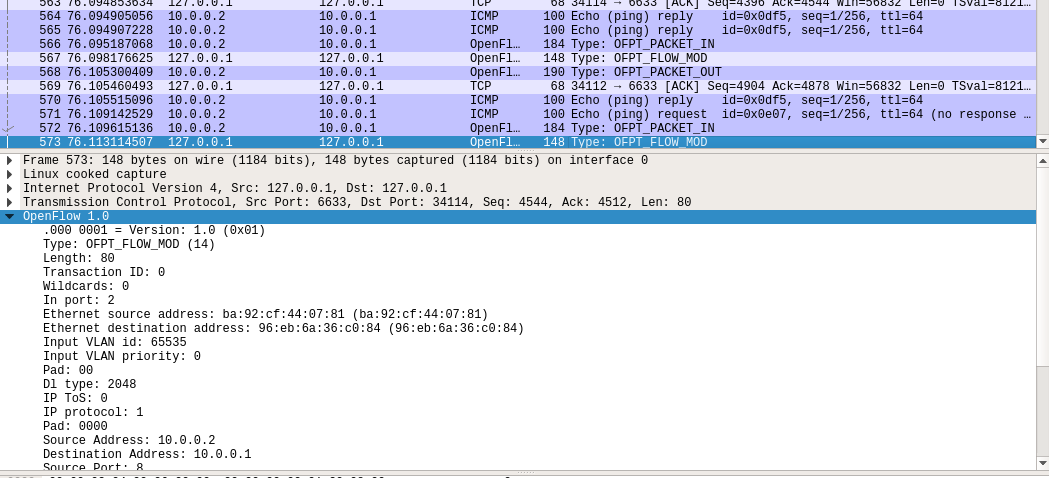
- flow_mod
结合flow_mod结构
struct ofp_flow_mod {

    struct ofp_header header;

    struct ofp_match match; /*流表的匹配域*/

    uint64_t cookie; /*流表项标识符*/

    uint16_t command; /*可以是ADD,DELETE,DELETE-STRICT,MODIFY,MODIFY-STRICT*/

    uint16_t idle_timeout; /*空闲超时时间*/

    uint16_t hard_timeout; /*最大生存时间*/

    uint16_t priority; /*优先级,优先级高的流表项优先匹配*/

    uint32_t buffer_id; /*缓存区ID ,用于指定缓存区中的一个数据包按这个消息的action列表处理*/

    uint16_t out_port; /*如果这条消息是用于删除流表则需要提供额外的匹配参数*/

    uint16_t flags; /*标志位,可以用来指示流表删除后是否发送flow‐removed消息,添加流表时是否检查流表重复项,添加的流表项是否为应急流表项。*/

    struct ofp_action_header actions[0]; /*action列表*/

};
分析抓取的flow_mod数据包,控制器通过6633端口向交换机34112端口、交换机34114端口下发流表项,指导数据的转发处理
PS.把控制器从openflow reference改成ovs controller
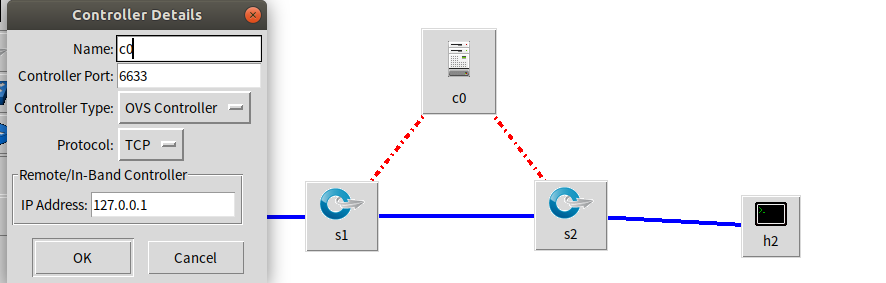
在hello报文中可以发现控制器支持的OpenFlow版本从1.0变成了1.3,因此,经过协商交换机和控制器之间将通过1.3版本的OpenFlow协议进行通信
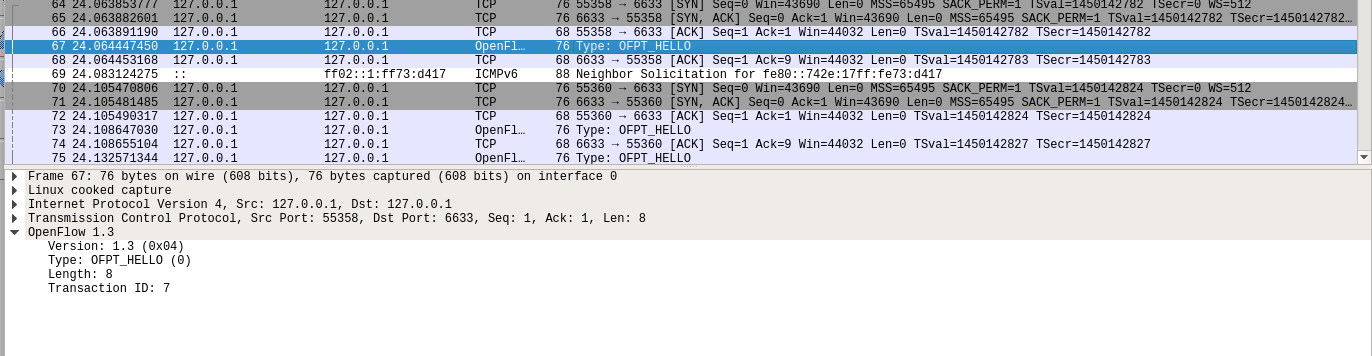
- flow_mod
2019 SDN上机第3次作业的更多相关文章
- 2019 SDN上机第7次作业
2019 SDN上机第7 次作业 basic补充`/* -- P4_16 -- */ include <core.p4> include <v1model.p4> const ...
- 2019 SDN上机第6次作业
2019 SDN上机第6次作业 1.实验拓扑 (1)实验拓扑 (2)使用Python脚本完成拓扑搭建 from mininet.topo import Topo from mininet.net im ...
- 2019 SDN上机第5次作业
2019 SDN上机第5次作业 1.浏览RYU官网学习RYU控制器的安装和RYU开发入门教程,提交你对于教程代码的理解,包括但不限于: 描述官方教程实现了一个什么样的交换机功能? 答:官方教程实现了一 ...
- 2019 SDN上机第四次作业
2019 SDN上机第4次作业 1. 解压安装OpenDayLight控制器(本次实验统一使用Beryllium版本) 修改环境变量 2. 启动并安装插件 3. 用Python脚本搭建如下拓扑,连接O ...
- 2019 SDN上机第三次作业
2019 SDN上机第三次作业 实验一 利用Mininet仿真平台构建如下图所示的网络拓扑,配置主机h1和h2的IP地址(h1:10.0.0.1,h2:10.0.0.2),测试两台主机之间的网络连通性 ...
- 2019 SDN上机第六次作业
1.实验拓扑 (1)实验拓扑 (2)使用python脚本完成拓扑搭建 from mininet.topo import Topo class Mytopo(Topo): def __init__(se ...
- 2019 SDN上机第五次作业
1.浏览RYU官网学习RYU控制器的安装和RYU开发入门教程,提交你对于教程代码的理解,包括但不限于: 描述官方教程实现了一个什么样的交换机功能? 实现将接收到的数据包发送到所有端口 控制器设定交换机 ...
- 2019 SDN上机第4次作业
1. 解压安装OpenDayLight控制器(本次实验统一使用Beryllium版本) 配置java环境 安装OpenDayLight控制器 2. 启动并安装插件 cd distribution-ka ...
- 2019 SDN上机第2次作业
1.利用mininet创建如下拓扑,要求拓扑支持OpenFlow 1.3协议,主机名.交换机名以及端口对应正确,请给出拓扑Mininet执行结果,展示端口连接情况 1.1拓扑 1.2 代码 #!/us ...
随机推荐
- Python基础-day02-3
循环 目标 程序的三大流程 while 循环基本使用 break 和 continue while 循环嵌套 01. 程序的三大流程 在程序开发中,一共有三种流程方式: 顺序 -- 从上向下,顺序执行 ...
- [开源]OSharpNS 步步为营系列 - 4. 添加业务对外API
什么是OSharp OSharpNS全称OSharp Framework with .NetStandard2.0,是一个基于.NetStandard2.0开发的一个.NetCore快速开发框架.这个 ...
- 响应国家号召 1+X 证书 Web 前端开发考试模拟题
1+x证书Web前端开发初级理论考试样题2019 http://blog.zh66.club/index.php/archives/149/ 1+x证书Web前端开发初级实操考试样题2019 http ...
- Spring、SpringMVC、Hibernate整合 ----超详细教程
一.数据库表 /* Navicat MySQL Data Transfer Source Server : 本地连接 Source Server Version : 50720 Source Host ...
- Zookeeper 到底能帮我们解决哪些问题?
Zookeeper 从设计模式角度来看,是一个基于观察者模式设计的分布式服务管理框架,它负责存储和管理大家都关心的数据,然后接受观察者的注册,一旦这些数据的状态发生变化,Zookeeper 就将负责通 ...
- SQL Server 判断各种对象是否存在和sysobjects的关系
一.判断表是否存在 object_id():获取表的ID,其中N表示Unicode类型.可以支持不同语种的对象名 ) drop table [dbo].[表名] 二.判断要创建的存储过程名是否存在 ) ...
- MySQL分析数据运行状态利器【show full processlist】
原文地址:https://www.cnblogs.com/shihuc/p/8733460.html 今天的主角是: SHOW [FULL] PROCESSLIST show full process ...
- 基于opencv 识别、定位二维码 (c++版)
前言 因工作需要,需要定位图片中的二维码:我遂查阅了相关资料,也学习了opencv开源库.通过一番努力,终于很好的实现了二维码定位.本文将讲解如何使用opencv定位二维码. 定位二维码不仅仅是为了识 ...
- Java问题记录——OutOfMemoryError
Java问题记录——OutOfMemoryError 摘要:本文主要分析了OutOfMemoryError的产生原因. 没有分页导致占用大量内存 查看进程 使用 jps 命令查看当前运行的Java进程 ...
- 探究java对象头
探究java对象头 研究java对象头,我这里先截取Hotspot中关于对象头的描述,本文研究基于64-bit HotSpot VM 文件路径 openjdk-jdk8u-jdk8u\hotspot\ ...