
QWidget 的 close 与 Qt::WA_DeleteOnClose
【1】close 与 Qt::WA_DeleteOnClose简介
1.1 Qt源码
 /*!

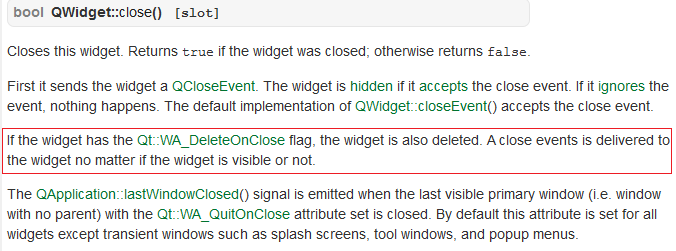
     Closes this widget. Returns \c true if the widget was closed;

     otherwise returns \c false.

     First it sends the widget a QCloseEvent. The widget is

     \l{hide()}{hidden} if it \l{QCloseEvent::accept()}{accepts}

     the close event. If it \l{QCloseEvent::ignore()}{ignores}

     the event, nothing happens. The default

     implementation of QWidget::closeEvent() accepts the close event.

     If the widget has the Qt::WA_DeleteOnClose flag, the widget

     is also deleted. A close events is delivered to the widget no

     matter if the widget is visible or not.

     The \l QApplication::lastWindowClosed() signal is emitted when the

     last visible primary window (i.e. window with no parent) with the

     Qt::WA_QuitOnClose attribute set is closed. By default this

     attribute is set for all widgets except transient windows such as

     splash screens, tool windows, and popup menus.

 */

 bool QWidget::close()

 {

     return d_func()->close_helper(QWidgetPrivate::CloseWithEvent);

 }

 /*!

     This event handler is called with the given \a event when Qt receives a window

     close request for a top-level widget from the window system.

     By default, the event is accepted and the widget is closed. You can reimplement

     this function to change the way the widget responds to window close requests.

     For example, you can prevent the window from closing by calling \l{QEvent::}{ignore()}

     on all events.

     Main window applications typically use reimplementations of this function to check

     whether the user's work has been saved and ask for permission before closing.

     For example, the \l{Application Example} uses a helper function to determine whether

     or not to close the window:

     \snippet mainwindows/application/mainwindow.cpp 3

     \snippet mainwindows/application/mainwindow.cpp 4

     \sa event(), hide(), close(), QCloseEvent, {Application Example}

 */

 void QWidget::closeEvent(QCloseEvent *event)

 {

     event->accept();

 }
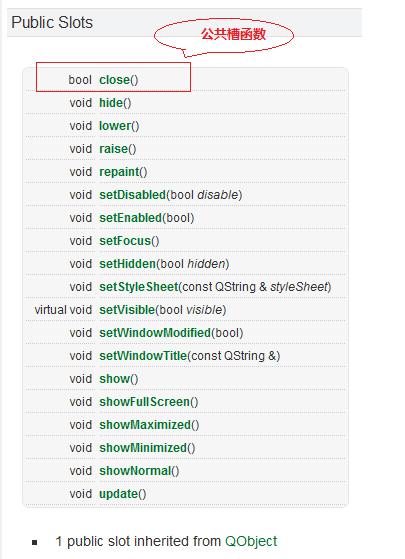
1.2 公共槽函数
1.3 帮助文档
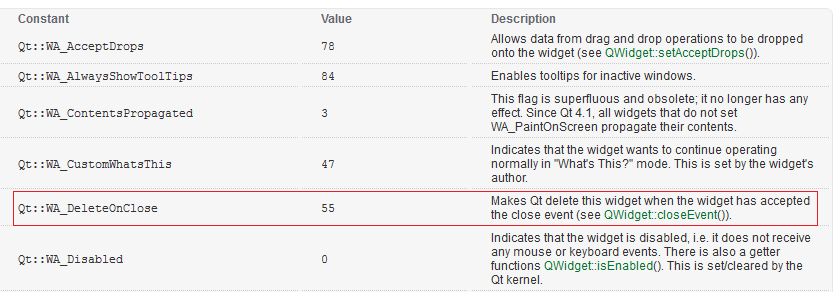
1.4 Qt::WA_DeleteOnClose
【2】实例代码
1.1 TWidget.h
 #ifndef TWIDGET_H

 #define TWIDGET_H

 #include <QWidget>

 #include <QDebug>

 namespace Ui

 {

     class TWidget;

 }

 class MyWidget : public QWidget

 {

 public:

     MyWidget(QWidget *parent = NULL);

     ~MyWidget();

 };

 class TWidget : public QWidget

 {

     Q_OBJECT

 public:

     explicit TWidget(QWidget *parent = );

     ~TWidget();

 private slots:

     void onPushButtonPressed();

 private:

     Ui::TWidget *m_pUI;

     MyWidget *m_pMyWidget;

 };

 #endif // TWIDGET_H
1.2 TWidget.cpp
 #include "TWidget.h"

 #include "ui_TWidget.h"

 MyWidget::MyWidget(QWidget *parent)

     : QWidget(parent)

 {

     qDebug() << "construct :: MyWidget";

 }

 MyWidget::~MyWidget()

 {

     qDebug() << "destruct :: ~MyWidget";

 }

 TWidget::TWidget(QWidget *parent)

     : QWidget(parent)

     , m_pUI(new Ui::TWidget)

     , m_pMyWidget(NULL)

 {

     m_pUI->setupUi(this);

     m_pMyWidget = new MyWidget();

     m_pMyWidget->setFixedSize(, );

     m_pMyWidget->setAttribute(Qt::WA_DeleteOnClose); // 设置属性Qt::WA_DeleteOnClose

     connect(m_pUI->pushButton, &QPushButton::pressed, this, &TWidget::onPushButtonPressed);

 }

 TWidget::~TWidget()

 {

     if (m_pUI != NULL)

     {

         delete m_pUI;

         m_pUI = NULL;

     }

     if (m_pMyWidget != NULL)

     {

         delete m_pMyWidget;

         m_pMyWidget = NULL;

     }

 }

 void TWidget::onPushButtonPressed()

 {

     if (m_pMyWidget != NULL)

     {

         m_pMyWidget->show();

     }

 }
1.3 main.cpp
 #include "TWidget.h"

 #include <QApplication>

 int main(int argc, char *argv[])

 {

     QApplication a(argc, argv);

     TWidget w;

     w.show();

     return a.exec();

 }
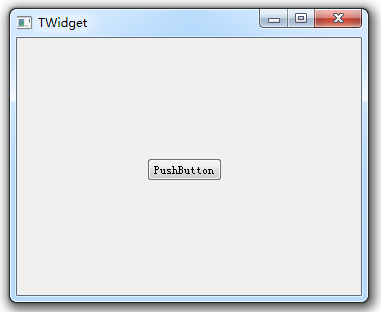
1.4 TWidget.ui 界面(UI很简单,仅仅为了验证问题,只放置了一个PushButton)
1.5 运行结果:
注意观察,现象如下:
第一次点击 pushButton 按钮,对话框弹出,关闭对话框。打印日志如下:
 construct :: MyWidget

 destruct :: ~MyWidget
第二次点击 pushButton 按钮,程序崩溃。
1.6 注释掉设置属性行(即TWidget.cpp 第24行),再编译、运行、一切正常。
【3】总结
如果设置窗体的Qt::WA_DeleteOnClose属性:调用close方法时,窗体将被析构掉。
Good Good Study, Day Day Up.
顺序 选择 循环 总结
QWidget 的 close 与 Qt::WA_DeleteOnClose的更多相关文章
- Qt浅谈之一:内存泄露(总结),对于QWidget可以setAttribute(Qt::WA_DeleteOnClose),而且绝对不能手动删除栈上的对象
一.简介 Qt内存管理机制:Qt 在内部能够维护对象的层次结构.对于可视元素,这种层次结构就是子组件与父组件的关系:对于非可视元素,则是一个对象与另一个对象的从属关系.在 Qt 中,在 Qt 中,删除 ...
- Qt 程序退出时断言错误——_BLOCK_TYPE_IS_VALID(pHead->nBlockUse),由setAttribute(Qt::WA_DeleteOnClose)引起
最近在学习QT,自己仿写了一个简单的QT绘图程序,但是在退出时总是报错,断言错误: 报错主要问题在_BLOCK_TYPE_IS_VALID(pHead->nBlockUse),是在关闭窗口时报的 ...
- Qt 窗口属性简介之Qt::WA_DeleteOnClose
一.简述 今天介绍一个简单的窗口属性——Qt::WA_DeleteOnClose. 在正常创建窗口后,我们一般会调用close()方法来关闭窗口,这里我们看一下Q助手中关于close()方法的介绍. ...
- Qt 窗体的模态与非模态(setWindowFlags(Qt::WindowStaysOnTopHint);比较有用,还有Qt::WA_DeleteOnClose)
概念 模态对话框(Modal Dialog)与非模态对话框(Modeless Dialog)的概念不是Qt所独有的,在各种不同的平台下都存在.又有叫法是称为模式对话框,无模式对话框等. 1. 模态窗体 ...
- Qt::WA_DeleteOnClose 造成的野指针问题
今天遇到了一个由Qt::WA_DeleteOnClose造成的野指针问题,在网上搜到的一个求助贴如下(http://bbs.csdn.net/topics/380182058): 主窗口类QMainW ...
- Qt的模态对话框和非模态对话框 经常使用setAttribute (Qt::WA_DeleteOnClose)
模态对话框就是指在子对话框弹出时,焦点被强行集中于该子对话框,子对话框不关闭,用户将无法操作其他的窗口.非模态相反,用户仍然可以操作其他的窗口,包括该子对话框的父对话框. 如果从线程角度来讲,模态对话 ...
- QWidget居中显示(qt窗口坐标原点是在”左上角”的,有图)
转载请说明出处, 并附上原文链接http://blog.csdn.net/qq907482638/article/details/72189014. 问题描述 在Qt学习过程中,在让QDialog居中 ...
- QT 随笔目录
[1]基础部分 <信号和槽机制> <信号与槽知识点> <QString 与 string转换> <QT 继承QWidget && 继承QDia ...
- QT中QWidget类简介
一.详细描述 QWidget类是所有用户界面对象的基类.通俗的来讲,Qt基本上所有的UI类都是由QWidget继承出来的,而QWidget继承于QObject, 大家可以查阅Qt source 即可 ...
随机推荐
- HashMap如何解决取Value值为Null
场景: 用HashMap方法时候,取Keys时候自认为敲的肯定是准确无误,然后能得到对应的Values 值. 但写脚本代码时候不好习惯,没事总喜欢敲个空格建,导致取Keys之后多空格. Featur ...
- 使用Apache CXF根据wsdl文件生成代码
1.去官网下载,我用的是apache-cxf-2.5.10.zip 2.解压 3.通过命令行进入Apache CXF的bin目录,如我的目录是D:\BIS\axis2\apache-cxf-2.7.1 ...
- 第一章:深入.NET框架
1..net框架结构 主要包含公共语言运行时(CLR)和框架类库(.NET Framework 类库 ,FCL) 2.CLR 1.对于一个将要面向.NET平台进行开发的人来说,了解一下.NET平台的 ...
- python序列元素引用容易出错的地方
python序列分列表和元组,不同之处在于元组的元素不能修改.元组使用小括号,列表使用方括号.元组创建很简单,只需要在括号中添加元素,并使用逗号隔开即可.举个简单的例子,a1是一个元组,a2是一个列表 ...
- what's the python之内置函数
what's the 内置函数? 内置函数,内置函数就是python本身定义好的,我们直接拿来就可以用的函数.(python中一共有68中内置函数.) Built-in Functions ...
- MySQL 5.7 并行复制
一.缘由: 某天看到主从复制延时的告警有点频繁,就想着是不是彻底可以解决一下. 一般主从复制,有三个线程参与,都是单线程:Binlog Dump(主) ----->IO Thread (从) - ...
- ansible进阶模板和角色使用
使用场景 Ansible 由于采用ssh远程连接登录管理,虽然不需要额外安装agent,但是速度慢效率低.不适合管理大规模的主机一般最大规模在200-300台,超大规模的主机管理适合使用puppet ...
- Vim配色方案报错解决方案
求Linux大神解答,我刚刚从网上下载了个vim的配色方案,配置好后启动vim就报如下错误,怎么处理呢?小白,求不被鄙视~ 处理 /usr/share/vim/vim72/colors/rainbow ...
- [js]js的表单验证
http://uule.iteye.com/blog/2183622 表单验证类 <form class="form" method="post" id= ...
- Tensorflow实现LeNet-5、Saver保存与读取
一. LeNet-5 LeNet-5是一种用于手写体字符识别的非常高效的卷积神经网络. 卷积神经网络能够很好的利用图像的结构信息. 卷积层的参数较少,这也是由卷积层的主要特性即局部连接和共享权重所决定 ...