
CALayer的子类之CAShapeLayer
一,CAShapeLayer介绍
* CAShapeLayer继承自CALayer,属于QuartzCore框架,可使用CALayer的所有属性。
CAShapeLayer是在坐标系内绘制贝塞尔曲线的,通过绘制贝塞尔曲线,设置shape(形状)的path(路径),从而绘制各种各样的图形以及不规则图形。因此,使用CAShapeLayer需要与UIBezierPath一起使用。
UIBezierPath类允许你在自定义的 View 中绘制和渲染由直线和曲线组成的路径.。你可以在初始化的时候直接为你的UIBezierPath指定一个几何图形。
通俗点就是UIBezierPath用来指定绘制图形路径,而CAShapeLayer就是根据路径来绘图的。
使用CAShapeLayer与贝塞尔曲线可以实现不在view的DrawRect方法中画出一些想要的图形
* 关于CAShapeLayer和DrawRect的比较
DrawRect:DrawRect属于CoreGraphic框架,占用CPU,消耗性能大
CAShapeLayer:CAShapeLayer属于CoreAnimation框架,通过GPU来渲染图形,节省性能。动画渲染直接提交给手机GPU,不消耗内存
二,CAShapeLayer属性介绍
CA_CLASS_AVAILABLE (10.6, 3.0, 9.0, 2.0)
@interface CAShapeLayer : CALayer
1、[CAShapeLayer layer].path
/* The path defining the shape to be rendered. If the path extends

 * outside the layer bounds it will not automatically be clipped to the

 * layer, only if the normal layer masking rules cause that. Upon

 * assignment the path is copied. Defaults to null. Animatable.

 * (Note that although the path property is animatable, no implicit

 * animation will be created when the property is changed.)

 */

@property(nullable) CGPathRef path;
解释:定义要渲染的形状的路径。 如果路径延伸到图层边界之外,不会自动被图层剪切,则只有在正常的图层遮罩规则才会实现自动剪切。 分配后,路径被复制。 缺省为nil,可动画。 (请注意,虽然path属性是可动画的,但是当属性改变时,不会创建隐式动画。)
示例代码:
- (void)viewDidLoad {

    [super viewDidLoad];

    [self initUI];

}

-(void)initUI{

    UIBezierPath * path = [UIBezierPath bezierPath];

    [path addArcWithCenter:CGPointMake(200.0, 300.0) radius:100 startAngle:0 endAngle:M_PI * 2 clockwise:YES];

    self.shaperLayer = [CAShapeLayer layer];

    self.shaperLayer.path =path.CGPath;

    self.shaperLayer.strokeColor =[UIColor blueColor].CGColor;

    self.shaperLayer.fillColor = [UIColor redColor].CGColor;

    self.shaperLayer.lineWidth = 2;

    self.shaperLayer.frame     = self.view.bounds;

    [self.view.layer addSublayer:self.shaperLayer];

    [self drawLineAnimation:self.shaperLayer];

}

- (void)drawLineAnimation:(CALayer*)layer{

    CABasicAnimation * bas =[CABasicAnimation animationWithKeyPath:@"strokeEnd"];

    bas.duration = 3;

    bas.fromValue =[NSNumber numberWithInteger:0];

    bas.toValue   =[NSNumber numberWithInteger:1];

    [layer addAnimation:bas forKey:@"key"];

}
演示: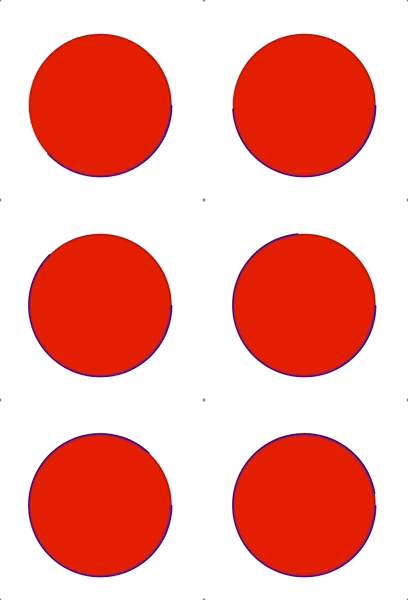
2、[CAShapeLayer layer].fillColor
/* The color to fill the path, or nil for no fill. Defaults to opaque

 * black. Animatable. */

@property(nullable) CGColorRef fillColor;
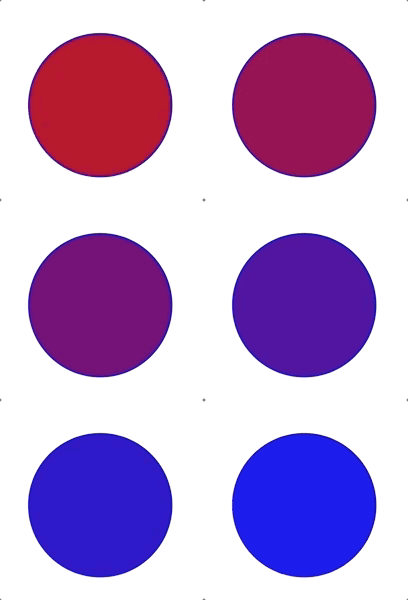
解释:官方解释是填充路径的颜色,或无填充时为nil。默认颜色为不透明的黑色,可动画。
示例代码:
- (void)viewDidLoad {

    [super viewDidLoad];

    [self initUI];

}

-(void)initUI{

    UIBezierPath * path = [UIBezierPath bezierPath];

    [path addArcWithCenter:CGPointMake(200.0, 300.0) radius:100 startAngle:0 endAngle:M_PI * 2 clockwise:YES];

    self.shaperLayer = [CAShapeLayer layer];

    self.shaperLayer.path =path.CGPath;

    self.shaperLayer.strokeColor =[UIColor blueColor].CGColor;

    self.shaperLayer.fillColor = [UIColor redColor].CGColor;

    self.shaperLayer.lineWidth = 2;

    self.shaperLayer.frame     = self.view.bounds;

    [self.view.layer addSublayer:self.shaperLayer];

    [self drawLineAnimation:self.shaperLayer];

}

- (void)drawLineAnimation:(CALayer*)layer{

    CABasicAnimation * bas =[CABasicAnimation animationWithKeyPath:@"fillColor"];

    bas.duration = 3;

    bas.fromValue =(__bridge id)[UIColor redColor].CGColor;

    bas.toValue   =(__bridge id)[UIColor blueColor].CGColor;

    [layer addAnimation:bas forKey:@"key"];

}
演示:
3、[CAShapeLayer layer].fillRule
/* The fill rule used when filling the path. Options are `non-zero' and

 * `even-odd'. Defaults to `non-zero'. */

@property(copy) NSString *fillRule;
解释:官方解释是当在填充颜色的时候则就需要这种填充规则,值有两种,非零和奇偶数,但默认是非零值。
属性用于指定使用哪一种算法去判断画布上的某区域是否属于该图形“内部” (内部区域将被填充)。对一个简单的无交叉的路径,哪块区域是“内部” 是很直观清除的。但是,对一个复杂的路径,比如自相交或者一个子路径包围另一个子路径,“内部”的理解就不那么明确了。
kCAFillRuleNonZero
字面意思是“非零”。按该规则,要判断一个点是否在图形内,从该点作任意方向的一条射线,然后检测射线与图形路径的交点情况。从0开始计数,路径从左向右穿过射线则计数加1,从右向左穿过射线则计数减1。得出计数结果后,如果结果是0,则认为点在图形外部,否则认为在内部。下图演示了kCAFillRuleNonZero规则:
kCAFillRuleEvenOdd
字面意思是“奇偶”。按该规则,要判断一个点是否在图形内,从该点作任意方向的一条射线,然后检测射线与图形路径的交点的数量。如果结果是奇数则认为点在内部,是偶数则认为点在外部。下图演示了kCAFillRuleEvenOdd 规则: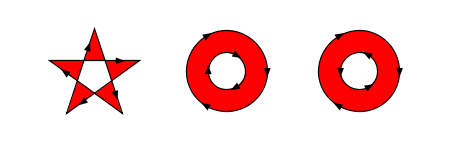
4、[CAShapeLayer layer].strokeColor
/* The color to fill the path's stroked outline, or nil for no stroking.

 * Defaults to nil. Animatable.
 */

@property(nullable) CGColorRef strokeColor;
解释:这个属性用于设置描边的颜色,如果不需要描边就传nil,默认就是nil,该属性还是可动画的。
代码示例:
- (void)viewDidLoad {

    [super viewDidLoad];

    [self initUI];

}

-(void)initUI{

    UIBezierPath * path = [UIBezierPath bezierPath];

    [path addArcWithCenter:CGPointMake(200.0, 300.0) radius:100 startAngle:0 endAngle:M_PI * 2 clockwise:YES];

    self.shaperLayer = [CAShapeLayer layer];

    self.shaperLayer.path =path.CGPath;

    self.shaperLayer.strokeColor =[UIColor blueColor].CGColor;

    self.shaperLayer.fillColor = [UIColor redColor].CGColor;

    self.shaperLayer.lineWidth = 2;

    self.shaperLayer.frame     = self.view.bounds;

    [self.view.layer addSublayer:self.shaperLayer];

}
演示: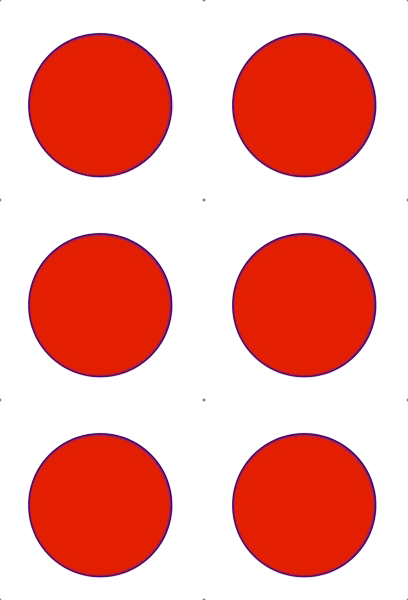
5、[CAShapeLayer layer].strokeStart 与 [CAShapeLayer layer].strokeEnd
/* These values define the subregion of the path used to draw the

 * stroked outline. The values must be in the range [0,1] with zero

 * representing the start of the path and one the end. Values in

 * between zero and one are interpolated linearly along the path

 * length. strokeStart defaults to zero and strokeEnd to one. Both are

 * animatable.
 */

@property CGFloat strokeStart;

@property CGFloat strokeEnd;
解释:这些值定义了用于绘制描边轮廓的路径的子区域。 值必须在[0,1]的范围内,其中0表示路径的开始,1表示结束。 介于0和1之间的值沿路径长度线性插值。strokeStart默认为零,strokeEnd默认为1。 两者都是可以动画的。
代码:
- (void)viewDidLoad {

    [super viewDidLoad];

    [self initUI];

}

-(void)initUI{

    UIBezierPath * path = [UIBezierPath bezierPath];

    [path addArcWithCenter:CGPointMake(200.0, 300.0) radius:100 startAngle:0 endAngle:M_PI * 2 clockwise:YES];

    self.shaperLayer = [CAShapeLayer layer];

    self.shaperLayer.path =path.CGPath;

    self.shaperLayer.strokeColor =[UIColor blueColor].CGColor;

    self.shaperLayer.fillColor = [UIColor redColor].CGColor;

    self.shaperLayer.fillRule  = kCAFillRuleEvenOdd;

    self.shaperLayer.lineWidth = 2;

    self.shaperLayer.strokeStart = 0.1;

    self.shaperLayer.frame     = self.view.bounds;

    [self.view.layer addSublayer:self.shaperLayer];

    [self drawLineAnimation:self.shaperLayer];

}

- (void)drawLineAnimation:(CALayer*)layer{

    CABasicAnimation * bas =[CABasicAnimation animationWithKeyPath:@"strokeEnd"];

    bas.duration = 3;

    bas.fromValue =@0.1;

    bas.toValue   =@0.9;

    [layer addAnimation:bas forKey:@"key"];

}
演示: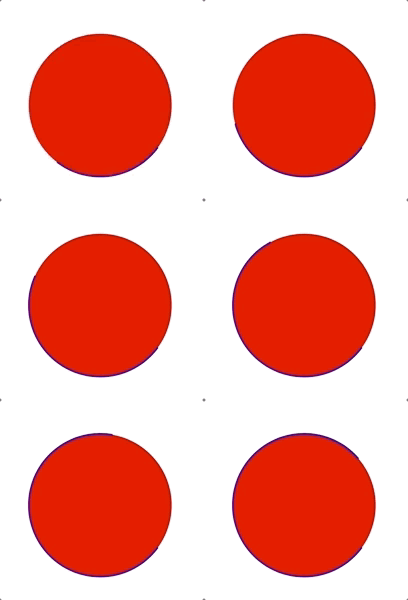
6、[CAShapeLayer layer].lineWidth 和 [CAShapeLayer layer].miterLimit
/* The line width used when stroking the path. Defaults to one.

 * Animatable.

 */

@property CGFloat lineWidth;

/* The miter limit used when stroking the path. Defaults to ten.

 * Animatable.

 */

@property CGFloat miterLimit;
解释:官方解释是lineWidth为线的宽度,默认为1;miterLimit为最大斜接长度。斜接长度指的是在两条线交汇处和外交之间的距离。只有lineJoin属性为kCALineJoinMiter时miterLimit才有效。边角的角度越小,斜接长度就会越大。为了避免斜接长度过长,我们可以使用miterLimit属性。如果斜接长度超过miterLimit的值,边角会以lineJoin的“bevel”即kCALineJoinBevel类型来显示。
代码:
- (void)viewDidLoad {

    [super viewDidLoad];

    [self initUI];

}

-(void)initUI{

    UIBezierPath * path = [UIBezierPath bezierPath];

    [path addArcWithCenter:CGPointMake(200.0, 300.0) radius:100 startAngle:0 endAngle:M_PI * 2 clockwise:YES];

    self.shaperLayer = [CAShapeLayer layer];

    self.shaperLayer.path =path.CGPath;

    self.shaperLayer.strokeColor =[UIColor blueColor].CGColor;

    self.shaperLayer.fillColor = [UIColor redColor].CGColor;

    self.shaperLayer.fillRule  = kCAFillRuleEvenOdd;

    self.shaperLayer.lineWidth = 2;

    self.shaperLayer.strokeStart = 0.1;

    self.shaperLayer.frame     = self.view.bounds;

    [self.view.layer addSublayer:self.shaperLayer];

    [self drawLineAnimation:self.shaperLayer];

}

- (void)drawLineAnimation:(CALayer*)layer{

    CABasicAnimation * bas =[CABasicAnimation animationWithKeyPath:@"lineWidth"];

    bas.duration = 3;

    bas.fromValue =@3;

    bas.toValue   =@10;

    [layer addAnimation:bas forKey:@"key"];

}
演示: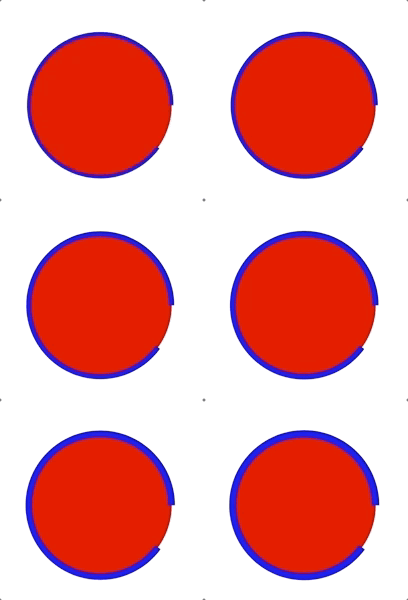
7、[CAShapeLayer layer].lineCap 与 [CAShapeLayer layer].lineJoin
/* The cap style used when stroking the path. Options are `butt', `round'

 * and `square'. Defaults to `butt'.

 */

@property(copy) NSString *lineCap;

/* The join style used when stroking the path. Options are `miter', `round'

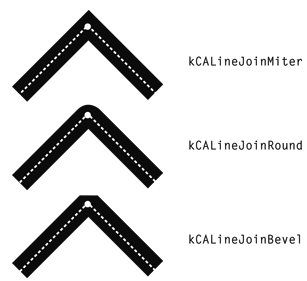
 * and `bevel'. Defaults to `miter'.

 */

@property(copy) NSString *lineJoin;
解释:
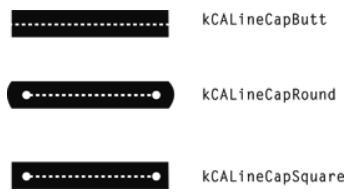
lineJoin为线连接类型,其值也有三个类型,分别为kCALineJoinMiter、kCALineJoinRound、kCALineJoinBevel,默认值是Miter。
8、[CAShapeLayer layer].lineDashPhase 与 [CAShapeLayer layer].lineDashPattern
/* The phase of the dashing pattern applied when creating the stroke.

 * Defaults to zero. Animatable.

 */

@property CGFloat lineDashPhase;

/* The dash pattern (an array of NSNumbers) applied when creating the

 * stroked version of the path. Defaults to nil.

 */

@property(nullable, copy) NSArray<NSNumber *> *lineDashPattern;
lineDashPhase:
设置边线的样式,默认为实线,该数组为一个NSNumber数组,数组中的数值依次表示
虚线中单个线的长度,和空白的长度,如:数组@[2,2,3,4] 表示 有长度为2的线,长度为2的空白,长度为3的线,长度为4的空白,不断循环后组成的虚线。
lineDashPattern:
边线样式的起始位置,即,如果
lineDashPattern设置为@[@2, @2, @3, @4],lineDashPhase即为第一个长度为2的线的起始位置,默认值为0,可动画注:fillColor与strokeColor都是在有UIBezierPath参数配置的情况下才能发生作用
代码:
- (void)viewDidLoad {

    [super viewDidLoad];

    [self initUI];

}

-(void)initUI{

    UIBezierPath * path = [UIBezierPath bezierPath];

    [path addArcWithCenter:CGPointMake(200.0, 300.0) radius:100 startAngle:0 endAngle:M_PI * 2 clockwise:YES];

    self.shaperLayer = [CAShapeLayer layer];

    self.shaperLayer.path =path.CGPath;

    self.shaperLayer.strokeColor =[UIColor blueColor].CGColor;

    self.shaperLayer.fillColor = [UIColor redColor].CGColor;

    self.shaperLayer.fillRule  = kCAFillRuleEvenOdd;

    self.shaperLayer.lineWidth = 2;

    self.shaperLayer.frame     = self.view.bounds;

    self.shaperLayer.lineDashPattern = @[@2, @3, @4, @5];

    self.shaperLayer.lineDashPhase   = 1;

    [self.view.layer addSublayer:self.shaperLayer];

}
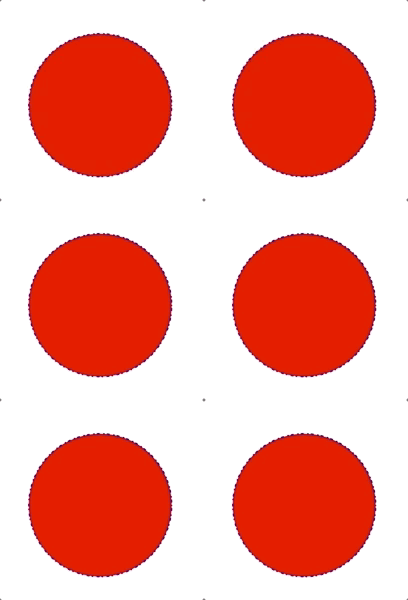
演示:
CALayer的子类之CAShapeLayer的更多相关文章
- CALayer及其子类
前言:这个系列要更新Core Animation的内容,但是CALayer是Core Animation的基础. 一 CALayer是什么? 摘自官网的一句话-Layers Provide the B ...
- iOS CALayer应用详解
跟着大神一起进步,本篇博客原文地址:http://blog.csdn.net/hello_hwc?viewmode=contents 一 CALayer是什么? Layers是绘图和动画的基础, L ...
- 动画黄金搭档:CADisplayLink&CAShapeLayer
我们在开发中有时会遇到一些看似非常复杂的动画,不知该如何下手,今天的这篇文章中我会讲到如何利用CADisplayLink和CAShapeLayer来构建一些复杂的动画,希望能在你下次构建动画中,给你一 ...
- 动画黄金搭档:CADisplayLink & CAShapeLayer
我们在开发中有时会遇到一些看似非常复杂的动画,不知该如何下手,今天的这篇文章中我会讲到如何利用CADisplayLink和CAShapeLayer来构建一些复杂的动画,希望能在你下次构建动画中,给你一 ...
- 放肆的使用UIBezierPath和CAShapeLayer画各种图形
CAShapeLayer 是 CALayer 的子类,但是比 CALayer 更灵活,可以画出各种图形,当然,你也可以使用其他方式来画,随你. 杂谈 在 CAShapeLayer 中,也可以像 CAL ...
- CAShapeLayer和CAGradientLayer
两个动画效果来了解一下CALayer的两个重要的subClass,CAGradientLayer和CAShapeLayer. 微视录制视频的时候那个进度效果和Spark相机类似,但是个人还是比较喜欢S ...
- 使用UIBezierPath和CAShapeLayer画各种图形
转载自:http://www.cocoachina.com/ios/20160214/15251.html CAShapeLayer 是 CALayer 的子类,但是比 CALayer 更灵活,可以画 ...
- [iOS Animation]-CALayer 专用图层
专用图层 复杂的组织都是专门化的 Catharine R. Stimpson 到目前为止,我们已经探讨过CALayer类了,同时我们也了解到了一些非常有用的绘图和动画功能.但是Core Animati ...
- iOS:CALayer(17-12-06更)
目录 1.CALayer(父类) 2.CAShapeLayer(形状/画布) 3.CAEmitterLayer(粒子发射层) 4.CAGradientLayer(渐变层) 5.CATransformL ...
随机推荐
- Fluent动网格【7】:网格节点运动
在动网格中,对于那些既包含了运动也包含了变形的区域,可以通过UDF来指定区域中每一个节点的位置.这给了用户最大的自由度来指定网格的运动.在其他的动网格技术中(如重叠网格)则很难做到这一点.定义网格节点 ...
- C#读取CSV
public class CSVFileHelper { /// <summary> /// 将DataTable中数据写入到CSV文件中 /// </summary> /// ...
- 主机使用代理上网,虚拟机centos7如何连外网
简介 今天任务不多,就想在学一些fastdfs,然后发现公司是通过代理上外网的,这里记录下,主机使用代理上网,虚拟机centos7如何连外网 vi /etc/yum.conf 加上 proxy=ht ...
- 【emWin】例程十八:jpeg图片显示
说明:1.将文件拷入SD卡内即可在指定位置绘制jpeg图片文件,不必加载到储存器. 由于jpeg格式文件显示时需要进行解压缩,耗用动态内存,iCore3所有模块受emwin缓存的限制,jpeg ...
- 【Unity】讯飞语音识别SDK
1.进入讯飞官网,注册帐号,进入控制台,创建新应用UnityXunfeiDemo,平台选Android.在当前应用这点下载SDK,添加AI能力(添加新服务),选择语音听写,即可下载安卓SDK(下称讯飞 ...
- [Linux]linux如何把文件切成多块
转:https://blog.csdn.net/qq_42224274/article/details/80880914 将一个大文件分成若干个小文件方法例如将一个BLM.txt文件分成前缀为 BLM ...
- android 中的一些资源注解,让编译器帮你检查代码
android 中的一些资源注解,让编译器帮你检查代码 写方便的时候可以用注解来声明一些参数,以明确的指示参数的类型,让代码更安全.我们看到,在android源代码里大量使用了注解.我整理了一些注解如 ...
- PwniumCTF2014 - JJSN总结
Write-ups 本文最早发布在TSRC,详细地址:http://security.tencent.com/index.php/blog/msg/55 Forensics USB is FUN 这道 ...
- H3C S5120清除console口密码
1.开机启动交换机显示Press Ctrl-B to enter Extended Boot menu...0 字样迅速按Ctrl-B进入如下字符介面提示: Press Ctrl-B to ente ...
- Mybatis(二)基于注解的入门实例
前言 上一篇简单的介绍了Mybatis的概念和基于XML来实现数据库的CRUD,这篇给大家实现基于注解的CRUD. 一.初始搭建 在基于注解当中前四步和上一篇基于XML是一样的,分别是: 1)创建数据 ...