
asp.net MVC之Action过滤器浅析
在asp.net MVC中,Action过滤器是一大利器,它可以在以下两个步骤执行相关的代码:
1.执行Action方法之前:OnActionExecuting
2.Action方法执行完毕后:OnActionExecuted
一般我们自定义的Action过滤器会继承FilterAttribute类和IActionFilter接口。
FilterAttribute类有两个关键属性:
AllowMultiple:布尔型,指示是否可指定筛选器特性的多个实例。如果可指定筛选器特性的多个实例,则为 true;否则为 false。
Order:int整型,获取或者设置执行操作筛选器的顺序。该属性后面会讲到。
IActionFilter接口有两个关键方法:
void OnActionExecuting(ActionExecutingContext filterContext):在进入Action之前执行该方法。
void OnActionExecuted(ActionExecutedContext filterContext):Action方法执行完毕之后立刻执行该方法。
接下来让我们用代码亲自实践。
首先自定义一个Action过滤器:
    public class MyFirstActionFilterAttribute : FilterAttribute, IActionFilter {

        public void OnActionExecuting(ActionExecutingContext filterContext) {

            filterContext.HttpContext.Response.Write(string.Format("<h4 style='background-color:black;color:white;'>{2} OnActionExecuting {0} {1}</h4>",

                filterContext.ActionDescriptor.ControllerDescriptor.ControllerName, filterContext.ActionDescriptor.ActionName, this.GetType().Name));

        }

        public void OnActionExecuted(ActionExecutedContext filterContext) {

            filterContext.HttpContext.Response.Write(string.Format("<h4 style='background-color:black;color:white;'>{2} OnActionExecuted {0} {1}</h4>",

                filterContext.ActionDescriptor.ControllerDescriptor.ControllerName, filterContext.ActionDescriptor.ActionName,GetType().Name));

        }

    }
接着我们将该方法过滤器附加到一个Action上:
        [MyFirstActionFilter]

        public ActionResult ActionFilterTest() {

            Response.Write("进入Action方法");

            return  new EmptyResult();

        }
执行结果如下:

执行的顺序果然是 OnActionExecuting》Action》OnActionExecuted。
如果有很多Action过滤器附加到一个Action方法上,那么执行的顺序又是怎样的呢?相当于自上而下压栈式执行,可以将OnActionExecuting当做左大括号,OnActionExecuted当做右大括号。
我们继续自定义两个Action过滤器来实践一下:
    public class MySecondActionFilterAttribute : FilterAttribute, IActionFilter {

        public void OnActionExecuting(ActionExecutingContext filterContext) {

            filterContext.HttpContext.Response.Write(string.Format("<h4 style='background-color:yellow;color:red;'>{2} OnActionExecuting {0} {1}</h4>",

                filterContext.ActionDescriptor.ControllerDescriptor.ControllerName, filterContext.ActionDescriptor.ActionName, this.GetType().Name));

        }

        public void OnActionExecuted(ActionExecutedContext filterContext) {

            filterContext.HttpContext.Response.Write(string.Format("<h4 style='background-color:yellow;color:red;'>{2} OnActionExecuted {0} {1}</h4>",

                filterContext.ActionDescriptor.ControllerDescriptor.ControllerName, filterContext.ActionDescriptor.ActionName, GetType().Name));

        }

    }

    public class MyThirdActionFilterAttribute : FilterAttribute, IActionFilter {

        public void OnActionExecuting(ActionExecutingContext filterContext) {

            filterContext.HttpContext.Response.Write(string.Format("<h4 style='background-color:aliceblue;color:blue;'>{2} OnActionExecuting {0} {1}</h4>",

                filterContext.ActionDescriptor.ControllerDescriptor.ControllerName, filterContext.ActionDescriptor.ActionName, this.GetType().Name));

        }

        public void OnActionExecuted(ActionExecutedContext filterContext) {

            filterContext.HttpContext.Response.Write(string.Format("<h4 style='background-color:aliceblue;color:blue;'>{2} OnActionExecuted {0} {1}</h4>",

                 filterContext.ActionDescriptor.ControllerDescriptor.ControllerName, filterContext.ActionDescriptor.ActionName, GetType().Name));

        }

    }
附加到同一个Action方法上:
        [MyFirstActionFilter]

        [MySecondActionFilter]

        [MyThirdActionFilter]

        public ActionResult ActionFilterTest() {

            Response.Write("进入Action方法");

            return  new EmptyResult();

        }
执行的结果如下图所示:
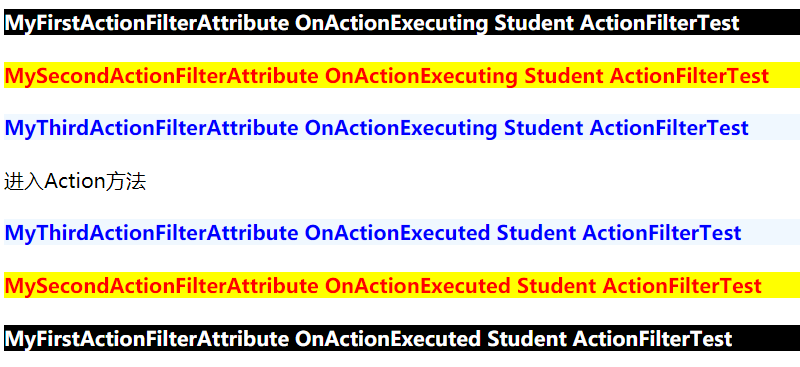
执行的顺序果然是自上而下、压栈式执行。这是默认的方式。
我们还可以通过设置每个Action过滤器的Order属性来自定义它们的执行顺序。这就是Action过滤器需要继承FilterAttribute的原因。
接下来我们打乱每个Action过滤器的位置,并设置每个Action过滤器的Order属性。如下代码:
        [MyThirdActionFilter(Order = )]

        [MySecondActionFilter(Order = )]

        [MyFirstActionFilter(Order =)]

        public ActionResult ActionFilterTest() {

            Response.Write("进入Action方法");

            return  new EmptyResult();

        }
运行程序,看一看执行的结果:
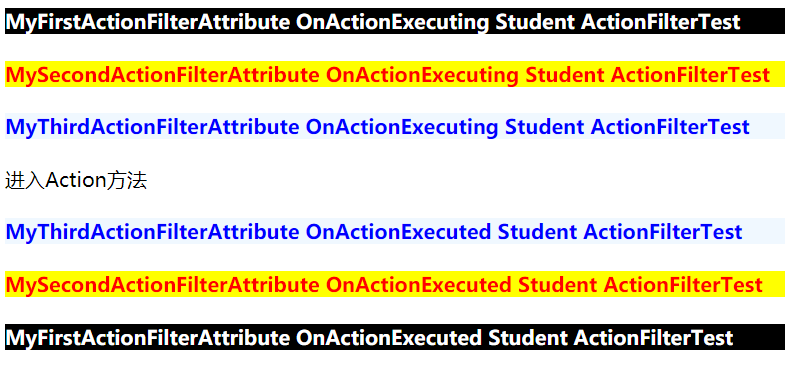
果然是根据Order的升序来执行的,且还是压栈式执行。
介绍一个实际的用法。如果遇到跨域的情况,可以在OnActionExecuting方法中判断当前用户码和相关标识,表示是否可以跨域处理。
类似如下代码:
        public void OnActionExecuting(ActionExecutingContext filterContext) {

            bool isAllowCrossDomain = false;

            //判断用户码和相关标识

            //......

            //判断完毕并设置isAllowCrossDomain

            //如果允许跨域

            if (isAllowCrossDomain) {

                //在此返回正确结果

            }

            else {

                //返回错误代码和消息说明

            }

            filterContext.HttpContext.Response.AddHeader("Access-Control-Allow-Origin", "*");

        }
asp.net MVC之Action过滤器浅析的更多相关文章
- asp.net MVC之Result过滤器浅析
在asp.net MVC中,每一个Action方法完成之后都会返回一个结果,而我们可以在Result过滤器中根据需要修改这个结果.例如可以根据UserAgent来判断客户端的来源是手机还是PC端,从而 ...
- Asp.Net MVC<五>:过滤器
ControllerActionInvoker在执行过程中除了利用ActionDescriptor完成对目标Action方法本身的执行外,还会执行相关过滤器(Filter).过滤器采用AOP的设计,它 ...
- ASP.NET MVC学习之过滤器篇(2)
下面我们继续之前的ASP.NET MVC学习之过滤器篇(1)进行学习. 3.动作过滤器 顾名思义,这个过滤器就是在动作方法调用前与调用后响应的.我们可以在调用前更改实际调用的动作,也可以在动作调用完成 ...
- C# MVC 用户登录状态判断 【C#】list 去重(转载) js 日期格式转换(转载) C#日期转换(转载) Nullable<System.DateTime>日期格式转换 (转载) Asp.Net MVC中Action跳转(转载)
C# MVC 用户登录状态判断 来源:https://www.cnblogs.com/cherryzhou/p/4978342.html 在Filters文件夹下添加一个类Authenticati ...
- 理解ASP.NET MVC Framework Action Filters
原文:http://www.cnblogs.com/darkdawn/archive/2009/03/13/1410477.html 本指南主要解释action filters,action filt ...
- ASP.NET MVC – 关于Action返回结果类型的事儿(上)
原文:ASP.NET MVC – 关于Action返回结果类型的事儿(上) 本文转自:博客园-文超的技术博客 一. ASP.NET MVC 1.0 Result 几何? Action的 ...
- 返璞归真 asp.net mvc (5) - Action Filter, UpdateModel, ModelBinder, Ajax, Unit Test
原文:返璞归真 asp.net mvc (5) - Action Filter, UpdateModel, ModelBinder, Ajax, Unit Test [索引页] [源码下载] 返璞归真 ...
- windows server 证书的颁发与IIS证书的使用 Dapper入门使用,代替你的DbSQLhelper Asp.Net MVC中Action跳转(转载)
windows server 证书的颁发与IIS证书的使用 最近工作业务要是用服务器证书验证,在这里记录下一. 1.添加服务器角色 [证书服务] 2.一路下一步直到证书服务安装完成; 3.选择圈选 ...
- asp.net MVC之 自定义过滤器(Filter) - shuaixf
一.系统过滤器使用说明 1.OutputCache过滤器 OutputCache过滤器用于缓存你查询结果,这样可以提高用户体验,也可以减少查询次数.它有以下属性: Duration :缓存的时间, 以 ...
随机推荐
- JAVA基础知识总结:十三
测试用一个字符串常量创建一个字符串对象 1.获取这个字符串的长度 2.获取任意长度的子串 3.判断这个字符串是否为空 4.将这个字符串中的小写字母转化为大写字母 5.获取某个字符在字符串中第一次出现的 ...
- 常用的 git 命令
更新 : 2019-03-02 写一个常用流程比较清楚 : 项目开始 : git clone ... git add file git commit -m "whatever" g ...
- 第 8 章 容器网络 - 059 - 安装配置 flannel
安装配置 flannel 1) build flannel flannel 没有现成的执行文件可用,必须自己 build,最可靠的方法是在 Docker 容器中 build. 不过用于做 build ...
- SQL中的where条件,在数据库中提取与应用浅析
1. 问题描述 一条SQL,在数据库中是如何执行的呢?相信很多人都会对这个问题比较感兴趣.当然,要完整描述一条SQL在数据库中的生命周期,这是一个非常巨大的问题,涵盖了SQL的词法解析.语法解析.权限 ...
- CF-721C DAG图拓扑排序+费用DP
比赛的时候写了个记忆化搜索,超时了. 后来学习了一下,这种题目应该用拓扑排序+DP来做. dp[][]保存走到[第i个节点][走过j个点]时所用的最短时间. pre[][]用前驱节点求路径 然后遍历一 ...
- Confluence 6 可以自定义的元素
色彩配色方案允许你对 UI 中的元素色彩进行编辑,包括顶部条,标签页和背景色. 有一些下面的 UI 元素被用在特定的主题中,配色方案的修改可能不会对这些元素有效. 顶部条(Top Bar)—— 顶部导 ...
- 从早期 Spring Boot 版本升级
如果你现在正在从早期的 Spring Boot 版本进行升级的话,请访问 “migration guide” on the project wiki 页面,这个页面提供了有关升级的详细指南.同时也请查 ...
- php文件处理函数
//basename的使用$path='test/abc.jpg'; echo basename($path);// echo '<br/>'; echo basename($path,' ...
- 21. Merge Two Sorted Lists (Java 合并有序链表 空间复杂度O(1))
题目: Merge two sorted linked lists and return it as a new list. The new list should be made by splici ...
- 焦作网赛-G-欧拉降幂
https://nanti.jisuanke.com/t/31716 答案就是2^(n-1)%mod ,n非常的大,由欧拉降幂公式 AB%C=AB%phi(C)+phi(C)%C 化简 2n- ...