
How to install Maven on Windows
To install Apache Maven on Windows, you just need to download the Maven’s zip file, and Unzip it to the directory you wish to install, and configure the Windows environment variables.
Tools Used :
- JDK 1.7
- Maven 3.2.2
- Windows 8
Note
Maven 3.2 requires JDK 1.6 or above, while Maven 3.0/3.1 requires JDK 1.5 or above
1. JDK and JAVA_HOME
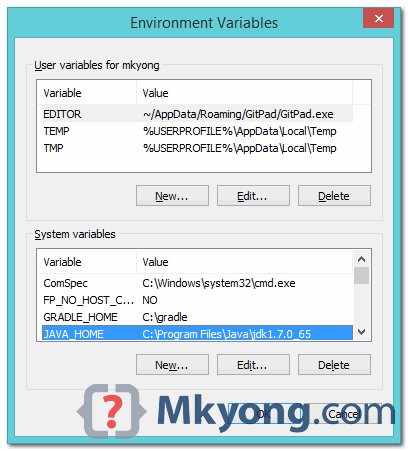
Make sure JDK is installed, and “JAVA_HOME” variable is added as Windows environment variable.
2. Download Apache Maven
Visit Maven official website, download the Maven zip file, for example : apache-maven-3.2.2-bin.zip. Unzip it to the folder you want to install Maven.
Assume you unzip to this folder – C:\Program Files\Apache\maven
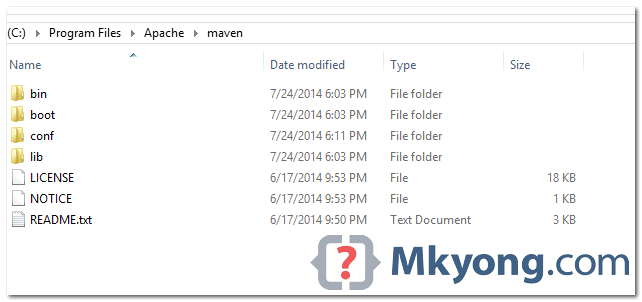
That’s all, just folders and files, installation is NOT required.
3. Add M2_HOME and MAVEN_HOME
Add both M2_HOME and MAVEN_HOME variables in the Windows environment, and point it to your Maven folder.
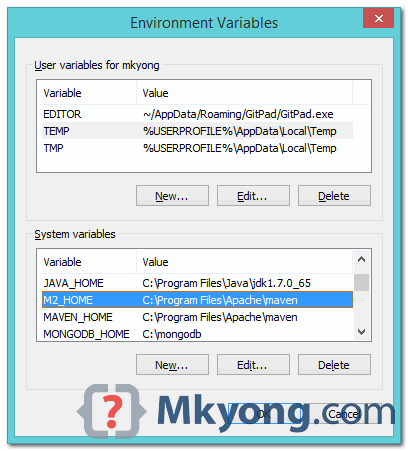
Maven document said add M2_HOME only, but some programs still reference Maven folder with MAVEN_HOME, so, it’s safer to add both.
4. Add To PATH
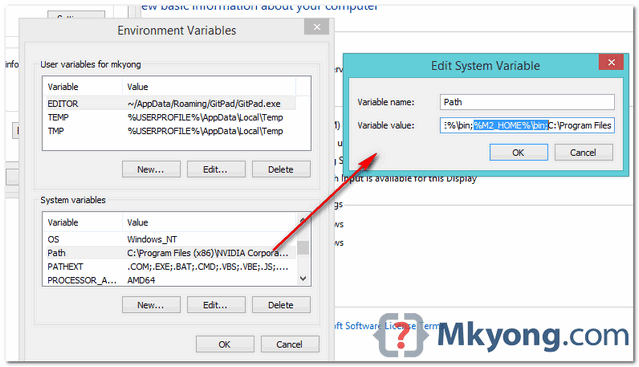
Update PATH variable, append Maven bin folder – %M2_HOME%\bin, so that you can run the Maven’s command everywhere.
5. Verification
Done, to verify it, run mvn –version in the command prompt.
C:\Users\mkyong>mvn -version

Apache Maven 3.2.2 (45f7c06d68e745d05611f7fd14efb6594181933e; 2014-06-17T21:51:42+08:00)

Maven home: C:\Program Files\Apache\maven

Java version: 1.7.0_65, vendor: Oracle Corporation

Java home: C:\Program Files\Java\jdk1.7.0_65\jre

Default locale: en_US, platform encoding: Cp1252

OS name: "windows 8.1", version: "6.3", arch: "amd64", family: "windows"

C:\Users\mkyong>
If you see a similar message, means the Apache Maven is installed successfully on Windows.
How to install Maven on Windows的更多相关文章
- maven在windows环境下加载settings.xml文件
今天发现maven在windows环境下加载的settings.xml文件是c:下的,就算修改conf下的settings.xml里的<localRepository>给他明确指向也没用.
- Install MongoDB on Windows (Windows下安装MongoDB)
Install MongoDB on Windows Overview Use this tutorial to install MongoDB on a Windows systems. PLATF ...
- Maven在Windows中的配置以及IDE中的项目创建
Maven在Windows下的配置 1.Maven下载地址:http://maven.apache.org/download.cgi,下载红框里的版本即可. 2.解压到D盘: 3.修改配置文件sett ...
- maven在windows及linux环境下安装
maven下载 下载地址:https://maven.apache.org/download.cgi maven在windows下安装 解压到D盘 修改配置文件 进入conf,打开settings.x ...
- 【Linux】-NO.7.Linux.3.Maven.1.001-【CentOS 7 Install Maven 3.5】-
1.0.0 Summary Tittle:[Linux]-NO.7.Linux.3.Maven.1.001-[CentOS 7 Install Maven 3.5]- Style:Linux Seri ...
- IntelliJ IDEA教程之如何clean或者install Maven项目
一.前言 Eclipse中如果我们想clean或者install工程,我们只需要右键工程,然后找到run->Maven install 或者run->Maven clean就可以了,但是I ...
- Install Terraform on Windows, Linux and Mac OS
Step-by-step tutorial of how to download and install Terraform on Windows, Linux and Mac OS. Terrafo ...
- Install ADDS on Windows Server 2012 R2 with PowerShell
Install ADDS on Windows Server 2012 R2 with PowerShell Posted by ethernuno on 20/04/2014 In this tut ...
- How To Install OpenSSL on Windows
转自 https://tecadmin.net/install-openssl-on-windows/ OpenSSL is a full-featured toolkit for the Trans ...
随机推荐
- node.js初识10
post请求 form.html <!DOCTYPE html> <html lang="en"> <head> <meta charse ...
- Vue+webpack项目中实现跨域的http请求
目前Vue项目中对json数据的请求一般使用两个插件vue-resource和axios, 但vue-resource已经不再维护, 而axios是官方推荐的且npm下载量已经170多万,github ...
- TP条件查询和分页查询
一.条件查询 前端页面 <!doctype html> <html> <head> <meta charset="utf-8"> & ...
- DX9 顶点缓存案例
// @time 2012.3.5 // @author jadeshu //包含头文件 #include <Windows.h> #include <d3d9.h> #pra ...
- linux文本文件编辑命令
1.cat命令 cat命令用于查看纯文本文件(内容较少的),格式为“cat [选项] [文件]”. Linux系统中有多个用于查看文本内容的命令,每个命令都有自己的特点,比如这个cat命令就是用于查看 ...
- 9.if/else/elif
简单的条件是通过使用 if/else/elif 语法创建的.条件的括号是允许的,但不是必需的.考虑到基于表的缩进的性质,可以使用 elif 而不是 else/if 来维持缩进的级别. if [expr ...
- 01 while 循环输入1 2 3 4 5 6 8 9 10
start = 1while True: if start == 7: start += 1 continue print(start) start ...
- C-Cow Sorting (置换群, 数学)
Farmer John's N (1 ≤ N ≤ 10,000) cows are lined up to be milked in the evening. Each cow has a uniqu ...
- sitecore系统教程之架构概述
Sitecore体验数据库(xDB)从实时大数据存储库中的所有通道源收集所有客户交互.它连接交互数据,为每个客户创建全面,统一的视图,并使营销人员可以使用数据来管理客户的实时体验. xDB架构非常灵活 ...
- 【Elasticsearch学习之二】Elasticsearch Rest风格操作
环境 虚拟机:VMware 10 Linux版本:CentOS-6.5-x86_64 客户端:Xshell4 FTP:Xftp4 jdk8 elasticsearch-2.2.0 一.Rest简介Re ...