
Install ADDS on Windows Server 2012 R2 with PowerShell
Install ADDS on Windows Server 2012 R2 with PowerShell
In this tutorial I’m installing ADDS on Windows Server 2012 R2 with PowerShell.
The old “Dcpromo.exe” is deprecated beginning with Windows Server 2012, but you can still rundcpromo.exe by using an answer file (dcpromo /unattend: or dcpromo /answer:). Since this is deprecated we might as well start using the new method since there is no need to migrate.
If you don’t have a copy, Download Windows Server 2012 R2 here and after installation don’t forget to run the “windows update” so you have all patches up to date.
Virtual Machine Setup:
OS: Windows Server 2012 R2

FQDN: dc01.ethernuno.intra

Processors 2 (1 per core)

Memory: 1Gb

Disk0: 50Gb

NIC: Bridge

IP Address: 192.168.1.10/24
Note: To install a new forest, you must be logged on as the local Administrator for the server.
Installing AD DS by with PowerShell
Open Windows PowerShell console with elevated privileges, and run the following command:
PS C:\Users\Administrator> Import-Module ServerManager

PS C:\Users\Administrator>
Install the AD DS server role, the AD DS and AD LDS server administration tools:
PS C:\Users\Administrator> Install-windowsfeature -name AD-Domain-Services –IncludeManagementTools

Success Restart Needed Exit Code     Feature Result

------- -------------- ---------     --------------

True   No             Success       {Active Directory Domain Services, Group P...

PS C:\Users\Administrator>
Check the available cmdlets in the ADDSDeployment module.
PS C:\Users\Administrator> Get-command –module ADDSDeployment

CommandType     Name                                               ModuleName

-----------     ----                                               ----------

Cmdlet         Add-ADDSReadOnlyDomainControllerAccount           ADDSDeployment

Cmdlet         Install-ADDSDomain                                 ADDSDeployment

Cmdlet         Install-ADDSDomainController                       ADDSDeployment

Cmdlet         Install-ADDSForest                                 ADDSDeployment

Cmdlet         Test-ADDSDomainControllerInstallation             ADDSDeployment

Cmdlet          Test-ADDSDomainControllerUninstallation           ADDSDeployment

Cmdlet         Test-ADDSDomainInstallation                       ADDSDeployment

Cmdlet         Test-ADDSForestInstallation                       ADDSDeployment

Cmdlet         Test-ADDSReadOnlyDomainControllerAccountCreation   ADDSDeployment

Cmdlet         Uninstall-ADDSDomainController                     ADDSDeployment

PS C:\Users\Administrator>
Note that you can run PowerShell cmdlets against remote servers using invoke-command with the ADDSDeployment cmdlet. To install AD DS on a remote server named dc02 in the ethernuno.intradomain, type:
PS C:\Users\Administrator> invoke-command {install-addsdomaincontroller –domainname ethernuno.intra –credential (get-credential) –computername dc02
Installing a new forest root domain using PowerShell
This is the best and simplest way to do it. To install a new forest named ethernuno.intra and be securely prompted to provide the DSRM password, type:
PS C:\Users\Administrator> Install-ADDSForest –domainname "ethernuno.intra"

SafeModeAdministratorPassword: *******

Confirm SafeModeAdministratorPassword: *******

The target server will be configured as a domain controller and restarted when this operation is complete.

Do you want to continue with this operation?

[Y] Yes [A] Yes to All [N] No [L] No to All [S] Suspend [?] Help (default is "Y"): A
Note: DNS server is installed by default when you run Install-ADDSForest.
Side note:
Although this is a lab you might want to install it the right way if you’re bringing your own server up. To do this you might want to separate your logs and database.
To install a new forest named ethernuno.intra, create a DNS delegation in the ethernuno.intradomain, set domain functional level to Windows Server 2008 R2 and set forest functional level to Windows Server 2008, install the Active Directory database and SYSVOL on the D:\ drive, install the log files on the E:\ drive, and be prompted to provide the Directory Services Restore Mode password and type:
PS C:\Users\Administrator> Install-ADDSForest –DomainName ethernuno.intra –CreateDNSDelegation –DomainMode Win2008 –ForestMode Win2008R2 –DatabasePath "d:\NTDS" –SYSVOLPath "d:\SYSVOL" –LogPath "e:\Logs"
If you answered “A” it will complete installation without prompting anything else and will also reboot.
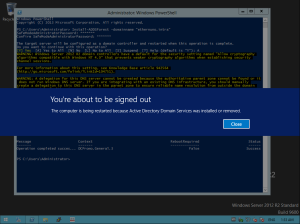
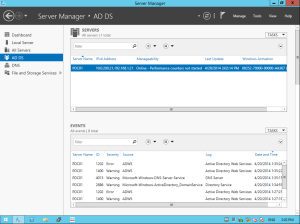
Logon as Administrator on the new domain and check server manager. You can see in server manager that the AD DS is installed:
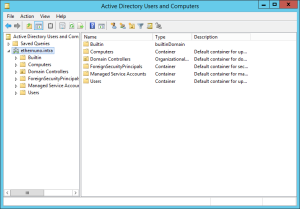
If you goto Start -> Administrative Tools, you can find all ADDS tools and the old AD Users and Computers manager:
How To Remove AD DS using PowerShell
To view the syntax and options for removing AD DS in PowerShell:
PS C:\Users\Administrator> Get-help Uninstall-ADDSDomainController
As an example, to demote with its minimal required arguments, the -credential argument is not required because the user logged on as a member of the Enterprise Admins group:
PS C:\Users\Administrator> Uninstall-ADDSDomainController –Forceremoval -Demoteoperationmasterrole
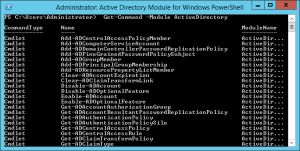
Use the Get-Command –Module ActiveDirectory to check the PowerShell commands that are available. I would advise you to start using PowerShell only and forget about gui manager. That’s where Microsoft is heading!
Hope you found this useful, lab on!
Install ADDS on Windows Server 2012 R2 with PowerShell的更多相关文章
- How to install SharePoint 2013 on Windows Server 2012 R2
[Update 26.02.2014] Many thanks to everybody commented on this post. As Falk already mentioned in th ...
- windows server 2012 r2 安装无法找到install.wim 错误代码0x80070026,以及制作U启动盘决解ISO文件超过5G大小限制的解决方案(转)
戴尔服务器r530 windows server 2012 r2 安装无法找到install.wim 错误代码0x80070026,以及制作U启动盘决解ISO文件超过5G大小限制的解决方案 关于在服务 ...
- Install SharePoint 2013 with SP1 on Windows Server 2012 R2 error - This Product requires .NF 4.5
博客地址:http://blog.csdn.net/FoxDave 最近因为项目需要要搭建SharePoint 2013的开发环境. 准备了Windows Server 2012 R2系统和Sha ...
- 安装windows server 2012 r2 的那点事儿
windows server 2012 r2 安装无法找到install.wim 错误代码0x80070026,以及制作U启动盘决解ISO文件超过5G大小限制的解决方案 用UltaISO刻录后,sou ...
- 在Windows Server 2012 R2上安装SharePoint 2013 with SP1失败,提示没有.net4.5的解决办法
现在的Server用Windows Server 2012 R2的越来越多了,在部署带Sp1的SharePoint2013的时候,走完预安装工具后,点击setup提示缺少.net4.5. 其实Wind ...
- [转]Installing SharePoint 2013 on Windows Server 2012 R2
转自:http://www.avivroth.com/2013/07/09/installing-sharepoint-2013-on-windows-server-2012-r2-preview/ ...
- Windows Server 2012 R2 IIS8.5+PHP(FastCGI)+MySQL环境搭建教程
原文地址:http://www.osyunwei.com/archives/7378.html 搬运是为了自己找资料方便. 准备篇 一.环境说明: 操作系统:Windows Server 2012 R ...
- Windows Server 2012 R2 IIS8.5+PHP(FastCGI)+MySQL环境搭建教程
准备篇 一.环境说明: 操作系统:Windows Server 2012 R2 PHP版本:php 5.5.8 MySQL版本:MySQL5.6.15 二.相关软件下载: 1.PHP下载地址: htt ...
- Windows Server 2012 R2 设置
一.任务栏左下角启动服务器管理器,然后进行设置.1.登录不显示服务器管理器 2.本地服务器,看到右边的IE增强的安全配置,如图所示,关闭两项内容.这样就关闭了IE增强安全提示框. 3.“工具”菜单,启 ...
随机推荐
- 【php】
1 <?php $arr = [ 'a' => 'aaa', ]; $arr2 = $arr; $arr2['a'] = 'ccc'; print_r($arr); print_r($ar ...
- NEO
平台: Windows 类型: 虚拟机镜像 软件包: .net core neo application server basic software blockchain neo open sourc ...
- IOS -刷帧动画(CADisplayLink)
@property (nonatomic, assign) int imageY; @end @implementation NJView -(void)awakeFromNib { NSLog(@& ...
- Android(java)学习笔记74:ListViewProject案例(ListView + ArrayAdapter)
1. 首先是MainActivity.java文件,如下: package com.himi.lv1; import java.util.ArrayList; import java.util.Lis ...
- 【洛谷1337】[JSOI2004] 吊打XXX(模拟退火经典题)
点此看题面 大致题意: 一个平面上有\(n\)个点,每个点有1个权值,现在要选择平面上的一个点,使这\(n\)个点的权值乘上到达选定点的距离之和最小. 模拟退火 我们可以用模拟退火来做这道题. 先将\ ...
- vue中v-show和v-if的异同
一.官方解释: v-if 是“真正”的条件渲染,因为它会确保在切换过程中条件块内的事件监听器和子组件适当地被销毁和重建. v-if 也是惰性的:如果在初始渲染时条件为假,则什么也不做——直到条件第一次 ...
- Java连接MySQL数据库实现用户名密码的验证方法 Java语句中sql查询语句'' ""作用
//方法一,可以验证登录,但方法不实用.package com.swift; import java.sql.Connection; import java.sql.DriverManager; im ...
- node 发送邮件demo (QQ邮箱)
nodemailer是nodejs中的邮件发送模块,本文使用的版本为2.5.0 --下载模块 npm install nodemailer npm下载模块后,在项目中引入就可以使用: var node ...
- neo4j 安装
查看 http://ip:7474/browser/
- 微信小程序js学习心得体会
微信小程序js学习心得体会 页面控制的bindtap和catchtap 用法,区别 <button id='123' data-userDate='100' bindtap='tabMessag ...