
Python--day19--time模块
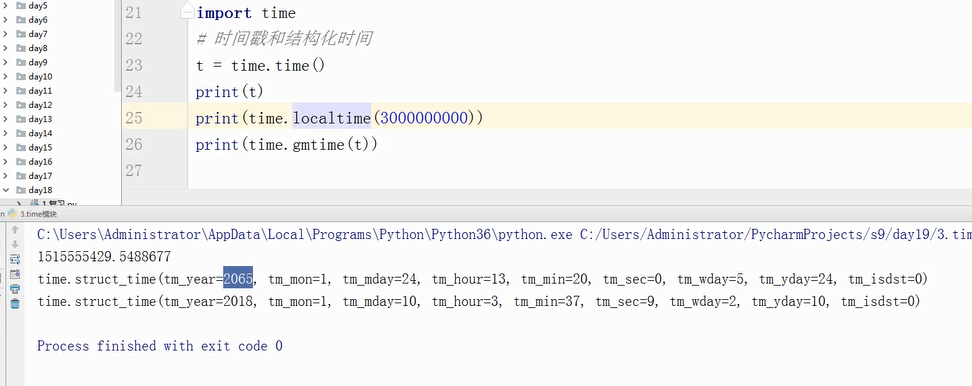
时间戳转化成结构化时间:
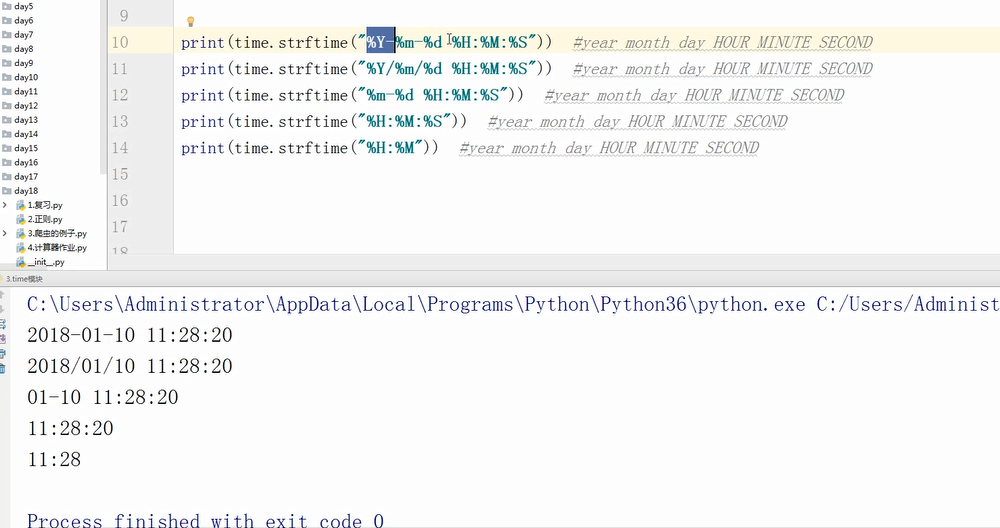
本地时间转换成时间字符串:
时间模块
和时间有关系的我们就要用到时间模块。在使用模块之前,应该首先导入这个模块。
#常用方法

1.time.sleep(secs)

(线程)推迟指定的时间运行。单位为秒。

2.time.time()

获取当前时间戳
表示时间的三种方式
在Python中,通常有这三种方式来表示时间:时间戳、元组(struct_time)、格式化的时间字符串:
(1)时间戳(timestamp) :通常来说,时间戳表示的是从1970年1月1日00:00:00开始按秒计算的偏移量。我们运行“type(time.time())”,返回的是float类型。
(2)格式化的时间字符串(Format String): ‘1999-12-06’
(3)元组(struct_time) :struct_time元组共有9个元素共九个元素:(年,月,日,时,分,秒,一年中第几周,一年中第几天等)
| 索引(Index) | 属性(Attribute) | 值(Values) |
|---|---|---|
| 0 | tm_year(年) | 比如2011 |
| 1 | tm_mon(月) | 1 - 12 |
| 2 | tm_mday(日) | 1 - 31 |
| 3 | tm_hour(时) | 0 - 23 |
| 4 | tm_min(分) | 0 - 59 |
| 5 | tm_sec(秒) | 0 - 60 |
| 6 | tm_wday(weekday) | 0 - 6(0表示周一) |
| 7 | tm_yday(一年中的第几天) | 1 - 366 |
| 8 | tm_isdst(是否是夏令时) | 默认为0 |
首先,我们先导入time模块,来认识一下python中表示时间的几种格式:

#导入时间模块

>>>import time

#时间戳

>>>time.time()

1500875844.800804

#时间字符串

>>>time.strftime("%Y-%m-%d %X")

'2017-07-24 13:54:37'

>>>time.strftime("%Y-%m-%d %H-%M-%S")

'2017-07-24 13-55-04'

#时间元组:localtime将一个时间戳转换为当前时区的struct_time

time.localtime()

time.struct_time(tm_year=2017, tm_mon=7, tm_mday=24,

          tm_hour=13, tm_min=59, tm_sec=37,

                 tm_wday=0, tm_yday=205, tm_isdst=0)
小结:时间戳是计算机能够识别的时间;时间字符串是人能够看懂的时间;元组则是用来操作时间的
几种格式之间的转换

#时间戳-->结构化时间

#time.gmtime(时间戳)    #UTC时间,与英国伦敦当地时间一致

#time.localtime(时间戳) #当地时间。例如我们现在在北京执行这个方法:与UTC时间相差8小时,UTC时间+8小时 = 北京时间

>>>time.gmtime(1500000000)

time.struct_time(tm_year=2017, tm_mon=7, tm_mday=14, tm_hour=2, tm_min=40, tm_sec=0, tm_wday=4, tm_yday=195, tm_isdst=0)

>>>time.localtime(1500000000)

time.struct_time(tm_year=2017, tm_mon=7, tm_mday=14, tm_hour=10, tm_min=40, tm_sec=0, tm_wday=4, tm_yday=195, tm_isdst=0)

#结构化时间-->时间戳

#time.mktime(结构化时间)

>>>time_tuple = time.localtime(1500000000)

>>>time.mktime(time_tuple)

1500000000.0
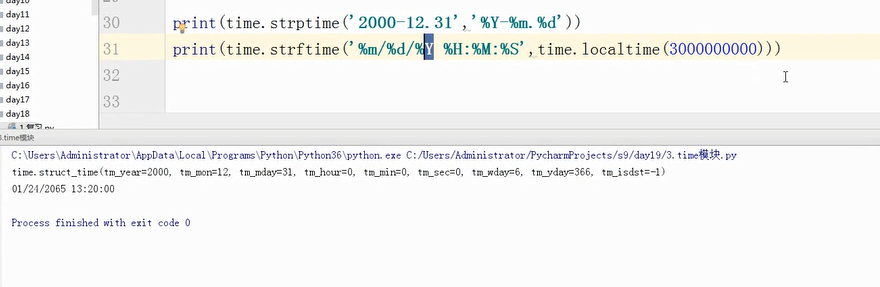
#结构化时间-->字符串时间

#time.strftime("格式定义","结构化时间")  结构化时间参数若不传,则显示当前时间

>>>time.strftime("%Y-%m-%d %X")

'2017-07-24 14:55:36'

>>>time.strftime("%Y-%m-%d",time.localtime(1500000000))

'2017-07-14'

#字符串时间-->结构化时间

#time.strptime(时间字符串,字符串对应格式)

>>>time.strptime("2017-03-16","%Y-%m-%d")

time.struct_time(tm_year=2017, tm_mon=3, tm_mday=16, tm_hour=0, tm_min=0, tm_sec=0, tm_wday=3, tm_yday=75, tm_isdst=-1)

>>>time.strptime("07/24/2017","%m/%d/%Y")

time.struct_time(tm_year=2017, tm_mon=7, tm_mday=24, tm_hour=0, tm_min=0, tm_sec=0, tm_wday=0, tm_yday=205, tm_isdst=-1)

#结构化时间 --> %a %b %d %H:%M:%S %Y串

#time.asctime(结构化时间) 如果不传参数,直接返回当前时间的格式化串

>>>time.asctime(time.localtime(1500000000))

'Fri Jul 14 10:40:00 2017'

>>>time.asctime()

'Mon Jul 24 15:18:33 2017'

#时间戳 --> %a %b %d %H:%M:%S %Y串

#time.ctime(时间戳)  如果不传参数,直接返回当前时间的格式化串

>>>time.ctime()

'Mon Jul 24 15:19:07 2017'

>>>time.ctime(1500000000)

'Fri Jul 14 10:40:00 2017'
计算时间差:
import time

true_time=time.mktime(time.strptime('2017-09-11 08:30:00','%Y-%m-%d %H:%M:%S'))

time_now=time.mktime(time.strptime('2017-09-12 11:00:00','%Y-%m-%d %H:%M:%S'))

dif_time=time_now-true_time

struct_time=time.gmtime(dif_time)

print('过去了%d年%d月%d天%d小时%d分钟%d秒'%(struct_time.tm_year-1970,struct_time.tm_mon-1,

                                       struct_time.tm_mday-1,struct_time.tm_hour,

                                       struct_time.tm_min,struct_time.tm_sec))
Python--day19--time模块的更多相关文章
- python之platform模块
python之platform模块 ^_^第三个模块从天而降喽!! 函数列表 platform.system() 获取操作系统类型,windows.linux等 platform.platform() ...
- python之OS模块详解
python之OS模块详解 ^_^,步入第二个模块世界----->OS 常见函数列表 os.sep:取代操作系统特定的路径分隔符 os.name:指示你正在使用的工作平台.比如对于Windows ...
- python之sys模块详解
python之sys模块详解 sys模块功能多,我们这里介绍一些比较实用的功能,相信你会喜欢的,和我一起走进python的模块吧! sys模块的常见函数列表 sys.argv: 实现从程序外部向程序传 ...
- 学习PYTHON之路, DAY 6 - PYTHON 基础 6 (模块)
一 安装,导入模块 安装: pip3 install 模块名称 导入: import module from module.xx.xx import xx from module.xx.xx impo ...
- linux下python调用c模块
在C调用Python模块时需要初始化Python解释器,导入模块等,但Python调用C模块却比较简单,下面还是以helloWorld.c 和 main.py 做一说明: (1)编写C代码,hel ...
- Python学习之模块进程函数详解
今天在看<Beginning Linux Programming>中的进程相关部分,讲到Linux几个进程相关的系统函数: system , exec , fork ,wait . Pyt ...
- python基础——第三方模块
python基础——第三方模块 在Python中,安装第三方模块,是通过包管理工具pip完成的. 如果你正在使用Mac或Linux,安装pip本身这个步骤就可以跳过了. 如果你正在使用Window ...
- python基础——使用模块
python基础——使用模块 Python本身就内置了很多非常有用的模块,只要安装完毕,这些模块就可以立刻使用. 我们以内建的sys模块为例,编写一个hello的模块: #!/usr/bin/env ...
- python 中time模块使用
在开始之前,首先要说明这几点: 1.在Python中,通常有这几种方式来表示时间:1)时间戳 2)格式化的时间字符串 3)元组(struct_time)共九个元素.由于Python的time模块实现主 ...
- Python之logging模块
一.引言 之前在写一些小程序的时候想把日志内容打到文件中,所以就自己写了一个logger.py的程序,如下: #!/usr/bin/python # -*- coding=utf-8 -*- impo ...
随机推荐
- 2019阿里云开年Hi购季域名与商标分会场全攻略!
2019阿里云云上Hi购季活动已经于2月25日正式开启,从已开放的活动页面来看,活动分为三个阶段: 2月25日-3月04日的活动报名阶段.3月04日-3月16日的新购满返+5折抢购阶段.3月16日-3 ...
- man命令及help命令
一.man命令 man命令常用工具命令 man命令是Linux下的帮助指令,通过man指令可以查看Linux中的指令帮助.配置文件帮助和编程帮助等信息. 语法: man(选项)(参数) 选项: -a: ...
- 【JZOJ2758】【SDOI2012】走迷宫(labyrinth)
╰( ̄▽ ̄)╭ Morenan 被困在了一个迷宫里. 迷宫可以视为 N 个点 M 条边的有向图,其中 Morena n处于起点 S , 迷宫的终点设为 T . 可惜的是 , Morenan 非常的脑小 ...
- 遗传算法MATLAB实现(3):多元函数优化举例
多峰的Shubert为: 求f(x,y)在[-10,10]x[-10,10]上的最大值. MATLAB代码: fun_mutv函数为: function my=fun_mutv(x,y) t1=zer ...
- orm1.0
class Field: def __init__(self,name,column_type,primary_key,defaule): self.name = name self.column_t ...
- rsa加解密的内容超长的问题解决
一. 现象: 有一段老代码用来加密的,但是在使用key A的时候,抛出了异常:javax.crypto.IllegalBlockSizeException: Data must not be ...
- 【风马一族_php】NO3_php基础知识
原文来自:http://www.cnblogs.com/sows/p/6001079.html(博客园的)风马一族 侵犯版本,后果自负 回顾 PHP基础语法 1.标签:<?php //PHP 代 ...
- Spark in action on Kubernetes - Spark Operator的原理解析
前言 在上篇文章中,向大家介绍了如何使用Spark Operator在kubernetes集群上面提交一个计算作业.今天我们会继续使用上篇文章中搭建的Playground进行调试与解析,帮助大家更深入 ...
- 在Swift中检查API的可用性
http://www.cocoachina.com/swift/20150901/13283.html 本文由CocoaChina译者ALEX吴浩文翻译自Use Your Loaf博客 原文:Chec ...
- sql —— having
在 SQL 中增加 HAVING 子句原因是,WHERE 关键字无法与聚合函数一起使用.HAVING 子句可以让我们筛选分组后的各组数据. 原表: 我们可以对上面数据根据性别这个字段进行分组查询,分别 ...