
CSS水平垂直居中常见方法总结
1、元素水平居中
当然最好使的是:
margin: 0 auto;
居中不好使的原因:
1、元素没有设置宽度,没有宽度怎么居中嘛!
2、设置了宽度依然不好使,你设置的是行内元素吧,行内元素和块元素的区别以及如何将行内元素转换为块元素请看我的另一篇文章!
示例 1:
<div class="box">

    <div class="content">

        哇!居中了

    </div>

</div>

<style type="text/css">

.box {

    background-color: #FF8C00;

    width: 300px;

    height: 300px;

    margin:  auto;

}

.content {

    background-color: #F00;

    width: 100px;

    height: 100px;

    line-height: 100px;//文字在块内垂直居中

    text-align: center;//文字居中

    margin: 0 auto;

}

</style>

、元素水平垂直居中
方案1:position 元素已知宽度
父元素设置为:position: relative;
子元素设置为:position: absolute;
距上50%,据左50%,然后减去元素自身宽度的距离就可以实现
<div class="box">

    <div class="content">

    </div>

</div>

.box {

    background-color: #FF8C00;

    width: 300px;

    height: 300px;

    position: relative;

}

.content {

    background-color: #F00;

    width: 100px;

    height: 100px;

    position: absolute;

    left: 50%;

    top: 50%;

    margin: -50px 0 0 -50px;

}

方案2:position transform 元素未知宽度
如果元素未知宽度,只需将上面例子中的margin: -50px 0 0 -50px;替换为:transform: translate(-50%,-50%);
效果如上!
示例 3:
<div class="box">

    <div class="content">

    </div>

</div>

.box {

    background-color: #FF8C00;

    width: 300px;

    height: 300px;

    position: relative;

}

.content {

    background-color: #F00;

    width: 100px;

    height: 100px;

    position: absolute;

    left: 50%;

    top: 50%;

    transform: translate(-50%,-50%);

}

方案3:flex布局 :父元素加
- display: flex;
- justify-content: center;
- align-items: center;
<div class="box">

    <div class="content">

    </div>

</div>

.box {

    background-color: #FF8C00;

    width: 300px;

    height: 300px;

    display: flex;        //flex布局

    justify-content: center;  //使子项目水平居中

    align-items: center;    //使子项目垂直居中

}

.content {

    background-color: #F00;

    width: 100px;

    height: 100px;

}

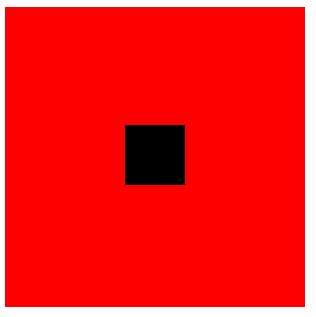
方案4:table-cell布局
示例 5:
因为table-cell相当与表格的td,td为行内元素,无法设置宽和高,所以嵌套一层,嵌套一层必须设置display: inline-block;td的背景覆盖了橘黄色,不推荐使用
<div class="box">

    <div class="content">

        <div class="inner">

        </div>

    </div>

</div>

.box {

    background-color: #FF8C00;//橘黄色

    width: 300px;

    height: 300px;

    display: table;

}

.content {

    background-color: #F00;//红色

    display: table-cell;

    vertical-align: middle;//使子元素垂直居中

    text-align: center;//使子元素水平居中

}

.inner {

    background-color: #000;//黑色

    display: inline-block;

    width: 20%;

    height: 20%;

}
CSS水平垂直居中常见方法总结的更多相关文章
- CSS水平垂直居中常见方法总结2
1.文本水平居中line-height,text-align:center(文字)元素水平居中 margin:0 auo 方案1:position 元素已知宽度 父元素设置为:position: re ...
- 53.CSS---CSS水平垂直居中常见方法总结
CSS水平垂直居中常见方法总结 1.元素水平居中 当然最好使的是: margin: 0 auto; 居中不好使的原因: 1.元素没有设置宽度,没有宽度怎么居中嘛! 2.设置了宽度依然不好使,你设置的是 ...
- CSS水平垂直居中的方法
原文链接:http://caibaojian.com/370.html 水平垂直居中,特别是使用在列表的时候经常会用到的,以前有需求的时候我也做过类似的代码,是使用display:table-cell ...
- 介绍一种css水平垂直居中的方法(非常好用!)
这次介绍一下一个水平垂直居中的css方法,这个方法可以说是百试百灵,废话不多说,直接附上代码: html,body{ width:100%; height:100%; } 你需要居中的元素{ posi ...
- css水平垂直居中的方法与 vertical-align 的用法
前言:这是笔者学习之后自己的理解与整理.如果有错误或者疑问的地方,请大家指正,我会持续更新! 1. 已知元素宽度 方法一:已知宽高,可以用position定位 + margin负值的方法 : 绝对定位 ...
- css 水平垂直居中的方法总结
在项目中经常会遇到设置元素水平垂直居中的需求.而且具体的场景也不同,所以将个人总结的方法做个汇总,希望对浏览者有用. 以下所举的例子都以一个html为准,这里规定好一些公用样式. body { bac ...
- [css]水平垂直居中的方法
1.top:cale(50% - 2rem); left:cale(50% - 2rem);
- CSS水平垂直居中总结
行内元素水平居中 把行内元素包裹在块级父元素中,且父元素中的css设置text-align:center; <!DOCTYPE html> <html> <head> ...
- CSS水平垂直居中的几种方法2
直接进入主题! 一.脱离文档流元素的居中 方法一:margin:auto法 CSS代码: div{ width: 400px; height: 400px; position: relative; b ...
随机推荐
- 题解【loj6277】数列分块入门1
题目描述 给出一个长为\(n\)的数列,以及\(n\)个操作,操作涉及区间加法,单点查值. 输入格式 第一行输入一个数字\(n\). 第二行输入\(n\)个数字,第\(i\)个数字为\(a_{i}\) ...
- sqlserver数据库导入大批量数据
参考: https://www.cnblogs.com/zhangliangzlee/p/3585862.html
- java测试框架详细说明-mvn+testng+allure
java测试框架 mvn+testng+allure 1.mvn代码目录结构 2.testng框架 2.1 testng.xml配置 2.2 注解 3.allure插件,方便报告阅览 4.配置文件.p ...
- python+selenium:浏览器webdriver操作(1)--基本对象定位
1.简单对象的定位-----自动化测试的核心 对象的定位应该是自动化测试的核心,要想操作一个对象,首先应该识别这个对象.一个对象就是一个人一样,他会有各种的特征(属性),如比我们可以通过一个人的身份证 ...
- 使用spring中遇到"java.lang.NoClassDefFoundError: org/aopalliance/intercept/MethodInterceptor"问题
项目中缺少aopalliance的jar包,下载一个相应的jar加入项目中就可以解决问题. 下载链接:http://www.java2s.com/Code/Jar/a/Downloadaopallia ...
- 题解 UVA1335 【Beijing Guards】
UVA1335 Beijing Guards 双倍经验:P4409 [ZJOI2006]皇帝的烦恼 如果只是一条链,第一个护卫不与最后一个护卫相邻,那么直接贪心,找出最大的相邻数的和. 当变成环,贪心 ...
- redis安装与基本使用
什么是Redis 什么是NoSQL 介绍Redis之前,先了解下NoSQL (Not noly SQL)不仅仅是SQL 属于非关系型数据库:Redis就属于非关系型数据库 传统的Mysql ,orac ...
- bugku 多种方法解决
首先打开链接发现是一个exe文件 实在是想不出办法了 只能回去看提示 说会有一张图片 不知道怎么就打开了hxd 然后拖进去 发现了一串 用图片base64加密的码 然后在网页中找到 解码 工具 htt ...
- Mongodb学习笔记(四)管理
一.数据导出.导入 数据导入:mongoexport ./mongoimport -d 数据库 -c 集合 文件名 数据导出:mongoimport 参数说明: -d:指明使用的库,如text -c: ...
- Atcoder Beginner Contest 147C(状态压缩)
最多15个人,用N个二进制的数字表示每个人的状态,然后检验.这串数字相当于已经把这些人的状态定了下来,如果和输入的情况不符则这串数字不正确,直接忽略,因为枚举了所有的情况,所以总有正确的,不必在错误的 ...