
C#实现拍照并且存水印照片
由于一直在高校工作,就涉及到招生工作,招生时候又要收集学生图像采集,所以就随手写了一个图像采集工具,废话不多说,进入正题。
图像采集需要调用摄像头就行拍照操作,网上查了一下资料,需要引用以下3个dll。

看一下运行界面
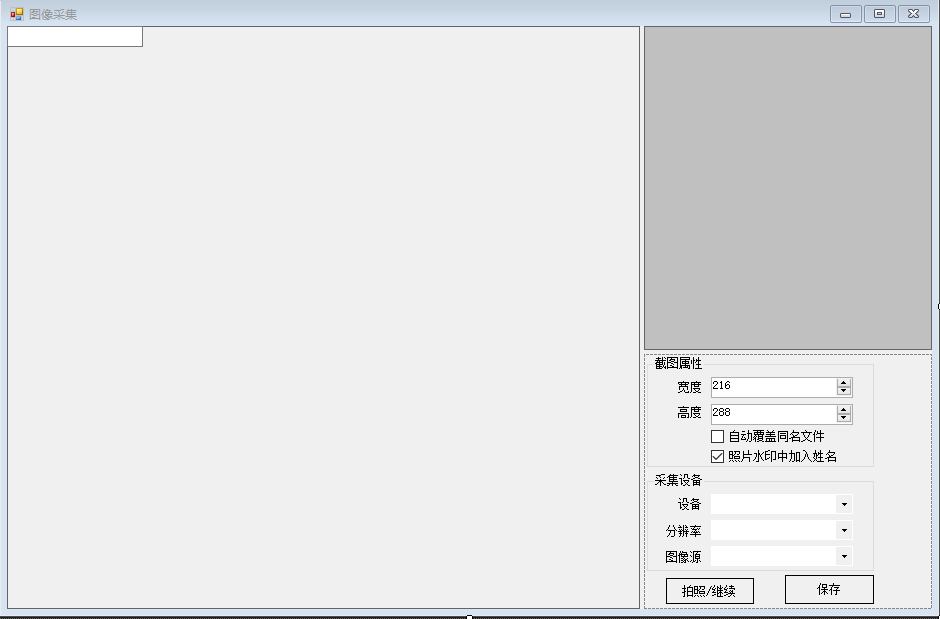
界面都比较low,主要是功能实现。
        private void Camera_Load(object sender, EventArgs e)

        {

            this.btnSave.Enabled = false;

            try

            {

                borderSize = GetBorderSize(this);

                captionHeight = GetCaptionHeight(this);

                //InitStudent("", "", "");

                this.comboBox_SizeMode.Text = "填充(保持比例)";

                FilterInfoCollection infos = new FilterInfoCollection(FilterCategory.VideoInputDevice);

                if ((infos != null) && (infos.Count > ))

                {

                }

                else

                {

                    MessageBox.Show("没有视频设备");

                }

                this.LoadVedio();

                this.splitContainer1.Panel2MinSize = ;

                this.splitContainer1.SplitterDistance = this.splitContainer1.Width - this.splitContainer1.Panel2MinSize + ;

                mf = new BorderForm();

                mf.Show(this);

                //mf.Left = (this.Left + this.splitContainer1.Panel1.Width - mf.Width) / 2;

                //mf.Top = (this.Top + this.splitContainer1.Panel1.Height - mf.Height) / 2;

                //marLeft = mf.Left - this.Left;

                //marTop = mf.Top - this.Top;

                Rectangle rtPic = this.pictureBox_Camera.RectangleToScreen(this.pictureBox_Camera.ClientRectangle);

                Rectangle rtMF = this.mf.RectangleToScreen(this.mf.ClientRectangle);

                if (rtPic == null || rtMF == null || rtPic.Width ==  || rtMF.Width == )

                {

                    return;

                }

                mf.Left = ((rtMF.Width + rtMF.Left) + (rtPic.Width + rtPic.Left)) / ;

                mf.Top = ((rtMF.Height + rtMF.Top) + (rtPic.Height + rtPic.Top)) / ;

                mf.SizeChanged += new EventHandler(mf_SizeChanged);

                mf.LocationChanged += new EventHandler(mf_LocationChanged);

                pictureBox_Camera_SizeChanged(sender, e);

                //启动连拍

                //this.ShootOneTime = 0;

                this.timer1.Start();

            }

            catch (Exception ex)

            {

                MessageBox.Show(ex.Message, "错误", MessageBoxButtons.OK, MessageBoxIcon.Error);

            }

        }
//加载摄像头设备

private void LoadVedio()

        {

            FilterInfoCollection infos = new FilterInfoCollection(FilterCategory.VideoInputDevice);

            if ((infos != null) && (infos.Count > ))

            {

                int index = ;

                foreach (FilterInfo info in infos)

                {

                    this.cmbCaptureDevice.Items.Add(new DeviceInfo(info.Name, info.MonikerString, index, FilterCategory.VideoInputDevice));

                    index++;

                }

                this.cmbCaptureDevice.SelectedIndex = ;

            }

        }
        /// <summary>

        /// 拍照

        /// </summary>

        private void Shoot()

        {

            try

            {

                if (this.pictureBox_Camera.Image != null && (int)this.numericUpDown1.Value >  && (int)this.numericUpDown2.Value > )

                {

                    Bitmap resultImage = new Bitmap((int)this.numericUpDown1.Value, (int)this.numericUpDown2.Value);

                    Graphics g = Graphics.FromImage(resultImage);

                    g.CopyFromScreen(new Point(this.mf.Location.X + , this.mf.Location.Y + ), new Point(,  + (isWin7 ?  : )), new Size(resultImage.Size.Width, resultImage.Size.Height - ( + (isWin7 ?  : ))));

                    if (!string.IsNullOrEmpty(XH))

                    {

                        string str = "";

                        if (this.XH != "")

                        {

                            str = this.XH;

                        }

                        else if (this.SFZH != "")

                        {

                            str = this.SFZH;

                        }

                        else if (this.KSH != "")

                        {

                            str = this.KSH;

                        }

                        if (this.checkBox2.Checked)

                        {

                            str = XM + " " + str;

                        }

                        int txtWidth = (int)(g.MeasureString(str, new Font("宋体", )).Width * 1.1);

                        Rectangle rec = new Rectangle((resultImage.Width - txtWidth) / , resultImage.Height - , txtWidth, );

                        g.FillRectangle(Brushes.White, rec);

                        StringFormat sf = new StringFormat();

                        sf.LineAlignment = StringAlignment.Center;

                        sf.Alignment = StringAlignment.Center;

                        rec.Height++;

                        g.DrawString(str, new Font("宋体", ), Brushes.Black, rec, sf);

                    }

                    this.pictureBox_tx.Image = resultImage;

                }

                else

                {

                    this.pictureBox_tx.Image = null;

                }

            }

            catch (Exception ex)

            {

                MessageBox.Show(ex.Message, "", MessageBoxButtons.OK, MessageBoxIcon.Error);

            }

        }
//选择摄像装置

private void cmbCaptureDevice_SelectedIndexChanged(object sender, EventArgs e)

        {

            if (this.cmbCaptureDevice.SelectedItem != null)

            {

                this.cmbDeviceCapability.Items.Clear();

                VideoCaptureDevice device = new VideoCaptureDevice(((DeviceInfo)this.cmbCaptureDevice.SelectedItem).MonikerString);

                for (int i = ; i < device.VideoCapabilities.Length; i++)

                {

                    VideoCapabilities capabilities = device.VideoCapabilities[i];

                    DeviceCapabilityInfo item = new DeviceCapabilityInfo(capabilities.FrameSize);

                    this.cmbDeviceCapability.Items.Add(item);

                }

                DeviceInfo selectedItem = (DeviceInfo)this.cmbCaptureDevice.SelectedItem;

                if (this.captureAForge != null)

                {

                    this.captureAForge.NewFrame -= new NewFrameEventHandler(this.captureAForge_NewFrame);

                    //this.captureAForge.SnapshotFrame -= new NewFrameEventHandler(this.captureAForge_SnapshotFrame);

                    if (this.captureAForge.IsRunning)

                    {

                        this.captureAForge.SignalToStop();

                    }

                    this.captureAForge.WaitForStop();

                    this.captureAForge = null;

                }

                this.captureAForge = new VideoCaptureDevice(selectedItem.MonikerString);

                this.captureAForge.ProvideSnapshots = true;

                this.captureAForge.NewFrame += new NewFrameEventHandler(this.captureAForge_NewFrame);

                //this.captureAForge.SnapshotFrame += new NewFrameEventHandler(this.captureAForge_SnapshotFrame);

                if (this.cmbDeviceCapability.Items.Count > )

                {

                    this.cmbDeviceCapability.SelectedIndex = ;

                }

            }

        }
//选择分辨率

 private void cmbDeviceCapability_SelectedIndexChanged(object sender, EventArgs e)

        {

            string[] strArray = this.cmbDeviceCapability.Text.Trim().Split(new char[] { 'x' });

            int width = int.Parse(strArray[]);

            int height = int.Parse(strArray[]);

            if (this.captureAForge != null)

            {

                if (this.captureAForge.IsRunning)

                {

                    this.captureAForge.SignalToStop();

                }

                this.captureAForge.WaitForStop();

                this.captureAForge.DesiredFrameSize = new Size(width, height);

                this.captureAForge.DesiredSnapshotSize = new Size(width, height);

                //this.captureAForge.DesiredFrameRate = 1000;

                this.captureAForge.Start();

            }

        }
//设置数据源大小

private void comboBox_SizeMode_SelectedIndexChanged(object sender, EventArgs e)

        {

            switch (this.comboBox_SizeMode.Text)

            {

                case "默认(原始大小)":

                    this.pictureBox_Camera.SizeMode = PictureBoxSizeMode.Normal;

                    break;

                case "居中(原始大小)":

                    this.pictureBox_Camera.SizeMode = PictureBoxSizeMode.CenterImage;

                    break;

                case "填充(拉伸图像)":

                    this.pictureBox_Camera.SizeMode = PictureBoxSizeMode.StretchImage;

                    break;

                case "填充(保持比例)":

                    this.pictureBox_Camera.SizeMode = PictureBoxSizeMode.Zoom;

                    break;

            }

        }
//保存照片

private void buttonSave_Click(object sender, EventArgs e)

        {

            try

            {

                string filename = Path.Combine(Application.StartupPath, "StuImages", "Newstuimages", this.XH + ".JPG");

                if (!this.checkBox1.Checked && File.Exists(filename))

                {

                    if (MessageBox.Show("该生已经有照片文件,是否覆盖?     ", "", MessageBoxButtons.OKCancel, MessageBoxIcon.Warning) == DialogResult.OK)

                    {

                        //存储到本地

                        this.pictureBox_tx.Image.Save(filename);

                        //OnDataChanged(this, new DataEventArgs(string.Format("头像采集(覆盖),学号:{0},姓名:{1},考生号:{2},身份证号:{3}", this.XH, this.XM, this.KSH, this.SFZH)));

                        this.txtKSH.Focus();

                        this.txtKSH.SelectAll();

                    }

                    else

                    {

                        return;

                    }

                }

                else

                {

                    this.pictureBox_tx.Image.Save(filename);

                    //OnDataChanged(this, new DataEventArgs(string.Format("头像采集,学号:{0},姓名:{1},考生号:{2},身份证号:{3}", this.XH, this.XM, this.KSH, this.SFZH)));

                    this.txtKSH.Focus();

                    this.txtKSH.SelectAll();

                }

                this.timer1.Start();

            }

            catch

            {

            }

            finally

            {

                //启用下面一行,点击保存后头像会立即启动刷新

                //this.timer1.Start();

                this.btnSave.Enabled = false;

            }

        }
保存照片可以选择自动覆盖同名照片或者在照片中加入水印效果。
操作时候可以自行拖动长方形的框进行选择拍照

源码下载:http://files.cnblogs.com/files/luoxiaozhao/Image_acquisitionForm.rar
请支持原创,转载请标明来源。
C#实现拍照并且存水印照片的更多相关文章
- WebForm水印照片
水印照片需要的元素 绘制:1.画布2.画笔 样式 粗细 颜色3.画什么东西4.用什么字体画 大小5.位置 展示页面 <%@ Page Language="C#" AutoEv ...
- Cocos2d-x使用android拍照功能加载照片内存过大,通过另存照片尺寸大小解决
使用2dx调用android拍照功能,拍照结束后在2dx界面显示拍照照片,如果不对照片做处理,会出现内存过大的问题,导致程序崩溃,如果仅仅另存拍照照片,则照片质量大小均下降,导致照片不够清晰,后来发现 ...
- jQuery+PHP+Mysql在线拍照和在线浏览照片
本文用示例讲述了如何使用jQuery与PHP及Mysql结合,实现WEB版在线拍照.上传.显示浏览的功能,ajax交互技术贯穿本文始末,所以本文的读者要求具备相当熟悉jQuery及其插件使用和javs ...
- Android 从相冊获取近期拍摄的多张照片(获取相机拍照所存储的照片)
转载请标明出处:http://blog.csdn.net/android_ls/article/details/39928519 在做公司项目时.遇到的需求:自己定义显示照片的网格视图,显示用户近期採 ...
- Python控制自己的手机摄像头拍照,并把照片自动发送到邮箱
写在前面的一些P话: 今天这个案例,就是控制自己的摄像头拍照,并且把拍下来的照片,通过邮件发到自己的邮箱里.想完成今天的这个案例,只要记住一个重点:你需要一个摄像头 思路 通过opencv调用摄像头拍 ...
- Android 拍照或相册选择照片进行显示缩放位图 Demo
拍照后直接使用 BitmapFactory.decodeStream(...) 进行创建 Bitmap 并显示是有问题的. Bitmap 是个简单对象,它只存储实际像素数据,也就是说,即使原始照片已压 ...
- Android开发 处理拍照完成后的照片角度
private void initImageAngle(){ Bitmap imageBitmap = BitmapFactory.decodeFile(FilePathSession.getFace ...
- UWP开发之Template10实践二:拍照功能你合理使用了吗?(TempState临时目录问题)
最近在忙Asp.Net MVC开发一直没空更新UWP这块,不过有时间的话还是需要将自己的经验和大家分享下,以求共同进步. 在上章[UWP开发之Template10实践:本地文件与照相机文件操作的MVV ...
- HTML5调用手机相机拍照
前端调用手机相机拍照 实现方式常见有两种: 一种是通过video控件,通过捕获video的流,截取video中的图像实现拍照, 还有一种是通过input[file]控件调用移动端的摄像头,实现拍照. ...
随机推荐
- loj2000[SDOI2017]数字表格
题意:f为Fibnacci数列.求$\prod_{1<=i<=n,1<=j<=m} f[gcd(i,j)]$. n,m<=1e6. 标程: #include<bit ...
- 在Vue项目中,添加的背景图片在服务器上不显示,如何处理
遇到的问题: 在vue项目开发过程中,我们常常会在页面中添加背景图片.可是当我们在样式中添加了背景图片,编译打包部署到服务器上时,发现图片并不能显示出来,这是为什么呢~~~ 我们一般写的css样式如下 ...
- Django 查漏补缺
Django 查漏补缺 Django 内容回顾: 一. Http 请求本质: 网络传输,运用socket Django程序: socket 服务端 a. 服务端监听IP和端口 b. 浏览器发送请求 ...
- Delphi GDI(一)
Delphi 7下IGDIPlus库的使用 IGDI+是一个免费开源封装微软GDI+功能的Delphi库,该库使得可以用Delphi语言代码快速简短的实现复杂GDI+应用程序. 官方网站:http:/ ...
- NX二次开发-UFUN获取球的参数UF_MODL_ask_sphere_parms
NX11+VS2013 #include <uf.h> #include <uf_modl.h> #include <uf_ui.h> UF_initialize( ...
- <Java编程思想>读书笔记(1)-对象导论、一切都是对象
1.面向对象编程:OOP (Object-oriented Programming) 2.Alan Kay 总结的面向对象语言5个基本特性: 1) 万物皆为对象 2) 程序是对象的集合,他们通过发送消 ...
- CSP-S 2019 —— 一个精神病人的呓语
此生无悔入OI(话说上次的“此生无悔”还是在B站上发的弹幕2333. $HZOI$们,我们要加油!QwQ (挖坑 写在前面 学了一年,拿了$160$,也无所谓,失败者不会被人记住. 最后想做的,就是把 ...
- 《DSP using MATLAB》Problem 9.4
只放第1小题. 代码: %% ------------------------------------------------------------------------ %% Output In ...
- Array类型中的检测数组,转换方法,栈方法,队列方法
我的新博客==> http://www.suanliutudousi.com/2017/08/24/array%E7%B1%BB%E5%9E%8B%E4%B8%AD%E7%9A%84%E6%A3 ...
- List<Map>中根据map的同一指标项数据——去重代码
先看网络上,博客经常出现的错误代码: for(ABatchAddCheckVO aBatchAddCheckVO : addList){ dto.put("aac001",aBat ...