
《DSP using MATLAB》Problem 9.4
只放第1小题。
代码:
%% ------------------------------------------------------------------------

%%            Output Info about this m-file

fprintf('\n***********************************************************\n');

fprintf('        <DSP using MATLAB> Problem 9.4.1 \n\n');

banner();

%% ------------------------------------------------------------------------

% ------------------------------------------------------------

%                  PART 1

% ------------------------------------------------------------

% Discrete time signal

n1_start = 0; n1_end = 100;

      n1 = [n1_start:1:n1_end];

xn1 = cos(0.15*pi*n1);                 % digital signal

     D = 4;                            % downsample by factor D

OFFSET = 0;

     y = downsample(xn1, D, OFFSET);

    ny = [n1_start:n1_end/D];

%    ny = [n1_start:n1_end/D-1];        % OFFSET=2

figure('NumberTitle', 'off', 'Name', 'Problem 9.4.1 xn1 and y')

set(gcf,'Color','white');

subplot(2,1,1); stem(n1, xn1, 'b');

xlabel('n'); ylabel('x(n)');

title('xn1 original sequence');  grid on;

subplot(2,1,2); stem(ny, y, 'r');

xlabel('ny'); ylabel('y(n)');

title(sprintf('y sequence, downsample by D=%d offset=%d', D, OFFSET));  grid on;

% ----------------------------

%       DTFT of xn1

% ----------------------------

M = 500;

[X1, w] = dtft1(xn1, n1, M);

magX1  = abs(X1);  angX1  = angle(X1);  realX1  = real(X1);  imagX1  = imag(X1);

max(magX1)

%% --------------------------------------------------------------------

%%              START X(w)'s  mag ang real imag

%% --------------------------------------------------------------------

figure('NumberTitle', 'off', 'Name', 'Problem 9.4.1 X1 DTFT');

set(gcf,'Color','white');

subplot(2,1,1); plot(w/pi,magX1); grid on; %axis([-2, -1, -0.5, 0, 0.15, 0.5, 1, 2]);

title('Magnitude Response');

xlabel('digital frequency in \pi units'); ylabel('Magnitude  |H|');

set(gca, 'xtick', [-2,-1.85,-1.5,-1,-0.15,0,0.15,0.5,1,1.5,1.85,2]);

subplot(2,1,2); plot(w/pi, angX1/pi); grid on;  %axis([-1,1,-1.05,1.05]);

title('Phase Response');

xlabel('digital frequency in \pi units'); ylabel('Radians/\pi');

figure('NumberTitle', 'off', 'Name', 'Problem 9.4.1 X1 DTFT');

set(gcf,'Color','white');

subplot(2,1,1); plot(w/pi, realX1); grid on;

title('Real Part');

xlabel('digital frequency in \pi units'); ylabel('Real');

subplot(2,1,2); plot(w/pi, imagX1); grid on;

title('Imaginary Part');

xlabel('digital frequency in \pi units'); ylabel('Imaginary');

%% -------------------------------------------------------------------

%%             END X's  mag ang real imag

%% -------------------------------------------------------------------

% ----------------------------

%       DTFT of y

% ----------------------------

M = 500;

[Y, w] = dtft1(y, ny, M);

magY_DTFT = abs(Y);  angY_DTFT = angle(Y);  realY_DTFT = real(Y);  imagY_DTFT = imag(Y);

max(magY_DTFT)

ratio = max(magX1)/max(magY_DTFT)

%% --------------------------------------------------------------------

%%              START Y(w)'s  mag ang real imag

%% --------------------------------------------------------------------

figure('NumberTitle', 'off', 'Name', 'Problem 9.4.1 Y DTFT');

set(gcf,'Color','white');

subplot(2,1,1); plot(w/pi, magY_DTFT); grid on;  %axis([-2,2, -1, 2]);

title('Magnitude Response');

xlabel('digital frequency in \pi units'); ylabel('Magnitude  |H|');

set(gca, 'xtick', [-2,-1.4,-1,-0.6,0,0.6,1,1.4,2]);

subplot(2,1,2); plot(w/pi, angY_DTFT/pi); grid on;  %axis([-1,1,-1.05,1.05]);

title('Phase Response');

xlabel('digital frequency in \pi units'); ylabel('Radians/\pi');

figure('NumberTitle', 'off', 'Name', 'Problem 9.4.1 Y DTFT');

set(gcf,'Color','white');

subplot(2,1,1); plot(w/pi, realY_DTFT); grid on;

title('Real Part');

xlabel('digital frequency in \pi units'); ylabel('Real');

subplot(2,1,2); plot(w/pi, imagY_DTFT); grid on;

title('Imaginary Part');

xlabel('digital frequency in \pi units'); ylabel('Imaginary');

%% -------------------------------------------------------------------

%%             END Y's  mag ang real imag

%% -------------------------------------------------------------------

figure('NumberTitle', 'off', 'Name', sprintf('Problem 9.4.1 X1 & Y--DTFT of x and y, D=%d offset=%d', D,OFFSET));

set(gcf,'Color','white');

subplot(2,1,1); plot(w/pi,magX1); grid on;  %axis([-1,1,0,1.05]);

title('Magnitude Response');

xlabel('digital frequency in \pi units'); ylabel('Magnitude  |H|');

set(gca, 'xtick', [-2,-1.85,-1.4,-1,-0.6,-0.5,-0.15,0,0.15,0.5,0.6,1,1.4,1.85,2]);

set(gca, 'ytick', [-0.2, 0, 13.5, 20, 40, 51, 60]);

hold on;

plot(w/pi, magY_DTFT, 'r'); gtext('magY(\omega)', 'Color', 'r');

hold off;

subplot(2,1,2); plot(w/pi, angX1/pi); grid on;  %axis([-1,1,-1.05,1.05]);

title('Phase Response');

xlabel('digital frequency in \pi units'); ylabel('Radians/\pi');

hold on;

plot(w/pi, angY_DTFT/pi, 'r'); gtext('AngY(\omega)', 'Color', 'r');

hold off;
运行结果:
分两种情况
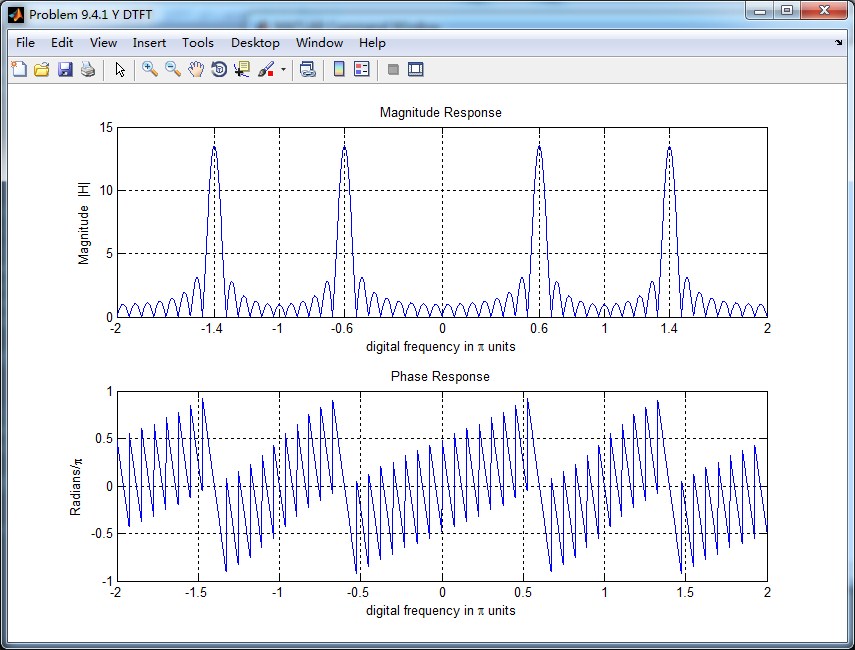
1、按照D=4抽取,offset=0
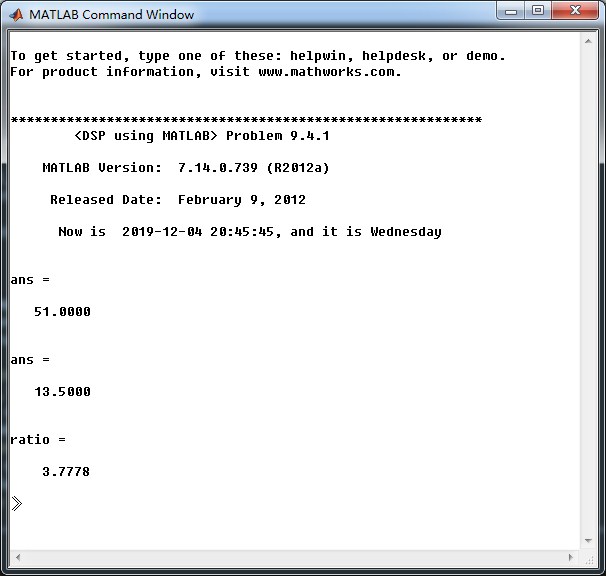
原始序列,抽取序列
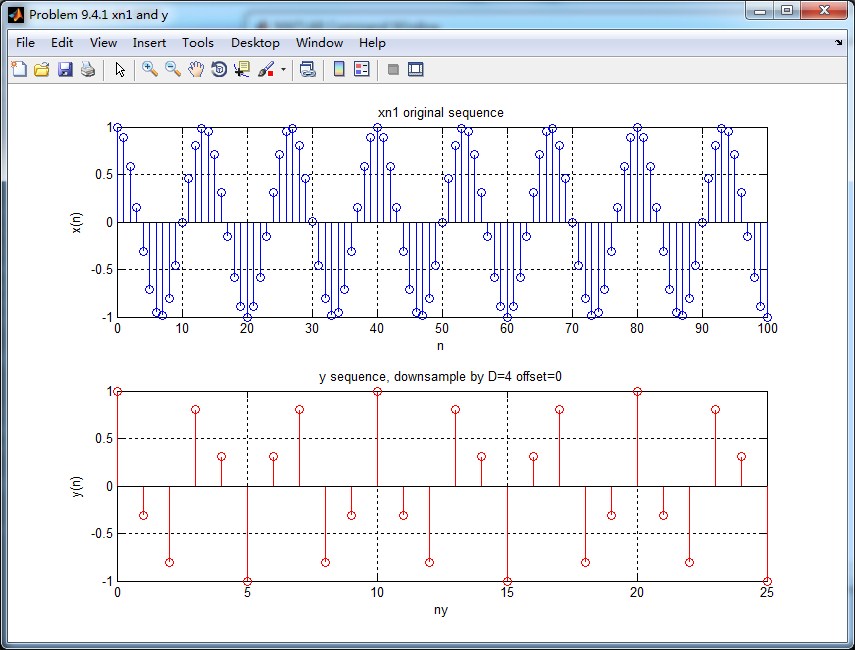
原始序列的谱
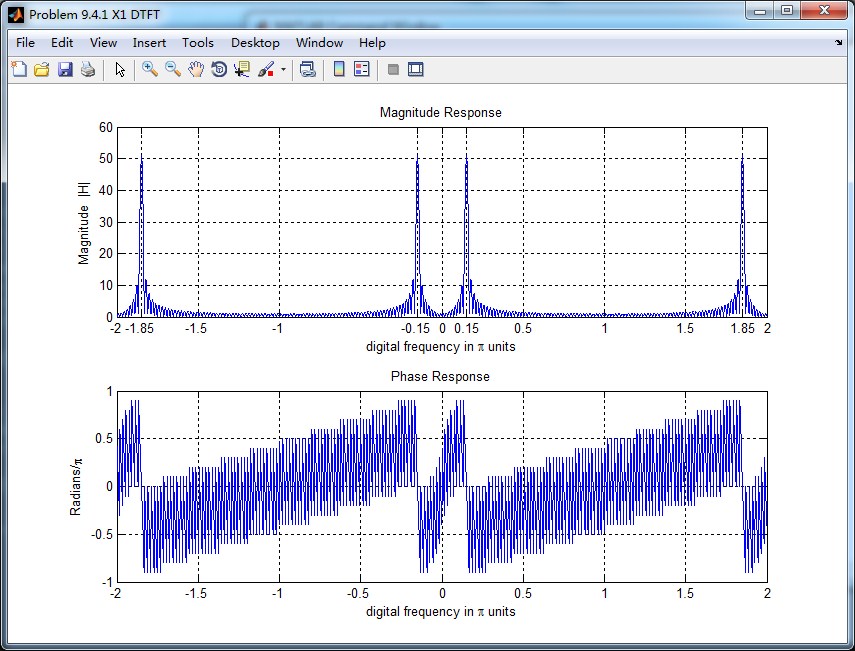
抽取序列的谱
二者的DTFT混叠到一起,红颜色曲线是抽取序列的DTFT,可看出,其幅度大致为原始序列的谱幅度的1/4(精确值是1/3.7778)。

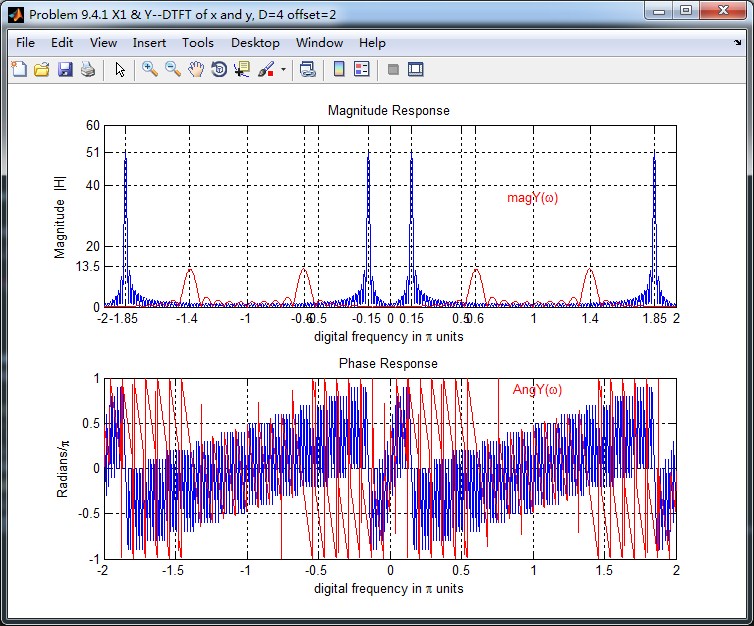
2、按照D=4抽取,offset=2
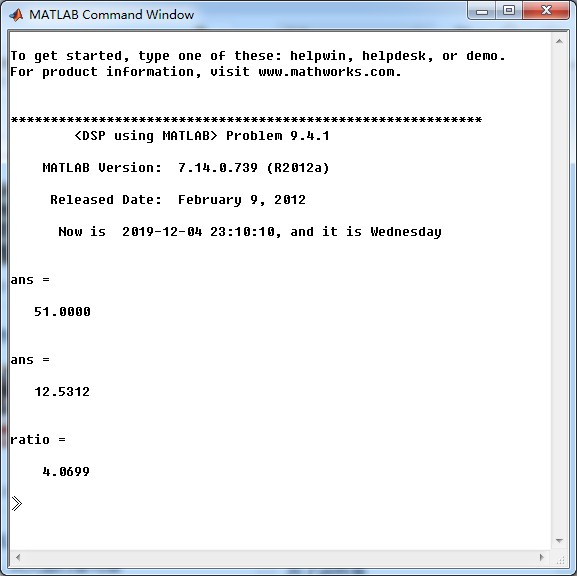


二者的DTFT混叠到一起,红颜色曲线是抽取序列的DTFT,可看出,其幅度大致为原始序列的谱幅度的1/4(精确值是1/4.0699)。
《DSP using MATLAB》Problem 9.4的更多相关文章
- 《DSP using MATLAB》Problem 7.27
代码: %% ++++++++++++++++++++++++++++++++++++++++++++++++++++++++++++++++++++++++++++++++ %% Output In ...
- 《DSP using MATLAB》Problem 7.26
注意:高通的线性相位FIR滤波器,不能是第2类,所以其长度必须为奇数.这里取M=31,过渡带里采样值抄书上的. 代码: %% +++++++++++++++++++++++++++++++++++++ ...
- 《DSP using MATLAB》Problem 7.25
代码: %% ++++++++++++++++++++++++++++++++++++++++++++++++++++++++++++++++++++++++++++++++ %% Output In ...
- 《DSP using MATLAB》Problem 7.24
又到清明时节,…… 注意:带阻滤波器不能用第2类线性相位滤波器实现,我们采用第1类,长度为基数,选M=61 代码: %% +++++++++++++++++++++++++++++++++++++++ ...
- 《DSP using MATLAB》Problem 7.23
%% ++++++++++++++++++++++++++++++++++++++++++++++++++++++++++++++++++++++++++++++++ %% Output Info a ...
- 《DSP using MATLAB》Problem 7.16
使用一种固定窗函数法设计带通滤波器. 代码: %% ++++++++++++++++++++++++++++++++++++++++++++++++++++++++++++++++++++++++++ ...
- 《DSP using MATLAB》Problem 7.15
用Kaiser窗方法设计一个台阶状滤波器. 代码: %% +++++++++++++++++++++++++++++++++++++++++++++++++++++++++++++++++++++++ ...
- 《DSP using MATLAB》Problem 7.14
代码: %% ++++++++++++++++++++++++++++++++++++++++++++++++++++++++++++++++++++++++++++++++ %% Output In ...
- 《DSP using MATLAB》Problem 7.13
代码: %% ++++++++++++++++++++++++++++++++++++++++++++++++++++++++++++++++++++++++++++++++ %% Output In ...
- 《DSP using MATLAB》Problem 7.12
阻带衰减50dB,我们选Hamming窗 代码: %% ++++++++++++++++++++++++++++++++++++++++++++++++++++++++++++++++++++++++ ...
随机推荐
- FS获取KERNEL32基址的三种方法
FS寄存器指向当前活动线程的TEB结构(线程结构) 偏移 说明 000 指向SEH链指针 004 线程堆栈顶部 008 线程堆栈底部 00C SubSystemTib 010 FiberD ...
- Retrofit全攻略——进阶篇
最近事比较多,距离上次写文章已经过去了一个月了.上一篇文章Retrofit全攻略——基础篇 介绍了Retrofit的基础用法,这篇文章介绍点进阶的用法. 打印网络日志 在开发阶段,为了方便调试,我们需 ...
- 2.3 Gulp
在前端工程化中最重要的就是流程管理,借用 gulp 可以很方便的基于流的方式定义流程任务,并将任务串联起来,本节中将详细介绍 gulp ,包括: gulp 介绍 gulp 是什么 gulp 能够解决哪 ...
- Django框架(二)—— 基本配置:app注册、模板配置、静态文件配置、数据库连接配置post和get
目录 app注册.模板配置.静态文件配置.数据库连接配置post和get 一.app 二.模板配置 三.静态文件配置 四.数据库连接配置 五.get请求和post请求 六.新手三件套 七.登录功能案例 ...
- 问题:Error running 'lugia-web': Address loaclhost:1099 is already in use
解决方法:cmd输入下面命令: 第一步: netstat -ano|findstr 1099 找到对应的pid 为3576.(每次不一样). 第二步:taskkill -f -pid 3576
- Hexo使用攻略-添加分类及标签
创建"分类"选项 生成"分类"页并添加tpye属性 打开命令行,进入博客所在文件夹.执行命令 hexo new page categories 成功后会提示: ...
- kernel32 的 GetVersionExA/W
今天接到一个问题,说Kernel32 模块的 GetVersionEx 获取系统版本不准确, 然后让我查查什么原因, 我当时就想,它不准,就用ntdll的 RtlGetVersion 阿,或者 Rtl ...
- Linux下的Ngnix服务器部署静态页
一.安装FTP vsftpd 的名字代表”very secure FTP daemon”, 安全是它的开发者 Chris Evans 考虑的首要问题之一.在这个 FTP 服务器设计开发的最开始的时候, ...
- 2019-8-31-dotnet-通过-HttpClient-下载文件同时报告进度的方法
title author date CreateTime categories dotnet 通过 HttpClient 下载文件同时报告进度的方法 lindexi 2019-08-31 16:55: ...
- who - 显示已经登录的用户
总览 (SYNOPSIS) who [OPTION]... [ FILE | ARG1 ARG2 ] 描述 (DESCRIPTION) -H, --heading 显示 栏目行 -i, -u, --i ...