
跟我一起做一个vue的小项目(七)
先看下我们所做项目的效果
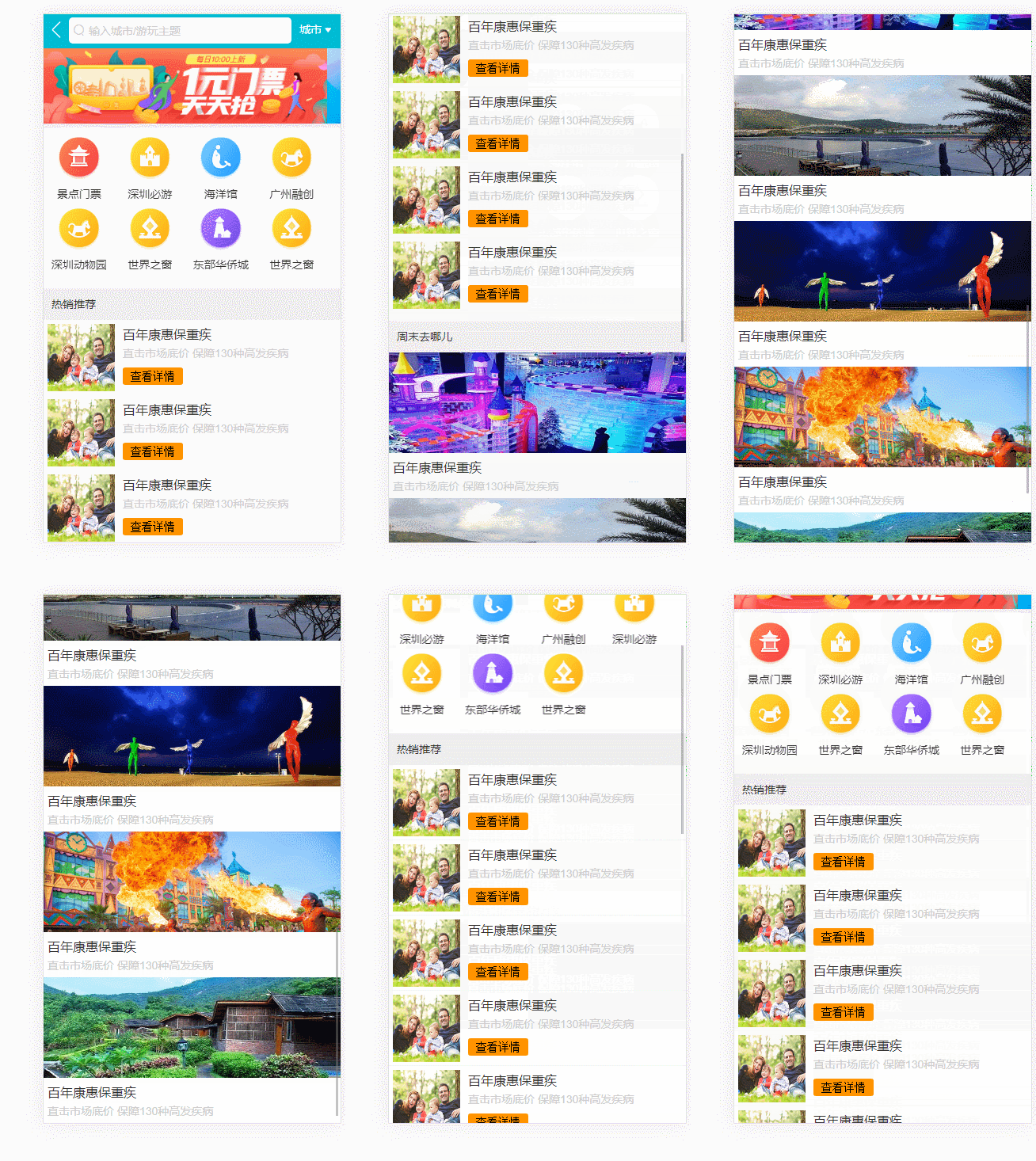
这些数据都是我们在data中定义的,不是从后端数据中请求的。那么
接下来我们使用axios渲染数据
npm install axios --save
每个组件里面的数据都不相同,但是单个的组件去进行数据请求的话,那么ajax请求还是太多了,我们在home.vue中发起一个请求
我们使用mock数据,在static中创建一个mock文件夹写入json文件
vue中提出了一个转发功能,我们写的接口路径就可以直接同线上的一致
{

    "ret":true,

    "data":{

        "swiperList": [{

            "id": "001",

            "imgUrl": "http://mp-piao-admincp.qunarzz.com/mp_piao_admin_mp_piao_admin/admin/20193/d7bbc21db442366a882e04ddc984669a.jpg_750x200_85e640d9.jpg"

          }, {

            "id": "002",

            "imgUrl": "http://mp-piao-admincp.qunarzz.com/mp_piao_admin_mp_piao_admin/admin/20196/5e02c14d35097f40d656f455837b63eb.jpg_750x200_adebb937.jpg"

          }],

          "iconList": [{

            "id": "003",

            "imgUrl": "http://img1.qunarzz.com/piao/fusion/1803/95/f3dd6c383aeb3b02.png",

            "desc": "景点门票"

          }, {

            "id": "004",

            "imgUrl": "http://img1.qunarzz.com/piao/fusion/1804/ff/fdf170ee89594b02.png",

            "desc": "深圳必游"

          }, {

            "id": "005",

            "imgUrl": "http://mp-piao-admincp.qunarzz.com/mp_piao_admin_mp_piao_admin/admin/20194/cba147cf6cfcea7109d0bff6aac6f626.png",

            "desc": "深圳动物园"

          }, {

            "id":" 006",

            "imgUrl":" http://img1.qunarzz.com/piao/fusion/1803/a6/6d97515091789602.png",

            "desc":" 世界之窗"

          }, {

           " id": "007",

            "imgUrl": "http://img1.qunarzz.com/piao/fusion/1803/b6/37560ece9c62b502.png",

            "desc": "东部华侨城"

          }, {

            "id": "008",

            "imgUrl": "http://img1.qunarzz.com/piao/fusion/1803/a6/6d97515091789602.png",

            "desc": "世界之窗"

          },

          {

            "id":" 009",

           " imgUrl": "http://img1.qunarzz.com/piao/fusion/1804/ff/fdf170ee89594b02.png",

           "desc":"深圳必游"

          } ],

          "recommendList": [

            {

                "id": "001",

              "imgUrl": "https://cdn.11bee.com/large_product_pic/0908_ZJ5301QZ5302_large_product_abbreviatedPic.jpg",

              "title": "百年康惠保重疾",

              "desc": "直击市场底价 保障130种高发疾病"

            },

            {

                "id": "002",

                "imgUrl": "https://cdn.11bee.com/large_product_pic/0908_ZJ5301QZ5302_large_product_abbreviatedPic.jpg",

                "title": "百年康惠保重疾",

                "desc": "直击市场底价 保障130种高发疾病"

            },

            {

                "id": "003",

                "imgUrl": "https://cdn.11bee.com/large_product_pic/0908_ZJ5301QZ5302_large_product_abbreviatedPic.jpg",

                "title": "百年康惠保重疾",

                "desc": "直击市场底价 保障130种高发疾病"

            },

            {

                "id": "004",

                "imgUrl": "https://cdn.11bee.com/large_product_pic/0908_ZJ5301QZ5302_large_product_abbreviatedPic.jpg",

                "title": "百年康惠保重疾",

                "desc": "直击市场底价 保障130种高发疾病"

            },

            {

                "id": "005",

                "imgUrl": "https://cdn.11bee.com/large_product_pic/0908_ZJ5301QZ5302_large_product_abbreviatedPic.jpg",

                "title": "百年康惠保重疾",

                "desc": "直击市场底价 保障130种高发疾病"

            }

          ],

          "weekendList": [

            {

             " id": "001",

                "imgUrl": "http://img1.qunarzz.com/sight/source/1811/15/66f14e0fd6fbb.jpg_r_640x214_5d69f21d.jpg",

             " title": "百年康惠保重疾",

              "desc": "直击市场底价 保障130种高发疾病"

            },

            {

            " id": "002",

                "imgUrl": "http://img1.qunarzz.com/sight/source/1811/15/66f14e0fd6fbb.jpg_r_640x214_5d69f21d.jpg",

            " title": "百年康惠保重疾",

                "desc": "直击市场底价 保障130种高发疾病"

            },

            {

            " id": "003",

                "imgUrl": "http://img1.qunarzz.com/sight/source/1811/15/66f14e0fd6fbb.jpg_r_640x214_5d69f21d.jpg",

            " title": "百年康惠保重疾",

                "desc": "直击市场底价 保障130种高发疾病"

            },

            {

            " id": "004",

                "imgUrl": "http://img1.qunarzz.com/sight/source/1811/15/66f14e0fd6fbb.jpg_r_640x214_5d69f21d.jpg",

            " title": "百年康惠保重疾",

                "desc": "直击市场底价 保障130种高发疾病"

            },  {

            " id": "005",

                "imgUrl": "http://img1.qunarzz.com/sight/source/1811/15/66f14e0fd6fbb.jpg_r_640x214_5d69f21d.jpg",

            " title": "百年康惠保重疾",

                "desc": "直击市场底价 保障130种高发疾病"

            }

        ]

    }

}
config中我们添加如下内容,它主要是对项目做一个转发功能
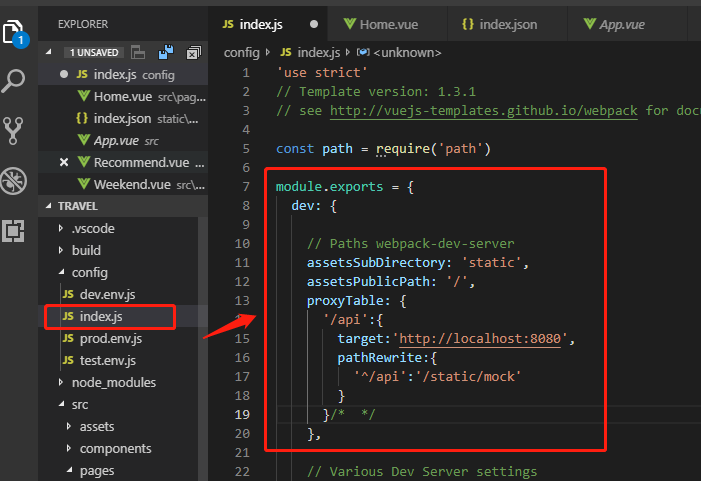
在home.vue中我们请求这个数据
<template>

  <div>

  <home-header></home-header>

  <home-swiper></home-swiper>

  <home-icons></home-icons>

  <home-recommend></home-recommend>

  <home-weekend></home-weekend>

  </div>

</template>

<script>

import HomeHeader from './components/Header'

import HomeSwiper from './components/Swiper'

import HomeIcons from './components/Icons'

import HomeRecommend from './components/Recommend'

import HomeWeekend from './components/Weekend'

import axios from 'axios'

export default {

  name: 'Home',

  components: {

    HomeHeader,

    HomeSwiper,

    HomeIcons,

    HomeRecommend,

    HomeWeekend

  },

  methods: {

    getHomeInfo () {

      axios.get('/api/index.json')

        .then(this.getHomeInfoSucc)

    },

    getHomeInfoSucc (res) {

      console.log('res', res)

    }

  },

  mounted () {

    this.getHomeInfo()

  }

}

</script>

<style>

</style>
我们可以看到数据可以打印出来
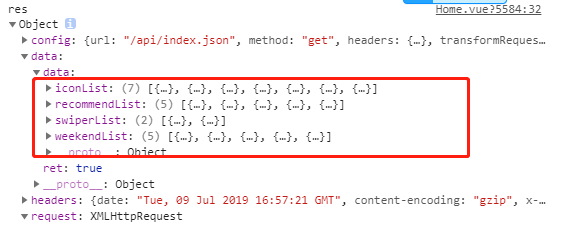
接下来我们要将从后台数据(我们模拟的数据)传递给子组件,并让其渲染数据。
我们首先在header中进行city的传值
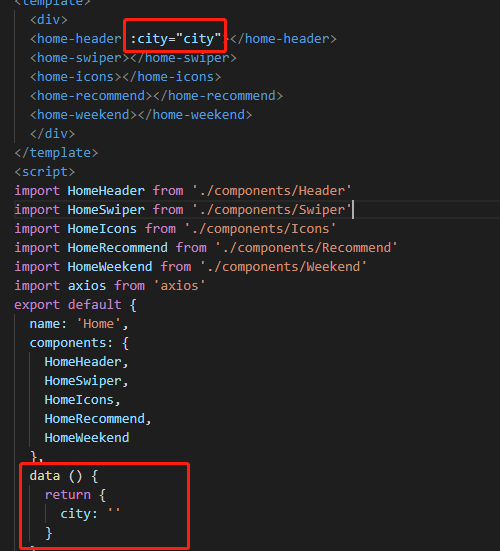
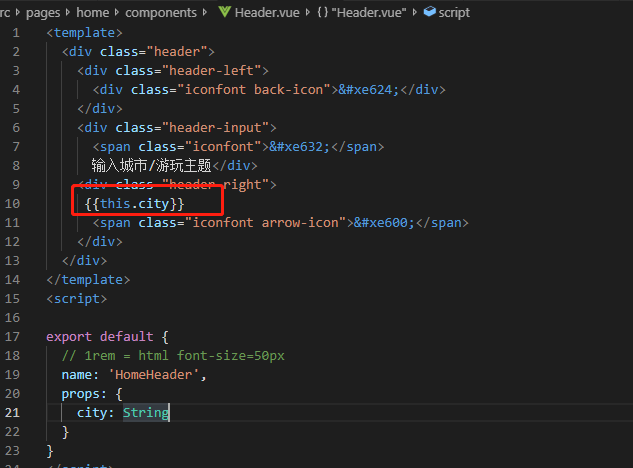
我们在home.vue写入这个
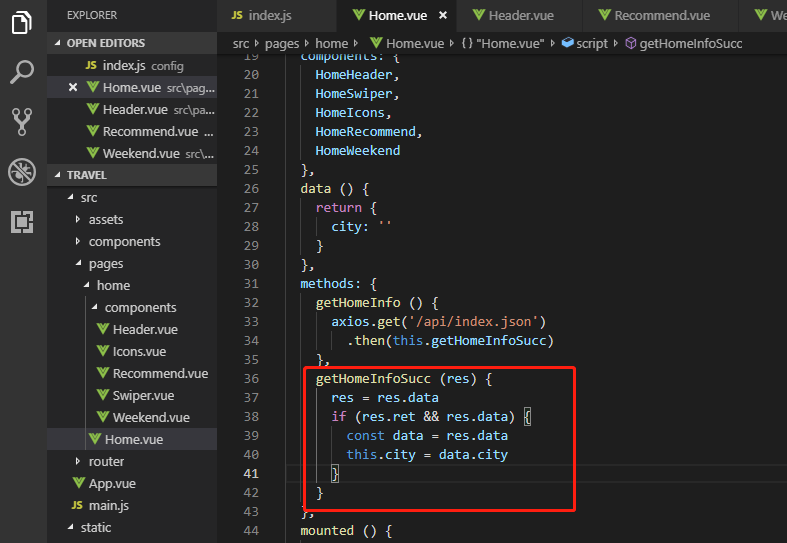
运行发现city值是可以取到的
我们用同样的方法取其他的值
放一下完整的代码
//home.vue

<template>

  <div>

  <home-header :city="city"></home-header>

  <home-swiper :list="swiperList"></home-swiper>

  <home-icons :list="iconList"></home-icons>

  <home-recommend :list="recommendList"></home-recommend>

  <home-weekend :list="weekendList"></home-weekend>

  </div>

</template>

<script>

import HomeHeader from './components/Header'

import HomeSwiper from './components/Swiper'

import HomeIcons from './components/Icons'

import HomeRecommend from './components/Recommend'

import HomeWeekend from './components/Weekend'

import axios from 'axios'

export default {

  name: 'Home',

  components: {

    HomeHeader,

    HomeSwiper,

    HomeIcons,

    HomeRecommend,

    HomeWeekend

  },

  data () {

    return {

      city: '',

      swiperList: [],

      iconList: [],

      recommendList: [],

      weekendList: []

    }

  },

  methods: {

    getHomeInfo () {

      axios.get('/api/index.json')

        .then(this.getHomeInfoSucc)

    },

    getHomeInfoSucc (res) {

      res = res.data

      if (res.ret && res.data) {

        const data = res.data

        this.city = data.city

        this.swiperList = data.swiperList

        this.iconList = data.iconList

        this.recommendList = data.recommendList

        this.weekendList = data.weekendList

      }

    }

  },

  mounted () {

    this.getHomeInfo()

  }

}

</script>

<style>

</style>
//src\pages\home\components\Weekend.vue

<template>

<div>

   <div class="recommend-title">周末去哪儿</div>

   <ul>

       <li class="item border-bottom" v-for="item of list" :key="item.id">

           <div class="item-img-wrapper">

                <img  class="item-img" :src="item.imgUrl" alt=""/>

           </div>

            <div class="item-info">

                <p class="item-title">{{item.title}}</p>

                <p class="item-desc">{{item.desc}}</p>

            </div>

       </li>

   </ul>

</div>

</template>

<script>

export default {

  name: 'HomeWeekend',

  props: {

    list: Array

  }

  // data () {

  //   return {

  //     weekendList: [

  //       {

  //         id: '001',

  //         imgUrl: 'http://img1.qunarzz.com/sight/source/1811/15/66f14e0fd6fbb.jpg_r_640x214_5d69f21d.jpg',

  //         title: '百年康惠保重疾',

  //         desc: '直击市场底价 保障130种高发疾病'

  //       },

  //       {

  //         id: '002',

  //         imgUrl: 'http://img1.qunarzz.com/sight/source/1811/b8/5d599bbdcf8b57.jpg_r_640x214_2ee055e3.jpg',

  //         title: '百年康惠保重疾',

  //         desc: '直击市场底价 保障130种高发疾病'

  //       },

  //       {

  //         id: '003',

  //         imgUrl: 'http://img1.qunarzz.com/sight/source/1505/fa/ca65fde9677de2.jpg_r_640x214_4500e3ff.jpg',

  //         title: '百年康惠保重疾',

  //         desc: '直击市场底价 保障130种高发疾病'

  //       },

  //       {

  //         id: '004',

  //         imgUrl: 'http://img1.qunarzz.com/sight/source/1602/88/bf120edeaea383.jpg_r_640x214_f8591f7b.jpg',

  //         title: '百年康惠保重疾',

  //         desc: '直击市场底价 保障130种高发疾病'

  //       },

  //       {

  //         id: '005',

  //         imgUrl: 'http://img1.qunarzz.com/sight/source/1811/f8/29dfa785277839.jpg_r_640x214_7d051523.jpg',

  //         title: '百年康惠保重疾',

  //         desc: '直击市场底价 保障130种高发疾病'

  //       }

  //     ]

  //   }

  // }

}

</script>

<style lang="stylus" scoped>

@import '~styles/mixins.styl';

.recommend-title

    margin-top:.2rem

    line-height:.8rem

    background:#eee

    text-indent:.2rem

 .item

    overflow:hidden

    .item-img-wrapper

        overflow:hidden

        height:0

        padding-bottom:37.09%

        .item-img

            width:100%

    .item-info

        padding:.1rem

        .item-title

            line-height:.54rem

            font-size:.32rem

            ellipsis()

        .item-desc

            line-height:.4rem

            color:#ccc

            ellipsis()

</style>
//src\pages\home\components\Swiper.vue

<template>

<div class="wrapper">

   <swiper :options="swiperOption" v-if="showSwiper">

    <!-- slides -->

    <swiper-slide v-for="item of list" :key="item.id">

      <img class="swiper-img" :src="item.imgUrl">

    </swiper-slide>

    <!-- <swiper-slide>

      <img class="swiper-img" src="">

    </swiper-slide> -->

    <!-- <swiper-slide>I'm Slide 3</swiper-slide>

    <swiper-slide>I'm Slide 4</swiper-slide>

    <swiper-slide>I'm Slide 5</swiper-slide>

    <swiper-slide>I'm Slide 6</swiper-slide>

    <swiper-slide>I'm Slide 7</swiper-slide> -->

    <!-- Optional controls -->

    <div class="swiper-pagination"  slot="pagination"></div>

    <!-- <div class="swiper-button-prev" slot="button-prev"></div>

    <div class="swiper-button-next" slot="button-next"></div>

    <div class="swiper-scrollbar"   slot="scrollbar"></div> -->

  </swiper>

</div>

</template>

<script>

export default {

  name: 'HomeSwiper',

  props: {

    list: Array

  },

  data () {

    return {

      swiperOption: {

        pagination: '.swiper-pagination',

        loop: 'true'

      }

      // swiperList: [{

      //   id: '001',

      //   imgUrl: 'http://mp-piao-admincp.qunarzz.com/mp_piao_admin_mp_piao_admin/admin/20193/d7bbc21db442366a882e04ddc984669a.jpg_750x200_85e640d9.jpg'

      // }, {

      //   id: '002',

      //   imgUrl: 'http://mp-piao-admincp.qunarzz.com/mp_piao_admin_mp_piao_admin/admin/20196/5e02c14d35097f40d656f455837b63eb.jpg_750x200_adebb937.jpg'

      // }]

    }

  },

  computed: {

    showSwiper () {

      return this.list.length

    }

  }

}

</script>

<style lang="stylus" scoped>

  .wrapper >>> .swiper-pagination-bullet-active

    background:#fff !important

  .wrapper

    overflow:hidden

    width:100%

    height:0

    padding-bottom:26.67%

    background:#eee

  .swiper-img

    width:100%

</style>
//src\pages\home\components\Recommend.vue

<template>

<div>

   <div class="recommend-title">热销推荐</div>

   <ul>

       <li class="item border-bottom" v-for="item of list" :key="item.id">

            <img  class="item-img" :src="item.imgUrl" alt=""/>

            <div class="item-info">

                <p class="item-title">{{item.title}}</p>

                <p class="item-desc">{{item.desc}}</p>

                <button class="item-button">查看详情</button>

            </div>

       </li>

   </ul>

</div>

</template>

<script>

export default {

  name: 'HomeRecommend',

  props: {

    list: Array

  }

  // data () {

  //   return {

  //     recommendList: [

  //       {

  //         id: '001',

  //         imgUrl: 'https://cdn.11bee.com/large_product_pic/0908_ZJ5301QZ5302_large_product_abbreviatedPic.jpg',

  //         title: '百年康惠保重疾',

  //         desc: '直击市场底价 保障130种高发疾病'

  //       },

  //       {

  //         id: '002',

  //         imgUrl: 'https://cdn.11bee.com/large_product_pic/0908_ZJ5301QZ5302_large_product_abbreviatedPic.jpg',

  //         title: '百年康惠保重疾',

  //         desc: '直击市场底价 保障130种高发疾病'

  //       },

  //       {

  //         id: '003',

  //         imgUrl: 'https://cdn.11bee.com/large_product_pic/0908_ZJ5301QZ5302_large_product_abbreviatedPic.jpg',

  //         title: '百年康惠保重疾',

  //         desc: '直击市场底价 保障130种高发疾病'

  //       },

  //       {

  //         id: '004',

  //         imgUrl: 'https://cdn.11bee.com/large_product_pic/0908_ZJ5301QZ5302_large_product_abbreviatedPic.jpg',

  //         title: '百年康惠保重疾',

  //         desc: '直击市场底价 保障130种高发疾病'

  //       },

  //       {

  //         id: '005',

  //         imgUrl: 'https://cdn.11bee.com/large_product_pic/0908_ZJ5301QZ5302_large_product_abbreviatedPic.jpg',

  //         title: '百年康惠保重疾',

  //         desc: '直击市场底价 保障130种高发疾病'

  //       }

  //     ]

  //   }

  // }

}

</script>

<style lang="stylus" scoped>

@import '~styles/mixins.styl';

.recommend-title

    margin-top:.2rem

    line-height:.8rem

    background:#eee

    text-indent:.2rem

 .item

    overflow:hidden

    display:flex

    height:1.9rem

    .item-img

        width:1.7rem

        height:1.7rem

        padding:.1rem

    .item-info

        flex:1

        padding:.1rem

        min-width:0

        .item-title

            line-height:.54rem

            font-size:.32rem

            ellipsis()

        .item-desc

            line-height:.4rem

            color:#ccc

            ellipsis()

        .item-button

            margin-top:.16rem

            background:#ff9300

            padding:0 .2rem

            border-radius:.06rem

            line-height:.44rem

</style>
//src\pages\home\components\Icons.vue

<template>

<div class="icons">

    <swiper :options="swiperOption">

        <!-- 这个是轮播的页数 -->

    <swiper-slide v-for="(page,index) of pages" :key="index">

        <!-- 这个是图标在每一页 -->

    <div class="icon" v-for="item of page" :key="item.id">

        <div class="icon-img">

            <img class="icon-img-content" :src="item.imgUrl" alt="" >

        </div>

        <p class="icon-desc">{{item.desc}}</p>

    </div>

     </swiper-slide>

          <!-- <swiper-slide>

     <div class="icon">

        <div class="icon-img">

            <img class="icon-img-content" src="http://img1.qunarzz.com/piao/fusion/1803/95/f3dd6c383aeb3b02.png" alt="" >

        </div>

        <p class="icon-desc">热门景点</p>

    </div>

      </swiper-slide> -->

    </swiper>

</div>

</template>

<script>

export default {

  name: 'HomeIcons',

  props: {

    list: Array

  },

  data () {

    return {

      swiperOption: {

        autoplay: false

      }

    }

  },

  // data () {

  //   return {

  //     iconList: [{

  //       id: '001',

  //       imgUrl: 'http://img1.qunarzz.com/piao/fusion/1803/95/f3dd6c383aeb3b02.png',

  //       desc: '景点门票'

  //     }, {

  //       id: '002',

  //       imgUrl: 'http://img1.qunarzz.com/piao/fusion/1804/ff/fdf170ee89594b02.png',

  //       desc: '深圳必游'

  //     }, {

  //       id: '003',

  //       imgUrl: 'http://img1.qunarzz.com/piao/fusion/1803/50/26ffa31b56646402.png',

  //       desc: '海洋馆'

  //     }, {

  //       id: '004',

  //       imgUrl: 'http://mp-piao-admincp.qunarzz.com/mp_piao_admin_mp_piao_admin/admin/20194/bda58ffc3016edad84e656e8a94b0321.png',

  //       desc: '广州融创'

  //     }, {

  //       id: '005',

  //       imgUrl: 'http://mp-piao-admincp.qunarzz.com/mp_piao_admin_mp_piao_admin/admin/20194/cba147cf6cfcea7109d0bff6aac6f626.png',

  //       desc: '深圳动物园'

  //     }, {

  //       id: '006',

  //       imgUrl: 'http://img1.qunarzz.com/piao/fusion/1803/a6/6d97515091789602.png',

  //       desc: '世界之窗'

  //     }, {

  //       id: '007',

  //       imgUrl: 'http://img1.qunarzz.com/piao/fusion/1803/b6/37560ece9c62b502.png',

  //       desc: '东部华侨城'

  //     }, {

  //       id: '008',

  //       imgUrl: 'http://img1.qunarzz.com/piao/fusion/1803/a6/6d97515091789602.png',

  //       desc: '世界之窗'

  //     },

  //     {

  //       id: '009',

  //       imgUrl: 'http://img1.qunarzz.com/piao/fusion/1804/ff/fdf170ee89594b02.png',

  //       desc: '深圳必游'

  //     } ]

  //   }

  // },

  computed: {// 自带缓存

    pages () {

      // 对轮播页数的处理 由函数返回来的数据

      const pages = []// 循环的页数

      // 循环项,循环项下标

      this.list.forEach((item, index) => {

        const page = Math.floor(index / 8)// 当前下标中的数据应该展示在轮播图的第几页

        if (!pages[page]) {

          pages[page] = []

        }

        pages[page].push(item)

      })

      return pages

    }

  }

}

</script>

<style lang="stylus" scoped>

@import '~styles/varibles.styl'

@import '~styles/mixins.styl'

.icons >>> .swiper-container

    height:0

    padding-bottom:50%

.icons

    margin-top:0.1rem

    .icon

        position:relative

        float:left

        width:25%

        padding-bottom:25%

        overflow:hidden

        height:0

        .icon-img

            position:absolute

            top:0

            left:0

            right:0

            bottom:0.44rem

            box-sizing:border-box

            padding:.1rem

            .icon-img-content

                height:100%

                display:block

                margin:0 auto

        .icon-desc

                position:absolute

                left:0

                right:0

                bottom:0

                height:.44rem

                line-height:.44rem

                color:$darkTextColor

                text-align:center

                ellipsis()

</style>
//src\pages\home\components\Header.vue
<template>
<div class="header">
<div class="header-left">
<div class="iconfont back-icon"></div>
</div>
<div class="header-input">
<span class="iconfont"></span>
输入城市/游玩主题</div>
<div class="header-right">
{{this.city}}
<span class="iconfont arrow-icon"></span>
</div>
</div>
</template>
<script>
export default {
// 1rem = html font-size=50px
name: 'HomeHeader',
props: {
city: String
}
}
</script>
<style lang="stylus" scoped>
@import '~styles/varibles.styl'
.header
line-height:0.86rem
background:$bgColor
color:#fff
display:flex
.header-left
width:0.64rem
float:left
.back-icon
text-align:center
font-size:0.4rem
.header-input
margin-top: 0.12rem;
line-height: 0.64rem;
-webkit-box-flex: 1;
-ms-flex: 1;
margin-bottom: 0.12rem;
flex: 1;
background: #fff;
padding-left: 0.1rem;
border-radius: 0.1rem;
color: #ccc;
.header-right
width:1.24rem
float:right
text-align:center
.arrow-icon
margin-left:-.04rem
font-size:.24rem
</style>
跟我一起做一个vue的小项目(七)的更多相关文章
- 跟我一起做一个vue的小项目(二)
这个vue项目是紧跟着之前的项目跟我一起做一个vue的小项目(一)来的. 我继续后面的开发(写的比较粗糙,边学边记录) 下图是header头部的样式 header组件内容如下 //header.vue ...
- 跟我一起做一个vue的小项目(八)
接下来我们进行的是城市选择页面的路由配置 添加city.vue,使其点击城市,然后跳转到city页面 //router.js import Vue from 'vue' import Router f ...
- 跟我一起做一个vue的小项目(五)
接下来我们要做的是热门推荐页面,我们写一个推荐组件 使用的方法也是前端data中的数据渲染到页面上面,这里对文字过长取省略号的方法不成功使用了一个小技巧 使用了min-width:0 我们来看完整的代 ...
- 跟我一起做一个vue的小项目(APPvue2.5完结篇)
先放一下这个完结项目的整体效果 下面跟我我一起进行下面项目的进行吧~~~ 接下来我们进行的是实现header的渐隐渐显效果,并且点击返回要回到首页 我们先看效果 在处理详情页向下移动过程中,heade ...
- 跟我一起做一个vue的小项目(四)
接下来我们进行的是轮播页面下面的导航页的开发 我们需要的是实现轮播页下面的图标,并且实现轮播效果 这个话,其实基本思路先是渲染出小图标,然后,我们要对页数进行判断,如果图标的个数展示的就是8个,那个这 ...
- 跟我一起做一个vue的小项目(十一)
接下来我们进行的是详情页动态路由及banner布局 先看页面的效果 下面是代码部分 <template> <div> <div class="banner&qu ...
- 跟我一起做一个vue的小项目(十)
接下来我们对城市列表页面进行优化,除了对数据优化,也会进行节流处理 //src\pages\city\components\Alphabet.vue <template> <ul c ...
- 跟我一起做一个vue的小项目(三)
接下来我们进行轮播的开发 安装插件,选用2.6.7的稳定版本 npm install vue-awesome-swiper@2.6.7 --save 根据其github上面的用法,我们在全局引用,在m ...
- 跟我一起做一个vue的小项目(九)
接下来我们进行的就是城市列表页面数据额动态渲染. 也是在mock数据,进行动态渲染 //city.json { "ret": true, "data":{ &q ...
随机推荐
- 腾讯bugly接入插件(CocosCreator)
下载: plugin-bugly.zip (1.4 MB) 插件开源地址: https://github.com/tidys/CocosCreatorPlugins/tree/master/packa ...
- Ubuntu环境下使用npm编译从git上clone下来的前端(Javascript)项目
一.更新Ubuntu软件源 打开终端依次输入: $ sudo apt-get update $ sudo apt-get install -y python-software-properties s ...
- Linux用户管理 (3)
用户管理 1 用户添加 基本语法 useradd [选项] 用户名 添加一个用户: 注意事项 1)当用户创建成功后,会自动的创建和用户同名的家目录 2)也可以通过 useradd -d 指定目录 新的 ...
- Nginx的安装--------tar包安装
Nginx的安装,在网上搜索是很多的结果,但是 真的安装起来却花费了不少 心思,总结起来就是依赖包安装了,但是没有指定对的路径,在安装的过程中遇到过两个问题: ①make[1]: *** [/usr/ ...
- 关于set_multicycle_path的最后总结
(1) –start/-end决定移动的距离以start_clock/end_clock为单元: (2) 对于-setup选项,移动距离是在默认关系的基础上移动(数值-1): (3) 默认往后, se ...
- 数组(Array)与 字符串(String)公用的属性与方法
数组与字符串都有很多方法,有一些方法是公用的,在这里就将数组与字符串公用的方法提取出来,方便大家的记忆 1. length 可通过str.length与arr.length分别取到字符串与数组的长度: ...
- NOIP 2017 提高组 day1t2 时间复杂度
P3952 时间复杂度 标签 NOIp提高组 2017 时空限制 1000ms / 128MB 小明正在学习一种新的编程语言 A++,刚学会循环语句的他激动地写了好多程序并 给出了他自己算出的时间复杂 ...
- 使用Parallel.Invoke并行你的代码
优势和劣势 使用Parallel.Invoke的优势就是使用它执行很多的方法很简单,而不用担心任务或者线程的问题.然而,它并不是适合所有的场景.Parallel.Invoke有很多的劣势 如果你使用它 ...
- 深入浅出 Java Concurrency (25): 并发容器 part 10 双向并发阻塞队列 BlockingDeque[转]
这个小节介绍Queue的最后一个工具,也是最强大的一个工具.从名称上就可以看到此工具的特点:双向并发阻塞队列.所谓双向是指可以从队列的头和尾同时操作,并发只是线程安全的实现,阻塞允许在入队出队不满足条 ...
- Windbg 问题集锦记录
问题1: 问: 0 Id: 15f4.e60 Suspend: 1 Teb: 7ffdf000 Unfrozen # ChildEBP RetAddr Args to Child ...