
.Net平台调用の初识
前言
工作过程中难免遇到混合编程,现在我们要谈的是C#和c++语言的编程。C#要调用C++的库目前可选主要有两种方式:Com技术和平台调用(P/Invoke)。现在我们要谈的是P/Invoke技术。
一、平台调用
使用平台调用的技术可以在托管代码中调用动态链接库(Dll)中实现的非托管函数,如Win32 Dll和C/C++ 创建的dll。看到这里,有些朋友们应该会有疑问——在怎样的场合我们可以使用
平台调用技术来调用动态链接库中的非托管函数呢?
.Net封装了一些系统的API供我们调用,一般我的操作我们是访问系统的,但是并不全面,我们也需要访问系统的本身的API。
有些程序,比如截图、底层处理等,使用C/C++有很大的优势,尤其是和其他公司的产品对接的时候。
托管代码的效率不如非托管代码,为了提高效率,此时也可以考虑托管代码中调用C库函数。
平台调用步骤
(1). 获得非托管函数的信息,即dll的名称,需要调用的非托管函数名等信息
(2). 在托管代码中对非托管函数进行声明,并且附加平台调用所需要属性
(3). 在托管代码中直接调用第二步中声明的托管函数
平台调用的调用过程
(1) 查找包含该函数的DLL(本地函数声明的时候需要dllimport标识)
(2) 将找到的DLL加载到内存中。
(3) 查找函数在内存中的地址并把其参数推入堆栈,来封送所需的数据。CLR只会在第一次调用函数时,才会去查找和加载DLL,并查找函数在内存中的地址。当函数被调用过一次之后,CLR会将函数的地址缓存起来,CLR这种机制可以提高平台调用的效率。在应用程序域被卸载之前,找到的DLL都一直存在于内存中。
(4) 执行非托管函数。
二、C/C++库的构建
注意:C#是无法直接调用c++的类的,我们可以写一个c++的类,再通过C/C++封装成C函数的方式,对外暴露。为了简单,以下只使用C函数。
1、我们选择新建项目(C++,动态链接库)

2、不要选择空项目,因为可能有其他依赖项
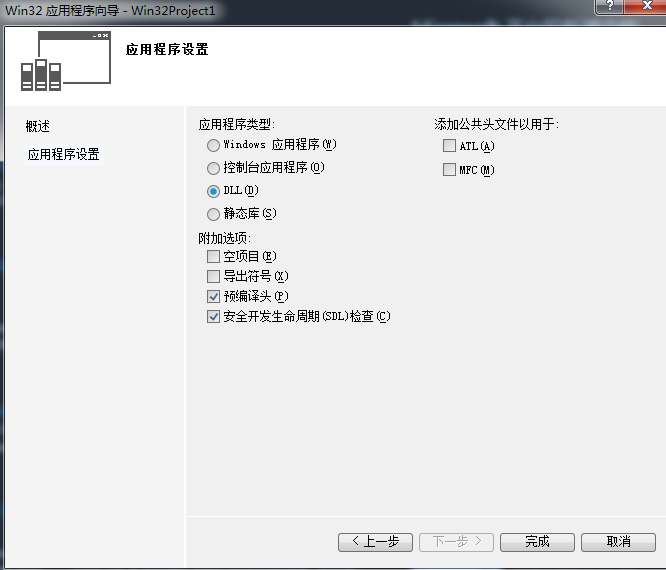
3、删除自带的示例代码,我们添加自己的接口(附加一个回调方法)
#ifdef ADDDLL_EXPORTS

#define ADDDLL_API __declspec(dllexport)

#else

#define ADDDLL_API __declspec(dllimport)

#endif

typedef void(__stdcall * RecvDataCallback) (unsigned char* pData, int iDataSize, int iMsgType, long lContext);

long mCallBackFunction=NULL;

EXTERN_C ADDDLL_API int add(int a,int b);

EXTERN_C ADDDLL_API bool MLogin(long lInstance,ULONG pServerIP,int iConferenceNo,long pCallBackFunction,long lContext);

EXTERN_C ADDDLL_API bool MLogout(long lInstance);

EXTERN_C ADDDLL_API bool MSendData(long lInstance,unsigned char* pData,int iDataSize,int iMsgType);

void logPrintf(const char* str);
cpp文件中实现
// AddDll.cpp : 定义 DLL 应用程序的导出函数。

//

#include "stdafx.h"

#include "AddDll.h"

int add(int a,int b)

{

    return a + b;

}

ADDDLL_API bool MLogin(long lInstance, ULONG pServerIP, int iConferenceNo, long pCallBackFunction, long lContext)

{

    std::string strLog="log from login:\r\n";

    strLog += "lInstance:" + std::to_string(lInstance);

    strLog += " pServerIP:"+ std::to_string(pServerIP);

    strLog += " iConferenceNo:" + std::to_string(pServerIP);

    strLog += " pCallBackFunction:" + std::to_string(pCallBackFunction);

    strLog += " lContext:" + std::to_string(lContext);

    strLog += "\r\n" ;

    logPrintf(strLog.c_str());

    mCallBackFunction = pCallBackFunction;

    return true;

}

ADDDLL_API bool MLogout(long lInstance)

{

    std::string strLog = "log from logout:\r\n";

    strLog += "lInstance:" + std::to_string(lInstance);

    strLog += "\r\n";

    logPrintf(strLog.c_str());

    return true;

}

ADDDLL_API bool MSendData(long lInstance, unsigned char * pData, int iDataSize, int iMsgType)

{

    std::string strLog = "log from sendData:\r\n";

    strLog += "lInstance:" + std::to_string(lInstance);

    strLog += " pData:" + std::string((const char *)pData);

    strLog += " iDataSize:" + std::to_string(iDataSize);

    strLog += " iMsgType:" + std::to_string(iMsgType);

    strLog += "\r\n";

    logPrintf(strLog.c_str());

    ( *(RecvDataCallback) mCallBackFunction)((unsigned char*) pData, strlen((const char *)pData), iMsgType, );

    return true;

}

void logPrintf(const char * str)

{

    FILE* fp = fopen("D:\\log.txt", "a+");

    if (fp)

    {

        fprintf(fp, str);

        fclose(fp);

    }

}
生成即可
4、需要注意的是,不要勾选空项目,因为可能有依赖项,如果是给C++调用,那么此处可以选择空项目
一定不要忘记导出标识
extern "C" __declspec(dllexport)
参见:点我三、C#端调用
  /// <summary>

    /// 注意:需要类中声明,方法中new,避免被回收

    /// </summary>

    /// <param name="pData"></param>

    /// <param name="iDataSize"></param>

    /// <param name="iMsgType"></param>

    /// <param name="lContext"></param>

    [UnmanagedFunctionPointer(CallingConvention.Cdecl)]

    public delegate  void RecvDataCallback(IntPtr pData,int iDataSize, int iSendMsgType, int iCallBackMsgType, long lContext);

    public static class CRelay

    {

        public static Int32 lInstance = ;

        [DllImport("RelayDllR.DLL", EntryPoint = "CreateInstance", SetLastError = true, CharSet = CharSet.Unicode, ExactSpelling = true, CallingConvention = CallingConvention.Cdecl)]

        public static extern Int32 CreateInstance();

        [DllImport("RelayDllR.DLL", EntryPoint = "DestroyInstance", SetLastError = true, CharSet = CharSet.Unicode, ExactSpelling = true, CallingConvention = CallingConvention.Cdecl)]

        public static extern void DestroyInstance(Int32 lInstance);

        [DllImport("RelayDllR.DLL", EntryPoint = "Login", SetLastError = true, CharSet = CharSet.Unicode, ExactSpelling = true, CallingConvention = CallingConvention.Cdecl)]

        public static extern bool Login(Int32 lInstance, UInt32 pServerIP, Int32 iConferenceNo,/*RecvDataCallback*/Int32 pCallBackFunction, Int32 lContext);

        [DllImport("RelayDllR.DLL", EntryPoint = "Logout",SetLastError = true, CharSet = CharSet.Unicode, ExactSpelling = true, CallingConvention = CallingConvention.Cdecl)]

        public static extern bool Logout(Int32 lInstance);

        [DllImport("RelayDllR.DLL", EntryPoint = "SendData", SetLastError = true, CharSet = CharSet.Unicode, ExactSpelling = true, CallingConvention = CallingConvention.Cdecl)]

        public static extern bool SendData(Int32 lInstance, [MarshalAs(UnmanagedType.LPArray)] byte[] pData, Int32 iDataSize, Int32 iMsgType);
注意:回调的声明不能少好 [UnmanagedFunctionPointer(CallingConvention.Cdecl)],否则可能只能调用有限次数后被平台释放,调用处应该在类中声明,方法中初始化(避免被GC回收)。
.Net平台调用の初识的更多相关文章
- Android动画效果之初识Property Animation(属性动画)
前言: 前面两篇介绍了Android的Tween Animation(补间动画) Android动画效果之Tween Animation(补间动画).Frame Animation(逐帧动画)Andr ...
- 初识Hadoop
第一部分: 初识Hadoop 一. 谁说大象不能跳舞 业务数据越来越多,用关系型数据库来存储和处理数据越来越感觉吃力,一个查询或者一个导出,要执行很长 ...
- python学习笔记(基础四:模块初识、pyc和PyCodeObject是什么)
一.模块初识(一) 模块,也叫库.库有标准库第三方库. 注意事项:文件名不能和导入的模块名相同 1. sys模块 import sys print(sys.path) #打印环境变量 print(sy ...
- 初识IOS,Label控件的应用。
初识IOS,Label控件的应用. // // ViewController.m // Gua.test // // Created by 郭美男 on 16/5/31. // Copyright © ...
- UI篇(初识君面)
我们的APP要想吸引用户,就要把UI(脸蛋)搞漂亮一点.毕竟好的外貌是增进人际关系的第一步,我们程序员看到一个APP时,第一眼就是看这个软件的功能,不去关心界面是否漂亮,看到好的程序会说"我 ...
- Python导出Excel为Lua/Json/Xml实例教程(一):初识Python
Python导出Excel为Lua/Json/Xml实例教程(一):初识Python 相关链接: Python导出Excel为Lua/Json/Xml实例教程(一):初识Python Python导出 ...
- 初识SpringMvc
初识SpringMvc springMvc简介:SpringMVC也叫Spring Web mvc,属于表现层的框架.Spring MVC是Spring框架的一部分,是在Spring3.0后发布的 s ...
- 初识redis数据类型
初识redis数据类型 1.String(字符串) string是redis最基本的类型,一个key对应一个value. string类型是二进制安全的.意思是redis的string可以包含任何数据 ...
- Redis初识、设计思想与一些学习资源推荐
一.Redis简介 1.什么是Redis Redis 是一个开源的使用ANSI C 语言编写.支持网络.可基于内存亦可持久化的日志型.Key-Value 数据库,并提供多种语言的API.从2010 年 ...
随机推荐
- 获取Windows某一目录下的所有文件名
#include <sys/types.h> #include <dirent.h> std::vector<std::string> get_all_fi ...
- 项目中AOP的实例应用
其中包括了权限管理.表单验证.事务管理.信息过滤.拦截器.过滤器.页面转发等等. 公司项目的应用:(涉及用户验证登录以及用户是否有管理员权限.心理用户权限等),还有涉及的其他日志管理代码就不一一举例了 ...
- Puppeteer自动化批量上传抖音视频
前言:最近因为项目宣传,所以用Puppeteer写了一个批量上传抖音视频的自动化程序用于推广. 环境和依赖:node,puppeteer 废话不多说,直接上代码: const puppeteer =r ...
- JS综合面试题1
function foo(){ getName = function () { alert(1); }; return this; } Foo.getName = function(){ alert( ...
- PHP中unset和null的比较
起因 因为感兴趣于unset($var)和$var=null的区别,于是找了一个stackoverflow高分问题及答案,翻译以供参考. 注:以下的问题和答案翻译自http://stackoverfl ...
- SpringMVC 与axis2 的整合(服务器端)
1,新建一个web project项目,项目的目录 如下: 2,导入需要的jar包,本例用的是axis2 1.7.3版本. 3,创建接口. package com.dsdl.hcm.webServic ...
- myeclipse中使用maven插件的时候,报错-Dmaven.multiModuleProjectDirectory system propery is not set.
-Dmaven.multiModuleProjectDirectory system propery is not set. Check $M2_HOME environment variable a ...
- loj2573[TJOI2018]数字计算
题意:操作1:x=x*m,输出x%mod.2.x/=map[m].m即第m次操作,保证该次操作为1操作,并且每个操作最多只会被删一次.q<=1e5. 线段树维护操作信息的乘积,删除把对应位置的权 ...
- Fabric.js的使用
最近项目有一个绘制的功能,搜了一圈发现fabric.js口碑不错,但是文档稀缺,于是东看看西搜搜的把项目的需求都给实现了,想分享一下. 篇幅有点长,但看完后可以轻松驾驭fabric.我的项目是基于VU ...
- Java实体与Json操作类
import com.fasterxml.jackson.core.JsonProcessingException; import com.fasterxml.jackson.databind.Jav ...