
vue - webpack.prod.conf.js
描述:webpack打包项目时的配置文件.
命令:yarn run build 或 npm run build
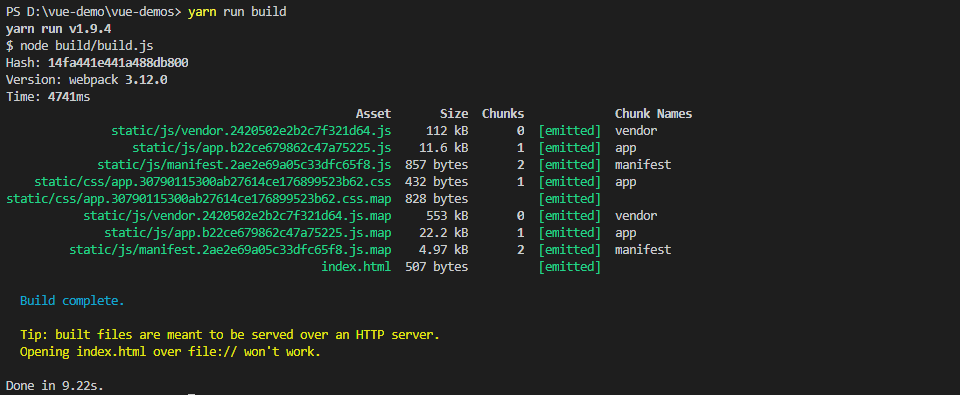
打包后,生成的文件在dist文件夹下
打包后,要在服务器环境下运行!!!
关于怎样运行,请查看:https://www.cnblogs.com/cisum/p/9370163.html ,
 'use strict'

 // 路径

 const path = require('path')

 // utils

 const utils = require('./utils')

 // webpack打包

 const webpack = require('webpack')

 // 来自cofig/index.js

 const config = require('../config')

 // 对象合并

 const merge = require('webpack-merge')

 // webpack基本配置

 const baseWebpackConfig = require('./webpack.base.conf')

 const CopyWebpackPlugin = require('copy-webpack-plugin')

 const HtmlWebpackPlugin = require('html-webpack-plugin')

 const ExtractTextPlugin = require('extract-text-webpack-plugin')

 const OptimizeCSSPlugin = require('optimize-css-assets-webpack-plugin')

 const UglifyJsPlugin = require('uglifyjs-webpack-plugin')

 const env = require('../config/prod.env')

 const webpackConfig = merge(baseWebpackConfig, {

   module: {

     rules: utils.styleLoaders({

       sourceMap: config.build.productionSourceMap,

       extract: true,

       usePostCSS: true

     })

   },

   devtool: config.build.productionSourceMap ? config.build.devtool : false,

   output: {

     path: config.build.assetsRoot,

     filename: utils.assetsPath('js/[name].[chunkhash].js'),

     chunkFilename: utils.assetsPath('js/[id].[chunkhash].js')

   },

   plugins: [

     // http://vuejs.github.io/vue-loader/en/workflow/production.html

     new webpack.DefinePlugin({

       'process.env': env

     }),

     // 混淆加密JavaScript

     new UglifyJsPlugin({

       uglifyOptions: {

         compress: {

           warnings: false

         }

       },

       sourceMap: config.build.productionSourceMap,

       parallel: true

     }),

     // 将css提取到自己的文件中

     new ExtractTextPlugin({

       filename: utils.assetsPath('css/[name].[contenthash].css'),

       //将以下选项设置为“false”将不会从codesplit块中提取CSS。

       //当webpack加载了codesplit块时,他们的CSS将使用style-loader动态插入。

       //它当前设置为“true”,因为我们看到源代码包含在codesplit包中,当它是“false”时,

       //增加文件大小:https://github.com/vuejs-templates/webpack/issues/1110

       allChunks: true,

     }),

     //压缩提取的CSS。 我们正在使用这个插件,以便可能

     //可以删除来自不同组件的重复CSS。

     new OptimizeCSSPlugin({

       cssProcessorOptions: config.build.productionSourceMap

         ? { safe: true, map: { inline: false } }

         : { safe: true }

     }),

     //使用正确的资产哈希生成dist index.html以进行缓存。

     //您可以通过编辑/index.html来自定义输出

     new HtmlWebpackPlugin({

       filename: config.build.index,

       template: 'index.html',

       inject: true,

       minify: {

         removeComments: true,

         collapseWhitespace: true,

         removeAttributeQuotes: true

         // 更多选项:

         // https://github.com/kangax/html-minifier#options-quick-reference

       },

       // 通过CommonsChunkPlugin持续使用多个块的必要条件

       chunksSortMode: 'dependency'

     }),

     // 原本模块没有改变时,保持module.id稳定

     new webpack.HashedModuleIdsPlugin(),

     // enable scope hoisting

     new webpack.optimize.ModuleConcatenationPlugin(),

     // 将原本模块js拆分为自己的文件

     new webpack.optimize.CommonsChunkPlugin({

       name: 'vendor',

       minChunks(module) {

         // node_modules中的任何必需模块都将解压缩到原模块

         return (

           module.resource &&

           /\.js$/.test(module.resource) &&

           module.resource.indexOf(

             path.join(__dirname, '../node_modules')

           ) === 0

         )

       }

     }),

     //将webpack运行时和模块清单提取到自己的文件中

     //每当应用程序包更新时,都会阻止更新供应商哈希

     new webpack.optimize.CommonsChunkPlugin({

       name: 'manifest',

       minChunks: Infinity

     }),

     //此实例从代码拆分块中提取共享块并捆绑它们

     //在一个单独的块中,类似于供应商块

     // see: https://webpack.js.org/plugins/commons-chunk-plugin/#extra-async-commons-chunk

     new webpack.optimize.CommonsChunkPlugin({

       name: 'app',

       async: 'vendor-async',

       children: true,

       minChunks: 3

     }),

     // 复制自定义静态目录

     new CopyWebpackPlugin([

       {

         from: path.resolve(__dirname, '../static'),

         to: config.build.assetsSubDirectory,

         ignore: ['.*']

       }

     ])

   ]

 })

 // 配置Gzip压缩

 if (config.build.productionGzip) {

   const CompressionWebpackPlugin = require('compression-webpack-plugin')

   webpackConfig.plugins.push(

     new CompressionWebpackPlugin({

       asset: '[path].gz[query]',

       algorithm: 'gzip',

       test: new RegExp(

         '\\.(' +

         config.build.productionGzipExtensions.join('|') +

         ')$'

       ),

       threshold: 10240,

       minRatio: 0.8

     })

   )

 }

 // 使用交互式可缩放树形图可视化webpack输出文件的大小

 if (config.build.bundleAnalyzerReport) {

   const BundleAnalyzerPlugin = require('webpack-bundle-analyzer').BundleAnalyzerPlugin

   webpackConfig.plugins.push(new BundleAnalyzerPlugin())

 }

 module.exports = webpackConfig
11
vue - webpack.prod.conf.js的更多相关文章
- vue-cli脚手架之webpack.prod.conf.js
webpack.prod.conf.js 生产环境配置文件: 'use strict'//js严格模式执行 const path = require('path')//这个模块是发布到NPM注册中心的 ...
- vue - webpack.base.conf.js
描述:webapck基本配置文件. 为了给开发文件和打包文件(webpack.dev.conf.js|| webpack.prod.conf.js) 提供方便. 'use strict' // 路径 ...
- vue-cli脚手架npm相关文件解读(2)webpack.prod.conf.js
系列文章传送门: 1.build/webpack.base.conf.js 2.build/webpack.prod.conf.js 3.build/webpack.dev.conf.js 4.bui ...
- vue-cli脚手架build目录中的webpack.prod.conf.js配置文件
// 下面是引入nodejs的路径模块 var path = require('path') // 下面是utils工具配置文件,主要用来处理css类文件的loader var utils = req ...
- vue - webpack.dev.conf.js
描述:开发时的配置.(配置开发时的一些操作) 例如这里,是否自动打开浏览器(默认true) 'use strict' // build/util.js const utils = require('. ...
- 手撕vue-cli配置——webpack.prod.conf.js篇
'use strict' const path = require('path') const utils = require('./utils') const webpack = require(' ...
- webpack.prod.conf.js
// 引入依赖模块 var path = require('path') var utils = require('./utils') var webpack = require('webpack') ...
- vue - webpack.dev.conf.js for merge
webpack-merge提供了一个merge连接数组并合并创建新对象的对象的函数.如果遇到函数,它将执行它们,通过算法运行结果,然后再次将返回的值包装在函数中. 这种行为在配置webpack时特别有 ...
- vue - webpack.dev.conf.js for FriendlyErrorsPlugin
描述:webpack网页端友好的报错信息就来自它 官网:https://www.npmjs.com/package/friendly-errors-webpack-plugin new Friendl ...
随机推荐
- Linux下python版本的升级步骤
1.先下载,你要升级的python版本(我升级的是python3.3.0) 可使用系统自带下载工具wget下载: wget http://www.python.org/ftp/python/3.3.0 ...
- socket编程(TCP)
1.模型:(图片来自百度百科) 服务端: 1)创建socket对象 int socket(int domain, int type, int protocol) domain:即协议域,又称为协议族( ...
- Elasticsearch match_phrase用法
目前有用到的用法如下: post /index_name/_search { "query" : { "match_phrase": { "nickn ...
- Xamarin XAML语言教程模板视图TemplatedView(一)
Xamarin XAML语言教程模板视图TemplatedView(一) 模板视图TemplatedView 与模板页面相对的是TemplatedView,它被称为模板视图,它的功能和模板页面类似,也 ...
- Sd - 数据库事务
SQL92事务的隔离级别 SQL 标准用三个必须在并行的事务之间避免的现象定义了四个级别的事务隔离. 这些不希望发生的现象是: 脏读(dirty reads):一个事务读取了另一个未提交的 ...
- 在intellij idea 中进行android 单元测试
本次用来测试的代码是sqlite进行数据操作. ######右键选择要进行单元测试的应用 #############弹出选择框,选择Android>Test Module>Next ### ...
- canvas元素内容生成图片
转自https://segmentfault.com/a/1190000003853394 想要将canvas元素当前显示的内容生成为图像文件,我们首先要获取canvas中的数据,在HTML5 < ...
- 【BZOJ 1018】【SHOI 2008】堵塞的交通traffic
http://www.lydsy.com/JudgeOnline/problem.php?id=1018 线段树维护连通性. 把每一列看成一个节点,对于线段树上的每一个节点,维护8个信息,前6个字面意 ...
- 【树形dp】Rebuilding Roads
[POJ1947]Rebuilding Roads Time Limit: 1000MS Memory Limit: 30000K Total Submissions: 11934 Accep ...
- 【BFS】【余数剪枝】Multiple
[poj1465]Multiple Time Limit: 1000MS Memory Limit: 32768K Total Submissions: 7731 Accepted: 1723 ...