
matplotlib之极坐标系的极角网格线(thetagrids)的显示刻度
极坐标系的极角网格线(thetagrids)的显示刻度
 #!/usr/bin/env python3

 #-*- coding:utf-8 -*-

 ############################

 #File Name: polar.py

 #Author: frank

 #Mail: frank0903@aliyun.com

 #Created Time:2018-05-22 22:08:01

 ############################

 import matplotlib.pyplot as plt

 import numpy as np

 import matplotlib as mpl

 zhfont = mpl.font_manager.FontProperties(fname='/usr/share/fonts/truetype/wqy/wqy-microhei.ttc')

 ax = plt.subplot(111, polar=True)

 plt.figtext(0.52, 0.95, '默认labels为角度(degree)', ha='center', size=20,fontproperties=zhfont)

 plt.thetagrids(np.linspace(0, 360, 6, endpoint=False))

 plt.savefig('default_degrees.jpg')

 plt.figtext(0.52, 0.95, '指定labels', ha='center', size=20,fontproperties=zhfont)

 plt.thetagrids(np.linspace(0, 360, 6, endpoint=False), ['a', 'b', 'c', 'd', 'e', 'f'])

 plt.savefig('special_degrees.jpg')

 plt.show()
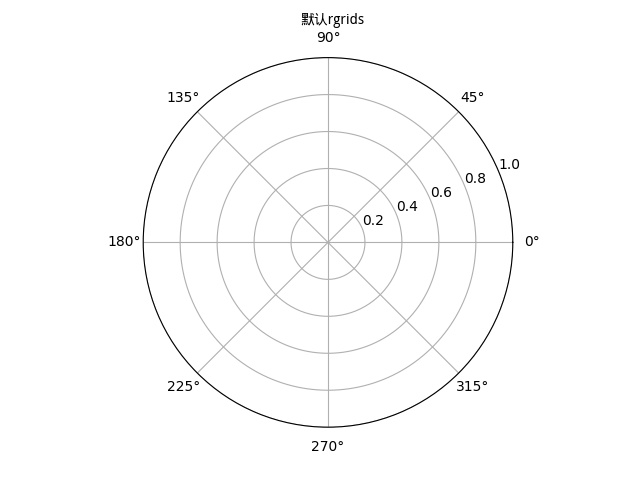

matplotlib.pyplot.thetagrids(*args, **kwargs)
Get or set the theta locations of the gridlines in a polar plot.
get or set 极角轴显示刻度。
If no arguments are passed, return a tuple (lines, labels) where lines is an array of radial gridlines (Line2D instances) and labels is an array of tick labels (Text instances):
lines, labels = thetagrids()
Otherwise the syntax is:
lines, labels = thetagrids(angles, labels=None, fmt='%d', frac = 1.1)
set the angles at which to place the theta grids (these gridlines are equal along the theta dimension).
angles is in degrees.
angles 是角度值,不能是弧度值。
labels, if not None, is a len(angles) list of strings of the labels to use at each angle.
If labels is None, the labels will be fmt%angle.
如果labels不为空,那么极角网格线的显示刻度为labels。
如果labels为空,那么极角网格线的显示刻度为 角度值。
frac is the fraction of the polar axes radius at which to place the label (1 is the edge). e.g., 1.05 is outside the axes and 0.95 is inside the axes.
frac 设置 极角显示刻度 距离 极角轴的距离。例如,极径为1,frac=1.1,那么极角的刻度显示的位置 离 r=1的极角网格线 0.1长度。
Return value is a list of tuples (lines, labels):
lines are Line2D instances
labels are Text instances.
Note that on input, the labels argument is a list of strings, and on output it is a list of Text instances.
matplotlib之极坐标系的极角网格线(thetagrids)的显示刻度的更多相关文章
- matplotlib之极坐标系的极径网格线(rgrids)的显示刻度
matplotlib之极坐标系的极径网格线(rgrids)的显示刻度 #!/usr/bin/env python3 #-*- coding:utf-8 -*- #################### ...
- matplotlib之创建极坐标系
#!/usr/bin/env python3 #-*- coding:utf-8 -*- ############################ #File Name: polar.py #Auth ...
- matplotlib极坐标系应用之雷达图
#!/usr/bin/env python3 #-*- coding:utf-8 -*- ############################ #File Name: test.py #Autho ...
- Python用matplotlib绘图网格线的设置
一.X轴网格线的设置 import matplotlib.pyplot as plt import numpy as np from pylab import mpl mpl.rcParams['fo ...
- 06. Matplotlib 2 |折线图| 柱状图| 堆叠图| 面积图| 填图| 饼图| 直方图| 散点图| 极坐标| 图箱型图
1.基本图表绘制 plt.plot() 图表类别:线形图.柱状图.密度图,以横纵坐标两个维度为主同时可延展出多种其他图表样式 plt.plot(kind='line', ax=None, figsiz ...
- Python自学笔记——matplotlib极坐标.md
一.极坐标 在平面内取一个定点O,叫极点,引一条射线Ox,叫做极轴,再选定一个长度单位和角度的正方向(通常取逆时针方向).对于平面内任何一点M,用ρ表示线段OM的长度(有时也用r表示),θ表示从Ox到 ...
- matplotlib极坐标方法详解
一.极坐标 在平面内取一个定点O,叫极点,引一条射线Ox,叫做极轴,再选定一个长度单位和角度的正方向(通常取逆时针方向).对于平面内任何一点M,用ρ表示线段OM的长度(有时也用r表示),θ表示从Ox到 ...
- 图表绘制工具--Matplotlib 2
''' [课程3.] 基本图表绘制 plt.plot() 图表类别:线形图.柱状图.密度图,以横纵坐标两个维度为主 同时可延展出多种其他图表样式 plt.plot(kind='line', ax=No ...
- 数据分析 大数据之路 六 matplotlib 绘图工具
散点图 #导入必要的模块 import numpy as np import matplotlib.pyplot as plt #产生测试数据 x = np.arange(1,10) y = x ...
随机推荐
- 配置Node Manager启动同一机器的两个域
进入/u01/FMW_Home/weblogic/wlserver_10.3/server/bin目录,在需要配置的节点上启动node manager,以weblogic用户登录 c d /u01/F ...
- linux安装ping
https://www.cnblogs.com/iamdevops/p/5743157.html 使用docker仓库下载的ubuntu 14.04 镜像.里面精简的连 ping 命令都没有.goog ...
- Java集合类理解
深入Java集合学习系列:http://zhangshixi.iteye.com/blog/674856 http://blog.csdn.net/shf4715/article/details/47 ...
- iOS:quartz2D绘图(在PDF文件上绘制图片)
quartz2D还可以在PDF文件上绘制图片,它有自己的PDF Graphics Context上下文,通过UIGraphicsBeginPDFContextToFile方法开始上下文后就可以绘制图片 ...
- [Todo]非常好的免费IT书籍资源 & Github排名
今天看github排名,看到排在第二位的是免费书籍: https://github.com/vhf/free-programming-books/blob/master/free-programmin ...
- libev客户端
#include <ev.h> #include <stdio.h> #include <netinet/in.h> #include <stdlib.h&g ...
- 两张表的笛卡尔积用sql语句
第一个表的行数乘以第二个表的行数等于笛卡尔积结果集的大小SELECT * FROM table1 CROSS JOIN table2
- 【云计算】k8s相关资料
参考资料: How to get started, and achieve tasks, using Kubernetes:http://kubernetes.io/docs/getting-star ...
- 教你用webgl快速创建一个小世界
收录待用,修改转载已取得腾讯云授权 作者:TAT.vorshen Webgl的魅力在于可以创造一个自己的3D世界,但相比较canvas2D来说,除了物体的移动旋转变换完全依赖矩阵增加了复杂度,就连生成 ...
- EasyUI-子页面增加显示tabs的一个问题
在父页面点个链接能动态看到子页面的情况太简单,请看easyUI官网:http://www.jeasyui.com/tutorial/layout/tabs2.php现在说的是在子页面点个按钮也能触发增 ...