
tensorflow-gpu安装遇到的坑
tensorflow-gpu安装好导入,一直出现以下错误
折腾了好久。
错误之前也按照中国官网安装及配置各环境变量:https://tensorflow.google.cn/install/gpu
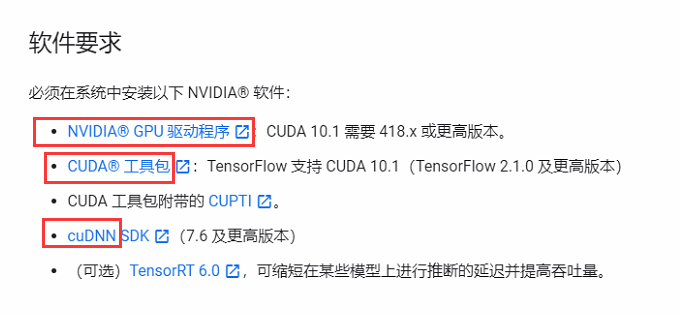
其次基于anaconda+Python3.7安装tensorflow_gpu-2.2.0-cp37也安装成功。
但import tensorflow as tf总出现以下错误。

ImportError                               Traceback (most recent call last)

D:\soft\anaconda3\lib\site-packages\tensorflow\python\pywrap_tensorflow.py in <module>

     57

---> 58   from tensorflow.python.pywrap_tensorflow_internal import *

     59

D:\soft\anaconda3\lib\site-packages\tensorflow\python\pywrap_tensorflow_internal.py in <module>

     27             return _mod

---> 28     _pywrap_tensorflow_internal = swig_import_helper()

     29     del swig_import_helper

D:\soft\anaconda3\lib\site-packages\tensorflow\python\pywrap_tensorflow_internal.py in swig_import_helper()

     23             try:

---> 24                 _mod = imp.load_module('_pywrap_tensorflow_internal', fp, pathname, description)

     25             finally:

D:\soft\anaconda3\lib\imp.py in load_module(name, file, filename, details)

    241         else:

--> 242             return load_dynamic(name, filename, file)

    243     elif type_ == PKG_DIRECTORY:

D:\soft\anaconda3\lib\imp.py in load_dynamic(name, path, file)

    341             name=name, loader=loader, origin=path)

--> 342         return _load(spec)

    343

ImportError: DLL load failed: 找不到指定的模块。

During handling of the above exception, another exception occurred:

ImportError                               Traceback (most recent call last)

<ipython-input-1-64156d691fe5> in <module>

----> 1 import tensorflow as tf

D:\soft\anaconda3\lib\site-packages\tensorflow\__init__.py in <module>

     39 import sys as _sys

     40

---> 41 from tensorflow.python.tools import module_util as _module_util

     42 from tensorflow.python.util.lazy_loader import LazyLoader as _LazyLoader

     43

D:\soft\anaconda3\lib\site-packages\tensorflow\python\__init__.py in <module>

     48 import numpy as np

     49

---> 50 from tensorflow.python import pywrap_tensorflow

     51

     52 # Protocol buffers

D:\soft\anaconda3\lib\site-packages\tensorflow\python\pywrap_tensorflow.py in <module>

     67 for some common reasons and solutions.  Include the entire stack trace

     68 above this error message when asking for help.""" % traceback.format_exc()

---> 69   raise ImportError(msg)

     70

     71 # pylint: enable=wildcard-import,g-import-not-at-top,unused-import,line-too-long

ImportError: Traceback (most recent call last):

  File "D:\soft\anaconda3\lib\site-packages\tensorflow\python\pywrap_tensorflow.py", line 58, in <module>

    from tensorflow.python.pywrap_tensorflow_internal import *

  File "D:\soft\anaconda3\lib\site-packages\tensorflow\python\pywrap_tensorflow_internal.py", line 28, in <module>

    _pywrap_tensorflow_internal = swig_import_helper()

  File "D:\soft\anaconda3\lib\site-packages\tensorflow\python\pywrap_tensorflow_internal.py", line 24, in swig_import_helper

    _mod = imp.load_module('_pywrap_tensorflow_internal', fp, pathname, description)

  File "D:\soft\anaconda3\lib\imp.py", line 242, in load_module

    return load_dynamic(name, filename, file)

  File "D:\soft\anaconda3\lib\imp.py", line 342, in load_dynamic

    return _load(spec)

ImportError: DLL load failed: 找不到指定的模块。

Failed to load the native TensorFlow runtime.

See https://www.tensorflow.org/install/errors

for some common reasons and solutions.  Include the entire stack trace

above this error message when asking for help.
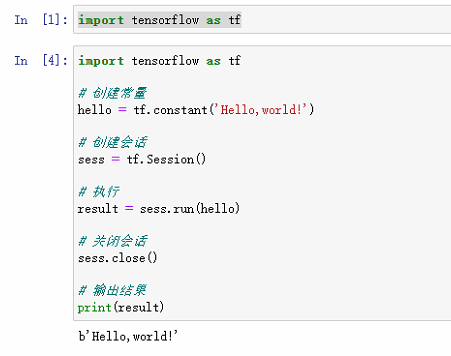
解决方法:
卸载。换版本,pip install tensorflow-gpu==1.15.0
成功:

tensorflow-gpu安装遇到的坑的更多相关文章
- TensorFlow DeepLab教程初稿-tensorflow gpu安装教程
TensorFlow DeepLab教程初稿-tensorflow gpu安装教程 商务合作,科技咨询,版权转让:向日葵,135-4855__4328,xiexiaokui#qq.com Summar ...
- tensorflow -gpu安装,史上最新最简单的途径(不用自己装cuda,cdnn)
tensorflow -gpu安装首先,安装Anoconda1. 官网下载点我: 2.安装 点击 python 3.6 version自动下载x64版,下载好之后,然后安装. 如图,打上勾之后,一路n ...
- 【转】Ubuntu 16.04安装配置TensorFlow GPU版本
之前摸爬滚打总是各种坑,今天参考这篇文章终于解决了,甚是鸡冻\(≧▽≦)/,电脑不知道怎么的,安装不了16.04,就安装15.10再升级到16.04 requirements: Ubuntu 16.0 ...
- Ubuntu 16.04 + CUDA 8.0 + cuDNN v5.1 + TensorFlow(GPU support)安装配置详解
随着图像识别和深度学习领域的迅猛发展,GPU时代即将来临.由于GPU处理深度学习算法的高效性,使得配置一台搭载有GPU的服务器变得尤为必要. 本文主要介绍在Ubuntu 16.04环境下如何配置Ten ...
- Win10上安装Keras 和 TensorFlow(GPU版本)
一. 安装环境 Windows 10 64bit 家庭版 GPU: GeForce GTX1070 Python: 3.5 CUDA: CUDA Toolkit 8.0 GA1 (Sept 2016 ...
- ubuntu16.04下安装TensorFlow(GPU加速)----详细图文教程【转】
本文转载自:https://blog.csdn.net/zhaoyu106/article/details/52793183 le/details/52793183 写在前面 一些废话 接触深度学习已 ...
- Google TensorFlow for GPU安装、配置大坑
Google TensorFlow for GPU安装.配置大坑 从本周一开始(12.05),共4天半的时间,终于折腾好Google TensorFlow for GPU版本,其间跳坑无数,摔得遍体鳞 ...
- 备注: ubt 16.04 安装 gtx 1060 --- 成功运行 tensorflow - gpu
---------------------------------------------------------------------------------------------------- ...
- win10系统下安装TensorFlow GPU版本
首先要说,官网上的指南是最好的指南. https://www.tensorflow.org/install/install_windows 需要FQ看. 想要安装gpu版本的TensorFlow.我们 ...
- 通过Anaconda在Ubuntu16.04上安装 TensorFlow(GPU版本)
一. 安装环境 Ubuntu16.04.3 LST GPU: GeForce GTX1070 Python: 3.5 CUDA Toolkit 8.0 GA1 (Sept 2016) cuDNN v6 ...
随机推荐
- Python:Excel自动化实践入门篇 甲【留言点赞领图书门票】
*以下内容为本人的学习笔记,如需要转载,请声明原文链接微信公众号「englyf」https://mp.weixin.qq.com/s?__biz=MzUxMTgxMzExNQ==&mid=22 ...
- Commons-Collections反序列化
Java反序列化漏洞 Commons Collections Apache Commons 是 Apache 软件基金会的项目.Commons Collections 包为 Java 标准的 Coll ...
- CLIP 改进工作串讲(下)学习笔记
1.图像生成 1.1CLIPasso(semantically-aware object sketching) 将物体的照片变成简笔画的形式,希望即使有最少的线条,也能识别出来物体. 问题定义,在纸上 ...
- python spacy [E050] Can't find model 'en_core_web_sm'
出现问题 [E050] Can't find model 'en_core_web_sm' 使用管理员权限打开shell控制台,输入命令 python -m spacy download en_cor ...
- SAP FBL1N屏幕增强,增加自定义的列
需求 因财务想要在查看未清和已清凭证的时候,看到是该凭证是否哪一个采购人员创建,因此新增一列创建人,关联关系是 EKKO-EBELN=BSEG-ZUONR,这里关联分配号是因为之前开发自动清账的时候做 ...
- vue table刷新单行数据
1.给el-table加上标记方法 <el-table v-loading="loading" :data="tagList1" @selection-c ...
- Mybatis 中传入List实现 批量插入、批量更新、批量删除
1. 批量插入: Mapper层: int insertList(List<UsersModel> list); 对应的mapper.xml: <!--批量插入信息--> &l ...
- redisTemplate类学习及理解
List<Object> list = masterRedisTemplate.executePipelined((RedisCallback<Long>) connectio ...
- CCIE DC Multicast Part 2.
Hi Guys! In my last blog post, we had a quick look at multicast and a more in depth look at how PIM ...
- Win10打开Autodesk软件时提示“管理员已阻止你运行此应用”
Win10用户的最大困扰就是系统的安全性太高,导致很多软件在运行时总是会报错,这不,又有同学遇到了下面的问题: 当你的电脑跳出这么鲜红的界面你是不是很想砸了它....手下留脑~它还能再奋斗两年. 出现 ...