
Springboot整合AOP和注解,实现丰富的切面功能
简介
我们在文章《Spring AOP与AspectJ的对比及应用》介绍了AOP的使用,这篇文章讲解一下AOP与注解的整合,通过注解来使用AOP,会非常方便。为了简便,我们还是来实现一个计时的功能。
整合过程
首先创建一个注解:
@Retention(RetentionPolicy.RUNTIME)

@Target(ElementType.METHOD)

public @interface PkslowLogTime {

}
然后在一个Service中使用注解:
@Service

@Slf4j

public class TestService {

    @PkslowLogTime

    public void fetchData() {

        log.info("fetchData");

        try {

            Thread.sleep(500);

        } catch (InterruptedException e) {

            throw new RuntimeException(e);

        }

    }

}
这个Service的方法会在Controller中调用:
@GetMapping("/hello")

public String hello() {

  log.info("------hello() start---");

  test();

  staticTest();

  testService.fetchData();

  log.info("------hello() end---");

  return "Hello, pkslow.";

}
接着是关键一步,我们要实现切面,来找到注解并实现对应功能:
@Aspect

@Component

@Slf4j

public class PkslowLogTimeAspect {

    @Around("@annotation(com.pkslow.springboot.aop.PkslowLogTime) && execution(* *(..))")

    public Object doAround(ProceedingJoinPoint joinPoint) throws Throwable {

        log.info("------PkslowLogTime doAround start------");

        MethodSignature methodSignature = (MethodSignature) joinPoint.getSignature();

        // Get intercepted method details

        String className = methodSignature.getDeclaringType().getSimpleName();

        String methodName = methodSignature.getName();

        // Measure method execution time

        StopWatch stopWatch = new StopWatch(className + "->" + methodName);

        stopWatch.start(methodName);

        Object result = joinPoint.proceed();

        stopWatch.stop();

        // Log method execution time

        log.info(stopWatch.prettyPrint());

        log.info("------PkslowLogTime doAround end------");

        return result;

    }

}
@Around("@annotation(com.pkslow.springboot.aop.PkslowLogTime) && execution(* *(..))")这个表达式很关键,如果不对,将无法正确识别;还有可能出现多次调用的情况。多次调用的情况可以参考:Stackoverflow
这里使用了Spring的StopWatch来计时。
测试
通过maven build包:
$ mvn clean package
日志可以看到有对应的织入信息:
[INFO] Join point 'method-execution(java.lang.String com.pkslow.springboot.controller.TestController.hello())' in Type 'com.pkslow.springboot.controller.TestController' (TestController.java:22) advised by around advice from 'com.pkslow.springboot.aop.ControllerAspect' (ControllerAspect.class(from ControllerAspect.java))

[INFO] Join point 'method-execution(java.lang.String com.pkslow.springboot.controller.TestController.hello())' in Type 'com.pkslow.springboot.controller.TestController' (TestController.java:22) advised by before advice from 'com.pkslow.springboot.aop.ControllerAspect' (ControllerAspect.class(from ControllerAspect.java))

[INFO] Join point 'method-execution(void com.pkslow.springboot.controller.TestController.test())' in Type 'com.pkslow.springboot.controller.TestController' (TestController.java:31) advised by around advice from 'com.pkslow.springboot.aop.ControllerAspect' (ControllerAspect.class(from ControllerAspect.java))

[INFO] Join point 'method-execution(void com.pkslow.springboot.controller.TestController.test())' in Type 'com.pkslow.springboot.controller.TestController' (TestController.java:31) advised by before advice from 'com.pkslow.springboot.aop.ControllerAspect' (ControllerAspect.class(from ControllerAspect.java))

[INFO] Join point 'method-execution(void com.pkslow.springboot.controller.TestController.staticTest())' in Type 'com.pkslow.springboot.controller.TestController' (TestController.java:37) advised by around advice from 'com.pkslow.springboot.aop.ControllerAspect' (ControllerAspect.class(from ControllerAspect.java))

[INFO] Join point 'method-execution(void com.pkslow.springboot.controller.TestController.staticTest())' in Type 'com.pkslow.springboot.controller.TestController' (TestController.java:37) advised by before advice from 'com.pkslow.springboot.aop.ControllerAspect' (ControllerAspect.class(from ControllerAspect.java))

[INFO] Join point 'method-execution(void com.pkslow.springboot.service.TestService.fetchData())' in Type 'com.pkslow.springboot.service.TestService' (TestService.java:12) advised by around advice from 'com.pkslow.springboot.aop.PkslowLogTimeAspect' (PkslowLogTimeAspect.class(from PkslowLogTimeAspect.java))
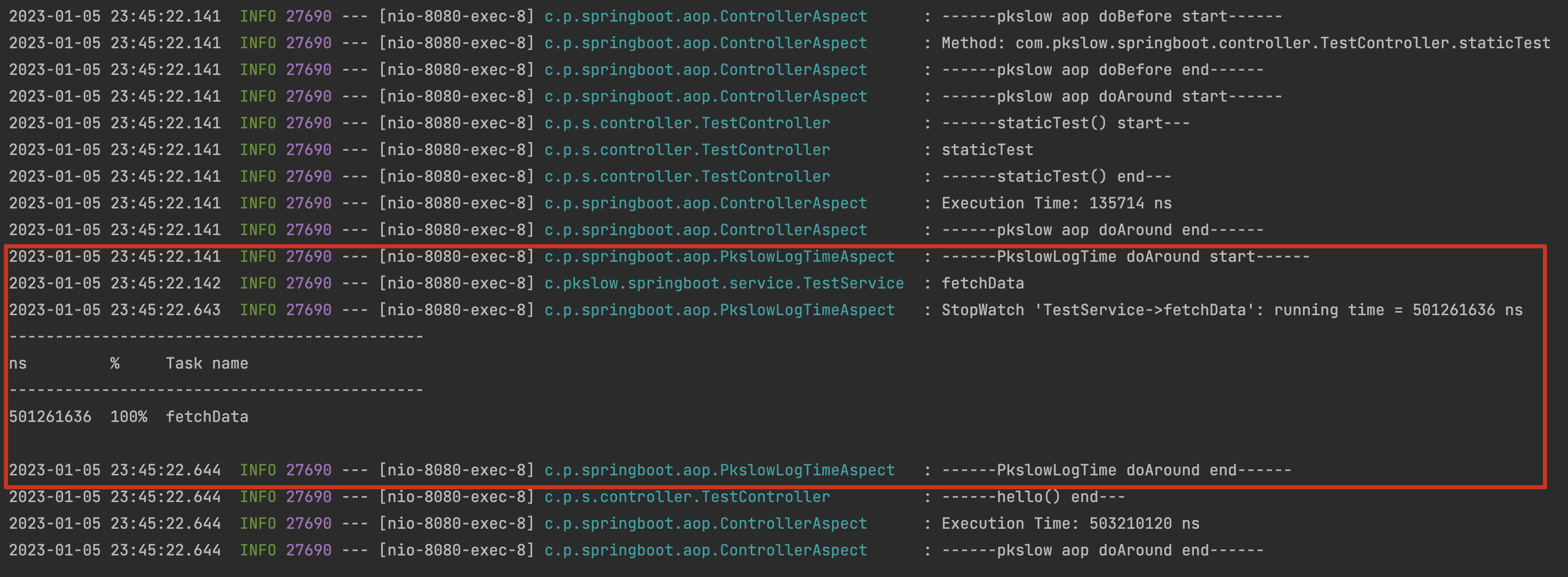
启动应用后访问接口,日志如下:
总结
通过注解可以实现很多功能,也非常方便。而且注解还可以添加参数,组合使用更完美了。
代码请看GitHub: https://github.com/LarryDpk/pkslow-samples
Springboot整合AOP和注解,实现丰富的切面功能的更多相关文章
- SpringBoot整合定时任务----Scheduled注解实现(一个注解全解决)
一.使用场景 定时任务在开发中还是比较常见的,比如:定时发送邮件,定时发送信息,定时更新资源,定时更新数据等等... 二.准备工作 在Spring Boot程序中不需要引入其他Maven依赖 (因为s ...
- spring框架aop用注解形式注入Aspect切面无效的问题解决
由于到最后我的项目还是有个邪门的错没解决,所以先把文章大概内容告知: 1.spring框架aop注解扫描默认是关闭的,得手动开启. 2.关于Con't call commit when autocom ...
- 【使用篇二】SpringBoot整合aop(13)
AOP为Aspect Oriented Programming的缩写,意为:面向切面编程,通过预编译方式和运行期动态代理实现程序功能的统一维护的一种技术.AOP是Spring框架中的一个重要内容,它通 ...
- springboot整合aop实现网站访问日志记录
目的: 统一日志输出格式,统计访问网站的ip. 思路: 1.针对不同的调用场景定义不同的注解,目前想的是接口层和服务层. 2.我设想的接口层和服务层的区别在于: (1)接口层可以打印客户端IP,而服务 ...
- SpringBoot整合Mybatis使用注解或XML的方式开发
2018-6-4 补充mybatis-spring-boot注解的使用 1.导包 只需要再导入mysql+mybatis两个包 <dependency> <groupId>or ...
- SpringBoot整合AOP
一.创建LogComponent类 类上加上@Component和@Aspect 表示把该类注册成spring组件和aop 二.创建6个方法 2.1 @Poin ...
- springboot整合mybatis之注解方式
1. 创建maven项目,工程目录如下图 2. 在pom.xml文件中添加mybatis依赖. 3. 创建实体类,并生成construct方法,getter和setter方法.同时在数据库中创建对应的 ...
- SpringBoot整合quartz实现动态启动,停止定时任务功能
注意:这个方法当程序重启之后会失效,所以必须将定时任务持久化到数据库,然后程序启动的时候重新把数据库的定时任务加载到quartz中 springboot程序启动初始化代码参考:https://www. ...
- Spring AOP通过注解的方式设置切面和切入点
切面相当于一个功能的某一个类,切入点是这个类的某部分和需要额外执行的其他代码块,这两者是多对多的关系,在代码块处指定执行的条件. Aspect1.java package com.yh.aop.sch ...
- Springboot的日志管理&Springboot整合Junit测试&Springboot中AOP的使用
==============Springboot的日志管理============= springboot无需引入日志的包,springboot默认已经依赖了slf4j.logback.log4j等日 ...
随机推荐
- ES6 学习笔记(二)解构赋值
一.数组的解构赋值 1.基本用法 ES6允许按照一定模式从数组和对象中提取值,然后对变量进行赋值,该操作即为解构 如: let [a,b,c]=[1,2,3]; console.log(a,b,c) ...
- 微信小程序根据开发环境切换域名
domain.js // 获取当前账号信息,线上小程序版本号仅支持在正式版小程序中获取,开发版和体验版中无法获取. // envVersion:'develop','trial','release' ...
- 学习ASP.NET Core Blazor编程系列十三——路由(完)
学习ASP.NET Core Blazor编程系列一--综述 学习ASP.NET Core Blazor编程系列二--第一个Blazor应用程序(上) 学习ASP.NET Core Blazor编程系 ...
- 小米mini路由器刷breed不死鸟和潘多拉固件
前言 开启小米路由器ssh, 这一步浪费我很长时间,因为目前的开发版都对ssh升级进行了md5校验,导致官方升级方法总是失败,所以换成老版本的 路由器固件就行了. 步骤 下载 0.4.36 mini路 ...
- Python3 Scrapy 框架学习
1.安装scrapy 框架 windows 打开cmd输入 pip install Scrapy 2.新建一个项目: 比如这里我新建的项目名为first scrapy startproject fir ...
- NET 6 实现滑动验证码(三)、接口
题外话,有网友说,这玩意根本很容易破解,确实是这样.但验证码这东西,就跟锁子很类似,防君子不防小人.验证码的发明其实是社会文明的退步.因为它阻碍了真正的使用者,却无法阻挡别有用心的人.但又有什么办法呢 ...
- python-CSV文件的读写
CSV文件:Comma-Separated Values,中文叫逗号分隔值或者字符分隔值,其文件以纯文本的形式存储表格数据. 可以理解成一个表格,只不过这个 表格是以纯文本的形式显示,单元格与单元格之 ...
- nginx压力测试及限速
测试工具:Apache ab windows安装教程:https://www.cnblogs.com/laijinquan/p/14694655.html 64位下载地址:https://www.ap ...
- 【Java EE】Day14 Servlet、HTTP、Request
一.Servlet 二.HTTP 三.Request 四.登录案例
- 【Spark】Day06-Spark高级课程:性能调优、算子调优、Shuffle调优、JVM调优、数据倾斜、TroubleShooting
一.Spark性能调优 1.常规性能调优 (1)最优资源配置:Executor数量.Executor内存大小.CPU核心数量&Driver内存 (2)RDD优化:RDD复用.RDD持久化(序列 ...