
Django--自定义用户认证
Django自带的用户认证
以前都是用Django自带的用户认证,用户名字段一对一关系对应Django--User表(其实它也是继承了abstractbaseuser)。
|
1
2
3
|
from django.contrib.auth.models import Userclass UserInfo(models.Model): username = models.OneToOneField(User) |
为什么使用要自定义用户认证?
原生的Django--User认证只有用户名和密码字段,自定义用户认证可以根据项目的需求定制化和扩展认证系统。
比如把唯一标识改成email,或加入用户组等等。
官方说明
官方文档:
Specifying a custom User model(指定自定义用户模型)
使用Django自定义用户模型必须满足:
模型必须有一个唯一的字段,可用于识别目的。
用户给定名称为“短”的标识,用户的全名为“长”标识符。他们可以返回完全相同的值。
构建一个符合用户自定义模型的最简单的方法是继承abstractbaseuser类。abstractbaseuser提供一个用户模型的核心实现,包括密码和符号密码重置。Django自带用用户认证User也是继承了它。一些关键的实现细节:
class models.CustomUser
USERNAME_FIELD
必须有一个唯一标识--USERNAME_FIELD
|
1
2
3
4
|
class MyUser(AbstractBaseUser): name = models.CharField(max_length=40, unique=True) ... USERNAME_FIELD = 'name' |
REQUIRED_FIELDS
创建superuser时的必须字段
|
1
2
3
4
5
6
|
class MyUser(AbstractBaseUser): ... date_of_birth = models.DateField() height = models.FloatField() ... REQUIRED_FIELDS = ['date_of_birth', 'height'] |
abstractbaseuser提供的方法
is_active(),is_authenticated()......
自定义models(略)
settings中添加models文件名
|
1
|
AUTH_USER_MODEL = 'app.MyUser(类名)' |
Django会去models中找这个类,所以要在原生的models.py中导入这个类。
代码实现
asset\user_models.py
|
1
2
3
4
5
6
7
8
9
10
11
12
13
14
15
16
17
18
19
20
21
22
23
24
25
26
27
28
29
30
31
32
33
34
35
36
37
38
39
40
41
42
43
44
45
46
47
48
49
50
51
52
53
54
55
56
57
58
59
60
61
62
63
64
65
66
67
68
69
70
71
72
73
74
75
76
77
78
79
80
81
82
83
|
#!/usr/bin/env python# -*- coding:utf-8 -*-from django.db import modelsfrom django.contrib.auth.models import ( BaseUserManager, AbstractBaseUser)class UserProfileManager(BaseUserManager): def create_user(self, email, name, password=None): """ Creates and saves a User with the given email, name and password. """ '''email是唯一标识,没有会报错''' if not email: raise ValueError('Users must have an email address') user = self.model( email=self.normalize_email(email), name=name, ) user.set_password(password) #检测密码合理性 user.save(using=self._db) #保存密码 return user def create_superuser(self, email, name, password): """ Creates and saves a superuser with the given email, name and password. """ user = self.create_user(email, password=password, name=name ) user.is_admin = True #比创建用户多的一个字段 user.save(using=self._db) return userclass UserProfile(AbstractBaseUser): email = models.EmailField( verbose_name='email address', max_length=255, unique=True, ) name = models.CharField(max_length=32) is_active = models.BooleanField(default=True) is_admin = models.BooleanField(default=False) objects = UserProfileManager() #创建用户 USERNAME_FIELD = 'email' REQUIRED_FIELDS = ['name'] def get_full_name(self): # The user is identified by their email address return self.email def get_short_name(self): # The user is identified by their email address return self.email def __str__(self): # __unicode__ on Python 2 return self.email '''django自带后台权限控制,对哪些表有查看权限等''' def has_perm(self, perm, obj=None): "Does the user have a specific permission?" # Simplest possible answer: Yes, always return True '''用户是否有权限看到app''' def has_module_perms(self, app_label): "Does the user have permissions to view the app `app_label`?" # Simplest possible answer: Yes, always return True @property def is_staff(self): "Is the user a member of staff?" # Simplest possible answer: All admins are staff return self.is_admin |
asset\models.py
|
1
|
from asset.user_models import UserProfile |
myCMDB\settings.py
|
1
|
AUTH_USER_MODEL = 'asset.UserProfile' |
asset\admin.py
|
1
2
|
from asset import modelsadmin.site.register(models.UserProfile) |
初始化数据库,登录后台。此时密码是明文显示,如果想改密码怎么办?
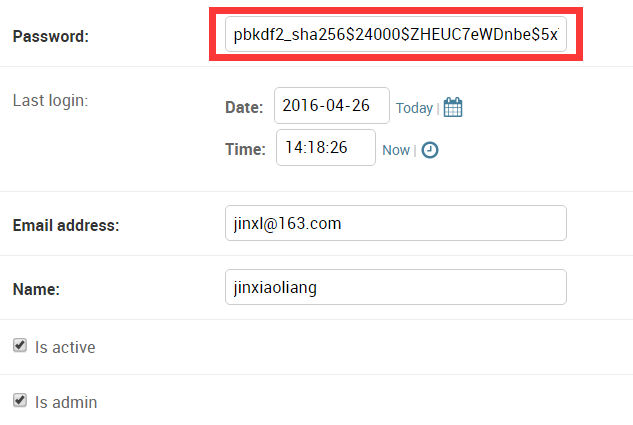
这时,需要自定义admin显示(官方都提供了)。
asset\admin.py
|
1
2
|
from user_admin import UserAdminadmin.site.register(models.UserProfile,UserAdmin) |
asset\user_admin.py
|
1
2
3
4
5
6
7
8
9
10
11
12
13
14
15
16
17
18
19
20
21
22
23
24
25
26
27
28
29
30
31
32
33
34
35
36
37
38
39
40
41
42
43
44
45
46
47
48
49
50
51
52
53
54
55
56
57
58
59
60
61
62
63
64
65
66
67
68
69
70
71
72
73
74
75
76
77
78
79
80
81
82
83
84
85
86
87
88
89
90
|
#!/usr/bin/env python# -*- coding:utf-8 -*-from django import formsfrom django.contrib import adminfrom django.contrib.auth.models import Groupfrom django.contrib.auth.admin import UserAdmin as BaseUserAdminfrom django.contrib.auth.forms import ReadOnlyPasswordHashFieldfrom asset.models import UserProfileclass UserCreationForm(forms.ModelForm): """A form for creating new users. Includes all the required fields, plus a repeated password.""" password1 = forms.CharField(label='Password', widget=forms.PasswordInput) password2 = forms.CharField(label='Password confirmation', widget=forms.PasswordInput) class Meta: model = UserProfile fields = ('email', 'name') def clean_password2(self): # Check that the two password entries match password1 = self.cleaned_data.get("password1") password2 = self.cleaned_data.get("password2") if password1 and password2 and password1 != password2: raise forms.ValidationError("Passwords don't match") return password2 def save(self, commit=True): # Save the provided password in hashed format user = super(UserCreationForm, self).save(commit=False) user.set_password(self.cleaned_data["password1"]) if commit: user.save() return userclass UserChangeForm(forms.ModelForm): """A form for updating users. Includes all the fields on the user, but replaces the password field with admin's password hash display field. """ password = ReadOnlyPasswordHashField() class Meta: model = UserProfile fields = ('email', 'password', 'name', 'is_active', 'is_admin') def clean_password(self): # Regardless of what the user provides, return the initial value. # This is done here, rather than on the field, because the # field does not have access to the initial value return self.initial["password"]class UserAdmin(BaseUserAdmin): # 以前是ModelAdmin # The forms to add and change user instances form = UserChangeForm add_form = UserCreationForm # The fields to be used in displaying the User model. # These override the definitions on the base UserAdmin # that reference specific fields on auth.User. list_display = ('email', 'name', 'is_admin') #这个和以前一样,显示什么 list_filter = ('is_admin',) fieldsets = ( (None, {'fields': ('email', 'password')}), ('Personal info', {'fields': ('name',)}), ('Permissions', {'fields': ('is_admin',)}), ) # add_fieldsets is not a standard ModelAdmin attribute. UserAdmin # overrides get_fieldsets to use this attribute when creating a user. add_fieldsets = ( (None, { 'classes': ('wide',), 'fields': ('email', 'name', 'password1', 'password2')} ), ) search_fields = ('email',) ordering = ('email',) filter_horizontal = ()# Now register the new UserAdmin...#admin.site.register(UserProfile, UserAdmin)# ... and, since we're not using Django's built-in permissions,# unregister the Group model from admin.admin.site.unregister(Group) #不显示系统自带的group |
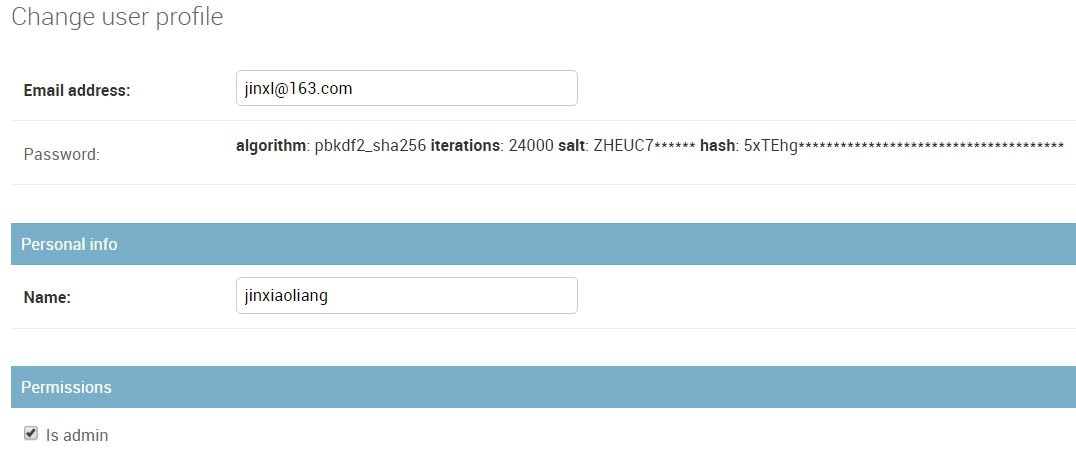
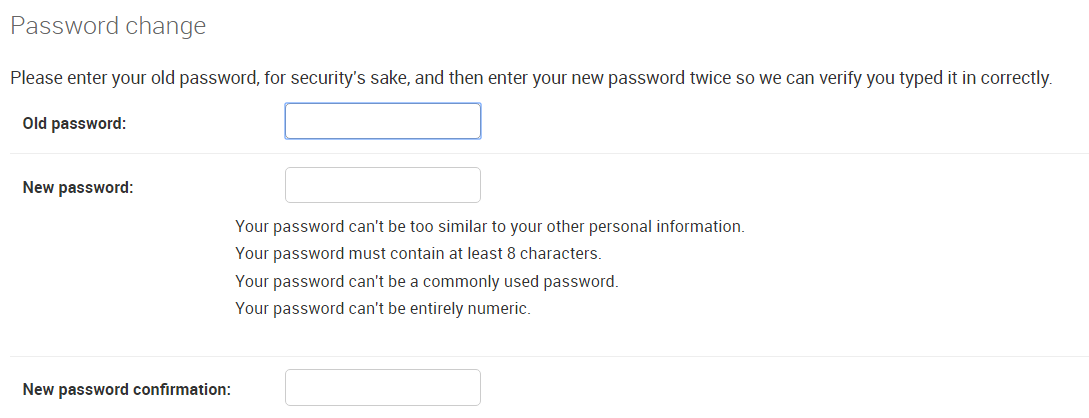
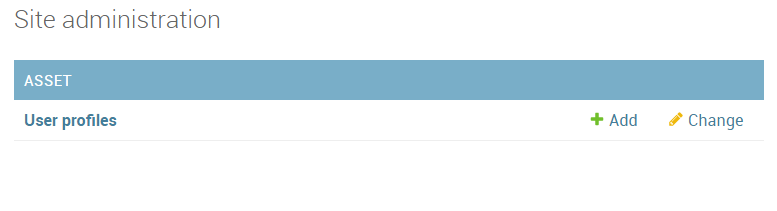
后台效果
编辑用户:
更改密码:
没有Group:
Django--自定义用户认证的更多相关文章
- Django自定义用户认证
自定义一个用户认证 详细参考官方文档: https://docs.djangoproject.com/en/1.9/topics/auth/customizing/#django.contrib.au ...
- CMDB资产管理系统开发【day25】:Django 自定义用户认证
官方文档:https://docs.djangoproject.com/en/1.10/topics/auth/customizing/#substituting-a-custom-user-mode ...
- Django自定义用户认证系统之自定义用户模型
参考文档:http://python.usyiyi.cn/django/topics/auth/customizing.html Django 自带的认证系统足够应付大多数情况,但你或许不打算使用现成 ...
- Django自定义用户认证系统Customizing authentication
扩展已有的用户模型Extending the existing User model 有两种方法来扩展默认的User Model而不用重写自己的模型.如果你不需要改变存储在数据库中的字段,而只是需要改 ...
- 使用django实现自定义用户认证
参考资料:https://docs.djangoproject.com/en/1.10/topics/auth/customizing/ 直接拉到最后看栗子啦 django自定义用户认证(使用自 ...
- 自定义用户认证(继承django的)
1.在app下创建一个自己用户认证文件,文件名随意,记得为.py文件 2.编辑该userauth.py文件 #!/usr/bin/env python #coding:utf-8 from djang ...
- python 全栈开发,Day79(Django的用户认证组件,分页器)
一.Django的用户认证组件 用户认证 auth模块 在进行用户登陆验证的时候,如果是自己写代码,就必须要先查询数据库,看用户输入的用户名是否存在于数据库中: 如果用户存在于数据库中,然后再验证用户 ...
- 深入一下Django的用户认证和cache
深入一下Django的用户认证和cache 用户认证 首先明白一个概念,http协议是无状态的,也就是每一次交互都是独立的,那如何让服务器和客户端进行有状态的交互呢,现在较为常见的方法就是让客户端在发 ...
- COOKIE与SESSION、Django的用户认证、From表单
一.COOKIE 与 SESSION 1.简介 1.cookie不属于http协议范围,由于http协议无法保持状态,但实际情况,我们却又需要“保持状态”,因此cookie就是在这样一个场景下诞生. ...
- Django--分页器(paginator)、Django的用户认证、Django的FORM表单
分页器(paginator) >>> from django.core.paginator import Paginator >>> objects = ['joh ...
随机推荐
- javascript工厂模式和构造函数模式创建对象
一.工厂模式 工厂模式是软件工程领域一种广为人知的设计模式,这种模式抽象了创建具体对象的过程(本书后面还将讨论其他设计模式及其在JavaScript 中的实现).考虑到在ECMAScript 中无法创 ...
- Chrome V8引擎系列随笔 (1):Math.Random()函数概览
先让大家来看一幅图,这幅图是V8引擎4.7版本和4.9版本Math.Random()函数的值的分布图,我可以这么理解 .从下图中,也许你会认为这是个二维码?其实这幅图告诉我们一个道理,第二张图的点的分 ...
- PHP类和对象之重载
PHP中的重载指的是动态的创建属性与方法,是通过魔术方法来实现的.属性的重载通过__set,__get,__isset,__unset来分别实现对不存在属性的赋值.读取.判断属性是否设置.销毁属性. ...
- Android的Kotlin秘方(II):RecyclerView 和 DiffUtil
作者:Antonio Leiva 时间:Sep 12, 2016 原文链接:http://antonioleiva.com/recyclerview-diffutil-kotlin/ 如你所知,在[支 ...
- Mysql - 触发器/视图
触发器在之前的项目中, 应用的着实不多, 没有办法的时候, 才会去用这个. 因为这个东西在后期并不怎么好维护, 也容易造成紊乱. 我最近的项目中, 由于数据库设计(别人设计的)原因, 导致一些最简单功 ...
- [Hadoop in Action] 第5章 高阶MapReduce
链接多个MapReduce作业 执行多个数据集的联结 生成Bloom filter 1.链接MapReduce作业 [顺序链接MapReduce作业] mapreduce-1 | mapr ...
- Web 前端攻防(2014版)
在百度 FEX 团队时写的.有次让我写点前端开发中注意的安全规范,结果写着写着就跑题了,写了一堆纯前端实现的攻击方式...当然还有防范措施. 文章就懒得粘过来了~ 直接贴个地址算了:) http:// ...
- FastClick 填坑及源码解析
最近产品妹子提出了一个体验issue —— 用 iOS 在手Q阅读书友交流区发表书评时,光标点击总是不好定位到正确的位置: 如上图,具体表现是较快点击时,光标总会跳到 textarea 内容的尾部.只 ...
- 分享我对 ASP.NET vNext 的一些感受,也许多年回过头看 So Easy!
写在前面 阅读目录: Visual Studio "14" CTP 关于 ASP.NET vNext ASP.NET vNext 实践 后记 ASP.NET vNext 发布已经过 ...
- 埃尔米特插值问题——用Python进行数值计算
当插值的要求涉及到对插值函数导数的要求时,普通插值问题就变为埃尔米特插值问题.拉格朗日插值和牛顿插值的要求较低,只需要插值函数的函数值在插值点与被插函数的值相等,以此来使得在其它非插值节点插值函数的值 ...