
centos 下Supervisor 守护进程基本配置
supervisor:C/S架构的进程控制系统,可使用户在类UNIX系统中监控、管理进程。常用于管理与某个用户或项目相关的进程。
组成部分
supervisord:服务守护进程
supervisorctl:命令行客户端
Web Server:提供与supervisorctl功能相当的WEB操作界面
XML-RPC Interface:XML-RPC接口
安装
easy_install supervisor
创建默认的配置文件
echo_supervisord_conf >/etc/supervisord.conf

vi /etc/supervisord.conf
修改配置文件如下,这个例子设置了一个Nginx和asp.net core的守护进程
 ; Sample supervisor config file.

 ;

 ; For more information on the config file, please see:

 ; http://supervisord.org/configuration.html

 ;

 ; Notes:

 ;  - Shell expansion ("~" or "$HOME") is not supported.  Environment

 ;    variables can be expanded using this syntax: "%(ENV_HOME)s".

 ;  - Comments must have a leading space: "a=b ;comment" not "a=b;comment".

 ;[unix_http_server]

 ;file=/tmp/supervisor.sock   ; (the path to the socket file)

 ;chmod=                 ; socket file mode (default )

 ;chown=nobody:nogroup       ; socket file uid:gid owner

 ;username=user              ; (default is no username (open server))

 ;password=               ; (default is no password (open server))

 [inet_http_server]         ; inet (TCP) server disabled by default

 port=127.0.0.1:        ; (ip_address:port specifier, *:port for all iface)

 username=user              ; (default is no username (open server))

 password=               ; (default is no password (open server))

 [supervisord]

 logfile=/tmp/supervisord.log ; (main log file;default $CWD/supervisord.log)

 logfile_maxbytes=50MB        ; (max main logfile bytes b4 rotation;default 50MB)

 logfile_backups=           ; (num of main logfile rotation backups;default )

 loglevel=info                ; (log level;default info; others: debug,warn,trace)

 pidfile=/tmp/supervisord.pid ; (supervisord pidfile;default supervisord.pid)

 nodaemon=false               ; (start in foreground if true;default false)

 minfds=                  ; (min. avail startup file descriptors;default )

 minprocs=                 ; (min. avail process descriptors;default )

 ;umask=                   ; (process file creation umask;default )

 ;user=chrism                 ; (default is current user, required if root)

 ;identifier=supervisor       ; (supervisord identifier, default is 'supervisor')

 ;directory=/tmp              ; (default is not to cd during start)

 ;nocleanup=true              ; (don't clean up tempfiles at start;default false)

 ;childlogdir=/tmp            ; ('AUTO' child log dir, default $TEMP)

 ;environment=KEY="value"     ; (key value pairs to add to environment)

 ;strip_ansi=false            ; (strip ansi escape codes in logs; def. false)

 ; the below section must remain in the config file for RPC

 ; (supervisorctl/web interface) to work, additional interfaces may be

 ; added by defining them in separate rpcinterface: sections

 [rpcinterface:supervisor]

 supervisor.rpcinterface_factory = supervisor.rpcinterface:make_main_rpcinterface

 [supervisorctl]

 serverurl=unix:///tmp/supervisor.sock ; use a unix:// URL  for a unix socket

 ;serverurl=http://127.0.0.1:9001 ; use an http:// url to specify an inet socket

 ;username=chris              ; should be same as http_username if set

 ;password=                ; should be same as http_password if set

 ;prompt=mysupervisor         ; cmd line prompt (default "supervisor")

 ;history_file=~/.sc_history  ; use readline history if available

 ; The below sample program section shows all possible program subsection values,

 ; create one or more 'real' program: sections to be able to control them under

 ; supervisor.

 ;[program:theprogramname]

 ;command=/bin/cat              ; the program (relative uses PATH, can take args)

 ;process_name=%(program_name)s ; process_name expr (default %(program_name)s)

 ;numprocs=                    ; number of processes copies to start (def )

 ;directory=/tmp                ; directory to cwd to before exec (def no cwd)

 ;umask=                     ; umask for process (default None)

 ;priority=                  ; the relative start priority (default )

 ;autostart=true                ; start at supervisord start (default: true)

 ;startsecs=                   ; # of secs prog must stay up to be running (def. )

 ;startretries=                ; max # of serial start failures when starting (default )

 ;autorestart=unexpected        ; when to restart if exited after running (def: unexpected)

 ;exitcodes=,                 ; 'expected' exit codes used with autorestart (default ,)

 ;stopsignal=QUIT               ; signal used to kill process (default TERM)

 ;stopwaitsecs=               ; max num secs to wait b4 SIGKILL (default )

 ;stopasgroup=false             ; send stop signal to the UNIX process group (default false)

 ;killasgroup=false             ; SIGKILL the UNIX process group (def false)

 ;user=chrism                   ; setuid to this UNIX account to run the program

 ;redirect_stderr=true          ; redirect proc stderr to stdout (default false)

 ;stdout_logfile=/a/path        ; stdout log path, NONE for none; default AUTO

 ;stdout_logfile_maxbytes=1MB   ; max # logfile bytes b4 rotation (default 50MB)

 ;stdout_logfile_backups=     ; # of stdout logfile backups (default )

 ;stdout_capture_maxbytes=1MB   ; number of bytes in 'capturemode' (default )

 ;stdout_events_enabled=false   ; emit events on stdout writes (default false)

 ;stderr_logfile=/a/path        ; stderr log path, NONE for none; default AUTO

 ;stderr_logfile_maxbytes=1MB   ; max # logfile bytes b4 rotation (default 50MB)

 ;stderr_logfile_backups=     ; # of stderr logfile backups (default )

 ;stderr_capture_maxbytes=1MB   ; number of bytes in 'capturemode' (default )

 ;stderr_events_enabled=false   ; emit events on stderr writes (default false)

 ;environment=A="",B=""       ; process environment additions (def no adds)

 ;serverurl=AUTO                ; override serverurl computation (childutils)

 ; The below sample eventlistener section shows all possible

 ; eventlistener subsection values, create one or more 'real'

 ; eventlistener: sections to be able to handle event notifications

 ; sent by supervisor.

 ;[eventlistener:theeventlistenername]

 ;command=/bin/eventlistener    ; the program (relative uses PATH, can take args)

 ;process_name=%(program_name)s ; process_name expr (default %(program_name)s)

 ;numprocs=                    ; number of processes copies to start (def )

 ;events=EVENT                  ; event notif. types to subscribe to (req'd)

 ;buffer_size=                ; event buffer queue size (default )

 ;directory=/tmp                ; directory to cwd to before exec (def no cwd)

 ;umask=                     ; umask for process (default None)

 ;priority=-                   ; the relative start priority (default -)

 ;autostart=true                ; start at supervisord start (default: true)

 ;startsecs=                   ; # of secs prog must stay up to be running (def. )

 ;startretries=                ; max # of serial start failures when starting (default )

 ;autorestart=unexpected        ; autorestart if exited after running (def: unexpected)

 ;exitcodes=,                 ; 'expected' exit codes used with autorestart (default ,)

 ;stopsignal=QUIT               ; signal used to kill process (default TERM)

 ;stopwaitsecs=               ; max num secs to wait b4 SIGKILL (default )

 ;stopasgroup=false             ; send stop signal to the UNIX process group (default false)

 ;killasgroup=false             ; SIGKILL the UNIX process group (def false)

 ;user=chrism                   ; setuid to this UNIX account to run the program

 ;redirect_stderr=false         ; redirect_stderr=true is not allowed for eventlisteners

 ;stdout_logfile=/a/path        ; stdout log path, NONE for none; default AUTO

 ;stdout_logfile_maxbytes=1MB   ; max # logfile bytes b4 rotation (default 50MB)

 ;stdout_logfile_backups=     ; # of stdout logfile backups (default )

 ;stdout_events_enabled=false   ; emit events on stdout writes (default false)

 ;stderr_logfile=/a/path        ; stderr log path, NONE for none; default AUTO

 ;stderr_logfile_maxbytes=1MB   ; max # logfile bytes b4 rotation (default 50MB)

 ;stderr_logfile_backups=     ; # of stderr logfile backups (default )

 ;stderr_events_enabled=false   ; emit events on stderr writes (default false)

 ;environment=A="",B=""       ; process environment additions

 ;serverurl=AUTO                ; override serverurl computation (childutils)

 ; The below sample group section shows all possible group values,

 ; create one or more 'real' group: sections to create "heterogeneous"

 ; process groups.

 ;[group:thegroupname]

 ;programs=progname1,progname2  ; each refers to 'x' in [program:x] definitions

 ;priority=                  ; the relative start priority (default )

 ; The [include] section can just contain the "files" setting.  This

 ; setting can list multiple files (separated by whitespace or

 ; newlines).  It can also contain wildcards.  The filenames are

 ; interpreted as relative to this file.  Included files *cannot*

 ; include files themselves.

 ;[include]

 ;files = relative/directory/*.ini

 [program:WebApp1MVC]

 command=dotnet /home/wilson/temp/PublishOutput/WebApp1.dll

 directory=/home/wilson/temp/PublishOutput/

 autostart=true

 autorestart=true

 stderr_logfile=/var/log/hellomvc.err.log

 stdout_logfile=/var/log/hellomvc.out.log

 environment=ASPNETCORE_ENVIRONMENT=Production

 user=wilson

 stopsignal=INT

 [program:Nginx]

 command=/usr/local/nginx/sbin/nginx

 directory=/usr/local/nginx/

 autostart=true

 autorestart=true

 stderr_logfile=/usr/local/nginx/logs/nginx.err.log

 stdout_logfile=/usr/local/nginx/logs/nginx.out.log

 user=wilson

 stopsignal=INT
关键配置如下:
 [program:WebApp1MVC]

 command=/usr/bin/dotnet /home/wilson/temp/PublishOutput/WebApp1.dll

 directory=/home/wilson/temp/PublishOutput/

 autostart=true

 autorestart=true

 stderr_logfile=/var/log/hellomvc.err.log

 stdout_logfile=/var/log/hellomvc.out.log

 environment=ASPNETCORE_ENVIRONMENT=Production

 user=www-data

 stopsignal=INT

 [program:Nginx]

 command=/usr/local/nginx/sbin/nginx

 directory=/usr/local/nginx/

 autostart=true

 autorestart=true

 stderr_logfile=/usr/local/nginx/logs/nginx.err.log

 stdout_logfile=/usr/local/nginx/logs/nginx.out.log

 user=wilson

 stopsignal=INT
启动Supervisor
supervisord -c /etc/supervisord.conf
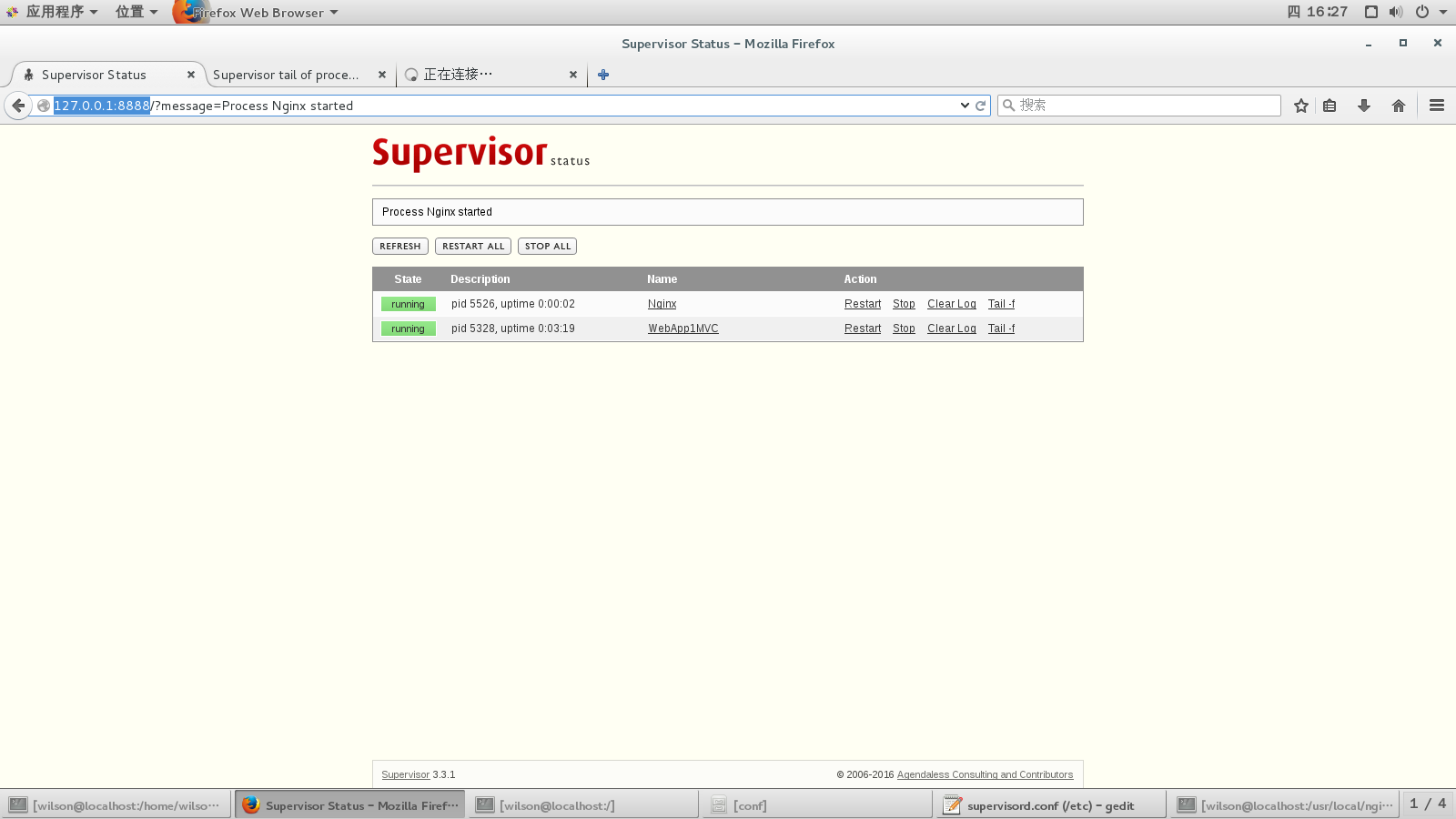
浏览器中输入http://127.0.0.1:8888,输入用户名密码,就可以看到后台进程列表
参考:
https://docs.asp.net/en/latest/publishing/linuxproduction.html#
http://supervisord.org/installing.html#internet-installing-with-setuptools
centos 下Supervisor 守护进程基本配置的更多相关文章
- Linux Supervisor 守护进程基本配置
supervisor:C/S架构的进程控制系统,可使用户在类UNIX系统中监控.管理进程.常用于管理与某个用户或项目相关的进程. 组成部分supervisord:服务守护进程supervisorctl ...
- 基于Laravel框架下使用守护进程supervisor实现定时任务(毫秒)
本篇文章给大家带来的内容是关于基于Laravel框架下使用守护进程supervisor实现定时任务(毫秒),有一定的参考价值,有需要的朋友可以参考一下,希望对你有所帮助. 公司需要实现X分钟内每隔Y秒 ...
- mac与centos下redis的安装与配置
前言 最近在用redis,下面简单写一下mac和centos下redis的安装与配置方法. 安装 mac下面 安装命令:brew intall redis 运行命令:brew services sta ...
- Centos7 使用 Supervisor 守护进程 Celery
一.Supervisor 安装(centos7 还有另一个进程守护命令 Systemd ) Centos 7 安装 Supervisord 二.Supervisor 守护进程 Centos7 使用 S ...
- 【Centos7】 中使用Supervisor守护进程
原文出处: Centos7 中使用Supervisor守护进程 配置supervisor实现进程守护 1.安装supervisor yum install Supervisor 2.启动服务 su ...
- CentOS 下SSH无密码登录的配置
CentOS 下SSH无密码登录的配置 最近学习Hadoop.它要求各节点之间通过SSH无密码登录,配置SSH的时候费了一番功夫,记录下来,以备忘. 配置SSH无密码登录需要3步: 1.生成公钥和私钥 ...
- Centos下telnet的安装和配置
Centos下telnet的安装和配置 首先为Centos配置地址(192.168.0.1/24) 一.查看本机是否有安装telnetrpm -qa | grep telnetrpm -q telne ...
- [转载]centos下yum安装samba及配置
centos下yum安装samba及配置 在我们使用 Windows 作为客户机的时候,通常有文件.打印共享的需求.作为Windows 网络功能之一,通常可以在 Windows 客户机之间通过Wind ...
- Docker 守护进程的配置和操作 & 远程访问
守护进程的配置和操作 1.查看守护进程 linux命令: ps -ef | gerp docker sudo status docker 2.开启关闭重启守护进程 sudo service docke ...
随机推荐
- java中怎么在table上显示数据
连接oracle:String result = ""; // 查询结果字符串 String sql = "select * from test"; // SQ ...
- bzoj 2763: [JLOI2011]飞行路线
#include<cstdio> #include<cstring> #include<iostream> #include<queue> #defin ...
- 支持Android iOS,firefox(其它未测)的图片上传客户端预览、缩放、裁切。
var version = '007'; var host = window.location.host; function $$(id){return document.getElementById ...
- 64位Win7下编译hadoop 1.2.1问题解决
0.报sed的错误.原因在于没有安装cygwin.安装cygwin的时候要选择sed 1.Cannot run program "autoreconf". 这个问题在网上看了很多解 ...
- 初学者SQL语句介绍
初学者SQL语句介绍 1.用 Select 子句检索记录 Select 子句是每一个检索数据的查询核心.它告诉数据库引擎返回什么字段. Select 子句的常见形式是: S ...
- c#用牛顿法计算根号下2的值
using System; using System.Collections.Generic; using System.Linq; using System.Text; using System.T ...
- HTML特殊符号对照表
特殊符号 命名实体 十进制编码 特殊符号 命名实体 十进制编码 Α Α Α Β Β Β Γ Γ Γ Δ Δ Δ Ε Ε Ε Ζ Ζ Ζ Η Η Η Θ Θ Θ Ι Ι Ι Κ Κ Κ Λ Λ Λ Μ ...
- 配置ConvenientBanner时出现的问题
ConvenientBanner: compile 'com.bigkoo:convenientbanner:2.0.5' 找不到依赖库 classpath 'com.jfrog.bintray.gr ...
- 在MAC OS X上如何启用crontab?
project: blog target: how-to-enable-crontab-on-osx.md date: 2015-12-16 status: publish tags: - OS X ...
- 解决Hibernate向MySQL数据库插入中文乱码问题
有时候我们在用hibernate插入中文的字符会出现乱码情况,如下图所示. 看到这种情况,第一反应便是应用程序用的字符集合数据库用的字符集不统一了.我的数据库用个是mysql的,看一下建表语句.用的是 ...