
Tomcat源码分析之—组件启动实现分析
Tomcat由多个组件组成,那么Tomcat是怎么对他们的生命周期进行管理的么,这里将从Tomcat源码去分析其生命周期的实现;
Bootstrape类为Tomcat的入口,所有的组件够通过实现Lifecycle接口来管理生命周期,Tomcat启动的时候只需调用Server容器的start(),然后父容器依序启动他所包含的子容器,关闭也是如此。
通过阅读源码可知一个Server里包含一个或多个Service,一个Service里包含一个Container,一个或多个Connector、Container又包含了Engine、Host、Context、Wrapper四个容器;
Tomcat的组件启动顺序为:
StandardServer.start()——》StandardServer.startInternal() ——》StandardService().start()——StandardService.startInternal() ——>》StandardEngine().start() ——》StandardEngine.startInternal()—》StandardEngine中启动其他组件,组件关闭也是如此;
现在我们通过Demo简单模拟Tomcat的启动
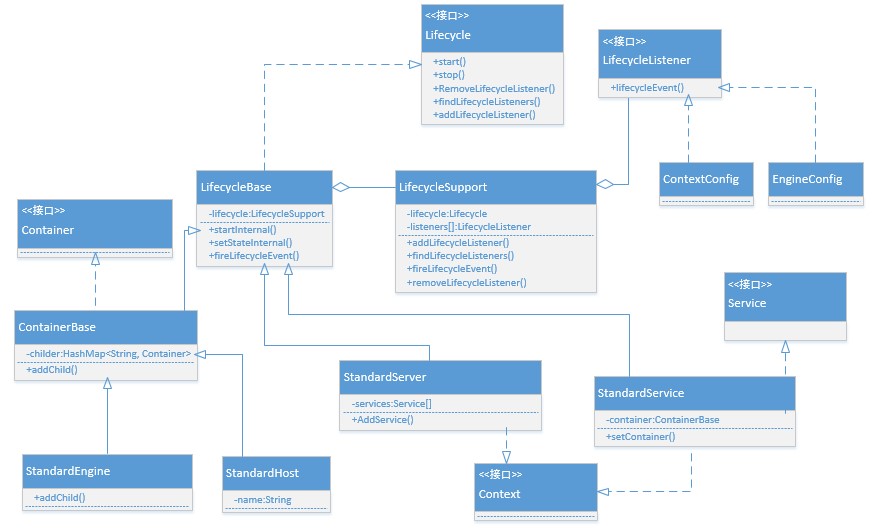
模拟Demo UML类图
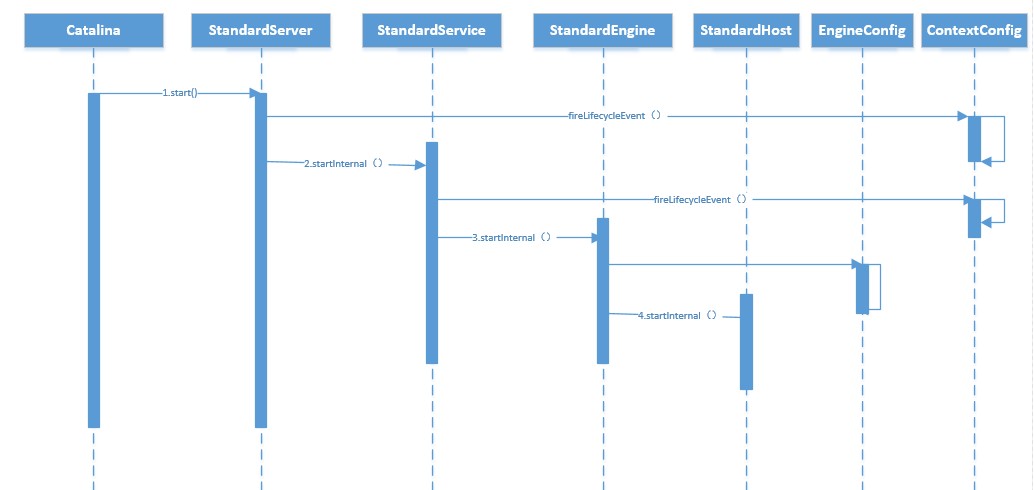
模拟Demo时序图
主要代码段如下:
Catalina类:
package co.solinx.Pattern.Observer;

/**

 * Created by LX on 2014/11/26.

 */

public class Catalina {

    public static void main(String[] args) {

        //Tomcat为多个组件组成的server为最外围最大的一个

        StandardServer server = new StandardServer();
        //为server添加监听器

        server.addLifecycleListener(new ContextConfig());

        //添加一个service

        StandardService service = new StandardService();

        server.AddService(service);
       //为service添加监听器

        service.addLifecycleListener(new ContextConfig());

        //添加一个engine

        StandardEngine standardEngine = new StandardEngine();
        //为engine添加监听器

        standardEngine.addLifecycleListener(new EngineConfig());

        StandardHost standardHost = new StandardHost("localhost");

//        StandardHost testHost = new StandardHost("test");

//        standardHost.addLifecycleListener(new EngineConfig());

        standardEngine.addChild("localhost", standardHost);

//        standardEngine.addChild("test", testHost);

        //往service添加engine容器

        service.setContainer(standardEngine);

        try {

            server.start();

        } catch (LifecycleException e) {

            e.printStackTrace();

        }

    }

}
StandardServer类
package co.solinx.Pattern.Observer;

/**

 * Created by LX on 2014/11/26.

 */

public class StandardServer extends LifecycleBase implements Context {

    Service services[] = new Service[0];

    @Override

    protected void startInternal() throws LifecycleException {

        for (int i = 0; i < services.length; i++) {

            services[i].start();

        }

        System.out.println("StandardServer start");

    }

    public void AddService(Service service) {

        Service result[] = new Service[services.length + 1];

        System.arraycopy(services, 0, result, 0, services.length);

        result[services.length] = service;

        services = result;

    }

}
StandardService类:
package co.solinx.Pattern.Observer;

/**

 * Created by LX on 2014/11/26.

 */

public class StandardService extends LifecycleBase implements Service, Context {

    protected ContainerBase container = null;

    @Override

    protected void startInternal() throws LifecycleException {

        container.start();

        System.out.println("StandardService start");

    }

    public void setContainer(ContainerBase container) {

        this.container = container;

    }

}
StandardEngine类:
package co.solinx.Pattern.Observer;

/**

 * Created by LX on 2014/11/26.

 */

public class StandardEngine extends ContainerBase {

    @Override

    protected void startInternal() throws LifecycleException {

        super.startInternal();

        System.out.println("StandardEngine start");

    }

    protected void addChild(String key, Container container) {

        super.addChild(key, container);

    }

}
LifecycleSupport类:
package co.solinx.Pattern.Observer;

/**

 * Created by LX on 2014/11/26.

 * 代理了具体监听者

 */

public class LifecycleSupport {

    public LifecycleSupport(Lifecycle lifecycle) {

        super();

        this.lifecycle = lifecycle;

    }

    private Lifecycle lifecycle = null;

    private LifecycleListener listeners[] = new LifecycleListener[0];

    private final Object listenersLock = new Object(); // Lock object for changes to listeners

    public void addLifecycleListener(LifecycleListener listener) {

        synchronized (listenersLock) {

            LifecycleListener results[] =

                    new LifecycleListener[listeners.length + 1];

            for (int i = 0; i < listeners.length; i++)

                results[i] = listeners[i];

            results[listeners.length] = listener;

            listeners = results;

        }

    }

    public LifecycleListener[] findLifecycleListeners() {

        return listeners;

    }

    public void fireLifecycleEvent(String type, Object data) {

        LifecycleEvent event = new LifecycleEvent(lifecycle, type, data);

        LifecycleListener interested[] = listeners;

        for (int i = 0; i < interested.length; i++)

            interested[i].lifecycleEvent(event);

    }

    public void removeLifecycleListener(LifecycleListener listener) {

        synchronized (listenersLock) {

            int n = -1;

            for (int i = 0; i < listeners.length; i++) {

                if (listeners[i] == listener) {

                    n = i;

                    break;

                }

            }

            if (n < 0)

                return;

            LifecycleListener results[] =

                    new LifecycleListener[listeners.length - 1];

            int j = 0;

            for (int i = 0; i < listeners.length; i++) {

                if (i != n)

                    results[j++] = listeners[i];

            }

            listeners = results;

        }

    }

}
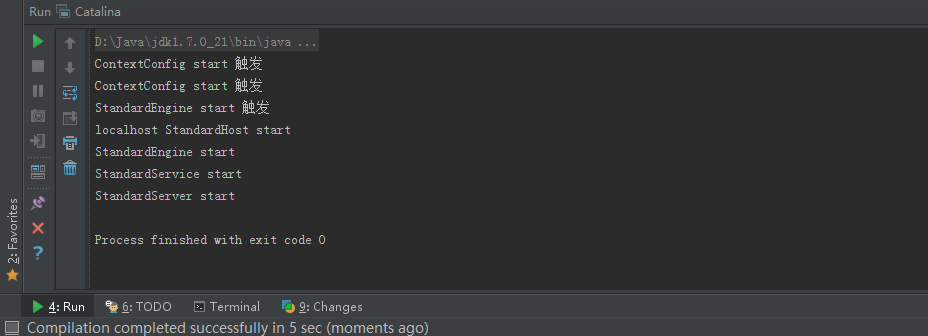
模拟程序运行结果:
文章首发地址:Solinx
http://www.solinx.co/archives/86
Tomcat源码分析之—组件启动实现分析的更多相关文章
- Tomcat8源码笔记(七)组件启动Server Service Engine Host启动
一.Tomcat启动的入口 Tomcat初始化简单流程前面博客介绍了一遍,组件除了StandardHost都有博客,欢迎大家指文中错误.Tomcat启动类是Bootstrap,而启动容器启动入口位于 ...
- 简单读!tomcat源码(一)启动与监听
tomcat 作为知名的web容器,很棒! 本文简单了从其应用命令开始拆解,让我们对他有清晰的了解,揭开神秘的面纱!(冗长的代码流水线,给你一目了然) 话分两头: 1. tomcat是如何启动的? 2 ...
- Tomcat源码分析之—具体启动流程分析
从Tomcat启动调用栈可知,Bootstrap类的main方法为整个Tomcat的入口,在init初始化Bootstrap类的时候为设置Catalina的工作路径也就是Catalina_HOME信息 ...
- Tomcat 源码分析(一)——启动与生命周期组件
写在前面的话:读Tomcat源码也有段时间了,大领悟谈不上.一些小心得记录下来,供大家参考相护学习. 一.启动流程 Tomcat启动首先需要熟悉的是它的启动流程.和初学者第一天开始写Hello Wor ...
- Tomcat源码分析(从启动流程到请求处理)
Tomcat 8.5下载地址 https://tomcat.apache.org/download-80.cgi Tomcat启动流程 Tomcat源码目录 catalina目录 catalina包含 ...
- Tomcat源码分析(下载、启动)
1.下载Tomcat源代码: https://tomcat.apache.org/download-80.cgi 2. 解压以及创建必要目录和配置 解压.新建catalina-home目录,同时将目录 ...
- [Tomcat 源码分析系列] (二) : Tomcat 启动脚本-catalina.bat
概述 Tomcat 的三个最重要的启动脚本: startup.bat catalina.bat setclasspath.bat 上一篇咱们分析了 startup.bat 脚本 这一篇咱们来分析 ca ...
- Tomcat源码分析——启动与停止服务
前言 熟悉Tomcat的工程师们,肯定都知道Tomcat是如何启动与停止的.对于startup.sh.startup.bat.shutdown.sh.shutdown.bat等脚本或者批处理命令,大家 ...
- Tomcat源码分析三:Tomcat启动加载过程(一)的源码解析
Tomcat启动加载过程(一)的源码解析 今天,我将分享用源码的方式讲解Tomcat启动的加载过程,关于Tomcat的架构请参阅<Tomcat源码分析二:先看看Tomcat的整体架构>一文 ...
随机推荐
- 第 18 章 CSS 表格与列表
学习要点: 1.表格样式 2.列表样式 3.其他功能 主讲教师:李炎恢 本章主要探讨 HTML5 中 CSS 表格和列表,通过表格和列表的样式设置,让表格和列表显示更加多元化. 一.表格样式 表格有五 ...
- 腾讯信鸽推送Android SDK快速指南
信鸽Android SDK是一个能够提供Push服务的开发平台,提供给开发者简便.易用的API接口,方便快速接入.目前支持Android 2.2及以上版本系统.本文档将引导用户以最快的速度嵌入信鸽SD ...
- Visual C++中的一些编程小技巧
在应用程序的任意地方实现窗体的最大化.最小化.正常窗口等功能 // 设置Windows窗体的状态void CMinWindowsDlg::SetWindowState(int nWindowSize) ...
- 初识Hibernate 缓存
生活就像一杯咖啡,让你我慢慢的品尝,品尝它的苦涩和甘甜...... 一.什么是Hibernate缓存. 解析:白话来说就是缓存数据的容器 官方标准点缓存:是计算机领域的概念,它介于应用程序和永久性数据 ...
- Xdebug文档(一)基本特性
基本属性(参数) xdebug.default_enable 类型: boolean,默认值: 1 这是xdebug的基本设置,默认在调试跟踪时显示错误信息.可以使用xdebug_disable()函 ...
- FancySelect – 更好用的 jQuery 下拉选择框插件
FancySelect 这款插件是 Web 开发中下拉框功能的一个更好的选择.FancySelect 使用方便,只要绑定页面上的任何 Select 元素,并调用就 .fancySelect() 就可以 ...
- 【iScroll源码学习00】模拟iScroll
前言 相信对移动端有了解的朋友对iScroll这个库非常熟悉吧,今天我们就来说下我们移动页面的iScroll化 iScroll是我们必学框架之一,我们这次先根据iScroll功能自己实现其功能,然后再 ...
- 避开unity的坑(转摘)
避开unity的坑(转摘) 以下总结一部分来自经验之谈,一部分来自其他人的分享.总的来讲,unity开发原型和效果.验证想法,确实是无比便利.可能一个月就把核心玩法做得差不多.强大的编辑器功能让我们也 ...
- 记Ubuntu开机黑屏及解决过程
之前遇到一次Ubuntu因为失误卸载了xinit.xserver的原因,导致开机黑屏无法进入系统,实际上当时是第一次遇到这种情况,因此花了点时间自己摸索,事后想来解决方案还是比较简单的,从目前的观点来 ...
- SharePoint大容量文档库整体搬迁的解决方案(SharePoint document library migration)
今天客户提出了一个需求,有一个文档库,里面有500多个文档,有word,excel还有pdf文档,想要把文档搬迁到一个新的站点上面去,新的文档库和原文档库有这同样的列,客户要求文档在迁移过程中属性要带 ...