
QtGui.QComboBox
The QtGui.QComboBox is a widget that allows a user to choose from a list of options.
#!/usr/bin/python

# -*- coding: utf-8 -*-

"""

ZetCode PyQt4 tutorial

This example shows

how to use QtGui.QComboBox widget.

author: Jan Bodnar

website: zetcode.com

last edited: September 2011

"""

import sys

from PyQt4 import QtGui, QtCore

class Example(QtGui.QWidget):

    def __init__(self):

        super(Example, self).__init__()

        self.initUI()

    def initUI(self):

        self.lbl = QtGui.QLabel("Ubuntu", self)

        combo = QtGui.QComboBox(self)

        combo.addItem("Ubuntu")

        combo.addItem("Mandriva")

        combo.addItem("Fedora")

        combo.addItem("Red Hat")

        combo.addItem("Gentoo")

        combo.move(50, 50)

        self.lbl.move(50, 150)

        combo.activated[str].connect(self.onActivated)

        self.setGeometry(300, 300, 300, 200)

        self.setWindowTitle('QtGui.QComboBox')

        self.show()

    def onActivated(self, text):

        self.lbl.setText(text)

        self.lbl.adjustSize()

def main():

    app = QtGui.QApplication(sys.argv)

    ex = Example()

    sys.exit(app.exec_())

if __name__ == '__main__':

    main()
The example shows a QtGui.QComboBox and a QtGui.QLabel. The combo box has a list of five options. These are the names of Linux distros. The label widget displays the selected option from the combo box.
combo = QtGui.QComboBox(self)

combo.addItem("Ubuntu")

combo.addItem("Mandriva")

combo.addItem("Fedora")

combo.addItem("Red Hat")

combo.addItem("Gentoo")
We create a QtGui.QComboBox widget with five options.
combo.activated[str].connect(self.onActivated)
Upon an item selection, we call the onActivated() method.
def onActivated(self, text):

    self.lbl.setText(text)

    self.lbl.adjustSize()
Inside the method, we set the text of the chosen item to the label widget. We adjust the size of the label.
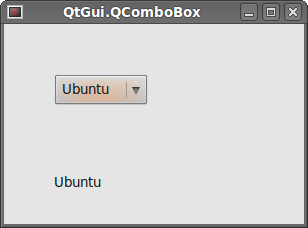 Figure: QtGui.QComboBox
QtGui.QComboBox的更多相关文章
- Pyqt QComboBox 省市区县联动效果
在Qt中, QComboBox方法窗口组件允许用户从列表清单中选择,在web中就是select标签,下拉选项. 省市区县的联动就是currentIndexChanged 获取当前的Index,通过这个 ...
- Pyqt Smtplib实现Qthread多线程发送邮件
一. smtplib 的介绍 smtplib.SMTP([host[, port[, local_hostname[, timeout]]]]) SMTP类构造函数,表示与SMTP服务器之间的连接 ...
- Pyqt QSystemTrayIcon 实现托盘效果
pyqt的托盘效果很好实现,在Pyqt的demo中有个例子 路径:PyQt4\examples\desktop\systray.py 今天我就仿这个Tray效果做效果 一. 创建UI trayicon ...
- Qt4升级Qt5注意问题
Qt4升级Qt5注意问题 Qt4过渡到Qt5的项目一开始就受阻,记录一下遇到的下面的问题 --->编译遇到类似错误: error: QCalendarWidget: No such file o ...
- pyqt记录内容(音乐播放器)
#这是UI文件 # -*- coding: utf-8 -*- # Form implementation generated from reading ui file 'AudioPlayerDia ...
- PYQT4 : QSystemTrayIcon练习
照着demo自己做了一遍,练练手 import sys from PyQt4 import QtGui from PyQt4 import QtCore class SysTray(QtGui.QDi ...
- pyqt4_应用例子(计算器,对话框,进度条,日历等等)
sklearn实战-乳腺癌细胞数据挖掘(博客主亲自录制视频教程) https://study.163.com/course/introduction.htm?courseId=1005269003&a ...
- PYQT控件使用
QtGui.QComboBox .addItem(string)#添加字符串项到Item.addItems(list)#添加列表或元组元素到Item.clear()#清除所有Item.clearEdi ...
- ZetCode PyQt4 tutorial widgets II
#!/usr/bin/python # -*- coding: utf-8 -*- """ ZetCode PyQt4 tutorial In this example, ...
随机推荐
- fpdf中文乱码,添加字符集
中文乱码 引入Olivier的chinese.php(点击下载) 支持中文,其中有Big5,GB两种 使用方法也很简单 $pdf->AddBig5Font(); $pdf->SetFont ...
- redis的原子性
什么是原子性操作 在多进程(线程)访问共享资源时,能够确保所有其他的进程(线程)都不在同一时间内访问相同的资源,(要么完全执行,要么完全不执行) 简单描述 有个变量X=0,要进行+1操作,步骤如下: ...
- 查看linux并发连接数的方法
查看Web服务器(Nginx Apache)的并发请求数及其TCP连接状态:netstat -n | awk '/^tcp/ {++S[$NF]} END {for(a in S) print a, ...
- Linux下同一网段内的IP中两台主机通信不经过路由器(ARP)(转)
答案一:同一网段A与B通信,不需要路由器介入. A直接广播ARP request 到广播域,B处于同一广播域,可以接收到ARP request,B用单播方式直接告诉A自己的MAC B 地址.A收到B的 ...
- springmvc 配置和spring配置?
最近在接触mybatis,之间使用springmvc时,配置文件一直是,web.xml+XX-servlet.xml 的配置(xx为web.xml中servlet name名称).为了整合mybati ...
- ubuntu systemtap-sdt-dev
http://kr.archive.ubuntu.com/ubuntu/pool/universe/s/systemtap/systemtap-sdt-dev_3.0-7_amd64.deb
- Gulp插件使用技巧
目录: 插件的安装卸载 插件使用的基本流程 拆分任务 监听 默认任务 一.插件的安装卸载 安装: npm install gulp-less --save-dev 卸载 npm uninstall g ...
- 解决:解压zip文件却变成cpgz文件
众所周知,zip是一种压缩文件格式,MAC OS默认支持的文件格式,当时偶尔当你打开zip文件想要解压时,却自动变成了cpgz文件而没有解压,再双击这个cpgz文件,Archive Utility又会 ...
- telnet用法 测试端口号
Telnet是进行远程登录的标准协议和主要方式它为用户提供了在本地计算机上完成远程主机工作的能力.可以用telnet命令来测试端口号是否正常打开还是关闭状态. 工具/原料 电脑 cmd命令 方法/步骤 ...
- OpenCV图像平滑处理
图像平滑处理 目标 本教程教您怎样使用各种线性滤波器对图像进行平滑处理,相关OpenCV函数如下: blur GaussianBlur medianBlur bilateralFilter 原理 No ...