
Android-ListView-CursorAdapter
在上篇博客,Android-ListView-SimpleCursorAdapter,中介绍了SimpleCurosrAdapter的使用操作(SimpleCursorAdapter是简单便捷Cursor数据处理的适配器,内部都已经封装好了),而CursorAdapter是属于自定义适配器范畴,虽然没有SimpleCursorAdapter那么方便,但灵活性比SimpleCursorAdapter要灵活些
在上篇博客,Android-ListView-(BaseAdapter初步),Android-ListView-(BaseAdapter使用),中介绍了BaseAdapter的使用操作等(BaseAdapter是对很多数据类型进行适配),而CursorAdapter是专门给Cursor数据进行适配的
BaseAdapter是CursorAdapter的父类
BaseAdapter是SimpleCursorAdapter的父类
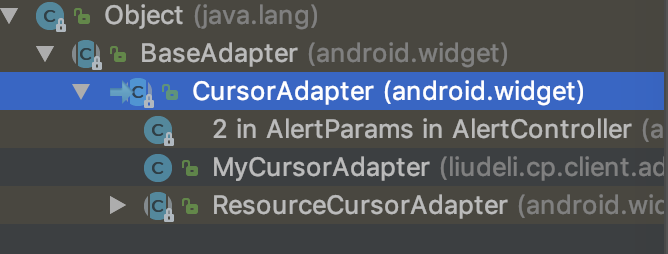
定义 MyCursorAdapter适配器
package liudeli.cp.client.adapter;

import android.app.LoaderManager;

import android.content.Context;

import android.content.CursorLoader;

import android.database.Cursor;

import android.view.LayoutInflater;

import android.view.View;

import android.view.ViewGroup;

import android.widget.CursorAdapter;

import android.widget.TextView;

import liudeli.cp.client.R;

public class MyCursorAdapter extends CursorAdapter {

    // 定义布局加载器

    private LayoutInflater layoutInflater;

    /**

     * 构造方法

     * @param context 传入上下文

     * @param c 传入Cursor游标

     * @param flags 传入标记

     */

    public MyCursorAdapter(Context context, Cursor c, int flags) {

        /**

         * 主要把这些值传递给父类的构造方法,就会自动的传递到 newView(Context context, Cursor cursor, ViewGroup parent)

         *                                              bindView(View view, Context context, Cursor cursor)

         */

        super(context, c, flags);

        layoutInflater = LayoutInflater.from(context);

    }

    /**

     * Item布局文件的处理

     * @param context 传入上下文

     * @param cursor

     * @param parent

     * @return

     */

    @Override

    public View newView(Context context, Cursor cursor, ViewGroup parent) {

        // Item布局文件,要显示的Item,在这里处理

        View view = layoutInflater.inflate(R.layout.layout_item, null);

        return view;

    }

    /**

     * 把Cursor获取的数据和布局文件进行绑定

     * @param view 此view 是上面 newView方法返回的View

     * @param context 上下文

     * @param cursor 游标

     */

    @Override

    public void bindView(View view, Context context, Cursor cursor) {

        // 获取到布局的控件

        TextView tvId =  view.findViewById(R.id.tv_id);

        TextView tvName = view.findViewById(R.id.tv_name);

        TextView tvAge = view.findViewById(R.id.tv_age);

        // 获取Cursor里面的数据

        int _id = cursor.getInt(cursor.getColumnIndex("_id"));

        String name = cursor.getString(cursor.getColumnIndex("name"));

        int age = cursor.getInt(cursor.getColumnIndex("age"));

        // 把数据绑定到控件里面去

        tvId.setText(_id + ""); // setText(数据必须是字符串);

        tvName.setText(name); // setText(数据必须是字符串);

        tvAge.setText(age + ""); // setText(数据必须是字符串);

    }

}
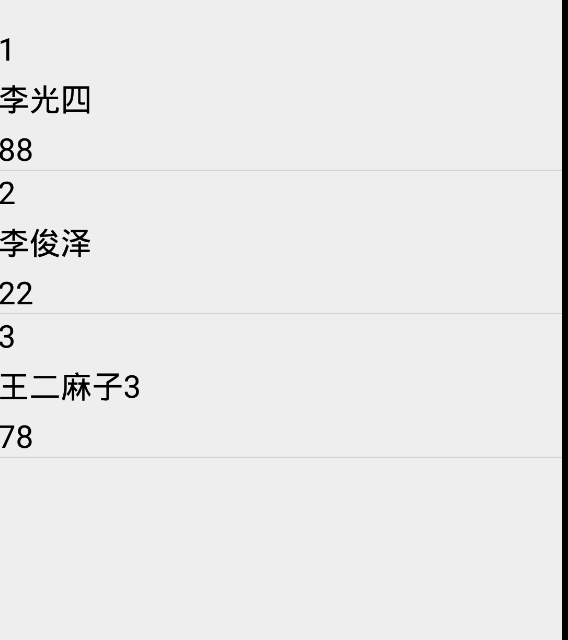
Java代码使用CursorAdapter适配器
  /**

     * 查询

     */

    public void query(View view) {

        cursor = contentResolver.query(uri,

                new String[]{"_id", "name", "age"},

                null, null

                , null, null);

        /**

         * 使用CursorAdapter 适配器

         */

        CursorAdapter adapter = new MyCursorAdapter(this, cursor, CursorAdapter.IGNORE_ITEM_VIEW_TYPE);

        // 给ListView设置适配器

        listview.setAdapter(adapter);

    }
Item布局文件:
<?xml version="1.0" encoding="utf-8"?>

<LinearLayout xmlns:android="http://schemas.android.com/apk/res/android"

    android:orientation="vertical"

    android:layout_width="match_parent"

    android:layout_height="wrap_content"

    android:layout_marginBottom="8dp">

    <TextView

        android:id="@+id/tv_id"

        android:layout_width="wrap_content"

        android:layout_height="wrap_content"

        android:textSize="20sp"

        android:text="id"

        android:textColor="@android:color/black"

        />

    <TextView

        android:id="@+id/tv_name"

        android:layout_width="wrap_content"

        android:layout_height="wrap_content"

        android:textSize="20sp"

        android:text="name"

        android:textColor="@android:color/black"

        android:layout_marginTop="5dp"

        />

    <TextView

        android:id="@+id/tv_age"

        android:layout_width="wrap_content"

        android:layout_height="wrap_content"

        android:textSize="20sp"

        android:text="age"

        android:textColor="@android:color/black"

        android:layout_marginTop="5dp"

        />

</LinearLayout>
Android-ListView-CursorAdapter的更多相关文章
- android ListView 九大重要属性详细分析、
android ListView 九大重要属性详细分析. 1.android ListView 一些重要属性详解,兄弟朋友可以参考一下. 首先是stackFromBottom属性,这只该属性之后你做好 ...
- Android ListView onItemClick Not Work
Android ListView onItemClick Not Work ListView item中有Button和RadioButton的时候,它的Item点击事件不起作用,需要设置item的属 ...
- 【腾讯Bugly干货分享】Android ListView与RecyclerView对比浅析--缓存机制
本文来自于腾讯bugly开发者社区,非经作者同意,请勿转载,原文地址:http://dev.qq.com/topic/5811d3e3ab10c62013697408 作者:黄宁源 一,背景 Recy ...
- Android ListView 常用技巧
Android ListView 常用技巧 Android TextView 常用技巧 1.使用ViewHolder提高效率 ViewHolder模式充分利用了ListView的视图缓存机制,避免了每 ...
- Android listview addHeaderView 和 addFooterView 详解
addHeaderView()方法:主要是向listView的头部添加布局addFooterView()方法:主要是向listView的底部添加布局 需要注意的是添加布局的时候应该添加从父容器开始添加 ...
- Android ListView滑动过程中图片显示重复错乱闪烁问题解决
最新内容建议直接访问原文:Android ListView滑动过程中图片显示重复错乱闪烁问题解决 主要分析Android ListView滚动过程中图片显示重复.错乱.闪烁的原因及解决方法,顺带提及L ...
- Android --ListView分页
参考博客:Android ListView分页加载(服务端+android端)Demo 监听OnScrollListener事件 class OnListScrollListener implemen ...
- Android ListView ListActivity PreferenceActivity背景变黑的问题ZT
Android ListView ListActivity PreferenceActivity背景变黑的问题 ListView在滚动时背景会变暗甚至变黑,这个要从Listview的效果说起,默认的L ...
- android listview去掉分割线
1:android listview去掉分割线 1>设置android:divider="@null" 2>android:divider="#0000000 ...
- 【转】android ListView 几个重要属性
android ListView 几个重要属性 分类: Android2012-03-08 19:25 19324人阅读 评论(5) 收藏 举报 listviewandroid活动javalistnu ...
随机推荐
- ORA-00600: 内部错误代码, 参数: [qctcte1]
[情景再现] 生产环境,JAVA程序某功能报错: ORA-00600: 内部错误代码, 参数: [qctcte1], [0], [], [], [], [], [], [] [问题排查] 1.检查Or ...
- 有关C#中的引用类型的内存问题
对于一个类,如果定义后(记作对象a),将另外一个对象b直接赋值(“a = b”)给它,则相当于将地址赋值给了这个对象.当另外一个对象b不再对这块地址应用时,a由于对这块地址仍在使用,这块地址的指向的栈 ...
- leetcode566
public class Solution { public int[,] MatrixReshape(int[,] nums, int r, int c) { ); ); if (row * col ...
- IOS 阻止 锁屏
[UIApplication sharedApplication].idleTimerDisabled=YES;不自动锁屏 idleTimerDisabled
- vue -Missing space before value for key 'path'vue.js解决空格报错
webpack.base.config.js文件注释掉下面的东西!! module: { rules: [ /*{ test: /\.(js|vue)$/, lo ...
- springboot 的定时任务使用
定时任务在Spring Boot中的集成 在启动类中加入开启定时任务的注解: 在SpringBoot中使用定时任务相当的简单.首先,我们在启动类中加入@EnableScheduling来开启定时任务. ...
- ROS 禁止公网暴力破解SSH FTP
最简单的彻底禁止公网访问SSH FTP端口 1 2 /ip firewall filter add chain=input protocol=tcp dst-port=21-22 src-addres ...
- cmder 设置
添加到系统变量 windows10可直接使用小娜搜索环境变量,然后将Cmder.exe所在目录加入Path项即可.之后通过win+r输入cmder即可启动 添加到右键菜单 在管理员权限的命令窗口下(可 ...
- linux shell 脚本攻略学习 -- head命令详解, tail命令详解
当要查看上千行的大文件时,我们可不会用cat命令把整个文件内容给打印出来,相反,我们可能只需要看文件的一小部分地内容(例如文件的前十行和后十行),我们也有可能需要打印出来前n行或后n行,也有可能打印除 ...
- (转)Android SDK Manager国内无法更新的解决方案
转载地址:http://www.linuxidc.com/Linux/2015-01/111958.htm 现在由于GWF,google基本和咱们说咱见了,就给现在在做Android 或者想学习An ...