
使用git将代码推到coding
1:前提下载好Git
2:在电脑上创建一个文件夹,打开此文件夹,单击右键—〉 git bash here
3:输入git init

完成后会在此文件夹下生成一个隐藏的.git后缀文件
4:将你的代码添加并提交到本地仓库
git add . ----> 所有文件
或 git add 《文件名》
git commit -m "项目描述"
5:将仓库代码推到线上coding(需要先获取远程仓库地址)
git remote add origin https:// git.coding.net/用户名/项目名.git
git push origin master
问题:
需要账号和密码
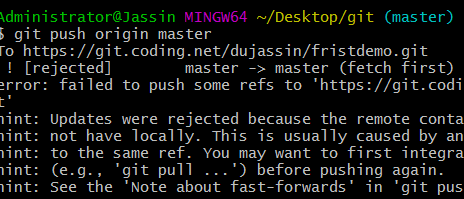
2:出现如下错误
hint: Updates were rejected because the remote contains work that you do

hint: not have locally. This is usually caused by another repository pushing

hint: to the same ref. You may want to first integrate the remote changes

hint: (e.g., 'git pull ...') before pushing again.

hint: See the 'Note about fast-forwards' in 'git push --help' for details.
方法:
1:git pull
Administrator@Jassin MINGW64 ~/Desktop/git (master)

$ git pull

warning: no common commits

remote: Counting objects: , done.

remote: Compressing objects: % (/), done.

remote: Total  (delta ), reused  (delta )

Unpacking objects: % (/), done.

From https://git.coding.net/dujassin/fristdemo

 * [new branch]      master     -> origin/master

There is no tracking information for the current branch.

Please specify which branch you want to merge with.

See git-pull() for details.

    git pull <remote> <branch>

If you wish to set tracking information for this branch you can do so with:

    git branch --set-upstream-to=origin/<branch> master
2:操作如上提示:
git pull <remote> <branch>
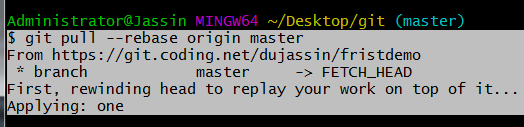
$ git pull --rebase origin master

From https://git.coding.net/dujassin/fristdemo

 * branch            master     -> FETCH_HEAD

First, rewinding head to replay your work on top of it...

Applying: one
再:
$ git push -u origin master
使用git将代码推到coding的更多相关文章
- 使用 git 将代码推送到多个仓库
使用 git 将代码推送到多个仓库 起因 起初,在 GitHub 建了一个仓库,200+ 的 commits .后来(终于在眼泪中明白...误
- Git 将本地代码推到 Coding 远程仓库
1 首先创建文件夹,将要推的项目文件夹拷贝过来,进入文件夹 右键 Git Bash Here 输入以下代码 把这个目录变成git管理的仓库 git init 2 把文件添加到版本库中,使用命令 git ...
- 将已有Git库代码推送到新建库中
cd /path/to/your/git/repo/ git remote -v git remote rm origin git remote add origin ssh://abc@gmail. ...
- coding上创建项目、创建代码仓库、将IDEA中的代码提交到coding上的代码仓库、Git的下载、IDEA上配置git
文章目录 一.Git的安装以及子啊IDEA上配置Git(下载好的可以跳过) 二.怎样让IDEA和Git建立关系 三.在coding上创建项目 四.在coding上创建代码仓库 五.Git工作理论 六. ...
- git 提交代码的流程
[root@ok-T IT-DOC]# ls hx-海星-wifi.rd web收藏.txt [root@ok-T IT-DOC]# git status -s ?? "web\346\22 ...
- 1. Git 克隆代码
1. Git 克隆代码 git clone git://github.com/facebook/hiphop-php.git 2. Git更新分支 查看服务器上的所有分支 [huzg@slave3 h ...
- Git版本控制:Gitlab及Coding.net的使用
http://blog.csdn.net/pipisorry/article/details/50709014 Gitlab介绍 GitLab是利用 Ruby on Rails 一个开源的版本管理系统 ...
- git提交代码五部曲
From: https://jingyan.baidu.com/article/359911f5a4fe4b57fe03060d.html 正常使用git时,提交代码五部曲. 工具/原料 电脑 已 ...
- Git提交代码失败: empty ident name (for <>) not allowed
使用git提交代码,报错如下: 下午2:56 Commit failed with error 0 files committed, 1 file failed to commit: 升级 empty ...
随机推荐
- random模块中最常用的几个函数
转自:http://www.cnblogs.com/yd1227/archive/2011/03/18/1988015.html 随机整数:>>> import random> ...
- C#设计模式之控制反转即依赖注入-微软提供的Unity
使用VS2015的Nuget管理器下载Unity. 程序员接口类: 1 namespace UnityDemo 2 { 3 public interface IProgrammer 4 { 5 voi ...
- SpringBoot项目结构介绍
一项目结构介绍 springboot框架本身对项目结构并没有特别的要求,但是按照最佳的项目结构可以帮助我们减少可能遇到的错误问题.结构如下: (1)应用主类SpringbootApplication应 ...
- JAXB和XStream比较
转自:https://www.cnblogs.com/tang9139/p/4825610.html http://www.cnblogs.com/wlsblog/p/7452882.html 这两东 ...
- PHP中用下划线开头的含义
命名的规则 加一个为私有的 加两个一般都是系统默认的,系统预定义的,即所谓:=====================“魔术方法”与“魔术常量”=====================★PHP起止为 ...
- 超好用的ip归属区域查询
源码如下: #!/usr/bin/env python#-*-coding:utf-8-*- import requestsfrom bs4 import BeautifulSoupimport re ...
- Mysql解压版配置环境等
背景故事:安装版的mysql和我的本本有仇,最后一步老卡死 1.首先先把下载好的压缩包解压,如下图:
- vue 自定义拖拽指令
<!DOCTYPE html> <html lang="en"> <head> <meta charset="UTF-8&quo ...
- PIVOT 和 UNPIVOT 命令的SQL Server版本
I:使用 PIVOT 和 UNPIVOT 命令的SQL Server版本要求 1.数据库的最低版本要求为 SQL Server 2005 或 更高 2.必须将数据库的兼容级别设置为 90 或 更高 3 ...
- idea git tag 管理
项目release 之后一般都会打一个tag 做记录.本人使用idea管理tag的时候,遇到的问题做一些记录. 1:idea 创建tag idea 创建tag ,我们可以右键项目,然后按照下图操作创建 ...