
Flume 启动
Configuration是Flume项目的入口程序了,当我们输入
bin/flume-ng agent --conf conf --conf-file conf/kafka1.properties --name test -Dflume.root.logger=INFO,console -Dorg.apache.flume.log.printconfig=true -Dorg.apache.flume.log.rawdata=true
后,脚本会导入环境变量,并且启动org.apache.flume.node.Application。
FLUME_AGENT_CLASS="org.apache.flume.node.Application"

# finally, invoke the appropriate command

# 判断是agent,然后调用run_flume

if [ -n "$opt_agent" ] ; then

  run_flume $FLUME_AGENT_CLASS $args

elif [ -n "$opt_avro_client" ] ; then

  run_flume $FLUME_AVRO_CLIENT_CLASS $args

elif [ -n "${opt_version}" ] ; then

  run_flume $FLUME_VERSION_CLASS $args

elif [ -n "${opt_tool}" ] ; then

  run_flume $FLUME_TOOLS_CLASS $args

else

  error "This message should never appear" 1

fi

run_flume() {

  local FLUME_APPLICATION_CLASS

  if [ "$#" -gt 0 ]; then

    FLUME_APPLICATION_CLASS=$1

    shift

  else

    error "Must specify flume application class" 1

  fi

  if [ ${CLEAN_FLAG} -ne 0 ]; then

    set -x

  fi

  $EXEC $JAVA_HOME/bin/java $JAVA_OPTS $FLUME_JAVA_OPTS "${arr_java_props[@]}" -cp "$FLUME_CLASSPATH" \

      -Djava.library.path=$FLUME_JAVA_LIBRARY_PATH "$FLUME_APPLICATION_CLASS" $*

}
然后调用Application类的main方法,这个方法里面加载了配置,并且启动了每个组件。
 public static void main(String[] args) {

    try {

	//flume 的zookeeper在1.7版本中还是一个实验特性

      boolean isZkConfigured = false;

	//设置一些必要的参数

      Options options = new Options();

      Option option = new Option("n", "name", true, "the name of this agent");

      option.setRequired(true);

      options.addOption(option);

      option = new Option("f", "conf-file", true,

          "specify a config file (required if -z missing)");

      option.setRequired(false);

      options.addOption(option);

      option = new Option(null, "no-reload-conf", false,

          "do not reload config file if changed");

      options.addOption(option);

      // Options for Zookeeper

      option = new Option("z", "zkConnString", true,

          "specify the ZooKeeper connection to use (required if -f missing)");

      option.setRequired(false);

      options.addOption(option);

      option = new Option("p", "zkBasePath", true,

          "specify the base path in ZooKeeper for agent configs");

      option.setRequired(false);

      options.addOption(option);

      option = new Option("h", "help", false, "display help text");

      options.addOption(option);

      CommandLineParser parser = new GnuParser();

      CommandLine commandLine = parser.parse(options, args);

      if (commandLine.hasOption('h')) {

        new HelpFormatter().printHelp("flume-ng agent", options, true);

        return;

      }

      String agentName = commandLine.getOptionValue('n');

      boolean reload = !commandLine.hasOption("no-reload-conf");

      if (commandLine.hasOption('z') || commandLine.hasOption("zkConnString")) {

        isZkConfigured = true;

      }

      Application application = null;

      if (isZkConfigured) {

        // get options

        String zkConnectionStr = commandLine.getOptionValue('z');

        String baseZkPath = commandLine.getOptionValue('p');

        if (reload) {

          EventBus eventBus = new EventBus(agentName + "-event-bus");

          List<LifecycleAware> components = Lists.newArrayList();

          PollingZooKeeperConfigurationProvider zookeeperConfigurationProvider =

              new PollingZooKeeperConfigurationProvider(

                  agentName, zkConnectionStr, baseZkPath, eventBus);

          components.add(zookeeperConfigurationProvider);

          application = new Application(components);

          eventBus.register(application);

        } else {

          StaticZooKeeperConfigurationProvider zookeeperConfigurationProvider =

              new StaticZooKeeperConfigurationProvider(

                  agentName, zkConnectionStr, baseZkPath);

          application = new Application();

          application.handleConfigurationEvent(zookeeperConfigurationProvider.getConfiguration());

        }

      } else {

        File configurationFile = new File(commandLine.getOptionValue('f'));

        /*

         * The following is to ensure that by default the agent will fail on

         * startup if the file does not exist.

         */

        if (!configurationFile.exists()) {

          // If command line invocation, then need to fail fast

          if (System.getProperty(Constants.SYSPROP_CALLED_FROM_SERVICE) ==

              null) {

            String path = configurationFile.getPath();

            try {

              path = configurationFile.getCanonicalPath();

            } catch (IOException ex) {

              logger.error("Failed to read canonical path for file: " + path,

                  ex);

            }

            throw new ParseException(

                "The specified configuration file does not exist: " + path);

          }

        }

        List<LifecycleAware> components = Lists.newArrayList();

		//如果reload为真,每过30秒钟加载一次配置文件

        if (reload) {

          EventBus eventBus = new EventBus(agentName + "-event-bus");

          //通过PollingPropertiesFileConfigurationProvider来创建一个线程,每隔30秒读取一次配置文件

          PollingPropertiesFileConfigurationProvider configurationProvider =

              new PollingPropertiesFileConfigurationProvider(

                  agentName, configurationFile, eventBus, 30);

          components.add(configurationProvider);

          application = new Application(components);

          eventBus.register(application);

        } else {

        //一次性加载配置文件

          PropertiesFileConfigurationProvider configurationProvider =

              new PropertiesFileConfigurationProvider(agentName, configurationFile);

          application = new Application();

          application.handleConfigurationEvent(configurationProvider.getConfiguration());

        }

      }

      //依次启动每个应用component

      application.start();

		//在应用程序结束的时候,调用stop()函数。

      final Application appReference = application;

      Runtime.getRuntime().addShutdownHook(new Thread("agent-shutdown-hook") {

        @Override

        public void run() {

          appReference.stop();

        }

      });

    } catch (Exception e) {

      logger.error("A fatal error occurred while running. Exception follows.", e);

    }

  }
在这个里面使用了PollingPropertiesFileConfigurationProvider 和 PropertiesFileConfigurationProvider 两个类,实际作用是提供每个组件的配置。
他们的类图如下:
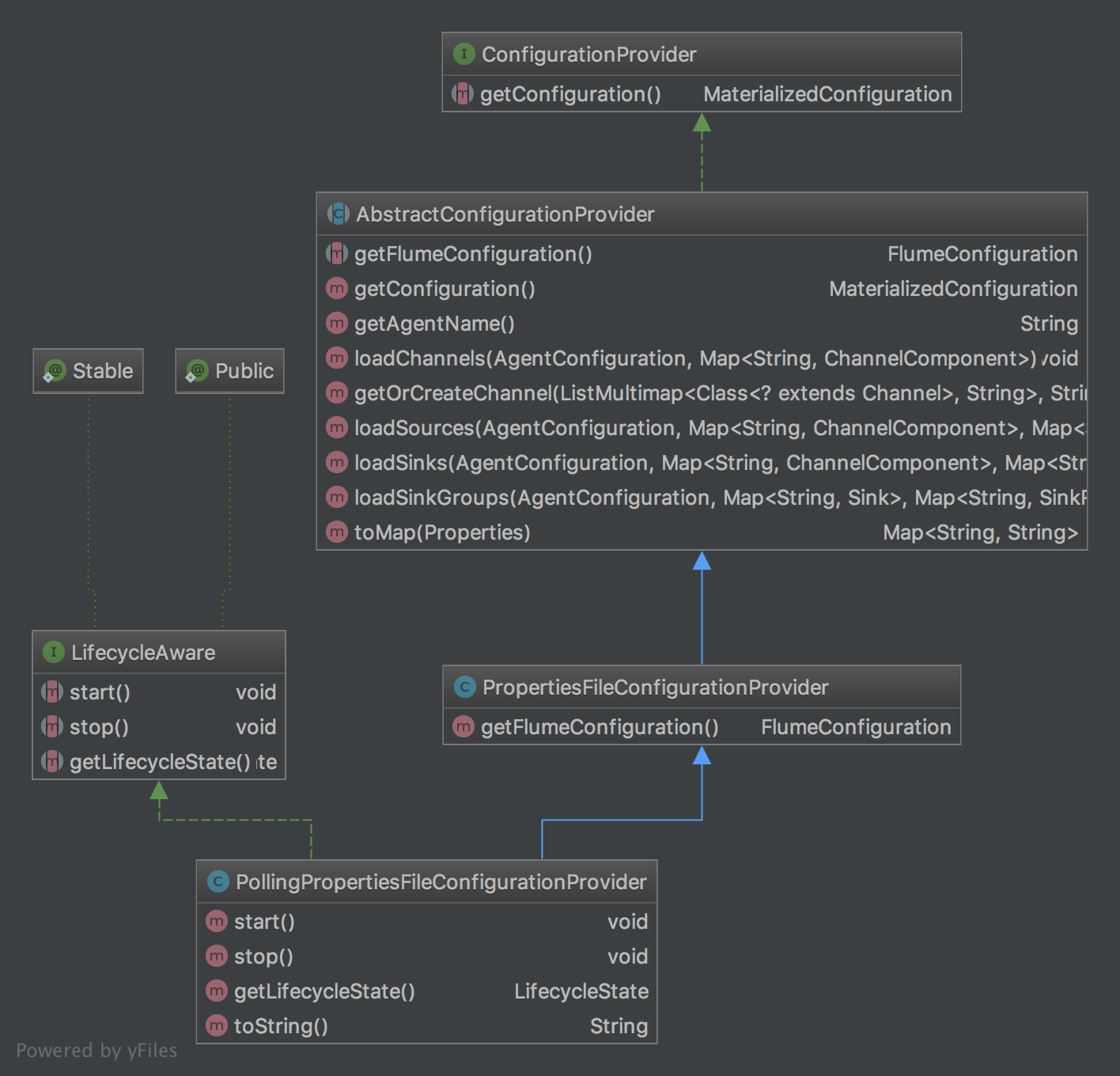
ConfigurationProvider是一个接口,所有***ConfigurationProvider都是为了各种组件提供配置。
public interface ConfigurationProvider {

  MaterializedConfiguration getConfiguration();

}
中间有一个抽象类,public abstract class AbstractConfigurationProvider implements ConfigurationProvider ,它会实现getConfiguration()接口,为每个一个组件添加配置。
  public MaterializedConfiguration getConfiguration() {

    MaterializedConfiguration conf = new SimpleMaterializedConfiguration();

    //获取配置,getFlumeConfiguration这个方法会在不同的子类中进行实现。

    FlumeConfiguration fconfig = getFlumeConfiguration();

    //获取不同agent的配置

    AgentConfiguration agentConf = fconfig.getConfigurationFor(getAgentName());

    if (agentConf != null) {

      Map<String, ChannelComponent> channelComponentMap = Maps.newHashMap();

      Map<String, SourceRunner> sourceRunnerMap = Maps.newHashMap();

      Map<String, SinkRunner> sinkRunnerMap = Maps.newHashMap();

      try {

        //加载channels,source,sinks,这里会创建出对应的对象

        loadChannels(agentConf, channelComponentMap);

        loadSources(agentConf, channelComponentMap, sourceRunnerMap);

        loadSinks(agentConf, channelComponentMap, sinkRunnerMap);

        //如果某个channel没有和source、sink做关联,就删除掉

        //如果关联着,就加入到conf里面,

        Set<String> channelNames = new HashSet<String>(channelComponentMap.keySet());

        for (String channelName : channelNames) {

          ChannelComponent channelComponent = channelComponentMap.get(channelName);

          if (channelComponent.components.isEmpty()) {

            LOGGER.warn(String.format("Channel %s has no components connected" +

                " and has been removed.", channelName));

            channelComponentMap.remove(channelName);

            Map<String, Channel> nameChannelMap =

                channelCache.get(channelComponent.channel.getClass());

            if (nameChannelMap != null) {

              nameChannelMap.remove(channelName);

            }

          } else {

            LOGGER.info(String.format("Channel %s connected to %s",

                channelName, channelComponent.components.toString()));

            conf.addChannel(channelName, channelComponent.channel);

          }

        }

        //将source、sink加入从里面

        for (Map.Entry<String, SourceRunner> entry : sourceRunnerMap.entrySet()) {

          conf.addSourceRunner(entry.getKey(), entry.getValue());

        }

        for (Map.Entry<String, SinkRunner> entry : sinkRunnerMap.entrySet()) {

          conf.addSinkRunner(entry.getKey(), entry.getValue());

        }

      } catch (InstantiationException ex) {

        LOGGER.error("Failed to instantiate component", ex);

      } finally {

        channelComponentMap.clear();

        sourceRunnerMap.clear();

        sinkRunnerMap.clear();

      }

    } else {

      LOGGER.warn("No configuration found for this host:{}", getAgentName());

    }

    return conf;

  }
话说里面的名字起的比较奇怪,SourceRunner,SinkRunner,ChannelComponent。
前面两个都是Runner,后面就是Component。
接下来就是public class PropertiesFileConfigurationProvider extends AbstractConfigurationProvider
在这个类里面实现了getFlumeConfiguration()方法。
最后就是
public class PollingPropertiesFileConfigurationProvider extends PropertiesFileConfigurationProvider implements LifecycleAware
这个类,就是实现了每隔30秒读取一次配置文件。它的start函数里面启动了一个单任务延迟线程池,来做文件操作。
 @Override

 public void start() {

   LOGGER.info("Configuration provider starting");

   Preconditions.checkState(file != null,

       "The parameter file must not be null");

   //启动一个线程池

       executorService = Executors.newSingleThreadScheduledExecutor(

           new ThreadFactoryBuilder().setNameFormat("conf-file-poller-%d")

               .build());

   FileWatcherRunnable fileWatcherRunnable =

       new FileWatcherRunnable(file, counterGroup);

   executorService.scheduleWithFixedDelay(fileWatcherRunnable, 0, interval,

       TimeUnit.SECONDS);

   lifecycleState = LifecycleState.START;

   LOGGER.debug("Configuration provider started");

 }
里面的FlieWatchRunnable类会判断文件是否更新,如果更新了,就重新调用getConfiguration方法。
整个配置加载的大体就是这样子,整个过程涉及到了FlumeConfiguration,下次记录一下Flume的配置类。
整个代码结构写的也很清晰,我觉得是这样子,笑。每个类,每个函数都能看出它的作用。这是需要学习的地方。
Flume 启动的更多相关文章
- [Spark][Flume]Flume 启动例子
Flume 启动例子: flume-ng agent --conf /etc/flume-ng/conf --conf-file /etc/flume-ng/conf/flume.conf --nam ...
- flume 启动,停止,重启脚本
#!/bin/bash #echo "begin start flume..." #flume的安装根目录(根据自己情况,修改为自己的安装目录) path=/sysware/apa ...
- Flume启动运行时报错org.apache.flume.ChannelFullException: Space for commit to queue couldn't be acquired. Sinks are likely not keeping up with sources, or the buffer size is too tight解决办法(图文详解)
前期博客 Flume自定义拦截器(Interceptors)或自带拦截器时的一些经验技巧总结(图文详解) 问题详情 启动agent服务 [hadoop@master flume-1.7.0]$ ...
- Flume启动错误之:Bootstrap Servers must be specified
今天测试项目的时候需要启动Flume,然而在启动时遇到了Bootstrap Servers must be specified错误,错误日志如下: [kfk@bigdata-pro01 flume-- ...
- Flume启动时报错Caused by: java.lang.InterruptedException: Timed out before HDFS call was made. Your hdfs.callTimeout might be set too low or HDFS calls are taking too long.解决办法(图文详解)
前期博客 Flume自定义拦截器(Interceptors)或自带拦截器时的一些经验技巧总结(图文详解) 问题详情 -- ::, (agent-shutdown-hook) [INFO - org.a ...
- Flume启动报错[ERROR - org.apache.flume.sink.hdfs. Hit max consecutive under-replication rotations (30); will not continue rolling files under this path due to under-replication解决办法(图文详解)
前期博客 Flume自定义拦截器(Interceptors)或自带拦截器时的一些经验技巧总结(图文详解) 问题详情 -- ::, (SinkRunner-PollingRunner-Default ...
- flume启动报错
执行flume-ng agent -c conf -f conf/load_balancer_server.conf -n a1 -Dflume.root.logger=DEBUG,console , ...
- flume【源码分析】分析Flume的启动过程
h2 { color: #fff; background-color: #7CCD7C; padding: 3px; margin: 10px 0px } h3 { color: #fff; back ...
- [转] flume使用(六):后台启动及日志查看
[From] https://blog.csdn.net/maoyuanming0806/article/details/80807087 处理的问题flume 普通方式启动会有自己自动停掉的问题,这 ...
随机推荐
- ruby on rails错误undefined method `title' for nil:NilClass
首先搞清楚这句话,在 Ruby 中,方法分为 public.private 和 protected 三种,仅仅有 public 方法才干作为控制器的动作. 我的出错的代码例如以下: controlle ...
- _00017 Kafka的体系结构介绍以及Kafka入门案例(0基础案例+Java API的使用)
博文作者:妳那伊抹微笑 itdog8 地址链接 : http://www.itdog8.com(个人链接) 博客地址:http://blog.csdn.net/u012185296 博文标题:_000 ...
- 如何从 Datagrid 中获得单元格的内容与 使用值转换器进行绑定数据的转换IValueConverter
一.如何从 Datagrid 中获得单元格的内容 DataGrid 属于一种 ItemsControl, 因此,它有 Items 属性并且用ItemContainer 封装它的 items. 但是,W ...
- BZOJ 2190 欧拉函数
思路: 递推出来欧拉函数 搞个前缀和 sum[n-1]*2+3就是答案 假设仪仗队是从零开始的 视线能看见的地方就是gcd(x,y)=1的地方 倒过来一样 刨掉(1,1) 就是ans*2+1 再加一下 ...
- kettle工具的设计原则
不多说,直接上干货! Kettle工具在设计初,就考虑到了一些设计原则.这些原则里借鉴了以前使用过的其他一些ETL工具积累下的经验和教训. 易于开发:作为数据仓库和ETL开发者,你只想把时间用在创建B ...
- MySQL学习(二)——SQL语句创建删除修改以及中文乱码问题
一.对数据库的操作 1.创建一个库 create database 库名; 创建带有编码的:create database 库名 character set 编码; 查看编码:show create ...
- PostgreSQL+PostGIS
PostGIS简介 PostGIS是对象关系型数据库系统PostgreSQL的一个扩展,PostGIS提供如下空间信息服务功能:空间对象.空间索引.空间操作函数和空间操作符.同时,PostGIS遵循O ...
- 4月17日 (PS:由于时间问题,现在才发,望老师见谅)疯狂猜成语-----第三次站立会议 参会人员:杨霏,袁雪,胡潇丹,郭林林,尹亚男,赵静娜
疯狂猜成语-----第三次站立会议 参会人员:杨霏,袁雪,胡潇丹,郭林林,尹亚男,赵静娜 会议内容: 组员依次汇报自己的工作进度,并且提出自己在进行任务的过程中遇到的问题,是否解决以及解决办法. 以下 ...
- SAI / PS绘画一个卡通女孩详解
本教程介绍使用SAI / PS绘画一个卡通女孩的教程 ,教程很详细,动起你的小手一起来试试吧! 软件下载:http://www.dongmansoft.com/xiazai.html 想要Get到更多 ...
- js的调试和优化
一.常见的错误和异常 1.拼写错误 拼写错误,可以有代码的高亮来发现. 2.访问不存在的变量 3.括号不匹配 养成规范的编写习惯,适当应用Tab.空行等. 4.字符串和变量链接错误 采用多加括号来进行 ...