
Flume 启动
Configuration是Flume项目的入口程序了,当我们输入
bin/flume-ng agent --conf conf --conf-file conf/kafka1.properties --name test -Dflume.root.logger=INFO,console -Dorg.apache.flume.log.printconfig=true -Dorg.apache.flume.log.rawdata=true
后,脚本会导入环境变量,并且启动org.apache.flume.node.Application。
FLUME_AGENT_CLASS="org.apache.flume.node.Application"

# finally, invoke the appropriate command

# 判断是agent,然后调用run_flume

if [ -n "$opt_agent" ] ; then

  run_flume $FLUME_AGENT_CLASS $args

elif [ -n "$opt_avro_client" ] ; then

  run_flume $FLUME_AVRO_CLIENT_CLASS $args

elif [ -n "${opt_version}" ] ; then

  run_flume $FLUME_VERSION_CLASS $args

elif [ -n "${opt_tool}" ] ; then

  run_flume $FLUME_TOOLS_CLASS $args

else

  error "This message should never appear" 1

fi

run_flume() {

  local FLUME_APPLICATION_CLASS

  if [ "$#" -gt 0 ]; then

    FLUME_APPLICATION_CLASS=$1

    shift

  else

    error "Must specify flume application class" 1

  fi

  if [ ${CLEAN_FLAG} -ne 0 ]; then

    set -x

  fi

  $EXEC $JAVA_HOME/bin/java $JAVA_OPTS $FLUME_JAVA_OPTS "${arr_java_props[@]}" -cp "$FLUME_CLASSPATH" \

      -Djava.library.path=$FLUME_JAVA_LIBRARY_PATH "$FLUME_APPLICATION_CLASS" $*

}
然后调用Application类的main方法,这个方法里面加载了配置,并且启动了每个组件。
 public static void main(String[] args) {

    try {

	//flume 的zookeeper在1.7版本中还是一个实验特性

      boolean isZkConfigured = false;

	//设置一些必要的参数

      Options options = new Options();

      Option option = new Option("n", "name", true, "the name of this agent");

      option.setRequired(true);

      options.addOption(option);

      option = new Option("f", "conf-file", true,

          "specify a config file (required if -z missing)");

      option.setRequired(false);

      options.addOption(option);

      option = new Option(null, "no-reload-conf", false,

          "do not reload config file if changed");

      options.addOption(option);

      // Options for Zookeeper

      option = new Option("z", "zkConnString", true,

          "specify the ZooKeeper connection to use (required if -f missing)");

      option.setRequired(false);

      options.addOption(option);

      option = new Option("p", "zkBasePath", true,

          "specify the base path in ZooKeeper for agent configs");

      option.setRequired(false);

      options.addOption(option);

      option = new Option("h", "help", false, "display help text");

      options.addOption(option);

      CommandLineParser parser = new GnuParser();

      CommandLine commandLine = parser.parse(options, args);

      if (commandLine.hasOption('h')) {

        new HelpFormatter().printHelp("flume-ng agent", options, true);

        return;

      }

      String agentName = commandLine.getOptionValue('n');

      boolean reload = !commandLine.hasOption("no-reload-conf");

      if (commandLine.hasOption('z') || commandLine.hasOption("zkConnString")) {

        isZkConfigured = true;

      }

      Application application = null;

      if (isZkConfigured) {

        // get options

        String zkConnectionStr = commandLine.getOptionValue('z');

        String baseZkPath = commandLine.getOptionValue('p');

        if (reload) {

          EventBus eventBus = new EventBus(agentName + "-event-bus");

          List<LifecycleAware> components = Lists.newArrayList();

          PollingZooKeeperConfigurationProvider zookeeperConfigurationProvider =

              new PollingZooKeeperConfigurationProvider(

                  agentName, zkConnectionStr, baseZkPath, eventBus);

          components.add(zookeeperConfigurationProvider);

          application = new Application(components);

          eventBus.register(application);

        } else {

          StaticZooKeeperConfigurationProvider zookeeperConfigurationProvider =

              new StaticZooKeeperConfigurationProvider(

                  agentName, zkConnectionStr, baseZkPath);

          application = new Application();

          application.handleConfigurationEvent(zookeeperConfigurationProvider.getConfiguration());

        }

      } else {

        File configurationFile = new File(commandLine.getOptionValue('f'));

        /*

         * The following is to ensure that by default the agent will fail on

         * startup if the file does not exist.

         */

        if (!configurationFile.exists()) {

          // If command line invocation, then need to fail fast

          if (System.getProperty(Constants.SYSPROP_CALLED_FROM_SERVICE) ==

              null) {

            String path = configurationFile.getPath();

            try {

              path = configurationFile.getCanonicalPath();

            } catch (IOException ex) {

              logger.error("Failed to read canonical path for file: " + path,

                  ex);

            }

            throw new ParseException(

                "The specified configuration file does not exist: " + path);

          }

        }

        List<LifecycleAware> components = Lists.newArrayList();

		//如果reload为真,每过30秒钟加载一次配置文件

        if (reload) {

          EventBus eventBus = new EventBus(agentName + "-event-bus");

          //通过PollingPropertiesFileConfigurationProvider来创建一个线程,每隔30秒读取一次配置文件

          PollingPropertiesFileConfigurationProvider configurationProvider =

              new PollingPropertiesFileConfigurationProvider(

                  agentName, configurationFile, eventBus, 30);

          components.add(configurationProvider);

          application = new Application(components);

          eventBus.register(application);

        } else {

        //一次性加载配置文件

          PropertiesFileConfigurationProvider configurationProvider =

              new PropertiesFileConfigurationProvider(agentName, configurationFile);

          application = new Application();

          application.handleConfigurationEvent(configurationProvider.getConfiguration());

        }

      }

      //依次启动每个应用component

      application.start();

		//在应用程序结束的时候,调用stop()函数。

      final Application appReference = application;

      Runtime.getRuntime().addShutdownHook(new Thread("agent-shutdown-hook") {

        @Override

        public void run() {

          appReference.stop();

        }

      });

    } catch (Exception e) {

      logger.error("A fatal error occurred while running. Exception follows.", e);

    }

  }
在这个里面使用了PollingPropertiesFileConfigurationProvider 和 PropertiesFileConfigurationProvider 两个类,实际作用是提供每个组件的配置。
他们的类图如下:
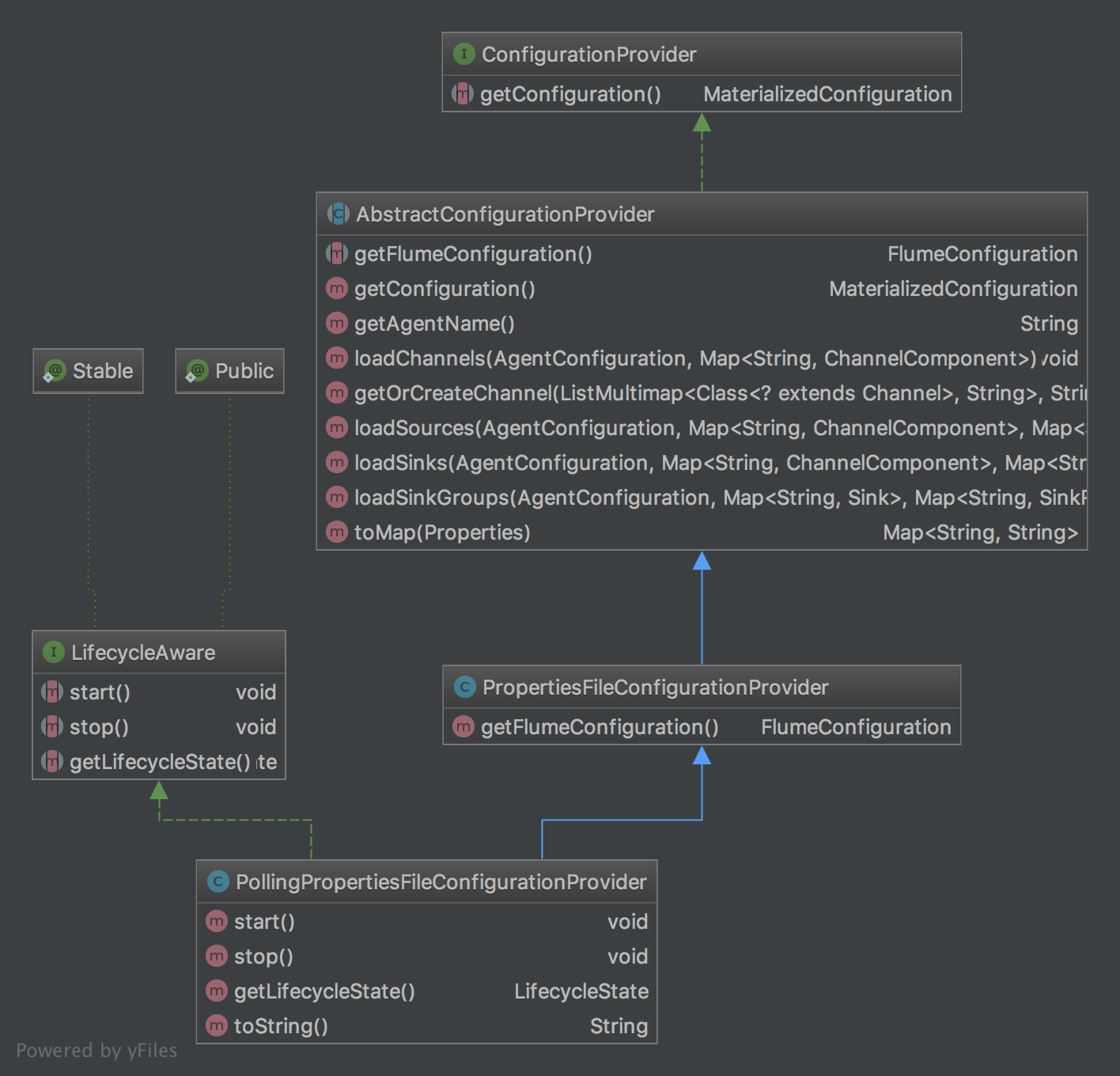
ConfigurationProvider是一个接口,所有***ConfigurationProvider都是为了各种组件提供配置。
public interface ConfigurationProvider {

  MaterializedConfiguration getConfiguration();

}
中间有一个抽象类,public abstract class AbstractConfigurationProvider implements ConfigurationProvider ,它会实现getConfiguration()接口,为每个一个组件添加配置。
  public MaterializedConfiguration getConfiguration() {

    MaterializedConfiguration conf = new SimpleMaterializedConfiguration();

    //获取配置,getFlumeConfiguration这个方法会在不同的子类中进行实现。

    FlumeConfiguration fconfig = getFlumeConfiguration();

    //获取不同agent的配置

    AgentConfiguration agentConf = fconfig.getConfigurationFor(getAgentName());

    if (agentConf != null) {

      Map<String, ChannelComponent> channelComponentMap = Maps.newHashMap();

      Map<String, SourceRunner> sourceRunnerMap = Maps.newHashMap();

      Map<String, SinkRunner> sinkRunnerMap = Maps.newHashMap();

      try {

        //加载channels,source,sinks,这里会创建出对应的对象

        loadChannels(agentConf, channelComponentMap);

        loadSources(agentConf, channelComponentMap, sourceRunnerMap);

        loadSinks(agentConf, channelComponentMap, sinkRunnerMap);

        //如果某个channel没有和source、sink做关联,就删除掉

        //如果关联着,就加入到conf里面,

        Set<String> channelNames = new HashSet<String>(channelComponentMap.keySet());

        for (String channelName : channelNames) {

          ChannelComponent channelComponent = channelComponentMap.get(channelName);

          if (channelComponent.components.isEmpty()) {

            LOGGER.warn(String.format("Channel %s has no components connected" +

                " and has been removed.", channelName));

            channelComponentMap.remove(channelName);

            Map<String, Channel> nameChannelMap =

                channelCache.get(channelComponent.channel.getClass());

            if (nameChannelMap != null) {

              nameChannelMap.remove(channelName);

            }

          } else {

            LOGGER.info(String.format("Channel %s connected to %s",

                channelName, channelComponent.components.toString()));

            conf.addChannel(channelName, channelComponent.channel);

          }

        }

        //将source、sink加入从里面

        for (Map.Entry<String, SourceRunner> entry : sourceRunnerMap.entrySet()) {

          conf.addSourceRunner(entry.getKey(), entry.getValue());

        }

        for (Map.Entry<String, SinkRunner> entry : sinkRunnerMap.entrySet()) {

          conf.addSinkRunner(entry.getKey(), entry.getValue());

        }

      } catch (InstantiationException ex) {

        LOGGER.error("Failed to instantiate component", ex);

      } finally {

        channelComponentMap.clear();

        sourceRunnerMap.clear();

        sinkRunnerMap.clear();

      }

    } else {

      LOGGER.warn("No configuration found for this host:{}", getAgentName());

    }

    return conf;

  }
话说里面的名字起的比较奇怪,SourceRunner,SinkRunner,ChannelComponent。
前面两个都是Runner,后面就是Component。
接下来就是public class PropertiesFileConfigurationProvider extends AbstractConfigurationProvider
在这个类里面实现了getFlumeConfiguration()方法。
最后就是
public class PollingPropertiesFileConfigurationProvider extends PropertiesFileConfigurationProvider implements LifecycleAware
这个类,就是实现了每隔30秒读取一次配置文件。它的start函数里面启动了一个单任务延迟线程池,来做文件操作。
 @Override

 public void start() {

   LOGGER.info("Configuration provider starting");

   Preconditions.checkState(file != null,

       "The parameter file must not be null");

   //启动一个线程池

       executorService = Executors.newSingleThreadScheduledExecutor(

           new ThreadFactoryBuilder().setNameFormat("conf-file-poller-%d")

               .build());

   FileWatcherRunnable fileWatcherRunnable =

       new FileWatcherRunnable(file, counterGroup);

   executorService.scheduleWithFixedDelay(fileWatcherRunnable, 0, interval,

       TimeUnit.SECONDS);

   lifecycleState = LifecycleState.START;

   LOGGER.debug("Configuration provider started");

 }
里面的FlieWatchRunnable类会判断文件是否更新,如果更新了,就重新调用getConfiguration方法。
整个配置加载的大体就是这样子,整个过程涉及到了FlumeConfiguration,下次记录一下Flume的配置类。
整个代码结构写的也很清晰,我觉得是这样子,笑。每个类,每个函数都能看出它的作用。这是需要学习的地方。
Flume 启动的更多相关文章
- [Spark][Flume]Flume 启动例子
Flume 启动例子: flume-ng agent --conf /etc/flume-ng/conf --conf-file /etc/flume-ng/conf/flume.conf --nam ...
- flume 启动,停止,重启脚本
#!/bin/bash #echo "begin start flume..." #flume的安装根目录(根据自己情况,修改为自己的安装目录) path=/sysware/apa ...
- Flume启动运行时报错org.apache.flume.ChannelFullException: Space for commit to queue couldn't be acquired. Sinks are likely not keeping up with sources, or the buffer size is too tight解决办法(图文详解)
前期博客 Flume自定义拦截器(Interceptors)或自带拦截器时的一些经验技巧总结(图文详解) 问题详情 启动agent服务 [hadoop@master flume-1.7.0]$ ...
- Flume启动错误之:Bootstrap Servers must be specified
今天测试项目的时候需要启动Flume,然而在启动时遇到了Bootstrap Servers must be specified错误,错误日志如下: [kfk@bigdata-pro01 flume-- ...
- Flume启动时报错Caused by: java.lang.InterruptedException: Timed out before HDFS call was made. Your hdfs.callTimeout might be set too low or HDFS calls are taking too long.解决办法(图文详解)
前期博客 Flume自定义拦截器(Interceptors)或自带拦截器时的一些经验技巧总结(图文详解) 问题详情 -- ::, (agent-shutdown-hook) [INFO - org.a ...
- Flume启动报错[ERROR - org.apache.flume.sink.hdfs. Hit max consecutive under-replication rotations (30); will not continue rolling files under this path due to under-replication解决办法(图文详解)
前期博客 Flume自定义拦截器(Interceptors)或自带拦截器时的一些经验技巧总结(图文详解) 问题详情 -- ::, (SinkRunner-PollingRunner-Default ...
- flume启动报错
执行flume-ng agent -c conf -f conf/load_balancer_server.conf -n a1 -Dflume.root.logger=DEBUG,console , ...
- flume【源码分析】分析Flume的启动过程
h2 { color: #fff; background-color: #7CCD7C; padding: 3px; margin: 10px 0px } h3 { color: #fff; back ...
- [转] flume使用(六):后台启动及日志查看
[From] https://blog.csdn.net/maoyuanming0806/article/details/80807087 处理的问题flume 普通方式启动会有自己自动停掉的问题,这 ...
随机推荐
- 《深入理解Android 卷III》第五章 深入理解Android输入系统
<深入理解Android 卷III>即将公布.作者是张大伟.此书填补了深入理解Android Framework卷中的一个主要空白.即Android Framework中和UI相关的部分. ...
- Wireshark默认不抓取本地包的解决方式
事实上这个工具我已经用过非常多年了,还叫Ethereal的时候就在用. 今天因为实验须要,要抓一下在localhost间的包,结果发现获取不到.解决方法也非常easy,在cmd下输入: route a ...
- oracle rac 巡检过程详解
一 RAC环境 RAC架构,2节点信息 节点1 SQL> show parameter instance NAME TYPE ...
- sublime配置python运行环境
1.sublime下载与插件管理 1.1 下载 官网地址:https://www.sublimetext.com/3 1.2 安装Package Control管理插件 使用ctrl + ` (感叹后 ...
- 采集电脑摄像头和mic,rtp端口推送音视频工具
介绍:这个是我在做一个rtmp播放的项目中自己写的rtp推送的工具,可选择摄像头,可选择推送rtp的端口和ip 下载地址: github:https://github.com/alexhegang/s ...
- C#线程调用带参数的方法,给控件赋值
System.Threading.Thread thread = new System.Threading.Thread(() => { //各种业务 //定义一个委托 public deleg ...
- hiho1116 - 数据结构 线段树(区间合并)
题目链接 现在有一个有n个元素的数组a1, a2, ..., an. 记f(i, j) = ai * ai+1 * ... * aj. 初始时,a1 = a2 = ... = an = 0,每次我会修 ...
- 路飞学城Python-Day4
29.二进制转换计算机使用的语言就是二进制古时候,人们使用信鸽.书信.千里马等方式.但是这样的方式是不可靠的,时间也长.古时候的军方,通过烽火狼烟进行简单的信息交流 30.二进制的转换(II)8 4 ...
- Uncaught TypeError: Cannot read property 'offsetTop' of undefined at VueComponent.handleScroll
mounted() { window.addEventListener("scroll", this.handleScroll); }, beforeDestroy() { win ...
- js 监听ios手机键盘弹起和收起的事件
document.body.addEventListener('focusin', () => { //软键盘弹起事件 console.log("键盘弹起") }) docu ...