
Android系统Recovery工作原理之使用update.zip升级过程分析(七)---Recovery服务的核心install_package函数【转】
本文转载自:http://blog.csdn.net/mu0206mu/article/details/7465514
一、 Recovery服务的核心install_package(升级update.zip特有)
和Recovery服务中的wipe_data、wipe_cache不同,install_package()是升级update.zip特有的一部分,也是最核心的部分。在这一步才真正开始对我们的update.zip包进行处理。下面就开始分析这一部分。还是先看图例:
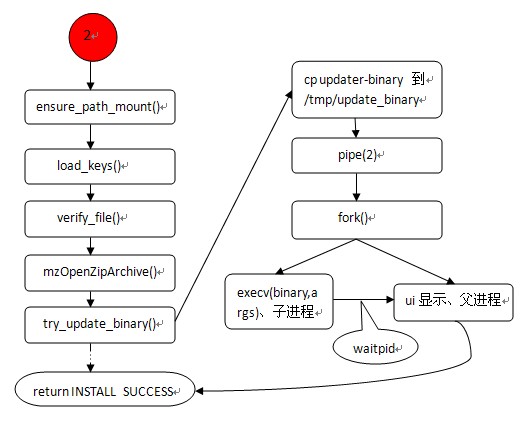
这一部分的源码文件位于:/gingerbread0919/bootable/recovery/install.c。这是一个没有main函数的源码文件,还是把源码先贴出来如下:
- /*
- * Copyright (C) 2007 The Android Open Source Project
- *
- * Licensed under the Apache License, Version 2.0 (the "License");
- * you may not use this file except in compliance with the License.
- * You may obtain a copy of the License at
- *
- * http://www.apache.org/licenses/LICENSE-2.0
- *
- * Unless required by applicable law or agreed to in writing, software
- * distributed under the License is distributed on an "AS IS" BASIS,
- * WITHOUT WARRANTIES OR CONDITIONS OF ANY KIND, either express or implied.
- * See the License for the specific language governing permissions and
- * limitations under the License.
- */
- #include <ctype.h>
- #include <errno.h>
- #include <fcntl.h>
- #include <limits.h>
- #include <sys/stat.h>
- #include <sys/wait.h>
- #include <unistd.h>
- #include "common.h"
- #include "install.h"
- #include "mincrypt/rsa.h"
- #include "minui/minui.h"
- #include "minzip/SysUtil.h"
- #include "minzip/Zip.h"
- #include "mtdutils/mounts.h"
- #include "mtdutils/mtdutils.h"
- #include "roots.h"
- #include "verifier.h"
- #define ASSUMED_UPDATE_BINARY_NAME "META-INF/com/google/android/update-binary"
- #define PUBLIC_KEYS_FILE "/res/keys"
- // If the package contains an update binary, extract it and run it.
- static int
- try_update_binary(const char *path, ZipArchive *zip) {
- const ZipEntry* binary_entry =
- mzFindZipEntry(zip, ASSUMED_UPDATE_BINARY_NAME);
- if (binary_entry == NULL) {
- mzCloseZipArchive(zip);
- return INSTALL_CORRUPT;
- }
- char* binary = "/tmp/update_binary";
- unlink(binary);
- int fd = creat(binary, 0755);
- if (fd < 0) {
- mzCloseZipArchive(zip);
- LOGE("Can't make %s\n", binary);
- return 1;
- }
- bool ok = mzExtractZipEntryToFile(zip, binary_entry, fd);
- close(fd);
- mzCloseZipArchive(zip);
- if (!ok) {
- LOGE("Can't copy %s\n", ASSUMED_UPDATE_BINARY_NAME);
- return 1;
- }
- int pipefd[2];
- pipe(pipefd);
- // When executing the update binary contained in the package, the
- // arguments passed are:
- //
- // - the version number for this interface
- //
- // - an fd to which the program can write in order to update the
- // progress bar. The program can write single-line commands:
- //
- // progress <frac> <secs>
- // fill up the next <frac> part of of the progress bar
- // over <secs> seconds. If <secs> is zero, use
- // set_progress commands to manually control the
- // progress of this segment of the bar
- //
- // set_progress <frac>
- // <frac> should be between 0.0 and 1.0; sets the
- // progress bar within the segment defined by the most
- // recent progress command.
- //
- // firmware <"hboot"|"radio"> <filename>
- // arrange to install the contents of <filename> in the
- // given partition on reboot.
- //
- // (API v2: <filename> may start with "PACKAGE:" to
- // indicate taking a file from the OTA package.)
- //
- // (API v3: this command no longer exists.)
- //
- // ui_print <string>
- // display <string> on the screen.
- //
- // - the name of the package zip file.
- //
- char** args = malloc(sizeof(char*) * 5);
- args[0] = binary;
- args[1] = EXPAND(RECOVERY_API_VERSION); // defined in Android.mk
- args[2] = malloc(10);
- sprintf(args[2], "%d", pipefd[1]);
- args[3] = (char*)path;
- args[4] = NULL;
- pid_t pid = fork();
- if (pid == 0) {
- close(pipefd[0]);
- execv(binary, args);
- fprintf(stdout, "E:Can't run %s (%s)\n", binary, strerror(errno));
- _exit(-1);
- }
- close(pipefd[1]);
- char buffer[1024];
- FILE* from_child = fdopen(pipefd[0], "r");
- while (fgets(buffer, sizeof(buffer), from_child) != NULL) {
- char* command = strtok(buffer, " \n");
- if (command == NULL) {
- continue;
- } else if (strcmp(command, "progress") == 0) {
- char* fraction_s = strtok(NULL, " \n");
- char* seconds_s = strtok(NULL, " \n");
- float fraction = strtof(fraction_s, NULL);
- int seconds = strtol(seconds_s, NULL, 10);
- ui_show_progress(fraction * (1-VERIFICATION_PROGRESS_FRACTION),
- seconds);
- } else if (strcmp(command, "set_progress") == 0) {
- char* fraction_s = strtok(NULL, " \n");
- float fraction = strtof(fraction_s, NULL);
- ui_set_progress(fraction);
- } else if (strcmp(command, "ui_print") == 0) {
- char* str = strtok(NULL, "\n");
- if (str) {
- ui_print("%s", str);
- } else {
- ui_print("\n");
- }
- } else {
- LOGE("unknown command [%s]\n", command);
- }
- }
- fclose(from_child);
- int status;
- waitpid(pid, &status, 0);
- if (!WIFEXITED(status) || WEXITSTATUS(status) != 0) {
- LOGE("Error in %s\n(Status %d)\n", path, WEXITSTATUS(status));
- return INSTALL_ERROR;
- }
- return INSTALL_SUCCESS;
- }
- // Reads a file containing one or more public keys as produced by
- // DumpPublicKey: this is an RSAPublicKey struct as it would appear
- // as a C source literal, eg:
- //
- // "{64,0xc926ad21,{1795090719,...,-695002876},{-857949815,...,1175080310}}"
- //
- // (Note that the braces and commas in this example are actual
- // characters the parser expects to find in the file; the ellipses
- // indicate more numbers omitted from this example.)
- //
- // The file may contain multiple keys in this format, separated by
- // commas. The last key must not be followed by a comma.
- //
- // Returns NULL if the file failed to parse, or if it contain zero keys.
- static RSAPublicKey*
- load_keys(const char* filename, int* numKeys) {
- RSAPublicKey* out = NULL;
- *numKeys = 0;
- FILE* f = fopen(filename, "r");
- if (f == NULL) {
- LOGE("opening %s: %s\n", filename, strerror(errno));
- goto exit;
- }
- int i;
- bool done = false;
- while (!done) {
- ++*numKeys;
- out = realloc(out, *numKeys * sizeof(RSAPublicKey));
- RSAPublicKey* key = out + (*numKeys - 1);
- if (fscanf(f, " { %i , 0x%x , { %u",
- &(key->len), &(key->n0inv), &(key->n[0])) != 3) {
- goto exit;
- }
- if (key->len != RSANUMWORDS) {
- LOGE("key length (%d) does not match expected size\n", key->len);
- goto exit;
- }
- for (i = 1; i < key->len; ++i) {
- if (fscanf(f, " , %u", &(key->n[i])) != 1) goto exit;
- }
- if (fscanf(f, " } , { %u", &(key->rr[0])) != 1) goto exit;
- for (i = 1; i < key->len; ++i) {
- if (fscanf(f, " , %u", &(key->rr[i])) != 1) goto exit;
- }
- fscanf(f, " } } ");
- // if the line ends in a comma, this file has more keys.
- switch (fgetc(f)) {
- case ',':
- // more keys to come.
- break;
- case EOF:
- done = true;
- break;
- default:
- LOGE("unexpected character between keys\n");
- goto exit;
- }
- }
- fclose(f);
- return out;
- exit:
- if (f) fclose(f);
- free(out);
- *numKeys = 0;
- return NULL;
- }
- int
- install_package(const char *path)
- {
- ui_set_background(BACKGROUND_ICON_INSTALLING);
- ui_print("Finding update package...\n");
- ui_show_indeterminate_progress();
- LOGI("Update location: %s\n", path);
- if (ensure_path_mounted(path) != 0) {
- LOGE("Can't mount %s\n", path);
- return INSTALL_CORRUPT;
- }
- ui_print("Opening update package...\n");
- int numKeys;
- RSAPublicKey* loadedKeys = load_keys(PUBLIC_KEYS_FILE, &numKeys);
- if (loadedKeys == NULL) {
- LOGE("Failed to load keys\n");
- return INSTALL_CORRUPT;
- }
- LOGI("%d key(s) loaded from %s\n", numKeys, PUBLIC_KEYS_FILE);
- // Give verification half the progress bar...
- ui_print("Verifying update package...\n");
- ui_show_progress(
- VERIFICATION_PROGRESS_FRACTION,
- VERIFICATION_PROGRESS_TIME);
- int err;
- err = verify_file(path, loadedKeys, numKeys);
- free(loadedKeys);
- LOGI("verify_file returned %d\n", err);
- if (err != VERIFY_SUCCESS) {
- LOGE("signature verification failed\n");
- return INSTALL_CORRUPT;
- }
- /* Try to open the package.
- */
- ZipArchive zip;
- err = mzOpenZipArchive(path, &zip);
- if (err != 0) {
- LOGE("Can't open %s\n(%s)\n", path, err != -1 ? strerror(err) : "bad");
- return INSTALL_CORRUPT;
- }
- /* Verify and install the contents of the package.
- */
- ui_print("Installing update...\n");
- return try_update_binary(path, &zip);
- }
下面顺着上面的流程图和源码来分析这一流程:
①ensure_path_mount():先判断所传的update.zip包路径所在的分区是否已经挂载。如果没有则先挂载。
②load_keys():加载公钥源文件,路径位于/res/keys。这个文件在Recovery镜像的根文件系统中。
③verify_file():对升级包update.zip包进行签名验证。
④mzOpenZipArchive():打开升级包,并将相关的信息拷贝到一个临时的ZipArchinve变量中。这一步并未对我们的update.zip包解压。
⑤try_update_binary():在这个函数中才是对我们的update.zip升级的地方。这个函数一开始先根据我们上一步获得的zip包信息,以及升级包的绝对路径将update_binary文件拷贝到内存文件系统的/tmp/update_binary中。以便后面使用。
⑥pipe():创建管道,用于下面的子进程和父进程之间的通信。
⑦fork():创建子进程。其中的子进程主要负责执行binary(execv(binary,args),即执行我们的安装命令脚本),父进程负责接受子进程发送的命令去更新ui显示(显示当前的进度)。子父进程间通信依靠管道。
⑧其中,在创建子进程后,父进程有两个作用。一是通过管道接受子进程发送的命令来更新UI显示。二是等待子进程退出并返回INSTALL SUCCESS。其中子进程在解析执行安装脚本的同时所发送的命令有以下几种:
progress <frac> <secs>:根据第二个参数secs(秒)来设置进度条。
set_progress <frac>:直接设置进度条,frac取值在0.0到0.1之间。
firmware <”hboot”|”radio”><filename>:升级firmware时使用,在API V3中不再使用。
ui_print <string>:在屏幕上显示字符串,即打印更新过程。
execv(binary,args)的作用就是去执行binary程序,这个程序的实质就是去解析update.zip包中的updater-script脚本中的命令并执行。由此,Recovery服务就进入了实际安装update.zip包的过程。
下一篇继续分析使用update-binary解析并执行updater-script的过程。
Android系统Recovery工作原理之使用update.zip升级过程分析(七)---Recovery服务的核心install_package函数【转】的更多相关文章
- Android系统Recovery工作原理之使用update.zip升级过程分析(九)---updater-script脚本语法简介以及执行流程【转】
本文转载自:http://blog.csdn.net/mu0206mu/article/details/7465603 Android系统Recovery工作原理之使用update.zip ...
- Android系统Recovery工作原理之使用update.zip升级过程分析(八)---解析并执行升级脚本updater-script【转】
本文转载自:http://blog.csdn.net/mu0206mu/article/details/7465551 Android系统Recovery工作原理之使用update.zip升级过程分 ...
- Android系统Recovery工作原理之使用update.zip升级过程分析(六)---Recovery服务流程细节【转】
本文转载自:http://blog.csdn.net/mu0206mu/article/details/7465439 Android系统Recovery工作原理之使用update.zip升级过程分 ...
- Android系统Recovery工作原理之使用update.zip升级过程分析(一)
通过分析update.zip包在具体Android系统升级的过程,来理解Android系统中Recovery模式服务的工作原理.我们先从update.zip包的制作开始,然后是Android系统的启动 ...
- Android系统Recovery工作原理之使用update.zip升级过程分析(一)---update.zip包的制作【转】
本文转载自:http://blog.csdn.net/mu0206mu/article/details/7399822 这篇及以后的篇幅将通过分析update.zip包在具体Android系统升级的过 ...
- Android系统Recovery工作原理之使用update.zip升级过程分析(三)【转】
本文转载自:http://blog.csdn.net/mu0206mu/article/details/7464699 以下的篇幅开始分析我们在上两个篇幅中生成的update.zip包在具体更新中所经 ...
- Android系统Recovery工作原理之使用update.zip升级过程---updater-script脚本语法简介以及执行流程(转)
目前update-script脚本格式是edify,其与amend有何区别,暂不讨论,我们只分析其中主要的语法,以及脚本的流程控制. 一.update-script脚本语法简介: 我们顺着所生成的脚本 ...
- Android系统Recovery工作原理
Android系统Recovery工作原理之使用update.zip升级过程分析(一)---update.zip包的制作 http://blog.csdn.net/mu0206mu/article/d ...
- (转)Android 系统 root 破解原理分析
现在Android系统的root破解基本上成为大家的必备技能!网上也有很多中一键破解的软件,使root破解越来越容易.但是你思考过root破解的 原理吗?root破解的本质是什么呢?难道是利用了Lin ...
随机推荐
- Canvas清空
当canvs与bitmap绑定时,canvas上绘制会导致bitmap改变内容,而且内容时叠加的.这时候需要清空bitmap上的内容,可以用以下做法. Paint paint = new Paint( ...
- mongo3.4 配置文件 注意事项
给mongo配置文件坑了好久,今天终于解决了.写个博客,庆祝一下. mongo3.4 版本,我是用YAML格式的配置文件. 一开始,配置之后,启动服务的时候,老是提示:“unrecognized op ...
- html5——背景
背景大小 background-size: % %;//宽 高 background-size: 100px 100px;//宽 高 background-size: cover;//覆盖,图片会完全 ...
- ECC 构筑安全可靠的区块链
现在很多基于区块链技术的数字货币系统,比如:比特币和以太坊,它们都使用了椭圆曲线密码学(ECC, Elliptic Curve Cryptography)来保证货币的安全性. ECC 是一种公开密钥密 ...
- Unity如何播放带有alpha 通道的视频
问题: 当使用Video Player播放带有alpha 通道的视频时带有黑色背景 解决方式: 使用文件格式为WEBM的视频,对视频文件进行的修改 在RawImage中,将New Render Tex ...
- js的StringBuffer类
function StringBuffer(str){ var arr = []; str = str || ""; arr.push(str); this.append = fu ...
- Bequeath Connection and SYS Logon
The following example illustrates how to use the internal_logon and SYSDBA arguments to specify the ...
- C++数组查重
今天课上实验课,遇到一道题目,需要查找一个数组中出现次数最多的元素和次数,并且输出.第一次用struct模拟字典,十分麻烦而且复杂度是O(n*n).其实,运用转化的思想,可以先将其排序,然后再查找即可 ...
- 6 DataFrame处理丢失数据--数据清洗
处理丢失数据 有两种丢失数据: · None · np.nan(NaN) 1 None None是Python自带的,其类 ...
- 【codeforces 764D】Timofey and rectangles
[题目链接]:http://codeforces.com/contest/764/problem/D [题意] 给你n个矩形,以左下角坐标和右上角坐标的形式给出; (保证矩形的边长为奇数) 问你有没有 ...