
RabbitMQ学习笔记(2)----RabbitMQ简单队列(Hello World)的使用
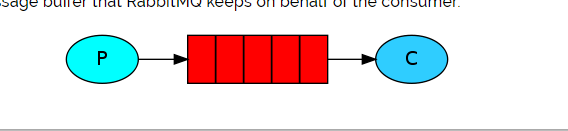
1. 简单队列结构图
2. 引入依赖
pom.xml文件
 <dependency>

      <groupId>com.rabbitmq</groupId>

      <artifactId>amqp-client</artifactId>

      <version>5.5.0</version>

    </dependency>

    <dependency>

      <groupId>org.slf4j</groupId>

      <artifactId>slf4j-api</artifactId>

      <version>1.8.0-beta2</version>

    </dependency>

    <dependency>

      <groupId>org.slf4j</groupId>

      <artifactId>slf4j-simple</artifactId>

      <version>1.8.0-beta2</version>

    </dependency>
3. 生产者生产消息
Producer如下:
package com.wangx.rabbitmq.helloworld;

import com.rabbitmq.client.Channel;

import com.rabbitmq.client.Connection;

import com.rabbitmq.client.ConnectionFactory;

import java.io.IOException;

import java.util.concurrent.TimeoutException;

public class Producer {

    /**

     * 队列名字

     */

    private static final String QUEUE_NAME = "MyQueue";

    public static void main(String[] args) throws IOException, TimeoutException {

        //创建连接工厂

        ConnectionFactory factory = new ConnectionFactory();

        //设置服务器主机

        factory.setHost("localhost");

        //设置用户名

        factory.setUsername("wangx");

        //设置密码

        factory.setPassword("wangx");

        //设置VirtualHost

        factory.setVirtualHost("/wangx");

        Connection connection = null;

        Channel channel = null;

        try {

            //创建连接

            connection = factory.newConnection();

            //创建消息通道

            channel = connection.createChannel();

            //声明队列

            channel.queueDeclare(QUEUE_NAME, false, false, false, null);

            String message = "Hello World!";

            //发送消息

            for (int i = 0; i < 10; i++) {

                //发送消息

                channel.basicPublish("", QUEUE_NAME, null, (message + i).getBytes());

                System.out.println(" [x] Sent '" + message + i + "'");

            }

        }catch (Exception e) {

            e.printStackTrace();

        } finally {

            channel.close();

            connection.close();

        }

    }

}
运行发送消息,然后查看控制台:
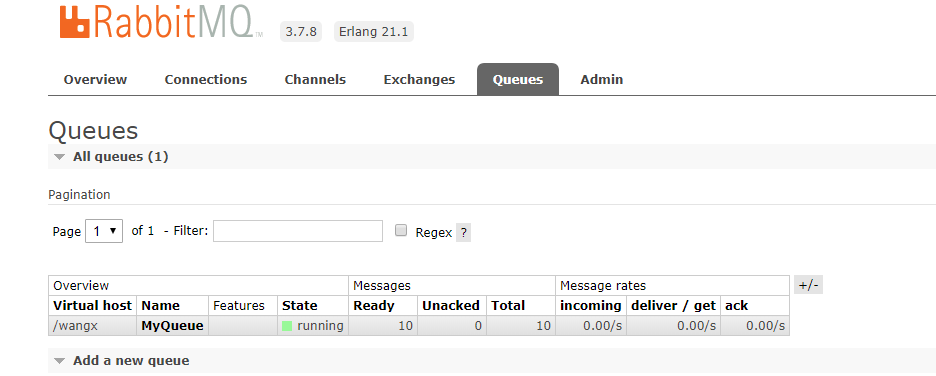
可以看到已经存在了刚刚的十条消息了。
4. 消费者消费消息
package com.wangx.rabbitmq.helloworld;

import com.rabbitmq.client.*;

import com.rabbitmq.client.impl.recovery.QueueRecoveryListener;

import java.io.IOException;

import java.util.concurrent.TimeoutException;

public class MyConsumer {

    /**

     * 队列名字

     */

    private static final String QUEUE_NAME = "MyQueue";

    public static void main(String[] args) throws IOException, TimeoutException {

        //创建连接工厂

        ConnectionFactory factory = new ConnectionFactory();

        //设置服务器主机

        factory.setHost("localhost");

        //设置用户

        factory.setUsername("wangx");

        //设置密码

        factory.setPassword("wangx");

        //设置VirtualHost

        factory.setVirtualHost("/wangx");

        Connection connection = null;

        Channel channel = null;

        try {

            //创建连接

            connection = factory.newConnection();

            //创建消息通道

            channel = connection.createChannel();

            //声明队列

            channel.queueDeclare(QUEUE_NAME, false, false, false, null);

            Consumer consumer = new DefaultConsumer(channel){

                //重写DefaultConsumer中handleDelivery方法,在方法中获取消息

                @Override

                public void handleDelivery(String consumerTag, Envelope envelope,

                                           AMQP.BasicProperties properties, byte[] body) throws IOException{

                    String message = new String(body, "UTF-8");

                    System.out.println("收到消息 '" + message + "'");

                }

            };

            //监听消息

            channel.basicConsume(QUEUE_NAME, true,consumer);

        }catch (Exception e) {

            e.printStackTrace();

        }finally {

        }

    }

}
启动消费者,可以看到将会成功消费刚刚生产的十条消息。
控制台打印如下:
收到消息 'Hello World!0'

收到消息 'Hello World!1'

收到消息 'Hello World!2'

收到消息 'Hello World!3'

收到消息 'Hello World!4'

收到消息 'Hello World!5'

收到消息 'Hello World!6'

收到消息 'Hello World!7'

收到消息 'Hello World!8'

收到消息 'Hello World!9'
查看rabbitmq:

刚刚生产者生产的消息已经不存在了,表示已经被消费了。
RabbitMQ学习笔记(2)----RabbitMQ简单队列(Hello World)的使用的更多相关文章
- [RabbitMQ学习笔记] - 初识RabbitMQ
RabbitMQ是一个由erlang开发的AMQP的开源实现. 核心概念 Message 消息,消息是不具名的,它由消息头和消息体组成,消息体是不透明的,而消息头则由 一系列的可选属性组成,这些属性包 ...
- RabbitMQ学习笔记五:RabbitMQ之优先级消息队列
RabbitMQ优先级队列注意点: 1.只有当消费者不足,不能及时进行消费的情况下,优先级队列才会生效 2.RabbitMQ3.5以后才支持优先级队列 代码在博客:RabbitMQ学习笔记三:Java ...
- RabbitMQ学习笔记1-hello world
安装过程略过,一搜一大把. rabbitmq管理控制台:http://localhost:15672/ 默认账户:guest/guest RabbitMQ默认监听端口:5672 JAVA API地 ...
- 官网英文版学习——RabbitMQ学习笔记(十)RabbitMQ集群
在第二节我们进行了RabbitMQ的安装,现在我们就RabbitMQ进行集群的搭建进行学习,参考官网地址是:http://www.rabbitmq.com/clustering.html 首先我们来看 ...
- RabbitMQ学习笔记(五) Topic
更多的问题 Direct Exchange帮助我们解决了分类发布与订阅消息的问题,但是Direct Exchange的问题是,它所使用的routingKey是一个简单字符串,这决定了它只能按照一个条件 ...
- 官网英文版学习——RabbitMQ学习笔记(一)认识RabbitMQ
鉴于目前中文的RabbitMQ教程很缺,本博主虽然买了一本rabbitMQ的书,遗憾的是该书的代码用的不是java语言,看起来也有些不爽,且网友们不同人学习所写不同,本博主看的有些地方不太理想,为此本 ...
- (转) Rabbitmq学习笔记
详见原文: http://blog.csdn.net/shatty/article/details/9529463 Rabbitmq学习笔记
- muduo网络库学习笔记(三)TimerQueue定时器队列
目录 muduo网络库学习笔记(三)TimerQueue定时器队列 Linux中的时间函数 timerfd简单使用介绍 timerfd示例 muduo中对timerfd的封装 TimerQueue的结 ...
- Spring MVC 学习笔记10 —— 实现简单的用户管理(4.3)用户登录显示全局异常信息
</pre>Spring MVC 学习笔记10 -- 实现简单的用户管理(4.3)用户登录--显示全局异常信息<p></p><p></p>& ...
- Spring MVC 学习笔记9 —— 实现简单的用户管理(4)用户登录显示局部异常信息
Spring MVC 学习笔记9 -- 实现简单的用户管理(4.2)用户登录--显示局部异常信息 第二部分:显示局部异常信息,而不是500错误页 1. 写一个方法,把UserException传进来. ...
随机推荐
- 常用CSS代码片段常见css bug
1.禁止文字被选中 .unselectable { -moz-user-select: -moz-none; -khtml-user-select: none; -webkit-user-select ...
- Java中的常量
常量的概念 是指在Java程序中固定不变的数据.我们可以理解为是一种特殊的变量,它的值被设定后,在程序运行过程中不允许改变. 常量的分类 整数常量: 所有的整数 例如 100 -100 123 ...
- Python中的多个装饰器装饰一个函数
def wrapper1(func1): def inner1(): print('w1 ,before') func1() print('w1 after') return inner1 def w ...
- openlayers5学习笔记-添加Overlay
tmp.addPosition = function (map, item) { var ele = document.createElement("div"); var img ...
- 搭建`wenblogic`执行`install`脚本失败
搭建weblogic服务,前期准备都已经完成,安装包都是已上传,执行install_wls1213.sh脚本,出现以下报错: install_wls1213.sh: line 1: rectory: ...
- 解决远程登录mysql命令行无法登录问题
由于甲骨文公司收购了mysql,mysql有商业化的趋势,所以想尝试安装下mariadb . yum install mariadb-server mariadb systemctl start ma ...
- Python笔记12-----画图Matplotlib
1.matplotlib:pyplot和pylab 如: import pylab as pl pl.figure(figsize=(8,6),dpi=100)[建立的图像大小和图的精度] pl.pl ...
- 网络教程(9)ARP。IP和以太网间映射
question: how does a knows that SFO is the right place to send as Ethernet frame subnet Mask: its ju ...
- 在Django运行安装mysqlclient和pymysql
推荐使用douban提供的pipy国内镜像服务,如果想手动指定源,可以在pip后面跟-i 来指定源. 下载mysqlclient为例: pip install mysqlclient -i http: ...
- Git clone时出现Please make sure you have the correct access rights and the repository exists.问题已解决。
看了好多资料终于搞定了git 中clone命令报错这个问题,废话不多说直接上步骤希望对大家有帮助. 1 删除.ssh文件夹(直接搜索该文件夹)下的known_hosts(手动删除即可,不需要git ...