
Nginx四层负载均衡
Nginx四层负载均衡概述
什么是四层负载均衡
四层负载均衡是基于传输层协议包来封装的(如:TCP/IP),那我们前面使用到的七层是指的应用层,他的组装在四层的基础之上,无论四层还是七层都是指的OSI网络模型。
四层负载均衡应用场景
1、四层+七层来做负载均衡,四层可以保证七层的负载均衡的高可用性;如:nginx就无法保证自己的服务高可用,需要依赖LVS或者keepalive。
2、如:tcp协议的负载均衡,有些请求是TCP协议的(mysql、ssh),或者说这些请求只需要使用四层进行端口的转发就可以了,所以使用四层负载均衡。
四层 + 七层构建大规模集群架构使用场景
 

四层负载均衡总结
1、四层负载均衡仅能转发TCP/IP协议、UDP协议、通常用来转发端口,如:tcp/22、udp/53;
2、四层负载均衡可以用来解决七层负载均衡端口限制问题;(七层负载均衡最大使用65535个端口号)
3、四层负载均衡可以解决七层负载均衡高可用问题;(多台后端七层负载均衡能同事的使用)
4、四层的转发效率比七层的高得多,但仅支持tcp/ip协议,不支持http和https协议;
5、通常大并发场景通常会选择使用在七层负载前面增加四层负载均衡。
nginx四层负载均衡场景实践
Nginx如何配置四层负载均衡
1、通过访问负载均衡的5555端口,实际是后端的web01的22端口在提供服务;
2、通过访问负载均衡的6666端口,实际是后端的mysql的3306端口在提供服务。
先配置两台lb负载均衡
[root@lb02 ~]# cat /etc/yum.repos.d/nginx.repo

[nginx-stable]

name=nginx stable repo

baseurl=http://nginx.org/packages/centos/7/$basearch/

gpgcheck=0

enabled=1

gpgkey=https://nginx.org/keys/nginx_signing.key

#在lb02上安装nginx

[root@lb02 yum.repos.d]# yum install -y nginx

#在lb02上同步lb01的所有nginx相关配置

[root@lb02 ~]# scp -r root@172.16.1.5:/etc/nginx /etc/

#启动nginx

[root@lb02 conf.d]# nginx -t

nginx: the configuration file /etc/nginx/nginx.conf syntax is ok

nginx: configuration file /etc/nginx/nginx.conf test is successful

[root@lb02 conf.d]# systemctl enable nginx

Created symlink from /etc/systemd/system/multi-user.target.wants/nginx.service to /usr/lib/systemd/system/nginx.service.

[root@lb02 conf.d]# nginx
1.创建存放四层负载均衡配置文件的目录
[root@lb03 ~]# vim /etc/nginx/nginx.conf

events {

        ....

}

include /etc/nginx/conf.c/*.conf;

http {

        .....

}

[root@lb03 ~]# mkdir /etc/nginx/conf.c
2.配置四层负载均衡
[root@lb03 conf.c]# cat lb_domain.conf

stream {

    upstream lb {

            server 172.16.1.5:80 weight=5 max_fails=3 fail_timeout=30s;

            server 172.16.1.6:80 weight=5 max_fails=3 fail_timeout=30s;

    }

    server {

            listen 80;

            proxy_connect_timeout 3s;

            proxy_timeout 3s;

            proxy_pass lb;

    }

}

[root@lb03 conf.c]# nginx -t

nginx: the configuration file /etc/nginx/nginx.conf syntax is ok

nginx: configuration file /etc/nginx/nginx.conf test is successful

[root@lb03 conf.c]# nginx -s reload

#配置本机hosts解析后浏览器访问并查看nginx日志
3.四层负载均衡开启日志
#四层负载均衡是没有access的日志的,因为在nginx.conf的配置中,access的日志格式是配置在http下的,而四层复杂均衡配置实在http以外的;

#如果需要日志则需要配置在stream下面

[root@web03 conf.c]# cat lb_domain.conf

stream {

    log_format  proxy '$remote_addr $remote_port - [$time_local] $status $protocol '

                  '"$upstream_addr" "$upstream_bytes_sent" "$upstream_connect_time"' ;

    access_log /var/log/nginx/proxy.log proxy;

    upstream lb {

            server 172.16.1.5:80 weight=5 max_fails=3 fail_timeout=30s;

            server 172.16.1.6:80 weight=5 max_fails=3 fail_timeout=30s;

    }

    server {

            listen 80;

            proxy_connect_timeout 3s;

            proxy_timeout 3s;

            proxy_pass lb;

    }

}
域名解析到lb03上,再次登录
查看日志:
[root@lb03 ~]# tail -f /var/log/nginx/proxy.log

541055 - lb03 - TCP - 10.0.0.1 - 1656 - 80 - 75.856 - 200 - 28/Aug/2019:03:22:50 +0800

344557 - lb03 - TCP - 10.0.0.1 - 1658 - 80 - 75.850 - 200 - 28/Aug/2019:03:22:50 +0800

284545 - lb03 - TCP - 10.0.0.1 - 1654 - 80 - 75.957 - 200 - 28/Aug/2019:03:22:50 +0800

225560 - lb03 - TCP - 10.0.0.1 - 1659 - 80 - 75.858 - 200 - 28/Aug/2019:03:22:50 +0800
使用nginx四层负载均衡实现tcp的转发
请求负载均衡 5555    --->     172.16.1.7:22;

请求负载均衡 6666    --->     172.16.1.51:3306;
配置nginx四层负载均衡实现tcp的转发
[root@lb4-01 ~]# cat /etc/nginx/conf.c/lb_domain.conf

stream {

    log_format  proxy '$remote_addr $remote_port - [$time_local] $status $protocol '

                      '"$upstream_addr" "$upstream_bytes_sent" "$upstream_connect_time"' ;

    access_log /var/log/nginx/proxy.log proxy;

#定义转发ssh的22端口

    upstream ssh_7 {

            server 10.0.0.7:22;

    }

#定义转发mysql的3306端口

    upstream mysql_51 {

            server 10.0.0.51:3306;

    }

    server {

            listen 5555;

            proxy_connect_timeout 3s;

            proxy_timeout 300s;

            proxy_pass ssh_7;

    }

    server {

            listen 6666;

            proxy_connect_timeout 3s;

            proxy_timeout 3s;

            proxy_pass mysql_51;

    }

}
使用本地连接
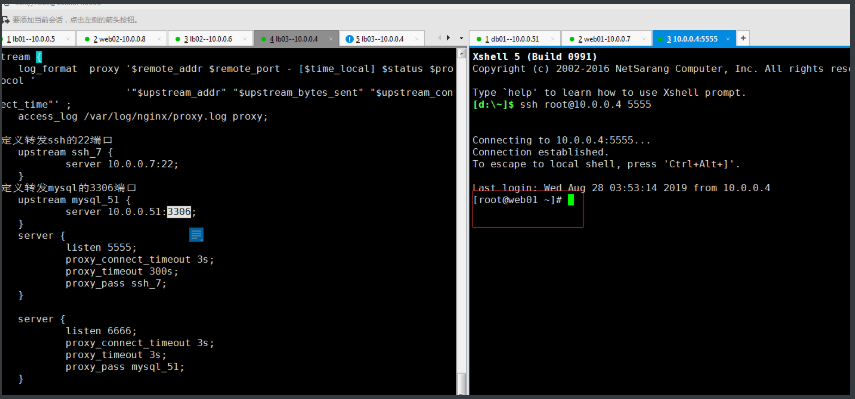
ssh root@10.0.0.4 5555

会自动跳转到端口所指定的服务器上
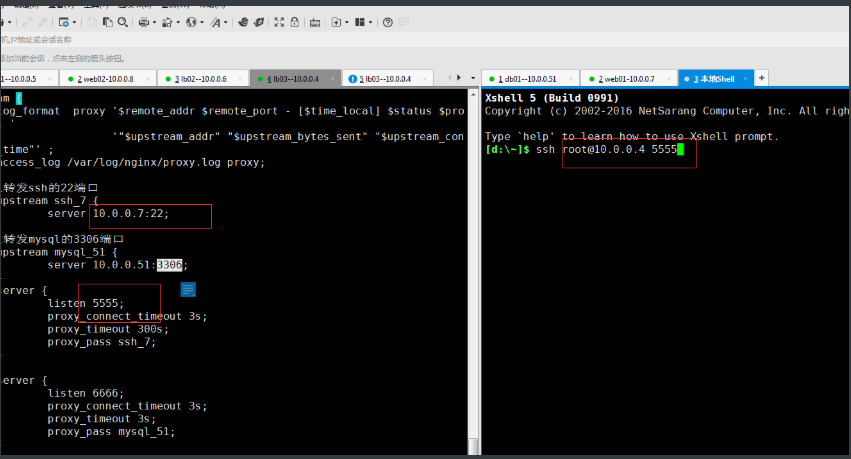
输入密码

自动连接到5555端口指定的服务器,跳转到web01
Nginx四层负载均衡的更多相关文章
- nginx四层负载均衡配置
nginx四层负载均衡配置代理Mysql集群 环境如下: ip 192.168.6.203 Nginx ip 192.168.6.*(多台) Mysql 步骤一 查看Nginx是否安装stream模块 ...
- Nginx四层负载均衡概述
目录 Nginx四层负载均衡概述 什么是负载均衡 负载均衡应用场景 四层,七层集群架构 四层负载均衡总结 Nginx如何配置四层负载均衡 nginx四层负载均衡端口转发 Nginx四层负载均衡概述 什 ...
- 14、Nginx四层负载均衡
1.Nginx四层负载均衡基本概述 1.1.什么是四层负载均衡 四层负载均衡基于传输层协议包来封装的(如:TCP/IP),那我们前面使用到的七层是指的应用层,它的组装在四层基础之上,无论四层还是七层都 ...
- 安装Nginx四层负载均衡
Nginx1.9开始支持tcp层的转发,通过stream实现的,而socket也是基于tcp通信. stream模块默认不安装的,需要手动添加参数:–with-stream,官方下载地址:downlo ...
- 14.Nginx四层负载均衡
1.七层负载均衡: 根据url 调度不同的集群 url.cheng.com 10.0.0.5 10.0.0.7 /pass 10.0.0.8 /user 1.web01和web02配置 (只不过代码不 ...
- Nginx 四层负载均衡
目录 四层负载均衡概述 配置七层负载均衡 配置四层负载均衡 四层负载均衡概述 四层负载均衡是基于IP+端口的负载均衡,七层负载均衡是基于URL或主机名等应用层信息的负载均衡. 其他层负载均衡(转载): ...
- linux+asp.net core+nginx四层负载均衡
Linux Disibutaion:Ubuntu 16.04.1 LTS Web Server:Nginx.Kestrel 关于如何在linux中部署asp.net core我这里不再详细介绍,可以参 ...
- 配置Nginx四层负载均衡
nginx 支持TCP转发和负载均衡的支持 实现下面的架构: 看配置: #user nobody; worker_processes 1; #error_log logs/error.log; #er ...
- Nginx四层负载均衡1
1.Nginx负载均衡Redis 服务器 IP地址 作用 系统版本 Nginx代理服务器 10.0.0.38 负载均衡服务器 Rocky8.6 Redis服务器1 10.0.0.18 Redis服务器 ...
随机推荐
- OtterCTF - Reverse - Msg Me This
原文地址:Msg Me This 题目 Category: Reverse Engineering Points: 500 Solves: 15 Description: Rick created a ...
- OpenCV图像数据字节对齐
目录 1. IplImage的data字段,是char*类型,是4字节对齐. 2. 手动创建的Mat通常是没有字节对齐的 3. 从IplImage转过来的Mat,是字节对齐的 4. 总结 图像数据是否 ...
- CF883J 2017-2018 ACM-ICPC, NEERC, Southern Subregional Contest - J. Renovation 贪心+树状数组
首先对于一个月的预算,如果非常小的话,我们可以留到后面的 \(a_i\) 最大的月来用,因为 \(a_i\) 越大能够拆建筑的越多. 于是我们把 \(a_i\) 合并给 \(i\) 后面的 \(a\) ...
- 简单使用vuex状态管理
1.在使用vue-cli脚手架创建项目后 npm install vuex 2.创建store文件夹,结构如下: 3.store中 index.js代码如下: 4.入口文件main.js中引入stor ...
- 0-2马尔可夫过程Markov Processes
在0-1中提到了,当最终output的p=0时,这个时候模型无法正常使用,为了解决这个问题,在0-4中会有所提及. 在本节中,其实,计算概率的时候,我们应该假设某一个位置的词与它前面的所有词都是相关的 ...
- Vue学习笔记-父子通信案例
<div id="app"> <cpn :number1="num1" :number2="num2" @num1chan ...
- cython安装、使用
cython安装.使用 原创 2012年09月27日 17:25:11 8436 0 0 一.cython 在linux(ubuntu)下安装 sudo apt-get install cython ...
- MySQL复制表结构和内容到另一个表中
一:(低版本的mysql不支持,mysql4.0.25 不支持,mysql5已经支持了)1.复制表结构到新表CREATE TABLE 新表LIKE 旧表 2.复制旧表的数据到新表(假设两个表结构一样) ...
- ubuntu+qt+opencv
linux下Qt+OpenCv环境的搭建: https://blog.csdn.net/yaowangII/article/details/84303124 1.qt:https://blog.csd ...
- Django-自定义用户模型
Django最方便的一点,是自带用户系统,但有些情况下,不符合项目需求, 原因1.我们有时候需要自定义一些字段,或者删除Django自带字段,2.我们有时候需要定义哪些字段是必填的,登陆时的用户名是哪 ...