
springCloud的使用02-----服务消费者(rest+ribbon)
1 将服务提供者做成集群模式
配置service-hi的端口为8762进行启动,配置service-hi的端口为8763进行启动,
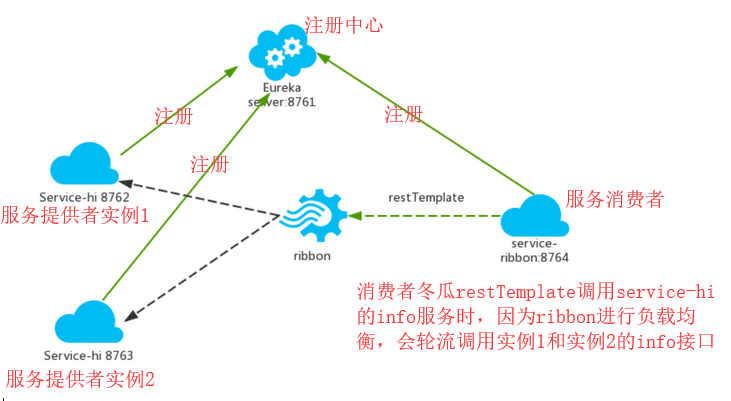
service-hi会在ecureka server上注册两个service-hi的实例,相当于一个小的集群

2 创建服务消费者
2.1 ribbon简介
在微服务框架中,业务被分成一个独立的服务,服务与服务的通讯是基于http restfull
spring cloud有两种调用方式,一种是ribbon+restTemplate,另一种是Feign
ribbon是一个负载均衡客户端,可以很好的控制http和tcp的一些行为。Feign默认集成了ribbon
2.2 创建springboot项目,引入jar依赖
<project xmlns="http://maven.apache.org/POM/4.0.0" xmlns:xsi="http://www.w3.org/2001/XMLSchema-instance"

    xsi:schemaLocation="http://maven.apache.org/POM/4.0.0 http://maven.apache.org/xsd/maven-4.0.0.xsd">

    <modelVersion>4.0.0</modelVersion>

    <groupId>com.beifeng.hadoop</groupId>

    <artifactId>beifeng-spring-cloud-consumer</artifactId>

    <version>0.0.1-SNAPSHOT</version>

    <packaging>jar</packaging>

    <name>beifeng-spring-cloud-consumer</name>

    <url>http://maven.apache.org</url>

    <parent>

        <groupId>org.springframework.boot</groupId>

        <artifactId>spring-boot-starter-parent</artifactId>

        <version>1.5.2.RELEASE</version>

        <relativePath />

    </parent>

    <properties>

        <project.build.sourceEncoding>UTF-8</project.build.sourceEncoding>

        <java.version>1.8</java.version>

    </properties>

    <dependencies>

        <dependency>

            <groupId>org.springframework.boot</groupId>

            <artifactId>spring-boot-starter-test</artifactId>

            <scope>test</scope>

        </dependency>

        <!-- 声明为web项目 -->

        <dependency>

            <groupId>org.springframework.boot</groupId>

            <artifactId>spring-boot-starter-web</artifactId>

        </dependency>

        <!-- 配置eureka -->

        <dependency>

            <groupId>org.springframework.cloud</groupId>

            <artifactId>spring-cloud-starter-eureka</artifactId>

        </dependency>

        <!-- 配置ribbon 负载均衡客户端 -->

        <dependency>

            <groupId>org.springframework.cloud</groupId>

            <artifactId>spring-cloud-starter-ribbon</artifactId>

        </dependency>

    </dependencies>

    <dependencyManagement>

        <dependencies>

            <dependency>

                <groupId>org.springframework.cloud</groupId>

                <artifactId>spring-cloud-dependencies</artifactId>

                <version>Dalston.RC1</version>

                <type>pom</type>

                <scope>import</scope>

            </dependency>

        </dependencies>

    </dependencyManagement>

    <build>

        <plugins>

            <plugin>

                <groupId>org.springframework.boot</groupId>

                <artifactId>spring-boot-maven-plugin</artifactId>

            </plugin>

        </plugins>

    </build>

    <repositories>

        <repository>

            <id>spring-milestones</id>

            <name>Spring Milestones</name>

            <url>https://repo.spring.io/milestone</url>

            <snapshots>

                <enabled>false</enabled>

            </snapshots>

        </repository>

    </repositories>

</project>
2.3 配置eureka server服务器地址
eureka:

 client:

  serviceUrl:

   defaultZone: http://localhost:8761/eureka/ #注册服务器地址

server:

  port: 8764

spring:

  application:

    name: cloud-consumer
2.4 在启动类中声明向注册中心注册,在controller中使用restTemplate进行消费相应的服务
spring cloud中discovery service有多中实现(eureka、consul、zookeeper等),
@EnableDiscoveryClient 基于spring-cloud-commons依赖,并且在classpath中实现
@EnableEurekaClient基于spring-cloud-netflix依赖,只能为eureka作用
查看源码 @EnableEurekaClient上有@EnableDiscoveryClient的注解
@Target(ElementType.TYPE)

@Retention(RetentionPolicy.RUNTIME)

@Documented

@Inherited

@EnableDiscoveryClient

public @interface EnableEurekaClient {

}
@SpringBootApplication

@EnableDiscoveryClient//向服务中心注册

@RestController

public class CloudConsumer {

    private static Logger logger=LoggerFactory.getLogger(CloudConsumer.class);

    @Autowired

    private RestTemplate restTemplate;

    public static void main(String[] args) {

        SpringApplication.run(CloudConsumer.class, args);

    }

    @Bean

    @LoadBalanced//使用这个restTemplate开启负载均衡

    RestTemplate initRestTemplate(){

        return new RestTemplate();

    }

    @RequestMapping("info")

    public String hiConsumer() {

        //使用restTemplate调用消费服务提供者的SERVICE-HI的info服务

        String response=restTemplate.getForObject("http://SERVICE-HI/info", String.class);

        logger.info(response);

        return response;

    }

}
2.5 启动查看结果

多次访问消费者的请求,查看调用服务的情况

2.6 架构分析
springCloud的使用02-----服务消费者(rest+ribbon)的更多相关文章
- Spring Cloud学习笔记【二】Eureka 服务提供者/服务消费者(ribbon)
Ribbon 是 Netflix 发布的开源项目,主要功能是为 REST 客户端实现负载均衡.它主要包括六个组件: ServerList,负载均衡使用的服务器列表.这个列表会缓存在负载均衡器中,并定期 ...
- 【SpringCloud】第二篇: 服务消费者(rest+ribbon)
前言: 必需学会SpringBoot基础知识 简介: spring cloud 为开发人员提供了快速构建分布式系统的一些工具,包括配置管理.服务发现.断路器.路由.微代理.事件总线.全局锁.决策竞选. ...
- springcloud干货之服务消费者(ribbon)
本章介绍springcloud中的服务消费者 springcloud服务调用方式有两种实现方式: 1,restTemplate+ribbon, 2,feign 本来想一篇讲完,发现篇幅有点长,所以本章 ...
- SpringCloud(2)服务消费者(rest+ribbon)
1.准备工作 这一篇文章基于上一篇文章的工程.启动eureka-server 工程,端口为 8761.分别以端口 8762 和 8763 启动 service-hi 工程.访问 localhost:8 ...
- SpringCloud教程 | 第二篇: 服务消费者(rest+ribbon)
在上一篇文章,讲了服务的注册和发现.在微服务架构中,业务都会被拆分成一个独立的服务,服务与服务的通讯是基于http restful的.Spring cloud有两种服务调用方式,一种是ribbon+r ...
- SpringCloud教程 | 第二篇: 服务消费者(rest+ribbon)(Finchley版本)
在上一篇文章,讲了服务的注册和发现.在微服务架构中,业务都会被拆分成一个独立的服务,服务与服务的通讯是基于http restful的.Spring cloud有两种服务调用方式,一种是ribbon+r ...
- 白话SpringCloud | 第四章:服务消费者(RestTemple+Ribbon+Feign)
前言 上两章节,介绍了下关于注册中心-Eureka的使用及高可用的配置示例,本章节开始,来介绍下服务和服务之间如何进行服务调用的,同时会讲解下几种不同方式的服务调用. 一点知识 何为负载均衡 实现的方 ...
- 史上最简单的SpringCloud教程 | 第二篇: 服务消费者(rest+ribbon)(Finchley版本)
转载请标明出处: 原文首发于:https://www.fangzhipeng.com/springcloud/2018/08/30/sc-f2-ribbon/ 本文出自方志朋的博客 在上一篇文章,讲了 ...
- 史上最简单的SpringCloud教程 | 第二篇: 服务消费者(rest+ribbon)
在上一篇文章,讲了服务的注册和发现.在微服务架构中,业务都会被拆分成一个独立的服务,服务与服务的通讯是基于http restful的.Spring cloud有两种服务调用方式,一种是ribbon+r ...
- springcloud的服务提供者与服务消费者
1.说明 springcloud中由服务消费者调用服务提供者一共有两种方法rest和feign 2.feign (1)使用feign的方式进行服务调,搭建服务提供者. 创建一个web项目(服务提供者) ...
随机推荐
- ASE "黄金点游戏"
问题定义 黄金点游戏是源于经济学家Richar Thaler构思的在1997年伦敦金融时报进行了一次公开竞猜活动.MSRA-ASE课程的第一次结对编程中,我们写了一个AI Bot来与大家玩儿这个游戏. ...
- React(2) --super关键字
参考:http://www.phonegap100.com/thread-4911-1-1.html Es6中的super可以用在类的继承中,super关键字,它指代父类的实例(即父类的this对象) ...
- jffs2镜像制作
自己被自己绊住了,出于对无知的恐惧,总觉得是很难的一件事情. demo board ltp-ddt qspi_mtd_dd_rw error:can't read superblock on /dev ...
- 设置intellij IDEA编辑框背景色
首先是打开idea开发工具,然后点击左上角的File,选择Settings设置 应用即时生效,无需重启idea
- bzoj4922 [Lydsy1706月赛]Karp-de-Chant Number 贪心+背包
题目传送门 https://lydsy.com/JudgeOnline/problem.php?id=4922 题解 记录每一个串的没有匹配的右括号 \()\) 的数量为 \(a_i\),为匹配的左括 ...
- CF 36E Two Paths
传送门 真实的自闭= =+ 考试的时候老师明明说了可以路径为空T^T 然后光荣的挂掉了 20分的链[明明是最送分的] 上来就看出来欧拉回路了嘛 然后思考了一下大概奇点配个对 删一条简单路径剩下的跑欧拉 ...
- 如何开启spring框架以注解形式的配置
步骤 导包(新版本需要导入spring-aop-4.3.17.RELEASE.jar) 为配置文件applicationContext.xml引入新的命名空间(约束) 开启使用注解 <?xml ...
- controllerpom
<properties> <project.build.sourceEncoding>UTF-8</project.build.sourceEncoding> &l ...
- SecureCRT 多窗口 批量操作Linux
1.打开多个窗口 2.Window --> Tile Verically将窗口并列展开 3.右击空白部分选择弹出下方的命令窗口 4.右击命令行窗口,选择发送命令至所有窗口 5.完成
- 双十一高并发场景背后的数据库RDS技术揭秘
[战报]11月11日聚石塔(阿里云数据库RDS产品形态)峰值QPS突破X00w,Proxy 峰值QPS超过X00w. 双十一就要来了,全世界都为其疯狂,但是在双十一抢购中经常会出现几万人抢一个红包或者 ...