
SpringCloud教程 | 第二篇: 服务消费者(rest+ribbon)
在上一篇文章,讲了服务的注册和发现。在微服务架构中,业务都会被拆分成一个独立的服务,服务与服务的通讯是基于http restful的。Spring cloud有两种服务调用方式,一种是ribbon+restTemplate,另一种是feign。在这一篇文章首先讲解下基于ribbon+rest。
一、ribbon简介
Ribbon is a client side load balancer which gives you a lot of control over the behaviour of HTTP and TCP clients. Feign already uses Ribbon, so if you are using @FeignClient then this section also applies.
ribbon是一个负载均衡客户端,可以很好的控制htt和tcp的一些行为。Feign默认集成了ribbon。
ribbon 已经默认实现了这些配置bean:
IClientConfig ribbonClientConfig: DefaultClientConfigImpl
IRule ribbonRule: ZoneAvoidanceRule
IPing ribbonPing: NoOpPing
ServerList ribbonServerList: ConfigurationBasedServerList
ServerListFilter ribbonServerListFilter: ZonePreferenceServerListFilter
ILoadBalancer ribbonLoadBalancer: ZoneAwareLoadBalancer
二、准备工作
这一篇文章基于上一篇文章的工程,启动eureka-server 工程;启动service-hi工程,它的端口为8762;将service-hi的配置文件的端口改为8763,并启动,这时你会发现:service-hi在eureka-server注册了2个实例,这就相当于一个小的集群。访问localhost:8761如图所示:
三、建一个服务消费者
重新新建一个spring-boot工程,取名为:service-ribbon;
在它的pom.xml文件分别引入起步依赖spring-cloud-starter-eureka、spring-cloud-starter-ribbon、spring-boot-starter-web,代码如下:
<?xml version="1.0" encoding="UTF-8"?>
<project xmlns="http://maven.apache.org/POM/4.0.0" xmlns:xsi="http://www.w3.org/2001/XMLSchema-instance"
         xsi:schemaLocation="http://maven.apache.org/POM/4.0.0 http://maven.apache.org/xsd/maven-4.0.0.xsd">
    <modelVersion>4.0.0</modelVersion>
    <parent>
        <groupId>org.springframework.boot</groupId>
        <artifactId>spring-boot-starter-parent</artifactId>
        <version>2.1.4.RELEASE</version>
        <relativePath/> <!-- lookup parent from repository -->
    </parent>
    <groupId>com.javen</groupId>
    <artifactId>service-ribbon</artifactId>
    <version>0.0.1-SNAPSHOT</version>
    <name>service-ribbon</name>
    <description>Demo project for Spring Boot</description>

    <properties>
        <java.version>1.8</java.version>
        <spring-cloud.version>Greenwich.SR1</spring-cloud.version>
    </properties>

    <dependencies>
        <dependency>
            <groupId>org.springframework.cloud</groupId>
            <artifactId>spring-cloud-starter-netflix-eureka-client</artifactId>
        </dependency>
        <dependency>
            <groupId>org.springframework.cloud</groupId>
            <artifactId>spring-cloud-starter-netflix-ribbon</artifactId>
        </dependency>

        <dependency>
            <groupId>org.springframework.boot</groupId>
            <artifactId>spring-boot-starter-web</artifactId>
        </dependency>

        <dependency>
            <groupId>org.springframework.boot</groupId>
            <artifactId>spring-boot-starter-test</artifactId>
            <scope>test</scope>
        </dependency>
    </dependencies>

    <dependencyManagement>
        <dependencies>
            <dependency>
                <groupId>org.springframework.cloud</groupId>
                <artifactId>spring-cloud-dependencies</artifactId>
                <version>${spring-cloud.version}</version>
                <type>pom</type>
                <scope>import</scope>
            </dependency>
        </dependencies>
    </dependencyManagement>

    <build>
        <plugins>
            <plugin>
                <groupId>org.springframework.boot</groupId>
                <artifactId>spring-boot-maven-plugin</artifactId>
            </plugin>
        </plugins>
    </build>

</project>
在工程的配置文件指定服务的注册中心地址为http://localhost:8761/eureka/,程序名称为 service-ribbon,程序端口为8764。配置文件application.yml如下:
eureka:
  client:
    serviceUrl:
      defaultZone: http://localhost:8761/eureka/

server:
  port: 8764

spring:
  application:
    name: service-ribbon
在工程的启动类中,通过@EnableDiscoveryClient向服务中心注册;并且向程序的ioc注入一个bean: restTemplate;并通过@LoadBalanced注解表明这个restRemplate开启负载均衡的功能。
@SpringBootApplication
@EnableDiscoveryClient
public class ServiceRibbonApplication {

    public static void main(String[] args) {
        SpringApplication.run(ServiceRibbonApplication.class, args);
    }

    @Bean
    @LoadBalanced
    RestTemplate restTemplate() {
        return new RestTemplate();
    }
}
写一个测试类HelloService,通过之前注入ioc容器的restTemplate来消费service-hi服务的“/hi”接口,在这里我们直接用的程序名替代了具体的url地址,在ribbon中它会根据服务名来选择具体的服务实例,根据服务实例在请求的时候会用具体的url替换掉服务名,代码如下:
@Service
public class HelloService {
    @Autowired
    RestTemplate restTemplate;

    public String hiService(String name) {
        return restTemplate.getForObject("http://SERVICE-HI/hi?name=" + name, String.class);
    }
}
写一个controller,在controller中用调用HelloService 的方法,代码如下:
@RestController
public class HelloControler {
    @Autowired
    HelloService helloService;

    @RequestMapping(value = "/hi")
    public String hi(@RequestParam String name) {
        return helloService.hiService(name);
    }
}
在浏览器上多次访问http://localhost:8764/hi?name=forezp,浏览器交替显示:
hi forezp,i am from port:8762
hi forezp,i am from port:8763
这说明当我们通过调用restTemplate.getForObject(“http://SERVICE-HI/hi?name=”+name,String.class)方法时,已经做了负载均衡,访问了不同的端口的服务实例。
四、此时的架构
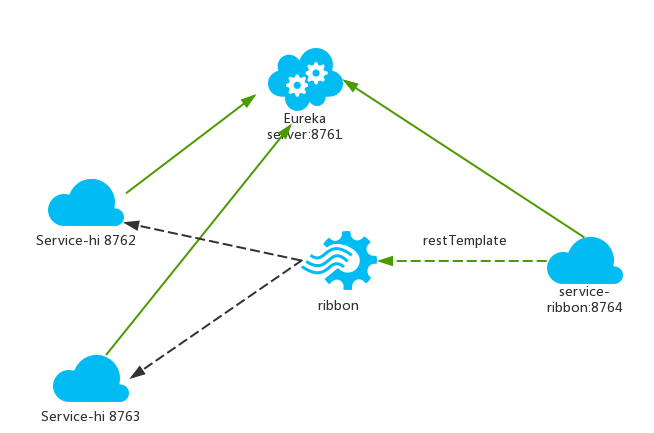
一个服务注册中心,eureka server,端口为8761
service-hi工程跑了两个实例,端口分别为8762,8763,分别向服务注册中心注册
sercvice-ribbon端口为8764,向服务注册中心注册
当sercvice-ribbon通过restTemplate调用service-hi的hi接口时,因为用ribbon进行了负载均衡,会轮流的调用service-hi:8762和8763 两个端口的hi接口;
SpringCloud教程 | 第二篇: 服务消费者(rest+ribbon)的更多相关文章
- SpringCloud教程 | 第二篇: 服务消费者(rest+ribbon)(Finchley版本)
在上一篇文章,讲了服务的注册和发现.在微服务架构中,业务都会被拆分成一个独立的服务,服务与服务的通讯是基于http restful的.Spring cloud有两种服务调用方式,一种是ribbon+r ...
- 史上最简单的SpringCloud教程 | 第二篇: 服务消费者(rest+ribbon)(Finchley版本)
转载请标明出处: 原文首发于:https://www.fangzhipeng.com/springcloud/2018/08/30/sc-f2-ribbon/ 本文出自方志朋的博客 在上一篇文章,讲了 ...
- 史上最简单的SpringCloud教程 | 第二篇: 服务消费者(rest+ribbon)
在上一篇文章,讲了服务的注册和发现.在微服务架构中,业务都会被拆分成一个独立的服务,服务与服务的通讯是基于http restful的.Spring cloud有两种服务调用方式,一种是ribbon+r ...
- 【SpringCloud】第二篇: 服务消费者(rest+ribbon)
前言: 必需学会SpringBoot基础知识 简介: spring cloud 为开发人员提供了快速构建分布式系统的一些工具,包括配置管理.服务发现.断路器.路由.微代理.事件总线.全局锁.决策竞选. ...
- SpringCloud教程 | 第一篇: 服务的注册与发现
一.spring cloud简介 spring cloud 为开发人员提供了快速构建分布式系统的一些工具,包括配置管理.服务发现.断路器.路由.微代理.事件总线.全局锁.决策竞选.分布式会话等等.它运 ...
- 史上最简单的SpringCloud教程 | 第九篇: 服务链路追踪(Spring Cloud Sleuth)(Finchley版本)
转载请标明出处: 原文首发于:>https://www.fangzhipeng.com/springcloud/2018/08/30/sc-f9-sleuth/ 本文出自方志朋的博客 这篇文章主 ...
- 史上最简单的SpringCloud教程 | 第九篇: 服务链路追踪(Spring Cloud Sleuth)
这篇文章主要讲述服务追踪组件zipkin,Spring Cloud Sleuth集成了zipkin组件. 注意情况: 该案例使用的spring-boot版本1.5.x,没使用2.0.x, 另外本文图3 ...
- SpringCloud教程 | 第九篇: 服务链路追踪(Spring Cloud Sleuth)
版权声明:本文为博主原创文章,欢迎转载,转载请注明作者.原文超链接 ,博主地址:http://blog.csdn.net/forezp. http://blog.csdn.net/forezp/art ...
- 史上最简单的SpringCloud教程 | 第三篇: 服务消费者(Feign)
转载请标明出处: https://www.fangzhipeng.com/springcloud/2017/07/12/sc03-feign/ 本文出自方志朋的博客 最新Finchley版本请访问: ...
随机推荐
- PTA数组作业一查找整数
代码 #include<stdio.h> int main(void){ int a[20],n,flag=0,x; int i; scanf("%d%d",& ...
- C#图片操作公共库
存一下,以后找起来方便 包括图片加载.压缩.base64等 public static class ImageFun { #region 图片 public static EncoderParamet ...
- 腾讯云服务器tomcat端口无法访问
第一种情况: 如题:https://console.cloud.tencent.com/cvm/securitygroup 需要去这个地址设置安全组. 说实话,一句mmp不知当讲不当讲.使用说明这块太 ...
- 前端面试题整理—JavaScript篇(二)
1.使用js实现一个可持续的动画 2.实现一个可以自由拖动的悬浮框 3.实现一个倒计时效果 4.使用js仿写一个原生下拉列表框 5.创建10个<a>标签,点击的时候弹出对应的序号 6.实现 ...
- IDEA 代码规范插件
前言 在工作过程中,每个人的代码习惯都不同,在一起工作做同一个项目,如果按照自己的习惯来,有可能造成代码维护困难,开发进度缓慢等. 代码规范的重要性 谷歌发布的代码规范中指出,80% 的缺失是由 20 ...
- JS中some(),every(),forEach(),map(),filter()区别
JS在1.6中为Array新增了几个方法map(),filter(),some(),every(),forEach(),也就是一共有这么多方法了. 刚开始接触这些倒也记得不是很清楚,在此纪录一下以加深 ...
- LeakCanary监测内存泄漏的原理
监测机制利用了Java的WeakReference和ReferenceQueue,通过将Activity包装到WeakReference中,被WeakReference包装过的Activity对象如果 ...
- SQL Server - Partition by 和 Group by对比
参考:https://www.cnblogs.com/hello-yz/p/9962356.html —————————————————— 今天大概弄懂了partition by和group by的区 ...
- 【原创】大叔问题定位分享(16)spark写数据到hive外部表报错ClassCastException: org.apache.hadoop.hive.hbase.HiveHBaseTableOutputFormat cannot be cast to org.apache.hadoop.hive.ql.io.HiveOutputFormat
spark 2.1.1 spark在写数据到hive外部表(底层数据在hbase中)时会报错 Caused by: java.lang.ClassCastException: org.apache.h ...
- SpringBoot 整合 Dubbo 进行分布式开发
自从Dubbo支持SpringBoot后,Dubbo与Spring的整合变得更加的简单了,下面就是完整的步骤: 1. 引入依赖 <dependency> <groupId>co ...