
JavaWeb_Get和Post方法传输数据区别
Get方法和Post方法传输数据区别: 传送门
- GET在浏览器回退时是无害的,而POST会再次提交请求
- GET产生的URL地址可以被Bookmark,而POST不可以
- GET请求会被浏览器主动cache,而POST不会,除非手动设置
- GET请求只能进行url编码,而POST支持多种编码方式
- GET请求参数会被完整保留在浏览器历史记录里,而POST中的参数不会被保留
- GET请求在URL中传送的参数是有长度限制的,而POST么有
- 对参数的数据类型,GET只接受ASCII字符,而POST没有限制
- GET比POST更不安全,因为参数直接暴露在URL上,所以不能用来传递敏感信息
- GET参数通过URL传递,POST放在Request body中

Learn
一、Get方式直接传参
二、通过表单Get方式传参
一、Get方式直接传参
直接在Url中输入要传参的值
通过System.out.println()控制台中打印出信息

<%@ page language="java" import="java.util.*" pageEncoding="ISO-8859-1"%>

<%

String path = request.getContextPath();

String basePath = request.getScheme()+"://"+request.getServerName()+":"+request.getServerPort()+path+"/";

%>

<!DOCTYPE HTML PUBLIC "-//W3C//DTD HTML 4.01 Transitional//EN">

<html>

  <head>

    <base href="<%=basePath%>">

    <title>My JSP 'index.jsp' starting page</title>

    <meta http-equiv="pragma" content="no-cache">

    <meta http-equiv="cache-control" content="no-cache">

    <meta http-equiv="expires" content="0">

    <meta http-equiv="keywords" content="keyword1,keyword2,keyword3">

    <meta http-equiv="description" content="This is my page">

    <!--

    <link rel="stylesheet" type="text/css" href="styles.css">

    -->

  </head>

  <body>

    Hello,Gary! <br>

   <%

           String username = request.getParameter("username");

           System.out.println(username);

           String password = request.getParameter("password");

           System.out.println(password);

    %>

  </body>

</html>
index.jsp
    usernae: gary

    password: 123456
二、通过表单Get方式传参

<%@ page language="java" import="java.util.*" pageEncoding="utf-8"%>

<%

String path = request.getContextPath();

String basePath = request.getScheme()+"://"+request.getServerName()+":"+request.getServerPort()+path+"/";

%>

<!DOCTYPE HTML PUBLIC "-//W3C//DTD HTML 4.01 Transitional//EN">

<html>

  <head>

    <base href="<%=basePath%>">

    <title>My JSP 'index.jsp' starting page</title>

    <meta http-equiv="pragma" content="no-cache">

    <meta http-equiv="cache-control" content="no-cache">

    <meta http-equiv="expires" content="0">

    <meta http-equiv="keywords" content="keyword1,keyword2,keyword3">

    <meta http-equiv="description" content="This is my page">

    <!--

    <link rel="stylesheet" type="text/css" href="styles.css">

    -->

  </head>

  <body>

    Hello,Gary! <br>

    登陆

    <form action="login.jsp" method="get">

    <input type = "text" name = "username"/>

    <input type = "password" name="password"/>

    <input type="submit">

    </form>

  </body>

</html>
index.hjsp
<%@ page language="java" import="java.util.*" pageEncoding="ISO-8859-1"%>

<%

String path = request.getContextPath();

String basePath = request.getScheme()+"://"+request.getServerName()+":"+request.getServerPort()+path+"/";

%>

<!DOCTYPE HTML PUBLIC "-//W3C//DTD HTML 4.01 Transitional//EN">

<html>

  <head>

    <base href="<%=basePath%>">

    <title>My JSP 'login.jsp' starting page</title>

    <meta http-equiv="pragma" content="no-cache">

    <meta http-equiv="cache-control" content="no-cache">

    <meta http-equiv="expires" content="0">

    <meta http-equiv="keywords" content="keyword1,keyword2,keyword3">

    <meta http-equiv="description" content="This is my page">

    <!--

    <link rel="stylesheet" type="text/css" href="styles.css">

    -->

  </head>

  <body>

    Login.jsp. <br>

  </body>

</html>
login.jsp
method="get" 将传输请求设置为get方式
    <form action="login.jsp" method="get">

    <input type = "text" name = "username"/>

    <input type = "password" name="password"/>

    <input type="submit">

    </form>
用户在登陆的时候账号和密码直接暴露在url中,即使 <input type = "password">也不能阻止我们直接从网页上获取用户密码
三、通过表单Post方式传参
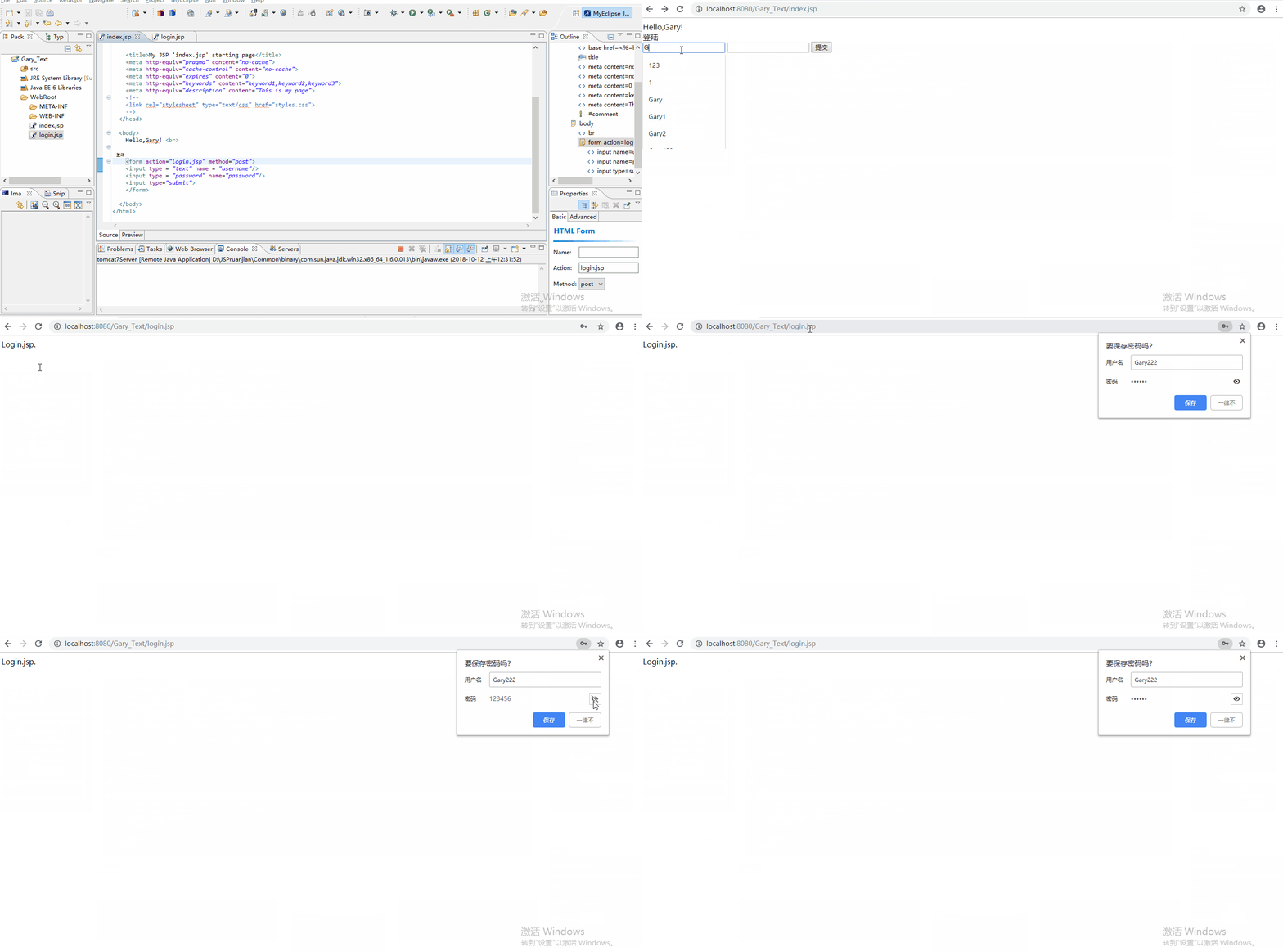
<%@ page language="java" import="java.util.*" pageEncoding="utf-8"%>

<%

String path = request.getContextPath();

String basePath = request.getScheme()+"://"+request.getServerName()+":"+request.getServerPort()+path+"/";

%>

<!DOCTYPE HTML PUBLIC "-//W3C//DTD HTML 4.01 Transitional//EN">

<html>

  <head>

    <base href="<%=basePath%>">

    <title>My JSP 'index.jsp' starting page</title>

    <meta http-equiv="pragma" content="no-cache">

    <meta http-equiv="cache-control" content="no-cache">

    <meta http-equiv="expires" content="0">

    <meta http-equiv="keywords" content="keyword1,keyword2,keyword3">

    <meta http-equiv="description" content="This is my page">

    <!--

    <link rel="stylesheet" type="text/css" href="styles.css">

    -->

  </head>

  <body>

    Hello,Gary! <br>

    登陆

    <form action="login.jsp" method="post">

    <input type = "text" name = "username"/>

    <input type = "password" name="password"/>

    <input type="submit">

    </form>

  </body>

</html>
index.jsp
<%@ page language="java" import="java.util.*" pageEncoding="ISO-8859-1"%>

<%

String path = request.getContextPath();

String basePath = request.getScheme()+"://"+request.getServerName()+":"+request.getServerPort()+path+"/";

%>

<!DOCTYPE HTML PUBLIC "-//W3C//DTD HTML 4.01 Transitional//EN">

<html>

  <head>

    <base href="<%=basePath%>">

    <title>My JSP 'login.jsp' starting page</title>

    <meta http-equiv="pragma" content="no-cache">

    <meta http-equiv="cache-control" content="no-cache">

    <meta http-equiv="expires" content="0">

    <meta http-equiv="keywords" content="keyword1,keyword2,keyword3">

    <meta http-equiv="description" content="This is my page">

    <!--

    <link rel="stylesheet" type="text/css" href="styles.css">

    -->

  </head>

  <body>

    Login.jsp. <br>

  </body>

</html>
login.jsp
method="post" 将传输请求设置为post方式
    <form action="login.jsp" method="post">

    <input type = "text" name = "username"/>

    <input type = "password" name="password"/>

    <input type="submit">

    </form>
JavaWeb_Get和Post方法传输数据区别的更多相关文章
- get方法与post方法的区别与js获取url参数的方式
1.get方法与post方法的区别: 区别一:get重点在从服务器上获取资源,post重点在向服务器发送数据:区别二:get传输数据是通过URL请求,以field(字段)= value的形式,置于UR ...
- 无线加密的多种方法及其区别(WEP WPA TKIP EAP)
无线加密的多种方法及其区别(WEP WPA TKIP EAP) 无线网络的安全性由认证和加密来保证. 认证允许只有被许可的用户才能连接到无线网络: 加密的目的是提供数据的保密性和完整性(数据在传输过程 ...
- ThinkPHP的D方法和M方法的区别
M方法和D方法的区别 ThinkPHP 中M方法和D方法都用于实例化一个模型类,M方法 用于高效实例化一个基础模型类,而 D方法 用于实例化一个用户定义模型类. 使用M方法 如果是如下情况,请考虑使用 ...
- 正则表达式中的exec和match方法的区别
正则表达式中的exec和match方法的区别 字符串的正则方法有:match().replace().search().split() 正则对象的方法有:exec().test() 1.match m ...
- Hibernate框架之get和load方法的区别
我们在学习Hibernate框架时,经常会进行修改,删除操作,对于这些操作,我们都应该先加载对象,然后在执行或删除的操作,那么这里Hibernate提供了两种方法按照主键加载对象,也就是我要说的get ...
- [BS-27] 创建NSURL的几个方法的区别
创建NSURL的几个方法的区别 URL的基本格式 = 协议://主机地址/路径 URL和Path的区别 * URL:统一资源定位符,格式 “协议+主机名称+路径” 例如:[NSURL UR ...
- Java线程中yield与join方法的区别
长期以来,多线程问题颇为受到面试官的青睐.虽然我个人认为我们当中很少有人能真正获得机会开发复杂的多线程应用(在过去的七年中,我得到了一个机会),但是理解多线程对增加你的信心很有用.之前,我讨论了一个w ...
- OpenGL的glTexImage2D()与gluBuild2DMipmaps()的使用方法及区别
OpenGL的glTexImage2D()与gluBuild2DMipmaps()的使用方法及区别 说明:两者的都是生成纹理,即:将载入的位图文件(*.bmp)转换成纹理贴图. 1.glTexImag ...
- Java线程中run和start方法的区别
http://bbs.csdn.net/topics/350206340 Thread类中run()和start()方法的区别如下:run()方法:在本线程内调用该Runnable对象的run()方法 ...
随机推荐
- MySQL中出现的小问题
./scripts/mysql_install_db: line 249: /app/mysql/bin/my_print_defaults: cannot execute binary fileNe ...
- 服务器部署Java Web及微信开发调试
参考摘抄: 阿里云部署Java网站和微信开发调试心得技巧(上):https://www.imooc.com/article/20583 阿里云部署Java网站和微信开发调试心得技巧(下):https: ...
- C# using用法之一(命名空间相关)
通过using关键字可以引入命名空间 using System; using System.Collections.Generic; using System.Linq; using System.T ...
- 客户端相关知识学习(四)之H5页面如何嵌套到APP中
Android原生如何渲染H5页面 Android与 H5 的交互方式大概有以下 1 种: 利用WebView进行交互(系统API) iOS原生如何渲染H5页面 iOS 与 H5 的交互方式大概有以下 ...
- 10 Python之文件操作
1.文件操作 f = open(文件路径, mode="模式", encoding="编码") f: 文件句柄 文件的路径: 相对路径 相对于当前程序所在的文件 ...
- PanDownload/AD16/MDK5/CAD2019及2007/Dev-C++/Office2016专业版软件安装包
版权声明:本文为博主原创文章,遵循CC 4.0 BY-SA 版权协议,转载请附上原文出处链接及本声明. 作者:struct_mooc 博客地址:https://www.cnblogs.com/stru ...
- leetcode297. 二叉树的序列化与反序列化
代码 /** * Definition for a binary tree node. * public class TreeNode { * int val; * TreeNode left; * ...
- 渗透神器CobaltStrike 3.1.2 去后门破解版 & Windows版TeamServer【转】
转自我八师傅博客 CS简介 Cobalt Strike(简称CS)是全球黑客公认一款非常优秀的渗透测试神器,以metasploit为基础的GUI的框架式渗透工具,集成了传统远控功能(远程桌面VNC.键 ...
- Pythonic Code In Several Lines
1. Fibonacci Series def Fib(n): if n == 1 or n == 2: return 1; else: return Fib(n - 1) + Fib(n - 2) ...
- 配置Nexus为maven的私服
1.配置Nexus为maven的私服 第一种方式:在项目的POM中如下配置 <repositories> <repository> <id>nexus_public ...