
使用Lucene.NET实现简单的站内搜索
使用Lucene.NET实现简单的站内搜索
- 导入Lucene.NET 开发包
Lucene 是apache软件基金会一个开放源代码的全文检索引擎工具包,是一个全文检索引擎的架构,提供了完整的查询引擎和索引引擎,部分文本分析引擎。Lucene的目的是为软件开发人员提供一个简单易用的工具包,以方便的在目标系统中实现全文检索的功能,或者是以此为基础建立起完整的全文检索引擎。Lucene.Net 是 .NET 版的Lucene。
你可以在这里下载到最新的Lucene.NET
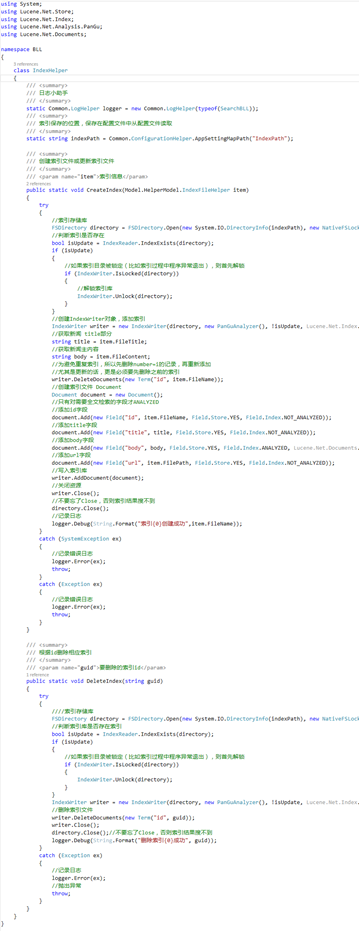
- 创建索引、更新索引、删除索引
- 搜索,根据索引查找
 using System;

 using Lucene.Net.Store;

 using Lucene.Net.Index;

 using Lucene.Net.Analysis.PanGu;

 using Lucene.Net.Documents;

 namespace BLL

 {

     class IndexHelper

     {

         /// <summary>

         /// 日志小助手

         /// </summary>

         static Common.LogHelper logger = new Common.LogHelper(typeof(SearchBLL));

         /// <summary>

         /// 索引保存的位置,保存在配置文件中从配置文件读取

         /// </summary>

         static string indexPath = Common.ConfigurationHelper.AppSettingMapPath("IndexPath");

         /// <summary>

         /// 创建索引文件或更新索引文件

         /// </summary>

         /// <param name="item">索引信息</param>

         public static void CreateIndex(Model.HelperModel.IndexFileHelper item)

         {

             try

             {

                 //索引存储库

                 FSDirectory directory = FSDirectory.Open(new System.IO.DirectoryInfo(indexPath), new NativeFSLockFactory());

                 //判断索引是否存在

                 bool isUpdate = IndexReader.IndexExists(directory);

                 if (isUpdate)

                 {

                     //如果索引目录被锁定(比如索引过程中程序异常退出),则首先解锁

                     if (IndexWriter.IsLocked(directory))

                     {

                         //解锁索引库

                         IndexWriter.Unlock(directory);

                     }

                 }

                 //创建IndexWriter对象,添加索引

                 IndexWriter writer = new IndexWriter(directory, new PanGuAnalyzer(), !isUpdate, Lucene.Net.Index.IndexWriter.MaxFieldLength.UNLIMITED);

                 //获取新闻 title部分

                 string title = item.FileTitle;

                 //获取新闻主内容

                 string body = item.FileContent;

                 //为避免重复索引,所以先删除number=i的记录,再重新添加

                 //尤其是更新的话,更是必须要先删除之前的索引

                 writer.DeleteDocuments(new Term("id", item.FileName));

                 //创建索引文件 Document

                 Document document = new Document();

                 //只有对需要全文检索的字段才ANALYZED

                 //添加id字段

                 document.Add(new Field("id", item.FileName, Field.Store.YES, Field.Index.NOT_ANALYZED));

                 //添加title字段

                 document.Add(new Field("title", title, Field.Store.YES, Field.Index.NOT_ANALYZED));

                 //添加body字段

                 document.Add(new Field("body", body, Field.Store.YES, Field.Index.ANALYZED, Lucene.Net.Documents.Field.TermVector.WITH_POSITIONS_OFFSETS));

                 //添加url字段

                 document.Add(new Field("url", item.FilePath, Field.Store.YES, Field.Index.NOT_ANALYZED));

                 //写入索引库

                 writer.AddDocument(document);

                 //关闭资源

                 writer.Close();

                 //不要忘了Close,否则索引结果搜不到

                 directory.Close();

                 //记录日志

                 logger.Debug(String.Format("索引{0}创建成功",item.FileName));

             }

             catch (SystemException ex)

             {

                 //记录错误日志

                 logger.Error(ex);

                 throw;

             }

             catch (Exception ex)

             {

                 //记录错误日志

                 logger.Error(ex);

                 throw;

             }

         }

         /// <summary>

         /// 根据id删除相应索引

         /// </summary>

         /// <param name="guid">要删除的索引id</param>

         public static void DeleteIndex(string guid)

         {

             try

             {

                 ////索引存储库

                 FSDirectory directory = FSDirectory.Open(new System.IO.DirectoryInfo(indexPath), new NativeFSLockFactory());

                 //判断索引库是否存在索引

                 bool isUpdate = IndexReader.IndexExists(directory);

                 if (isUpdate)

                 {

                     //如果索引目录被锁定(比如索引过程中程序异常退出),则首先解锁

                     if (IndexWriter.IsLocked(directory))

                     {

                         IndexWriter.Unlock(directory);

                     }

                 }

                 IndexWriter writer = new IndexWriter(directory, new PanGuAnalyzer(), !isUpdate, Lucene.Net.Index.IndexWriter.MaxFieldLength.UNLIMITED);

                 //删除索引文件

                 writer.DeleteDocuments(new Term("id", guid));

                 writer.Close();

                 directory.Close();//不要忘了Close,否则索引结果搜不到

                 logger.Debug(String.Format("删除索引{0}成功", guid));

             }

             catch (Exception ex)

             {

                 //记录日志

                 logger.Error(ex);

                 //抛出异常

                 throw;

             }

         }

     }

 }
IndexHelper 添加、更新、删除索引
 using Lucene.Net.Analysis;

 using Lucene.Net.Analysis.PanGu;

 using Lucene.Net.Documents;

 using Lucene.Net.Index;

 using Lucene.Net.Search;

 using Lucene.Net.Store;

 using Model.HelperModel;

 using System;

 using System.Collections.Generic;

 namespace BLL

 {

     public static class SearchBLL

     {

         //一个类中可能会有多处输出到日志,多处需要记录日志,常将logger做成static 静态变量

         /// <summary>

         /// 日志助手

         /// </summary>

         static Common.LogHelper logger = new Common.LogHelper(typeof(SearchBLL));

         /// <summary>

         /// 索引保存位置

         /// </summary>

         static string indexPath = Common.ConfigurationHelper.AppSettingMapPath("IndexPath");

         /// <summary>

         /// 搜索

         /// </summary>

         /// <param name="keywords">用户搜索的关键词</param>

         /// <returns>返回搜索的结果</returns>

         public static List<SearchResult> Search(string keywords)

         {

             try

             {

                 //索引存储库

                 FSDirectory directory = FSDirectory.Open(new System.IO.DirectoryInfo(indexPath), new NoLockFactory());

                 //创建IndexReader对象

                 IndexReader reader = IndexReader.Open(directory, true);

                 //创建IndexSearcher对象

                 IndexSearcher searcher = new IndexSearcher(reader);

                 //新建PhraseQuery 查询对象

                 PhraseQuery query = new PhraseQuery();

                 //把用户输入的关键词进行拆词

                 foreach (string word in SplitWord(keywords))

                 {

                     //添加搜索关键词

                     query.Add(new Term("body", word));

                 }

                 //设置分词间距为100字之内

                 query.SetSlop();

                 TopScoreDocCollector collector = TopScoreDocCollector.create(, true);

                 //根据查询条件查询结果

                 searcher.Search(query, null, collector);

                 //搜索到的ScoreDoc结果

                 ScoreDoc[] docs = collector.TopDocs(, collector.GetTotalHits()).scoreDocs;

                 //保存搜索结果的list

                 List<SearchResult> listResult = new List<SearchResult>();

                 for (int i = ; i < docs.Length; i++)

                 {

                     //取到文档的编号(主键,这个是Lucene .net分配的)

                     //检索结果中只有文档的id,如果要取Document,则需要Doc再去取

                     //降低内容占用

                     int docId = docs[i].doc;

                     //根据id找Document

                     Document doc = searcher.Doc(docId);

                     string number = doc.Get("id");

                     string title = doc.Get("title");

                     string body = doc.Get("body");

                     string url = doc.Get("url");

                     //建立一个搜索结果对象

                     SearchResult result = new SearchResult();

                     result.Number = number;

                     result.Title = title;

                     result.BodyPreview = Preview(body, keywords);

                     result.Url = url;

                     //添加到结果列表

                     listResult.Add(result);

                 }

                 if (listResult.Count == )

                 {

                     return null;

                 }

                 else

                 {

                     return listResult;

                 }

             }

             catch (SystemException ex)

             {

                 logger.Error(ex);

                 return null;

             }

             catch (Exception ex)

             {

                 logger.Error(ex);

                 return null;

             }

         }

         /// <summary>

         /// 获取内容预览

         /// </summary>

         /// <param name="body">内容</param>

         /// <param name="keyword">关键词</param>

         /// <returns></returns>

         private static string Preview(string body, string keyword)

         {

             //创建HTMLFormatter,参数为高亮单词的前后缀

             PanGu.HighLight.SimpleHTMLFormatter simpleHTMLFormatter = new PanGu.HighLight.SimpleHTMLFormatter("<font color=\"red\">", "</font>");

             //创建 Highlighter ,输入HTMLFormatter 和 盘古分词对象Semgent

             PanGu.HighLight.Highlighter highlighter = new PanGu.HighLight.Highlighter(simpleHTMLFormatter, new PanGu.Segment());

             //设置每个摘要段的字符数

             highlighter.FragmentSize = ;

             //获取最匹配的摘要段

             string bodyPreview = highlighter.GetBestFragment(keyword, body);

             return bodyPreview;

         }

         /// <summary>

         /// 盘古分词,对用户输入的搜索关键词进行分词

         /// </summary>

         /// <param name="str">用户输入的关键词</param>

         /// <returns>分词之后的结果组成的数组</returns>

         private static string[] SplitWord(string str)

         {

             List<string> list = new List<string>();

             Analyzer analyzer = new PanGuAnalyzer();

             TokenStream tokenStream = analyzer.TokenStream("", new System.IO.StringReader(str));

             Lucene.Net.Analysis.Token token = null;

             while ((token = tokenStream.Next()) != null)

             {

                 list.Add(token.TermText());

             }

             return list.ToArray();

         }

     }

 }
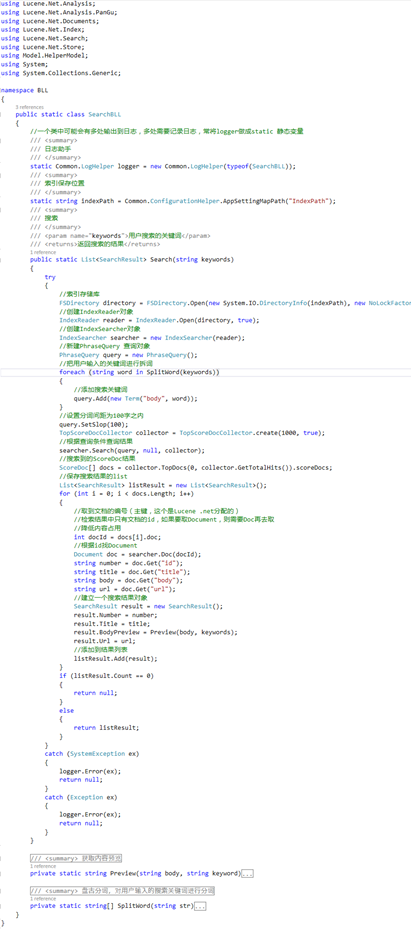
Search 通过查找索引实现搜索
 namespace Model.HelperModel

 {

     public class SearchResult

     {

         public string Number { get; set; }

         public string Title { get; set; }

         public string BodyPreview { get; set; }

         public string Url { get; set; }

     }

 }
SearchResult 模型
使用Lucene.NET实现简单的站内搜索的更多相关文章
- es简单打造站内搜索
最近挺忙的,在外出差,又同时干两个项目.白天一个晚上一个,特别是白天做的项目,马上就要上线了,在客户这里 三天两头开会,问题很多真的很想好好静下来怼代码,半夜做梦都能fix bugs~ 和客户交流真的 ...
- 基于lucene.net 和ICTCLAS2014的站内搜索的实现1
Lucene.net是一个搜索引擎的框架,它自身并不能实现搜索.须要我们自己在当中实现索引的建立,索引的查找.全部这些都是依据它自身提供的API来实现.Lucene.net本身是基于java的,可是经 ...
- Lucene.net站内搜索—4、搜索引擎第一版技术储备(简单介绍Log4Net、生产者消费者模式)
目录 Lucene.net站内搜索—1.SEO优化 Lucene.net站内搜索—2.Lucene.Net简介和分词Lucene.net站内搜索—3.最简单搜索引擎代码Lucene.net站内搜索—4 ...
- Lucene.net站内搜索—3、最简单搜索引擎代码
目录 Lucene.net站内搜索—1.SEO优化 Lucene.net站内搜索—2.Lucene.Net简介和分词Lucene.net站内搜索—3.最简单搜索引擎代码Lucene.net站内搜索—4 ...
- Lucene.net站内搜索—6、站内搜索第二版
目录 Lucene.net站内搜索—1.SEO优化 Lucene.net站内搜索—2.Lucene.Net简介和分词Lucene.net站内搜索—3.最简单搜索引擎代码Lucene.net站内搜索—4 ...
- Lucene.net站内搜索—5、搜索引擎第一版实现
目录 Lucene.net站内搜索—1.SEO优化 Lucene.net站内搜索—2.Lucene.Net简介和分词Lucene.net站内搜索—3.最简单搜索引擎代码Lucene.net站内搜索—4 ...
- Lucene.net站内搜索—2、Lucene.Net简介和分词
目录 Lucene.net站内搜索—1.SEO优化 Lucene.net站内搜索—2.Lucene.Net简介和分词Lucene.net站内搜索—3.最简单搜索引擎代码Lucene.net站内搜索—4 ...
- Lucene.net站内搜索—1、SEO优化
目录 Lucene.net站内搜索—1.SEO优化 Lucene.net站内搜索—2.Lucene.Net简介和分词Lucene.net站内搜索—3.最简单搜索引擎代码Lucene.net站内搜索—4 ...
- 站内搜索——Lucene +盘古分词
为了方便的学习站内搜索,下面我来演示一个MVC项目. 1.首先在项目中[添加引入]三个程序集和[Dict]文件夹,并新建一个[分词内容存放目录] Lucene.Net.dll.PanGu.dll.Pa ...
随机推荐
- 界面排版-TableLayout的stretchColumns方法
1.先把XML內的預設RelativeLayout排版方式清空,在去Layout區拉一個TableLayout的到表單上,XML下會出現下面程式碼 <TableLayout xmln ...
- ADT-bundle(Android Development Tools)环境配置
Android开发环境有两套比较主流的:ADT-bundle和Android Studio,前者是Eclipse插件的形式进行开发,后者是Android的官方IDE. ADT环境的配置与调试:(1)安 ...
- Direct2D开发:纹理混合
转载请注明出处:http://www.cnblogs.com/Ray1024 一.概述 我们都知道Direct2D可以加载并显示图片,但是不知道你有没有想过,这个2D的图形引擎可以进行纹理混合吗?如果 ...
- SQL Server里的INTERSECT
在今天的文章里,我想讨论下SQL Server里的INTERSECT设置操作.INTERSECT设置操作彼此交叉2个记录集,返回2个集里列值一样的记录.下图演示了这个概念. INTERSECT与INN ...
- Sprint回顾
1.回顾组织 主题:“我们下次怎么样才能更加认真对待?” 时间:设定为1至2个小时. 参与者:整个团队. 场所:能够在不受干扰的情况下讨论. 秘书:指定某人当秘书,筹备.记录.整理. 2.回顾流程 ...
- Scrum 项目 6.0
-------------------------6.0------------------------------------ sprint演示 1.坚持所有的sprint都结束于演示. 团队的成果 ...
- EasyUI组合树插件
一.引用CSS和JS <link href="~js/easyui/easyui.css" rel="stylesheet" type="tex ...
- C#调用windows api示例
这是运行结果: Api函数是构筑Windws应用程序的基石,每一种Windows应用程序开发工具,它提 供的底层函数都间接或直接地调用了Windows API函数,同时为了实现功能扩 展,一般也都提供 ...
- KTV点歌系统
经过十多天的艰苦奋战,MyKTV点歌系统终于成型,从刚开始接到项目的茫然,到完成项目时的喜悦,整个过程的艰辛和付出只有自己知道.虽然这个项目还有许多需要完善的地方,譬如添加歌词信息,实现窗体的美化等, ...
- HTML5 Audio and JavaScript Control
IE8 以下无效 <!DOCTYPE html> <html> <head> <meta content="text/html; charset=u ...