
Web Service 小练习
对于网站与网站之间数据互动,这是我的说法,不是专家说的,不要相信。应该有专业的说法。
从他人的网站通过一个接口获取数据,这一直是我感到神奇的事,怎么实现的,一直萦绕于心,想要弄过究竟,怎么是实现的啊!不止一次在群里听到同样的提问。可惜每次我都没有深入探究,自己太懒惰了,不想动手实践,想找现成的,可惜也没有去找。
还是要工作压力驱使,不然也许这个一直对我来说是一个疑惑。工作中有这么一个任务就是通过接口去获取供应商的数据,还好已经有现成的了,我只要看懂,然后模仿做一个就可以了,不过也费了我不少时间。发现有两种方式:一是通过xml,二是通过web service。我做的是用xml实现,而另外一种当时就没有深入去探究了。但是在我心里一直是一个结,我要试一试,实现它。于是有了今天的结果。一个小小实验。
我是用asp.net 4.0实验的 两个项目,模拟两个网站。其实也包含了几个知识点:web Service,数据压缩,流数据等,dataset 与流的互转化。
web Service 端代码,从数据库中获取数据,然后使用了压缩,流传递数据
 using System;

 using System.Collections.Generic;

 using System.Linq;

 using System.Web;

 using System.Web.Services;

 using System.Data;

 using System.Data.SqlClient;

 using System.Text;

 using System.IO;

 using System.Runtime.Serialization.Formatters.Binary;

 using System.Runtime.Serialization;

 using System.IO.Compression;

 namespace WebSiteTest

 {

     /// <summary>

     /// WebServiceSend 的摘要说明

     /// </summary>

     [WebService(Namespace = "http://tempuri.org/")]

     [WebServiceBinding(ConformsTo = WsiProfiles.BasicProfile1_1)]

     [System.ComponentModel.ToolboxItem(false)]

     // 若要允许使用 ASP.NET AJAX 从脚本中调用此 Web 服务,请取消对下行的注释。

     // [System.Web.Script.Services.ScriptService]

     public class WebServiceSend : System.Web.Services.WebService

     {

         [WebMethod]

         public string HelloWorld()

         {

             return "Hello World";

         }

         [WebMethod]

         public int add( int a, int b)

         {

             return a + b;

         }

         //用流发送数据

         [WebMethod]

         public byte[] getdata(int id)

         {

             byte[] bArrayResult = null;

             string sqlstr = "select * from   BlogArticle where BlogId>" + id;

             DataSet ds=new DataSet();

             using (SqlConnection conn = new SqlConnection(connstr))

             {

                 conn.Open();

                 using (SqlCommand cmd = new SqlCommand())

                 {

                     cmd.CommandText = sqlstr;

                     cmd.CommandType = CommandType.Text;

                     cmd.Connection = conn;

                     SqlDataAdapter dap = new SqlDataAdapter(cmd);

                     dap.Fill(ds);

                     ds.RemotingFormat = SerializationFormat.Binary;

                     MemoryStream ms = new MemoryStream();

                     IFormatter bf = new BinaryFormatter();

                     bf.Serialize(ms, ds);

                     bArrayResult = ms.ToArray();

                     ms.Close();

                     return Compress(bArrayResult);

                     //return dt.Rows[0]["BlogTitle"].ToString();

                 }

             }

         }

         //[WebMethod]

         //public byte[] getgzipdata(int id)

         //{

         //    byte[] bArrayResult = null;

         //    string sqlstr = "select * from   BlogArticle where BlogId>" + id;

         //    DataSet ds = new DataSet();

         //    using (SqlConnection conn = new SqlConnection(connstr))

         //    {

         //        conn.Open();

         //        using (SqlCommand cmd = new SqlCommand())

         //        {

         //            cmd.CommandText = sqlstr;

         //            cmd.CommandType = CommandType.Text;

         //            cmd.Connection = conn;

         //            SqlDataAdapter dap = new SqlDataAdapter(cmd);

         //            dap.Fill(ds);

         //            ds.RemotingFormat = SerializationFormat.Binary;

         //            MemoryStream ms = new MemoryStream();

         //            IFormatter bf = new BinaryFormatter();

         //            bf.Serialize(ms, ds);

         //            bArrayResult = ms.ToArray();

         //            ms.Close();

         //            return bArrayResult;

         //            //return dt.Rows[0]["BlogTitle"].ToString();

         //        }

         //    }

         //}

         //压缩流数据

         public static byte[] Compress(byte[] bytes)

         {

             using (MemoryStream ms = new MemoryStream())

             {

                 GZipStream Compress = new GZipStream(ms, CompressionMode.Compress);

                 Compress.Write(bytes, , bytes.Length);

                 Compress.Close();

                 return ms.ToArray();

             }

         }

         private static string connstr = "Data Source=.;Initial Catalog=mytest;Integrated Security=True";//数据库连接

     }

 }
压缩前数据大小如图片一
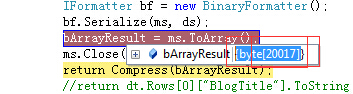
压缩后数据大小如图片二

接收端 代码,需要web引用
using System;

using System.Collections.Generic;

using System.Linq;

using System.Web;

using System.Web.UI;

using System.Web.UI.WebControls;

using System.Data;

using System.IO;

using System.Runtime.Serialization;

using System.Runtime.Serialization.Formatters.Binary;

using System.IO.Compression;

namespace WebReceivetest

{

    public partial class WebForm1 : System.Web.UI.Page

    {

        protected void Page_Load(object sender, EventArgs e)

        {

        }

        protected void btntest_Click(object sender, EventArgs e)

        {

            MyWebTest.WebServiceSend websend = new MyWebTest.WebServiceSend();

            int first = int.Parse(txtfirst.Text);

            int second = int.Parse(txtsecond.Text);

            int result = websend.add(first, second);

            labresult.Text = result.ToString();

            //string xx=websend.getdata(10);

            //labresult.Text = result.ToString() + "-----------" + xx;

            DataSet ds = BinaryToDataset(websend.getdata());//151是数据库中的一个id编号

            GridView1.DataSource = ds;

            GridView1.DataBind();

        }

        //流转换为dataset数据

        public DataSet BinaryToDataset(byte[] bUserData)

        {

            if (bUserData == null)

            {

                //MessageBox.Show("二进制数据流为空");

                //err = "";

                return null;

            }

            // 反序列化的过程

            MemoryStream ms = new MemoryStream(Decompress(bUserData));

            IFormatter bf = new BinaryFormatter();

            object obj = bf.Deserialize(ms);

            DataSet dsResult = (DataSet)obj;

            ms.Close();

            return dsResult;

        }

        //解压流数据

        public static byte[] Decompress(Byte[] bytes)

        {

            using (MemoryStream tempMs = new MemoryStream())

            {

                using (MemoryStream ms = new MemoryStream(bytes))

                {

                    GZipStream Decompress = new GZipStream(ms, CompressionMode.Decompress);

                    Decompress.CopyTo(tempMs);

                    Decompress.Close();

                    return tempMs.ToArray();

                }

            }

        }

    }

}
解压前数据大小如图片三
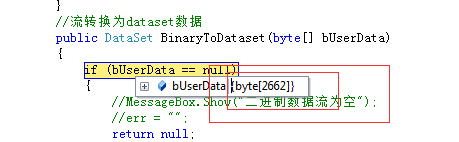
压缩后数据大小如图片四
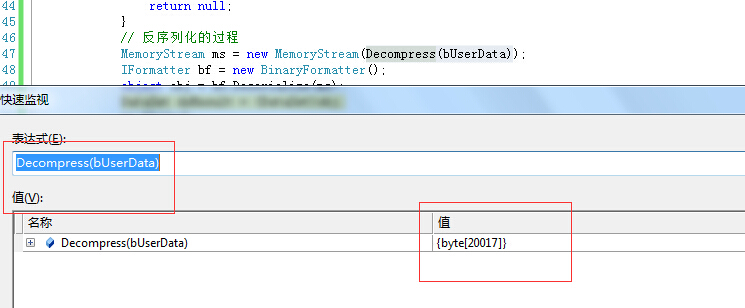
通过这一次小实验,心中的疑惑完全消除了。实践——求真——消除疑惑。
参考:http://www.cnblogs.com/zhangzheny/archive/2007/06/16/785734.html
http://www.cnblogs.com/amylis_chen/archive/2012/11/06/2757808.html
http://www.cnblogs.com/qugangf/archive/2011/04/11/2012193.html
Web Service 小练习的更多相关文章
- 使用TcpTrace小工具截获Web Service的SOAP报文
Web Service客户端对服务端进行调用时,请求和响应都使用SOAP报文进行通讯.在开发和测试时,常常查看SOAP报文的内容,以便进行分析和调试.TcpTrace是一款比较小巧的工具,可以让我们截 ...
- Web Service测试工具小汇
1..NET WebService Studio 这款工具出自微软内部,最大的优点是可视化很好,不用去看那些XML文件,WebService的基础内容就有XML,但是测试中Case过多,每次测试结果都 ...
- .NET基础拾遗(7)Web Service的开发与应用基础
Index : (1)类型语法.内存管理和垃圾回收基础 (2)面向对象的实现和异常的处理 (3)字符串.集合与流 (4)委托.事件.反射与特性 (5)多线程开发基础 (6)ADO.NET与数据库开发基 ...
- ORACLE存储过程调用Web Service
1. 概述 最近在ESB项目中,客户在各个系统之间的服务调用大多都是在oracle存储过程中进行的,本文就oracle存储过程调用web service来进行说明.其他主流数据库,比如mysql和sq ...
- Web Service 中返回DataSet结果大小改进
http://www.cnblogs.com/scottckt/archive/2012/11/10/2764496.html Web Service 中返回DataSet结果方法: 1)直接返回Da ...
- WCF、Net remoting、Web service概念及区别
Windows通信基础(Windows Communication Foundation,WCF)是基于Windows平台下开发和部署服务的软件开发包(Software Development Kit ...
- Web Service简介 内部资料 请勿转载 谢谢合作
1.1.Web Service基本概念 Web Service也叫XML Web Service WebService是一种可以接收从Internet或者Intranet上的其它系统中传递过来的请求, ...
- 什么是web service
一.序言 大家或多或少都听过WebService(Web服务),有一段时间很多计算机期刊.书籍和网站都大肆的提及和宣传WebService技术,其中不乏很多吹嘘和做广告的成分.但是不得不承认的是Web ...
- Web Service 的工作原理
Web Service基本概念 Web Service也叫XML Web Service WebService是一种可以接收从Internet或者Intranet上的其它系统中传递过来的请求,轻量级的 ...
随机推荐
- Openwrt LuCI模块练习详细步骤
前言 又到了成胖子^_^每周一博的时间了.最近在学习openwrt luci方面的知识,为了贯穿整个知识体系,练习题目为: 通过页面配置周期性地往/tmp/addtest文件写入内容和时间戳 1.在w ...
- Android中手机号、车牌号正则表达式
手机号 手机号的号段说明转载自:国内手机号码的正则表达式|蜗牛的积累 手机名称有GSM:表示只支持中国联通或者中国移动2G号段(130.131.132.134.135.136.137.138.139. ...
- Storm wordcount Read from file
source code: package stormdemo; import java.io.BufferedReader; import java.io.BufferedWriter; import ...
- [转]jQuery插件实现模拟alert和confirm
本文转自:http://www.jb51.net/article/54577.htm (function () { $.MsgBox = { Alert: function (title, msg) ...
- java9-2形式参数
1.形式参数: 基本类型(太简单) 引用类型 类名:(匿名对象的时候其实我们已经讲过了)需要的是该类的对象 抽象类:需要的是该抽象的类子类对象 接口:需要的是该接口的实现类对象 A. 类名:(匿名对象 ...
- [转] Linux下防火墙iptables用法规则详及其防火墙配置
from: http://www.cnblogs.com/yi-meng/p/3213925.html 备注: 排版还不错,建议看以上的链接. iptables规则 规则--顾名思义就是规矩和原则,和 ...
- 6月27日 OGDF不同的布局算法
检查不同布局算法 备注 CircularLayout 可以非连通 FastMultipoleMultilevelEmbedder FMMMLayout 可以非连通 StressMajoriz ...
- smarty中foreach的用法举例
- 第三章 续:时间控件(TimePicker)
上一章,介绍了datetimepicker使用, 然而,当只需要时分秒的时候,它并不怎么理想,因此又找了一个单独的时间控制插件 现在介绍一个timepicker,用法差不多,但是它只是基于bootst ...
- 客户端缓存(Client Cache)
通常在服务器端大家都已经做了很多缓存的工作,ASP.NET CACHE也好MemeryCache也好却总是忽略了客户端缓存. 因为大家都知道不管哪个client都会缓存已经访问过的站点,但是浏览器缓存 ...