
nginx入门(安装,启动,关闭,信号量控制)
公司使用到了nginx,于是周末初步接触了一下nginx,立即被其简洁,优雅,高效的特性给迷住了。nginx是在是个好东西,配置极其简单,容易理解,极其高效,稍微一调优,ab测试10k并发,很轻松。比起apache来强太多了...
1. 下载
[root@localhost src]# wget -c http://nginx.org/download/nginx-1.6.2.tar.gz

--2015-01-11 16:04:13--  http://nginx.org/download/nginx-1.6.2.tar.gz

Resolving nginx.org... 206.251.255.63

Connecting to nginx.org|206.251.255.63|:80... connected.

HTTP request sent, awaiting response... 200 OK

Length: 804164 (785K) [application/octet-stream]

Saving to: “nginx-1.6.2.tar.gz”

100%[=====================================================================>] 804,164     5.03K/s   in 3m 42s

2015-01-11 16:07:57 (3.54 KB/s) - “nginx-1.6.2.tar.gz” saved [804164/804164]
2.解压
[root@localhost src]# tar xvf nginx-1.6.2.tar.gz

nginx-1.6.2/

nginx-1.6.2/auto/

nginx-1.6.2/conf/

nginx-1.6.2/contrib/

nginx-1.6.2/src/

nginx-1.6.2/configure

...
3. 安装
[root@localhost nginx-1.6.2]# ./configure

....

creating objs/Makefile

Configuration summary

  + using system PCRE library

  + OpenSSL library is not used

  + using builtin md5 code

  + sha1 library is not found

  + using system zlib library

  nginx path prefix: "/usr/local/nginx"

  nginx binary file: "/usr/local/nginx/sbin/nginx"

  nginx configuration prefix: "/usr/local/nginx/conf"

  nginx configuration file: "/usr/local/nginx/conf/nginx.conf"

  nginx pid file: "/usr/local/nginx/logs/nginx.pid"

  nginx error log file: "/usr/local/nginx/logs/error.log"

  nginx http access log file: "/usr/local/nginx/logs/access.log"

  nginx http client request body temporary files: "client_body_temp"

  nginx http proxy temporary files: "proxy_temp"

  nginx http fastcgi temporary files: "fastcgi_temp"

  nginx http uwsgi temporary files: "uwsgi_temp"

  nginx http scgi temporary files: "scgi_temp"

[root@localhost nginx-1.6.2]# make && make install

[root@localhost nginx]# pwd

/usr/local/nginx

[root@localhost nginx]# ll

total 16

drwxr-xr-x. 2 root root 4096 Jan 11 16:12 conf

drwxr-xr-x. 2 root root 4096 Jan 11 16:12 html

drwxr-xr-x. 2 root root 4096 Jan 11 16:12 logs

drwxr-xr-x. 2 root root 4096 Jan 11 16:12 sbin
安装成功。其中conf是配置文件的目录,html是放web页面的目录,logs是放日志文件的目录,sbin目录是 nginx运行时二进制文件。安装时有可能报PCRE库缺失,可以使用命令安装即可:yum -y install pcre-devel;
4. 启动关闭nginx的方法
[root@localhost sbin]# /usr/local/nginx/sbin/nginx

[root@localhost sbin]# echo $?

0

[root@localhost sbin]# ps -elf|grep nginx

1 S root      3740     1  0  80   0 -   887 -      16:16 ?        00:00:00 nginx: master process /usr/local/nginx/sbin/nginx

5 S nobody    3741  3740  0  80   0 -   933 -      16:16 ?        00:00:00 nginx: worker process

0 S root      3744  1306  0  80   0 -  1088 -      16:16 pts/1    00:00:00 grep nginx

[root@localhost sbin]# netstat -antp

Active Internet connections (servers and established)

Proto Recv-Q Send-Q Local Address               Foreign Address             State       PID/Program name

tcp        0      0 0.0.0.0:22                  0.0.0.0:*                   LISTEN      1131/sshd

tcp        0      0 127.0.0.1:631               0.0.0.0:*                   LISTEN      1004/cupsd

tcp        0      0 0.0.0.0:40035               0.0.0.0:*                   LISTEN      928/rpc.statd

tcp        0      0 0.0.0.0:111                 0.0.0.0:*                   LISTEN      908/rpcbind

tcp        0      0 0.0.0.0:80                  0.0.0.0:*                   LISTEN      3740/nginx

tcp        0     64 192.168.137.9:22            192.168.137.1:51321         ESTABLISHED 1267/sshd

tcp        0      0 192.168.137.9:22            192.168.137.1:51322         ESTABLISHED 1270/sshd

tcp        0      0 192.168.137.9:22            192.168.137.1:51336         ESTABLISHED 1331/sshd

tcp        0      0 :::22                       :::*                        LISTEN      1131/sshd

tcp        0      0 ::1:631                     :::*                        LISTEN      1004/cupsd

tcp        0      0 :::38082                    :::*                        LISTEN      928/rpc.statd

tcp        0      0 :::111                      :::*                        LISTEN      908/rpcbind
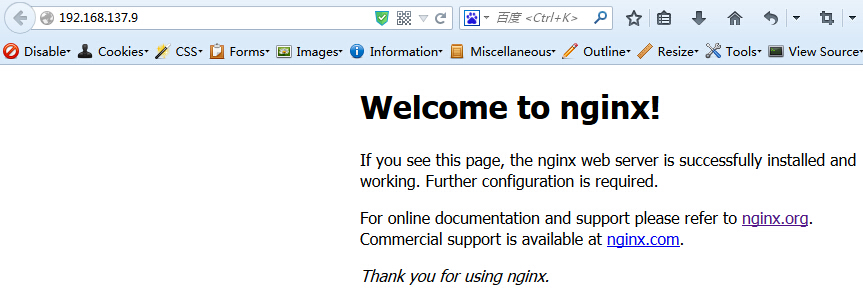
上面所示,成功启动了ngnix,在80端口运行。
nginx的进程分为了master 进程和worker进程,前者做为管理进程,管理后者,后者是处理页面请求的进程,worker可以有多个。一般根据CPU核数和负载进行配置多个worker. 我们访问试试:
nginx的启动,关闭等等操作命令如下:
[root@localhost sbin]# /usr/local/nginx/sbin/nginx -h

nginx version: nginx/1.6.2

Usage: nginx [-?hvVtq] [-s signal] [-c filename] [-p prefix] [-g directives]

Options:

  -?,-h         : this help

  -v            : show version and exit

  -V            : show version and configure options then exit

  -t            : test configuration and exit

  -q            : suppress non-error messages during configuration testing

  -s signal     : send signal to a master process: stop, quit, reopen, reload

  -p prefix     : set prefix path (default: /usr/local/nginx/)

  -c filename   : set configuration file (default: conf/nginx.conf)

  -g directives : set global directives out of configuration file
/usr/local/nginx/sbin/nginx -s stop
/usr/local/nginx/sbin/nginx -s quit
/usr/local/nginx/sbin/nginx -s reopen
/usr/local/nginx/sbin/nginx -s reload
分别表示 优雅的停止nginx;立即停止nginx;重新打开日志文件;平滑的重启nginx并重新加载nginx的配置文件;
/usr/local/nginx/sbin/nginx -t 可以用来修改配置文件之后,测试配置文件是否有语法错误
. 通过信号量来控制nginx
其实质是通过信号量来对nginx进行控制的,所以也可以通过下面的方式来控制nginx:
kill -INT `cat /usr/local/nginx/logs/nginx.pid`
[root@localhost logs]# kill -INT `cat /usr/local/nginx/logs/nginx.pid`

[root@localhost logs]# ps -elf|grep nginx

0 S root      3843  1306  0  80   0 -  1088 -      16:37 pts/1    00:00:00 grep nginx
看到nginx的两个进程被我们杀掉了。还有其他的信号量可以使用,分别对应到上面的命令。
kill -HUP pid, kill -USR1 pid, kill -USR2 pid 等等,总结如下:
1. TERM,INT : Quick shutdown,立即关闭进程,不管他有没有在处理请求;
2. QUIT : Graceful shutdown, 优雅的关闭进程,也就是等到该进程处理的请求都完成之后才关闭;
3. HUP : Configuration reload, start the new worker processes with a new configuration. Gracefully shutdown the old worker processes
4. USR1 : Reopen the log files, 重新打开日志文件,在备份日志按月/日分割日志时用;
5. USR2 : Upgrade Executable on the fly, 平滑的升级;
6. WINCH : Gracefully shutdown the worker processes, 优雅的关闭旧的进程(配合USR2来进行升级);
先写到这里,后面继续学习nginx的配置。
nginx入门(安装,启动,关闭,信号量控制)的更多相关文章
- 【nginx】nginx的工作模式和信号量控制
nginx是一个多进程/多线程高性能web服务器,在linux系统中,nginx启动后会以后台守护进程(daemon)的方式去运行,后台进程包含一个master进程和多个worker进程(这个数量可以 ...
- Nginx入门安装升级
1).Nginx ("engine x") 是一个高性能HTTP 和 反向代理 服务器.IMAP.POP3.SMTP 服务器. Nginx特点是占有内存少,并发能力强,事实上Ngi ...
- nginx入门,安装
Nginx是一款轻量级的Web 服务器/反向代理服务器及电子邮件(IMAP/POP3)代理服务器,并在一个BSD-like 协议下发行.其特点是占有内存少,并发能力强,事实上nginx的并发能力确实在 ...
- Linux 下的 Redis 安装 && 启动 && 关闭 && 卸载
转自https://blog.csdn.net/zgf19930504/article/details/51850594 Redis 在Linux 和 在Windows 下的安装是有很大的不同的,和通 ...
- nginx 入门 安装
.yum解决编译nginx所需的依赖包,之后你的nginx就不会报错了 yum install gcc patch libffi-devel python-devel zlib-devel bzip2 ...
- Nginx Windows 安装启动
原文连接:http://tengine.taobao.org/book/appendix_c.html#nginxwindows 下载 Nginx是开源软件,用户可以访问 http://nginx.o ...
- Linux下的MongoDB安装&启动&关闭
一.下载安装包 下载地址 二.解压安装包 $ tar -zxvf mongodb-linux-x86_64-3.0.6.tgz 三.复制到指定的目录下 $ mv mongodb-linux-x86_6 ...
- shell脚本之nginx的安装
为了编写nginx自动部署的脚本而刚学习的shell脚本语言.写文章只是为了记录,有错误勿喷. 一.创建shell脚本程序 操作系统是Linux的 CentOS 7 版本. ...
- nginx入门与实战 安装 启动 配置nginx Nginx状态信息(status)配置 正向代理 反向代理 nginx语法之location详解
nginx入门与实战 网站服务 想必我们大多数人都是通过访问网站而开始接触互联网的吧.我们平时访问的网站服务 就是 Web 网络服务,一般是指允许用户通过浏览器访问到互联网中各种资源的服务. Web ...
随机推荐
- HT图形组件设计之道(三)
上篇我们通过定制了CPU和内存展示界面,体验了HT for Web通过定义矢量实现图形绘制与业务数据的代码解耦及绑定联动,这类案例后续文章还会继续以便大家掌握更多的矢量应用场景,本篇我们先切换个话题, ...
- 用Qt写软件系列二:QCookieViewer(浏览器Cookie查看器)
预备 继上篇<浏览器缓存查看器QCacheViewer>之后,本篇开始QCookieViewer的编写.Cookie技术作为网站收集用户隐私信息.分析用户偏好的一种手段,广泛应用于各大网站 ...
- Dir /U /c 输出Unicode字符的特性
比如某个目录列表如下: D:\Spec\a.txtD:\Spec\Dir・C.txtD:\Spec\else.txtD:\Spec\קתקווה.dataD:\Spec\中・文.txt 直接dir / ...
- 最新的SqlHelper 类
最新的SqlHelper 类 摘自:http://www.cnblogs.com/sufei/archive/2010/01/14/1648026.html using System; using S ...
- onclick事件与onserverclick事件
1.这里仅对web控件而言,onclick事件执行的是客户端中的代码, <%@ Page Language="C#" AutoEventWireup="true&q ...
- 常用库nuget包集合
ColorConsole htmlagilitypack.1.4.9.5 经测试效率比 CsQueryLaster 高 csvhelper Extend Devlib系列一套 itextsharp l ...
- 你可以做一个更好的Coder为了自己的将来
小小的星辰 工作已经一年多了,时间真的好快啊!发现自己还是终于走出了当初的阴影!我可以快乐的做我自己了.这两年发现自己改变了很多!很庆幸,我可以不想你了!伤感的心情总会过去的.还记得曾经说过一句:“离 ...
- Retention、Documented、Inherited三种注解
Retention注解 Retention(保留)注解说明,这种类型的注解会被保留到那个阶段. 有三个值:1.RetentionPolicy.SOURCE —— 这种类型的Annotations只在源 ...
- 泛函编程(23)-泛函数据类型-Monad
简单来说:Monad就是泛函编程中最概括通用的数据模型(高阶数据类型).它不但涵盖了所有基础类型(primitive types)的泛函行为及操作,而且任何高阶类或者自定义类一旦具备Monad特性就可 ...
- ztree addNode editName removeNode
1.ztree api中完全拥有以上操作的相关解释,及简单Demo. 2.主要是要学会将单独的效果组合起来使用. 2.1 如: 添加完新的Node节点之后,怎么立即进入新节点的编辑状态来修改名称(或 ...