
Pandas 数据结构Series:基本概念及创建
Series:"一维数组"
1. 和一维数组的区别
# Series 数据结构

# Series 是带有标签的一维数组,可以保存任何数据类型(整数,字符串,浮点数,Python对象等),轴标签统称为索引

s = pd.Series(np.random.rand(5))

print(s)        #从输出可见区别于数组,有了标签。Series = 一维数组+标签组成

print(type(s))

# 查看数据、数据类型

print(s.index,type(s.index))

print(s.values,type(s.values))

# .index查看series索引,类型为rangeindex

# .values查看series值,类型是ndarray

# 核心:series相比于ndarray,是一个自带索引index的数组 → 一维数组 + 对应索引

# 所以当只看series的值的时候,就是一个ndarray

# series和ndarray较相似,索引切片功能差别不大

# series和dict相比,series更像一个有顺序的字典(dict本身不存在顺序),其索引原理与字典相似(一个用key,一个用index)
运行结果:
0    0.732950

1    0.147740

2    0.219600

3    0.038931

4    0.910124

dtype: float64

<class 'pandas.core.series.Series'>

RangeIndex(start=0, stop=5, step=1) <class 'pandas.core.indexes.range.RangeIndex'>

[0.73295047 0.14774017 0.21959958 0.03893087 0.9101244 ] <class 'numpy.ndarray'>
2. 标签可以多元化,不一定为数字
import pandas as pd

S = pd.Series([99,66,78],index = ['Jone','Tom','James'])

print(S)

print(S.loc['James'])  # 用标签去求对应的值

print(S.iloc[0])     #后面会讲
输出:
Jone     99

Tom      66

James    78

dtype: int64

78

99
3. Series 的创建方法:
(1)由字典创建
# Series 创建方法一:由字典创建,字典的key就是index,values就是values

dic = {'a':1 ,'b':2 , 'c':3, '':4, '':5}

s = pd.Series(dic)

print(s)

# 注意:key肯定是字符串,假如values类型不止一个会怎么样? → dic = {'a':1 ,'b':'hello' , 'c':3, '4':4, '5':5}

#如果值有一个是字符串,那么全都是字符串类型的了
输出结果:
4    4

5    5

a    1

b    2

c    3

dtype: int64
(2)由一维数组创建
# Series 创建方法二:由数组创建(一维数组)

arr = np.random.randn(5)

s = pd.Series(arr)

print(arr)

print(s)

# 默认index是从0开始,步长为1的数字

s = pd.Series(arr, index = ['a','b','c','d','e'],dtype = np.object)

print(s)

# index参数:设置index,长度保持一致

# dtype参数:设置数值类型
输出结果:
[-2.56328023  0.87233579  0.47630666  1.91715736 -1.26924024]

0   -2.563280

1    0.872336

2    0.476307

3    1.917157

4   -1.269240

dtype: float64

a    -2.56328

b    0.872336

c    0.476307

d     1.91716

e    -1.26924

dtype: object
(3)由序列创建
s = pd.Series([11,22,12,56,78,31])    #由序列创建

s
输出结果:
0    11

1    22

2    12

3    56

4    78

5    31

dtype: int64
4. 名称属性:“name"
# Series 名称属性:name

s1 = pd.Series(np.random.randn(5))

print(s1)

print('-----')

s2 = pd.Series(np.random.randn(5),name = 'test')

print(s2)

print(s1.name, s2.name,type(s2.name))

# name为Series的一个参数,创建一个数组的 名称

# .name方法:输出数组的名称,输出格式为str,如果没用定义输出名称,输出为None

s3 = s2.rename('hehehe')

print(s3)

print(s3.name, s2.name)

# .rename()重命名一个数组的名称,并且新指向一个数组,原数组不变
输出结果:
0   -1.285306

1   -0.586416

2   -1.966362

3   -1.507387

4    0.622088

dtype: float64

-----

0   -0.763427

1   -1.588831

2   -1.676116

3    0.453159

4   -0.874990

Name: test, dtype: float64

None test <class 'str'>

0   -0.763427

1   -1.588831

2   -1.676116

3    0.453159

4   -0.874990

Name: hehehe, dtype: float64

hehehe test
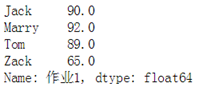
小练习:分别由字典、数组的方式,创建以下要求的Series
import pandas as pd

#(1)用字典创建

dic = {'Jack0':90,'Marry':92.,'Tom':89.0,'Zack':65.}

d = pd.Series(dic,name = '作业1')

print(d,'\n')

#(2)直接写

s = pd.Series([90.0,92.0,89.0,65.0],index = ['Jack','Marry','Tom','Zack'],name = "作业1")

print(s)
Pandas 数据结构Series:基本概念及创建的更多相关文章
- 利用pandas进行数据分析之一:pandas数据结构Series
Series是一种类似于一维数组的对象,又一组数据(各种Numpy数据类型)以及一组与之相关的数据标签(即是索引)组成. 可以将Series看成是一个定长的有序字段,因为它是索引值到数据值的一个映射. ...
- 02. Pandas 1|数据结构Series、Dataframe
1."一维数组"Series Pandas数据结构Series:基本概念及创建 s.index . s.values # Series 数据结构 # Series 是带有标签的一 ...
- Pandas之Series
# Series 数据结构 # Series 是带有标签的一维数组,可以保存任何数据类型(整数,字符串,浮点数,Python对象等),轴标签统称为索引 import numpy as np impor ...
- 03. Pandas数据结构
03. Pandas数据结构 Series DataFrame 从DataFrame中查询出Series 1. Series Series是一种类似于一维数组的对象,它由一组数据(不同数据类型)以及一 ...
- Pandas 数据结构Dataframe:基本概念及创建
"二维数组"Dataframe:是一个表格型的数据结构,包含一组有序的列,其列的值类型可以是数值.字符串.布尔值等. Dataframe中的数据以一个或多个二维块存放,不是列表.字 ...
- pandas 学习(1): pandas 数据结构之Series
1. Series Series 是一个类数组的数据结构,同时带有标签(lable)或者说索引(index). 1.1 下边生成一个最简单的Series对象,因为没有给Series指定索引,所以此时会 ...
- pandas数据结构:Series/DataFrame;python函数:range/arange
1. Series Series 是一个类数组的数据结构,同时带有标签(lable)或者说索引(index). 1.1 下边生成一个最简单的Series对象,因为没有给Series指定索引,所以此时会 ...
- pandas中数据结构-Series
pandas中数据结构-Series pandas简介 Pandas是一个开源的,BSD许可的Python库,为Python编程语言提供了高性能,易于使用的数据结构和数据分析工具.Python与Pan ...
- Pandas初体验之数据结构——Series和DataFrame
Pandas是为了解决数据分析任务而创建的,纳入了大量的库和标准数据模型,提供了高效地操作大型数据集所需的工具. 对于Pandas包,在Python中常见的导入方法如下: from pandas im ...
随机推荐
- Python常用模块(一)
一.time模块 time模块提供各种操作时间的函数 时间三种格式 1.时间戳 以1970年1月1日 00:00:00开始的秒数 2.本地时间 localtime,表示计算机当前的时间 3.UTC世界 ...
- Java学习笔记——String类常用方法
所谓的字符串就是对数组的包装,所以字符串内容无法进行更改.String在JDK1.8以前保存的是字符数组:private final char value[]; 而在JDK1.9之后保存的是字节数组: ...
- Lucene学习入门——下载初识
本文从官网下载Lucene开始,一步一步进行Lucene的应用学习研究.下载初识Snowball Stemmer 1.下载 (1)首先,去Lucne的Apache官网主页 http://lucene. ...
- centos7.3上用源代码安装zabbix3.2.7
安装zabbix之前请自行先搭建好LAMP环境! 1.下载源码安装包并解压 1.1 下载 [root@nmserver- ~]# mkdir zabbix [root@nmserver- ~]# cd ...
- PointCNN 论文翻译解析
1. 前言 卷积神经网络在二维图像的应用已经较为成熟了,但 CNN 在三维空间上,尤其是点云这种无序集的应用现在研究得尤其少.山东大学近日公布的一项研究提出的 PointCNN 可以让 CNN 在点云 ...
- Maven一些零散的知识点
Maven常用命令: 1. 创建Maven的普通java项目: mvn archetype:create -DgroupId=com.yida.framework -DartifactId=hello ...
- Locust的官网及安装
Locust官网: https://docs.locust.io/en/latest/installation.html for Python 3: $ python3 -m pip install ...
- hash函数的选择
哈稀函数按照定义可以实现一个伪随机数生成器(PRNG),从这个角度可以得到一个公认的结论:哈希函数之间性能的比较可以通过比较其在伪随机生成方面的比较来衡量. 一般来说,对任意一类的数据存在一个理论上完 ...
- IA32的三种地址
IA32的三种地址 逻辑地址:机器语言指令仍用这种地址指定一个操作数的地址或一条指令的地址. 这种寻址方式在Intel的分段结构中表现得尤为具体,它使得MS-DOS或Windows程序员把程序分为若干 ...
- 【转】Android的setTag
前言 首先我们要知道setTag方法是干什么的,SDK解释为 Tags Unlike IDs, tags are not used to identify views. Tags are essent ...