
EXTjs+SpringMVC+Mybatis实现照片的上传,下载,查看关键技术整理
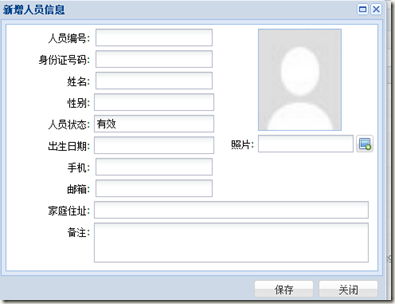
第一个问题:如何通过Extjs4实现照片上传的布局展示以及本地照片选择后的在一个区域内进行图片预览
实现照片上传的布局展示:
items : [ {

                        xtype : 'box',

                        itemId : 'imageShow',

                        id:'imageShow',

                        border : 1,

                        style : {

                            borderColor : '#99bbe8',

                            borderStyle : 'solid',

                        },

                        margin : '0 0 5 55',

                        autoEl : {

                            width : 105,

                            height : 128,

                            tag : 'img',

                            //style : 'filter:progid:DXImageTransform.Microsoft.AlphaImageLoader(sizingMethod=scale);',

                            complete : 'off',

                            src : 'images/blank.jpg',

                        }

                    }, {

                        xtype : 'filefield',

                        name : 'imageFile',

                        itemId:'imageFile',

                        id:'person_imageFile',

                        labelWidth : 50,

                        width : 200,

                        fieldLabel : '照片',

                        allowBlank : false,

                        buttonText: '',

                        buttonConfig: {

                            iconCls: 'upload-icon'

                        }

                    } ]
显示的样式为:
第二个问题:如何在chrome中选择本地的照片后进行图片的预览:(对file控件进行监控)
'#personWindow #imageFile' : {

                change : this.handlerImageFile

            },
handlerImageFile:function(view,value){

        var file=Ext.query('#person_imageFile input[type=file]')[0];

        var img=view.previousSibling().getEl().dom;

          var reader = new FileReader();

          reader.onload = function(evt){img.src = evt.target.result;}

          reader.readAsDataURL(file.files[0]);

    },
第三个问题:如何跟SpringMVC结合保存照片呢?
1.含有照片的form,必须要通过form.submit来进行提交:
savePersonAction:function(button,urlString){

        var form = button.up('window').down('form').getForm();

        form.submit({

            clientValidation : true,

            url : urlString,

            params : {

                // newStatus: 'delivered'

            },

            scope : this,// 使回调函数中的this变成当前的类

            success : function(form, action) {

                if (action.result.success == 'true') {

                    Ext.Msg.alert('系统提示', action.result.msg,function(){

                        button.up('window').hide();

                        this.refreshGrid();

                    },this);

                } else {

                    Ext.Msg.alert('系统提示', action.result.errorMsg);

                }

            },

        });

    }
2.在spring的配置文件中增加配置:
<bean id="multipartResolver" class="org.springframework.web.multipart.commons.CommonsMultipartResolver">

        <!-- one of the properties available; the maximum file size in bytes -->

        <property name="maxUploadSize" value="100000"/>

        <property name="maxInMemorySize" value="4096" />

    </bean>
3.在bean中增加配置
private Date csrq;

    private String jtzz;

    private String bz;

    private Integer photoId;

    private CommonsMultipartFile imageFile;//上传的文件
4.使用bean来接受参数:
@ResponseBody

    @RequestMapping("/userManage/person/insertPerson")

    public String insertPerson(SysPersonModel sysPersonModel) {

        Map resultMap = new HashMap();

        try {

            sysPersonService.insertPerson(sysPersonModel);

            resultMap.put("success", "true");

            resultMap.put("msg", "保存成功");

        } catch (ApplicationException e) {

            resultMap.put("success", "ApplicationException");

            resultMap.put("errorMsg", e.getMessage());

        } catch (Exception e) {

            e.printStackTrace();

            resultMap.put("success", "Exception");

            resultMap.put("errorMsg", e.getMessage());

        }

        return JSON.toJSONString(resultMap);

    }
第四个问题:如何在Mybatis中进行文件的保存和查看呢?
1.增加Photo相关的Bean以及Mapper类,以及sql文件:
package cn.telchina.standard.entity;

public class PhotoModel {

    private Integer photoId;

    private String photoName;

    private Object photo;

    public Integer getPhotoId() {

        return photoId;

    }

    public void setPhotoId(Integer photoId) {

        this.photoId = photoId;

    }

    public String getPhotoName() {

        return photoName;

    }

    public void setPhotoName(String photoName) {

        this.photoName = photoName;

    }

    public Object getPhoto() {

        return photo;

    }

    public void setPhoto(Object photo) {

        this.photo = photo;

    }

}
package cn.telchina.standard.mapper;

import java.util.List;

import cn.telchina.standard.entity.PhotoModel;

public interface PhotoMapper {

    public int getPhotoId();

    public void createPhoto(PhotoModel photoModel);

    public int deletePhoto(int photoId);

    public int updatePhoto(PhotoModel photo);

    public  List<PhotoModel> getPhotoForUpdate(int photoId);

    public  List<PhotoModel> getPhoto(int photoId);

}
<?xml version="1.0" encoding="UTF-8"?>

<!DOCTYPE mapper PUBLIC "-//mybatis.org//DTD Mapper 3.0//EN"  "http://mybatis.org/dtd/mybatis-3-mapper.dtd">

<mapper namespace="cn.telchina.standard.mapper.PhotoMapper">

    <!-- <![CDATA[sql 尽量每个sql必须写,防止有些特殊字符对sql语句造成的破坏 -->

    <select id="getPhotoId" resultType="int">

        <![CDATA[

        select base.seq_photo.nextval id from dual

        ]]>

    </select>

    <insert id="createPhoto" parameterType="PhotoModel">

        <![CDATA[

        INSERT INTO base.PHOTO(photoid,photoname,photo)

            VALUES(#{photoId},#{photoName, jdbcType=VARCHAR}, empty_blob())

         ]]>

    </insert>

     <select id="getPhotoForUpdate" resultType="PhotoModel">

        SELECT photoid,

               photo,

               photoname

          FROM base.PHOTO

         WHERE photoid = #{photoId} for update

    </select>

    <delete id="deletePhoto" >

        DELETE FROM base.PHOTO

              WHERE PHOTO_ID = #{photoId}

    </delete>

    <update id="updatePhoto" parameterType="PhotoModel" >

        UPDATE base.PHOTO

           SET photoname = #{photoName, jdbcType=VARCHAR}

         WHERE photoid = #{photoId}

    </update>

    <select id="getPhoto" resultType="PhotoModel">

        SELECT photoid,

               photo,

               photoname

          FROM base.PHOTO

         WHERE photoid = #{photoId}

    </select>

</mapper>
2.在service中增加新增照片的代码:
@Transactional(rollbackFor = Exception.class)

    public void insertPerson(SysPersonModel sysPersonModel)

            throws ApplicationException {

        this.checkPersonByRybh(sysPersonModel.getRybh());

        this.checkPersonBySfzhm(sysPersonModel.getSfzhm());

        int photoId = photoMapper.getPhotoId();

        String fileName = sysPersonModel.getImageFile().getOriginalFilename();

        PhotoModel photoModel = new PhotoModel();

        photoModel.setPhotoId(photoId);

        photoModel.setPhotoName(fileName);

        photoMapper.createPhoto(photoModel);

        updatePhoto(sysPersonModel, photoId);

        sysPersonModel.setPhotoId(photoId);

        sysPersonMapper.insertPerson(sysPersonModel);

    }

private void updatePhoto(SysPersonModel sysPersonModel, Integer photoId) {

        List<PhotoModel> list = photoMapper.getPhotoForUpdate(photoId);

        PhotoModel newPhotoModel = list.get(0);

        BLOB photo = (BLOB) newPhotoModel.getPhoto();

        BufferedInputStream in = null;

        BufferedOutputStream out = null;

        try {

            out = new BufferedOutputStream(

                    photo.getBinaryOutputStream());// 暂时使用这个废弃的方法

            // ops = content.setBinaryStream(0);//ojdbc14支持,ojdbc6,5都不支持

            in = new BufferedInputStream(

                    (FileInputStream) sysPersonModel.getImageFile()

                            .getInputStream());

            byte[] data = FileCopyUtils.copyToByteArray(in);

            out.write(data);

        } catch (Exception e) {

            e.printStackTrace();

        } finally {

            try {

                if (in != null) {

                    in.close();

                }

                if (out != null) {

                    out.close();

                }

            } catch (IOException e) {

                e.printStackTrace();

            }

        }

    }
3文件的展示和下载:
前台代码:
//进入新增页面时初始化默认头像

    initImageSrc:function(view){

        if(view.down('#imageShow').getEl()){

            var img=view.down('#imageShow').getEl().dom;

            img.src='images/blank.jpg';

        }

    },

//查看

    showImg:function(view,photoId){

        if(photoId!=""){

            var img=view.down('#imageShow').getEl().dom;

            img.src='userManage/person/showPhoto.json?photoId='+photoId;

        }else{

            this.initImageSrc(view);

        }

    },

//下载

downFileButtonHandler:function(button){

        var sm = button.up('#datagrid').getSelectionModel();

        if (sm.getCount() == 0) {

            Ext.Msg.alert('系统提示', "修改人员信息前先选中一条记录!");

        } else {

            var record = sm.getSelection()[0];

            var photoId=record.data.photoId;

            if(photoId!=""){

                window.open('userManage/person/downFile.json?photoId='+photoId,"_self");

            }else{

                Ext.Msg.alert('系统提示', "该人员没有头像!");

            }

        }

    },
@ResponseBody

    @RequestMapping(value = "/userManage/person/showPhoto")

    public void showPhoto(Integer photoId, HttpServletResponse response) {

        OutputStream outputStream = null;

        InputStream in = null;

        try {

            PhotoModel photoModel = sysPersonService.getPhotoById(photoId);

            BLOB photo = (BLOB) photoModel.getPhoto();

            response.setContentType("image/jpeg");

            response.setCharacterEncoding("UTF-8");

            outputStream = new BufferedOutputStream(response.getOutputStream());

            in = new BufferedInputStream(photo.getBinaryStream());

            int len = 0;

            byte[] buf = new byte[1024];

            while ((len = in.read(buf, 0, 1024)) != -1) {

                outputStream.write(buf, 0, len);

            }

        } catch (ApplicationException e) {

            // TODO Auto-generated catch block

            e.printStackTrace();

        } catch (IOException e) {

            // TODO Auto-generated catch block

            e.printStackTrace();

        } catch (Exception e) {

            // TODO Auto-generated catch block

            e.printStackTrace();

        } finally {

            try {

                in.close();

                outputStream.flush();

                outputStream.close();

            } catch (IOException e) {

                // TODO Auto-generated catch block

                e.printStackTrace();

            }

        }

    }

    @ResponseBody

    @RequestMapping(value = "/userManage/person/downFile")

    public void downFile(Integer photoId, HttpServletResponse response) {

        OutputStream outputStream = null;

        InputStream in = null;

        try {

            PhotoModel photoModel = sysPersonService.getPhotoById(photoId);

            BLOB photo = (BLOB) photoModel.getPhoto();

            // byte[] data=photo.getBytes();

            String fileName = photoModel.getPhotoName() == null ? "照片.jpg"

                    : photoModel.getPhotoName();

            fileName = URLEncoder.encode(fileName, "UTF-8");

            response.reset();

            response.setHeader("Content-Disposition", "attachment; filename=\""

                    + fileName + "\"");

            response.addHeader("Content-Length", "" + photo.length());

            response.setContentType("application/octet-stream;charset=UTF-8");

            in = new BufferedInputStream(photo.getBinaryStream());

            outputStream = new BufferedOutputStream(response.getOutputStream());

            int len = 0;

            byte[] buf = new byte[1024];

            while ((len = in.read(buf, 0, 1024)) != -1) {

                outputStream.write(buf, 0, len);

            }

        } catch (ApplicationException e) {

            // TODO Auto-generated catch block

            e.printStackTrace();

        } catch (IOException e) {

            // TODO Auto-generated catch block

            e.printStackTrace();

        } catch (Exception e) {

            // TODO Auto-generated catch block

            e.printStackTrace();

        } finally {

            try {

                in.close();

                outputStream.flush();

                outputStream.close();

            } catch (IOException e) {

                // TODO Auto-generated catch block

                e.printStackTrace();

            }

        }

    }
EXTjs+SpringMVC+Mybatis实现照片的上传,下载,查看关键技术整理的更多相关文章
- SpringMVC——返回JSON数据&&文件上传下载
--------------------------------------------返回JSON数据------------------------------------------------ ...
- springmvc 多文件/文件夹上传 下载
注入依赖 <properties> <project.build.sourceEncoding>UTF-8</project.build.sourceEncoding&g ...
- CentOS上传下载查看命令
之前往CentOS中上传都用ftp软件,这里介绍一种另外的上传下载方式,两个命令轻松搞定.这两个命令目前只针对Xshell和SecureCRT等远程终端软件才支持,并且还会有时间的限制.大概30秒不上 ...
- extjs插件开发上传下载文件简单案例
前台,extjs,框架,mybatis,spring,springMVC,简单的文件上传下载案例. 必要的jar包,commons-fileupload-1.3.1.jar,commons-io-2. ...
- SpringMVC整合fastdfs-client-java实现web文件上传下载
原文:http://blog.csdn.net/wlwlwlwl015/article/details/52682153 本篇blog主要记录一下SpringMVC整合FastDFS的Java客户端实 ...
- springmvc文件上传下载简单实现案例(ssm框架使用)
springmvc文件上传下载实现起来非常简单,此springmvc上传下载案例适合已经搭建好的ssm框架(spring+springmvc+mybatis)使用,ssm框架项目的搭建我相信你们已经搭 ...
- SpringMVC实现上传下载功能
配置资源(jar包) 将前端页面整理好: 写核心的几个配置文件(applicationContext+wed.xml+jdbc.properties+log4j+springMVC.xml) 都是在s ...
- SpringMVC文件上传下载(单文件、多文件)
前言 大家好,我是bigsai,今天我们学习Springmvc的文件上传下载. 文件上传和下载是互联网web应用非常重要的组成部分,它是信息交互传输的重要渠道之一.你可能经常在网页上传下载文件,你可能 ...
- springmvc 上传下载
springmvc文件上传下载在网上搜索的代码 参考整理了一份需要使用的jar.commons-fileupload.jar与commons-io-1.4.jar 二个文件 1.表单属性为: enct ...
随机推荐
- HashSet底层存储元素的源码分析
此类实现 Set 接口,由哈希表(实际上是一个 HashMap 实例)支持.它不保证 set 的迭代顺序:特别是它不保证该顺序恒久不变.此类允许使用 null 元素. HashSet<Strin ...
- luogu P1437 [HNOI2004]敲砖块
三角形向右对齐后 你想打掉一个砖块,那么你必须打掉右上方的三角形,前缀和维护 若是第i列若是k个,那么它右边的那一列至少选了k-1个 f[i][j][k] 表示从后向前选到第 i 列第j个一共打了k次 ...
- skywalking学习
skywalking简介 SkyWalking一个开源可观测性平台,用于收集.分析.聚合和可视化来自服务和云原生基础设施的数据.SkyWalking提供了一种简单的方法,可以让你清晰的查看分布式系统. ...
- cf 546C Soldier and Cards
题目链接:C. Soldier and Cards Two bored soldiers are playing card war. Their card deck consists of exact ...
- iOS isa 浅析
看见一到面试题讲述一下Objective-C中的isa?完全没听说过,打算小研究一下. 参考:http://blog.sina.com.cn/s/blog_7a2ffd5c01010nme.html ...
- C++之纯虚函数
1. 纯虚函数形式 class Parent { public: ; }; 代码中的func1就是纯虚函数,没有函数体,没有函数的具体实现,有virtual,在函数名后面带有“ = 0”形式: 2.对 ...
- Solr 6.6.0 ERROR: Port 8983 is already being used by another process.
在目录D:\work\Solr\solr-6.6.0\bin下打开命令框: 输入:solr -e dih报错:ERROR: Port 8983 is already being used by ano ...
- [阿里Hao]Android无线开发的几种经常使用技术
本文由阿里巴巴移动安全client.YunOS资深project师Hao(嵌入式企鹅圈原创团队成员)撰写,是Hao在嵌入式企鹅圈发表的第一篇原创文章.对Android无线开发的几种经常使用技术进行综述 ...
- Win7梦幻桌面字体有问题怎么办
1:首先,下载我提供的压缩文件,解压"Win7中文界面梦幻桌面补丁",得到若干文件,这时可能需要管理员权限,详细的压缩包里有说明. 2: 然后在桌面上单击右键,可以发 ...
- python特殊函数
__doc__ 类(实例).__doc__ 类的描述信息 '''class des''' __module__ 类(实例).__module__ 表示当前操作的对象在那个模块 __class__ ...