
在windows上搭建镜像yum站的方法
在windows上搭建镜像yum站的方法(附bat脚本)
方法一:支持rsync的网站
对于常用的centos、Ubuntu、等使用官方yum源在 http://mirrors.ustc.edu.cn 都存在镜像。
同时 http://mirrors.ustc.edu.cn 网站又支持 rsync 协议, 可以通过rsync实现 镜像yum源。
 _______________________________________________________________

|         University of Science and Technology of China         |

|           Open Source Mirror  (mirrors.ustc.edu.cn)           |

|===============================================================|

|                                                               |

| Debian primary mirror in China mainland (ftp.cn.debian.org),  |

|     also mirroring a great many OSS projects & Linux distros. |

|                                                               |

| Currently we don't limit speed. To prevent overload, Each IP  |

| is only allowed to start upto 2 concurrent rsync connections. |

|                                                               |

| This site also provides http/https/ftp access.                |

|                                                               |

| Supported by USTC Network Information Center                  |

|          and USTC Linux User Group (http://lug.ustc.edu.cn/). |

|                                                               |

|    Sync Status:  https://mirrors.ustc.edu.cn/status/          |

|           News:  https://servers.ustclug.org/                 |

|        Contact:  lug@ustc.edu.cn                              |

|                                                               |

|_______________________________________________________________|
在windows上使用rsync需要用到 cwRsync 下载地址是 https://www.itefix.net/dl/cwRsync_5.5.0_x86_Free.zip;
其官网为 https://www.itefix.net/cwrsync
使用rsync的时候需要编写脚本,设置要同步的内容

其中centos7_base.bat脚本内容 供大家参考:
@echo off

SETLOCAL

SET CWRSYNCHOME=%~dp0

IF NOT EXIST %CWRSYNCHOME%home\%USERNAME%\.ssh MKDIR  %CWRSYNCHOME%home\%USERNAME%\.ssh

SET CWOLDPATH=%PATH%

SET PATH=%CWRSYNCHOME%bin;%PATH%

rsync  -av --delete rsync://mirrors.ustc.edu.cn/centos/7/os/x86_64/    /cygdrive/f/yum/nginx/html/centos/7/os/x86_64/
方法二:使用wget命令下载不支持rsync协议的源
由于线上跑的系统还有CentOS5.4、6.4、6.5、6.5、6.6、6.8,而各镜像站维护的最早的版本已经是6.9,所以需要爬archive站点的rpm包来自建yum仓库。

# wget -r -p -np -k http://archives.fedoraproject.org/pub/archive/epel/5Server/x86_64/

# wget -r -p -np -k http://archives.fedoraproject.org/pub/epel/6Server/x86_64/

-c, --continue resume getting a partially-downloaded file. 断点续传

-nd, --no-directories don't create directories. 不创建层级目录,所有文件下载到当前目录

-r, --recursive specify recursive download. 递归下载

-p, --page-requisites get all images, etc. needed to display HTML page.

下载页面所有文件,使页面能在本地打开

-k, --convert-links make links in downloaded HTML or CSS point to local files.

转换链接指向本地文件

-np, --no-parent don't ascend to the parent directory. 不下载父级目录的文件

-o, --output-file=FILE log messages to FILE. 指定日志输出文件

-O, --output-document=FILE write documents to FILE. 指定文件下载位置

-L, --relative follow relative links only. 只下载相对链接,如果页面嵌入其他站点不会被下载
windows上wget命令使用方法
下载:http://downloads.sourceforge.net/gnuwin32/wget-1.11.4-1-setup.exe
官网:http://gnuwin32.sourceforge.net/packages/wget.htm
安装
双击即可安装,安装到目录:D:\GnuWin32

修改环境变量
右键计算机 -> 属性 -> 高级系统设置 -> 环境变量 -> 系统变量 GNU_HOME=D:\GnuWin32\bin
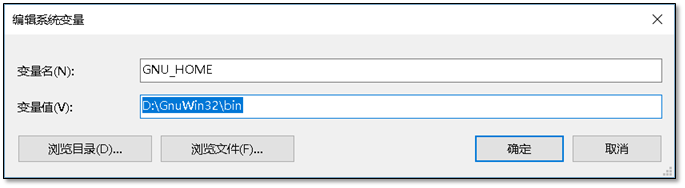
添加path变量,在cmd中可以使用wget命令。 PATH=;%GNU_HOME%

c:\>wget -V

SYSTEM_WGETRC = c:/progra~1/wget/etc/wgetrc

syswgetrc = D:\GnuWin32/etc/wgetrc

GNU Wget 1.11.4

Copyright (C) 2008 Free Software Foundation, Inc.

License GPLv3+: GNU GPL version 3 or later

<http://www.gnu.org/licenses/gpl.html>.

This is free software: you are free to change and redistribute it.

There is NO WARRANTY, to the extent permitted by law.

最初由 Hrvoje Niksic <hniksic@xemacs.org> 编写。

Currently maintained by Micah Cowan <micah@cowan.name>.
提供web服务
同时提供web服务需要用到nginx
nginx 下载 页面 http://nginx.org/en/download.html
附:nginx 配置文件
worker_processes  1;

events {

    worker_connections  1024;

}

http {

    include       mime.types;

    default_type  application/octet-stream;

    sendfile        on;

    keepalive_timeout  65;

    server {

        listen       80;

        server_name  localhost;

        location / {

            autoindex  on;

            root   html;

            index  index.html index.htm;

        }

    }

    server {

        listen       80;

        server_name  repo.zabbix.com;

        location / {

            autoindex  on;

            root   html/zabbix;

            index  index.html index.htm;

        }

    }

    server {

        listen       80;

        server_name  sp.repo.webtatic.com mirror.webtatic.com;

        location / {

            autoindex  on;

            root   html/webtatic;

            index  index.html index.htm;

        }

    }

}
最后使用浏览器访问
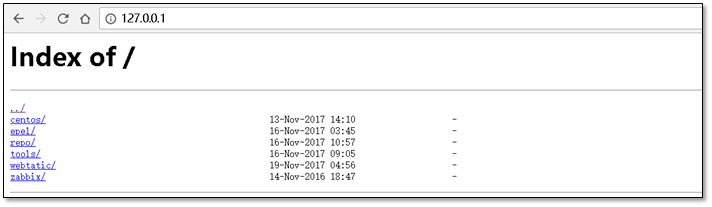
在linux服务器中设置解析
[root@m01 ~]# cat /etc/hosts

127.0.0.1    localhost localhost.localdomain localhost4 localhost4.localdomain4

::1          localhost localhost.localdomain localhost6 localhost6.localdomain6

10.0.0.1     mirrors.aliyuncs.com mirrors.aliyun.com repo.zabbix.com
附件:
附件1、 cwrsync + 全部 bat 脚本 https://files.cnblogs.com/files/clsn/cwRsync.rar
附件2、 nginx + 配置文件 https://files.cnblogs.com/files/clsn/nginx.zip
特别感谢:国强哥提供wget命令使用
此文章出自惨绿少年,转载请注明
在windows上搭建镜像yum站的方法的更多相关文章
- 在windows上搭建镜像yum站的方法(附bat脚本)
方法一:支持rsync的网站 对于常用的centos.Ubuntu.等使用官方yum源在 http://mirrors.ustc.edu.cn 都存在镜像. 同时 http://mirrors.ust ...
- 在linux上搭建本地yum源
准备yum仓库的光盘镜像IOS文件: 设置光驱加载本地磁盘的yum仓库的光盘镜像文件: 在linux的命令行输入setup命令打开设置窗口,选择"System Service": ...
- 如何在Windows上搭建Android开发环境
Android开发越来越火,许多小伙伴们纷纷学习Android开发,学习Android开发首要任务是搭建Android开发环境,由于大家 主要实在Windows 上开发Android,下面就详细给大家 ...
- 在Windows上搭建PhoneGAP(crodova)的开发环境
PhoneGAP是一个可以将web应用打包成移动应用的开源框架,使用它可以迅速的将HTML.CSS和JavaScript开发的web应用打包成跨平台的移动应用程序,而Apache Cordova是Ph ...
- Windows上搭建远程访问服务
Windows上搭建远程访问服务 转自:https://blog.51cto.com/13871378/2153308?source=dra 概述:允许客户机通过拨号连接或虚拟专用网连接到公司局域网, ...
- 在windows上搭建git server Gitblit
在Windows上搭建Git Server 第1步:下载Java并安装Java.我这里下载的是jdk1.7.0_79 第2步:配置Java环境变量 右键” 计算机” => ”属性” => ...
- Windows上搭建Flume运行环境
1.如果没有安装过Java环境,则需首先安装JDK. 可参考<Windows上搭建Kafka运行环境>中的搭建环境安装JDK部分 2.官方下载Flume(当前为apache-flume-1 ...
- (转)Windows上搭建Kafka运行环境
转自:<Windows上搭建Kafka运行环境> 完整解决方案请参考: Setting Up and Running Apache Kafka on Windows OS 在环境搭建过 ...
- [转]Windows上搭建Kafka运行环境
[转]http://www.cnblogs.com/alvingofast/p/kafka_deployment_on_windows.html Windows上搭建Kafka运行环境 完整解决方 ...
随机推荐
- 【Linux】让Ubuntu 支持 GBK等字符集,解决中文乱码
对GBK,GB2312,GB18030字符集的支持是UBUNTU中文乱码的罪魁祸首,其实我们可以在保持UTF-8为默认编码的条件下添加对这几个编码的支持,以解决中文乱码问题. 我想这个问题肯定有其他人 ...
- Spring注解之@Lazy注解,源码分析和总结
一 关于延迟加载的问题,有次和大神讨论他会不会直接或间接影响其他类.spring的好处就是文档都在代码里,网上百度大多是无用功. 不如,直接看源码.所以把当时源码分析的思路丢上来一波. 二 源码分析 ...
- wepy-cli 开发小程序如何使用vant组件
同样使用wepy-cli快速生成的小程序,目前可以使用组件: 直接通过 git 下载 Vant Weapp 源代码,并将dist目录拷贝到自己的项目中 git clone https://github ...
- SQL 分页实现
--通用分页 ALTER PROCEDURE [dbo].[Sys_Pagination_1] @tblName VARCHAR(2000) , -- 表名 @strGetFields VARCHAR ...
- spring mvc 文件下载 get请求解决中文乱码问题
方案简写,自己或有些基础的可以看懂,因为没时间写的那么详细 方案1 spring mvc解决get请求中文乱码问题, 在tamcat中server.xml文件 URIEncoding="UT ...
- eros 修改 android上原生picker的颜色的呢
修改选中颜色和文字颜色 修改文件如下 修改窗口底色
- JavaScript获取URL参数公共方法
写一个JavaScript获取URL参数的通用方法,可以把它放到常用方法的JS文件中调用,直接上代码例子,新手可以学习一下! <!DOCTYPE html> <html lang=& ...
- 关于dom4j在maven中的使用
在maven中添加dom4j的依赖, (如何使用eclipse构建maven项目, 这里就不在赘述) <!-- https://mvnrepository.com/artifact/org.do ...
- python+selenium之自动生成excle,保存到指定的目录下
进行之自动化测试,想把自动生成的excle保存到指定的目录下.网上百度的代码如下: import xlwt import time time = time.strftime ('%Y%m%d%H%M% ...
- WebAPI项目添加定时服务
开发平台: VS2019 背景: 在开发小程序的API服务的时候,由于access_token的有效期为7200秒,也就是2小时,这就需要后端定时的去更新这个access_token,便于调用小程序的 ...