
在windows上搭建镜像yum站的方法
在windows上搭建镜像yum站的方法(附bat脚本)
方法一:支持rsync的网站
对于常用的centos、Ubuntu、等使用官方yum源在 http://mirrors.ustc.edu.cn 都存在镜像。
同时 http://mirrors.ustc.edu.cn 网站又支持 rsync 协议, 可以通过rsync实现 镜像yum源。
 _______________________________________________________________

|         University of Science and Technology of China         |

|           Open Source Mirror  (mirrors.ustc.edu.cn)           |

|===============================================================|

|                                                               |

| Debian primary mirror in China mainland (ftp.cn.debian.org),  |

|     also mirroring a great many OSS projects & Linux distros. |

|                                                               |

| Currently we don't limit speed. To prevent overload, Each IP  |

| is only allowed to start upto 2 concurrent rsync connections. |

|                                                               |

| This site also provides http/https/ftp access.                |

|                                                               |

| Supported by USTC Network Information Center                  |

|          and USTC Linux User Group (http://lug.ustc.edu.cn/). |

|                                                               |

|    Sync Status:  https://mirrors.ustc.edu.cn/status/          |

|           News:  https://servers.ustclug.org/                 |

|        Contact:  lug@ustc.edu.cn                              |

|                                                               |

|_______________________________________________________________|
在windows上使用rsync需要用到 cwRsync 下载地址是 https://www.itefix.net/dl/cwRsync_5.5.0_x86_Free.zip;
其官网为 https://www.itefix.net/cwrsync
使用rsync的时候需要编写脚本,设置要同步的内容

其中centos7_base.bat脚本内容 供大家参考:
@echo off

SETLOCAL

SET CWRSYNCHOME=%~dp0

IF NOT EXIST %CWRSYNCHOME%home\%USERNAME%\.ssh MKDIR  %CWRSYNCHOME%home\%USERNAME%\.ssh

SET CWOLDPATH=%PATH%

SET PATH=%CWRSYNCHOME%bin;%PATH%

rsync  -av --delete rsync://mirrors.ustc.edu.cn/centos/7/os/x86_64/    /cygdrive/f/yum/nginx/html/centos/7/os/x86_64/
方法二:使用wget命令下载不支持rsync协议的源
由于线上跑的系统还有CentOS5.4、6.4、6.5、6.5、6.6、6.8,而各镜像站维护的最早的版本已经是6.9,所以需要爬archive站点的rpm包来自建yum仓库。

# wget -r -p -np -k http://archives.fedoraproject.org/pub/archive/epel/5Server/x86_64/

# wget -r -p -np -k http://archives.fedoraproject.org/pub/epel/6Server/x86_64/

-c, --continue resume getting a partially-downloaded file. 断点续传

-nd, --no-directories don't create directories. 不创建层级目录,所有文件下载到当前目录

-r, --recursive specify recursive download. 递归下载

-p, --page-requisites get all images, etc. needed to display HTML page.

下载页面所有文件,使页面能在本地打开

-k, --convert-links make links in downloaded HTML or CSS point to local files.

转换链接指向本地文件

-np, --no-parent don't ascend to the parent directory. 不下载父级目录的文件

-o, --output-file=FILE log messages to FILE. 指定日志输出文件

-O, --output-document=FILE write documents to FILE. 指定文件下载位置

-L, --relative follow relative links only. 只下载相对链接,如果页面嵌入其他站点不会被下载
windows上wget命令使用方法
下载:http://downloads.sourceforge.net/gnuwin32/wget-1.11.4-1-setup.exe
官网:http://gnuwin32.sourceforge.net/packages/wget.htm
安装
双击即可安装,安装到目录:D:\GnuWin32

修改环境变量
右键计算机 -> 属性 -> 高级系统设置 -> 环境变量 -> 系统变量 GNU_HOME=D:\GnuWin32\bin
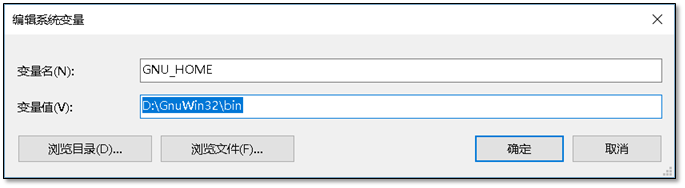
添加path变量,在cmd中可以使用wget命令。 PATH=;%GNU_HOME%

c:\>wget -V

SYSTEM_WGETRC = c:/progra~1/wget/etc/wgetrc

syswgetrc = D:\GnuWin32/etc/wgetrc

GNU Wget 1.11.4

Copyright (C) 2008 Free Software Foundation, Inc.

License GPLv3+: GNU GPL version 3 or later

<http://www.gnu.org/licenses/gpl.html>.

This is free software: you are free to change and redistribute it.

There is NO WARRANTY, to the extent permitted by law.

最初由 Hrvoje Niksic <hniksic@xemacs.org> 编写。

Currently maintained by Micah Cowan <micah@cowan.name>.
提供web服务
同时提供web服务需要用到nginx
nginx 下载 页面 http://nginx.org/en/download.html
附:nginx 配置文件
worker_processes  1;

events {

    worker_connections  1024;

}

http {

    include       mime.types;

    default_type  application/octet-stream;

    sendfile        on;

    keepalive_timeout  65;

    server {

        listen       80;

        server_name  localhost;

        location / {

            autoindex  on;

            root   html;

            index  index.html index.htm;

        }

    }

    server {

        listen       80;

        server_name  repo.zabbix.com;

        location / {

            autoindex  on;

            root   html/zabbix;

            index  index.html index.htm;

        }

    }

    server {

        listen       80;

        server_name  sp.repo.webtatic.com mirror.webtatic.com;

        location / {

            autoindex  on;

            root   html/webtatic;

            index  index.html index.htm;

        }

    }

}
最后使用浏览器访问
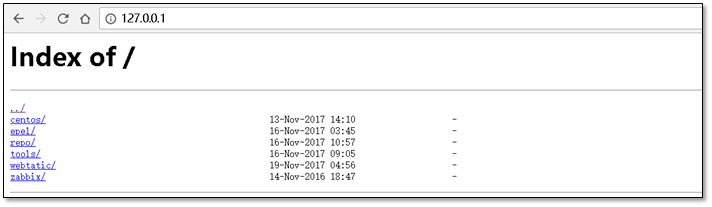
在linux服务器中设置解析
[root@m01 ~]# cat /etc/hosts

127.0.0.1    localhost localhost.localdomain localhost4 localhost4.localdomain4

::1          localhost localhost.localdomain localhost6 localhost6.localdomain6

10.0.0.1     mirrors.aliyuncs.com mirrors.aliyun.com repo.zabbix.com
附件:
附件1、 cwrsync + 全部 bat 脚本 https://files.cnblogs.com/files/clsn/cwRsync.rar
附件2、 nginx + 配置文件 https://files.cnblogs.com/files/clsn/nginx.zip
特别感谢:国强哥提供wget命令使用
此文章出自惨绿少年,转载请注明
在windows上搭建镜像yum站的方法的更多相关文章
- 在windows上搭建镜像yum站的方法(附bat脚本)
方法一:支持rsync的网站 对于常用的centos.Ubuntu.等使用官方yum源在 http://mirrors.ustc.edu.cn 都存在镜像. 同时 http://mirrors.ust ...
- 在linux上搭建本地yum源
准备yum仓库的光盘镜像IOS文件: 设置光驱加载本地磁盘的yum仓库的光盘镜像文件: 在linux的命令行输入setup命令打开设置窗口,选择"System Service": ...
- 如何在Windows上搭建Android开发环境
Android开发越来越火,许多小伙伴们纷纷学习Android开发,学习Android开发首要任务是搭建Android开发环境,由于大家 主要实在Windows 上开发Android,下面就详细给大家 ...
- 在Windows上搭建PhoneGAP(crodova)的开发环境
PhoneGAP是一个可以将web应用打包成移动应用的开源框架,使用它可以迅速的将HTML.CSS和JavaScript开发的web应用打包成跨平台的移动应用程序,而Apache Cordova是Ph ...
- Windows上搭建远程访问服务
Windows上搭建远程访问服务 转自:https://blog.51cto.com/13871378/2153308?source=dra 概述:允许客户机通过拨号连接或虚拟专用网连接到公司局域网, ...
- 在windows上搭建git server Gitblit
在Windows上搭建Git Server 第1步:下载Java并安装Java.我这里下载的是jdk1.7.0_79 第2步:配置Java环境变量 右键” 计算机” => ”属性” => ...
- Windows上搭建Flume运行环境
1.如果没有安装过Java环境,则需首先安装JDK. 可参考<Windows上搭建Kafka运行环境>中的搭建环境安装JDK部分 2.官方下载Flume(当前为apache-flume-1 ...
- (转)Windows上搭建Kafka运行环境
转自:<Windows上搭建Kafka运行环境> 完整解决方案请参考: Setting Up and Running Apache Kafka on Windows OS 在环境搭建过 ...
- [转]Windows上搭建Kafka运行环境
[转]http://www.cnblogs.com/alvingofast/p/kafka_deployment_on_windows.html Windows上搭建Kafka运行环境 完整解决方 ...
随机推荐
- 练习十六:Python日期格式应用(datetime)
练习:关于python日期格式应用练习.用python方法如何输出指定格式形式的日期 这里用到datetime模块,datetime模块重新封装了time模块,提供了更多接口,提供的类包括:date, ...
- python_sting字符串的方法及注释
string类型是python内置的类型,无需安装 方法/属性 说明 capitalize() 把字符串的第一个字符改为大写 casefold() 把整个字符串的所有字符改为小写 ...
- spring boot——MockMvc的用法 (SpringBoot 1.5.18)下测试通过
spring boot——MockMvc的用法 1.pom配置 <dependency> <groupId>org.springframework.boot</gro ...
- CentOS mini 和 nginx 的安装和配置要点
1.安装VMware Player 版本:5.0.2 build-1031769 2.安装XShell 版本:Build 0126 3.安装CentOS 版本:6.4-x86_64- ...
- 如何设计企业移动应用 by宋凯
移动应用设计内部培训 by宋凯 企业移动应用的特点:简约.效率.增强ERP与环境的结合.及时.安全.企业内社交. 一句话定义你的移动应用:然后围绕这句话来设计你的APP. 一:如何定义你的应用: 1, ...
- 4 - Channelhandler和ChannelPipeline
4.1 Channelhandler 4.1.1 Channel声明周期(状态事件) 方法 描述 ChannelUnregistered Channnel已创建,但是未注册到EventLoop Cha ...
- 冷笑话,idea 按删除键就是undo?
第一反应是keymap被改了,一看 那么,看起来就是alt出问题了 解决方法 在公司换一个键盘或者狂按alt
- linux下使用shell脚本批处理命令
1.新建脚本touch first.sh 2.写入命令vi first.sh #!/bin/bash #publish service and api echo "copy file&quo ...
- java如何调用服务端的WSDL接口
如何使用http://192.168.0.170:8090/kaoshi?wsdl调用服务端暴露在外面可以使用的接口 1.首先创建调用ws的web项目,就一个普通的web项目就行: 2.通过eclip ...
- HQL语句中的join fetch
from Paper as paper join fetch paper.authors as authors where authors.id='xxxx'; from Paper as paper ...