
React-Native(四):React Native之View学习
React Native实现以下布局效果:携html5(http://m.ctrip.com/html5/)
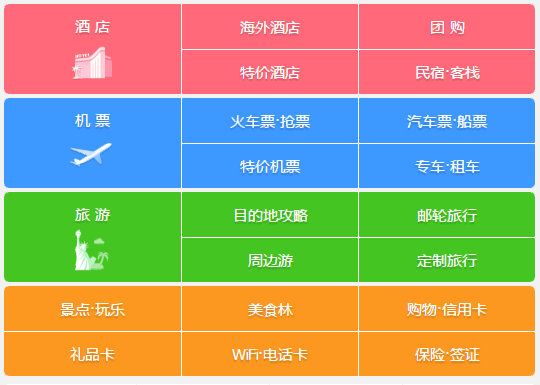
基于HelloWord修改项目代码:
 /**

  * Sample React Native App

  * https://github.com/facebook/react-native

  * @flow

  */

 import React, { Component } from 'react';

 import {

   AppRegistry,

   StyleSheet,

   PixelRatio,

   Text,

   View

 } from 'react-native';

 export default class HelloWord extends Component {

   render() {

     return (

       <View style={styles.body}>

         <View style={[styles.container,styles.redColor]}>

           <View style={[styles.item,styles.center]}>

             <Text style={styles.font}>酒 店</Text>

           </View>

           <View style={[styles.item,styles.leftRightLine]}>

             <View style={[styles.center,styles.flex,styles.bottonLine]}>

               <Text style={styles.font}>海外酒店</Text>

             </View>

             <View style={[styles.center,styles.flex]}>

               <Text style={styles.font}>特价酒店</Text>

             </View>

           </View>

           <View style={[styles.item]}>

             <View style={[styles.center,styles.flex,styles.bottonLine]}>

               <Text style={styles.font}>团购</Text>

             </View>

             <View style={[styles.center,styles.flex]}>

               <Text style={styles.font}>民宿*客栈</Text>

             </View>

           </View>

         </View>

         <View style={[styles.container,styles.blueColor]}>

           <View style={[styles.item,styles.center]}>

             <Text style={styles.font}>机 票</Text>

           </View>

           <View style={[styles.item,styles.leftRightLine]}>

             <View style={[styles.center,styles.flex,styles.bottonLine]}>

               <Text style={styles.font}>火车票·抢票</Text>

             </View>

             <View style={[styles.center,styles.flex]}>

               <Text style={styles.font}>特价机票</Text>

             </View>

           </View>

           <View style={[styles.item]}>

             <View style={[styles.center,styles.flex,styles.bottonLine]}>

               <Text style={styles.font}>汽车票·船票</Text>

             </View>

             <View style={[styles.center,styles.flex]}>

               <Text style={styles.font}>专车·租车</Text>

             </View>

           </View>

         </View>

         <View style={[styles.container,styles.greenColor]}>

           <View style={[styles.item,styles.center]}>

             <Text style={styles.font}>旅 游</Text>

           </View>

           <View style={[styles.item,styles.leftRightLine]}>

             <View style={[styles.center,styles.flex,styles.bottonLine]}>

               <Text style={styles.font}>目的地攻略</Text>

             </View>

             <View style={[styles.center,styles.flex]}>

               <Text style={styles.font}>周边游</Text>

             </View>

           </View>

           <View style={[styles.item]}>

             <View style={[styles.center,styles.flex,styles.bottonLine]}>

               <Text style={styles.font}>邮轮旅行</Text>

             </View>

             <View style={[styles.center,styles.flex]}>

               <Text style={styles.font}>定制旅行</Text>

             </View>

           </View>

         </View>

         <View style={[styles.container,styles.yellowColor]}>

           <View style={styles.item}>

             <View style={[styles.center,styles.flex,styles.bottonLine]}>

               <Text style={styles.font}>景点·玩乐</Text>

             </View>

             <View style={[styles.center,styles.flex]}>

               <Text style={styles.font}>礼品卡</Text>

             </View>

           </View>

           <View style={[styles.item,styles.leftRightLine]}>

             <View style={[styles.center,styles.flex,styles.bottonLine]}>

               <Text style={styles.font}>美食林</Text>

             </View>

             <View style={[styles.center,styles.flex]}>

               <Text style={styles.font}>WiFi·电话卡</Text>

             </View>

           </View>

           <View style={[styles.item]}>

             <View style={[styles.center,styles.flex,styles.bottonLine]}>

               <Text style={styles.font}>购物·信用卡</Text>

             </View>

             <View style={[styles.center,styles.flex]}>

               <Text style={styles.font}>保险·签证</Text>

             </View>

           </View>

         </View>

       </View>

     );

   }

 }

 const styles = StyleSheet.create({

   body:{

     flex:1,

   },

   flex:{

     flex:1,

   },

   container: {

     marginTop:1,

     marginLeft:1,

     marginRight:1,

     height:84,

     flexDirection:'row',

     borderRadius:5,

     padding:2,

   },

   redColor:{

     backgroundColor:'#FF0067',

   },

   blueColor:{

     backgroundColor:'#3d98ff',

   },

   greenColor:{

     backgroundColor:'#44c522',

   },

   yellowColor:{

     backgroundColor:'#fc9720',

   },

   item:{

     flex:1,

     height:80,

   },

   center:{

     justifyContent:'center',

     alignItems:'center',

   },

   font:{

     color:'#fff',

     fontSize:16,

     fontWeight:'bold',

   },

   leftRightLine:{

     borderLeftWidth:1/PixelRatio.get(),

     borderRightWidth:1/PixelRatio.get(),

     borderColor:'#fff',

   },

   bottonLine:{

     borderBottomWidth:1/PixelRatio.get(),

     borderColor:'#fff',

   },

 });

 AppRegistry.registerComponent('HelloWord', () => HelloWord);
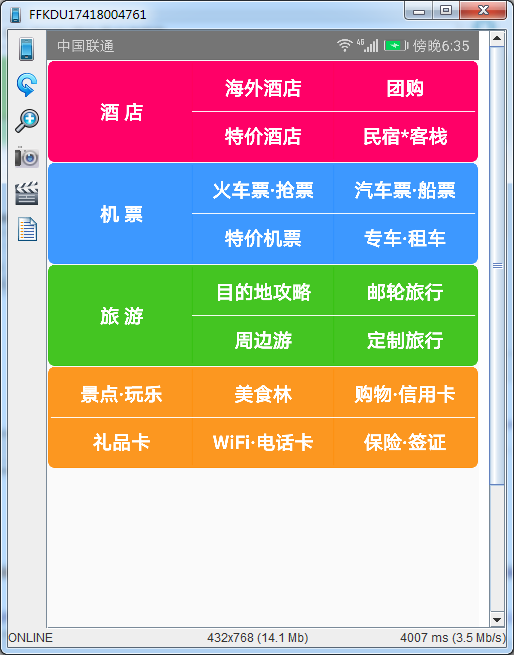
最终运行效果:
React-Native(四):React Native之View学习的更多相关文章
- React Native组件(二)View组件解析
相关文章 React Native探索系列 React Native组件系列 前言 了解了RN的组件的生命周期后,我们接着来学习RN的具体的组件.View组件是最基本的组件,也是首先要掌握的组件,这一 ...
- React Native指南汇集了各类react-native学习资源、开源App和组件
来自:https://github.com/ele828/react-native-guide React Native指南汇集了各类react-native学习资源.开源App和组件 React-N ...
- React Native(四)——顶部以及底部导航栏实现方式
效果图: 一步一步慢慢来: 其实刚入手做app的时候,就应该做出简单的顶部以及底部导航栏.无奈又在忙其他事情,导致这些现在才整理出来. 1.顶部导航栏:react-native-scrollable- ...
- React Native之React速学教程(下)
概述 本篇为<React Native之React速学教程>的最后一篇.本篇将带着大家一起认识ES6,学习在开发中常用的一些ES6的新特性,以及ES6与ES5的区别,解决大家在学习Reac ...
- React Native之React速学教程(中)
概述 本篇为<React Native之React速学教程>的第一篇.本篇将从React的特点.如何使用React.JSX语法.组件(Component)以及组件的属性,状态等方面进行讲解 ...
- React Native之React速学教程(上)
概述 本篇为<React Native之React速学教程>的第一篇.本篇将从React的特点.如何使用React.JSX语法.组件(Component)以及组件的属性,状态等方面进行讲解 ...
- 【React Native】React Native项目设计与知识点分享
闲暇之余,写了一个React Native的demo,可以作为大家的入门学习参考. GitHub:https://github.com/xujianfu/ElmApp.git GitHub:https ...
- Native VS React Native VS 微信小程序
随着React Native和 微信小程序的出现,Native一家独大的局面出现裂痕,很多小公司使用已经正在着手微信小程序和React Native了,我公司就已经走上React Native之路.那 ...
- React Native & react-native-web-player & React Native for Web
React Native & react-native-web-player & React Native for Web https://github.com/dabbott/rea ...
随机推荐
- Centos7数据实时同步
Rsync+inotify 功能要求 通过rsync+inotify将数据库指定目录实时同步到备份服务器. 环境说明 M:192.168.10.11 数据库服务器 S:192.168.10.13 备份 ...
- 【阿里聚安全·安全周刊】500万台Android设备受感染|YouTube封杀枪支组装视频
本周的七个关键词: 500万Android 设备受感染丨 黑客将矛头指向无线传输协议 丨 YouTube封杀枪支视频 丨 AMD将发布补丁 丨 Gooligan Android 僵尸网络 丨 N ...
- 笔记:XML-解析文档-流机制解析器(SAX、StAX)
DOM 解析器完整的读入XML文档,然后将其转换成一个树型的数据结构,对于大多数应用,DOM 都运行很好,但是,如果文档很大,并且处理算法又非常简单,可以在运行时解析节点,而不必看到完整的树形结构,那 ...
- Java高级篇(一)——线程
前面我们系统的了解了Java的基础知识,本篇开始将进入到Java更深层次的介绍,我们先来介绍一下Java中的一个重要的概念--线程. 一.什么是线程 在了解线程前,我们首先要了解进程的概念.进程是操作 ...
- 【Python】 list & dict & str
list & dict & str 这三种类型是python中最常用的几种数据类型.他们都是序列的一种 ■ 序列通用操作 1. 分片 s[a:b] 返回序列s中从s[a]到s[b- ...
- mysql新手入门随笔
1.启动/关闭服务器 第一种方法:通过Notifier 第二种方法: 通过Windows自带的服务管理:计算机右键选择管理弹出框选择"服务和应用程序"里的服务列表,从列表中找到My ...
- 用SQL语言操作数据
使用T-SQL插入数据(一)SQL是什么?Structured Query Language :结构化查询语言T-SQL:Transact-SQLT-SQL是SQL的增强版对功能进行了扩充 ...
- Java基础学习笔记十八 异常处理
什么是异常?Java代码在运行时期发生的问题就是异常. 在Java中,把异常信息封装成了一个类.当出现了问题时,就会创建异常类对象并抛出异常相关的信息(如异常出现的位置.原因等). 异常的继承体系 在 ...
- breeze源码阅读心得
在阅读Spark ML源码的过程中,发现很多机器学习中的优化问题,都是直接调用breeze库解决的,因此拿来breeze源码想一探究竟.整体来看,breeze是一个用scala实现的基 ...
- Linux 终端 Bash 常用快捷键介绍及经验
1. 最重要的自动补全 命令 解释 Tab 自动补全 不用多说,自动补全可以节省大量时间 2. 编辑跳转 命令 解释 Ctrl + A 跳转到当前行首 Ctrl + E 跳转到当前行末 Alt + F ...