
安装php扩展 ffmpeg-php
环境: CentOS 6.5 PHP5.6  安装前php 已加载GD 模块(yum install php-gd)
1、添加ffmpeg和ffmpeg-devel源
cat > /etc/yum.repos.d/dag.repo <<EOF

[dag]

name=Dag RPM Repository for Red Hat Enterprise Linux

baseurl=http://www.mirrorservice.org/sites/apt.sw.be/redhat/el$releasever/en/$basearch/dag

gpgcheck=1

enabled=1

EOF
导入签名认证
rpm --import http://www.mirrorservice.org/sites/apt.sw.be/RPM-GPG-KEY.dag.txt
rpm -ivh http://www.mirrorservice.org/sites/apt.sw.be/redhat/el6/en/x86_64/rpmforge/RPMS/rpmforge-release-0.5.3-1.el6.rf.x86_64.rpm
2、安装ffmpeg
yum install ffmpeg ffmpeg-devel
#ffmpeg -version

FFmpeg version 0.6.5, Copyright (c) 2000-2010 the FFmpeg developers

  built on Jan 29 2012 17:52:15 with gcc 4.4.5 20110214 (Red Hat 4.4.5-6)

  configuration: --prefix=/usr --libdir=/usr/lib64 --shlibdir=/usr/lib64 --mandir=/usr/share/man --incdir=/usr/include --disable-avisynth --extra-cflags='-O2 -g
-pipe -Wall -Wp,-D_FORTIFY_SOURCE=2 -fexceptions -fstack-protector --param=ssp-buffer-size=4 -m64 -mtune=generic -fPIC' --enable-avfilter --enable-avfilter-lavf
--enable-libdc1394 --enable-libdirac --enable-libfaac --enable-libfaad --enable-libfaadbin --enable-libgsm --enable-libmp3lame --enable-libopencore-amrnb
--enable-libopencore-amrwb --enable-librtmp --enable-libschroedinger --enable-libspeex --enable-libtheora --enable-libx264 --enable-gpl --enable-nonfree
--enable-postproc --enable-pthreads --enable-shared --enable-swscale --enable-vdpau --enable-version3 --enable-x11grab

  libavutil     50.15. 1 / 50.15. 1

  libavcodec    52.72. 2 / 52.72. 2

  libavformat   52.64. 2 / 52.64. 2

  libavdevice   52. 2. 0 / 52. 2. 0

  libavfilter    1.19. 0 /  1.19. 0

  libswscale     0.11. 0 /  0.11. 0

  libpostproc   51. 2. 0 / 51. 2. 0

FFmpeg 0.6.5

libavutil     50.15. 1 / 50.15. 1

libavcodec    52.72. 2 / 52.72. 2

libavformat   52.64. 2 / 52.64. 2

libavdevice   52. 2. 0 / 52. 2. 0

libavfilter    1.19. 0 /  1.19. 0

libswscale     0.11. 0 /  0.11. 0

libpostproc   51. 2. 0 / 51. 2. 0
3、下载 ffmpeg-fpm-0.6.0
svn co svn://svn.code.sf.net/p/ffmpeg-php/code/branches/ffmpeg-php/ffmpeg-php-0.6.0/ /usr/local/src/ffmpeg-php-0.6.0
4、安装
cd /usr/local/src/ffmpeg-php-0.6.0
/usr/bin/phpize
./configure --enable-skip-gd-check (不启用此选项的话 安装完会显示 ffmpeg-php gd support => disabled)
make
到这里会报错 ,如下

make: *** [ffmpeg_movie.lo] 错误 1
解决办法:
vim ffmpeg_movie.c
row 311: list_entry *le; 改为zend_rsrc_list_entry *le;
row 346: list_entry new_le;改为 zend_rsrc_list_entry new_le;
row 360: hashkey_length+1, (void *)&new_le, sizeof(list_entry),改为hashkey_length+1, (void *)&new_le,sizeof(zend_rsrc_list_entry),
重新make
报错如下:

解决办法:
sed -i 's/PIX_FMT_RGBA32/PIX_FMT_RGB32/g' ffmpeg_frame.c
重新make
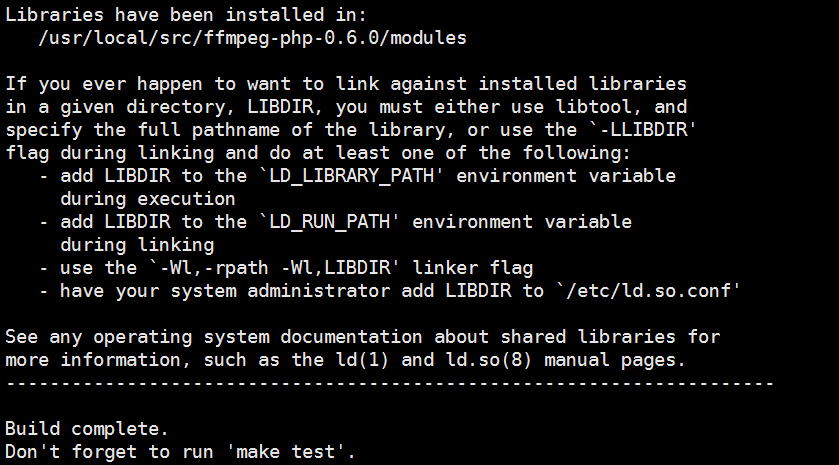
make install
#make install

Installing shared extensions:     /usr/lib64/php/modules/
添加PHP配置文件
echo "extension = ffmpeg.so" /etc/php.d/50-ffmpeg.ini
service php-fpm reload
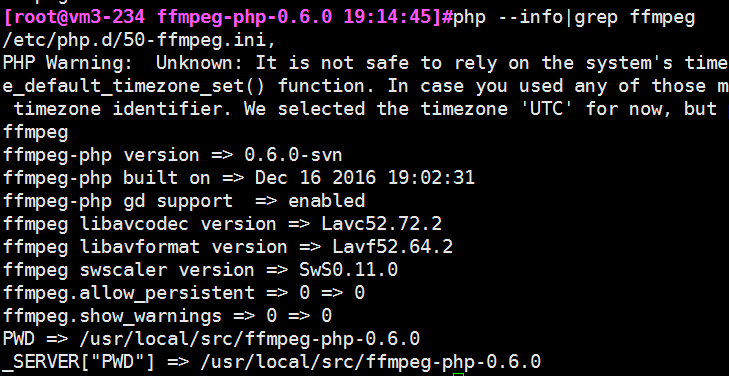
#php -m|grep ffmpeg
ffmpeg
安装php扩展 ffmpeg-php的更多相关文章
- pecl 轻松安装php扩展
PECL 的全称是 The PHP Extension Community Library ,是一个开放的并通过 PEAR(PHP Extension and Application Reposito ...
- 编译安装PHP7并安装Redis扩展Swoole扩展
编译安装PHP7并安装Redis扩展Swoole扩展 在编译php7的机器上已经有编译安装过php5.3以上的版本,从而依赖库都有了 本php7是编译成fpm-php 使用的, 如果是apache那么 ...
- 使用phpize安装php扩展
环境: CentOs 6.3 php 7 nginx 举例: 安装ssh2扩展 1.登陆http://pecl.php.net,搜索ssh2,如下图所示,注意版本的选择要根据php的版本来 2.下载s ...
- centos下安装php扩展php-memcached
说来坎坷,为了安装这个php的扩展php-memcached,连操作系统都换了,从centos5.5升级到了centos6.8!! centos5.5中在安装php扩展php-memcached的依赖 ...
- 如何正确使用 Composer 安装 Laravel 扩展包
我们经常要往现有的项目中添加扩展包,有时候因为文档的错误引导,如下图来自 这个文档 的: composer update 这个命令在我们现在的逻辑中,可能会对项目造成巨大伤害. 因为 composer ...
- win10 64位安装memcache扩展和开启redis扩展
前面有关于win10下搭建wamp环境的介绍,在此不在赘述,php操作memcache有memcache库和memcached库,其中memcache是php内置的扩展库,支持面向对象和面向过程两种操 ...
- Linux下,如何给PHP安装pdo_mysql扩展
下载了一个免费开源的广告系统(openadserver),在Linux上安装时,提示要安装 pdo_mysql 扩展,先前有过编译安装 soap扩展 的经历,今天要编译安装 pdo_mysql 扩展, ...
- [Linux][PHP]安装swoole扩展
1.下载swoole 2.解压并配置 /usr/local/php/bin/phpize ./configure --enable-swoole-debug --enable-sockets --en ...
- lnmp---------------lnmp1.3-full安装包安装lnmp环境,如何安装PHP扩展
1. 如果已经安装LNMP套件,请按以下步骤处理 a. 跳转到fileinfo源代码目录` cd /root/downloads/lnmp1.2-full/src/php-7.0.7/ext/file ...
- linux php 安装 memcache 扩展
1. memcached依赖于libevent,需要先安装libevent. tar zxvf libevent-2.0.21-stable.tar.gz cd libevent-2.0.21-sta ...
随机推荐
- ROM型启动方式概述
ROM 型启动方式概述 所有的VxWorks 内核映像类型中,只有VxWorks 类型使用的bootrom 引导程序进行启动,此时VxWorks 内核映像放置在主机端,由目标板bootrom 完成Vx ...
- Struts2(六) 用Struts完成客户列表显示
Struts完成客户列表显示 所用的基础知识 在之前的随笔中已经讲过.这篇是介绍如何使用Struts 完成客户列表显示 . 下面是 完成的代码执行逻辑图: 抽取项目部分代码 相信大家认真看一遍就明 ...
- 远程块存储iSCSI
/* Border styles */ #table-2 thead, #table-2 tr { border-top-width: 1px; border-top-style: solid; bo ...
- Docker 入门之swarm部署web应用
笔者近期在利用的docker搭建一个swarm集群,目前的应用还是入门级的,读者可自行根据自己的需要修改自己需要部署的应用,今天笔者介绍的是一个web应用的swarm集群的搭建.看这篇文章之前,我希望 ...
- monkey日志分析
Monkey测试的og分析,我们可以通过几个关键词来判断测试是否通过.1)Monkey finished打开LOG,查看log的最下端,是否有类似以下字段:## Network stats: elap ...
- JavaScript设计模式(8)-装饰者模式
装饰者模式 1. 作用: 可用来透明地把对象包装在具有同样接口的另一对象之中,这样可以给一个方法添加一些行为,然后将方法调用传递给原始对象. 可用于为对象增加功能,用来代替大量子类. 装饰者对其组件进 ...
- js+jq实现图片预览,支持到ie9+ff+chrome
<!DOCTYPE html> <html lang="en"> <head> <meta charset="UTF-8&quo ...
- [Luogu2463][SDOI2008]Sandy的卡片
BZOJ权限题qwq Luogu sol "两个子串长度相同且一个串的全部元素加上一个数就会变成另一个串" 其实就是差分一波以后完全相同 所以对输入的数据进行差分,同时记一下每一个 ...
- 【BZOJ4010】【HNOI2015】菜肴制作(拓扑排序)
[BZOJ4010][HNOI2015]菜肴制作(拓扑排序) 题面 Description 知名美食家小 A被邀请至ATM 大酒店,为其品评菜肴. ATM 酒店为小 A 准备了 N 道菜肴,酒店按照为 ...
- [Baltic2004]数字序列
原题请见<左偏树的特点及其应用>BY 广东省中山市第一中学 黄源河 题意 给出序列\(a[1...n]\),要求构造序列\(b[1...n]\)使得\(\sum_{i=1}^{n}|a_i ...