
python写一个防御DDos的脚本(请安好环境否则无法实验)
起因:
居然有ddos脚本,怎么可以没防御ddos的脚本!
开始:
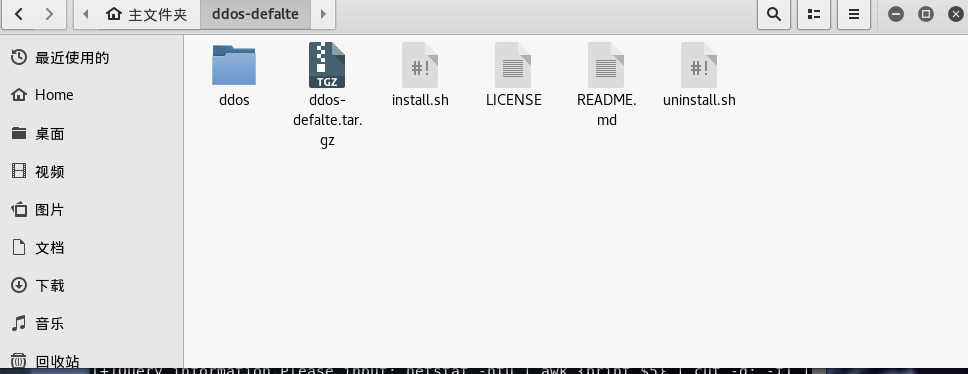
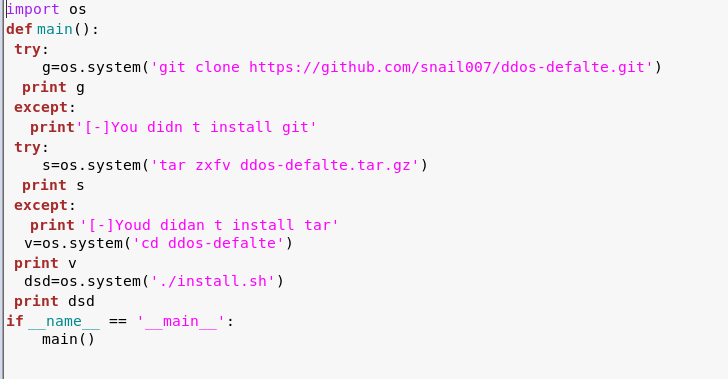
1.请执行 install.py安装好DDos-defalte,会在root目录下多出这个文件夹
代码:
2.然后执行fyddos.py
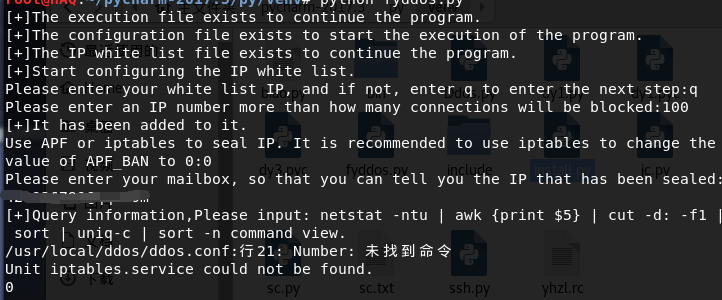
第一个让你设置IP白名单
第二个让你设置一个ip超过100个连接数,自动封掉
第三个封ip,自动发送邮件,设置好你的邮件
默认封600秒
4.然后输入这条命令
netstat -ntu | awk '{print $5}' | cut -d: -f1 | sort | uniq -c | sort -n
就可以查询谁DDos你了
DDos-defalte

DDOS defalte是一款免费的用来防御和减轻DDoS攻击。它通过netstat监测跟踪创建大量网络连接的IP地址,在检测到某个结点超过预设的限制时,该程序会通过APF或iptables禁止或阻挡这些IP.

#该版对原版进行了错误修复,而且进行了本地化不需要安装的时候下载文件。

#安装步骤

下载 ddos-defalte.tar.gz

tar zxfv ddos-defalte.tar.gz

cd ddos-defalte

./install.sh

安装完毕。

配置文件位于 /usr/local/ddos/ddos.conf

ip白名单文件位于 /usr/local/ddos/ignore.ip.list ,格式:一行一个ip

配置完毕之后执行命令 ddos 可以看到一行行的输出,每行:第一个是连接数 第二个是对应ip

/usr/local/sbin/ddos命令是脚本/usr/local/ddos/ddos.sh的一个软链接

安装完毕。 然后只需要计划任务周执 ddos 命令即可。ddos每执行一次都会检测配置里面的设置监测系统网络连接情况封ip。

比如root帐号下,执crontab -e 可以这样执行计划任务 */1 * * * * /usr/local/ddos/ddos.sh >/dev/null 2>&1

命令ddos有一些带参数的用法,可以通过ddos -h 了解用法。

配置文件/usr/local/ddos/ddos.conf的一些简要说明:

PROGDIR="/usr/local/ddos"

PROG="/usr/local/ddos/ddos.sh"

IGNORE_IP_LIST="/usr/local/ddos/ignore.ip.list"  #ip的白名单

APF="/etc/apf/apf"

IPT="/sbin/iptables"

##### How many connections define a bad IP? Indicate that below.

NO_OF_CONNECTIONS=100 #一个ip超过100个连接数,自动封掉

##### APF_BAN=1 (Make sure your APF version is atleast 0.96)

##### APF_BAN=0 (Uses iptables for banning ips instead of APF)

APF_BAN=0 #这里我使用iptables封ip

##### KILL=0 (Bad IPs are'nt banned, good for interactive execution of script)

##### KILL=1 (Recommended setting)

KILL=1

##### An email is sent to the following address when an IP is banned.

##### Blank would suppress sending of mails ,设置为 root 则不发邮件

EMAIL_TO="root"  #封ip,自动发送邮件

##### Number of seconds the banned ip should remain in blacklist.

BAN_PERIOD=600
所有代码:
import os

import time

def fyddos():

    IGNORE_IP_LIST = "/usr/local/ddos/ignore.ip.list"

    PGOPDIR="/usr/local/ddos/ddos.conf"

    PROG = "/usr/local/ddos/ddos.sh"

    if os.path.exists(PROG):

     print '[+]The execution file exists to continue the program.'

    else:

        print '[-]The execution file does not exist, the closing procedure.'

        exit()

    if os.path.exists(PGOPDIR):

        print '[+]The configuration file exists to start the execution of the program.'

    else:

        print '[-]There is no exit procedure for the configuration file.'

        exit()

    if os.path.exists(IGNORE_IP_LIST):

        print '[+]The IP white list file exists to continue the program.'

    else:

        print '[-]IP white list file does not exist, end the program.'

        exit()

    time.sleep(1)

    print '[+]Start configuring the IP white list.'

    IPlist=raw_input('Please enter your white list IP, and if not, enter q to enter the next step:')

    if IPlist=='q':

        try:

          import dy1

        except Exception , g:

            print '[-]Catch the error cause:',g

        print '[+]It has been added to it.'

        time.sleep(3)

        try:

          import dy2

        except Exception , r:

            print '[-]Catch the error cause:',r

        time.sleep(3)

        try:

            import dy3

        except Exception , p:

            print '[-]Catch the error cause:',p

        print '[+]Query information,Please input: netstat -ntu | awk ''{print $5}'' | cut -d: -f1 | sort | uniq-c | sort -n command view.'

        isd=os.system('ddos')

        sda=os.system('service iptables status')

        print isd

        print sda

    else:

        list=open('/usr/local/ddos/ignore.ip.list','w')

        list.write(IPlist+"\n")

        print '[+]It has been added to it:',IPlist

        time.sleep(3)

        try:

          import dy1

        except Exception , w:

          print('[-]Catch the error cause:',w)

        time.sleep(3)

        try:

            import dy2

        except Exception , d:

            print '[-]Catch the error cause:',d

        time.sleep(3)

        try:

            import dy3

        except Exception ,z:

            print '[-]Catch the error cause:',z

        print '[+]Query information,Please input: netstat -ntu | awk ''{print $5}'' | cut -d: -f1 | sort | uniq-c | sort -n command view.'

        isds = os.system('ddos')

        sdas= os.system('service iptables status')

        print isds

        print sdas

fyddos()
conf=input('Please enter an IP number more than how many connections will be blocked:')

data = ''

with open('/usr/local/ddos/ddos.conf', 'r+') as f:

    for line in f.readlines():

        if (line.find('NO_OF_CONNECTIONS') == 0):

            line = 'NO_OF_CONNECTIONS={}'.format(conf) + '\n'

        data += line

with open('/usr/local/ddos/ddos.conf', 'r+') as f:

    f.writelines(data)
lv=raw_input('Use APF or iptables to seal IP. It is recommended to use iptables to change the value of APF_BAN to 0:')

data=''

with open('/usr/local/ddos/ddos.conf','r+') as f:

    for line in f.readlines():

        if(line.find('APF_BAN')==0):

            line='APF_BAN={}'.format(lv)+'\n'

        data+=line

with open('/usr/local/ddos/ddos.conf','r+') as f:

    f.writelines(data)
原理:通过DDos-defalte的设置来帮助我们防御DDos(如果愿意请自行加设置代码)
一篇有关DDos-defalte的文章:http://blog.csdn.net/fly2749/article/details/51354696
ddos-defalte的Github下载地址:https://github.com/snail007/ddos-defalte
我的Github:https://github.com/422926799/python
python写一个防御DDos的脚本(请安好环境否则无法实验)的更多相关文章
- 用python写一个自动化盲注脚本
前言 当我们进行SQL注入攻击时,当发现无法进行union注入或者报错等注入,那么,就需要考虑盲注了,当我们进行盲注时,需要通过页面的反馈(布尔盲注)或者相应时间(时间盲注),来一个字符一个字符的进行 ...
- Python写一个京东抢券脚本
最近看到京东图书每天有优惠券发放,满200减100,诱惑还是蛮大的.反正自己抢不到,想着写个脚本试试. 几个关键步骤 获取优惠券的url 直接审查元素 获取cookie 通过本地代理,比如BurpSu ...
- python写一个翻译的小脚本
起因: 想着上学看不懂English的PDF感慨万分........ 然后就有了翻译的脚本. 截图: 代码: #-*- coding:'utf-8' -*- import requests impor ...
- 【Python】如何基于Python写一个TCP反向连接后门
首发安全客 如何基于Python写一个TCP反向连接后门 https://www.anquanke.com/post/id/92401 0x0 介绍 在Linux系统做未授权测试,我们须准备一个安全的 ...
- 用Python写一个简单的Web框架
一.概述 二.从demo_app开始 三.WSGI中的application 四.区分URL 五.重构 1.正则匹配URL 2.DRY 3.抽象出框架 六.参考 一.概述 在Python中,WSGI( ...
- 十行代码--用python写一个USB病毒 (知乎 DeepWeaver)
昨天在上厕所的时候突发奇想,当你把usb插进去的时候,能不能自动执行usb上的程序.查了一下,发现只有windows上可以,具体的大家也可以搜索(搜索关键词usb autorun)到.但是,如果我想, ...
- [py]python写一个通讯录step by step V3.0
python写一个通讯录step by step V3.0 参考: http://blog.51cto.com/lovelace/1631831 更新功能: 数据库进行数据存入和读取操作 字典配合函数 ...
- python写一个md5解密器
前言: md5解密,百度了一下发现教程不是很多也不详细. 这个图都没一张...跳转地址:点我 0x01 windows环境,kali也可以啊 burpsuite requests模块 bs4模块 0x ...
- Python写一个自动点餐程序
Python写一个自动点餐程序 为什么要写这个 公司现在用meican作为点餐渠道,每天规定的时间是早7:00-9:40点餐,有时候我经常容易忘记,或者是在地铁/公交上没办法点餐,所以总是没饭吃,只有 ...
随机推荐
- fastq,sam文件一些小结(持续补充。。。)
ST-E00211::H5L3NCCXY:::: chr14 141M = - ACTTCACCTCCTGGAGTCCTGGACTTCCCCACATCTCCCCTGCCCCTCCCACGTTTCCAT ...
- [编织消息框架][JAVA核心技术]动态代理应用12-总结
动态代理这篇比较长,是框架组成的重要基础 回顾下学到的应用技术 1.异常应用 2.annotation技术 3.数值与逻辑分享 4.jdk.cglib.javassist等动态代理技术 5.懒处理.预 ...
- python中的if __name__=='__main__': main()解析
python中我们会看到一段代码是这样的: if __name__=='__main__': main() 这段代码的什么意思,我们可以知道代码的意思是如果__name__=='__main__'为T ...
- rsyslogd以及日志轮替logrotate的梳理
rsyslog 1)日志类型 auth :(authpriv) 主要与认证有关的机制,例如 login, ssh, su 等需要帐号/密码的咚咚: cron: 就是例行性工作排程 cron/at 等产 ...
- js 闭包的用法详解
一.闭包 实现可重用的局部变量,且保护其不受污染的机制. 外层函数包裹受保护的变量和内层函数. 内层函数专门负责操作外层函数的局部变量. 将内层函数返回到外层函数外部,反复调用. 二.作用域 子函数会 ...
- 两个input均分自适应
最近项目中,做到了表格类似的表单 左边是标题,右边是输入框,由于种种和项目相关原因,我们采取了div布局 div label input*2div里面有1个input,有的时候,遇到日期,会有2个in ...
- Hyperledger Fabric 1.0 从零开始(九)——Fabric多节点集群生产启动
7:Fabric多节点集群生产启动 7.1.多节点服务器配置 在生产环境上,我们沿用4.1.配置说明中的服务器各节点配置方案. 我们申请了五台生产服务器,其中四台服务器运行peer节点,另外一台服务器 ...
- TypeScript体验
TypeScript 在线玩 http://www.typescriptlang.org/play/index.html ts最终编译成js 网站最终还是要引用js. ts面向对象的感念更加直观, ...
- easyHOOK socket send recv
代码比较简单,就不做注释了. 包含一个sockethookinject.DLL 和sockethook.exe 有一点不清楚, SetExclusiveACL可以添加当前线程的hook, 但是eas ...
- Django-- 多数据库联用
django项目中使用多个数据库的方法, 多个数据库的联用 以及多数据库时数据导入导出的方法. 直接给出一种简单的方法吧,想了解更多的到官方教程,点击此处 给每个app都可以单独的设置一个数据库 se ...